 ee
eePrinters ›
Best Black And White Laser Printer 2026
Which black and white laser printer actually delivers the best value in 2026? The market is packed with options from Brother, HP, and Canon. Each claims fast speeds and sharp output. But real-world performance varies widely. After comparing seven top-rated models, the Brother HL-L2460DW stands out for most home offices. It balances speed, size, and cost better than anything else at its price point.
Laser printers remain the go-to choice for anyone printing more than a few pages per week. Unlike inkjet models, they never dry out between jobs. Toner cartridges last thousands of pages. The cost per page stays low. Black and white laser printers skip the color complexity entirely. That means fewer parts, fewer jams, and fewer headaches. For documents, reports, and everyday office output, monochrome laser is still king.
This roundup covers seven printers across different budgets and use cases. Some are simple single-function units. Others pack scanning, copying, and faxing into one machine. The guide below breaks down what matters most — print speed, paper capacity, connectivity, and long-term running costs — so buyers can match the right printer to their actual needs. Those dealing with streaky print lines or faded output on an aging printer will find solid upgrade options here.

Contents
Top Rated Picks of 2026
- #PreviewProductRating
- Bestseller No. 1
 Rating:

- Bestseller No. 2
 Rating:
 - Bestseller No. 3
 Rating:
- Bestseller No. 4
 Rating:
 - Bestseller No. 5
 Rating:
 - Bestseller No. 6
 Rating:
 - Bestseller No. 7
 Rating:
Product Reviews
1. Brother HL-L2460DW — Best for Home Offices
The Brother HL-L2460DW is a compact monochrome laser printer built for daily home office use. It prints at up to 36 pages per minute. That is fast enough for most small teams. Automatic duplex printing comes standard. It cuts paper usage in half without any manual flipping. The footprint is small enough to sit on a desk or shelf without dominating the workspace.
Connectivity options cover all the basics. Dual-band wireless supports both 2.4GHz and 5GHz networks. Ethernet and USB are also available. The Brother Mobile Connect app adds remote printing from phones and tablets. It also tracks toner levels and lets users reorder supplies on the go. The Refresh Subscription trial included with purchase can simplify toner management for buyers who prefer automatic deliveries.
Print quality is sharp and consistent. Text comes out crisp at standard resolution. Graphics look clean for a monochrome unit. The toner cartridge system keeps running costs reasonable. Brother's genuine supplies are widely available. Third-party compatible cartridges bring the per-page cost down even further. For a printer that just works day after day, this one is hard to beat at its price.
Pros:
- Fast 36 ppm print speed for the price tier
- Dual-band Wi-Fi plus Ethernet and USB connectivity
- Compact design fits easily on a desk
- Automatic duplex printing saves paper
Cons:
- Print-only — no scanner or copier built in
- Paper tray capacity is limited for high-volume offices
2. HP LaserJet MFP M234dw — Best Budget Multifunction
The HP LaserJet MFP M234dw packs printing, scanning, and copying into an affordable package. It prints up to 30 pages per minute single-sided. Two-sided printing hits 19 images per minute. HP claims the fastest duplex speed in its class. For small teams of one to five people, it handles daily document tasks without breaking a sweat.
Setup is straightforward through the HP Smart app. The app walks users through wireless configuration step by step. Once connected, it offers mobile printing, scan-to-email, and basic document management. The flatbed scanner handles standard letter-size originals. Copy quality is solid for internal documents. The overall build feels sturdy for a budget multifunction unit.
The main trade-off is paper capacity. The input tray holds a standard amount. High-volume offices will find themselves refilling it often. Toner costs are reasonable with the standard cartridge. HP's Instant Ink program (now covering select laser models) can reduce per-page costs for predictable monthly printing volumes. For buyers who need scan and copy without spending more, this is the value pick in 2026.
Pros:
- Print, scan, and copy at a budget-friendly price
- Fastest duplex printing in its class
- Easy wireless setup via HP Smart app
Cons:
- Smaller paper tray capacity than pricier models
- No fax capability
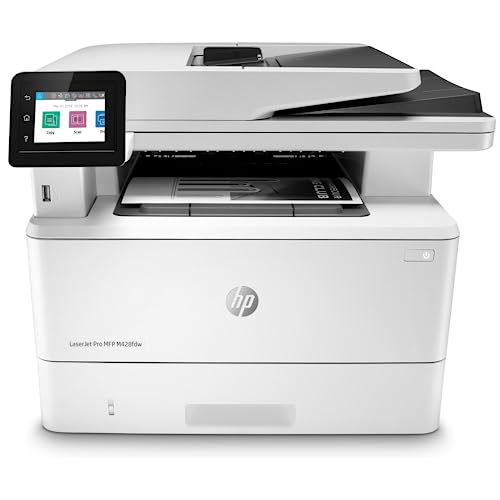
3. HP LaserJet Pro MFP M428fdw — Best All-in-One for Business
The HP LaserJet Pro MFP M428fdw is a full-featured all-in-one. It prints, scans, copies, and faxes. That four-function combo covers nearly every office document need. Print speeds are competitive. Output quality is consistently sharp. The automatic document feeder (ADF) handles multi-page scan and copy jobs without manual page feeding.
Security is a standout feature. HP Wolf Pro Security is built into the hardware, firmware, and operating system. It protects against malware and unauthorized access. For businesses handling sensitive documents, this layer of protection matters. The customizable control panel lets users save workflow shortcuts. Repetitive tasks like scan-to-folder or copy-with-specific-settings become one-touch operations.
Built-in Ethernet and wireless connectivity keep the printer accessible across the office network. Alexa compatibility adds voice-command printing for hands-free convenience. The duplex printing and scanning save time on two-sided documents. The main downside is the price — it sits above the budget models. But for offices that need fax and advanced security, the investment pays for itself quickly. Anyone concerned about network vulnerabilities should also review wireless printer security tips to lock down their setup.
Pros:
- Full four-function: print, scan, copy, and fax
- HP Wolf Pro Security built in
- Customizable control panel for workflow automation
- ADF for multi-page scanning and copying
Cons:
- Higher price point than simpler models
- Larger footprint requires more desk space
4. Canon imageCLASS MF465dw II — Best for Speed and Expandability
The Canon imageCLASS MF465dw II is a speed demon. It prints up to 42 pages per minute. That puts it among the fastest models in this roundup. It handles print, scan, copy, and fax. The four-in-one design covers all standard office tasks. Canon includes a three-year limited warranty — longer than most competitors offer.
Paper capacity is expandable. The standard tray holds a generous amount. Optional add-on trays increase total capacity for offices that burn through reams quickly. Wireless setup is straightforward. Duplex printing is automatic. The scanner produces clean digital copies of documents and receipts. For offices that scan as much as they print, the MF465dw II keeps up without bottlenecks.
Canon's toner system is cost-effective for moderate to heavy use. The high-yield cartridge options bring per-page costs down significantly. Build quality feels solid. The control panel is intuitive. One area where Canon trails HP is in security features — there is no equivalent to HP Wolf. But for offices prioritizing raw speed and paper handling flexibility, this Canon is a strong contender in 2026.
Pros:
- 42 ppm print speed — one of the fastest in its class
- Expandable paper capacity with optional trays
- Three-year limited warranty from Canon
- Full four-in-one functionality
Cons:
- Lacks advanced security features found in HP models
- Bulkier than single-function printers
5. HP LaserJet Pro 4001n — Best Wired Office Printer
The HP LaserJet Pro 4001n takes a no-nonsense approach. It prints. That is all it does. And it does it fast — up to 42 pages per minute. No scanner. No copier. No fax. Just clean, professional black and white output at blazing speed. For offices that already have a separate scanner or multifunction device, this dedicated printer fills the gap perfectly.
Connectivity is wired only. Ethernet and USB are the two options. There is no Wi-Fi built in. HP offers the 4001dw variant for buyers who need wireless. The wired-only approach actually has advantages. It eliminates wireless troubleshooting. Connection is stable and fast. Network printing through Ethernet works reliably across office networks of up to ten users.
HP's advanced security features are included. The printer detects and blocks threats at the firmware level. Mobile printing is still available through the HP Smart app when the printer is on the network. The output quality is crisp. Text is sharp at any font size. The toner cartridge yields are generous. For offices that want speed and reliability without the multifunction complexity, the 4001n delivers. Understanding how many pages a toner cartridge can print helps buyers estimate long-term costs before purchasing.
Pros:
- 42 ppm — tied for fastest in this roundup
- Stable wired connection via Ethernet or USB
- Advanced HP security features included
- Supports up to 10 users
Cons:
- No wireless — Ethernet and USB only
- Print-only — no scan, copy, or fax
6. HP LaserJet Enterprise M507dn — Best for Large Offices
The HP LaserJet Enterprise M507dn is built for heavy workloads. It targets growing businesses that print thousands of pages per month. The print speed is competitive. Output quality remains consistent even during long print runs. The duty cycle (maximum pages per month a printer is designed to handle) is significantly higher than consumer-grade models.
Security is where this model dominates. HP calls it "the world's most secure printing." Over 200 embedded security features protect against malware, data breaches, and unauthorized access. HP Web JetAdmin allows IT administrators to manage the printer remotely. They can push firmware updates, apply policies, and monitor usage across a fleet of devices. HP JetAdvantage Security Manager adds another layer of configuration control. For organizations subject to data compliance regulations, these features are not optional — they are essential.
Built-in Ethernet and automatic duplex printing come standard. The paper handling is robust. The first page comes out fast. Toner yields are high with the enterprise-grade cartridges. The per-page cost drops even further at scale. The trade-off is size and price. This is not a desk printer. It belongs in a dedicated printer area or supply room. But for offices with 10 or more regular users, the M507dn is the enterprise-class workhorse that keeps running. According to Wikipedia's overview of laser printing, the technology has evolved significantly since its introduction, and enterprise models like this represent the peak of modern monochrome output.
Pros:
- Over 200 built-in security features — industry leading
- HP Web JetAdmin for remote fleet management
- High monthly duty cycle for heavy printing
- Low per-page cost at enterprise toner yields
Cons:
- Print-only — no scan, copy, or fax
- Large footprint — not suited for small desks
- Premium price point
7. Brother HL-L6200DW — Best for High-Volume Printing
The Brother HL-L6200DW is a volume printer. It prints up to 48 pages per minute. That is the fastest speed in this entire roundup. The 570-sheet standard paper capacity means fewer trips to refill the tray. Optional add-on trays expand capacity even further. For offices that print hundreds of pages daily, this model keeps up without complaint.
The real cost advantage comes from Brother's super high-yield toner cartridges. These cartridges print thousands of pages before replacement. The per-page cost drops well below what standard-yield cartridges deliver. Over months and years, the savings add up significantly. Buyers focused on the cheapest printers to run should take a close look at this model's total cost of ownership.
Wireless and Ethernet connectivity are both included. Duplex printing is automatic. The printer supports Amazon Dash Replenishment (now part of broader smart reordering features). It monitors toner levels and can automatically order replacements before the cartridge runs dry. The build quality is industrial. It handles the stress of high daily output without mechanical issues. The only limitation is that it is print-only. Offices needing scan or copy should pair it with a standalone scanner or choose a multifunction model instead.
Pros:
- 48 ppm — fastest printer in this roundup
- 570-sheet paper capacity, expandable with add-on trays
- Super high-yield toner for lowest per-page cost
- Wireless, Ethernet, and duplex all included
Cons:
- Print-only — no multifunction features
- Larger and heavier than compact models
Buying Guide: How to Choose the Best Black and White Laser Printer
Print Speed and Monthly Volume
Print speed matters most for shared office printers. A model rated at 30 ppm handles light workloads fine. Offices printing more than 500 pages per week should target 40 ppm or higher. The monthly duty cycle tells how many pages the printer can handle without premature wear. Home offices can safely ignore duty cycle. Busy shared printers cannot. Match the duty cycle to actual monthly output — not peak output, but typical use. Running a printer at its maximum rated volume shortens its lifespan.
Single-Function vs. Multifunction
Single-function printers only print. They tend to be faster, cheaper, and more compact. Multifunction printers (MFPs) add scanning, copying, and sometimes faxing. An MFP saves desk space by replacing multiple devices. But if one function breaks, the whole unit may need service. Offices that rarely scan should save money with a dedicated printer and a separate flatbed scanner. Offices that scan and copy daily benefit from an all-in-one MFP. Consider how often each function is actually used before paying extra for features that may sit idle.
Connectivity Options
Most modern laser printers offer wireless, Ethernet, and USB connections. Wireless is convenient for home offices and small teams. Ethernet provides more stable connections for shared office printers on a network. USB works for single-computer setups. Some models — like the HP LaserJet Pro 4001n — only offer wired connections. That is not a drawback if the printer sits next to a router or switch. Mobile printing apps from Brother, HP, and Canon allow printing from smartphones and tablets over the network. Check that the printer supports the mobile platform used in the office.
Toner Costs and Long-Term Value
The purchase price is only part of the equation. Toner cost per page determines the true cost of ownership. Standard-yield cartridges cost less upfront but more per page. High-yield and super high-yield cartridges cost more initially but bring per-page costs down dramatically. Brother's super high-yield cartridges are among the most economical. HP's enterprise toner also delivers strong value at scale. Third-party compatible cartridges can reduce costs further, though they may affect print quality or warranty coverage. Always calculate cost-per-page before buying — a cheaper printer with expensive toner costs more over time than a pricier printer with cheap toner. Learning how to extend toner cartridge life also helps reduce long-term operating costs.
Common Questions
What is the difference between a laser printer and an inkjet printer?
Laser printers use toner powder and heat to fuse text onto paper. Inkjet printers spray liquid ink through tiny nozzles. Laser printers are faster and better for high-volume text documents. Inkjet printers produce better photo quality and handle color more affordably at low volumes. For black and white document printing, laser is almost always the better choice. Toner never dries out between uses, unlike ink cartridges.
How long does a toner cartridge last?
A standard toner cartridge typically prints 1,000 to 3,000 pages. High-yield cartridges print 3,000 to 6,000 pages. Super high-yield options — like those for the Brother HL-L6200DW — can exceed 12,000 pages. Actual yield depends on coverage. Most manufacturers rate cartridges at 5% page coverage, which equals about one paragraph of text per page. Pages with heavy graphics or dense text will use more toner per page.
Do black and white laser printers need maintenance?
Minimal maintenance is needed. Replace the toner cartridge when print quality fades. Clean the paper rollers occasionally to prevent jams. Some models have a separate drum unit that needs replacement every 20,000 to 50,000 pages. Keep the printer in a clean, dry environment. Avoid dusty areas. Beyond that, monochrome laser printers are remarkably low-maintenance compared to inkjets, which require periodic head cleaning and alignment.
Can a monochrome laser printer print photos?
Technically, yes. But the results are poor. Monochrome laser printers render photos in grayscale using dot patterns. Fine detail and tonal gradation are limited. Photos look flat and lack the depth that even a budget inkjet can produce. For occasional photo printing, use an online print service or a separate inkjet. Monochrome laser printers excel at text, charts, graphs, and line art — not photographs.
Is wireless printing secure?
Wireless printing introduces potential security risks. The printer connects to the same network as other devices. If the network is compromised, the printer could be accessed remotely. HP models with Wolf Pro Security offer hardware-level protection. Other brands rely on standard network security. Best practices include setting a strong printer password, enabling firmware auto-updates, disabling unused protocols, and keeping the printer on a separate network segment if possible. Enterprise environments should use models with built-in security management tools.
What paper sizes do these printers support?
All seven printers in this roundup support standard Letter (8.5 x 11 inches) and Legal (8.5 x 14 inches) paper. Most also handle envelopes, labels, and cardstock. The multifunction models can scan and copy at Letter and Legal sizes through their flatbed scanners. Some models support custom paper sizes through manual feed trays. Check the specific model's specifications for exact supported sizes and weights before purchasing specialty media.
Buy on Walmart
- Brother HL-L2460DW Wireless Compact Monochrome Laser Printer — Walmart Link
- HP LaserJet MFP M234dw Wireless Printer, Print, scan, Copy, — Walmart Link
- HP LaserJet Pro MFP M428fdw Wireless Monochrome All-in-One P — Walmart Link
- Canon imageCLASS MF465dw II - Monochrome Wireless Duplex Las — Walmart Link
- HP LaserJet Pro 4001n Black & White Printer, Print, Fast spe — Walmart Link
- HP LaserJet Enterprise M507dn Monochrome Printer with Built- — Walmart Link
- Brother HL-L6200DW Wireless Monochrome Laser Printer with Du — Walmart Link
Buy on eBay
- Brother HL-L2460DW Wireless Compact Monochrome Laser Printer — eBay Link
- HP LaserJet MFP M234dw Wireless Printer, Print, scan, Copy, — eBay Link
- HP LaserJet Pro MFP M428fdw Wireless Monochrome All-in-One P — eBay Link
- Canon imageCLASS MF465dw II - Monochrome Wireless Duplex Las — eBay Link
- HP LaserJet Pro 4001n Black & White Printer, Print, Fast spe — eBay Link
- HP LaserJet Enterprise M507dn Monochrome Printer with Built- — eBay Link
- Brother HL-L6200DW Wireless Monochrome Laser Printer with Du — eBay Link
Next Steps
- Check current prices — Printer prices shift frequently on Amazon. Click through to each product listing above and compare the current sale price against the features offered. Timing a purchase around Prime Day or holiday sales can save 15–30%.
- Calculate total cost of ownership — Look up the price of replacement toner cartridges for the top two or three models on the shortlist. Multiply the per-page cost by estimated monthly page count. A printer that costs $50 more upfront but saves $0.02 per page pays for itself within a few months of moderate use.
- Match features to actual needs — List the functions used weekly: print, scan, copy, fax. If only printing is needed, skip the multifunction models. If scanning is a daily task, invest in a quality MFP with an automatic document feeder. Paying for unused features wastes money.
- Verify network compatibility — Confirm that the printer supports the office's connection type. Wi-Fi-only offices should avoid the HP 4001n. Wired-only setups benefit from its stability. Check that the printer's mobile app supports the smartphones and tablets in use.
- Read user reviews for long-term reliability — Manufacturer specs tell half the story. Check reviews from buyers who have used the printer for six months or more. Look for mentions of paper jams, toner quality over time, and driver update issues. Real-world reliability data beats spec sheets every time.
 |
 |
 |
 |

About Marcus Reeves
Marcus Reeves is a printing technology specialist with over 12 years of hands-on experience in the industry. Before turning to technical writing, he spent eight years as a service technician for HP and Brother enterprise printer lines, where he diagnosed and repaired thousands of inkjet and laser machines. Marcus holds an associate degree in electronic engineering technology from DeVry University and a CompTIA A+ certification. He is passionate about helping home users and small offices get the most out of their printers without paying ink subscription fees. When he is not testing the latest cartridge refill kits, he tinkers with vintage dot-matrix printers and 3D printers in his garage workshop.