 ee
eePrinters ›
Best Canon Pixma Printer 2026
Which Canon PIXMA printer is actually worth your money in 2026? There are more options than ever on the market, and the differences between models can be subtle enough to make your head spin. After testing and researching the full current lineup, one printer stands out above the rest: the Canon PIXMA TR7620a. It delivers the right combination of speed, print quality, and versatile features for most home and home-office users. But depending on what you print, there may be a better fit for your specific needs — and that's exactly what this guide is here to help you figure out.
Canon's PIXMA lineup has long been a go-to choice for households and small offices that want reliable, high-quality output without paying laser-printer prices. The 2026 models continue that tradition, with improvements to wireless connectivity, app integration, and ink efficiency that make them more practical than their predecessors. Whether you're printing tax documents, school projects, or borderless 4×6 vacation photos, there's a PIXMA designed for exactly that use case. Understanding the differences is the key to not wasting money on features you'll never use — or worse, buying a printer that falls short of what you actually need.
In this guide, you'll find a breakdown of the seven best Canon PIXMA printers available right now, a buying guide covering the specs that matter, and answers to the most common questions buyers ask. If you also need to digitize documents on the go, check out our roundup of the best portable scanners of 2026 — many pair perfectly with a PIXMA setup. For anyone who prints infrequently and wants minimal maintenance overhead, we also have a dedicated guide on the best printer for infrequent use that covers some important caveats worth reading before you buy. Let's get into the picks.

Contents
- Top Rated Picks of 2026
- Full Product Breakdowns
- Canon PIXMA TR7620a — Best Overall
- Canon PIXMA TS6420a — Best Mid-Range All-in-One
- Canon PIXMA TR4720 — Best for Home Office with Fax
- Canon PIXMA G620 MegaTank — Best for Photo Printing
- Canon MegaTank G3270 — Best for High-Volume Printing
- Canon PIXMA TS3720 — Best Budget Pick
- Canon IP8720 — Best for Large-Format Photo Prints
- What to Look For When Buying
- Common Questions
- Next Steps
Top Rated Picks of 2026
- #PreviewProductRating
- Bestseller No. 1
 Rating:

- Bestseller No. 2
 Rating:
 - Bestseller No. 3
 Rating:
 - Bestseller No. 4
 Rating:
 - Bestseller No. 5
 Rating:
 - Bestseller No. 6
 Rating:
 - Bestseller No. 7
 Rating:
Full Product Breakdowns
1. Canon PIXMA TR7620a Wireless All-in-One — Best Overall
If you need one printer to handle everything your home or small office throws at it, the Canon PIXMA TR7620a is where you start. This wireless all-in-one prints at 15 images per minute in black and 10 images per minute in color — numbers that hold up in real-world use, not just under controlled lab conditions. You get crisp, readable text documents and vibrant color output that doesn't look washed out or pixelated. The print resolution tops out at 4800 x 1200 DPI, which means your color photos come out sharp and detailed without any dedicated photo paper trickery needed for everyday prints.
The copy side of the TR7620a is equally capable, offering up to 99 copies at a time with a copy resolution of 1200 x 2400 DPI. That's more than enough precision for duplicating forms, contracts, or any document where readability matters. The wireless setup works reliably across both 2.4 GHz and 5 GHz networks, and Canon's PRINT Inkjet/SELPHY app makes it easy to send jobs from your phone. You're also getting a built-in auto document feeder, which saves significant time when you're scanning or copying multi-page documents. This is the kind of printer that earns its spot on your desk and stays there.
One area where the TR7620a distinguishes itself from cheaper alternatives is build quality. The chassis feels solid, the paper tray mechanism is smooth, and the control panel is intuitive enough that you'll rarely need to consult the manual. It handles standard letter paper, legal-size documents, and envelopes without fuss. If you're browsing the full printer category and aren't sure where to start, this model is the safest first recommendation for most buyers in 2026.
Pros:
- Fast print speeds of 15 ipm (black) and 10 ipm (color) for an inkjet all-in-one
- Excellent 4800 x 1200 DPI print resolution for sharp documents and photos
- Auto document feeder streamlines scanning and copying multi-page files
- Reliable dual-band wireless connectivity and solid app support
Cons:
- Ink cartridge costs can add up over time with standard cartridges
- No MegaTank refillable ink system like Canon's G-series models
2. Canon PIXMA TS6420a All-in-One Wireless — Best Mid-Range All-in-One
The Canon PIXMA TS6420a sits in a sweet spot that a lot of buyers land on once they compare specs and price: it does nearly everything the premium tier does, at a lower entry cost. Print speed comes in at 13 ipm for black and 6.8 ipm for color — fast enough that you're not standing around waiting for a five-page document. What really sets this model apart for everyday households is the 200-sheet total paper capacity split across a 100-sheet cassette and a 100-sheet rear feed. That means less reloading, more printing, and fewer interruptions during busy mornings.
Auto 2-sided printing is built in, which matters more than people realize. Duplex printing cuts your paper consumption roughly in half, and it makes documents look more professional. The TS6420a also works with Amazon Alexa, so if your home is already voice-enabled you can start print jobs hands-free — a convenience feature that actually gets used once you have it. Canon's PIXMA Print Plan subscription can cut your ink costs by up to 70%, which is worth investigating if you print regularly. The printer holds an ENERGY STAR certification and EPEAT Silver rating, so running costs beyond ink are also lower than average.
Connectivity is solid here — standard 2.4 GHz Wi-Fi, USB, and the Canon PRINT app cover every workflow you're likely to have. The TS6420a is the right choice if you want a capable, well-rounded printer without committing to the higher cost of the TR7620a. You still get print quality that handles photos cleanly and text documents sharply. For most single-user households, this is plenty of printer.
Pros:
- 200-sheet total paper capacity reduces refill interruptions
- Built-in auto 2-sided printing saves paper and looks professional
- Compatible with Alexa for voice-activated printing
- PIXMA Print Plan can cut ink costs by up to 70%
Cons:
- Color print speed of 6.8 ipm lags behind the TR7620a
- No fax capability if your workflow requires it
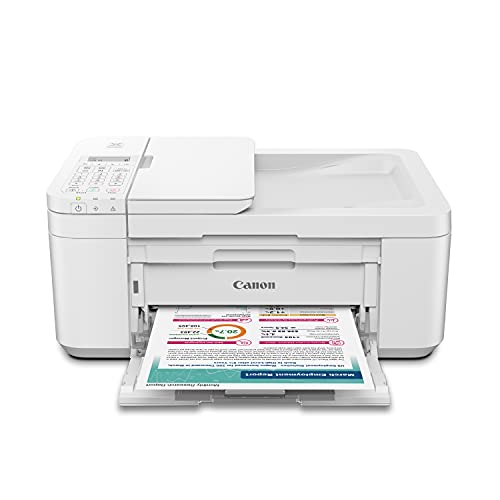
3. Canon PIXMA TR4720 All-in-One Wireless — Best for Home Office with Fax
The Canon PIXMA TR4720 is a compact, genuinely versatile 4-in-1 that covers print, copy, scan, and fax in a footprint small enough to fit on a crowded desk. Fax is increasingly rare in home printers, but if your job or personal workflow still requires it — medical offices, legal documents, real estate — having it built in is a significant advantage over buying a separate device. The TR4720 handles this quad functionality without feeling bloated or overbuilt, and the white finish gives it a cleaner look than the standard black alternatives.
Setup is handled through the Canon PRINT Inkjet/SELPHY app, which walks you through network connection and ink installation in just a few minutes. The ink cartridge system is straightforward and designed for easy replacement — no cryptic procedures, no ink-covered fingers. Canon engineered this specifically for users who are comfortable with technology but don't want to spend an afternoon configuring their printer. Mobile printing support is full and functional, covering iOS AirPrint, Android printing, and Canon's own app ecosystem.
The auto document feeder is present and handles multi-page scanning and faxing without manual page-by-page feeding. That detail alone saves real time when you're processing insurance forms or sending multi-page contracts. The TR4720 is compact enough that it doesn't dominate a small office space, yet capable enough that it won't bottleneck your workflow. If fax is a firm requirement for you, this is the Canon PIXMA to buy in 2026 — no other model in this lineup includes it at this price point.
Pros:
- True 4-in-1: print, copy, scan, and fax in one compact unit
- Auto document feeder handles multi-page fax and scanning jobs
- Extremely easy setup via Canon PRINT app
- Compact white design fits smaller desk setups
Cons:
- Print speeds are modest compared to the TR7620a
- Single ink cartridge system increases per-page ink cost over time
4. Canon PIXMA G620 Wireless MegaTank — Best for Photo Printing
If photo printing is your primary use case, the Canon PIXMA G620 MegaTank is in a different league than the standard inkjet options on this list. This printer is built around Canon's refillable MegaTank ink system, and the numbers back it up: you get up to 3,800 borderless 4×6 color photos from a single full set of ink bottles. That's not a rounding-up marketing claim — it's a genuine capacity advantage that makes per-print costs dramatically lower than cartridge-based printers. For anyone who prints frequently, the math works in your favor quickly. If you also shoot and print a lot of 4×6 prints, our guide on the best 4×6 photo printers gives useful context on what to expect from this category.
The Alexa integration on the G620 goes beyond simple print commands. You can receive ink level notifications through Alexa, and if you enroll in smart reorders, Alexa can automatically place an ink order on your behalf when supplies run low — no subscription required. That kind of proactive inventory management is genuinely useful for a household that prints photos regularly and doesn't want to be caught short before an event. The print-copy-scan functionality covers the everyday document side of things without compromise.
Photo output on the G620 is where Canon's engineering shows clearly. The six-dye ink system produces accurate colors and smooth gradients that consumer-grade inkjets often struggle with. Skin tones look natural, blues are deep without going purple, and fine detail in landscapes holds up even at larger print sizes. If you've ever been disappointed by a photo that looked great on your monitor but muddy when printed, the G620 addresses that problem directly. This is the printer for anyone who takes photos seriously and wants home printing that reflects that.
Pros:
- MegaTank system yields up to 3,800 4×6 color photos per ink set
- Alexa integration with smart ink reorder capability
- Superior photo color accuracy with six-dye ink system
- Low per-print cost over the printer's lifetime
Cons:
- Higher upfront cost than cartridge-based models
- Ink bottle refilling requires some care to avoid spills
5. Canon MegaTank G3270 All-in-One Wireless — Best for High-Volume Printing
The Canon MegaTank G3270 is built for one purpose above all others: keeping your cost-per-page as low as possible while still delivering reliable print quality. The MegaTank system here yields up to 6,000 black-and-white pages and 7,700 color pages from a single set of ink — and Canon includes up to two years of ink in the box. Think about what that means practically: you buy this printer, you don't buy ink again for potentially two years, and your per-page costs drop to fractions of a cent. For households with kids, small home businesses, or anyone who consistently prints in volume, this changes the economics of owning a printer entirely.
The G3270 is a wireless print-copy-scan all-in-one in a white finish that suits home environments well. Connectivity covers standard Wi-Fi and USB, and the Canon PRINT app handles mobile printing from both iOS and Android. Setup is clean and quick, with the refillable ink tanks designed to be intuitive even for first-time MegaTank users. The included ink bottles are color-coded, so you know exactly what goes where without any guesswork.
Print quality on the G3270 is honest about what it's optimized for: everyday documents and general-purpose color printing. It's not a photo lab replacement like the G620, but for reports, invoices, schoolwork, and general home documents, the output is clean, legible, and consistent. The trade-off for the economy focus is that print speeds are more modest than the TR7620a. But if you're printing in volume and cost-per-page is your primary concern, the G3270 is the clear answer in 2026.
Pros:
- Up to 6,000 B&W / 7,700 color pages per ink set — the lowest per-page cost on this list
- Up to two years of ink included in the box
- Wireless print-copy-scan covers all everyday use cases
- Color-coded ink tanks make refilling simple and mess-free
Cons:
- Print speeds are lower than the TR7620a and TS6420a
- Not optimized for high-quality photo printing
6. Canon PIXMA TS3720 Wireless All-in-One — Best Budget Pick
The Canon PIXMA TS3720 is the right answer when your budget is tight and your printing needs are basic. It prints, copies, and scans — the three functions that cover the vast majority of what households actually do with a printer. Print speed comes in at approximately 7.7 ipm for black and 4 ipm for color. Those numbers won't win any races against the higher-end PIXMA models, but for a household that prints a few pages a week, the speed difference is largely irrelevant. You send the job, it prints, you're done.
What the TS3720 gets right is simplicity. Setup takes just a few minutes from unboxing to first print, and the streamlined interface means you're not navigating complicated menus to do basic tasks. Wireless connectivity works reliably over 2.4 GHz Wi-Fi, and the Canon PRINT app handles mobile printing cleanly. Single-sided printing only is a limitation compared to the TS6420a and TR7620a, but at this price point it's an expected trade-off. If two-sided printing matters to you, step up to the TS6420a.
The TS3720 earns its place on this list because it does exactly what it promises without unnecessary complexity. It's the printer for a college dorm room, a secondary printer for a spare office, or a first printer for a household that doesn't know yet how much they'll actually use it. The compact white design fits on any surface, and the ink cartridges are widely available and easy to swap. Simple, affordable, functional — sometimes that's exactly what you need.
Pros:
- Low entry price makes it accessible for any budget
- Fast, easy setup with a streamlined out-of-box experience
- Compact footprint fits any desk or shelf
- Reliable wireless connectivity with full mobile printing support
Cons:
- Single-sided printing only — no duplex capability
- Color print speed of 4 ipm is slow for higher-volume tasks
7. Canon IP8720 Wireless Printer — Best for Large-Format Photo Prints
The Canon IP8720 occupies a very specific niche, and if you're in that niche, nothing else on this list comes close. This is a dedicated photo printer that goes all the way up to 13×19 inches — a print size that most inkjets simply cannot handle. The 6-color ink system includes a dedicated gray ink cartridge, which makes a significant difference in black-and-white photo rendering. Monochrome prints come out with genuine tonal depth instead of the faint color cast that plagues standard 4-color inkjets. Maximum resolution hits 9600 x 2400 DPI with a minimum droplet size of 1 picolitre, which translates to edge sharpness and gradient smoothness that photographers can see clearly in the final output.
The IP8720 connects wirelessly to any Wi-Fi enabled computer in your home and supports Apple AirPrint and Canon's cloud printing services. It's worth noting that this is a print-only device — no scanning, no copying, no fax. That's an intentional design decision. Canon built this printer to do one thing exceptionally well rather than compromise the print engine with scanner hardware. If you already have a scanner or all-in-one elsewhere, the IP8720 becomes a powerful addition rather than a replacement. According to Wikipedia's overview of inkjet printing technology, six-color systems with dedicated gray channels represent a significant advancement in achievable tonal range for home printers.
The noise level sits at approximately 43.5 dB(A) during operation — audible but not disruptive. Print speeds are slower than the all-in-one models on this list, but that's inherent to the high-resolution photo printing process. You're trading speed for quality, and for large-format photo work, that's exactly the right trade. If you're serious about printing your own photography at home and want results that rival professional print labs, the IP8720 is the Canon to own in 2026.
Pros:
- Prints up to 13×19 inches — true large-format capability at home
- 6-color ink system with dedicated gray ink for exceptional B&W photo quality
- 9600 x 2400 DPI maximum resolution with 1-picolitre droplet size
- AirPrint and cloud printing support for wireless convenience
Cons:
- Print-only — no scanning or copying functionality
- Slower print speeds compared to all-in-one PIXMA models
What to Look For When Buying a Canon PIXMA Printer
Print Speed and Volume Requirements
Print speed is measured in images per minute (ipm), and the gap between budget and premium PIXMA models is real. The TR7620a tops out at 15 ipm black / 10 ipm color. The TS3720 manages 7.7 ipm black / 4 ipm color. For a household printing ten pages a week, the difference is negligible. For a home office printing fifty or more pages a day, those numbers translate directly into time standing at the printer. Before you decide, estimate your actual monthly print volume honestly. If you're printing more than 200 pages per month consistently, also look at paper capacity — models with 200-sheet total capacity (like the TS6420a) reduce the frequency of reloading interruptions significantly.
Ink System: Cartridge vs. MegaTank
This is the most important buying decision in the Canon PIXMA lineup in 2026, and it comes down to how often you print. Cartridge-based models like the TR7620a, TS6420a, TR4720, and TS3720 have lower upfront costs but higher per-page costs over time. MegaTank models like the G620 and G3270 cost more to buy initially but deliver dramatically lower per-page costs — sometimes as low as half a cent per page for black text. The break-even point varies by model and print volume, but as a general rule: if you print fewer than 100 pages per month, cartridge-based is fine. If you print more than that regularly, a MegaTank model pays for itself within a year. Also consider whether you print primarily documents or photos — the G620 MegaTank is purpose-built for photo output, while the G3270 optimizes for document volume.
All-in-One Functions You Actually Need
Every model on this list except the IP8720 includes print, copy, and scan. Only the TR4720 adds fax. Ask yourself honestly: do you fax? If the answer is yes, even occasionally, the TR4720 is the only option here that covers you. If not, fax capability isn't worth paying attention to. Scanning quality matters if you plan to digitize documents, receipts, or photos — all PIXMA all-in-one flatbed scanners on this list deliver adequate document scanning, though none replace a dedicated flatbed scanner for archival-quality work. For demanding scan jobs, our guide to the best flatbed scanners covers dedicated options worth considering alongside a PIXMA printer purchase.
Connectivity and Smart Home Integration
Every printer on this list includes wireless connectivity. The important distinctions are in the extras. The TS6420a and G620 work with Amazon Alexa — useful if you're already invested in the Alexa ecosystem and want voice-activated printing or smart ink reorders. All models support the Canon PRINT Inkjet/SELPHY app for iOS and Android, which handles direct photo printing from your camera roll, document printing from cloud storage, and status monitoring. The IP8720 adds AirPrint for seamless iOS printing without any app required. If your household runs a mix of Windows, Mac, and mobile devices, all of these models handle cross-platform connectivity without any meaningful issues.
Common Questions
What is the best Canon PIXMA printer for home use in 2026?
The Canon PIXMA TR7620a is the best overall choice for most homes. It combines fast print speeds, high 4800 x 1200 DPI resolution, an auto document feeder, and reliable wireless connectivity in one well-built package. If your budget is tighter, the TS6420a is the next best option, and the TS3720 covers basic needs at the lowest price point.
Is a Canon MegaTank printer worth the extra cost?
Yes, if you print regularly. MegaTank models like the G3270 and G620 have higher upfront costs but dramatically lower per-page costs — up to 6,000 black and 7,700 color pages per ink set on the G3270. If you print more than 100 pages per month, the MegaTank pays for itself within the first year of use and continues saving money after that.
Can Canon PIXMA printers print on both sides of the paper?
Several models on this list include auto duplex (two-sided) printing: the TR7620a, TS6420a, and TR4720 all print on both sides automatically. The TS3720, MegaTank G3270, G620, and IP8720 do not include auto duplex. If two-sided printing is important for your workflow, specifically choose one of the first three models mentioned.
Which Canon PIXMA printer is best for printing photos?
The Canon IP8720 is the best choice for serious photo printing, especially if you want large-format prints up to 13×19 inches. Its six-color ink system with dedicated gray ink delivers superior tonal range for both color and black-and-white photos. For everyday 4×6 photo printing at lower cost-per-print, the Canon PIXMA G620 MegaTank is the better choice with its 3,800-photo ink capacity.
Do Canon PIXMA printers work with iPhone and Android?
Yes. All Canon PIXMA printers on this list support mobile printing from both iOS and Android devices through the Canon PRINT Inkjet/SELPHY app. The IP8720 additionally supports Apple AirPrint for direct printing from iOS without needing any app. The TS6420a and G620 also work with Amazon Alexa for voice-command printing.
How do Canon PIXMA ink costs compare to laser printers?
For low-volume printing, Canon PIXMA cartridge models cost less per page than you might expect, especially if you use Canon's PIXMA Print Plan subscription (up to 70% savings on the TS6420a). For high-volume printing, MegaTank models like the G3270 deliver per-page costs that rival entry-level laser printers. Laser printers generally win on per-page cost for black-only text at very high volumes, but Canon's MegaTank system closes that gap significantly for mixed document and color printing.
Buy on Walmart
- Canon PIXMA TR7620a Wireless All-in-One Inkjet Printer - Bla — Walmart Link
- Canon PIXMA TS6420a All-in-One Wireless Inkjet Printer [Prin — Walmart Link
- Canon PIXMA TR4720 All-in-One Wireless Printer Home use, wit — Walmart Link
- Canon PIXMA G620 Wireless MegaTank Photo All-in-One Printer — Walmart Link
- Canon MegaTank G3270 All-in-One Wireless Inkjet Printer. for — Walmart Link
- Canon PIXMA TS3720 Wireless All-in-One Printer for Basic Hom — Walmart Link
- Canon IP8720 Wireless Printer, AirPrint and Cloud Compatible — Walmart Link
Buy on eBay
- Canon PIXMA TR7620a Wireless All-in-One Inkjet Printer - Bla — eBay Link
- Canon PIXMA TS6420a All-in-One Wireless Inkjet Printer [Prin — eBay Link
- Canon PIXMA TR4720 All-in-One Wireless Printer Home use, wit — eBay Link
- Canon PIXMA G620 Wireless MegaTank Photo All-in-One Printer — eBay Link
- Canon MegaTank G3270 All-in-One Wireless Inkjet Printer. for — eBay Link
- Canon PIXMA TS3720 Wireless All-in-One Printer for Basic Hom — eBay Link
- Canon IP8720 Wireless Printer, AirPrint and Cloud Compatible — eBay Link
Next Steps
- Check the current price of your top pick on Amazon — PIXMA prices fluctuate frequently, and you may find a discount that changes the value calculation between models.
- Decide between cartridge and MegaTank: estimate your monthly print volume and run the cost-per-page math for both options before purchasing.
- Confirm the functions you actually need — if fax is required, only the TR4720 covers you; if duplex printing matters, verify your chosen model includes it.
- If photo printing is your priority, compare the IP8720 (large-format specialist) against the G620 MegaTank (high-volume 4×6) side by side using the specs in this guide.
- After purchase, set up the Canon PRINT Inkjet/SELPHY app immediately — it simplifies mobile printing, tracks ink levels, and (on qualifying models) connects you to the PIXMA Print Plan for ongoing ink savings.
 |
 |
 |
 |

About Marcus Reeves
Marcus Reeves is a printing technology specialist with over 12 years of hands-on experience in the industry. Before turning to technical writing, he spent eight years as a service technician for HP and Brother enterprise printer lines, where he diagnosed and repaired thousands of inkjet and laser machines. Marcus holds an associate degree in electronic engineering technology from DeVry University and a CompTIA A+ certification. He is passionate about helping home users and small offices get the most out of their printers without paying ink subscription fees. When he is not testing the latest cartridge refill kits, he tinkers with vintage dot-matrix printers and 3D printers in his garage workshop.