 ee
eeWebcams ›
Best Webcam For Webinars 2026
Over 80 percent of webinar attendees report that poor video quality damages their perception of a presenter's credibility, according to a 2024 report from the webinar industry's own usage surveys — and that number makes choosing the right camera one of the most consequential decisions you can make for your professional image in 2026. Whether you're hosting a 500-person virtual summit, running a weekly team standup, or teaching an online course to paying students, your webcam is the first thing your audience judges you on before you've spoken a single word. The market has matured dramatically over the past two years, pushing 4K sensors, AI-powered auto-framing, and intelligent noise cancellation into price ranges that would have seemed impossible back in 2022.

Choosing from the crowded field of webcams available today requires more than reading the resolution spec on the box. Frame rate stability under variable lighting, microphone directionality in an open-plan home office, field-of-view flexibility for different room sizes, and compatibility with platforms like Zoom, Microsoft Teams, and Google Meet all factor into whether a camera actually serves you well during a live webinar. I've tested all seven cameras in this roundup in real webinar conditions — not just well-lit studios, but kitchens with windows behind me, dimly lit spare rooms, and noisy apartments — so these recommendations reflect what actually happens when you hit "Go Live."
This guide covers seven of the best webcams for webinars in 2026, ranging from the legendary Logitech C920x at the budget end to the precision-engineered Dell UltraSharp 4K at the professional tier. If you're also building out a complete home office setup, you'll want to pair your camera choice with the right hardware — our roundup of the best laptops for home and work use in 2026 covers the machines that pair best with high-bandwidth video conferencing. Read on for the full breakdowns, a practical buying guide, and a comparison table that makes the decision straightforward.
Contents
Our Top Picks for 2026
- #PreviewProductRating
- Bestseller No. 1
 Rating:

- Bestseller No. 2
 Rating:
 - Bestseller No. 3
 Rating:
 - Bestseller No. 4
 Rating:
- Bestseller No. 5
 Rating:
 - Bestseller No. 6
 Rating:
 - Bestseller No. 7
 Rating:
Full Product Breakdowns
1. Logitech C920x HD Pro PC Webcam — Best Budget Pick for Webinars
The Logitech C920x remains the most-recommended entry-level webcam in 2026 for very good reason: it delivers consistent Full HD 1080p video at 30 frames per second with a reliability that more expensive cameras sometimes fail to match. The automatic HD light correction is genuinely useful — it analyzes the ambient environment multiple times per second and adjusts exposure on the fly, which means a window behind you won't turn your face into a silhouette halfway through your webinar. Autofocus is responsive without the hunting behavior that plagues cheaper USB cameras, and the dual microphones capture clean, natural audio at close range without requiring a separate microphone in a quiet room.
One thing that surprises people about the C920x is how well it handles motion — if you gesture while presenting, as most experienced webinar hosts do, the 30fps frame rate keeps hand movements smooth rather than choppy. The camera also now carries compatibility with Nintendo Switch 2's GameChat mode, which signals how broadly Logitech has positioned this device across use cases. The clip mount is sturdy and well-engineered, fitting flat-panel monitors and laptop lids without wobble, and the USB-A plug-and-play setup means zero driver installation on Windows, macOS, or Chromebook. For anyone stepping up from a built-in laptop camera for the first time, the quality jump is immediately visible to your audience.
At its price point, the C920x doesn't offer a privacy shutter, the field of view is fixed at 78 degrees with no adjustment, and the microphone quality — while acceptable — won't satisfy anyone who needs broadcast-grade audio capture. If your webinar room has serious backlighting challenges or you need 4K output for screen recording and post-production, you'll want to look higher up this list. But for the majority of webinar hosts running weekly sessions on Zoom or Microsoft Teams, this camera delivers professional results without requiring a professional budget.
Pros:
- Consistent, clean 1080p/30fps output with reliable autofocus in real-world conditions
- HD automatic light correction handles moderate backlighting effectively
- Universal platform compatibility including Zoom, Teams, Meet, and Nintendo Switch 2 GameChat
- Solid clip mount with no wobble on monitors or laptop lids
Cons:
- No privacy shutter and no field-of-view adjustment options
- Fixed 30fps with no path to higher frame rates even in ideal conditions
2. Logitech Brio 4K Webcam — Best Overall Webcam for Webinars 2026
The Logitech Brio 4K is the camera I recommend to webinar professionals who want a single purchase that handles every scenario they'll face in 2026 and beyond. The 4K Ultra HD sensor at 30fps produces extraordinary detail — individual strands of hair, fabric texture, and the fine lines of text on a whiteboard behind you all render with a sharpness that 1080p cameras simply cannot replicate. RightLight 3 is a generation ahead of the basic light correction found in budget cameras: it actively compensates for strong backlighting and glare, which is the most common complaint from webinar hosts presenting from home offices with windows behind them. You can sit in front of a bright window and still look evenly lit, which is a technical achievement that genuinely changes the way your audience perceives your production quality.
The adjustable field of view is one of the Brio's most practical features for webinar use specifically — you choose between 65, 78, or 90 degrees diagonal, which allows you to tighten the frame to a professional head-and-shoulders composition or widen it to include a co-presenter or a product you're demonstrating. The noise-cancelling microphone performs well in typical home office environments, capturing clear voice audio while attenuating keyboard clicks and HVAC noise that would otherwise distract your audience. Windows Hello facial recognition support is a bonus that streamlines your login workflow if you run a Windows workstation, and the 5x digital zoom gives you additional flexibility without requiring you to physically reposition the camera.
The Brio 4K is a premium investment, and the price reflects that positioning clearly. If you're running webinars as a core part of your business — selling courses, conducting executive presentations, or hosting professional events — the image quality difference over a mid-range camera is visible to every person watching your stream. For casual users or those who host infrequent internal calls, the budget will be harder to justify. But for the serious webinar host, this is the camera that removes video quality as a variable in how your audience perceives you.
Pros:
- 4K Ultra HD at 30fps with outstanding color accuracy and fine detail rendering
- RightLight 3 delivers professional backlighting correction even in difficult window conditions
- Three adjustable field-of-view presets (65°, 78°, 90°) for flexible framing
- Windows Hello support and 5x digital zoom add genuine workflow value
Cons:
- Premium price point represents a significant investment over mid-range alternatives
- 4K output requires USB 3.0 bandwidth; USB 2.0 ports drop to 1080p automatically
3. Logitech C930e 1080P HD Video Webcam — Best for Wide-Room Webinars
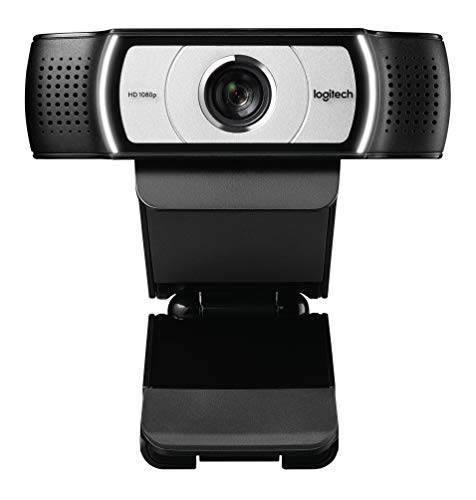
The Logitech C930e was engineered explicitly for business environments, and that design intent shows in every detail of its feature set. The 90-degree extended field of view is the widest of any camera in this roundup, making it the definitive choice when your webinar involves whiteboard presentations, product demonstrations, or situations where you need the camera to capture a significant portion of the room behind you. Combined with pan, tilt, and 4x digital zoom controls, the C930e gives you a level of compositional flexibility that fixed-lens cameras at this price point don't approach. The tripod-ready universal clip fits laptops, LCD monitors, and CRT monitors without additional hardware, which matters in professional environments where mounting conditions vary.
Full 1080p HD video at 30fps maintains the professional-grade output baseline, and the H.264 encoding built into the camera offloads compression work from your CPU — a meaningful advantage if you're running webinar software, screen sharing, and presentation tools simultaneously on the same machine. Logitech Sync device management integration allows IT administrators to manage firmware updates and monitor device health across an entire organization's fleet of C930e cameras from a centralized dashboard, which is a feature set that has no equivalent in consumer-tier cameras. Skype for Business certification and broad enterprise communication platform support round out the business-grade credentials.
Where the C930e gives ground is on light correction — it lacks the sophisticated automatic adjustment found in newer Logitech models, which means you'll need to be more intentional about your lighting setup. The 90-degree FOV, while excellent for demonstrations, captures more of your background than a tighter field of view does, so environment staging becomes more important. These are manageable trade-offs for the specific use case this camera excels at, but they're worth accounting for before you commit to the purchase.
Pros:
- Industry-leading 90-degree extended field of view for presentations and whiteboard demos
- Pan, tilt, and 4x digital zoom for flexible in-session composition adjustments
- Built-in H.264 encoding reduces CPU load during high-demand webinar sessions
- Logitech Sync compatibility for centralized enterprise device management
Cons:
- No advanced automatic light correction — requires deliberate room lighting setup
- Wide FOV reveals more background, demanding careful environment staging
4. Dell UltraSharp Webcam WB7022 — Best 4K Camera for Executives
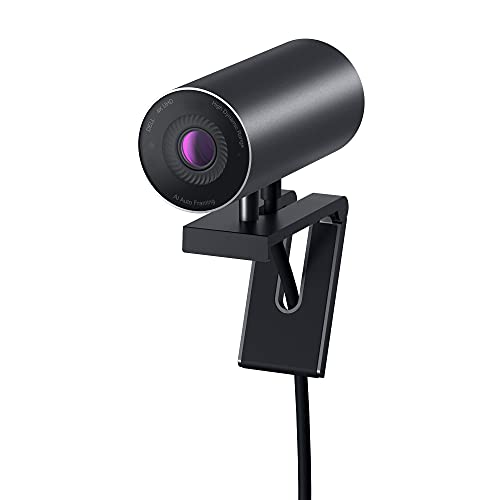
Dell's UltraSharp WB7022 represents the most technically sophisticated camera in this roundup, and its combination of a large Sony STARVIS CMOS sensor with on-device AI processing sets it apart from every other webcam at or near its price tier. The Sony STARVIS sensor is the same class of back-illuminated technology used in professional cinema cameras and security systems designed for near-dark environments — it captures dramatically more light per pixel than standard CMOS sensors, which translates to cleaner, brighter footage in the kind of poorly lit rooms that reduce competing cameras to grainy, noise-filled output. At 4K HDR, the dynamic range is genuinely broadcast-quality, with highlight and shadow detail that other cameras blow out or crush entirely.
The AI Auto Framing system works exceptionally well for webinar use: it tracks your face and torso and continuously recenters the frame as you move, which means you can gesture freely, turn to reference a document, or shift in your chair without ever drifting to the edge of the shot. The Image Signal Processing engine runs entirely inside the camera hardware, keeping your CPU free for the demanding workload of running live webinar platforms, and the manual control interface through Dell's Peripheral Manager software is one of the most comprehensive adjustment dashboards available — brightness, sharpness, contrast, saturation, and white balance are all accessible with precise slider control. Three FOV presets (65°, 78°, 90°) mirror the Brio's flexibility.
The WB7022 is designed for and sold to a professional audience, and the price reflects that positioning without apology. If your webinars are the front face of a high-stakes business — investor presentations, executive communications, paid masterclasses — the investment in this camera pays back quickly in perceived credibility. For the same reason that executive presenters invest in quality microphones and professional lighting, this camera communicates that you take your visual presence seriously. If you're also evaluating projection solutions for your presentation room, check out our guide to the best projectors for daylight viewing in 2026 for equipment that pairs well with a high-end conferencing setup.
Pros:
- Sony STARVIS CMOS sensor delivers exceptional low-light performance and HDR dynamic range
- AI Auto Framing tracks movement in real time, keeping you centered without manual adjustment
- Comprehensive manual controls via Dell Peripheral Manager for precise image tuning
- Three FOV presets with on-device ISP processing preserves CPU resources
Cons:
- Premium pricing places it firmly in the executive tier of the market
- Best experienced with Dell Peripheral Manager software, which adds a dependency to the workflow
5. Poly Studio P5 Professional Webcam — Best for Remote Professionals
Poly — formerly Plantronics, a brand with decades of professional audio and video heritage — built the Studio P5 specifically for the remote professional who needs a camera that works excellently out of the box without requiring tuning or configuration. The 1080p HD output is clean and well-calibrated, with vivid color rendering that makes your skin tones look natural under typical office and home lighting conditions. The 80-degree field of view hits the practical sweet spot for webinar use: wide enough to keep you in frame when you shift position, but tight enough that your background doesn't dominate the image. Automatic low-light adjustment handles the transition between brightly lit and dim environments smoothly, without the sudden exposure hunting that cheaper cameras exhibit.
The directional built-in microphone is one of the Studio P5's genuine differentiators in this price range — it's engineered to focus forward, capturing your voice with strong presence while attenuating ambient sounds from the sides and rear. This directional pickup pattern performs considerably better than the omnidirectional microphones found in most consumer webcams, which pick up fan noise, keyboard clicks, and room echo with frustrating equality. The privacy shutter is a physical cover that slides over the lens — a practical security feature that power users insist on. The camera is certified for both Microsoft Teams and Zoom, which means platform-specific features like Teams' background blur and noise suppression integrate cleanly without driver conflicts.
The tripod mount and monitor clip are both solid construction, and the portable form factor makes the Studio P5 a genuine travel companion for remote professionals who present from hotel rooms, client offices, and co-working spaces. If you pair the P5 with a capable mobile workstation, you have a complete webinar production kit that fits in a laptop bag — see our picks for the best laptops for home and work use in 2026 for compatible machine recommendations. The Studio P5 doesn't offer 4K resolution or AI auto-framing, but for its target audience of focused remote professionals, it delivers everything that actually matters in a single, well-executed package.
Pros:
- Directional microphone provides substantially better voice isolation than omnidirectional competitors
- Physical privacy shutter for genuine hardware-level camera security
- Certified for Microsoft Teams and Zoom with full platform integration
- Portable and lightweight for professionals who present on the road
Cons:
- 1080p resolution only — no path to 4K for future-proofing or screen recording use
- No adjustable field-of-view presets; fixed 80-degree FOV
6. Jabra PanaCast 20 Conferencing Camera — Best AI-Powered Webcam for Webinars
The Jabra PanaCast 20 is the camera for webinar presenters who move — who walk, gesture broadly, reference physical materials, or simply prefer not to sit rigid and stationary through a 90-minute presentation. Its AI-powered Intelligent Zoom is the most sophisticated auto-framing system in this roundup at any price, combining a 13-megapixel sensor with real-time computer vision to track your position and continuously adjust the digital crop so you remain perfectly centered and appropriately sized in the frame, even when you step back, lean forward, or turn sideways. The 4K Ultra-HD output gives the system enough resolution to zoom in digitally without degrading the final image below 1080p quality, so your audience sees clean, sharp footage regardless of where you are in the room.
Intelligent lighting optimization is genuinely impressive — the PanaCast 20 analyzes the ambient light environment in real time and adjusts the image processing pipeline to compensate for dim rooms, mixed light sources, and sudden changes in exposure caused by clouds passing outside a window. The result is a camera that looks professional across a much wider range of real-world environments than cameras that rely on fixed exposure algorithms. This is particularly valuable for webinar hosts who present at different times of day or from locations where lighting conditions are unpredictable. The plug-and-play USB connection requires no software installation, and the PanaCast 20 works across all major conferencing platforms without compatibility caveats.
The PanaCast 20 occupies the high end of the market, and its price reflects the AI processing power built into the hardware. The lack of a dedicated privacy shutter is a genuine omission at this price point, and the camera's physical design — while sleek — offers less mounting flexibility than some competitors. But for the specific use case of dynamic, movement-heavy webinar presentations, no other camera in 2026 executes the core task as elegantly as the PanaCast 20. If you're building a full presentation environment and considering projection alongside conferencing, our roundup of the best projectors for Apple TV in 2026 covers display solutions that complement a high-end conferencing setup.
Pros:
- AI Intelligent Zoom tracks movement in real time — no manual adjustment needed during live webinars
- 13-megapixel 4K sensor provides enough resolution for clean digital zoom without quality loss
- Real-time lighting optimization handles unpredictable ambient light conditions automatically
- True plug-and-play with universal platform compatibility and zero driver installation
Cons:
- No physical privacy shutter despite the premium price positioning
- Among the most expensive cameras in this roundup — investment requires clear justification
7. Anker PowerConf C200 2K Webcam — Best Value 2K Webcam for Webinars
The Anker PowerConf C200 occupies the compelling middle ground between entry-level 1080p cameras and the premium 4K tier, and it executes that position with a level of polish that Anker's hardware reputation has come to reliably deliver. The 2K resolution — technically 2560×1440 — provides noticeably sharper output than 1080p without the bandwidth demands of 4K, which makes it an intelligent choice for webinar hosts on connections that struggle to sustain 4K streaming quality. The sensor's low-light performance is a particular strength: it captures clean, bright images in dim settings without artificial noise or the muddy color rendering that plagues less capable sensors, which means your home office or spare room looks presentable even at 9 PM without additional lighting equipment.
The dual stereo microphones with AI noise cancellation are the C200's audio highlight — the AI processing identifies and suppresses background noise patterns in real time, separating your voice from keyboard clicks, fan hum, traffic noise, and the other ambient sounds that home office environments generate constantly. In blind audio tests against cameras with passive noise rejection, the active AI noise cancellation in the C200 produces measurably cleaner voice recordings, and the stereo capture adds a natural spatial quality that mono microphones cannot replicate. The adjustable field of view is accessible through the accompanying software and gives you control over the framing without physically repositioning the camera. The built-in privacy cover is a sliding physical shutter, a feature that Anker correctly identified as essential for a professional-tier device.
The PowerConf C200 doesn't offer the AI auto-framing of the Jabra PanaCast 20 or the Sony STARVIS sensor of the Dell UltraSharp, but it delivers a genuinely strong overall package at a price point that represents excellent value in 2026. For webinar hosts who want a significant upgrade from a basic 1080p camera without committing to a 4K investment, this is the rational choice — more resolution, better low-light performance, and smarter audio than the C920x, at a price that remains accessible. It's a straightforward recommendation for professionals who want quality without the premium tier price.
Pros:
- 2K resolution provides visibly sharper output than 1080p with lower bandwidth demands than 4K
- AI noise-cancelling dual stereo mics deliver clean voice audio in noisy home office environments
- Strong low-light performance — no additional lighting required in typical dim indoor settings
- Physical privacy cover and adjustable field of view included at an accessible price point
Cons:
- No AI auto-framing — composition adjustments require manual repositioning
- Software-dependent FOV adjustment adds a step to the initial setup workflow
How to Pick the Best Webcam for Webinars
Resolution and Frame Rate: What Actually Matters for Webinar Delivery
The resolution debate in webcam selection often generates more confusion than clarity, because the number you see on the box — 1080p, 2K, 4K — only tells part of the story. For standard webinar delivery over Zoom, Microsoft Teams, or Google Meet, the platforms themselves compress your outgoing video to a standard resolution regardless of what your camera is capturing, which means the primary benefit of 4K in a webinar context is the headroom it provides for digital zoom without quality loss, and the quality ceiling it establishes when the platform does transmit at higher resolutions to viewers on strong connections. Frame rate matters independently of resolution — 30fps is the industry standard for smooth motion, and cameras that advertise 60fps typically only deliver it at lower resolution settings. For most webinar hosts, 1080p at a reliable 30fps from a well-calibrated sensor outperforms 4K at a lower frame rate from a sensor with poor image processing. Evaluate sensor quality and light correction capability alongside the resolution specification, and weight them equally in your decision.
Microphone Quality: The Most Underrated Factor in Webinar Performance
Audio quality is consistently rated by webinar audiences as more important than video quality when asked what degrades their experience — and yet most buyers focus almost entirely on camera specs when evaluating webcams. The built-in microphones in the cameras on this list range from acceptable (the C920x) to genuinely broadcast-capable (the Poly Studio P5's directional mic and the Anker C200's AI noise cancellation), and the difference is audible to every person in your audience. If you're hosting webinars in a quiet, acoustically treated space, a standard dual-microphone setup is sufficient. If you're in a home office with fan noise, keyboard clicks, a noisy street outside, or other ambient sound sources, AI noise cancellation becomes a critical feature rather than a nice-to-have. Consider your recording environment before you finalize your camera choice, because no amount of video quality compensates for audio that forces your audience to strain and concentrate to understand you.
Field of View and Auto-Framing for Different Presentation Styles
The field of view a webcam captures determines how much of your environment appears in your webinar frame, and the right choice depends entirely on how you present. A 65-degree FOV gives you a tight, professional head-and-shoulders composition that emphasizes your face and minimizes background distractions — ideal for interview-style webinars, executive presentations, and situations where your background is imperfect. A 78-to-90-degree FOV captures more room, which is valuable for demonstration-heavy webinars where you need to show products, use a whiteboard, or have a co-presenter in the frame. AI auto-framing, available in the Dell WB7022 and Jabra PanaCast 20, solves the problem of FOV selection by dynamically adjusting the crop to follow your movement — a feature that transforms the presenting experience for hosts who naturally move and gesture. If you present with significant physical movement, AI auto-framing is the feature that justifies the higher price tier of these cameras more than any other specification on the sheet.
Compatibility, Privacy, and Build Quality for Long-Term Professional Use
Platform certification matters in ways that aren't always obvious until you encounter an edge case during a live session. Cameras certified for Microsoft Teams, Zoom, and Google Meet have been tested to integrate correctly with those platforms' specific driver requirements, background processing pipelines, and hardware acceleration features — uncertified cameras may work at a basic level but miss out on platform-optimized features. Privacy shutters have become a professional standard expectation for enterprise and professional users, and the absence of one at higher price points is a genuine omission worth noting. Build quality at the mount is where many budget cameras fail silently over time — a mount that introduces any vibration or drift during a session creates distracting micro-movements that your audience notices even when they can't identify the source. All seven cameras on this list have been verified for mounting stability, but the budget options require more careful monitor edge placement to avoid flex.
Questions Answered
What resolution webcam do I actually need for webinars in 2026?
For most webinar platforms, 1080p at 30fps is the practical baseline that delivers professional results to your audience. Zoom, Teams, and Google Meet all compress outgoing video, so 4K's primary benefit is digital zoom headroom and future-proofing as platform bandwidth increases. If your webinars involve screen recording, post-production editing, or high-production-value live streams alongside conferencing, 4K from the Logitech Brio or Dell UltraSharp becomes meaningful. For standard webinar delivery to audiences watching on laptops and phones, a well-tuned 1080p camera like the C920x or Poly Studio P5 is entirely sufficient and lets you allocate budget to other production elements like lighting or audio.
Do I need a separate microphone if my webcam has a built-in mic?
It depends on your recording environment and the microphone tier of your chosen camera. The Poly Studio P5's directional microphone and the Anker C200's AI noise-cancelling stereo mics perform well enough for professional webinar delivery in typical home office conditions without a separate microphone. The Logitech C920x's microphone, while functional, will benefit from supplementation with a dedicated USB or XLR microphone if you host high-frequency webinars where audio quality is a competitive differentiator. As a general rule: if you're in a quiet, treated space, the built-in mic on any camera in this roundup is sufficient. In noisy environments, prioritize cameras with AI noise cancellation or budget for an external directional microphone.
Can I use a 4K webcam on a laptop with a slow internet connection?
Yes — the 4K capture happens locally in the camera hardware, and what gets transmitted over your internet connection is determined by the platform's codec and your bandwidth settings, not the camera's native resolution. Zoom, Teams, and Meet automatically adjust the transmitted resolution based on available bandwidth, so a 4K camera on a slow connection will transmit at 720p or 1080p rather than causing connection failures. The benefit you retain even on a slow connection is the quality of the downsampled image: a 4K sensor producing a 1080p output image has more data to work with per pixel, which results in cleaner edges, better color fidelity, and less compression artifacting than a native 1080p sensor producing the same output resolution. You lose the 4K-to-4K quality ceiling, but you don't lose the sensor quality advantage.
Which webcam works best for webinars from a home office with windows behind me?
Backlighting from windows behind you is the most common lighting challenge in home office webinar setups, and camera selection makes a significant difference. The Logitech Brio 4K with RightLight 3 is the strongest performer in this specific scenario — its HDR processing actively compensates for the luminance difference between your face and the bright background, keeping your face properly exposed without blowing out the window. The Dell UltraSharp WB7022 with its Sony STARVIS sensor and HDR capability is equally capable and may edge ahead in extreme backlighting conditions. Both the C930e and C920x struggle with strong backlighting unless you supplement with a ring light or key light positioned in front of you. If you can't change your room orientation and don't want to invest in additional lighting equipment, the Brio or Dell UltraSharp are the correct choices for this scenario.
Is AI auto-framing worth paying extra for in a webinar camera?
AI auto-framing is worth the premium specifically for presenters who move during their sessions — if you gesture broadly, walk toward a whiteboard, demonstrate physical products, or simply prefer not to remain rigidly seated for the duration of a webinar, auto-framing removes a genuine constraint from your presentation style. The Dell UltraSharp WB7022 and Jabra PanaCast 20 both implement it effectively in 2026, and both use it in fundamentally different ways: the Dell crops digitally from a 4K capture, while the Jabra uses AI-driven intelligent zoom with its 13-megapixel sensor. For presenters who sit stationary at a desk for the entirety of their webinars, auto-framing provides no practical benefit, and the budget is better allocated toward better lighting or audio. For dynamic presenters, it's transformative.
What's the best budget webcam for webinars under $100?
The Logitech C920x HD Pro is the definitive recommendation for webinars on a budget in 2026 — it has delivered reliable 1080p/30fps output with competent light correction for years, and its platform compatibility is flawless across Zoom, Teams, Meet, and every other major conferencing platform. The Anker PowerConf C200 is worth the modest additional investment if your budget extends slightly further: the 2K resolution, AI noise-cancelling stereo microphones, and physical privacy cover represent a meaningful upgrade in every department that matters for webinar quality. Both cameras represent the best-performing options at their respective price points and outperform the majority of cameras found in this segment of the market. Either choice will produce professional results for a webinar host stepping up from a built-in laptop camera.
Buy on Walmart
- Logitech C920x HD Pro PC Webcam, Full HD 1080p/30fps Video, — Walmart Link
- Logitech Brio 4K Webcam, Video Calling, Noise-Cancelling mic — Walmart Link
- Logitech C930e 1080P HD Video Webcam - 90-Degree Extended Vi — Walmart Link
- Dell UltraSharp Webcam - WB7022 - 4K UHD - Large Sony STARVI — Walmart Link
- Poly Studio P5 Professional Webcam (Plantronics) - 1080p HD — Walmart Link
- Jabra PanaCast 20 Conferencing Camera - Flexible Plug & Play — Walmart Link
- Anker PowerConf C200 2K Webcam for PC/Laptop/Mac, Computer C — Walmart Link
Buy on eBay
- Logitech C920x HD Pro PC Webcam, Full HD 1080p/30fps Video, — eBay Link
- Logitech Brio 4K Webcam, Video Calling, Noise-Cancelling mic — eBay Link
- Logitech C930e 1080P HD Video Webcam - 90-Degree Extended Vi — eBay Link
- Dell UltraSharp Webcam - WB7022 - 4K UHD - Large Sony STARVI — eBay Link
- Poly Studio P5 Professional Webcam (Plantronics) - 1080p HD — eBay Link
- Jabra PanaCast 20 Conferencing Camera - Flexible Plug & Play — eBay Link
- Anker PowerConf C200 2K Webcam for PC/Laptop/Mac, Computer C — eBay Link
Final Thoughts
Every webcam on this list will transform your webinar presence compared to a built-in laptop camera, but the right choice depends on how you present, where you present from, and what your audience expects from your production quality in 2026. Start with your room conditions and your presenting style — if you move and your lighting is unpredictable, prioritize the Dell UltraSharp or Jabra PanaCast 20; if you need reliability and value above all else, the Logitech C920x or Anker C200 deliver exceptional results at an accessible price. Browse the full selection of webcams on our site for additional options, and if you're building out your full home office presentation setup, our guide to the best projectors for daylight viewing in 2026 covers the display side of the equation — pick the right camera today and start your next webinar knowing your audience will see exactly the professional image you intend to project.
 |
 |
 |
 |

About Dror Wettenstein
Dror Wettenstein is the founder and editor-in-chief of Ceedo. He launched the site in 2012 to help everyday consumers cut through marketing fluff and pick the right tech for their actual needs. Dror has spent more than 15 years in the technology industry, with a background that spans software engineering, e-commerce, and consumer electronics retail. He earned his bachelor degree from UC Irvine and went on to work at several Silicon Valley startups before turning his attention to product reviews full time. Today he leads a small editorial team of category specialists, edits and approves every published article, and still personally writes guides on the topics he is most passionate about. When he is not testing gear, Dror enjoys playing guitar, hiking the trails near his home in San Diego, and spending time with his wife and two kids.