 ee
eeHDMI ARC vs eARC: What Is the Difference for Soundbars
If you've ever tried connecting a soundbar to your TV, you've almost certainly come across the terms ARC and eARC on the back of your devices. Understanding the difference between HDMI ARC vs eARC for soundbars can mean the difference between getting thin stereo audio and experiencing full Dolby Atmos surround sound. Both technologies use a single HDMI cable to carry audio from your TV to your soundbar, but they are far from equal. Whether you're shopping for a new soundbar or trying to get the most out of what you already own, this guide breaks down everything you need to know about HDMI ARC vs eARC soundbar compatibility, bandwidth, audio formats, and real-world setup tips.
Before diving into the technical details, it helps to understand why these ports exist at all. Traditionally, connecting a soundbar meant running a separate audio cable — optical or coaxial — from the TV to the soundbar. HDMI ARC changed that by letting a single HDMI cable handle both video going to the TV and audio returning to the soundbar. eARC took that concept and dramatically expanded it. If you've been wondering whether your current setup is holding back your audio quality, read on — the answer is almost certainly in your HDMI port.

Contents
What Is HDMI ARC?
ARC stands for Audio Return Channel. It was introduced as part of the HDMI 1.4 specification and represented a significant convenience upgrade for home theater setups. Before ARC, you needed a dedicated audio output cable — typically a TOSLINK optical cable — running from your TV to your soundbar or AV receiver. ARC eliminated that extra cable by allowing audio to travel "upstream" through the same HDMI cable already connected between your TV and your audio device.
How ARC Works
When you watch content directly on your TV — whether through a built-in streaming app, an antenna, or a cable box connected to the TV — the TV processes that audio and then needs to send it back out to your soundbar. ARC creates a dedicated return channel in the HDMI cable to do exactly that. Without ARC, the HDMI cable only sends data in one direction: from your source device to your TV. ARC adds a second lane going the other way.
The ARC port on your TV is usually labeled directly on the port itself, often printed as "HDMI 1 (ARC)" or similar. Most TVs and soundbars with HDMI ARC also support CEC (Consumer Electronics Control), which lets a single remote control both the TV and the soundbar volume. This is a major quality-of-life improvement that most users take for granted once they've experienced it. If you're troubleshooting CEC issues or volume control problems, the culprit is often a misconfigured setting — our guide on how to set up a soundbar for best sound quality covers these settings in detail.
Audio Formats Supported by ARC
This is where ARC's age starts to show. The original ARC standard supports a bandwidth of only 1 Mbps, which is enough for:
- Standard PCM stereo (2.0 channels)
- Dolby Digital (up to 5.1 channels, lossy)
- DTS Digital Surround (up to 5.1 channels, lossy)
Notice what's missing: there is no support for lossless audio formats like Dolby TrueHD, DTS-HD Master Audio, or object-based audio formats like Dolby Atmos or DTS:X over ARC. The bandwidth simply isn't there. If you've wondered why your Dolby Atmos soundbar doesn't seem to be getting full Atmos performance via the ARC port, this is the reason — ARC can carry a Dolby Digital Plus signal at best, and even then only in specific implementations.
What Is HDMI eARC?
eARC stands for Enhanced Audio Return Channel and was introduced with the HDMI 2.1 specification. It is a massive leap over standard ARC, designed specifically to handle the high-bandwidth audio formats that modern soundbars and AV receivers are built around. If you've invested in a premium soundbar that supports Dolby Atmos or DTS:X, eARC is the connection you need to unlock its full potential.
How eARC Improves on ARC
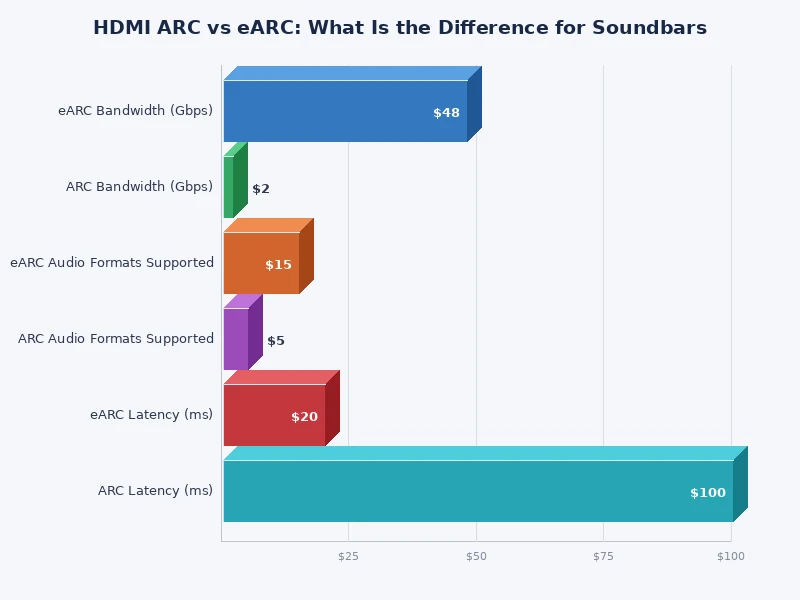
The most dramatic improvement is bandwidth. While standard ARC is limited to 1 Mbps, eARC provides up to 37 Mbps — roughly 37 times more. This extra headroom is not just a spec sheet number; it directly enables the transmission of uncompressed multi-channel audio and lossless codecs that would otherwise be impossible.
eARC also improves on the underlying communication protocol between devices. It uses a dedicated Ethernet channel within the HDMI cable for device discovery and control, making the connection more reliable and less prone to the handshake errors and dropouts that plague older ARC implementations. CEC compatibility is maintained, so your existing remote control setup continues to work.
One important practical note: eARC is backwards compatible with ARC. If your TV has an eARC port but your soundbar only supports ARC, the devices will negotiate down to standard ARC automatically. The reverse is also true — an ARC soundbar connected to an eARC TV will use standard ARC. You need both devices to support eARC to benefit from eARC performance.
Audio Formats Supported by eARC
eARC opens the door to the full range of modern audio codecs:
- Uncompressed PCM stereo and multi-channel PCM (up to 7.1)
- Dolby TrueHD with Dolby Atmos metadata (lossless, object-based)
- DTS-HD Master Audio (lossless)
- DTS:X (object-based, lossless)
- Dolby Digital Plus with Atmos (lossy but higher quality than standard Dolby Digital)
For soundbar owners, the headline features are Dolby Atmos via TrueHD and DTS:X. If you want to understand how these formats affect day-to-day listening, our article on what is Dolby Atmos and do you need it in a soundbar explains the real-world differences in plain language.
HDMI ARC vs eARC: Side-by-Side Comparison
The table below summarizes the key differences between standard HDMI ARC and eARC for soundbar use. These distinctions matter most when you're deciding whether to upgrade your TV, soundbar, or both.
| Feature | HDMI ARC | HDMI eARC |
|---|---|---|
| Introduced with | HDMI 1.4 | HDMI 2.1 |
| Maximum bandwidth | ~1 Mbps | ~37 Mbps |
| PCM stereo (2.0) | Yes | Yes |
| Dolby Digital 5.1 (lossy) | Yes | Yes |
| Dolby Digital Plus | Limited (TV-dependent) | Yes |
| Dolby TrueHD / Atmos (lossless) | No | Yes |
| DTS-HD Master Audio (lossless) | No | Yes |
| DTS:X (object-based) | No | Yes |
| Uncompressed 7.1 PCM | No | Yes |
| CEC device control | Yes | Yes (improved) |
| Backwards compatibility | — | Yes (falls back to ARC) |
| Cable requirement | Standard HDMI cable | Premium High Speed HDMI cable recommended |

Does ARC vs eARC Actually Matter for Your Soundbar?
The honest answer is: it depends entirely on your soundbar and how you use your TV. For casual TV watching — news, sports, network shows — standard ARC with Dolby Digital 5.1 sounds perfectly fine on most soundbars. The limitation becomes very real when you start watching 4K Blu-ray content, streaming from apps that deliver Dolby Atmos, or gaming with spatial audio.
Dolby Atmos and eARC
Dolby Atmos is the audio format most commonly associated with eARC's advantages. When streamed through services like Netflix or Disney+, Atmos content is delivered as Dolby Digital Plus with Atmos metadata — a format that can technically pass through ARC on some TVs, though with reduced quality compared to the lossless TrueHD version. However, when playing a 4K Blu-ray disc, the Atmos audio is encoded as Dolby TrueHD, which requires eARC's higher bandwidth to pass through to a soundbar. Without eARC, your TV will typically downmix TrueHD to standard Dolby Digital before sending it over ARC — you still get surround sound, but you lose the Atmos object data and lossless quality.
This makes eARC particularly important for home theater enthusiasts who use physical media. If you only stream, the gap between ARC and eARC is smaller — but still meaningful. For a deeper dive into what Atmos actually sounds like in practice, see our comparison of Dolby Atmos soundbar vs regular soundbar.
DTS:X and eARC
DTS:X is less common than Dolby Atmos in streaming services, but it remains the dominant format on many physical Blu-ray releases, particularly from studios that license DTS. Like Dolby Atmos over TrueHD, DTS:X requires lossless transmission and therefore eARC. Over ARC, DTS:X content will typically be downmixed to standard DTS 5.1 by the TV before transmission. If your soundbar supports DTS:X and you're watching physical media, eARC is not optional — it's essential.
How to Set Up ARC or eARC With a Soundbar
Setting up ARC or eARC is straightforward in principle, but there are a few common pitfalls that cause problems for many users. The physical connection is the easy part: connect your soundbar to the HDMI port labeled ARC or eARC on your TV using an HDMI cable. For eARC, use a Premium High Speed HDMI cable (look for the label on the packaging) to ensure it can handle the higher bandwidth.
Enabling eARC in TV Settings
Many TVs ship with eARC disabled by default, or with a general "HDMI-CEC" setting that controls both CEC and eARC together. The exact menu path varies by brand, but you're generally looking for:
- Samsung: Settings → Sound → Expert Settings → HDMI-eARC Mode → Auto
- LG: Settings → Sound → Sound Out → eARC
- Sony: Settings → Display & Sound → Audio output → eARC
- TCL/Hisense: Settings → System → HDMI & CEC → eARC
On the soundbar side, most modern soundbars with eARC support detect the connection automatically. Some require you to manually select the eARC input in the soundbar's input menu. Refer to your soundbar's manual if it doesn't switch automatically after enabling eARC on the TV.
CEC and Volume Control
CEC (Consumer Electronics Control) is what allows your TV remote to control your soundbar's volume over the HDMI connection. It's branded differently by each manufacturer — Samsung calls it Anynet+, LG calls it SimpLink, Sony calls it Bravia Sync — but they all use the same underlying HDMI CEC protocol. Make sure CEC is enabled on both your TV and soundbar for this to work. If your soundbar volume won't respond to the TV remote, CEC is almost always the culprit. Our guide on how to fix soundbar audio delay also covers related sync and handshake issues that often appear alongside CEC problems.
Which Should You Choose: ARC or eARC?
In an ideal world, everyone would choose eARC — it's strictly better in every measurable way. The real-world question is whether your existing equipment supports it and whether the upgrade is worth the cost for your specific use case.
Stick with ARC if:
- Your TV and/or soundbar do not have eARC ports
- You primarily stream content (not physical media) and your soundbar isn't a flagship Atmos model
- You're on a budget and the available soundbars in your price range only support ARC
Upgrade to eARC if:
- You own or plan to buy a soundbar with Dolby Atmos or DTS:X support
- You watch 4K Blu-ray discs regularly
- You want to future-proof your setup as streaming services increasingly deliver lossless audio
- You're already buying a new TV — at that point, any mid-range or premium model will include eARC at no extra cost
It's also worth noting that eARC is now standard on virtually all new mid-range and premium TVs. If you're buying a new TV to pair with a quality soundbar, eARC support is essentially guaranteed. The pairing decision becomes more relevant when upgrading only one component — either the TV or the soundbar — and needing to assess whether the other half of the chain can keep up.
For context on how your soundbar compares to other audio options, the article on soundbar vs TV speakers gives a useful baseline for understanding where soundbars fit in the home audio ecosystem overall — regardless of which HDMI port you're using.
Frequently Asked Questions
What is the main difference between HDMI ARC and eARC for soundbars?
The main difference is bandwidth and audio format support. HDMI ARC offers around 1 Mbps and supports lossy formats like Dolby Digital 5.1 and DTS. HDMI eARC provides up to 37 Mbps and supports lossless formats including Dolby TrueHD with Atmos, DTS-HD Master Audio, DTS:X, and uncompressed multi-channel PCM — formats that are essential for getting the best audio from a premium soundbar.
Can I use eARC with a soundbar that only has ARC?
Yes, but you won't get eARC performance. eARC is backwards compatible with ARC, so an eARC-equipped TV connected to an ARC-only soundbar will automatically negotiate down to standard ARC. You'll still get the convenience of a single HDMI cable and CEC control, but you won't receive lossless or object-based audio formats. Both devices must support eARC to benefit from it.
Do I need a special HDMI cable for eARC?
For most setups, a standard high-speed HDMI cable will work, but for reliable eARC performance — especially when passing Dolby TrueHD or DTS-HD Master Audio — a Premium High Speed HDMI cable is recommended. These are rated for 18 Gbps bandwidth and are certified to handle the demands of eARC. Look for the "Premium High Speed" label on the cable packaging rather than relying on brand claims alone.
Is Dolby Atmos possible over HDMI ARC?
Only in a limited way. Some TVs can pass Dolby Digital Plus with Atmos metadata over ARC, which delivers a compressed version of Atmos. However, the full lossless Dolby Atmos experience via Dolby TrueHD — as found on 4K Blu-ray discs — requires eARC's higher bandwidth. If you're streaming Atmos content from Netflix or Apple TV+, you may get a version of Atmos over ARC, but if you want the highest quality, eARC is necessary.
How do I know if my TV has eARC?
Check the back of your TV for HDMI ports labeled "eARC." The eARC port is typically on HDMI port 1, though it varies by manufacturer. You can also check your TV's specifications on the manufacturer's website or in the user manual. If the TV was manufactured after 2019 and is a mid-range or premium model, it very likely includes an eARC port. Budget TVs from that era may have ARC only.
Why is my soundbar not getting Dolby Atmos even though I have an eARC connection?
Several factors can prevent Atmos from reaching your soundbar over eARC. First, confirm that eARC is enabled in your TV's audio settings — many TVs ship with it disabled. Second, verify the content source actually contains Atmos audio (not all shows or movies do). Third, check that your soundbar's input is set to eARC rather than optical or another input. Finally, try a Premium High Speed HDMI cable if you haven't already, as a low-quality cable can cause signal issues that prevent lossless audio transmission.
 |
 |
 |
 |

About Dror Wettenstein
Dror Wettenstein is the founder and editor-in-chief of Ceedo. He launched the site in 2012 to help everyday consumers cut through marketing fluff and pick the right tech for their actual needs. Dror has spent more than 15 years in the technology industry, with a background that spans software engineering, e-commerce, and consumer electronics retail. He earned his bachelor degree from UC Irvine and went on to work at several Silicon Valley startups before turning his attention to product reviews full time. Today he leads a small editorial team of category specialists, edits and approves every published article, and still personally writes guides on the topics he is most passionate about. When he is not testing gear, Dror enjoys playing guitar, hiking the trails near his home in San Diego, and spending time with his wife and two kids.
Leave a Reply

