 ee
eeLaptops ›
How To Choose the Right Laptop Screen Size
Picking the wrong screen size is one of the most common laptop buying mistakes. Whether you work from home, travel constantly, or game for hours, knowing how to choose laptop screen size correctly saves you from buyer's remorse. The right size affects portability, eye strain, productivity, and even battery life. Our laptop reviews cover the full range of screen sizes, and this guide breaks down exactly what to look for before you buy.
Screen size is measured diagonally, corner to corner, in inches. That single number shapes the entire laptop experience — how heavy it is, how big the keyboard feels, how much you can fit on screen at once. This guide walks you through every key consideration so you can match the right screen to your lifestyle.
Contents
Screen Size Categories Explained
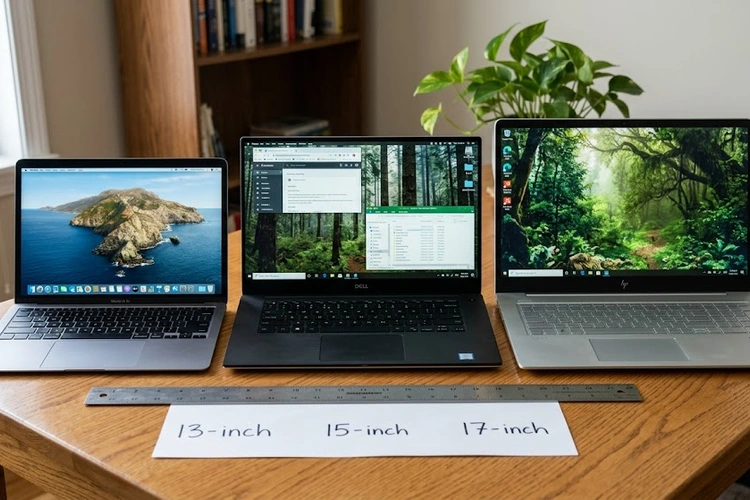
Laptop screens generally fall into three brackets. Understanding what each bracket delivers helps narrow your options fast.
Small Screens: 11–13 Inches
Laptops in the 11–13 inch range are the lightest and most compact available. They slip into a backpack without adding much weight and are easy to use on planes or trains. The trade-off is a smaller keyboard, limited screen real estate, and usually fewer ports. Chromebooks and ultrabooks dominate this bracket. If your primary tasks are email, web browsing, and light document editing, a 13-inch model is a smart, travel-friendly choice.
Mid-Range Screens: 14–15.6 Inches
The 14–15.6 inch range is the most popular for a reason. It balances portability with usability. A 14-inch laptop is still light enough to carry daily, while a 15.6-inch model offers a larger display and often a numpad on the keyboard. Most mainstream laptops — business, student, and general-purpose — land here. The Intel vs AMD processor debate is especially relevant in this bracket, since both chipmakers compete hard in 15-inch productivity machines.
Large Screens: 16–18 Inches
Screens from 16 to 18 inches are desktop-replacement territory. They deliver immersive displays ideal for gaming, video editing, and 3D rendering, but the weight — often 2.5 kg or more — makes daily carrying impractical. These machines usually have stronger cooling systems and more powerful GPUs. If your laptop rarely leaves your desk, a 17 or 18-inch screen transforms the experience.

How to Choose Laptop Screen Size by Use Case
The single most reliable way to choose the right screen size is to start with how you actually use the machine. The same screen that feels perfect for a graphic designer may frustrate a frequent flyer.
Travel and Commuting
If you work from airports, cafes, or client sites, prioritize 13–14 inches. You gain long battery life, sub-1.5 kg weight, and a form factor that fits most airline tray tables. Screen real estate is smaller, but modern high-DPI displays at 13 inches look crisp and are easier on the eyes than older low-resolution panels at the same size.
Office and Productivity Work
For spreadsheets, document editing, email, and video calls, a 14–15.6 inch screen hits the sweet spot. You can open two windows side by side at 1080p without squinting. Many office workers pair a 15.6-inch laptop with an external monitor at their desk — a setup that removes any size limitation entirely. If you're curious about extending your screen, see how to use your laptop as a second monitor to get dual-screen productivity from hardware you already own.
Creative and Design Work
Video editors, photographers, and illustrators benefit from 15.6 inches or larger. More screen space means more room for timelines, toolbars, and canvas. Color accuracy and panel type matter as much as size here — an OLED or high-gamut IPS panel at 16 inches is far more useful than a cheap TN panel at 17 inches. Also consider that creative workflows often pair with drawing tablets; learning how to use a tablet as a drawing pad for your PC can complement even a large-screen laptop setup for illustration work.
Gaming
Gamers typically want 15.6 inches at a minimum, with 17.3 inches being the standard for desktop-replacement rigs. High refresh rates (144 Hz, 165 Hz, 240 Hz) matter more than resolution for competitive games. A larger panel makes fast-moving scenes easier to track. Be aware that gaming laptops in the 17-inch range are heavy and power-hungry — battery life while gaming is often under two hours.
Screen Size vs. Display Quality
Size alone does not determine how good a screen looks or feels. A smaller screen with superior specs often beats a larger screen with mediocre ones.
Resolution and Pixel Density
Pixel density — measured in pixels per inch (PPI) — determines sharpness. A 1080p display on a 13-inch screen looks sharper than the same resolution spread across 17 inches. According to Wikipedia's article on pixel density, the human eye struggles to distinguish individual pixels above roughly 300 PPI at normal viewing distances. For a 15.6-inch laptop, 1080p (141 PPI) is acceptable; 1440p or 4K is noticeably crisper. At 13 inches, 1080p already delivers a clean image.
Panel Type Matters Too
IPS panels offer wide viewing angles and accurate colors. OLED panels deliver perfect blacks and exceptional contrast. TN panels are fast but have poor color reproduction and narrow viewing angles. For a deep breakdown, the guide on IPS vs OLED vs TN laptop displays covers every panel type in detail. When choosing screen size, also evaluate which panel type is available at that size within your budget — premium OLED panels are more common at 14–16 inches than at the extremes.
Screen Size and Portability Trade-Offs
Every extra inch of screen adds weight, chassis thickness, and usually reduces battery life. The table below summarizes typical weight and battery estimates across common screen sizes to help you weigh the portability cost against screen real estate.
| Screen Size | Typical Weight | Avg. Battery Life | Best For | Portability |
|---|---|---|---|---|
| 11–12 inches | 0.9–1.2 kg | 8–12 hrs | Students, light use | Excellent |
| 13–14 inches | 1.2–1.6 kg | 8–14 hrs | Travelers, remote workers | Very Good |
| 15–15.6 inches | 1.6–2.2 kg | 5–10 hrs | Office, general use | Good |
| 16–17.3 inches | 2.0–2.8 kg | 3–7 hrs | Creators, gamers | Fair |
| 18 inches | 2.8–3.5 kg | 2–5 hrs | Desktop replacement | Poor |
Weight is the most tangible portability factor. A 1 kg difference between a 13-inch ultrabook and a 15.6-inch mainstream laptop feels significant after carrying it for a full day. If your back or shoulder health is a concern, smaller is almost always better.
When to Extend Rather Than Upgrade
Sometimes the right answer to "I need more screen space" is not a bigger laptop — it is an external monitor. A 14-inch laptop connected to a 27-inch monitor at your desk gives you the best of both worlds: full portability when you travel, and a large workspace when you are stationary. USB-C and Thunderbolt ports on modern laptops make this connection seamless.
If your battery health has degraded and you are spending more time plugged in at your desk, that is a signal your usage pattern has shifted toward stationary work. In that case, a screen size upgrade may genuinely benefit you. On the other hand, if your laptop's battery is simply failing, the guide on how to fix a laptop that won't charge may resolve the issue and restore your mobility — letting you keep a smaller, more portable screen size.

Quick Comparison: Screen Sizes at a Glance
Use the summary below as a final checklist. Match your primary use case to the recommended size, then cross-check against your budget and portability needs.
| User Type | Recommended Size | Minimum Resolution | Key Priority |
|---|---|---|---|
| Frequent traveler | 13–14 inches | 1920×1200 | Weight, battery |
| Student | 13–15.6 inches | 1920×1080 | Balance, price |
| Office / remote worker | 14–15.6 inches | 1920×1080 | Productivity, ergonomics |
| Video / photo editor | 15.6–16 inches | 2560×1600 | Color accuracy, real estate |
| Gamer | 15.6–17.3 inches | 1920×1080 @ 144 Hz+ | Refresh rate, GPU power |
| Desktop replacement | 17.3–18 inches | 2560×1440 | Raw power, large display |
Knowing how to choose laptop screen size comes down to three questions: Where will you use it? What will you do on it? How much are you willing to carry? Answer those honestly, and the right screen size becomes obvious. No single size is universally best — the best size is the one that fits your actual daily workflow without compromise.
Frequently Asked Questions
What is the best laptop screen size for most people?
A 14–15.6 inch screen suits the majority of users. It balances portability with enough screen space for productive multitasking, and most mainstream laptops in this range offer good resolution and battery life.
Is a 13-inch laptop screen too small for work?
Not for most tasks. A 13-inch laptop with a 1080p or higher resolution display is perfectly comfortable for writing, email, spreadsheets, and video calls. If you regularly split windows or work with large spreadsheets, a 14-inch or external monitor setup will feel less cramped.
Does screen size affect laptop battery life?
Yes. Larger screens require more power to light up, which reduces battery life. A 17-inch gaming laptop typically lasts two to four hours on battery, while a 13-inch ultrabook often exceeds ten hours under light use.
What screen size is best for gaming laptops?
Most gamers prefer 15.6 or 17.3 inches. These sizes accommodate high refresh rate panels, larger keyboards with numpad, and better cooling layouts. The trade-off is weight — gaming laptops at these sizes often exceed 2.5 kg.
How is laptop screen size measured?
Laptop screens are measured diagonally from one corner to the opposite corner, in inches. A "15.6-inch" laptop has a display panel that measures 15.6 inches from the bottom-left corner to the top-right corner of the screen.
Should I choose a bigger screen or an external monitor?
If you move around frequently, choose a smaller portable laptop and add an external monitor at your desk. If your laptop rarely leaves a fixed location, a larger built-in screen simplifies your setup. A 14-inch laptop with a 27-inch external monitor is one of the most flexible and cost-effective setups available.
 |
 |
 |
 |

About Priya Anand
Priya Anand covers laptops, tablets, and mobile computing for Ceedo. She holds a bachelor degree in computer science from the University of Texas at Austin and has spent the last nine years writing reviews and buying guides for consumer electronics publications. Before joining Ceedo, Priya worked as a product analyst at a major retailer where she helped curate the laptop and tablet category. She has personally benchmarked more than 200 portable computers and is particularly interested in battery longevity, repairability, and the trade-offs between Windows, macOS, ChromeOS, and Android tablets. Outside of work, she runs a small Etsy shop selling laptop sleeves she sews herself.