 ee
eeInkjet vs Laser Printer: Which Should You Buy?
A colleague once called me in a panic — she'd just bought a budget inkjet for her home office and was burning through cartridges within weeks, spending more on ink than she had on the printer itself. "Nobody mentioned the cost per page," she said, frustrated. If you're standing at that same crossroads today, the inkjet vs laser printer debate is worth taking seriously. The answer isn't as obvious as the price tags suggest, and getting it wrong costs real money. Browse Ceedo's printer reviews and you'll quickly see that the right choice depends almost entirely on how you print — not just what you print.
Contents
Common Printer Myths You Should Stop Believing
The inkjet vs laser printer conversation is cluttered with half-truths that have hardened into received wisdom over the years. Two of the most persistent are about speed and print quality — and getting them straight will save you from expensive buyer's remorse the moment you plug the machine in.
The Speed Myth
Laser printers are faster — that's the shorthand most people carry. For office-volume text documents, it's largely accurate. A mid-range laser can output 30–40 pages per minute on plain text without any effort. But the gap narrows considerably once you move to color documents, and it nearly disappears on photo printing. Modern inkjets — particularly those using high-capacity ink tanks rather than individual cartridges — can reach 15–20 ppm on standard documents. For the typical home user printing boarding passes and school worksheets, that difference is imperceptible in practice.
The myth also ignores warm-up time. Laser printers use a heated fuser to bond toner to paper; entry-level models can take 10–15 seconds to rouse from sleep. Quality inkjets print almost immediately. If you're sending one or two pages at a time throughout the day, an inkjet may actually feel quicker in real use — even if the spec sheet says otherwise.
The Quality Myth
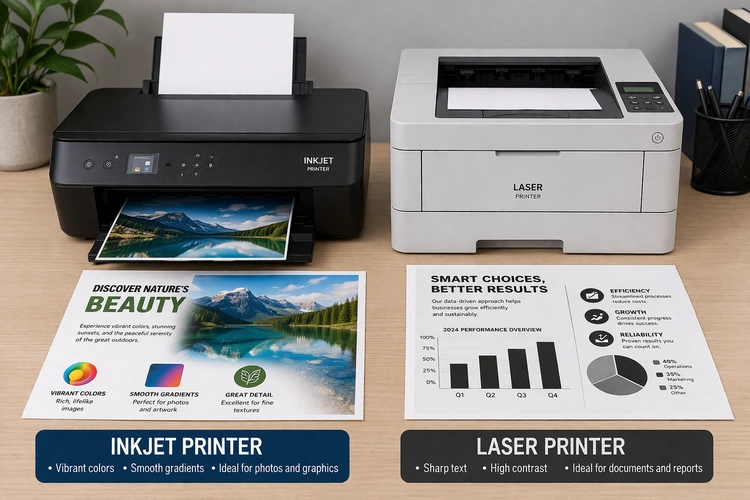
A second assumption is that laser printers produce sharper output across the board. For black text on white paper, they genuinely do — toner particles fuse cleanly and resist smearing even when fresh off the page. But for gradients, photography, or rich color work, inkjet technology holds a decisive advantage. The inkjet printing process sprays microscopic droplets that blend seamlessly, which is why professional photo production still relies heavily on inkjet-based systems.
If your printing life consists entirely of spreadsheets and contracts, laser text quality is a genuine benefit you'll appreciate every day. But if you ever print flyers, client-facing materials, or photos, the inkjet's color reproduction is hard to match at the same price point.
What Does Each Printer Really Cost You?
The number on the shelf is the hardware price. The number that actually matters is total cost of ownership. The two rarely align, and understanding where the real expense sits will shift your perspective on which machine makes financial sense for your household or office over any meaningful timeframe.
Upfront Hardware Costs
Inkjet printers have a lower barrier to entry. A capable color all-in-one with scanning, copying, and wireless printing can be had for $80–$150. Entry-level color laser all-in-ones typically start around $200–$250, with reliable mid-range models sitting in the $300–$400 range. Monochrome laser printers — black-and-white only — are notably cheaper, sometimes as low as $120, and they're genuinely excellent if color output is never a requirement.
The ink tank revolution has shuffled this calculus somewhat. Printers like the Epson EcoTank or Canon MegaTank ship with enough ink to print thousands of pages from the box. Hardware costs land at $200–$350, but per-bottle refill costs drop dramatically compared to traditional cartridges. These models are increasingly popular with high-volume home users who want inkjet color quality without the cartridge treadmill — and they've made the upfront-vs-running-cost comparison more nuanced than it was a few years ago.
Cost Per Page: The Real Number
This is where the comparison becomes uncomfortable for inkjet fans. A standard inkjet cartridge yields roughly 200–400 pages; at typical retail prices, that works out to 5–15 cents per page for color output. Laser toner cartridges yield 1,500–3,000 pages, and high-yield versions push 6,000–10,000 pages. At volume, laser cost per page typically lands between 1–4 cents — a difference that compounds dramatically over a year of regular printing.
Pro tip: If you print fewer than 30 pages a month, cartridge cost is almost irrelevant — but inkjet heads can clog from disuse. Run a test page once a week to keep nozzles clear and avoid wasting ink on cleaning cycles.
It's also worth noting that refilling toner cartridges is a legitimate cost-cutting strategy for laser printer owners — provided you use a quality refill kit and follow the process correctly. Third-party toner is another avenue, though quality varies considerably by brand and model.
Inkjet vs Laser Printer: Side-by-Side Breakdown
Framing the inkjet vs laser printer decision as a single winner-takes-all contest misses the point. Each technology has a natural home, and identifying yours is straightforward once you map the key specs against your actual workflow. The table below gives you the numbers side by side.
| Feature | Inkjet Printer | Laser Printer |
|---|---|---|
| Entry price (color all-in-one) | $80–$150 | $200–$400 |
| Cost per page (color) | 5–15 cents | 3–8 cents |
| Cost per page (mono) | 3–8 cents | 1–3 cents |
| Print speed (text) | 8–20 ppm | 20–40 ppm |
| Photo quality | Excellent | Fair to Good |
| Text sharpness | Good | Excellent |
| Media flexibility | High (glossy, canvas, labels) | Moderate (standard paper) |
| Warm-up time | Near-instant | 10–30 seconds |
| Risk of clogging from disuse | Yes | No |
| Best for | Photos, color, low-to-medium volume | High-volume text, office use |

When Inkjet Wins
Choose an inkjet if you print photos regularly, need to work with specialty media — glossy photo paper, iron-on transfers, cardstock — or want a lower entry cost with flexible color capability. Inkjets are also the better call when color accuracy matters for creative or client-facing work. Households with occasional, varied printing needs tend to find inkjets more versatile; the ability to print vibrant color without a large upfront investment makes them practical for most families.
When Laser Wins
A laser printer earns its keep in any environment that generates steady document volume — contracts, reports, invoices, intake packets. If you run a small business or home office and you consistently print 200 or more pages per month, the lower cost per page offsets the higher hardware investment within a year. Monochrome lasers in particular are nearly maintenance-free workhorses that tend to outlast comparable inkjets. Toner doesn't dry out from disuse, which means a laser left idle for a month will perform identically on day one of the next job as it did the last time you used it.
Getting your printer connected properly is also part of the equation — our guide on connecting a wireless printer to your network walks through the setup steps that apply to both printer types, whether you're configuring a new office laser or troubleshooting an inkjet that lost its Wi-Fi connection.
Planning Your Print Setup for the Long Haul
Buying a printer isn't a one-time transaction — it's the beginning of an ongoing supply chain relationship. The consumables, the firmware updates, the paper trays you'll fill a thousand times: these small interactions define your experience far more than the unboxing moment. Thinking through your evolving needs before you buy prevents regrets that compound quietly over years.
Volume and Frequency
Print volume remains the single most reliable predictor of which technology suits you. Under 50 pages a month, inkjet economics are entirely acceptable — especially with an ink tank model where per-bottle refill costs are low. Between 50 and 200 pages monthly, the choice is genuinely close, and your color requirements tip the balance. Above 200 pages per month, a laser printer is almost always the more economical long-term choice, and the per-page cost advantage compounds meaningfully by the end of the first year.
Frequency matters independently of total volume. Someone who prints 100 pages in a single batch once a month and someone who prints five pages every day have very different needs, even at the same monthly count. Daily low-volume use suits both technologies, but sporadic batch printing favors laser. An inkjet left idle for weeks risks clogged print heads that require cleaning cycles — and that cleaning wastes ink before the actual job even begins.
Connectivity and Features
Modern all-in-ones — whether inkjet or laser — ship with Wi-Fi, mobile printing support via Apple AirPrint and Mopria, and cloud integration. The feature gap between the two technologies at the mid-range tier has largely closed. If you need a scanner that handles fragile or oversized documents, flatbed glass quality becomes relevant; keeping it clean is a simple habit that makes a visible difference, and a guide on cleaning the scanner glass properly covers everything from removing smudges to dealing with stubborn residue.
Duplex printing — automatic two-sided output — once lived exclusively at the premium end of the market. It's now standard on laser printers at $200 and increasingly available on higher-end inkjets. For offices trying to reduce paper consumption, automatic duplex printing can meaningfully cut your paper budget over a year of heavy use. It's a small feature that earns its keep quietly over thousands of pages.

Getting the Most From Your Printer
Whichever technology you land on, good habits extend hardware life, reduce per-page costs, and prevent the breakdowns that reliably surface right before an important deadline. Most printer problems are preventable — and they follow predictable patterns once you understand how each technology fails.
Maintenance Tips
For inkjet owners, the single most effective habit is regular use. Printing at least one test page per week when the machine sits idle keeps nozzles clear and prevents the dried-ink blockages that can permanently damage a print head. When blockages do occur, the built-in cleaning utility resolves most of them, but use it sparingly — each cycle consumes ink. Persistent blockages sometimes respond to manual cleaning with a lint-free cloth and distilled water applied carefully to the nozzle plate.
Laser printers are more tolerant of neglect but have their own failure signatures. Toner smearing or ghost images usually indicate a worn drum unit or fuser approaching end of life. Replacing these components proactively — as they approach their rated page count rather than waiting for a failure mid-job — keeps output quality consistent. On lower-cost models, the drum is bundled inside the toner cartridge, making the maintenance cycle essentially automatic with each replacement.
Both printer types benefit from keeping the scanner glass free of dust and smudges. Contamination on the glass transfers directly to every scanned document and copy, producing mysterious streaks that people often mistake for hardware failure. A microfiber cloth and a small amount of glass cleaner applied to the cloth — not poured directly onto the glass — resolves most issues immediately. If you're dealing with a situation where the HP scanner isn't working but the printer itself is fine, the culprit is usually a driver conflict or a pending firmware update rather than a hardware problem.
Supplies Management
Running out of ink or toner mid-job is one of the minor but disproportionately aggravating experiences of modern office life. Both major printer ecosystems now offer subscription services — HP Instant Ink, Epson ReadyPrint, Canon Pixma Print Plan — that ship replacement consumables before you run out based on actual usage data from the printer itself. These services make economic sense at medium-to-high print volumes but can feel like overkill for occasional users printing a handful of pages per week.
For laser printer users, high-yield toner cartridges almost always deliver a lower cost per page than standard-yield options, even accounting for their higher sticker price. The arithmetic is simple: if a standard cartridge yields 1,500 pages at $25 and a high-yield yields 3,500 at $42, the per-page difference adds up to real savings across a busy office year. Stocking a spare cartridge — one in the machine, one on the shelf — also eliminates the scramble that comes when the low-toner warning appears on a Friday afternoon.
The decision framework here isn't unique to printers. It mirrors the same total-cost analysis you'd apply when choosing between a tablet vs laptop: the device with the lower entry price isn't always the more economical choice once you account for how you'll actually use it over its lifetime.
Frequently Asked Questions
Is an inkjet or laser printer better for home use?
For most households, an inkjet all-in-one offers the best combination of versatility, color quality, and low entry cost. If your home printing is primarily text documents at consistent volume, a monochrome laser printer may save you more money over time — but for general family use, inkjet covers more bases.
Which printer has lower running costs?
Laser printers have a significantly lower cost per page, especially for high-volume text output. Inkjet ink tank models have narrowed the gap, but traditional inkjet cartridges remain expensive per page compared to laser toner at equivalent volumes. For anything over 200 pages per month, laser is almost always cheaper to run.
Can a laser printer print photos?
Yes, but the quality is generally inferior to a dedicated photo inkjet. Laser printers produce acceptable color photos for casual or internal use, but they lack the tonal depth and color accuracy of photo-grade inkjet output. For prints intended to be displayed or shared professionally, an inkjet is the better choice.
Do inkjet printers clog if left unused?
Yes. Ink in the print heads dries out if the printer sits idle for extended periods, causing partial or complete clogs. Printing at least one page per week prevents most issues. When clogs do occur, the printer's built-in head cleaning utility usually resolves them, though it consumes a small amount of ink in the process.
How do I pick based on how much I print?
A simple rule: under 50 pages per month, an inkjet works fine; 50–200 pages per month, either technology can work depending on color needs; over 200 pages per month, a laser printer's lower cost per page typically recoups the higher hardware investment within the first year of use.
Is a laser printer worth buying for a home office?
If your home office generates consistent document volume — contracts, invoices, reports — a laser printer is almost always worth the investment. The lower cost per page, faster output on text, and near-zero maintenance compared to inkjet makes it the practical choice for any professional printing environment.
What is the difference between ink and toner cartridges?
Ink cartridges contain liquid ink sprayed onto paper through microscopic nozzles — the mechanism behind inkjet printers. Toner cartridges contain dry powder electrostatically transferred to paper and fused with heat — the mechanism behind laser printers. Toner cartridges last significantly longer than ink cartridges and typically cost less per page at comparable print volumes.
Key Takeaways
- Inkjet printers offer lower upfront costs and superior color and photo quality, making them the right choice for home users, creative work, and mixed media printing.
- Laser printers have a significantly lower cost per page and excel at high-volume text output, making them the smarter long-term investment for offices and anyone printing over 200 pages monthly.
- Print volume and frequency are the most reliable factors for deciding between the two — sporadic low-volume use suits inkjet, while consistent heavy use strongly favors laser.
- Basic maintenance habits — weekly test prints for inkjets, proactive drum and fuser replacement for lasers — are the single biggest factor in getting full value from either technology.
 |
 |
 |
 |

About Dror Wettenstein
Dror Wettenstein is the founder and editor-in-chief of Ceedo. He launched the site in 2012 to help everyday consumers cut through marketing fluff and pick the right tech for their actual needs. Dror has spent more than 15 years in the technology industry, with a background that spans software engineering, e-commerce, and consumer electronics retail. He earned his bachelor degree from UC Irvine and went on to work at several Silicon Valley startups before turning his attention to product reviews full time. Today he leads a small editorial team of category specialists, edits and approves every published article, and still personally writes guides on the topics he is most passionate about. When he is not testing gear, Dror enjoys playing guitar, hiking the trails near his home in San Diego, and spending time with his wife and two kids.
Leave a Reply

