 ee
eePrinters ›
Best Dual Tray Laser Printer 2026
Businesses waste an estimated $725 per employee per year on paper and printing costs — and a significant chunk of that waste comes down to the wrong printer for the job. If your office prints high volumes across multiple paper sizes or stocks, a dual tray laser printer is one of the single best investments you can make in 2026. Two paper trays mean less manual intervention, fewer jams, and the ability to keep letterhead in one tray and standard stock in the other without stopping mid-job.
The market has matured considerably. Today's best dual tray laser printers are not just fast — they're secured, networked, and built for fleets. Whether you're managing a five-person office or a 50-workstation enterprise environment, there's a machine on this list that fits. We've broken down seven of the strongest contenders, comparing speed, paper capacity, security features, and total cost of ownership so you can make a confident call.
If you've been comparing other business printing options, it's also worth checking out our guide to the best business office printers for a broader look at the category. And if you're running a Linux environment, our best printer for Linux guide covers compatibility in detail. Now, let's get into the dual-tray options that stand out in 2026.

Contents
Standout Models in 2026
- #PreviewProductRating
- Bestseller No. 1
 Rating:

- Bestseller No. 2
 Rating:
- Bestseller No. 3
 Rating:
- Bestseller No. 4
 Rating:
 - Bestseller No. 5
 Rating:
- Bestseller No. 6
 Rating:
 - Bestseller No. 7
 Rating:
Our Hands-On Reviews
1. HP LaserJet Enterprise M507dn — Best Overall for Enterprise Security
The HP LaserJet Enterprise M507dn is built for offices that take security seriously. HP claims this is the world's most secure printer, and while that's a bold statement, the numbers back it up: over 200 embedded security features, including HP Sure Start (which validates firmware integrity at every boot), runtime intrusion detection, and automatic self-healing. For regulated industries like healthcare, finance, or legal, that's not marketing fluff — it's a genuine operational advantage.
Performance is just as impressive. You get 45 pages per minute in monochrome, automatic two-sided printing, and a standard dual-tray setup that handles up to 650 sheets before you need to refill. The 4.3-inch color touchscreen makes navigation intuitive, and HP Web JetAdmin lets your IT team manage this printer alongside an entire fleet from a single dashboard. The M507dn integrates cleanly into enterprise environments running Active Directory and supports HP JetAdvantage Security Manager for applying security policies at scale.
The toner yields are excellent — the high-capacity cartridge delivers up to 17,500 pages, which drastically reduces your cost per page. Monthly duty cycle tops out at 150,000 pages, so this machine handles serious volume without complaint. Setup via Ethernet is straightforward, and the unit feels solid — this is a printer you buy once and keep for years.
Pros:
- Over 200 embedded security features including runtime intrusion detection
- 45 ppm print speed with 650-sheet dual paper capacity
- High-capacity toner cartridge yields up to 17,500 pages
- HP Web JetAdmin fleet management for enterprise IT departments
- HP Sure Start validates firmware at every power-on
Cons:
- No wireless connectivity — Ethernet and USB only
- Higher upfront cost compared to entry-level business printers
2. Brother HL-L5100DN — Best Budget-Friendly Business Workhorse
The Brother HL-L5100DN earns its place on this list by delivering genuine dual-tray performance at a price point that won't derail your IT budget. It's a no-frills monochrome laser printer that focuses on what matters most: speed, reliability, and low running costs. You get 40 ppm print speed, built-in duplex printing, and a 250-sheet main tray with an additional 250-sheet lower tray — 500 sheets total standard, expandable to 1,300 sheets with optional add-on trays.
The HL-L5100DN connects via Gigabit Ethernet, making it a solid networked printer for small to mid-sized offices. Brother's driver and software support is broad — Windows, Mac, and Linux all work without jumping through hoops. The drum and toner cartridge system is separate, which means lower long-term consumable costs. The high-yield toner cartridge (TN-850) prints up to 8,000 pages, and drum replacement (DR-820) is needed only every 30,000 pages.
Where this printer shines is in the value equation. You're not getting advanced security features or a color touchscreen, but you are getting a printer that prints fast, handles dual trays, and runs reliably day after day. For SMBs that just need pages out quickly and cheaply, the HL-L5100DN delivers without drama. It's also worth noting that Brother's build quality has a strong reputation — these machines routinely last 5 to 7 years in active office use.
Pros:
- Competitive price point for a true dual-tray business laser
- 40 ppm with Gigabit Ethernet and automatic duplex
- Expandable paper capacity up to 1,300 sheets
- Separate drum and toner system lowers long-term costs
- Broad OS compatibility including Linux
Cons:
- No wireless — wired Ethernet and USB only
- No touchscreen; basic two-line LCD display
- Standard toner cartridge yield is modest at 3,000 pages
3. Lexmark MX632adwe — Best All-in-One for High Monthly Volume
The Lexmark MX632adwe is a powerhouse multifunction machine built for offices that print, scan, copy, and fax at significant volume. Lexmark rates it for 2,000 to 20,000 pages per month — that's a wide range, and this machine handles the top end without degradation in print quality. Print speed hits 50 ppm in monochrome, and the 1200 x 1200 dpi output delivers crisp, sharp text that holds up well on everything from internal memos to client-facing documents.
The dual-tray setup is paired with automatic duplex printing, making it efficient for large print jobs with minimal paper handling. Wireless and wired connectivity are both on board, so you can connect it via Ethernet for the main office network while also enabling Wi-Fi for mobile workers. The MX632adwe is TAA compliant, which is a requirement for many U.S. government and federal contractor environments — a niche but important distinction. According to the Trade Agreements Act, TAA compliance means the product is manufactured or substantially transformed in a designated country, which matters for procurement in certain sectors.
The scanner is a standout feature. You get a 50-sheet automatic document feeder for scanning multi-page documents hands-free, with duplex scan capability so both sides of a page are captured in one pass. Lexmark's software ecosystem is mature — the management tools let you set usage policies, control color access (though this is mono-only), and monitor consumable levels remotely. For a busy office that needs a single machine to handle everything at volume, the MX632adwe is a serious contender.
Pros:
- 50 ppm print speed with 1200 x 1200 dpi resolution
- Recommended for up to 20,000 pages per month
- TAA compliant for government and federal contractor use
- Both wired Ethernet and wireless connectivity included
- 50-sheet ADF with duplex scan for efficient document handling
- Print, scan, copy, and fax in a single unit
Cons:
- Higher price point than single-function alternatives
- Fax capability is becoming less relevant for many modern offices
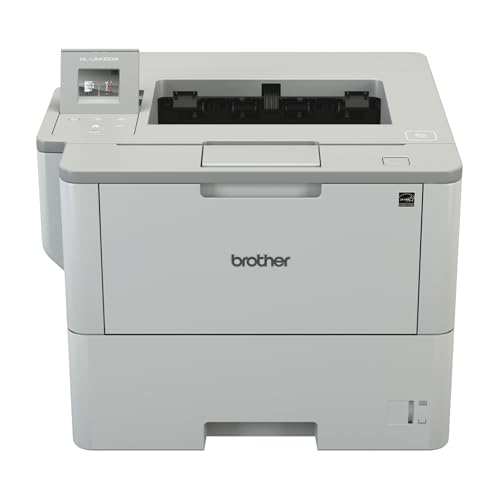
4. Brother HL-L6400DW — Best for Wireless-First Office Environments
The Brother HL-L6400DW is the wireless upgrade path for offices that loved the HL-L5100DN but needed more flexibility in how they connect. This machine brings 1200 x 1200 dpi resolution, 50 ppm print speed, and wireless networking to a dual-tray platform — a combination that's harder to find at this price tier than you'd expect. At 29.3 lbs, it's solidly built without being unwieldy to position in a shared workspace.
The dual-tray setup gives you 520 sheets of standard capacity, and the machine supports expansion up to 1,610 sheets with optional add-on trays. That's meaningful capacity for a print-heavy office. Automatic duplex printing is built in, and the wireless connection supports Wi-Fi Direct, so mobile users can print without connecting to the main network. NFC tap-to-print is also available for compatible Android devices.
Brother's management software handles fleet deployment cleanly, and the HL-L6400DW works well in mixed environments. If you're running a combination of desktops and mobile devices — tablets, phones, laptops — this printer accommodates them all without requiring separate drivers or workarounds. For offices increasingly relying on mobile workflows, that matters. The high-yield toner cartridge (TN-890) delivers up to 12,000 pages, keeping your per-page cost low over the machine's lifespan.
Pros:
- Wireless, NFC, and Ethernet all included
- 50 ppm with 1200 x 1200 dpi output quality
- Expandable paper capacity up to 1,610 sheets
- High-yield toner at up to 12,000 pages per cartridge
- Wi-Fi Direct for mobile printing without network access
Cons:
- No scanning or copying — print-only machine
- Basic display compared to competitors at this price point
5. HP LaserJet Enterprise MFP M430f — Best Entry-Level Enterprise MFP
The HP LaserJet Enterprise MFP M430f is HP's answer to the question: what if you need enterprise-level reliability and management, but you're not yet at the scale where the M507dn's full feature set is justified? At 42 ppm with a 50-sheet automatic document feeder, full duplex printing, and HP FutureSmart firmware, the M430f delivers a professional multifunction experience without the premium price of HP's higher-tier enterprise line.
HP FutureSmart is a genuine differentiator here. It means the firmware on this printer can be updated to add new features, security patches, and capability enhancements over the machine's lifespan — you're not locked into the feature set at time of purchase. For IT departments managing a 3 to 5 year hardware refresh cycle, that's a meaningful long-term value proposition. The M430f also supports optional multifunction apps for mobile workers, letting you extend capabilities like scan-to-cloud or mobile fax as your team's needs evolve.
Security follows the HP Enterprise playbook: HP Sure Start, whitelisting, and intrusion detection are all present. The 50-sheet ADF handles multi-page document workflows efficiently, and the dual paper trays give you the paper-type flexibility that defines this category. If you're shopping for a printer that also scans, copies, and faxes — and you want HP's ecosystem — the M430f is where you start. For iPad-centric offices, also check our best wireless printer for iPad guide for compatibility specifics.
Pros:
- HP FutureSmart firmware enables ongoing feature and security updates
- 42 ppm with 50-sheet ADF for efficient document handling
- Full MFP (print, scan, copy, fax) in dual-tray format
- HP enterprise security stack included at entry-level price
- Optional mobile workflow apps extend functionality over time
Cons:
- 42 ppm is slower than competitors at a similar price
- No wireless connectivity — Ethernet and USB only
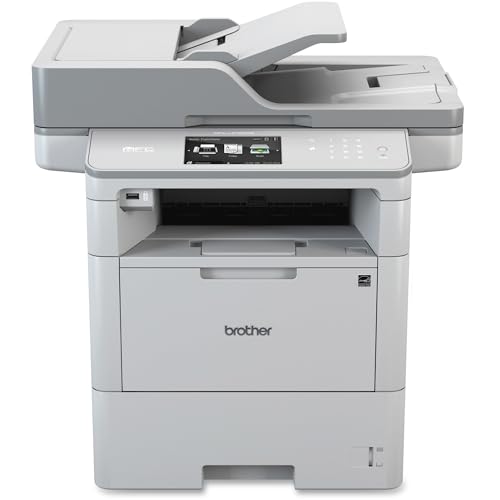
6. Brother MFC-L6750DW — Best All-in-One for Growing Teams
Brother's MFC-L6750DW is a full-featured multifunction laser printer that checks every box a growing team needs: print, scan, copy, fax, wireless, dual tray, duplex, and a large 70-sheet ADF for document-heavy workflows. Print speed clocks in at 48 ppm — competitive with most enterprise units — and the 1200 x 1200 dpi resolution keeps document quality sharp and professional. The 7-inch color touchscreen is one of the best interfaces in this category, making navigation genuinely easy for less tech-savvy users.
The dual-tray configuration ships standard with 570-sheet total capacity, and you can expand to 1,610 sheets with optional lower trays. That's enterprise-level paper capacity from a mid-market machine. Wireless connectivity includes Wi-Fi Direct and NFC in addition to standard Wi-Fi and Ethernet, so every user in your office — regardless of device — can connect. Brother's iPrint&Scan app handles mobile printing and scanning smoothly on both iOS and Android.
One standout feature is the 70-sheet ADF with duplex scan capability. If your team regularly scans multi-page contracts, reports, or forms, that ADF handles the load without manual page flipping. The high-yield toner cartridge (TN-890) prints up to 12,000 pages, and the drum unit (DR-890) lasts up to 50,000 pages — some of the best consumable economics in this category. For teams that are growing and need a machine that grows with them, the MFC-L6750DW is the right long-term choice. It's the kind of productivity equipment that pairs naturally with the productivity tools discussed in our best HP Instant Ink printer guide if you're evaluating your whole printing ecosystem.
Pros:
- 48 ppm with 70-sheet duplex ADF for heavy document workflows
- 7-inch color touchscreen — best display in this category
- Full wireless stack: Wi-Fi, Wi-Fi Direct, NFC, Ethernet
- Expandable paper capacity up to 1,610 sheets
- 12,000-page high-yield toner and 50,000-page drum
- Full MFP: print, scan, copy, fax
Cons:
- Larger footprint than print-only alternatives
- Fax adds cost and complexity most modern offices no longer need
7. Xerox VersaLink B415 — Best for Speed and TAA-Compliant Environments
The Xerox VersaLink B415 brings the Xerox reputation for enterprise print reliability to a mid-market multifunction package. Rated at up to 50 ppm, it matches the fastest machines on this list. TAA compliance makes it a viable choice for government procurement and federal contractors who need to meet sourcing requirements. The dual-tray format with automatic duplex printing is standard, and Xerox's integration with cloud workflows — including Microsoft 365, Google Drive, and Dropbox — is a genuine productivity advantage in 2026's hybrid work environment.
The VersaLink B415 runs on Xerox ConnectKey technology, which gives you access to a range of productivity apps through an intuitive touchscreen interface. Scan to email, scan to cloud, and secure print release are all available without third-party software. The machine also supports Xerox Workplace Suite for fleet management, which is useful if you're managing multiple units across a larger organization.
Print quality at 1200 x 1200 dpi is excellent. Xerox's fine-line rendering and edge definition are particularly sharp — text documents look crisp even at small font sizes, which matters for legal documents and financial reports. The ADF handles up to 50 sheets and supports duplex scanning. For government and regulated-industry buyers who need TAA compliance plus strong cloud integration, the VersaLink B415 is the clear pick in 2026.
Pros:
- 50 ppm — tied for fastest on this list
- TAA compliant for government and federal procurement
- Xerox ConnectKey with native cloud app integration
- Sharp 1200 x 1200 dpi output with excellent fine-line rendering
- Xerox Workplace Suite for multi-unit fleet management
Cons:
- Xerox toner cartridges can be more expensive than Brother or HP equivalents
- ConnectKey app ecosystem has a learning curve for new users
What to Look For When Buying a Dual Tray Laser Printer
Paper Capacity and Tray Configuration
The whole point of a dual-tray printer is eliminating the constant paper refill interruptions that plague single-tray machines. But not all dual-tray setups are equal. Look for these specifics:
- Standard capacity per tray: Most business-grade units offer 250 to 520 sheets per tray. Higher is better if you print in large batches.
- Expandability: Can you add a third or fourth tray? Machines like the Brother HL-L6400DW and MFC-L6750DW support expansion to 1,610 sheets — that's a full workday of printing without a refill.
- Media types: Make sure the second tray supports the media types you actually use. Envelopes, letterhead, heavy cardstock — check the spec sheet before you buy.
- Tray lockout: Enterprise machines often let you lock specific trays to specific users or departments, preventing the wrong media from being used on the wrong job.
Print Speed and Monthly Duty Cycle
Speed matters, but the monthly duty cycle matters more if you're printing high volumes. Here's how to read those numbers:
- ppm (pages per minute): Ranges from 40 ppm (Brother HL-L5100DN) to 50 ppm (Lexmark MX632adwe, Xerox VersaLink B415). For most offices, 40+ ppm is more than adequate.
- Monthly duty cycle vs. recommended monthly volume: The duty cycle is the maximum. The recommended monthly volume is what the machine is designed for. Always buy to the recommended range, not the maximum.
- First-page-out time: How fast does the first page emerge after you send a job? On warm machines, this is typically 6 to 8 seconds. Cold start is longer — relevant if your office turns printers off at night.
Connectivity and Network Integration
Modern offices run mixed environments. Your printer needs to handle all of them:
- Gigabit Ethernet: Essential for networked printing in offices with multiple users. All seven machines on this list include wired Ethernet.
- Wireless (Wi-Fi): Not all models include it — the HP M507dn and M430f are Ethernet-only. If wireless matters to you, look at the Brother HL-L6400DW, MFC-L6750DW, Lexmark MX632adwe, or Xerox VersaLink B415.
- Mobile printing: AirPrint (iOS), Mopria (Android), and Wi-Fi Direct are the standards to look for. Check that your specific mobile workflow is supported before committing.
- Cloud integration: Increasingly important in 2026 — the Xerox VersaLink B415 and Lexmark MX632adwe both offer direct cloud workflow integration without needing a PC as intermediary.
Total Cost of Ownership: Toner Yields and Security
The purchase price is just the beginning. Run the TCO numbers before you decide:
- Toner yield: High-yield cartridges dramatically reduce your cost per page. The Brother TN-890 at 12,000 pages and HP's enterprise cartridge at 17,500 pages are both strong performers. Always calculate cost-per-page, not cartridge price.
- Drum life: Separate drum units (Brother's approach) mean you only replace what wears out. Brother drums typically last 30,000 to 50,000 pages.
- Security costs: If your organization faces audit requirements or data breach liability, the HP M507dn's 200+ security features aren't a luxury — they're insurance. Factor that into your TCO comparison.
- Service and warranty: All seven machines offer at least 1-year on-site or depot service. Extended warranty contracts are worth considering for machines running 10,000+ pages per month.
What People Ask
What is a dual tray laser printer?
A dual tray laser printer has two separate paper trays — typically a main tray and a secondary tray — that can each hold a different paper type, size, or stock. This lets you switch between, say, standard 8.5×11 copy paper and letterhead without manually swapping paper mid-job. For offices with diverse printing needs, dual trays eliminate interruptions and reduce the risk of printing on the wrong media.
How many pages per month should a dual tray laser printer handle?
Match the printer to your actual monthly volume. For offices printing under 3,000 pages per month, the Brother HL-L5100DN is more than adequate. For 5,000 to 15,000 pages, the Brother MFC-L6750DW or HP M507dn are appropriate. For 15,000 to 20,000 pages, the Lexmark MX632adwe or Xerox VersaLink B415 are designed for that range. Always target the manufacturer's recommended monthly volume, not the maximum duty cycle.
Is a monochrome laser printer enough for a business office?
For the vast majority of business document printing — reports, contracts, invoices, internal communications — monochrome laser is the right choice. It's faster, cheaper per page, and more reliable than color laser or inkjet alternatives. Color printing makes sense for marketing materials or client-facing design work, but those jobs are typically better handled by a dedicated color device or print shop rather than a general-purpose office printer.
What's the difference between an MFP and a standard laser printer?
An MFP (multifunction printer) adds scanning, copying, and often faxing to the base print capability. Standard laser printers only print. If your office needs to digitize incoming documents, make copies without a PC, or send faxes — the Lexmark MX632adwe, HP M430f, Brother MFC-L6750DW, and Xerox VersaLink B415 all cover those functions. If you only need to print and you want the simplest, most reliable setup, a print-only machine like the HP M507dn or Brother HL-L5100DN is the better choice.
Do I need TAA compliance for my printer?
TAA compliance is required for U.S. federal government agencies and many federal contractors under the Trade Agreements Act. If your organization sells to the federal government or handles government contracts, check that your printer is TAA compliant before purchasing. On this list, the Lexmark MX632adwe and Xerox VersaLink B415 are both TAA compliant. For most private-sector businesses, TAA compliance is not a procurement requirement.
How do I reduce printing costs with a dual tray laser printer?
The biggest lever is toner yield — always buy high-yield cartridges over standard-yield. The per-page cost difference is significant. Beyond that: enable duplex printing as the default to cut paper use in half, set the second tray to the paper type used most frequently to avoid mis-feeds, and use fleet management software (HP Web JetAdmin, Xerox Workplace Suite, or Brother's BRAdmin) to monitor usage and set print policies that reduce unnecessary print jobs.
Buy on Walmart
- HP LaserJet Enterprise M507dn Monochrome Printer with Built- — Walmart Link
- Brother HL-L5100DN Business Laser Printer with Networking an — Walmart Link
- Lexmark MX632adwe Multifunction Mono Printer Wired & Wireles — Walmart Link
- HL-L6400DW Laser Printer — Walmart Link
- HP LaserJet Enterprise MFP M430f Monochrome All-in-One Print — Walmart Link
- MFC-L6750DW Laser P/S/C/F — Walmart Link
- Xerox VERSALINK B415 Multifunction Printer UP to 50PPM Duple — Walmart Link
Buy on eBay
- HP LaserJet Enterprise M507dn Monochrome Printer with Built- — eBay Link
- Brother HL-L5100DN Business Laser Printer with Networking an — eBay Link
- Lexmark MX632adwe Multifunction Mono Printer Wired & Wireles — eBay Link
- HL-L6400DW Laser Printer — eBay Link
- HP LaserJet Enterprise MFP M430f Monochrome All-in-One Print — eBay Link
- MFC-L6750DW Laser P/S/C/F — eBay Link
- Xerox VERSALINK B415 Multifunction Printer UP to 50PPM Duple — eBay Link
Key Takeaways
- The HP LaserJet Enterprise M507dn is the top pick for security-conscious enterprise environments, with over 200 embedded security features and a 17,500-page toner yield that keeps costs low over the long run.
- The Brother MFC-L6750DW is the best all-rounder for growing teams — 48 ppm, a 70-sheet duplex ADF, 7-inch touchscreen, and full wireless connectivity at a price that doesn't require budget approval from the CFO.
- The Lexmark MX632adwe and Xerox VersaLink B415 are the strongest choices for high-volume environments and government procurement, with 50 ppm speeds and TAA compliance built in.
- For budget-focused small businesses that just need reliable dual-tray laser printing without the extras, the Brother HL-L5100DN delivers the core value proposition at the lowest price on this list.
 |
 |
 |
 |

About Marcus Reeves
Marcus Reeves is a printing technology specialist with over 12 years of hands-on experience in the industry. Before turning to technical writing, he spent eight years as a service technician for HP and Brother enterprise printer lines, where he diagnosed and repaired thousands of inkjet and laser machines. Marcus holds an associate degree in electronic engineering technology from DeVry University and a CompTIA A+ certification. He is passionate about helping home users and small offices get the most out of their printers without paying ink subscription fees. When he is not testing the latest cartridge refill kits, he tinkers with vintage dot-matrix printers and 3D printers in his garage workshop.