 ee
eePrinters ›
Best Multifunction Printer 2026
The HP OfficeJet Pro 9125e earns the top spot in 2026 for its combination of AI-assisted formatting, fast color output, and a feature set that rivals printers costing twice as much. If you're shopping for a multifunction printer that handles the full office workload — printing, scanning, copying, and faxing — you have more strong options right now than at any point in the last decade, spanning budget laser models to wide-format inkjet workhorses designed for serious volume.
A multifunction printer consolidates four or five office machines into one footprint, and the 2026 lineup has sharpened dramatically around two fault lines: ink cost versus laser reliability, and color capability versus monochrome speed. Inkjet models from HP and Epson lead on upfront price and color richness, while laser models dominate in per-page cost and consistent output quality over hundreds of thousands of pages. Understanding where you land on those trade-offs is the fastest path to the right purchase, and this guide walks you through every major option in detail.
Whether you're equipping a five-person team that prints contracts all day, running a home office that occasionally needs color brochures, or managing a creative studio that needs borderless wide-format output, there is a specific model here built for your workload. If you're also evaluating standalone options, our best wireless printer for Mac guide covers single-function models worth considering, and if black-and-white volume is your priority, the best black and white laser printer 2026 roundup goes deeper on toner-based picks.

Contents
- Standout Models in 2026
- In-Depth Reviews
- HP OfficeJet Pro 9125e — Best for Color Office Printing
- Epson EcoTank ET-4850 — Best for Low Ink Running Costs
- HP LaserJet Pro M283FDW — Best Renewed Color Laser Value
- HP LaserJet MFP M234dw — Best for Small Teams
- HP Color LaserJet Pro M479fdw — Best for Business Security
- Epson WorkForce Pro WF-7840 — Best for Wide-Format Printing
- Epson WorkForce Pro WF-4830 — Best High-Volume Inkjet
- Key Features to Consider When Choosing
- FAQs
- Next Steps
Standout Models in 2026
- #PreviewProductRating
- Bestseller No. 1
 Rating:

- Bestseller No. 2
 Rating:
- Bestseller No. 3
 Rating:
- Bestseller No. 4
 Rating:
 - Bestseller No. 5
 Rating:
 - Bestseller No. 6
 Rating:
 - Bestseller No. 7
 Rating:
In-Depth Reviews
1. HP OfficeJet Pro 9125e — Best for Color Office Printing
The HP OfficeJet Pro 9125e is the printer you reach for when color quality and office-grade speed both matter and you don't want to pay laser prices to get there. Print speeds of 22 ppm in black and 18 ppm in color are genuinely competitive for an inkjet at this price tier, and the AI-assisted formatting feature — which strips unwanted content from web pages and emails before printing — is one of those quality-of-life additions that sounds minor until you realize you're no longer wasting half a sheet on a cookie consent banner every single day. The 250-sheet input tray and auto document feeder make this a legitimately hands-off machine for small teams producing regular print runs of presentations and flyers.
Setup through the HP Smart app takes under ten minutes, and the three-month Instant Ink trial included in the box gives you breathing room to evaluate per-page costs before committing to a subscription. The auto duplex printing and scanning reduce paper consumption significantly, which adds up across a full workweek, and the wireless connectivity handles both 2.4 GHz and 5 GHz bands without any configuration headaches. For a color inkjet all-in-one in 2026, the 9125e sets the benchmark at its price point.
The one real limitation is ink cost beyond the Instant Ink trial — standard individual cartridges carry a moderate per-page cost, so if you're printing several hundred color pages per month, plan your ink strategy before that trial expires. That said, for moderate-volume color printing in a professional environment, this is the model that consistently delivers.
Pros:
- AI-assisted print formatting eliminates wasted pages from web and email jobs
- Fast color output at 18 ppm — competitive for an inkjet all-in-one
- Auto duplex print and scan, ADF, and 250-sheet tray in one package
- Three-month Instant Ink trial lowers the barrier to ownership
Cons:
- Standard ink cartridge costs climb at higher monthly print volumes
- No Ethernet port — wireless and USB only
2. Epson EcoTank ET-4850 — Best for Low Ink Running Costs
If your monthly print volume is high and ink costs are killing your budget, the Epson EcoTank ET-4850 is the most sensible long-term investment in this entire category. The cartridge-free Supertank design replaces expensive individual ink cartridges with refillable high-capacity tanks that dramatically reduce per-page costs — Epson rates each included ink set for up to two years of printing for the average user, and replacement bottles cost a fraction of traditional cartridge packs. The upfront price is higher than comparable cartridge-based models, but you recoup that premium within the first year if you print regularly.
Print quality at 4800 x 1200 dpi resolution delivers sharp text and vibrant color output that holds up well on both plain paper and presentation stock. Black output reaches 15.5 ppm and color lands at 8.5 ppm — not the fastest in the category, but adequate for office workloads that aren't purely high-speed document production. The wireless setup covers standard Wi-Fi, Ethernet, and Wi-Fi Direct, so connecting this to your network is straightforward regardless of your office configuration. The Epson Smart Panel app adds mobile printing and scan-to-cloud functionality that keeps you productive away from your desk.
The ET-4850 includes a full complement of MFP functions: print, scan, copy, fax, and ADF — so nothing is missing. The one trade-off you make is print speed; if you regularly need to output 100+ pages in a single job quickly, a laser model may serve you better for pure throughput.
Pros:
- Cartridge-free Supertank design delivers dramatically lower per-page ink costs
- Included ink rated for up to two years of average use
- 4800 x 1200 dpi resolution produces clean, detailed color and text output
- Wi-Fi, Ethernet, and Wi-Fi Direct connectivity covered natively
Cons:
- Slower color output at 8.5 ppm compared to faster inkjet competitors
- Higher upfront cost versus standard cartridge-based models
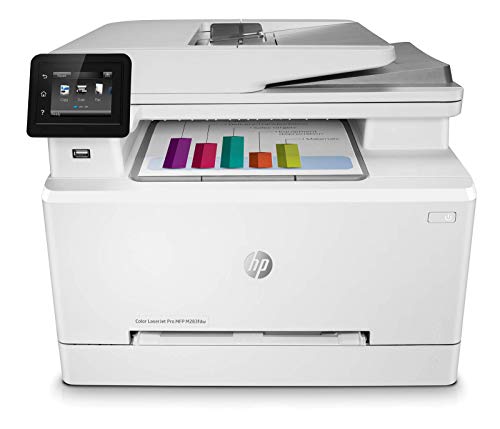
3. HP LaserJet Pro M283FDW — Best Renewed Color Laser Value
The HP LaserJet Pro M283FDW in renewed condition gives you professional color laser output at a price point that makes genuine sense for a small office or home office that needs reliable, high-quality color documents without a new-unit budget. Print, copy, scan, and fax are all covered, and the 22 ppm output speed keeps job queues moving at a pace that won't frustrate your team during peak hours. The 50-page automatic document feeder handles multi-page scan and copy jobs without babysitting, and automatic two-sided printing is standard across all paper sizes.
The HP Smart app is the standout feature here for remote work scenarios — it lets you set up the printer from scratch, manage print jobs from a mobile device, receive status notifications, and even trigger print and scan jobs when you're away from the office, which is legitimately useful for a distributed team. The wireless connection is stable and straightforward to configure, and the combination of Wi-Fi, Ethernet, and USB gives you multiple backup connection paths. Laser output means consistent, smudge-free results every time, which matters if your documents frequently need to be handled immediately after printing.
One important note: this is a renewed unit, and while HP's renewal program maintains quality standards, you should verify the warranty coverage at the time of purchase. For the price differential versus a new unit, most buyers find the trade-off well worth it, especially for an office setting where a spare toner cartridge already sits on the shelf.
Pros:
- 22 ppm color laser speed delivers professional document output without waiting
- HP Smart app enables full remote print and scan management from any device
- 50-page ADF and auto duplex eliminate manual page handling for most jobs
- Renewed pricing makes color laser accessible on a tighter budget
Cons:
- Renewed unit — warranty terms vary and should be confirmed before purchase
- Color toner replacement costs remain higher than inkjet ink alternatives
4. HP LaserJet MFP M234dw — Best for Small Teams
If your team's workload is primarily black-and-white documents — reports, contracts, internal memos, client briefs — the HP LaserJet MFP M234dw is the fastest and most cost-effective solution in this lineup for that specific use case. Up to 30 ppm single-sided and 19 images per minute two-sided printing is the fastest duplex output in its class for 2026, and the per-page toner cost on a monochrome laser is significantly lower than any inkjet equivalent at similar volumes. For 1-5 users sharing a central office printer, this machine is sized exactly right and priced to match.
The HP Smart app integration is consistent with the broader HP ecosystem — setup, mobile printing, and remote scan management all work through the same interface you'd use across other HP devices, which simplifies IT management in mixed-device offices. Wireless connectivity is reliable and the small physical footprint means you can tuck this onto a shelf or side table without dedicating floor space to it. Instant Ink compatibility gives you subscription-based toner management if you prefer predictable monthly costs rather than per-cartridge purchasing.
The clear limitation is the lack of color output. If even occasional color printing — a presentation cover, a signed color scan, a client-facing flyer — is part of your workflow, you need a different model on this list. But for a team where color printing is genuinely never required, you're overpaying for capability you won't use with any other model here. For parallel planning, our guide on best double sided printers covers dedicated duplex-optimized options worth comparing.
Pros:
- Fastest two-sided printing in its class at up to 19 images per minute duplex
- Low per-page toner cost makes high-volume monochrome printing economical
- Compact footprint fits easily in small team environments
- Instant Ink eligible for predictable subscription-based toner management
Cons:
- Monochrome only — no color printing whatsoever
- No ADF included, limiting scan and copy throughput for multi-page documents
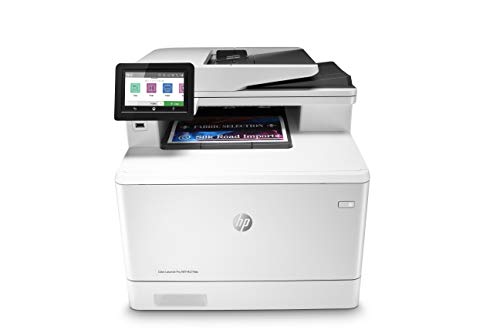
5. HP Color LaserJet Pro M479fdw — Best for Business Security
The HP Color LaserJet Pro M479fdw is built for businesses where security is not optional and workflow automation is a daily operational need. HP Wolf Pro Security runs protection at the hardware, firmware, and OS level simultaneously — this is not a software checkbox but a genuinely layered defense against the kind of networked printer vulnerabilities that have become a documented attack vector in enterprise environments. The customizable touchscreen control panel lets you save and apply complex multi-step workflow settings with a single tap, which eliminates procedural errors on repetitive jobs and speeds up document processing across the whole team.
Print, scan, copy, and fax performance is professional-grade across the board. The color laser output produces consistently sharp, accurate results on everything from standard letter documents to heavier cardstock, and the one-year next-business-day onsite warranty is an exceptional support commitment that most competitors in this segment don't match. If your printer goes down on a Wednesday morning, HP's warranty means a technician arrives Thursday — that kind of guaranteed response time has real dollar value in a business context where a broken printer stops billable work.
The M479fdw carries a premium price relative to the other models in this roundup, which is entirely justified by the security infrastructure and warranty terms, but you should be realistic about whether your environment actually requires those features. If you're running a solo home office, you're paying for enterprise-grade protection you don't need. If you're managing sensitive client data or operating in a regulated industry, this is the only model on this list that belongs in your office.
Pros:
- HP Wolf Pro Security protects at hardware, firmware, and OS levels simultaneously
- One-year next-business-day onsite warranty minimizes costly downtime
- Customizable touchscreen enables one-touch execution of complex multi-step workflows
- Professional color laser output suitable for client-facing documents
Cons:
- Premium pricing — overkill for home office or solo users who don't need enterprise security
- Larger footprint than the M234dw or M283FDW — requires dedicated desk or cabinet space
6. Epson WorkForce Pro WF-7840 — Best for Wide-Format Printing
The Epson WorkForce Pro WF-7840 occupies a unique position in the 2026 multifunction printer market: it's the only model in this roundup that handles wide-format output up to 13" x 19", which makes it the obvious choice for architects, graphic designers, photographers, and marketing teams who regularly print large-format materials without sending jobs to a print shop. PrecisionCore Heat-Free technology drives print output quickly and cleanly, and the DURABrite Ultra ink produces smudge-resistant, vibrant results that hold up on both coated and uncoated paper stocks across the full 13" x 19" print area.
The 500-sheet paper capacity is the largest in this entire category comparison, meaning you can load a full ream and run extended print jobs without a mid-job refill interruption — a practical advantage in any environment where volume and paper variety are both part of the daily routine. The 50-page ADF handles scanning and copying multi-page originals at full office speed, and the 4.3-inch touchscreen panel makes navigating print settings and workflow options significantly easier than the small single-line displays on budget models. Full wireless, Wi-Fi Direct, Ethernet, and USB connectivity covers every connection scenario your office might need.
The trade-off is physical size and price — the WF-7840 is the largest and most expensive inkjet all-in-one in this guide, and if you're never actually printing above standard letter size, you're paying for capacity you'll never use. For creative professionals and design studios that regularly produce large-format proofs and marketing materials, however, this machine pays for itself in outsourced print jobs it eliminates within the first few months.
Pros:
- Wide-format output up to 13" x 19" — the only model in this category that handles this size
- Industry-leading 500-sheet paper capacity reduces mid-job interruptions
- DURABrite Ultra ink delivers smudge-resistant output on multiple paper stocks
- 4.3-inch color touchscreen simplifies navigation and job management
Cons:
- Largest physical footprint in this lineup — requires dedicated counter or cabinet space
- Premium pricing is only justified if you actually print wide-format regularly
7. Epson WorkForce Pro WF-4830 — Best High-Volume Inkjet
The Epson WorkForce Pro WF-4830 is the high-speed inkjet all-in-one for offices that need fast output, large paper capacity, and multiple connection options without stepping up to wide-format size or laser pricing. At 25 ppm in black, it delivers competitive throughput that matches or exceeds most laser models in this guide at a significantly lower per-unit cost, and the DURABrite Ultra ink produces clean, professional results that dry quickly to prevent smudging on freshly printed pages. The 500-sheet paper capacity keeps the machine running through extended print runs without constant paper deck attention, which is exactly what a busy shared office printer needs.
Connectivity is genuinely comprehensive on the WF-4830: standard Wi-Fi, Wi-Fi Direct, Bluetooth Low Energy, and Ethernet all ship built-in, giving you flexibility to integrate this printer into virtually any office network configuration. The Alexa compatibility enables voice-triggered print jobs, which is a minor convenience in a well-connected office setup. App-based and email printing via the Epson iPrint and Smart Panel apps let your team send jobs from smartphones, tablets, and remote computers without any additional setup. The 50-page ADF and 4.3-inch color touchscreen complete a feature set that punches well above this model's price point.
The WF-4830 sits at the intersection of speed, capacity, and value in this lineup — it doesn't have the wide-format capability of the WF-7840 or the enterprise security features of the M479fdw, but for a standard letter-size office workload at high volume, it delivers more throughput per dollar than any other inkjet model here. If you're also evaluating your office's document finishing equipment, our roundup of the best laminator for crafts covers complementary tools worth adding to your setup.
Pros:
- 25 ppm black output matches laser speed at inkjet pricing
- 500-sheet paper capacity handles extended print runs without refills
- Wi-Fi, Wi-Fi Direct, Bluetooth, and Ethernet all built in natively
- Alexa voice printing and full mobile app support for remote print jobs
Cons:
- Limited to standard letter size — no wide-format output
- Ink costs rise at very high monthly volumes compared to laser toner alternatives
Key Features to Consider When Choosing a Multifunction Printer
Inkjet vs. Laser: Matching Technology to Your Workload
This is the most consequential decision you make when buying a multifunction printer in 2026, and the right answer depends entirely on what you print and how often. Inkjet printers — including the HP OfficeJet Pro 9125e and both Epson WorkForce Pro models — deliver superior color quality, lower hardware costs, and cartridge-free tank options that dramatically reduce long-term ink spending. Laser printers — the HP LaserJet models and the Color LaserJet Pro M479fdw — produce consistent, smudge-proof output at lower per-page costs at high volumes and are more reliable for offices printing thousands of pages monthly. If your workflow is primarily high-volume monochrome documents, laser is the clear choice; if color quality and lower upfront investment matter more, inkjet wins.
- Choose inkjet when color quality matters, monthly volumes are moderate (under 1,000 pages), or upfront price is constrained
- Choose laser when volume is high, output consistency is critical, or toner cost-per-page savings justify the higher hardware price
- Consider supertank inkjet (EcoTank ET-4850) when you print regularly and want to eliminate cartridge replacement entirely
Print Speed and Paper Capacity
Print speed is measured in pages per minute (ppm), and the gap between manufacturers' rated speeds and real-world output under load can be significant — factor in a 15-20% reduction from rated speeds for continuous mixed jobs. Paper capacity matters more than most buyers anticipate: a 250-sheet tray on a busy shared printer means someone is refilling it twice a day, while a 500-sheet tray like the WF-7840 and WF-4830 carry runs through lunch without interruption.
- For 1-5 users: 20-25 ppm and 250-sheet capacity are adequate
- For 5-10 users: target 25+ ppm and 500-sheet capacity to avoid bottlenecks
- For duplex-heavy workloads: prioritize the rated two-sided ppm, not single-sided speed
Connectivity and Mobile Printing
Every model in this guide supports wireless printing, but the specifics matter depending on your office configuration. Wi-Fi Direct and Bluetooth Low Energy allow device-to-printer connections without routing through a network router, which is useful in conference rooms or co-working environments. Ethernet connectivity is essential if your printer lives in a wired server closet or network rack, and all HP models here include it except the 9125e. Mobile app support — HP Smart for HP models, Epson Smart Panel for Epson — adds scan-to-cloud, remote job management, and notification features that are genuinely useful in distributed work environments.
ADF, Duplex, and Fax: The Features You'll Actually Use Daily
The automatic document feeder (ADF) is the single most underrated feature on a multifunction printer if you handle any volume of multi-page scan or copy jobs. Without an ADF, every multi-page document requires manual page-by-page feeding — a time cost that adds up quickly. All models in this guide include an ADF except the HP LaserJet MFP M234dw, which is worth knowing before purchase if scanning multi-page documents is part of your regular workflow. Auto duplex printing is standard across all models here and delivers meaningful paper savings across a full workweek of double-sided document output.
FAQs
What is the best multifunction printer for a small office in 2026?
The HP OfficeJet Pro 9125e is the best all-around multifunction printer for small offices in 2026, offering fast color output, AI-assisted formatting, auto duplex printing and scanning, and an ADF in a package that handles the full range of print, scan, copy, and fax workloads without requiring a laser-tier budget. For offices that print very high volumes of monochrome documents, the HP LaserJet MFP M234dw provides faster duplex speeds and lower per-page costs.
Is inkjet or laser better for an office multifunction printer?
Laser is better for offices printing high volumes of primarily black-and-white documents, because per-page toner costs drop sharply at volume and laser output is consistently smudge-proof and fast. Inkjet is better when color quality matters, monthly volumes are moderate, or when a supertank model like the Epson EcoTank ET-4850 can reduce ink costs to laser-competitive levels over time. For most small-to-medium offices with mixed workloads in 2026, a high-performance inkjet covers the full range of needs at a lower entry cost.
How many pages per month should I expect from these printers?
Monthly duty cycle ratings vary significantly across this lineup. The HP Color LaserJet Pro M479fdw is rated for up to 40,000 pages monthly and is built for sustained high-volume environments. The HP OfficeJet Pro 9125e and Epson WorkForce Pro models are rated for 500-1,500 pages per month under recommended use. Exceeding the recommended monthly page volume consistently will shorten the printer's service life and increase maintenance costs, so match the model's rated capacity to your actual expected monthly output before purchasing.
What is the cheapest way to run a multifunction printer long-term?
The Epson EcoTank ET-4850's cartridge-free Supertank system delivers the lowest long-term ink cost of any inkjet model in this guide, with replacement ink bottles costing a fraction of equivalent cartridge packs. For laser printing, monochrome toner in models like the HP LaserJet MFP M234dw carries very low per-page costs at volume. HP Instant Ink and similar subscription services also reduce effective per-page costs significantly if your monthly volume fits the subscription tiers cleanly.
Do I need a fax function on a multifunction printer in 2026?
Fax is still an active requirement in several industries — legal, medical, financial, and government contexts all regularly rely on fax for document transmission and compliance reasons. All models in this guide include fax functionality. If you know your workflow never requires fax, you're not paying extra for it since it's bundled into every MFP at this tier, but you should confirm before purchase if your industry has specific compliance requirements around fax transmission and archiving.
What is the best multifunction printer for printing wide-format documents?
The Epson WorkForce Pro WF-7840 is the only model in this roundup that supports wide-format printing up to 13" x 19", making it the definitive choice for users who regularly print architectural drawings, design proofs, large marketing materials, or oversized presentations. No other model in this guide handles paper above standard letter size, so if wide-format output is a requirement rather than a preference, the WF-7840 is your answer without compromise.
Buy on Walmart
- HP OfficeJet Pro 9125e Wireless All-in-One Color Inkjet Prin — Walmart Link
- Epson EcoTank ET-4850 Wireless All-in-One Cartridge-Free Sup — Walmart Link
- HP Laser Jet Pro M283FDW Multifunction Color Fax/Scan/Printe — Walmart Link
- HP LaserJet MFP M234dw Wireless Printer, Print, scan, Copy, — Walmart Link
- HP Color LaserJet Pro Multifunction M479fdw Wireless Laser P — Walmart Link
- Epson Workforce Pro WF-7840 Wireless All-in-One Wide-Format — Walmart Link
- Epson Workforce Pro WF-4830 Wireless All-in-One Printer, Aut — Walmart Link
Buy on eBay
- HP OfficeJet Pro 9125e Wireless All-in-One Color Inkjet Prin — eBay Link
- Epson EcoTank ET-4850 Wireless All-in-One Cartridge-Free Sup — eBay Link
- HP Laser Jet Pro M283FDW Multifunction Color Fax/Scan/Printe — eBay Link
- HP LaserJet MFP M234dw Wireless Printer, Print, scan, Copy, — eBay Link
- HP Color LaserJet Pro Multifunction M479fdw Wireless Laser P — eBay Link
- Epson Workforce Pro WF-7840 Wireless All-in-One Wide-Format — eBay Link
- Epson Workforce Pro WF-4830 Wireless All-in-One Printer, Aut — eBay Link
Next Steps
- Check current prices on Amazon for your top one or two picks — prices on these models fluctuate regularly, and the best-value choice may shift week to week.
- Calculate your actual monthly page volume using your last three months of print records, then match it against each model's recommended monthly duty cycle to confirm you're not overloading the hardware.
- Compare your top pick against your current printer's per-page cost — factor in ink or toner, paper, and the annualized hardware cost to determine the true cost-per-page and payback period.
- Review full user feedback on Amazon for the model you're considering, specifically filtering for reviews from buyers in the same use case (home office, small team, high-volume production) as your own.
- Check compatibility with your existing devices — confirm that your operating system, mobile platform, and any cloud services you rely on are fully supported before completing your purchase.
 |
 |
 |
 |

About Marcus Reeves
Marcus Reeves is a printing technology specialist with over 12 years of hands-on experience in the industry. Before turning to technical writing, he spent eight years as a service technician for HP and Brother enterprise printer lines, where he diagnosed and repaired thousands of inkjet and laser machines. Marcus holds an associate degree in electronic engineering technology from DeVry University and a CompTIA A+ certification. He is passionate about helping home users and small offices get the most out of their printers without paying ink subscription fees. When he is not testing the latest cartridge refill kits, he tinkers with vintage dot-matrix printers and 3D printers in his garage workshop.