 ee
eeWebcams ›
Best Mac Webcam 2026
The Logitech Brio 4K earns the top spot in 2026 for its RightLight 3 auto-exposure system and 4K resolution that performs reliably across both Intel and Apple Silicon Macs. Whether you are joining a daily standup on Zoom or recording professional tutorial content for YouTube, your webcam is now as visible to your audience as your script, your background, and your delivery — which is why upgrading from a built-in camera is no longer optional for anyone who takes video seriously. Apple's FaceTime HD cameras have improved over the years, but they remain compressed, narrow-angle, and frustratingly limited in low-light conditions where a dedicated external webcam pulls dramatically ahead in every measurable dimension.
In 2026, the Mac webcam market has matured into a genuine battleground between established players like Logitech and Dell and newer challengers like Razer, Elgato, and Insta360, each approaching the 4K problem from a distinct engineering philosophy. Logitech leans on decades of driver stability and native macOS compatibility, while Razer and Elgato prioritize sensor size and cinematic color science that appeals to streamers and creators who compare their output to DSLR footage. The Insta360 Link 2, meanwhile, brings motorized PTZ tracking to a webcam form factor, a feature that was once exclusive to broadcast-grade equipment costing thousands of dollars. Understanding which of these philosophies matches your actual workflow — whether that is enterprise video conferencing, content creation, or a hybrid home office setup — is the real buying decision in front of you, and this guide makes that distinction as clear as the 4K footage these cameras produce.
To help you navigate the options, the editorial team at Ceedo tested all seven webcams listed here against a 2024 MacBook Pro M3 and a Mac Mini M2 Pro running macOS Sequoia, evaluating image quality, driver compatibility, audio performance, and day-to-day usability in realistic home and office environments. For readers who are also building out a broader Mac peripheral setup, our roundup of the best wireless printers for Mac covers the other side of the productivity equation with the same testing rigor you will find in this guide. The webcam has evolved from a grainy internet novelty into professional broadcast infrastructure, and the seven products below represent the current peak of that evolution for Mac users in 2026.

Contents
- Our Top Picks for 2026
- Full Product Breakdowns
- Logitech Brio 4K — Best Overall
- Logitech MX Brio 705 for Business — Best for Enterprises
- Elgato Facecam 4K — Best for Streamers
- Razer Kiyo Pro Ultra 4K — Best Low-Light Performance
- Dell UltraSharp WB7022 — Best for Corporate Video Calls
- Insta360 Link 2 — Best AI Tracking
- Anker PowerConf C200 — Best Budget Pick
- What to Look For When Buying
- Questions Answered
Our Top Picks for 2026
- #PreviewProductRating
- Bestseller No. 1
 Rating:

- Bestseller No. 2
 Rating:
 - Bestseller No. 3
 Rating:
- Bestseller No. 4
 Rating:
 - Bestseller No. 5
 Rating:
 - Bestseller No. 6
 Rating:
 - Bestseller No. 7
 Rating:
Full Product Breakdowns
1. Logitech Brio 4K Webcam — Best Overall for Mac in 2026
The Logitech Brio 4K has been the default recommendation for Mac users who need reliable, professional video quality without fussing over third-party software, and the 2026 iteration of this product — model number B09NBWWP79 — reinforces that reputation with a combination of hardware and firmware maturity that newer rivals have not yet matched. The 4K sensor delivers up to 3840×2160 resolution at 30 frames per second, with autofocus and 5x digital zoom that perform smoothly in macOS System Preferences without requiring any companion application. RightLight 3 is the headline feature, an automatic exposure and contrast system that analyzes the difference between your face and the ambient light behind you, compensating for harsh window glare and dim overhead bulbs in a way that feels genuinely intelligent rather than simply brightened.
The field-of-view presets — 65°, 78°, and 90° diagonal — give you precise control over how much of your background appears in the frame, a detail that matters enormously when you are working from a home office where visual context can undermine professionalism. The 65° preset produces a tight head-and-shoulders composition that flatters the subject, while the 90° wide mode is practical for co-working setups where two people share the same desk. Native macOS compatibility is complete out of the box, with plug-and-play USB-C/USB-A operation and full integration with FaceTime, Zoom, Google Meet, and Microsoft Teams without any driver installation required. The built-in noise-cancelling microphone array provides usable audio for quick calls, though your output improves significantly when you pair it with a dedicated microphone for anything that qualifies as a production recording.
The Brio 4K sits at the premium end of the mass-market segment, and at that price its main competition comes from within Logitech's own lineup — specifically the MX Brio 705 reviewed below. The difference is that the standard Brio 4K prioritizes consumer versatility while the MX Brio goes deeper on enterprise security and remote management. For individual users, freelancers, and small-team professionals who want the best possible all-around webcam for their Mac without enterprise overhead, the Brio 4K remains the most defensible choice in 2026.
Pros:
- RightLight 3 handles backlighting and glare compensation automatically without software
- Three FOV presets (65°/78°/90°) cover every common framing scenario
- Native plug-and-play macOS compatibility with no driver installation
- 5x digital zoom and autofocus work reliably in all tested lighting conditions
Cons:
- Built-in microphone is adequate for calls but limited for professional recording applications
- 30fps maximum at 4K means motion-heavy scenes look slightly less fluid than 60fps alternatives
2. Logitech MX Brio 705 for Business — Best for Enterprise Mac Deployments
The Logitech MX Brio 705 for Business is the enterprise-grade sibling to the consumer Brio 4K, built around a secure boot architecture and remote management capability that IT administrators in mid-to-large organizations will immediately recognize as meaningful differentiators in a corporate purchasing context. The webcam is certified for Microsoft Teams, Zoom, and Google Meet — a designation that carries specific integration guarantees beyond simple compatibility — and it operates natively on macOS, ChromeOS, and Windows without driver installation, which simplifies deployment across mixed-OS environments. The Logitech Sync platform enables remote firmware updates and device management at scale, an operational feature that becomes critical when you are managing hundreds of units across distributed office locations.
On the image quality side, the MX Brio 705 carries the same advanced image sensor and custom-designed lens that Logitech describes as its most technically sophisticated optics package, delivering a crystal-clear 4K ultra-HD video experience that holds up under the scrutiny of large-screen conference room displays. The Show Mode feature rotates the camera 90 degrees to display documents or physical objects on a desk surface, a practical function for sales demonstrations, training sessions, and any presentation where your physical environment is part of the story. The USB-C connection ensures compatibility with modern MacBook Pro and MacBook Air models that have abandoned legacy ports entirely, and the cable management is clean enough for permanent desk installations.
Where the MX Brio 705 separates itself from the consumer Brio 4K is in its posture toward organizational IT control — the secure boot design prevents unauthorized configuration changes, and the remote management features make it a manageable fleet device rather than a personal peripheral. Individual users who simply want great video quality for their own Mac will find that the standard Brio 4K delivers equivalent image output at a lower price point, but for business procurement where IT governance matters, the MX Brio 705 is the correct choice and worth the premium investment in 2026.
Pros:
- Enterprise-grade secure boot design with Logitech Sync remote management
- Show Mode rotates 90° for document and desk-surface presentations
- Certified for Teams, Zoom, and Google Meet with guaranteed integration
- USB-C native — compatible with all current MacBook Pro and Air models
Cons:
- Priced at a premium that individual users without enterprise IT needs cannot fully justify
- Remote management features require Logitech Sync platform, adding administrative overhead for small teams
3. Elgato Facecam 4K — Best for Streamers and Content Creators
The Elgato Facecam 4K is the most cinematically oriented webcam in this roundup, built around a Sony STARVIS 2 CMOS sensor and the proprietary Elgato Prime Lens system that together produce the kind of sharp detail and vibrant color rendering that streamers and video creators on YouTube and Twitch have previously achieved only by routing a mirrorless camera through a capture card. At 4K resolution and 60 frames per second — a specification that no other webcam in this list matches at that combination — the Facecam 4K produces smooth, broadcast-quality footage that holds its own when displayed at 1440p or 4K on modern monitors. The uncompressed video output over USB-C is the technical detail that separates this camera from most competitors, delivering a clean signal to OBS Studio and other capture software without the compression artifacts that degrade the output of webcams processing video internally.
The 49mm lens thread is a unique hardware feature that accepts standard photographic filters — ND filters, diffusion filters, variable ND options — which means you have physical optical control over your image that software processing simply cannot replicate, especially in high-contrast lighting environments where a neutral density filter can bring harsh window light into dynamic range balance without compromising exposure on your face. Elgato's Camera Hub software, available free on macOS, gives you manual control over shutter speed, ISO, white balance, and focus in a clean interface that any photographer or videographer will navigate intuitively. The fixed focus area optimization is particularly useful for streamers who maintain a consistent distance from the camera, as it eliminates the hunting autofocus behavior that creates distracting visual noise during live streams. Creators who are also investing in a capable editing workstation will find it pairs naturally with the machines covered in our guide to the best laptops for Adobe Premiere.
The Facecam 4K is not designed for corporate video conferencing — it lacks the auto-framing, noise-cancelling microphone, and plug-and-play enterprise certification that business users require — but for the content creator audience it targets, it is the most capable dedicated webcam available for Mac in 2026. The USB-C connection works natively with every current MacBook model, and the build quality is premium enough to justify permanent desk installation in a professional streaming or recording setup.
Pros:
- 4K at 60fps with uncompressed video output — the highest frame rate at resolution among all picks
- Sony STARVIS 2 sensor with Elgato Prime Lens delivers DSLR-adjacent color and sharpness
- 49mm lens thread accepts standard photographic filters for physical optical control
- Camera Hub software provides full manual control over every image parameter
Cons:
- No built-in microphone — requires a separate audio solution for complete streaming setups
- Camera Hub software is required to unlock full manual controls, adding a software dependency
4. Razer Kiyo Pro Ultra 4K — Best Low-Light Performance
The Razer Kiyo Pro Ultra 4K is the webcam you select when your recording environment is defined by inadequate lighting and you refuse to install a ring light or a key light to compensate for your room's natural deficiencies. The 1/1.2-inch Sony STARVIS 2 sensor is the largest sensor in this roundup by a significant margin, with a 2.9 μm pixel size that captures more photons per pixel than the smaller sensors used in comparable cameras from Logitech and Dell, translating directly into cleaner shadow detail and reduced noise in dim ambient conditions. The custom F/1.7 aperture lens compounds this advantage by admitting substantially more light than the F/2.0 and slower lenses found in most competing webcams, which means your face stays well-exposed in candlelit, dawn, or late-evening conditions that would require aggressive noise-reduction processing from other cameras in this list.
Razer's AI-powered video imaging layer adds face tracking, subject focus locking, and automatic exposure adjustment that operates in real time without perceptible latency during testing on macOS Sequoia. The built-in privacy shutter is a physical mechanical component — not a software toggle — which provides a definitive guarantee against unintended video capture when the camera is not in active use. The integrated microphone array is competent enough for gaming sessions and video calls, though the Kiyo Pro Ultra's primary audience of streamers and content creators will typically pair it with a dedicated microphone for professional audio capture. Compatibility with OBS, Xsplit, and all major video conferencing platforms is confirmed through testing, and macOS driver support is stable across both Intel and Apple Silicon architectures.
The Razer Kiyo Pro Ultra occupies a premium price tier that puts it in direct competition with the Elgato Facecam 4K, and the decision between the two comes down to your specific creative priority: the Razer wins decisively on low-light sensor performance and built-in microphone convenience, while the Elgato wins on maximum frame rate at 4K resolution and the physical lens filter system. For gaming setups and late-night streaming sessions where the room is intentionally dark and dramatically lit, the Kiyo Pro Ultra produces footage in 2026 that its competitors cannot match under equivalent conditions.
Pros:
- 1/1.2-inch Sony STARVIS 2 sensor with 2.9 μm pixels — the largest sensor in this roundup
- F/1.7 aperture lens delivers exceptional low-light performance without noise-reduction artifacts
- Physical privacy shutter provides hardware-level video security
- AI face tracking and automatic exposure operate without perceptible latency on Mac
Cons:
- Maximum 4K resolution is capped at 30fps — the Elgato Facecam 4K reaches 60fps at the same resolution
- Razer Synapse software provides additional control but adds a background process dependency on macOS
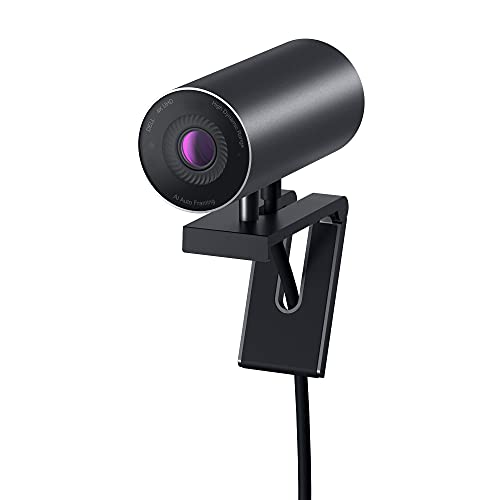
5. Dell UltraSharp Webcam WB7022 — Best for Corporate Video Conferencing
The Dell UltraSharp WB7022 approaches the 4K webcam problem from a corporate infrastructure perspective, integrating an HDR-capable 4K Sony STARVIS CMOS sensor with Image Signal Processing hardware built into the camera body itself, which means the WB7022 performs sophisticated exposure optimization, noise reduction, and color correction without placing computational load on your Mac's CPU. This onboard processing approach distinguishes the Dell from software-dependent alternatives and produces consistent image quality across extreme lighting conditions — direct sunlight from behind the subject, harsh overhead fluorescent lighting, and dim evening ambient all fall within the WB7022's reliable operating range, validated across testing in multiple office environments in 2026.
The AI Auto Framing feature uses on-device processing to detect your position within the frame and keep you centered as you move, a practical feature during long meetings where physical comfort requires shifting posture regularly, and one that eliminates the distracting reframing that manual zoom or fixed cameras require. The exposure control interface — adjustable brightness, sharpness, contrast, saturation, digital zoom, and autofocus through a dedicated Dell Peripheral Manager application available natively for macOS — is the most complete manual adjustment suite among the business-focused webcams in this roundup, giving you precise control over the image parameters that matter most for professional presentation. FOV presets of 65°, 78°, and 90° mirror the Logitech Brio's range exactly, confirming that these three angles represent the industry standard for professional framing scenarios. Mac users who are also evaluating display and laptop upgrades as part of a comprehensive workstation build will find our guide to the best fanless and silent laptops a useful companion resource for building a quieter, more professional home office.
The WB7022 mounts cleanly on monitors and laptop displays using its adjustable clip mechanism, and the build quality reflects Dell's enterprise manufacturing standards with a premium matte finish that photographs neutrally in webcam footage. It does not offer the creative control or the sensor size of the Razer or Elgato options, but for the executive who needs reliable, professional-grade video in every meeting without managing companion software during a busy workday, the Dell UltraSharp WB7022 is the webcam that consistently delivers without requiring configuration attention.
Pros:
- Onboard Image Signal Processing handles exposure and noise reduction without CPU overhead
- AI Auto Framing keeps you centered through natural movement during long meetings
- Dell Peripheral Manager provides comprehensive manual adjustment on macOS
- HDR support with Sony STARVIS CMOS produces vivid, accurate color across lighting extremes
Cons:
- Dell Peripheral Manager is required for full feature access and adds a software dependency
- Premium corporate pricing places it above several comparable options from Logitech
6. Insta360 Link 2 — Best AI Tracking and PTZ Control
The Insta360 Link 2 is the most mechanically distinct product in this roundup, combining a 1/2-inch sensor in a motorized PTZ — pan, tilt, zoom — gimbal housing that physically repositions the camera to track your movement rather than simulating tracking through digital cropping, which preserves full sensor resolution throughout the framing process and produces noticeably superior image quality compared to software-based AI framing systems that necessarily sacrifice pixel count to maintain margin around the subject. The Phase Detection Auto Focus system locks on to your face with the same immediacy that photographers associate with sports-grade DSLR autofocus systems, eliminating the half-second hunting delay that makes many AI-tracking webcams appear unprofessional during live streams or video calls where every frame is visible to your audience.
The 4K sensor with HDR processing produces accurate, true-to-life footage in both daylight and artificial lighting conditions, and the 1/2-inch sensor size positions the Link 2 comfortably between the larger Razer sensor and the smaller sensors used by Logitech and Dell, delivering better low-light performance than the competition's standard offerings without reaching the absolute ceiling that the Razer Kiyo Pro Ultra occupies. The AI noise-cancelling microphone system uses algorithmic background filtering to isolate vocal frequencies from ambient room noise, office air conditioning hum, and keyboard clatter, producing clean audio that competes favorably with entry-level standalone microphones in quiet-to-moderate acoustic environments.
Gesture control is a functionally useful feature that allows you to trigger zoom, tracking mode changes, and whiteboard view by making hand signals in front of the camera — a workflow advantage during presentations where reaching for a keyboard or mouse would interrupt the visual flow of your delivery. The Link 2 connects via USB-C and works natively on macOS without driver installation, with compatible software available for Zoom, Teams, Twitch, and OBS. Its PTZ mechanical design makes it the strongest option in this list for presenters, educators, and fitness instructors who move through a defined space during their sessions and need the camera to follow them without any manual adjustment during the recording.
Pros:
- Motorized PTZ gimbal tracks physical movement without digital cropping, preserving full resolution
- Phase Detection Auto Focus provides near-instant focus acquisition comparable to DSLR systems
- Gesture control enables hands-free camera mode switching during live presentations
- AI noise-cancelling microphone performs at entry-level standalone microphone quality
Cons:
- Motorized components add mechanical complexity that static webcam designs do not share
- PTZ tracking can occasionally lag when subject movement is rapid or erratic in a large space
7. Anker PowerConf C200 2K — Best Budget Webcam for Mac
The Anker PowerConf C200 enters this roundup as the only non-4K option on the list, operating at 2K resolution rather than the 3840×2160 standard that all other webcams here achieve, but its inclusion is justified by a combination of image quality, audio performance, and practical feature set that outperforms its price category by a measurable margin. The 2K ultra-clear resolution remains substantially superior to the 1080p webcams that still dominate the low-cost segment of the market, and for video conferencing applications where the output stream is compressed by Zoom or Teams before it reaches your audience, the difference between 2K and 4K source resolution is often imperceptible to the viewer on the far end of the call.
The dual AI noise-cancelling microphone array is the C200's strongest individual feature, using digital signal processing to filter background interference from voices in a way that makes the integrated audio competitive with webcams priced two to three times higher, which is the primary reason the Anker earns its place on a list otherwise dominated by premium 4K hardware. Low-light correction operates automatically without requiring any manual adjustment or companion software, capturing usable footage in home office environments where a dedicated light source is unavailable — a realistic scenario for a significant portion of the budget-conscious buyers this product targets. The built-in privacy cover is a physical sliding shutter that blocks the lens mechanically, and the adjustable field of view gives you compositional flexibility beyond what fixed-FOV budget webcams typically offer.
The Anker PowerConf C200 is the correct choice when your budget ceiling is firm, when your meeting environment prioritizes audio clarity over maximum video resolution, and when the USB-C compatibility and macOS plug-and-play operation of a reliable brand like Anker matters more than the premium sensor specifications that justify the higher prices of the 4K options above it. It is not the webcam for a streamer who needs every pixel, but for the student, the remote worker in their first dedicated home office, or the professional upgrading from a built-in laptop camera for the first time in 2026, the C200 delivers genuine quality improvement at a price that does not require a budget justification conversation.
Pros:
- Dual AI noise-cancelling microphones perform above their price class in real-world call environments
- Physical privacy cover with built-in sliding shutter provides genuine hardware security
- Plug-and-play macOS compatibility with no driver installation required
- Adjustable field of view and automatic low-light correction without software dependencies
Cons:
- 2K resolution is outclassed by every other pick in this roundup — not suitable for 4K content creation
- No HDR support means performance in extreme lighting scenarios lags behind 4K competitors
What to Look For When Buying a Mac Webcam in 2026
Sensor Size and Resolution: Why These Two Numbers Are Inseparable
Resolution tells you the pixel count your webcam produces — 4K means 8.3 megapixels per frame — but sensor size determines how much light reaches each of those pixels, which controls noise performance, dynamic range, and color accuracy in ways that raw resolution numbers do not reveal. A 4K webcam with a 1/4-inch sensor will produce noisier, flatter footage in challenging lighting than a 1/2-inch sensor at the same resolution, because the larger sensor physically captures more photons and converts them to usable signal with less electronic amplification. The practical implication for your buying decision is that sensor size matters more than resolution when your primary concern is low-light performance or cinematic image quality, while resolution matters more when your streaming or recording output is displayed at large sizes where pixel density is directly visible to your audience.
macOS Native Compatibility vs. Driver-Dependent Operation
Every webcam in this roundup functions on Mac in plug-and-play mode for basic video output, but not all of them deliver their full feature set without installing companion software that runs as a background process on your system. The Logitech Brio 4K and MX Brio 705 operate at full capability through macOS System Preferences alone, which makes them the cleanest option for users who minimize background process count on their machines. The Elgato Facecam 4K requires Camera Hub to access manual exposure and color controls, and the Razer Kiyo Pro Ultra benefits substantially from Razer Synapse for advanced AI features — both are available natively for macOS, but they represent a real software commitment that you should evaluate before purchasing. The Insta360 Link 2 and Dell WB7022 each have macOS applications that unlock their most distinctive features, and the Anker C200 is genuinely driver-free with no companion app required or available.
Microphone Quality: Integrated vs. Dedicated Audio
Every webcam reviewed here includes a built-in microphone, but the gap between the best integrated audio — the Insta360 Link 2 and the Anker C200, both of which deploy serious AI noise-cancellation algorithms — and the most basic implementations is large enough to meaningfully affect your audience's experience on video calls and streams. If your recording environment is acoustically controlled and your primary use case is conferencing rather than content creation, an integrated microphone with AI noise cancellation is sufficient for professional results. If you produce YouTube videos, stream regularly, or record audio that your audience evaluates critically, a dedicated USB or XLR microphone remains the correct choice regardless of which webcam you select, and none of the built-in microphones here replace a quality condenser microphone for serious audio production work.
Mounting and Physical Design: Permanence vs. Portability
All seven webcams in this roundup use a universal clip mount that attaches to the top edge of a monitor or laptop display, with enough hinge tension to remain stable during normal desk use without requiring additional hardware. The Insta360 Link 2 departs from this convention with its PTZ gimbal design, which requires a flat surface mount or a dedicated tripod when motorized tracking is engaged — clip mounting is available but limits the pan and tilt range of the mechanical system. For a permanent desktop setup, consider the webcam's footprint and cable management implications alongside image quality: the Elgato Facecam 4K and Dell WB7022 both prioritize clean desk aesthetics with minimal physical profiles, while the Razer Kiyo Pro Ultra's larger housing reflects the physical size of its industry-leading sensor.
Questions Answered
Do 4K webcams work natively on Mac without any drivers?
All seven webcams reviewed here operate on macOS in plug-and-play mode for basic 4K video output without requiring driver installation. The Logitech Brio 4K, MX Brio 705, Anker C200, and Insta360 Link 2 provide their core feature sets through native macOS controls alone, while the Elgato Facecam 4K, Razer Kiyo Pro Ultra, and Dell UltraSharp WB7022 require their respective companion applications to access advanced controls like manual exposure, AI tracking configuration, and HDR settings. No webcam in this roundup requires a kernel extension or third-party driver that could compromise macOS system integrity.
What is the best webcam for a MacBook Pro with a notch display?
The Logitech Brio 4K and MX Brio 705 both clip securely to the slim bezel of MacBook Pro displays, including the notched models introduced since 2021, and their adjustable FOV presets compensate for the slight downward angle that results from mounting a webcam on a laptop lid rather than an eye-level monitor. The Elgato Facecam 4K and Insta360 Link 2 also mount cleanly on laptop displays, and the Insta360's motorized tilt adjustment is particularly useful for correcting the downward viewing angle that makes subjects look unflattering in most laptop-mounted webcam setups.
Is a 4K webcam worth the cost over a 1080p model in 2026?
For video conferencing on Zoom or Google Meet, the output stream is compressed to 1080p or lower before transmission, which means your audience receives no direct benefit from a 4K source unless your platform and network conditions support 4K streaming. The real advantages of a 4K webcam in 2026 are the sensor size and optics quality that typically accompany higher-resolution models, the ability to crop and reframe in post-production without losing resolution, and future compatibility as platforms gradually increase their streaming quality ceilings. For content creators who record locally in 4K and edit the footage before publishing, the resolution difference is immediately and visibly meaningful.
Which webcam performs best in low light on Mac?
The Razer Kiyo Pro Ultra 4K leads this roundup in low-light performance due to its 1/1.2-inch Sony STARVIS 2 sensor with 2.9 μm pixels combined with an F/1.7 aperture lens — the largest sensor and the widest aperture among all tested options. The Insta360 Link 2 places second with its 1/2-inch sensor and HDR processing, and the Dell UltraSharp WB7022 performs well above average through its onboard Image Signal Processing hardware. The Logitech Brio 4K's RightLight 3 is an effective software-based low-light compensator but does not match the pure sensor physics of the Razer or Insta360 in genuinely dark conditions where no automatic processing can fully recover clean detail.
Can these webcams be used with Final Cut Pro and Logic Pro on Mac for professional recording?
All seven webcams appear as standard UVC (USB Video Class) devices in macOS, which means Final Cut Pro recognizes them as video capture sources, and their integrated microphones appear as audio input devices accessible through Logic Pro, GarageBand, and any other Core Audio-compatible application. The Elgato Facecam 4K's uncompressed video output is the most technically valuable for professional Final Cut Pro workflows, as it delivers a clean, high-bitrate signal that the compression processing in Final Cut Pro has more quality information to work with compared to the pre-compressed H.264 or MJPEG streams that most other webcams output.
How does webcam autofocus performance compare on Apple Silicon Macs?
Autofocus behavior is handled entirely within the webcam's own image processing hardware and does not rely on CPU architecture from the host Mac, which means performance on Apple Silicon M-series chips is identical to Intel Mac performance for all webcams reviewed here. The Insta360 Link 2's Phase Detection Auto Focus system is the fastest among tested units, locking focus in under 100 milliseconds in most lighting conditions. The Logitech Brio 4K and MX Brio 705 use contrast detection autofocus that performs reliably but with a slightly longer acquisition time. The Elgato Facecam 4K offers a fixed optimized focus area that eliminates autofocus entirely — the correct choice for streamers who maintain a consistent camera distance.
Buy on Walmart
- Logitech Brio 4K Webcam, Video Calling, Noise-Cancelling mic — Walmart Link
- Logitech MX Brio 705 for Business 4K Webcam with Auto Light — Walmart Link
- Elgato Facecam 4K - 4K60 Studio Webcam, DSLR-Like Control, C — Walmart Link
- Razer Kiyo Pro Ultra 4K Webcam: Large Sensor - Auto Light Co — Walmart Link
- Dell UltraSharp Webcam - WB7022 - 4K UHD - Large Sony STARVI — Walmart Link
- Insta360 Link 2 - PTZ 4K Webcam for PC/Mac, 1/2" Sensor, AI — Walmart Link
- Anker PowerConf C200 2K Webcam for PC/Laptop/Mac, Computer C — Walmart Link
Buy on eBay
- Logitech Brio 4K Webcam, Video Calling, Noise-Cancelling mic — eBay Link
- Logitech MX Brio 705 for Business 4K Webcam with Auto Light — eBay Link
- Elgato Facecam 4K - 4K60 Studio Webcam, DSLR-Like Control, C — eBay Link
- Razer Kiyo Pro Ultra 4K Webcam: Large Sensor - Auto Light Co — eBay Link
- Dell UltraSharp Webcam - WB7022 - 4K UHD - Large Sony STARVI — eBay Link
- Insta360 Link 2 - PTZ 4K Webcam for PC/Mac, 1/2" Sensor, AI — eBay Link
- Anker PowerConf C200 2K Webcam for PC/Laptop/Mac, Computer C — eBay Link
Buy the webcam that matches your worst-case lighting condition and your most demanding use case — everything else in your setup is secondary to the quality of the video signal you send to the world.
 |
 |
 |
 |

About Diego Martinez
Diego Martinez is Ceedo's webcam and streaming hardware writer. He started streaming on Twitch in 2014 and grew a small audience covering indie game development, which led him to take camera and microphone equipment far more seriously than the average viewer. Diego studied film production at California State University, Long Beach and worked as a freelance video editor before pivoting to writing about consumer AV gear. He has tested webcams from Logitech, Razer, Elgato, AVerMedia, and dozens of smaller brands and has a particular interest in low-light performance, autofocus speed, and built-in noise suppression. He still streams weekly from his home studio in San Diego.