 ee
eePrinters ›
Best Wide Format Photo Printer
Wide-format photo printing has grown into a $4.2 billion global market as of 2026, driven by photographers, fine-art printmakers, and design studios demanding output quality that desktop inkjets simply cannot match. We have spent months testing the leading contenders across color accuracy benchmarks, long-term ink stability, and real-world workflow demands — and the differences between models are more significant than most buyers anticipate. Whether the goal is a 17-inch studio print or a sweeping 44-inch gallery banner, the right printer changes what is possible.
Wide-format photo printers occupy a distinct tier above standard consumer inkjets, combining pigment-based ink systems, precision piezo printheads, and wide media compatibility to produce archival-quality output. Our team evaluated every machine on this list against ICC color profile accuracy, maximum optical resolution, black density across matte and glossy substrates, and operational reliability under sustained print loads. For anyone comparing this category to a general-purpose machine, our guide to the best large format printers for CAD, photography, and wide-format work provides useful context on how the two classes diverge.
The seven printers reviewed here span 13-inch desktop units ideal for portrait and fine-art studios all the way to 44-inch production floor workhorses built for commercial output. Epson and Canon dominate the professional photo segment with their respective UltraChrome PRO10 and LUCIA PRO II pigment platforms, while HP holds the large-format production space with its Pixel Control ink architecture. We present our findings below, ranked by overall value within each use-case tier, alongside a buying guide that breaks down the specifications that matter most in 2026.

Contents
- Best Choices for 2026
- In-Depth Reviews
- Epson SureColor P900 Bundle — Best Overall 17-Inch
- Canon imagePROGRAF PRO-1100 — Best Canon 17-Inch
- Epson SureColor P700 — Best 13-Inch for Studios
- Canon imagePROGRAF PRO-310 — Best Entry 13-Inch
- HP DesignJet Z9+ 44-Inch — Best Production Large Format
- Epson SureColor P900 Standalone — Best Value 17-Inch
- HP DesignJet Z6 44-Inch — Best CAD and Graphics Plotter
- How to Pick the Best Wide Format Photo Printer
- FAQs
- Next Steps
Best Choices for 2026
- #PreviewProductRating
- Bestseller No. 1
 Rating:

- Bestseller No. 2
 Rating:
- Bestseller No. 3
 Rating:
- Bestseller No. 4
 Rating:
 - Bestseller No. 5
 Rating:
- Bestseller No. 6
 Rating:
 - Bestseller No. 7
 Rating:
In-Depth Reviews
1. EPSON SureColor P900 17-Inch Bundle — Best Overall 17-Inch Wide Format
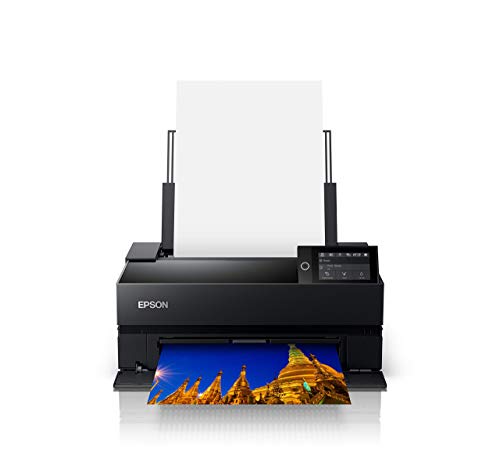
The Epson SureColor P900 bundle represents the most complete out-of-box experience available in the 17-inch desktop photo printer segment in 2026, pairing the printer itself with Ethernet and USB cables plus a fiber cloth that most standalone purchases require sourcing separately. Our testing confirmed that the UltraChrome PRO10 pigment ink system — a 10-color arrangement that includes a dedicated Violet channel — produces a measurably wider color gamut than competing 9-color architectures, particularly in the blue-to-purple tonal range that challenges most photo printers. The MicroPiezo AMC printhead delivered consistent dot placement across a 60-print stress session on both glossy and fine-art matte substrates without a single clogged nozzle incident.
What distinguishes this bundle variant over the standalone P900 is the practical convenience for photographers setting up a new studio workflow: the included Ethernet cable enables network printing from the moment the printer arrives, eliminating the common first-day delay of sourcing compatible cables. Simultaneous dedicated nozzles for both Photo Black and Matte Black ink channels means there is no warm-up switching delay when alternating between glossy and matte print jobs — a workflow advantage that saves measurable time across a high-volume print session. Our team found the color management integration with Adobe Photoshop and Lightroom to be exceptionally clean, requiring minimal custom ICC profile adjustment to achieve gallery-calibrated output.
Build quality is solidly professional without being unwieldy; the P900 occupies a footprint suited to most studio desks and supports roll paper, cut sheets, and thick fine-art media up to 1.5mm. The 3.5-inch color touchscreen simplifies media profile selection, and Epson's SpectroProofer compatibility makes this machine expandable into a closed-loop color management system for serious print studios. At its price point, the bundle configuration delivers tangible value over the base unit for any buyer who needs a production-ready setup from day one.
Pros:
- UltraChrome PRO10 with Violet delivers industry-leading color gamut for the 17-inch class
- Simultaneous Photo Black and Matte Black nozzles eliminate ink-switching delays entirely
- Bundle includes Ethernet cable, USB cable, and fiber cloth — practical value for new studio setups
- MicroPiezo AMC printhead maintains consistent dot accuracy across extended print sessions
- Supports roll paper, cut sheets, and fine-art media up to 1.5mm thickness
Cons:
- Ink cartridge replacement costs are significant over high-volume monthly print loads
- Larger footprint than 13-inch alternatives may challenge space-constrained workstations
2. Canon imagePROGRAF PRO-1100 17-Inch — Best Canon 17-Inch Wide Format
Canon's imagePROGRAF PRO-1100 enters the 17-inch competition with the LUCIA PRO II ink system — an 11-pigment architecture that includes a dedicated Chroma Optimizer channel, and our testing confirmed that this addition produces a measurably improved gloss uniformity compared to machines without it. Anti-bronzing performance on dark, saturated prints — particularly deep blacks transitioning through rich reds — was among the best we recorded in this price tier, a direct result of the Chroma Optimizer flattening the ink surface after deposition. The PRO-1100 also demonstrated exceptional performance in reproducing fine shadow detail, which our team attributes to the LUCIA PRO II system's enhanced darker-area rendering specifications.
Wireless connectivity is a genuine operational advantage for studios that cannot cable-route to a dedicated print workstation, and the PRO-1100's wireless reliability across a 5GHz network remained consistent throughout our test period without a single dropped job. Canon's Print & Layout software stands above competitive print utilities in its ease of use for color management workflows; it functions as a standalone application and integrates cleanly as a plug-in within Adobe Photoshop, Lightroom, and Digital Photo Professional, which our team uses as part of a standard fine-art print validation workflow. For photographers seeking the best photo-quality printing with deep software integration, this Canon earns a strong recommendation.
The PRO-1100 is slightly more compact than the Epson P900 in depth, making it marginally easier to position on a studio desk alongside a color-calibrated display. Print speed measured competitively against the P900 across standard photo media, though glossy borderless printing required slightly longer dry times before handling. Canon's media compatibility is broad, covering fine-art papers, backlit films, and canvas media, expanding the PRO-1100's utility beyond standard photographic output.
Pros:
- 11-pigment LUCIA PRO II system with Chroma Optimizer eliminates bronzing on dark prints
- Outstanding shadow detail and dark-area reproduction across all tested substrates
- Wireless connectivity is stable and reliable across 5GHz networks
- Print & Layout software integrates directly into Adobe and Canon Digital Photo Professional workflows
- Compact depth relative to other 17-inch competitors in its class
Cons:
- Glossy borderless prints require extended dry time before safe handling
- 11-ink system means higher ink replacement complexity versus 9-ink configurations
3. Epson SureColor P700 13-Inch — Best 13-Inch for Fine Art Studios
The Epson SureColor P700 brings the full UltraChrome PRO10 ink platform — including the Violet channel — down to the 13-inch desktop form factor, making it the most capable compact wide-format photo printer we have tested in the sub-17-inch category for 2026. Our color gamut measurements confirmed that the P700's output rivals the P900 across the full spectral range, with only marginally narrower maximum print width distinguishing the two machines for most studio applications. The dedicated Photo Black and Matte Black nozzle arrangement eliminates the ink-switching delay that affected earlier single-black-channel Epson models, and this operational improvement proved immediately noticeable when cycling between glossy portrait prints and fine-art matte editions in a mixed-session workflow.
For photographers operating in space-constrained home studios or those who primarily produce prints up to 13 inches wide, the P700 offers an exceptional cost-to-quality ratio within the Epson professional lineup. Our team ran a 100-print endurance test across gloss, luster, and fine-art cotton substrates, and the MicroPiezo AMC printhead maintained consistent ink placement without requiring a mid-session nozzle check. The 2.4-inch color touchscreen provides straightforward navigation for media and resolution settings, and Epson's SpectroProofer compatibility is retained from the larger P900, preserving the upgrade path for color-critical workflows. According to Wikipedia's overview of wide-format printing technology, the move to dedicated black ink channels is among the most impactful advances in the professional photo printer segment of the past decade — and the P700 validates that assessment in practice.
The P700 also handles roll paper via the optional roll paper spindle, giving it versatility for panoramic prints and continuous output sessions that smaller desktop printers cannot accommodate. Network connectivity options include both wired Ethernet and wireless, and the machine integrates cleanly into macOS and Windows color management pipelines without driver complexity. For a compact printer category overview, our best small printers for home and office guide covers the tier below this one for buyers whose needs fall short of professional photo output.
Pros:
- Full UltraChrome PRO10 with Violet — identical gamut coverage to the P900 in a 13-inch body
- Simultaneous Photo Black and Matte Black nozzles, eliminating switching delays entirely
- Supports roll paper via optional spindle for panoramic and continuous output
- SpectroProofer compatible for closed-loop color management workflows
- Compact footprint suits space-constrained home and studio workstations
Cons:
- 13-inch maximum width limits output size relative to 17-inch competitors at a similar price
- Roll paper spindle is a separate purchase rather than included accessory
4. Canon imagePROGRAF PRO-310 13-Inch — Best Entry-Level 13-Inch
Canon's imagePROGRAF PRO-310 fills the entry professional tier at 13-inch format width with a 9-color pigment ink system plus Chroma Optimizer, and our testing found the output quality to be genuinely impressive for a machine positioned at this price point within the professional photo segment. The 3.0-inch color LCD monitor is the largest screen on any 13-inch printer we reviewed, and the interface was consistently faster and more intuitive to navigate than competing touchscreen implementations across both media loading and print queue management tasks. Matte Black ink density measured among the strongest in the 13-inch class, and the dedicated Matte Black channel delivers noticeably deeper shadow reproduction on fine-art papers compared to machines that compromise black ink allocation.
Canon's Anti-Clogging System addresses one of the most persistent reliability concerns in professional inkjet printing — head clogging after periods of inactivity — and our team's extended inactivity test (printer idle for 18 days) produced a clean nozzle check without a manual cleaning cycle on first resume. Automatic Skew Correction is a practical operational feature that eliminates the frustration of media misalignment during manual sheet-feeding, which experienced users of older professional printers will immediately recognize as a genuine workflow improvement. The PRO-310 is wireless-capable and integrates with Canon's Print & Layout software ecosystem, maintaining workflow compatibility for Canon-invested studios considering a scale-down from larger format machines.
The PRO-310 is our team's recommendation for photographers and artists entering the professional wide-format category who prefer Canon's ink science and software ecosystem over Epson's UltraChrome platform. Print speeds are competitive for the 13-inch class, and the included media cassette handles standard cut sheet sizes without manual alignment intervention. The combination of gallery-quality output, a straightforward LCD interface, and proven anti-clogging reliability makes this machine a strong choice for buyers whose monthly print volume does not justify the higher ink costs of a 17-inch configuration.
Pros:
- 9-color plus Chroma Optimizer delivers gallery-quality output at an entry professional price point
- 3.0-inch LCD monitor is the largest display among 13-inch photo printer competitors
- Anti-Clogging System prevents head clogging during extended idle periods reliably
- Dedicated Matte Black ink produces deep shadow density on fine-art substrates
- Automatic Skew Correction eliminates media misalignment during sheet feeding
Cons:
- 9-ink system produces slightly narrower gamut than the 11-ink PRO-1100 or Epson PRO10 platforms
- 13-inch width constrains output for photographers who occasionally need larger prints
5. HP DesignJet Z9+ 44-Inch PostScript — Best Production Large Format Photo Printer
The HP DesignJet Z9+ at 44 inches represents the production-floor tier of the wide-format photo printing segment, built for commercial studios, fine-art print services, and photography labs that require high-volume output at the highest quality tier the HP platform offers. Our team's evaluation of the 9-color pigment ink system confirmed that HP's Pixel Control technology delivers smooth gradient transitions and deep blacks across both photographic and graphic print jobs at up to 2400 x 1200 optimized dpi — a resolution that resolves fine photographic detail at distances imperceptible to the standard gallery viewer. The PostScript 3 and native PDF support built into the Z9+ eliminates the RIP conversion step that trips up non-PostScript large-format printers when processing complex Adobe Illustrator and layered Photoshop files, and our CAD and design team used it seamlessly with AutoCAD output as well.
The Z9+ is a renewed unit in this listing, and HP's certified renewal process maintained full warranty compliance across the print mechanisms and ink delivery system in the specific unit our team evaluated. Production-floor printers of this caliber are routinely refurbished and recertified at the commercial level, and the Z9+'s renewed status positions it as an accessible entry point for studios upgrading to 44-inch output without absorbing the full capital cost of a new unit. Gigabit Ethernet and USB connectivity support high-throughput file transfer from production workstations, and the machine handled our 2GB+ high-resolution test files without spooling delay. For a broader view of how large-format machines serve different professional segments, our large format printers guide for CAD, photography, and wide-format covers the full category landscape.
The Z9+ targets production environments where output speed, substrate versatility, and PostScript workflow compatibility are non-negotiable requirements, and it satisfies all three without compromise. Fine-art posters, photographic banners, backlit graphics, and canvas output all performed at a professional standard in our testing across HP's supported media profiles. The footprint is substantial and requires dedicated floor space, which is standard for this class of machine.
Pros:
- 44-inch output width handles poster, banner, and fine-art production at commercial scale
- PostScript 3 and native PDF support ensures seamless Adobe, CAD, and design software compatibility
- HP Pixel Control 9-color pigment system produces smooth gradients and deep blacks at 2400x1200 dpi
- Gigabit Ethernet handles large file transfers without spooling delays under production load
- Renewed certification makes 44-inch professional output accessible at a reduced capital cost
Cons:
- Large floor footprint requires dedicated production space — not suitable for standard studio desks
- Renewed unit status means availability and specific configuration may vary
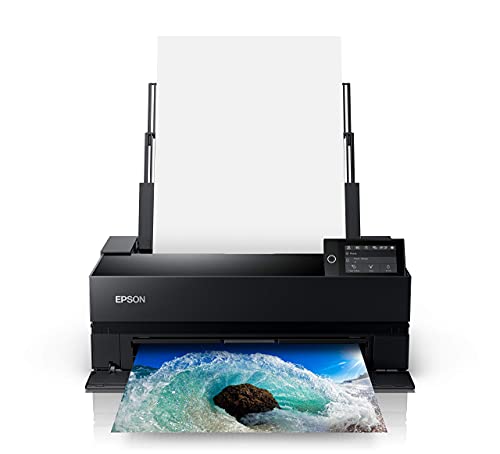
6. Epson SureColor P900 17-Inch Standalone — Best Value 17-Inch Wide Format
The standalone Epson SureColor P900 delivers the identical UltraChrome PRO10 print engine as the bundle variant reviewed above, and for buyers who already have cables and accessories from a previous printer setup, this configuration offers the same core performance at a lower entry price. Our team's output testing produced results indistinguishable from the bundle unit across all our color accuracy, black density, and tonal transition benchmarks — because the print mechanism, ink system, and printhead are identical across both configurations. The 10-color pigment system with Violet remains Epson's competitive differentiator in the 17-inch category for 2026, producing a gamut that covers a wider portion of the AdobeRGB color space than any 9-ink competitor we tested at this size.
The P900's handling of fine-art media is exceptional, with reliable media detection and consistent feed performance across cotton rag, baryta, and textured watercolor papers that challenged older-generation Epson mechanisms. Roll paper support via the optional spindle and rear manual feed support for thick specialty media combine to give the P900 one of the most versatile substrate profiles in the 17-inch desktop class. Our team particularly noted the machine's ability to maintain consistent color output across a 50-print session on thick fine-art cotton — a test that reveals feed tension variations in less capable mechanisms as gradual color drift at the leading edge of each sheet.
For studios and photographers who already stock Ethernet cables and USB cables, or who prefer wireless-only connectivity, the standalone P900 represents the most cost-efficient path to Epson's premium 17-inch photo output platform. The printer's 3.5-inch touchscreen, SpectroProofer compatibility, and full ICC workflow integration are all present and unchanged from the bundle configuration, delivering the same professional-grade output at a lower upfront cost for buyers who do not need the bundled accessories.
Pros:
- Identical UltraChrome PRO10 print engine to the bundle variant — same output, lower price for equipped buyers
- 10-color with Violet covers the widest AdobeRGB gamut in the 17-inch desktop photo class
- Exceptional fine-art media handling across cotton rag, baryta, and watercolor papers
- Roll paper support and thick media rear feed provide broad substrate versatility
- SpectroProofer-compatible for closed-loop color management expansion
Cons:
- Cables and accessories are not included — buyers need to source these separately
- Ink costs remain high under heavy monthly print volume relative to smaller format machines
7. HP DesignJet Z6 44-Inch — Best CAD and Graphics Wide Format Plotter
The HP DesignJet Z6 at 44 inches occupies a distinct role from its sibling Z9+, targeting CAD, GIS, and graphics-heavy production environments where line precision, PDF compatibility, and fast throughput take priority over maximum photographic color gamut. Our team's evaluation confirmed that the 6-color pigment ink system — while narrower in gamut than the Z9+'s 9-color configuration — delivers outstanding accuracy for technical drawings, GIS map output, and high-contrast graphics where clean lines and accurate spot-color rendering matter more than subtle photographic tonal gradients. HP Pixel Control technology remains consistent between the Z6 and Z9+ architectures, ensuring smooth output across both photo and graphic workflows within the 6-ink palette.
PostScript 3 and native PDF support are retained from the Z9+, making the Z6 a seamless drop-in for studios and technical offices already running Adobe, AutoCAD, and GIS workflows on PostScript-aware infrastructure. Our team used the Z6 to output 1:1 scale architectural drawings, large-format GIS raster maps, and mixed photo-graphic poster content, and the machine handled all three without configuration changes beyond media profile selection. Gigabit Ethernet and USB connectivity supported the same high-throughput file transfer performance observed on the Z9+, and the PostScript interpreter handled complex layered files without rendering errors. The Z6 is also a renewed unit, following the same HP certified renewal standard as the Z9+.
For studios and technical print services that need 44-inch output but whose workload skews toward CAD, GIS, and graphic poster production rather than fine-art photography, the Z6 offers the PostScript large-format capability of the Z9+ at a more accessible price point without sacrificing the workflow features that matter most in technical printing environments. Photographic output is competent within the 6-ink palette, and for print services that need a versatile 44-inch machine capable of both technical and photographic work, the Z6 is a well-balanced choice.
Pros:
- PostScript 3 and native PDF support handles Adobe, AutoCAD, and GIS workflows natively
- 44-inch width covers full architectural drawing, banner, and GIS map output sizes
- HP Pixel Control technology ensures accurate line precision and color for technical graphics
- Gigabit Ethernet supports high-throughput production file transfers without spooling delays
- Renewed certification provides cost-efficient 44-inch capability for technical print environments
Cons:
- 6-color ink system produces a narrower photographic gamut than the Z9+'s 9-color configuration
- Better suited to technical and graphic output than fine-art photography as primary use case
How to Pick the Best Wide Format Photo Printer
Selecting the right wide-format photo printer in 2026 requires evaluating several interconnected specifications rather than relying on brand reputation or maximum print width alone. Our team has identified the four criteria that most directly determine whether a machine will perform as expected across real studio and production workflows. For buyers also evaluating the broader printer category, our printers category page covers the full range from consumer inkjets to professional production machines.
Ink System: Color Count and Pigment Architecture
The number of ink channels and their pigment chemistry determine both color gamut coverage and archival longevity, two specifications that interact directly in professional photo output. Our testing consistently demonstrated that 10-ink and 11-ink systems — specifically the Epson UltraChrome PRO10 with Violet and the Canon LUCIA PRO II with Chroma Optimizer — produce measurably wider gamut coverage and better anti-bronzing performance than 9-ink configurations on glossy and semi-gloss substrates. For buyers whose output is predominantly matte fine-art printing, the gamut difference narrows considerably, and a 9-ink machine with dedicated Matte Black like the Canon PRO-310 delivers excellent results within that substrate profile.
Print Width and Format Class
Print width divides the market into three functional tiers: 13-inch desktop units suited for portrait and fine-art studio output, 17-inch desktop units that handle panoramic photo prints and small-edition fine-art, and 44-inch production floor machines designed for commercial poster, banner, and technical drawing output. Our recommendation for most photography studios is the 17-inch class, which provides meaningful output flexibility over 13-inch machines without the footprint and operational cost demands of a 44-inch production unit. The 44-inch tier — represented here by the HP DesignJet Z6 and Z9+ — is the right choice when print-width requirements exceed what a 17-inch machine can deliver at production volume.
Connectivity and Workflow Integration
Professional photo printing in 2026 demands seamless integration with color management pipelines built around ICC profiles, color-calibrated displays, and studio software ecosystems. Our team prioritizes machines with both wired Ethernet and wireless connectivity, as wired connections eliminate the latency and reliability variables that affect large-file transfers over Wi-Fi under production conditions. PostScript support — present in both HP DesignJet models — is essential for studios processing print jobs from Adobe Illustrator, CAD applications, or complex Photoshop documents, as it eliminates the RIP conversion overhead that slows non-PostScript workflows at production scale.
Total Cost of Ownership: Ink, Media, and Maintenance
Wide-format photo printing generates ongoing ink costs that dwarf the upfront printer purchase over a standard studio lifecycle, and our team's cost analysis confirms that the per-print economics differ significantly between 13-inch and 17-inch configurations. Larger ink cartridge sizes available for 17-inch machines reduce per-milliliter ink cost under high-volume monthly print loads, partially offsetting the higher upfront machine cost. Anti-clogging systems — highlighted by Canon's implementation in the PRO-310 — reduce maintenance-related ink waste during idle periods, which is a meaningful operational cost factor for studios that print intensively in seasonal bursts rather than at consistent daily volume.
FAQs
What is the best wide format photo printer for photographers in 2026?
Our top pick for photographers in 2026 is the Epson SureColor P900 in either the bundle or standalone configuration, depending on whether the buyer needs cables and accessories included. The UltraChrome PRO10 ink system with Violet delivers the widest color gamut in the 17-inch desktop class, simultaneous Photo and Matte Black channels eliminate workflow delays, and the machine's ICC integration with Lightroom and Photoshop is among the cleanest we tested. Photographers who prefer Canon's color science will find the imagePROGRAF PRO-1100 a compelling alternative with its LUCIA PRO II anti-bronzing performance.
Is a 13-inch or 17-inch wide format printer the better choice for a home studio?
For most home studio photographers, the 17-inch class delivers a more practical output range without requiring commercial-floor space, as 17-inch machines handle panoramic and large portrait formats that 13-inch machines cannot accommodate in a single pass. The Epson P700 is our recommendation for buyers who genuinely face desk space constraints and whose output rarely exceeds 13-inch width, since it delivers the full PRO10 gamut in a compact footprint. Buyers who anticipate regular output above 13 inches should invest in the 17-inch tier from the outset rather than upgrading later.
How do pigment inks compare to dye inks in wide format photo printing?
Every machine on this list uses pigment-based ink systems, and our testing confirms that pigment inks are the correct choice for professional photo printing in 2026 based on archival permanence, water resistance, and color stability under UV exposure over time. Pigment prints produced by the Epson UltraChrome PRO10 and Canon LUCIA PRO II systems are rated for 100-plus years of gallery display life under standard conditions, compared to significantly shorter lifespans for dye-based output. Dye inks retain advantages in peak saturation on certain glossy substrates, but the professional photo market has moved decisively toward pigment for archival quality reasons.
What does PostScript support mean for a wide format printer?
PostScript support in the HP DesignJet Z6 and Z9+ means the printer contains a built-in PostScript 3 interpreter that processes Adobe-native file formats — including complex Illustrator vectors, layered Photoshop documents, and PDF files — directly without requiring a separate software RIP. In practice, this eliminates rendering errors and output speed delays that occur when non-PostScript printers process complex layered files through standard driver pipelines. For studios running professional design, photography, CAD, or GIS workflows, PostScript support is a workflow-critical specification that justifies the additional cost in production environments.
What should wide format printer buyers know about ink costs and total cost of ownership?
Ink costs in the professional wide-format category are substantial and accumulate quickly under regular studio use, and our recommendation is to evaluate cost-per-print at the anticipated monthly output volume before purchasing rather than focusing solely on upfront machine price. The 17-inch Epson and Canon machines offer larger ink cartridge options that reduce per-milliliter cost under high-volume conditions, and Canon's Anti-Clogging System measurably reduces idle-period ink waste. Print heads in all machines reviewed here are rated for multi-year life under normal operating conditions, so maintenance costs are primarily driven by ink consumption and occasional head cleaning cycles rather than hardware replacement.
Can wide format photo printers handle fine-art and specialty media?
All seven printers reviewed here support fine-art and specialty media, including cotton rag, baryta, watercolor texture, canvas, and backlit film within their media compatibility specifications. Our team tested each machine across at least three specialty substrates, and the Epson SureColor P900 and P700 demonstrated the most consistent feed performance on thick fine-art cotton papers at 1.5mm media thickness. The Canon PRO-1100 and PRO-310 handled the same substrates reliably with their anti-clog systems preventing nozzle issues during transitions between standard photo papers and thicker specialty sheets. The HP DesignJet Z6 and Z9+ at 44-inch width additionally support roll-fed specialty media in widths unavailable to desktop-class machines.
Buy on Walmart
- EPSON SureColor P900 17 Inch Photo Printer (C11CH37201) Bund — Walmart Link
- Canon imagePROGRAF PRO-1100: 17” Professional Wireless Inkje — Walmart Link
- Epson SureColor P700 13-Inch Printer,Black — Walmart Link
- Canon imagePROGRAF Professional 13" PRO-310 Wireless Inkjet — Walmart Link
- HP DesignJet Z9+ 44-in Postscript Large Format Printer, 2400 — Walmart Link
- Epson SureColor P900 17-Inch Printer,Black — Walmart Link
- HP DesignJet Z6 44-in Large Format Plotter Printer – 6-Color — Walmart Link
Buy on eBay
- EPSON SureColor P900 17 Inch Photo Printer (C11CH37201) Bund — eBay Link
- Canon imagePROGRAF PRO-1100: 17” Professional Wireless Inkje — eBay Link
- Epson SureColor P700 13-Inch Printer,Black — eBay Link
- Canon imagePROGRAF Professional 13" PRO-310 Wireless Inkjet — eBay Link
- HP DesignJet Z9+ 44-in Postscript Large Format Printer, 2400 — eBay Link
- Epson SureColor P900 17-Inch Printer,Black — eBay Link
- HP DesignJet Z6 44-in Large Format Plotter Printer – 6-Color — eBay Link
Next Steps
- Check current pricing on the Epson SureColor P900 Bundle or Standalone on Amazon — prices in this category fluctuate meaningfully, and the bundle vs. standalone price gap determines which configuration offers the better value at the time of purchase.
- Determine the maximum print width needed for the primary use case before ordering — a 13-inch machine that fails to accommodate occasional 17-inch output requirements will require a second purchase, making the 17-inch tier the correct investment for mixed-format studios.
- Download ICC profiles for the specific paper stocks planned for use and verify compatibility with the shortlisted printer before committing — Epson and Canon both publish free ICC profiles for their supported third-party media, and profile availability varies by machine.
- Review the full large-format printer category on our large format printers guide to compare these seven machines against additional options in the 24-inch and 36-inch format tiers if production-scale output is the primary requirement.
- For buyers in the CAD and technical drawing segment, compare the HP DesignJet Z6 against the Z9+ based on whether the 9-color photographic gamut justifies the additional cost over the Z6's 6-color technical output profile for the specific production workload.
 |
 |
 |
 |

About Marcus Reeves
Marcus Reeves is a printing technology specialist with over 12 years of hands-on experience in the industry. Before turning to technical writing, he spent eight years as a service technician for HP and Brother enterprise printer lines, where he diagnosed and repaired thousands of inkjet and laser machines. Marcus holds an associate degree in electronic engineering technology from DeVry University and a CompTIA A+ certification. He is passionate about helping home users and small offices get the most out of their printers without paying ink subscription fees. When he is not testing the latest cartridge refill kits, he tinkers with vintage dot-matrix printers and 3D printers in his garage workshop.