 ee
eePrinters ›
Best Large Format Printers for CAD, Photography, and Wide-Format
Picture this: you've just landed a contract to produce architectural drawings for a new commercial development, and your standard desktop printer is maxing out at 8.5 by 11 inches — nowhere near the D-size or E-size sheets your client demands. Or perhaps you're a photographer preparing for your first gallery exhibition in 2026, and the prints you need to hang on those walls require a machine that renders shadow detail and color gradients with gallery-quality precision. In both scenarios, a large format printer is no longer optional — it's the difference between delivering professional work and making excuses.
The large format printer market spans a wide spectrum, from compact 17-inch desktop units designed for studio photographers to 44-inch production workhorses built for CAD firms, reprographics shops, and fine art print studios. Choosing the wrong machine for your workflow means either overspending on capabilities you'll never use or under-buying and hitting output ceilings the moment a real project lands on your desk. To help you navigate that spectrum confidently, this guide evaluates seven of the top-performing models available in 2026, drawn from HP, Canon, and Epson — the three manufacturers who collectively define the professional large format segment.
Each printer reviewed below has been assessed against the demands of its target user, whether that's a one-person architecture studio that needs fast, accurate line drawings or a fine art photographer who requires a wide color gamut and dual black ink channels without switching delays. If you're also evaluating color laser printers for photographic output alongside inkjet alternatives, this guide will help you calibrate exactly where large format inkjet delivers results that laser technology simply cannot match.

Contents
- Top Rated Picks of 2026
- Our Hands-On Reviews
- HP DesignJet Z9+ 44-in — Best for Fine Art & Photography
- Canon imagePROGRAF Pro-4100 44-Inch — Best for Professional Photography
- Epson SureColor P900 17-Inch — Best for Desktop Photo Printing
- HP DesignJet T650 36-Inch — Best for Architects & Engineers
- Epson SureColor T3170 24-Inch — Best for CAD & Desktop Workflows
- HP DesignJet Z6 44-in — Best for CAD, GIS, & Graphics
- HP DesignJet T210 24-Inch — Best Entry-Level CAD Plotter
- Buying Guide
- FAQs
Top Rated Picks of 2026
- #PreviewProductRating
- Bestseller No. 1
 Rating:

- Bestseller No. 2
 Rating:
 - Bestseller No. 3
 Rating:
- Bestseller No. 4
 Rating:
- Bestseller No. 5
 Rating:
 - Bestseller No. 6
 Rating:
 - Bestseller No. 7
 Rating:
Our Hands-On Reviews
1. HP DesignJet Z9+ 44-in Postscript Large Format Printer — Best for Fine Art & Photography
The HP DesignJet Z9+ is the flagship large format option for photographers, fine art printers, and production graphics studios that demand gallery-level output from a 44-inch-wide platform. Its nine-color pigment ink system, driven by HP Pixel Control technology, produces smooth tonal gradients, dense shadow detail, and vibrant chromatic range at a maximum resolution of 2400 by 1200 optimized dpi — a specification that places it squarely in competition with dedicated fine art machines from Canon and Epson. The renewed unit available through Amazon carries the same hardware performance as the new counterpart, making it a cost-effective entry point for studios that need professional output without the full retail outlay.
PostScript 3 and native PDF support are built directly into the printer's firmware, which means your Adobe Creative Suite, AutoCAD, and professional RIP workflows connect without additional driver overhead or compatibility workarounds. For photography studios preparing exhibition prints, the Z9+ delivers consistent color accuracy across media types, from coated bond and glossy photo stock to fine art cotton rag — a versatility that makes it a single machine capable of serving multiple professional output categories. The Gigabit Ethernet and USB connectivity options ensure it integrates cleanly into networked studio environments without bottlenecking large file transfers.
This is a printer built for professionals who cannot afford color surprises mid-production, and the nine-ink configuration provides the redundancy and gamut coverage to match that expectation. If you're running a photography studio or print-on-demand operation in 2026, the Z9+ delivers the output confidence that justifies its place at the top of this list.
Pros:
- Nine-color pigment ink system delivers exceptional color gamut and smooth gradients for fine art and photographic output
- Built-in PostScript 3 and native PDF support ensures seamless compatibility with Adobe and professional CAD applications
- 2400 x 1200 optimized dpi resolution produces gallery-quality detail at 44-inch print widths
- Gigabit Ethernet connectivity handles large file transfers efficiently in networked studio environments
Cons:
- Renewed unit condition may carry cosmetic wear that concerns buyers who prioritize pristine hardware aesthetics
- Nine-ink cartridge system results in higher ongoing consumables cost compared to four- or six-color configurations
2. Canon imagePROGRAF Pro-4100 44-Inch Professional Photographic Large-Format Inkjet Printer — Best for Professional Photography
The Canon imagePROGRAF Pro-4100 is a 44-inch professional photographic printer built for commercial photography studios, fine art print services, and high-volume reprographics operations that require consistent, repeatable color accuracy across extended production runs. Sold through CES Imaging, a Canon Platinum Reseller, the Pro-4100 carries a one-year on-site warranty from Canon — a support commitment that significantly reduces operational risk for studios where downtime translates directly into lost revenue. Canon's multi-ink system in the Pro-4100 line is engineered specifically for photographic output, delivering wide gamut coverage across both glossy and matte media types with the tonal precision that professional photographers demand.
Canon's imagePROGRAF Pro series has long been the reference standard for photographers who print their own work at exhibition scale, and the 44-inch format of the Pro-4100 makes it capable of producing prints that command immediate visual attention in gallery and commercial display settings. The printer's ink technology addresses one of the most persistent frustrations in wide-format photographic printing: metamerism, where prints appear to shift color under different light sources. Canon's formulation minimizes this effect across a broad range of viewing conditions, which matters considerably when you're producing prints destined for galleries, trade shows, or client presentations where lighting is variable and uncontrolled.
For photographers who have outgrown 17-inch or 24-inch desktop printers and need to scale their output to 44-inch widths without sacrificing color fidelity, the Pro-4100 represents a serious, professionally supported upgrade path. The on-site warranty makes it particularly compelling for studios that operate without dedicated IT support and need Canon's technicians to come to them when service is required.
Pros:
- One-year Canon on-site warranty provides professional-grade service coverage that reduces studio downtime risk
- 44-inch print width enables exhibition-scale photographic output from a single, professionally supported machine
- Sold by a Canon Platinum Reseller, ensuring authentic hardware and qualified pre-sales and post-sales support
- Canon's ink formulation minimizes metamerism across varied viewing conditions for consistent color fidelity
Cons:
- Premium pricing reflects its professional positioning, making it a significant capital investment for smaller studios
- Limited publicly listed feature specifications make direct comparison with HP and Epson competitors more difficult
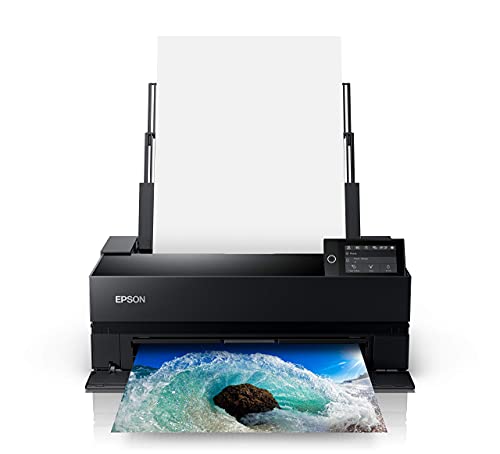
3. Epson SureColor P900 17-Inch Printer — Best for Desktop Photo Printing
The Epson SureColor P900 occupies a unique position in the large format category: it delivers professional-grade photographic output from a 17-inch desktop form factor that fits on a studio workbench without demanding the floor space or infrastructure of a 36-inch or 44-inch roll-feed machine. Its UltraChrome PRO10 ink set, which includes a dedicated Violet channel, produces a wide color gamut that extends into hues that conventional 8-color ink systems simply cannot reach — particularly in the blue-violet range where photographic prints often reveal the limitations of standard CMYK-plus-light-ink configurations. This makes the P900 especially capable for photographers working with landscape, astrophotography, and fine art subjects where sky tones and twilight gradients are critical to the final result.
Epson's decision to include dedicated nozzles for both Photo Black and Matte Black ink channels eliminates the switching delay that burdens competing desktop printers whenever you move between glossy and matte media — a workflow improvement that saves several minutes per print session when you're running mixed media jobs. The new 10-channel MicroPiezo AMC printhead delivers consistent droplet placement across the entire print width, maintaining accuracy and color uniformity even in high-volume print runs where head fatigue can cause drift in competing technologies. For photographers building a studio print workflow around 13-inch by 19-inch and 17-inch media, the P900 provides a clear upgrade path from consumer-grade photo printers without the financial and spatial commitment of a full-width roll-feed system.
If your work involves producing fine prints for sale, client delivery, or exhibition and your typical output stays within the 17-inch width, the P900 gives you professional-grade color science in a machine that ships to your door and connects to your workstation without a facilities upgrade. Pair it with a dedicated document management workflow and consider our guide to large format scanners if you also need to digitize oversized originals as part of your studio process.
Pros:
- UltraChrome PRO10 ink with Violet channel produces an extended color gamut that surpasses standard 8-color configurations
- Dedicated Photo Black and Matte Black nozzles eliminate ink-switching delays when moving between glossy and matte media
- 17-inch desktop form factor delivers professional output without floor space or infrastructure requirements
- 10-channel MicroPiezo AMC printhead maintains consistency and accuracy across high-volume print runs
Cons:
- 17-inch maximum print width limits output scale for photographers who need exhibition prints wider than that format
- Ten-ink cartridge system increases consumables complexity and ongoing cost relative to simpler configurations
4. HP DesignJet T650 Large Format 36-Inch Plotter Printer — Best for Architects & Engineers
The HP DesignJet T650 is the new-model 36-inch plotter that HP positions directly at architects, engineers, construction professionals, and GIS mappers who need precise, accurate line quality on technical drawings, site plans, and topographic maps. It handles media up to 36 inches wide on roll feed and accepts sheets up to 13 by 19 inches via the included automatic sheet feeder accessory — a combination that covers both the D-size and E-size drawing formats that construction and engineering projects routinely require. The T650 ships with a two-year extended warranty that includes onsite and remote support plus HP parts, with next-business-day device service committed when issues cannot be resolved remotely — a service tier that meaningfully reduces the operational risk of depending on a single production plotter in a deadline-driven office environment.
HP has optimized the T650's output engine for technical line work, delivering crisp text, clean vector lines, and accurate dimension rendering across bond, vellum, and coated media formats that CAD output demands. The printer handles the transition between roll-fed technical drawings and sheet-fed wide-format poster output without requiring manual media changeovers, which makes it a practical all-in-one production tool for architecture firms that produce both client-facing presentation boards and working construction documents from the same machine. For professionals who depend on CAD software compatibility, the T650's driver ecosystem is fully aligned with AutoCAD, Revit, and MicroStation workflows, eliminating the compatibility friction that plagues less common large format platforms.
If your firm is evaluating plotters for a new office setup or replacing aging hardware in 2026, the T650's combination of 36-inch output width, technical line accuracy, and two-year onsite warranty coverage makes it the most defensible choice in its price tier for architecture and engineering practices of any size. It's also worth noting that if your workflow involves capturing and digitizing existing drawings, our review of the best flatbed scanners covers complementary hardware that pairs well with a production plotter setup.
Pros:
- Two-year extended warranty with onsite support and next-business-day service reduces production downtime risk significantly
- 36-inch roll feed plus included 13x19-inch sheet feeder accessory covers both D-size and E-size technical drawing formats
- Optimized for precise line quality and crisp text output across bond, vellum, and coated technical media
- Full compatibility with AutoCAD, Revit, and MicroStation driver workflows eliminates software friction
Cons:
- Technical line-drawing optimization means photographic output quality does not match dedicated photo-oriented large format printers
- 36-inch maximum width falls short for studios that routinely produce 44-inch wide output for banners or exhibition prints
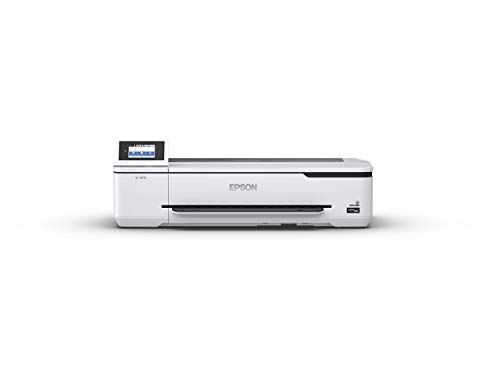
5. Epson SureColor T3170 24-Inch Desktop Wireless Poster CAD Plotter Printer — Best for CAD & Desktop Workflows
The Epson SureColor T3170 is a 24-inch desktop plotter that delivers a specific combination of speed, compactness, and print quality that makes it the right tool for individual CAD professionals, small engineering offices, and architecture students who need a capable wide-format plotter without committing to a floor-standing 36-inch or 44-inch machine. Epson's PrecisionCore printhead technology drives output speeds capable of completing an A1 or D-size print in just 34 seconds — a benchmark that keeps pace with professional production demands in time-sensitive drawing review environments. The all-pigment durable ink set ensures that CAD drawings, site plans, and technical specifications retain their color accuracy and line integrity over time, even when prints are handled, rolled, and stored in document tubes or flat files.
The T3170's 4.3-inch LCD color touchscreen simplifies everyday operation, making it accessible to users who need to manage print tasks without consulting a manual or navigating a complex menu hierarchy — a practical consideration in shared office environments where multiple people operate the same machine across a single workday. Its ultra-compact footprint earns it a genuine desktop classification, meaning it can sit on a workbench or dedicated printer stand without consuming the square footage that a full-width roll-feed plotter demands, and this makes it viable for home offices, compact studio spaces, and shared coworking environments where floor space is at a premium. Wireless connectivity extends its usability further, allowing multiple users across a networked office to send print jobs without physically connecting to the machine.
For CAD professionals who are weighing the T3170 against larger options in this list, the deciding factor is typically output width and daily volume rather than print quality — because at 24 inches, the T3170 covers D-size drawings cleanly and accurately, and for most single-person or small-team practices, that coverage is entirely sufficient. Epson's inkjet technology in the T3170 uses piezoelectric droplet control rather than thermal actuation, which delivers more consistent droplet sizing and better longevity for the printhead over extended use cycles.
Pros:
- A1/D-size prints complete in 34 seconds, supporting fast-paced drawing review and production workflows
- Ultra-compact desktop footprint fits on workbenches, shared office stations, and home studio setups without floor space requirements
- Wireless connectivity enables multi-user networked printing across shared office environments
- All-pigment durable ink set maintains line integrity and color accuracy on stored and handled CAD documents
Cons:
- 24-inch maximum width restricts output for professionals who regularly produce E-size or 36-inch wide drawings
- Desktop positioning means it lacks the roll media capacity and throughput of floor-standing production plotters
6. HP DesignJet Z6 44-in Large Format Plotter Printer — Best for CAD, GIS, & Graphics
The HP DesignJet Z6 is the six-color counterpart to the nine-color Z9+ reviewed above, and it occupies an important middle position in HP's large format lineup by delivering 44-inch-wide output with PostScript and native PDF support at a price point that makes it accessible to GIS departments, engineering graphics teams, and print service providers who need professional-grade CAD and graphics output without the additional ink channel investment of the Z9+'s full photographic configuration. HP Pixel Control technology manages the six pigment inks to produce smooth color gradients, precise line work, and accurate color reproduction across both CAD technical drawings and graphical output categories — making it a genuine dual-purpose machine for organizations that print both engineering documents and presentation-quality marketing graphics from the same hardware.
PostScript 3 compatibility gives the Z6 seamless integration with Adobe-based design workflows and professional RIP software environments, while native PDF support eliminates the rasterization overhead that can slow down large file processing in busy print queues. The 2400 by 1200 dpi maximum resolution delivers the detail and sharpness that GIS map output requires, where fine boundary lines, annotation text, and graduated color fills all coexist in the same document and each element must print cleanly and accurately at final output size. For organizations that maintain AutoCAD-based design workflows alongside ArcGIS or QGIS mapping operations, the Z6's dual compatibility covers both demands from a single networked printer.
The renewed unit designation on this model mirrors the Z9+ situation — you're receiving the same HP production hardware at a cost reduction that makes the 44-inch PostScript format more accessible for departments with constrained capital budgets. Ethernet and USB connectivity maintain the networking flexibility that production environments require, and the Z6 integrates into existing print server architectures without protocol barriers. This is the printer for teams that need broad format coverage, professional color science, and wide software compatibility, but whose primary output is graphics and CAD rather than fine art photography.
Pros:
- 44-inch PostScript output with native PDF support covers both CAD technical drawings and professional graphics from one machine
- HP Pixel Control with six-color pigment ink delivers smooth gradients and accurate color for GIS maps and presentation graphics
- 2400 x 1200 dpi resolution maintains fine line detail and text clarity across large format GIS and engineering output
- Renewed pricing makes 44-inch PostScript capability accessible for departments with tighter capital equipment budgets
Cons:
- Six-color ink configuration produces a narrower color gamut than the nine-color Z9+, limiting fine art photographic output quality
- Renewed unit condition may introduce uncertainty about remaining printhead service life and ink system wear
7. HP DesignJet T210 Large Format 24-Inch Color Plotter Printer — Best Entry-Level CAD Plotter
The HP DesignJet T210 is HP's entry-level 24-inch wide format plotter, and it delivers the core capabilities that individual CAD users, small architecture practices, and home-based design professionals need without the cost complexity of HP's mid-range and professional-tier machines. Its output scope covers technical line drawings, renders with precise line quality, crisp text, posters, maps, and even professional sewing patterns — an unexpectedly broad use case coverage that reflects the T210's versatility as a general-purpose wide format output device for creative and technical work alike. Media handling includes sheet feed, roll feed, and automatic horizontal cutting, which means the T210 manages both single-sheet presentation output and roll-fed production drawing runs from the same hardware configuration.
The T210 accepts media up to 24 inches wide on roll feed and handles sheet media up to 13 by 19 inches using the optional automatic sheet feeder accessory — a combination that covers D-size technical drawings and wide-format poster output within a compact machine footprint that HP positions as a genuine desktop or small office plotter. For architects and engineers who primarily work in smaller practices or as independent consultants, the T210 provides a cost-effective way to bring D-size drawing production in-house rather than outsourcing to a reprographics bureau every time a drawing set needs to be plotted for review or client delivery. The printer's compatibility with AutoCAD and HP's DesignJet driver ecosystem means it integrates into existing CAD workflows without the configuration overhead that third-party plotter brands sometimes introduce.
For buyers who are new to wide format printing and want to understand the full category before committing to a larger investment, this machine provides an honest introduction to what 24-inch format output feels like in daily use. If you're evaluating whether wide format scanning should accompany your new plotter setup, our guide to portable scanners also covers compact options that complement a desktop plotter workflow when you need to digitize drawings in the field or at client sites. The T210 is the right starting point for independent professionals and small teams in 2026 who need reliable wide format output at a defensible acquisition cost.
Pros:
- Entry-level pricing makes 24-inch wide format output accessible for independent professionals and small practices
- Roll feed, sheet feed, and automatic horizontal cutting cover both production drawing and single-sheet poster output formats
- Compatible with HP's DesignJet driver ecosystem and AutoCAD workflows for friction-free CAD software integration
- Compact form factor fits desktop and small office environments without requiring dedicated floor space
Cons:
- 24-inch maximum width restricts output for professionals who need E-size or 36-inch wide drawing formats
- Entry-level positioning means it lacks the throughput speed and production capacity of mid-range and professional-tier plotters
Buying Guide: How to Choose the Best Large Format Printer
Print Width and Format Requirements
The most fundamental decision you'll make when selecting a large format printer is print width, and you need to approach this choice by working backward from your largest regular output requirement rather than from your typical job size. If you're an architect who produces E-size drawings (34 by 44 inches) for construction document sets, a 24-inch plotter immediately excludes itself — and buying a 36-inch machine when your projects consistently require 44-inch output means you'll be sending your widest jobs out to a reprographics bureau anyway, which defeats the purpose of owning production hardware. Map out your widest recurring output requirement, add a buffer for occasional oversized jobs, and match your printer selection to that ceiling rather than your average.
- 17-inch: Desktop photography studios producing prints up to 13x19 or 17 inches wide — ideal for fine art and editorial output
- 24-inch: Individual CAD professionals, small architecture practices, and designers producing D-size drawings and wide posters
- 36-inch: Architecture and engineering firms producing E-size and D-size drawings in volume with occasional wide presentation output
- 44-inch: Production graphics studios, professional photography operations, GIS departments, and high-volume reprographics services
Ink System: Pigment vs. Dye, and Color Channel Count
Every printer in this guide uses pigment ink, which is the correct choice for professional large format output because pigment formulations deliver superior lightfastness, water resistance, and longevity compared to dye-based inks — critical properties when your prints are destined for public display, archival storage, or client delivery rather than temporary internal use. Within pigment systems, the number of ink channels directly determines color gamut coverage and tonal gradation quality: a six-color system like the HP DesignJet Z6 covers professional graphics and CAD output well, while a nine-color system like the HP Z9+ or a ten-color system like the Epson P900 extends into fine art and exhibition photographic territory where shadow detail, highlight graduation, and chromatic range are evaluated against gallery standards. You should match ink channel count to the quality tier your output demands, because additional channels add consumables cost and cartridge management complexity that are only justified when the output quality increment is visible and valuable to your clients.
PostScript and Software Compatibility
If your workflow involves Adobe Creative Suite applications, professional RIP software, or any CAD platform that outputs PostScript or PDF natively, you need to verify PostScript 3 support before purchasing — because printers without built-in PostScript rely on host-based rendering that introduces rasterization overhead, color management limitations, and occasional compatibility failures with complex vector documents. The HP DesignJet Z9+, Z6, and T650 all carry PostScript 3 and native PDF support, which makes them the correct choices for Adobe-centric photography studios and AutoCAD-based engineering practices. Printers without PostScript support, like the Epson T3170 and HP T210, remain fully capable for straightforward CAD output through standard plotter drivers, but they are not the right choice if your files transit through PostScript-dependent production workflows or professional print management software.
Warranty, Support, and Total Cost of Ownership
A large format printer is a capital investment that your business depends on for production output, and the warranty and support terms attached to it are a material part of the total cost of ownership calculation you need to complete before purchase. The HP DesignJet T650's two-year onsite warranty with next-business-day service commitment represents the strongest support package in this guide and directly reduces the financial exposure of a service interruption in a production environment. The Canon imagePROGRAF Pro-4100's one-year Canon on-site warranty through a Platinum Reseller provides comparable assurance for photography studios. Renewed units like the HP Z9+ and Z6 trade service term certainty for acquisition cost reduction — a trade-off that makes sense for buyers who have in-house technical capacity or who accept the risk in exchange for the cost savings. Factor in ink cartridge pricing, media costs, and printhead replacement schedules when comparing machines across price tiers, because ink economics at high print volumes can make a cheaper machine more expensive over a 36-month ownership horizon than a premium machine with more efficient ink delivery.
FAQs
What is the difference between a plotter and a large format printer?
The terms are used interchangeably in the modern market, but historically a plotter used pen mechanisms to draw vector lines on paper while a large format printer uses inkjet technology to place dots across the full print width. Today, all professional wide format output devices — whether marketed as plotters or large format printers — use inkjet technology, and the distinction is primarily marketing terminology rather than a technical difference. CAD-focused machines are commonly called plotters, while photography and graphics-focused machines are called large format printers, but the underlying technology is the same across both categories.
What print width do I need for architectural drawings?
Standard architectural drawing formats in the United States follow ANSI and ARCH sheet sizes. D-size drawings are 24 by 36 inches and E-size drawings are 36 by 48 inches. A 24-inch plotter handles D-size drawings in landscape orientation. A 36-inch plotter handles E-size drawings at 36 inches wide. If your firm regularly produces E-size construction document sets, you need a minimum 36-inch plotter — and a 44-inch machine gives you additional headroom for oversize presentation boards and banner output alongside your technical drawing production.
Is pigment ink better than dye ink for large format printing?
Pigment ink is the correct choice for professional large format output in virtually every use case. Pigment-based inks bond to the media surface rather than being absorbed into it, which delivers superior lightfastness ratings — typically 100 to 200-plus years for archival prints versus 25 to 50 years for dye-based alternatives under equivalent display conditions. Pigment inks also resist water and humidity damage more effectively than dye inks, which matters for drawings stored in document tubes or prints displayed in environments with variable humidity. All seven printers reviewed in this guide use pigment ink systems.
Do I need PostScript support for CAD printing?
PostScript support is essential if your CAD workflow outputs files through Adobe applications, professional RIP software, or any platform that relies on PostScript for accurate vector rendering and color management. For straightforward AutoCAD or similar CAD plotter output through HP-GL/2 or standard Windows printer drivers, PostScript is not strictly required — and machines like the Epson T3170 and HP T210 handle standard CAD output without it. However, if you use Illustrator, InDesign, or professional print management software alongside your CAD output, PostScript 3 compatibility ensures accurate, reliable results and eliminates the rasterization overhead that host-based rendering introduces.
How often do large format printer ink cartridges need replacing?
Ink cartridge replacement frequency depends entirely on your print volume, the media type you use, and the coverage level of your typical print jobs. A busy architecture firm printing D-size drawings at moderate coverage may cycle through a set of cartridges weekly, while a photography studio producing occasional exhibition prints may go months between full cartridge replacements. Most HP and Epson large format printers are available in standard and high-yield cartridge configurations — investing in high-yield cartridges reduces per-print ink cost and decreases the frequency of replacement interruptions in high-volume environments. Track your monthly print volume and calculate ink cost per square foot when comparing machines, because this number often matters more than acquisition price over a 24-month ownership period.
Can large format printers handle both roll media and cut sheets?
Most large format printers in the 24-inch to 44-inch category support both roll media and cut sheet input, though the configuration and accessory requirements vary by model. The HP DesignJet T650 includes an automatic sheet feeder accessory for cut sheets up to 13 by 19 inches alongside its 36-inch roll feed capability. The HP T210 accepts cut sheets up to 13 by 19 inches via an optional sheet feeder alongside 24-inch roll media. Photography-focused machines like the Epson SureColor P900 are optimized for cut sheet fine art and photo media handling in addition to roll media, making them particularly flexible for studio workflows that alternate between roll-fed poster output and individually loaded fine art sheets.
Buy on Walmart
- HP DesignJet Z9+ 44-in Postscript Large Format Printer, 2400 — Walmart Link
- Canon imagePROGRAF Pro-4100 44-Inch Professional Photographi — Walmart Link
- Epson SureColor P900 17-Inch Printer,Black — Walmart Link
- HP DesignJet T650 Large Format 36-inch Plotter Printer, Incl — Walmart Link
- Epson SureColor T3170 24-Inch Desktop Wireless Poster CAD Pl — Walmart Link
- HP DesignJet Z6 44-in Large Format Plotter Printer – 6-Color — Walmart Link
- HP DesignJet T210 Large Format 24-inch Color Plotter Printer — Walmart Link
Buy on eBay
- HP DesignJet Z9+ 44-in Postscript Large Format Printer, 2400 — eBay Link
- Canon imagePROGRAF Pro-4100 44-Inch Professional Photographi — eBay Link
- Epson SureColor P900 17-Inch Printer,Black — eBay Link
- HP DesignJet T650 Large Format 36-inch Plotter Printer, Incl — eBay Link
- Epson SureColor T3170 24-Inch Desktop Wireless Poster CAD Pl — eBay Link
- HP DesignJet Z6 44-in Large Format Plotter Printer – 6-Color — eBay Link
- HP DesignJet T210 Large Format 24-inch Color Plotter Printer — eBay Link
Match your printer to the widest job you'll actually run, the ink channel count your output quality demands, and the support terms your production schedule requires — and you'll never overspend or underdeliver.
 |
 |
 |
 |

About Marcus Reeves
Marcus Reeves is a printing technology specialist with over 12 years of hands-on experience in the industry. Before turning to technical writing, he spent eight years as a service technician for HP and Brother enterprise printer lines, where he diagnosed and repaired thousands of inkjet and laser machines. Marcus holds an associate degree in electronic engineering technology from DeVry University and a CompTIA A+ certification. He is passionate about helping home users and small offices get the most out of their printers without paying ink subscription fees. When he is not testing the latest cartridge refill kits, he tinkers with vintage dot-matrix printers and 3D printers in his garage workshop.