 ee
eeLaptops ›
Best Laptop For Car Tuning 2026
Picture yourself at a dyno facility at 10 PM, laptop open on the rolling road cart, watching a customer's AFR trace scroll across the screen while the engine holds steady at 6,500 RPM. Your tuning software is pulling live data on forty-plus PIDs, the USB connection to the ECU interface cannot stutter, and the display needs to be legible despite the shop lighting overhead. That scenario exposes what a laptop for car tuning actually demands — and it has nothing to do with gaming benchmarks or thin-and-light aesthetics.
In 2026, the best laptops for car tuning split clearly between two camps: fully rugged machines certified to MIL-STD-810H and IP66 standards, engineered to survive the grease, vibration, coolant mist, and temperature swings of real shop environments, and high-performance workstations that deliver the raw multi-core compute and memory bandwidth that demanding ECU software like HP Tuners, WinOLS, EFI Live, and Cobb Accessport Manager require under sustained load. The Panasonic Toughbook and Getac lines own the rugged category; the Dell Precision, HP ZBook, and Lenovo ThinkPad Pro platforms dominate the performance side. Picking the wrong philosophy costs you either reliability or capability — and neither failure mode is acceptable when a client's engine is on the stand.
Whether you're a professional dyno tuner running a full client roster or an experienced enthusiast dialing in your own build, every machine on this list has been evaluated against the specific demands of car tuning workflows — not general productivity, not gaming, not content creation. Our full laptop reviews cover the broader market, but below you'll find the definitive breakdown for this exact use case, including rugged credentials, interface compatibility, processing muscle, and display usability under real working conditions.

Contents
Top Rated Picks of 2026
- #PreviewProductRating
- Bestseller No. 1
 Rating:

- Bestseller No. 2
 Rating:
- Bestseller No. 3
 Rating:
- Bestseller No. 4
 Rating:
 - Bestseller No. 5
 Rating:
 - Bestseller No. 6
 Rating:
 - Bestseller No. 7
 Rating:
In-Depth Reviews
1. Panasonic Toughbook 40 FZ-40 MK2 — Best for Field-Ready Rugged Performance
The Panasonic Toughbook 40 FZ-40 MK2 sits at the top of this list for one reason: nothing else in the laptop market in 2026 matches its combination of processing power and real-world rugged certification at this level. The magnesium alloy chassis carries both MIL-STD-810H and IP66 ratings, meaning it handles drops, vibration profiles, thermal shock, blowing rain, and direct water spray without degrading — not as marketing language but as independently tested, certified capability. For mobile tuners who travel to customer locations, work track events across variable weather, or operate in shop bays where coolant mist and brake dust are atmospheric constants, this machine is the only choice that doesn't require environmental compromises on your part.
Intel's Core Ultra 7 165H vPro processor — 16 cores scaling to 5.0GHz — with a dedicated neural processing unit powers the internals. Car tuning software doesn't leverage the NPU directly, but the multi-core architecture ensures that even the most aggressive real-time data logging sessions with forty-plus simultaneous PIDs, live wideband analysis, and background OS processes never introduce latency into your capture stream. 32GB of RAM and a 512GB Opal-encrypted SSD deliver serious storage and memory headroom — the encryption keeps client tune file archives secure, and the storage volume accommodates years of log files without capacity management becoming a maintenance task. The 14-inch FHD display peaks at 1,200 nits with anti-reflective treatment and capacitive glove-touch support, making it fully legible in direct sunlight at a track paddock, a specification no workstation-class machine at any price point can match. The 5MP infrared webcam with Windows 11 Pro completes a package that commands a significant premium — and earns every dollar of it for professional mobile tuning operations where the machine is a revenue-generating tool, not an overhead cost.
Pros:
- MIL-STD-810H and IP66 certified — survives drops, water, dust, vibration, and thermal shock in real field conditions
- Intel Core Ultra 7 165H at 5.0GHz with 32GB RAM handles every current ECU tuning software stack with substantial headroom
- 1,200-nit anti-reflective display with glove-touch support delivers outdoor legibility that no competing platform offers
Cons:
- Premium price positions it out of reach for enthusiast or part-time tuner budgets
- Full rugged chassis weight and bulk reduce portability compared to business-class machines
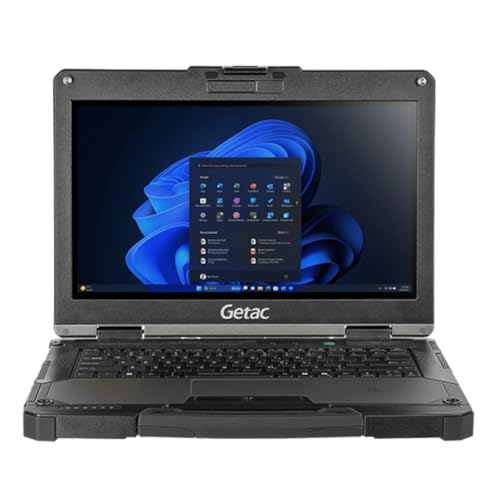
2. Getac B360G1 Fully Rugged Laptop — Best for Budget Rugged Field Work
The Getac B360G1 occupies the most operationally practical position on this list for professional shops that need fully rugged hardware without the Toughbook 40's price ceiling. This renewed unit carries MIL-STD-810H and IP66 certifications on a compact 13.3-inch chassis — the same internationally recognized durability standards as the premium tier, but at a price point that makes buying multiples for a technician fleet a realistic business decision rather than a capital expenditure argument. The build quality is genuinely rugged in every sense: drop resistance, vibration tolerance, and ingress protection are tested and certified, not marketing approximations.
The Intel Core i5-10210U running at up to 4.2GHz won't produce benchmark numbers that compete with the Ultra 7 in the Toughbook 40, but it handles every OBD-II diagnostic tool, ECU flashing utility, and real-time data logging application currently in professional circulation without hesitation. The 16GB of DDR4 RAM and 256GB SSD provide the headroom needed to run your tuning software, a reference browser tab, and a data export spreadsheet simultaneously without memory pressure. Tuners working with very large WinOLS calibration file projects will eventually encounter the processor's ceiling under sustained load, but for 90% of professional diagnostic and tune delivery workflows, the B360G1 never shows strain. The integrated Smart Card Reader and Barcode Scanner add professional shop management utility, and the 13.3-inch FHD touchscreen reads cleanly under the varied lighting conditions of a working shop bay. As a renewed unit, cosmetic condition varies — but the IP66 certification means the hardware that actually matters has already demonstrated it can absorb punishment.
Pros:
- Full MIL-STD-810H and IP66 rugged certification at substantially reduced cost compared to Panasonic
- Integrated Smart Card Reader and Barcode Scanner add professional workflow utility for shop management
- 13.3-inch FHD touchscreen reads clearly across varied indoor lighting environments
Cons:
- 10th-generation i5 CPU shows measurable age against modern processor platforms under sustained compute workloads
- 256GB SSD fills quickly when archiving multiple customer tune file libraries and log sets
3. Panasonic Toughbook CF-54 MK2 — Best for Legacy Software Compatibility
The Panasonic Toughbook CF-54 MK2 renewed earns its place on this list for a specific category of tuner: the professional whose tool chain is standardized on software and interface hardware that performs most stably on a mature, well-tested platform with established driver support. The 6th-generation Intel Core i5-6300U at up to 3.0GHz is not a competitive processor by 2026 benchmarking standards, but some dealer-level flash tools, older WinOLS configurations, and proprietary manufacturer interface software have documented compatibility histories that run smoother on known-good hardware platforms than on machines with cutting-edge silicon and freshly written drivers. When your shop's revenue depends on a specific software stack behaving predictably, that stability factor deserves real weight.
The 16GB of RAM and 512GB SSD provide solid operational performance, and the built-in 4G LTE is a genuine differentiator for mobile and field tuning scenarios — consistent data connectivity for cloud sync, remote calibration database lookups, and diagnostic resource access without a separate hotspot device simplifies your carry kit meaningfully. The DVD drive, increasingly rare in laptop design, covers the occasional client or fleet manager who still delivers calibration software and data on optical media, a scenario more common in heavy commercial vehicle and industrial tuning than in enthusiast performance builds. Toughbook build quality remains consistent across generations — magnesium alloy chassis, drop resistance, and the density that signals genuine rugged construction rather than consumer hardware dressed in aggressive styling. This is a renewed unit, so inspect the listed condition carefully, but the CF-54 line's reputation for longevity means refurbished examples typically retain years of reliable service life ahead of them.
Pros:
- Mature hardware platform delivers excellent driver and software stability for legacy tuning tool chains
- Built-in 4G LTE provides reliable field connectivity without dependence on external hotspot hardware
- DVD drive covers optical media delivery scenarios still common in fleet and industrial tuning environments
Cons:
- 6th-generation i5 CPU delivers noticeably slower sustained performance than any current processor platform
- 14-inch HD non-touch display at 1366×768 resolution is below the standard that modern tuning software interfaces benefit from
4. Dell Precision 3581 Workstation Laptop — Best for High-Performance Tuning Workstation
The Dell Precision 3581 is the machine you reach for when your tuning workflow crosses into computationally intensive territory that consumer and business laptops simply cannot sustain without throttling. Dell equipped this 2023 Precision with the 13th-generation Intel Core i7-13800H — 14 cores scaling to 5.2GHz — backed by a substantial 64GB of DDR5 RAM running at 4800MHz. If you're simultaneously managing large WinOLS calibration projects, running live data logging with dozens of channels, pulling real-time dyno trace analysis, and cross-referencing reference material in a browser, that memory ceiling gives you genuine operational breathing room that no 16GB or 32GB machine can match. For tuners who also use their machine for vehicle dynamics simulation, custom fabrication CAD work, or engineering analysis alongside the ECU calibration workflow, the Precision 3581 delivers without requiring separate hardware.
The dedicated Nvidia GeForce RTX A500 with 4GB of GDDR6 memory handles GPU-accelerated visualization tasks — real-time wideband graph rendering, dyno trace overlays, and any analysis application that offloads rendering to the graphics processor rather than the CPU. For tuners who need a machine that functions as a capable mobile workstation for engineering or design work between tuning sessions, the A500 bridges into professional graphics territory at a price point that dedicated workstation GPU configurations can't approach. The 15.6-inch FHD display provides comfortable screen real estate for multi-pane software layouts, and the included 1TB NVMe SSD handles large calibration file libraries, extensive log archives, and full OS headroom without capacity constraints. The two-year warranty with Next Business Day on-site service is the detail that distinguishes this machine for professional shops — a downed tuning laptop costs real money in rescheduled appointments and missed dyno revenue, and Dell's service coverage addresses that operational risk directly.
Pros:
- 13th-gen i7 at 14 cores with 64GB DDR5 RAM handles any current ECU tuning software without throttling or compromise
- Nvidia RTX A500 supports GPU-accelerated visualization and dual-purpose engineering workloads
- Two-year warranty with Next Business Day on-site service protects professional shop revenue against hardware downtime
Cons:
- 15.6-inch form factor adds bulk and weight that limits comfortable mobile tuning scenarios
- RTX A500 is entry-level by workstation GPU standards and won't satisfy heavy 3D rendering or simulation demands
5. HP ZBook Firefly 14 G11 — Best for Portable Professional Workflow
The HP ZBook Firefly 14 G11 is the machine that challenges the assumption that professional-grade tuning performance requires either workstation bulk or rugged-chassis weight penalties. The AMD Ryzen 7 8840HS processor at up to 5.1GHz with 8 cores and 16 threads consistently outperforms most Intel competitors operating at equivalent power envelopes, and paired with 32GB of DDR5 RAM and a 1TB PCIe NVMe SSD, it handles HP Tuners VCM Suite, EFI Live, and Cobb Accessport Manager through even heavy multi-channel data logging sessions without perceptible friction. The 3-cell 56Whr battery with fast charging to 50% in 30 minutes is a genuine operational advantage for tuners who move between a shop, a dyno facility, and a track paddock across a single workday — you're never hunting for an outlet at a critical moment.
ISV certifications from independent software vendors confirm that professional engineering applications behave predictably and stably on this platform, which matters for tuners who also run simulation or CAD tools alongside calibration software. The MIL-STD-810G rating adds meaningful durability insurance without the full rugged chassis weight penalty. AMD Radeon 780M integrated graphics deliver hardware-accelerated display output and GPU-assisted visualization that surpasses what older integrated GPU platforms can manage — for tuners whose analysis software benefits from GPU acceleration without requiring the discrete GPU tier of the Dell Precision, the Radeon 780M hits the practical optimum. If your shop workflow includes external GPU expansion for more demanding visualization tasks, our guide to laptops for eGPU setups details the ZBook Firefly's Thunderbolt 4 compatibility with external GPU enclosures in full. The 14-inch WUXGA touchscreen at 800 nits with 100% sRGB coverage reads accurately for log trace analysis, and Thunderbolt 4 connectivity supports three external 4K monitors at 60Hz when docked at a main workstation — an office setup that rivals what a desktop delivers for stationary workflow days.
Pros:
- Ryzen 7 8840HS at 5.1GHz delivers workstation-class performance per watt in a genuinely portable chassis
- Fast charging to 50% in 30 minutes enables sustained all-day mobile operation between power sources
- ISV certifications ensure stability with demanding professional and engineering applications
Cons:
- No discrete dedicated GPU limits sustained GPU-intensive visualization or simulation workloads
- AMD platform requires driver verification for some older tuning hardware interfaces that assume Intel chipset behavior
6. Lenovo ThinkPad X1 Carbon Gen 12 — Best Ultralight for Professional Tuning
The Lenovo ThinkPad X1 Carbon Gen 12 consistently surprises tuners who expect ultralight to mean underpowered. The recycled carbon fiber chassis is genuinely lightweight without any of the flex or structural compromise that consumer thin-and-light machines often introduce, and inside it, Intel's 14th-generation Core Ultra 7 165U vPro processor — backed by 32GB of LPDDR5X at 6400MHz and a 1TB Gen4 NVMe SSD — handles every ECU tuning software stack currently in professional use without hesitation. Meteor Lake architecture brings meaningful improvements in multi-core performance and AI-assisted workloads over the previous generation, and the vPro platform layer adds enterprise-grade security and remote management capabilities that multi-technician shops can leverage for centralized device administration.
The 14-inch WUXGA touchscreen with 100% sRGB coverage delivers accurate color reproduction for log trace analysis and calibration reference work, and the 6400MHz memory specification is notably fast for an ultrabook-class platform — application switching between your ECU software, a real-time data logger, and reference browser tabs remains instantaneous rather than producing the brief hesitation that slower memory configurations introduce. Lenovo's keyboard on the X1 Carbon line remains among the best available on any laptop form factor, which matters for tuners who spend hours at a time inputting calibration parameters. The One Year Onsite Warranty with Premier Support upgrade availability covers professional-use requirements adequately. This is not an IP66-rated rugged machine, so it requires careful handling in environments with active coolant or chemical exposure, but it handles the normal rigors of professional travel and shop-adjacent use without issue. For tuners managing high-volume client operations who need a machine that covers both dyno sessions and office-based customer management without carrying two devices, the X1 Carbon Gen 12 makes that trade with the lowest weight penalty of anything on this list.
Pros:
- Recycled carbon fiber ultralight chassis delivers premium portability without structural compromise or compute sacrifice
- 32GB at 6400MHz plus Gen4 NVMe SSD provides genuinely fast application performance and instant multitasking response
- Intel vPro enables enterprise-grade security and centralized remote management for multi-machine shop fleets
Cons:
- No IP or MIL rugged rating against ingress — requires careful environmental management in active shop conditions
- Integrated graphics only — not suited for GPU-intensive visualization or engineering simulation workloads
7. Lenovo ThinkPad T14s Gen 5 — Best for AI-Enhanced Business Productivity
The Lenovo ThinkPad T14s Gen 5 rounds out this list as the AI-enhanced business platform for professional tuners who manage client relationships, scheduling, remote consultations, and administrative workflows alongside their calibration work. The Intel Core Ultra 5 135U with 12 cores handles HP Tuners, EFI Live, and real-time data logging efficiently, and the 32GB of DDR5 RAM at 6400MHz ensures that running your ECU software alongside customer management tools, cloud sync services, and multiple browser reference tabs never produces the memory-induced throttling that plagues machines with half that capacity. The 1TB PCIe NVMe SSD provides substantial storage headroom for tune file archives, extensive log libraries, and the operating system without requiring active capacity management on your part.
At 2.73 lbs, the T14s Gen 5 is the lightest fully MIL-STD-810H rated machine on this list, and that combination of portability and certified durability makes it the strongest travel companion of the non-rugged options for tuners who carry their machine on flights to client locations or track events. Dual Thunderbolt 4 ports with HDMI support three external 4K monitors at 60Hz simultaneously — a meaningful advantage when docked at your main workstation for stationary workflow days, where the multi-monitor setup matches what a desktop arrangement provides. AI-powered video features including automatic framing and background blur are operationally useful for professional remote consultations with clients reviewing dyno results and tune revisions over video call, and Dolby Audio integration elevates call quality above what standard laptop audio typically delivers. For tuners who need a broader perspective on portability and connectivity tradeoffs across professional laptop categories, our guide to laptops for journalists covers multi-monitor docking and mobile workflow considerations in comparable depth. The 5MP IR webcam with Windows Hello facial login adds the kind of security convenience that a client-facing professional operation appreciates, and the backlit keyboard handles low-light shop environments without requiring an external lamp.
Pros:
- MIL-STD-810H certified durability packaged in an ultralight 2.73 lb chassis — the lightest rugged option on this list
- Dual Thunderbolt 4 supports three external 4K monitors simultaneously for full desktop-replacement docked setups
- AI-enhanced video conferencing features improve remote client consultation quality directly out of the box
Cons:
- Core Ultra 5 135U delivers a step down from the Ultra 7 platforms under sustained heavy compute workloads
- 400-nit display brightness is adequate for indoor environments but challenging for extended direct-sunlight use
Choosing the Right Laptop for Car Tuning: A Buying Guide
Rugged vs. Performance: Matching the Machine to Your Environment
The first and most consequential decision in selecting a car tuning laptop in 2026 is whether your operating environment demands full rugged certification or whether a business-class machine with MIL-STD-810G/H covers your durability needs adequately. If you work in an active shop bay where coolant mist, brake dust, vibration from running engines, and the occasional drop are daily operational realities, IP66-certified hardware like the Panasonic Toughbook 40 or Getac B360G1 pays for itself in longevity over machines that cost half as much but fail in their first year of shop exposure. IP66 means independently tested protection against dust ingress and powerful water jets from any direction — that's not a spec that business-class machines offer at any price. For tuners who work exclusively at clean dyno facilities, controlled shop environments, or primarily carry their machine between controlled indoor locations, a workstation-class machine with MIL-STD-810G certification covers realistic durability demands without the fully rugged price premium. The decision is genuinely binary — identify your actual environment, not an idealized version of it, before committing.
Processor and Memory Requirements for Modern Tuning Software
Modern ECU tuning software communicates across multiple simultaneous data streams — real-time sensor values, calculated parameters, and closed-loop feedback channels — that your laptop must decode, display, and log without introducing latency into the capture stream. HP Tuners VCM Suite, WinOLS, and EFI Live all benefit from higher core counts and clock speeds, particularly when running simultaneous logging channels, background data processing, and software rendering in parallel. In 2026, 16GB of RAM is the practical minimum for single-application tuning workflows, but 32GB is the correct standard for multi-application setups that combine ECU software, a real-time data analyzer, a browser with calibration references, and export spreadsheets running simultaneously. The 13th-gen Intel i7-13800H and Core Ultra 7 165H platforms on this list represent the performance ceiling; the 10th-gen i5 in the Getac handles standard workflows but will exhibit ceiling behavior under maximum simultaneous data load scenarios.
Connectivity and Interface Compatibility
Tuning hardware — OBD-II interface cables, wideband lambda controllers, serial-to-USB adapters, ECU flash cables, and data acquisition modules — imposes specific connectivity requirements that deserve careful verification before purchase. USB-A ports matter: many professional tuning interface cables use USB-A connectors that don't perform reliably through adapters, particularly during flash operations where a dropped connection can corrupt an ECU. Confirm that your chosen machine carries native USB-A ports alongside USB-C and Thunderbolt. Thunderbolt 4 connectivity, available on the HP ZBook Firefly, Lenovo X1 Carbon, and ThinkPad T14s on this list, adds genuine value for eGPU expansion, high-bandwidth external storage, and multi-monitor docking — all relevant if your shop runs high-volume log file management or multi-display dyno setups. For the full breakdown of eGPU compatibility across laptop platforms, our eGPU laptop guide covers the specifics in detail. Built-in 4G LTE — present on the Toughbook CF-54 MK2 — eliminates dependence on external hotspot hardware for field tuning scenarios where Wi-Fi is unavailable.
Display Brightness and Outdoor Usability
Display brightness determines whether your laptop is operationally usable in the environments where car tuning actually happens — and those environments are not always controlled indoor spaces. Track paddocks, outdoor dyno setups, parking lot mobile tune sessions, and track-day events involve direct and indirect sunlight that renders 400-nit displays functionally unreadable without shade. The Panasonic Toughbook 40's 1,200-nit anti-reflective panel is in a category by itself — fully legible in direct sunlight, a specification no workstation or business-class machine on this list approaches. The HP ZBook Firefly at 800 nits handles shaded outdoor conditions and bright overcast days competently. Machines in the 400-nit tier — the ThinkPad T14s and X1 Carbon — deliver excellent indoor performance but require shade management for sustained outdoor use. Identify your typical deployment environment and weight display brightness accordingly, because it's a specification that directly impacts your ability to work effectively in field conditions.
Frequently Asked Questions
What software do professional car tuners use on their laptops?
Professional car tuners primarily run HP Tuners VCM Suite, EFI Live, WinOLS, EcuFlash, Cobb Accessport Manager, RomRaider, and manufacturer-specific dealer-level flash tools. Many tuners simultaneously operate data logging platforms, wideband AFR monitoring applications, and dyno analysis software alongside the core ECU calibration tool, which is why 32GB of RAM is the recommended standard for 2026 tuning laptop configurations.
Do you need a rugged laptop for car tuning in 2026?
Full rugged certification with IP66 ingress protection is essential for tuners who work in active shop environments with coolant mist, brake dust, and vibration exposure, or who operate in outdoor and variable-weather field conditions. Tuners who work exclusively at clean dyno facilities or in controlled indoor environments get adequate durability coverage from MIL-STD-810G/H certified business-class machines at significantly lower cost than fully rugged hardware.
How much RAM do you need for ECU tuning software?
16GB is the practical minimum for single-application ECU tuning workflows in 2026, but 32GB is the correct specification for professional multi-application setups that combine ECU calibration software, real-time data loggers, browser-based calibration references, and export analysis tools running simultaneously. Tuners managing large WinOLS calibration projects with complex base maps benefit from 64GB configurations like the Dell Precision 3581 offers.
Does CPU core count matter for car tuning performance?
Yes — higher core counts directly improve responsiveness when running multiple tuning applications simultaneously and reduce processing lag during real-time multi-channel data capture and logging sessions. The 13th-gen Intel i7-13800H at 14 cores and the Core Ultra 7 165H at 16 cores on this list deliver the strongest sustained performance under multi-threaded tuning workloads; the i5-10th gen in the Getac handles standard single-application tuning without issue but shows ceiling behavior under maximum simultaneous channel loads.
Can a gaming laptop be used for car tuning?
Gaming laptops can execute tuning software, but they trade professional durability, port selection, and software certification for GPU performance that ECU calibration applications don't require. Gaming hardware prioritizes peak burst performance over sustained reliability, and the fan profiles, thermal management behavior, and driver update cadence of gaming machines can introduce instability into professional software environments. A workstation or rugged business laptop purpose-built for sustained professional operation is the correct hardware investment for a tuning workflow where reliability directly affects revenue.
What connectivity does a car tuning laptop need?
Prioritize native USB-A ports for legacy OBD-II interfaces and ECU flash cables that don't perform reliably through adapters during critical flash operations. USB-C and Thunderbolt 4 ports cover modern peripherals, external GPU enclosures, high-speed storage, and multi-monitor docking. Built-in 4G LTE is genuinely valuable for field tuning sessions in locations without reliable Wi-Fi. Serial-to-USB adapters function correctly on every machine on this list, but native USB-A ports eliminate adapter reliability variables at exactly the moments when reliability is non-negotiable.
Buy on Walmart
- Panasonic Toughbook 40, FZ-40 MK2 Rugged Laptop, 14-inch FHD — Walmart Link
- Getac B360G1 Fully Rugged Laptop, i5-10th Gen up to 4.2GHz, — Walmart Link
- Panasonic Toughbook CF-54 MK2, Rugged Laptop, i5-6300U @3.00 — Walmart Link
- Dell Precision 3581 Workstation Laptop (2023) | 15.6" 1920x1 — Walmart Link
- HP ZBook Firefly 14 G11 Mobile Workstation Laptop (14" FHD+ — Walmart Link
- Lenovo Gen 12 ThinkPad X1 Carbon Laptop with Intel Ultra 7 1 — Walmart Link
- Lenovo ThinkPad T14s Gen 5 Business AI PC Laptop (14" FHD+, — Walmart Link
Buy on eBay
- Panasonic Toughbook 40, FZ-40 MK2 Rugged Laptop, 14-inch FHD — eBay Link
- Getac B360G1 Fully Rugged Laptop, i5-10th Gen up to 4.2GHz, — eBay Link
- Panasonic Toughbook CF-54 MK2, Rugged Laptop, i5-6300U @3.00 — eBay Link
- Dell Precision 3581 Workstation Laptop (2023) | 15.6" 1920x1 — eBay Link
- HP ZBook Firefly 14 G11 Mobile Workstation Laptop (14" FHD+ — eBay Link
- Lenovo Gen 12 ThinkPad X1 Carbon Laptop with Intel Ultra 7 1 — eBay Link
- Lenovo ThinkPad T14s Gen 5 Business AI PC Laptop (14" FHD+, — eBay Link
Final Thoughts
Every laptop on this list delivers in its category — the Panasonic Toughbook 40 MK2 is the definitive choice for mobile and field tuning professionals who refuse to compromise on rugged certification, the Dell Precision 3581 is the raw performance pick for compute-intensive workflows, and the HP ZBook Firefly and Lenovo ThinkPad options hit the professional sweet spot for tuners who need portability and workstation credibility in a single machine. Match the machine to your actual operating environment and software requirements, check the Amazon listings for current pricing, and make the call that serves your tuning workflow directly — your clients' engines and your shop's reputation depend on hardware that performs without hesitation when it counts most.
 |
 |
 |
 |

About Dror Wettenstein
Dror Wettenstein is the founder and editor-in-chief of Ceedo. He launched the site in 2012 to help everyday consumers cut through marketing fluff and pick the right tech for their actual needs. Dror has spent more than 15 years in the technology industry, with a background that spans software engineering, e-commerce, and consumer electronics retail. He earned his bachelor degree from UC Irvine and went on to work at several Silicon Valley startups before turning his attention to product reviews full time. Today he leads a small editorial team of category specialists, edits and approves every published article, and still personally writes guides on the topics he is most passionate about. When he is not testing gear, Dror enjoys playing guitar, hiking the trails near his home in San Diego, and spending time with his wife and two kids.