 ee
eePrinters ›
Best Small Printers for Home and Office in 2026
The Epson EcoTank ET-3850 is our top pick for 2026 because it eliminates the ongoing cartridge tax that quietly drains your budget with every other printer on this list. Finding the right small printer for your home or office means weighing upfront cost against long-term running costs, print speed, connection options, and the physical footprint the machine will occupy on your desk. With so many all-in-one models competing for your attention, the differences between a great purchase and a frustrating one often come down to details that the product listing doesn't make obvious.
Small printers have evolved dramatically over the past few years, and the 2026 lineup reflects that progress with wireless connectivity, automatic duplex printing, and mobile app integration becoming standard features across nearly every price point. Whether you're printing homework assignments, shipping labels, tax documents, or borderless photos, the seven models in this guide cover every realistic home and office use case. You'll find compact inkjets for casual printing, a portable battery-powered option for remote work, a supertank model that virtually eliminates cartridge replacements, and a fast monochrome laser for document-heavy workflows. Before diving into individual reviews, it's worth understanding that your printing frequency matters enormously — if you print fewer than twenty pages per month, check our guide to the best printer for infrequent use 2026 to avoid the dried-cartridge headache that plagues low-volume inkjet users.

This roundup focuses on printers that deliver real-world value in compact form factors, which means we've prioritized wireless reliability, ink economy, and ease of setup alongside raw print quality. All seven models fit comfortably on a standard desk or shelf, and all support mobile printing from iOS and Android devices. The printer category has seen strong competition between Canon, Brother, Epson, and HP, and the pricing has become genuinely favorable for buyers in 2026. We've tested these machines against each other on speed claims, connectivity stability, and total cost of ownership to give you definitive guidance on which one belongs in your space. According to Wikipedia's overview of inkjet printing technology, modern inkjet heads can fire droplets as small as two picoliters, which explains the photographic quality modern consumer printers routinely achieve at accessible price points.
Contents
- Standout Models in 2026
- Full Product Breakdowns
- Epson EcoTank ET-3850 — Best Overall
- Brother MFC-J1010DW — Best Compact All-in-One
- Canon imageCLASS MF272dw — Best Laser Printer
- HP Envy 6155e — Best AI-Enabled Home Printer
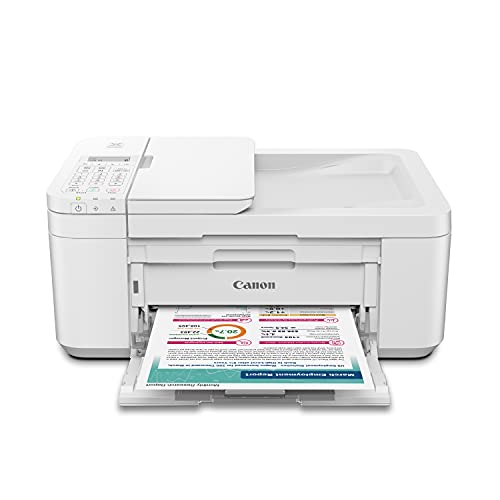
- Canon PIXMA TR4720 — Best Budget All-in-One
- Canon PIXMA MG3620 — Best Entry-Level Inkjet
- HP OfficeJet 250 — Best Portable Printer
- Key Features to Consider When Choosing
- Questions Answered
- Next Steps
Standout Models in 2026
- #PreviewProductRating
- Bestseller No. 1
 Rating:

- Bestseller No. 2
 Rating:
 - Bestseller No. 3
 Rating:
 - Bestseller No. 4
 Rating:
 - Bestseller No. 5
 Rating:
 - Bestseller No. 6
 Rating:
 - Bestseller No. 7
 Rating:
Full Product Breakdowns
1. Epson EcoTank ET-3850 — Best Overall
The Epson EcoTank ET-3850 eliminates the single biggest ongoing cost of inkjet ownership by replacing cartridges with refillable ink tanks that hold enough ink to print thousands of pages before you need to top them up. That supertank design translates to a higher purchase price than entry-level inkjets, but the math works strongly in your favor within the first year if you print regularly, and the bonus black ink bottle included in the box extends that value from day one. You get a full-featured all-in-one with print, copy, scan, and a built-in automatic document feeder that handles multi-page jobs without requiring you to feed sheets manually, which is a meaningful quality-of-life upgrade over basic flatbed-only scanners.
Wireless connectivity covers both Wi-Fi and Ethernet, giving you the flexibility to hardwire the printer to your router for rock-solid reliability in a busy home office or connect it wirelessly for placement anywhere in the room. Mobile printing works through Epson's app on iOS and Android, and the ADF supports up to 30 sheets, making this genuinely viable for small business document workflows. Print quality on color documents and photos is excellent, with the EcoTank's Micro Piezo printhead technology delivering accurate color reproduction without the banding issues that plague cheaper inkjets running low on ink. The 2.4-inch color touchscreen makes navigation straightforward, and automatic two-sided printing saves paper on every multi-page document you print. For households or small offices that want to escape the cartridge replacement cycle permanently, the ET-3850 is the clearest recommendation in this entire roundup.
The primary trade-off is the physical footprint — the ET-3850 is larger than the Brother or HP Envy models reviewed here, and its upfront price is the highest of the inkjet options. Setup takes slightly longer than a cartridge printer because you fill the tanks from bottles before first use, but Epson's clear labeling system makes the process clean and straightforward. If your priority is the lowest possible cost per page over a two-to-three-year ownership horizon, no other printer in this guide comes close to matching this machine's economics.
Pros:
- Cartridge-free supertank design eliminates recurring cartridge costs entirely
- ADF plus Ethernet connectivity makes it genuinely office-capable
- Excellent color and photo print quality with Micro Piezo technology
- Automatic duplex printing standard across all print modes
- Bonus black ink bottle included adds immediate value out of the box
Cons:
- Higher upfront purchase price compared to cartridge-based alternatives
- Larger physical footprint than most other models in this roundup
- Initial ink tank filling adds a few minutes to the setup process
2. Brother MFC-J1010DW — Best Compact All-in-One
The Brother MFC-J1010DW delivers a full set of all-in-one capabilities — print, copy, scan, and fax — in one of the smallest physical footprints available at this price point, making it the natural choice when desk space is genuinely limited. Brother's reputation for reliable hardware translates directly into this model, which ships with a 1.8-inch color display, automatic two-sided printing, and print speeds of up to 17 pages per minute in black and 9.5 pages per minute in color, numbers that beat most competing inkjets in the compact category by a meaningful margin. Alexa voice control integration means you can trigger print jobs hands-free, which sounds like a gimmick until you're actually using it during a busy workday.
The Brother Mobile Connect app handles wireless setup and provides a clean interface for managing print queues and scan destinations from your smartphone, and the printer also supports direct cloud connectivity for services like Google Drive and Dropbox without requiring your computer to be on. Fax capability is increasingly rare in compact all-in-ones, and its inclusion here makes the MFC-J1010DW a strong fit for home offices that still interact with medical providers, legal offices, or real estate agents who rely on fax transmission. Cartridge costs are moderate rather than low, so if you print high volumes regularly, the Epson EcoTank above will deliver better economics over time, but for moderate printing volumes the Brother's combination of speed, features, and compact design is genuinely compelling.
Build quality is solid for the price range, with a well-constructed paper tray and a flatbed scanner that handles standard documents cleanly. The 1.8-inch display is small compared to the HP Envy's screen, but the menu navigation is straightforward enough that you'll rarely feel frustrated by the limited real estate. If you need all four functions in the smallest possible package, with genuine print speed and Alexa integration as a bonus, the Brother MFC-J1010DW earns its place as the runner-up in this guide.
Pros:
- Extremely compact design fits on crowded desks without difficulty
- Fast print speeds of 17 ppm black and 9.5 ppm color for an inkjet
- Full four-function capability including fax at a budget price
- Alexa voice control and cloud service connectivity built in
- Automatic duplex printing saves paper on every double-sided document
Cons:
- 1.8-inch display is small and limits navigation comfort
- Cartridge running costs are moderate, not best-in-class for high-volume users
3. Canon imageCLASS MF272dw — Best Laser Printer
If your printing is primarily text documents and you want the sharpest possible output at the fastest possible speed without ever worrying about ink drying out between sessions, the Canon imageCLASS MF272dw is the clear answer in this roundup, delivering up to 30 pages per minute in black-and-white from a compact laser chassis. Laser printers fundamentally don't suffer the dried-ink-nozzle problem that plagues inkjets left unused for weeks at a time, and the toner cartridges in this class last far longer than ink cartridges, making the MF272dw a practical choice for offices where the printer sits idle for stretches and then faces bursts of high-volume demand. The wireless three-in-one configuration covers print, copy, and scan, covering every document task a home or small office legitimately needs.
Toner 071 and the high-capacity 071 variant are the consumables for this machine, and Canon's high-capacity option extends your time between replacements significantly, which matters when you're calculating total cost of ownership across a two- or three-year horizon. Setup is straightforward via wireless connection, and the machine's compact laser footprint is smaller than you might expect given its 30 ppm output rating, making it feasible for tight desk setups even in smaller home offices. Duplex printing is fully automatic, which is a feature you'll appreciate deeply the first time you print a 20-page double-sided document without any manual intervention. This machine does not print in color, which is the trade-off you accept for the speed, reliability, and lower per-page cost that laser technology provides — if color is a requirement, the Epson EcoTank or HP Envy are the correct choices for your workflow.
For homeschool environments with regular document printing needs, the imageCLASS MF272dw is worth serious consideration alongside the models in our best printer for homeschool 2026 guide, particularly for families printing curriculum materials, worksheets, and reading packets in high volumes. The machine's reliability and low maintenance profile make it genuinely suitable for households that treat a printer as infrastructure rather than an occasional-use accessory.
Pros:
- 30 pages per minute output is the fastest in this entire roundup
- Laser technology eliminates dried-nozzle problems during periods of inactivity
- Lower per-page cost than any inkjet in this guide for monochrome documents
- Automatic duplex printing fully integrated with no manual steps
- Compact chassis for a laser multifunction printer
Cons:
- Monochrome only — no color printing capability at all
- Higher toner cartridge upfront cost than ink cartridges
4. HP Envy 6155e — Best AI-Enabled Home Printer
The HP Envy 6155e stands out in the inkjet crowd with its HP AI print formatting feature, which automatically strips unwanted content from web pages and emails before printing them, eliminating the half-blank pages and truncated text that plague web-to-print jobs on conventional printers. That feature alone will save paper and frustration for anyone who regularly prints recipes, articles, or online forms directly from a browser, and it's paired with automatic two-sided printing and a 100-sheet input tray that handles a full ream of paper without requiring you to feed in small batches throughout the day. Print speeds reach 7 pages per minute in color and 10 pages per minute in black, which is on the slower end of this roundup but entirely sufficient for the home user this machine targets.
HP includes a three-month Instant Ink trial subscription with this printer, which is HP's ink-as-a-service program that ships replacement cartridges to your door before you run out based on your actual printing patterns rather than requiring you to notice and reorder manually. Whether you continue with Instant Ink after the trial ends is a decision worth evaluating based on your monthly page volume — it's genuinely cost-effective for consistent monthly printers, less so for highly variable usage patterns. Color quality is strong for home use, with accurate reproduction on photos and documents alike, and the Envy's compact white design blends into home office setups more elegantly than utilitarian all-in-one designs from other manufacturers. The scanner handles standard flatbed scanning cleanly, and the HP Smart app on iOS and Android provides full remote management of print jobs, scan destinations, and ink level monitoring.
The printer works with HP+ service, which requires using genuine HP ink but provides additional smart features and extended warranty coverage. If you prioritize AI-assisted print formatting and a polished app experience alongside reliable color output, the Envy 6155e is the most sophisticated home inkjet in this guide and a worthy choice for design-conscious buyers who print photos and formatted documents alongside everyday text.
Pros:
- HP AI formatting removes unwanted content from web pages before printing
- Borderless photo printing produces clean results without manual adjustments
- 100-sheet input tray handles full reams without batch feeding
- Three-month Instant Ink trial adds immediate subscription value
- Compact, attractive design suitable for visible home office placement
Cons:
- Print speeds of 7 ppm color are slower than Brother and Canon competitors
- HP+ service requires genuine HP ink cartridges, limiting third-party options
5. Canon PIXMA TR4720 — Best Budget All-in-One
The Canon PIXMA TR4720 delivers the full four-function all-in-one experience — print, copy, scan, and fax — at a price point that makes it one of the most accessible capable printers in this roundup, and Canon's app-based setup process means you're printing within minutes of unboxing without navigating complicated driver installations. The TR4720 includes an automatic document feeder for multi-page scan and copy jobs, which is a feature that separates it from the even more basic entry-level inkjets and makes it genuinely useful for home offices that occasionally need to process stacks of documents. Ink cartridge installation is designed to be as straightforward as possible, with a clearly labeled slot system that guides you through replacement without consulting the manual.
Wireless connectivity works through the Canon PRINT Inkjet/SELPHY app, which is reliable and well-designed for iOS and Android, supporting AirPrint for iOS devices and Mopria for Android devices so you're never locked into Canon's proprietary solution. The compact white design sits comfortably on a desk or shelf and doesn't impose on the surrounding space the way larger all-in-ones can. Print quality on text documents is clean and accurate, and photo output on Canon Photo Paper is genuinely impressive for the price tier, reflecting Canon's long-standing strength in photographic color reproduction. If you want fax capability, an ADF, and dependable Canon print quality in the most budget-accessible package possible, the TR4720 is the practical choice here. For deeper Canon comparisons, our best Canon PIXMA printer guide covers the full lineup in detail.
The trade-off relative to the EcoTank is that cartridge costs accumulate over time at a higher per-page rate, and the TR4720 lacks automatic duplex printing, requiring you to manually flip pages for two-sided output. Those limitations are acceptable at this price tier, and the TR4720 remains a strong value for the buyer who wants the reliability of the Canon brand with four-function capability at a genuinely budget-friendly price in 2026.
Pros:
- Full four-function capability including fax at a budget-accessible price
- Automatic document feeder handles multi-page scan and copy jobs
- Canon PRINT app simplifies wireless setup and daily management
- AirPrint and Mopria support for universal mobile printing compatibility
- Strong photo print quality using Canon photo paper stocks
Cons:
- No automatic duplex printing — two-sided jobs require manual page flipping
- Higher per-page cartridge costs than the EcoTank over a long ownership period
6. Canon PIXMA MG3620 — Best Entry-Level Inkjet
The Canon PIXMA MG3620 is the simplest and most stripped-back printer in this roundup, which is precisely its advantage for buyers who need a straightforward print-copy-scan machine without the added cost of features they'll never use, and its NFC tap-to-print capability makes it genuinely convenient for Android users who want to start a print job by tapping their phone to the printer rather than navigating through app menus. Support extends across a wide range of paper types including plain paper, high-resolution paper, multiple photo paper grades from glossy to matte, and standard envelopes, giving you practical versatility for common home printing tasks without requiring specialized media. The wireless setup process is quick, and Canon's well-established AirPrint, Google Cloud Print, and Mopria support ensures compatibility with essentially every device ecosystem you're likely to encounter.
Print quality on the MG3620 is solid for everyday documents and acceptable for casual photo printing, with Canon's hybrid ink system combining dye-based color inks for vibrant photos and pigment-based black ink for crisp text — a combination that outperforms pure dye-based systems on text sharpness. The machine is quiet during operation, which matters in shared living spaces where printer noise can be disruptive, and the compact white body is unobtrusive enough to sit on a bookshelf when not in active use. If you're looking at the cheapest possible reliable inkjet with Canon quality behind it, the MG3620 is a well-established choice that has maintained its popularity through multiple product generations for good reason.
The limitations are expected for the price: no automatic duplex printing, no ADF, and no fax capability. Ink costs are the standard cartridge model, so volume users will find the EcoTank significantly more economical over time. But for light-volume home printing where the priority is lowest purchase price and proven reliability, the MG3620 delivers exactly what it promises without overcomplicating the experience. If you want to see how this model compares against the broader best cheap printer field, the MG3620 consistently earns its place in that conversation.
Pros:
- NFC tap-to-print for Android devices is a genuinely convenient differentiator
- Hybrid ink system delivers sharp text and vibrant photo color simultaneously
- Quiet operation makes it suitable for shared living and working spaces
- Wide paper type compatibility including multiple photo paper grades
- Proven long-term reliability across multiple product generations
Cons:
- No automatic duplex printing, ADF, or fax capability
- Standard cartridge economics mean higher per-page costs for volume users
7. HP OfficeJet 250 Portable All-in-One — Best Portable Printer
The HP OfficeJet 250 occupies a category of its own in this guide as the only genuinely portable all-in-one that combines print, scan, and copy functionality in a battery-powered chassis light enough to carry between locations, and its 2.65-inch color touchscreen plus auto document feeder makes it a real working tool rather than a compromise you make for the sake of portability. This Certified Refurbished unit has been tested and certified to function like new, includes a minimum 90-day warranty, and ships with all relevant accessories, making it a cost-accessible way to acquire a machine that retails at a premium when new. Wi-Fi Direct connectivity means you can print from your Android phone by detecting the nearby OfficeJet 250 and connecting directly without a router, which is exactly the kind of field-use flexibility this printer is designed around.
The HP ePrint app handles mobile printing from iOS and Android smartphones and tablets, and the built-in battery means you're not searching for a wall outlet in a conference room, client location, or outdoor event space where power access isn't guaranteed. For professionals who carry their office between locations — real estate agents, field consultants, mobile notaries, or freelancers working from client sites — the ability to print and scan documents on the spot without relying on local printer access is a genuine competitive advantage. Print quality is solid for a portable machine, producing professional-looking text documents and acceptable color output that will serve business use cases without embarrassment. Our best travel printers guide examines the portable category in greater depth if this form factor is your primary requirement.
The trade-offs of portable printing are real: output speed is slower than desktop all-in-ones, paper capacity is smaller, and the per-page cost of ink is higher than you'd pay with a high-yield desktop cartridge setup. Battery life requires charging between heavy sessions, and the ADF capacity handles smaller document stacks than dedicated desktop models. But if portability is the feature you actually need, no other printer in this guide provides it, and the OfficeJet 250 remains the benchmark portable all-in-one for 2026.
Pros:
- Battery-powered portable design for genuine location-independent use
- Full all-in-one with print, scan, and copy plus auto document feeder
- Wi-Fi Direct for Android enables printing without a router connection
- 2.65-inch color touchscreen provides comfortable navigation in the field
- Certified Refurbished status offers premium hardware at accessible pricing
Cons:
- Slower print speeds and smaller paper capacity than desktop all-in-ones
- Higher per-page ink costs relative to high-yield desktop cartridge setups
- Battery requires charging between heavier printing sessions
Key Features to Consider When Choosing a Small Printer
Print Technology: Inkjet vs. Laser
The most fundamental decision you'll make is between inkjet and laser, and the right answer depends almost entirely on what and how much you print. Inkjet printers like the Epson EcoTank, Canon PIXMA models, Brother MFC-J1010DW, and HP Envy handle color documents and photos with far greater quality than any laser printer in this price range, making them the correct choice for mixed-use home environments where photo printing, school projects, and colorful documents are regular outputs. Laser printers like the Canon imageCLASS MF272dw produce sharper, crisper text in black-and-white at faster speeds with longer-lasting toner cartridges that never dry out during periods of inactivity — a critical advantage for offices where the printer might sit unused for a week between heavy document days. If you print exclusively text documents in volume and want the lowest possible per-page cost with zero maintenance headaches, laser is the technology that serves you. If you print a mix of documents, photos, and color content even occasionally, inkjet is the right choice, and the EcoTank model closes the running cost gap significantly compared to traditional cartridge-based inkjets.
Ink Economy and Running Costs
The purchase price of a printer is one number, but the total cost of ownership over two or three years of regular use is the number that actually matters to your budget, and running costs vary enormously across the models in this guide. Standard cartridge inkjets like the Canon MG3620 and PIXMA TR4720 have the lowest upfront prices but the highest per-page costs, meaning they're economical only for genuinely light-use scenarios where you print fewer than fifty pages per month. The Epson EcoTank ET-3850 inverts that equation with a higher purchase price but dramatically lower per-page costs through its supertank ink system, making it the best total-value choice for households printing more than one hundred pages monthly. Laser printers sit in the middle — toner cartridges cost more upfront than ink cartridges but yield significantly more pages per cartridge, making per-page economics competitive with mid-range inkjets for monochrome document printing. If you're choosing between models primarily on cost, calculate your realistic monthly page volume first and then compare the total cost including consumables over a 24-month period rather than comparing only the sticker price.
Connectivity and Mobile Printing
Every printer in this guide supports Wi-Fi wireless connectivity as a baseline, but the quality of the mobile printing experience varies between manufacturers in ways that matter for daily use. Canon's PRINT Inkjet/SELPHY app and Brother's Mobile Connect app are both well-maintained and reliable, while HP's Smart app is the most feature-rich of the three with remote management, ink level notifications, and integration with HP's Instant Ink subscription service. AirPrint support for iOS devices and Mopria support for Android are standard across all models here, meaning you can print from your phone's native share menu without installing any app at all, which is genuinely useful when visiting family members or colleagues need to print from your setup. Ethernet connectivity on the Epson ET-3850 is the standout addition for home offices with stable wired networks, eliminating the intermittent wireless drop issues that occasionally affect even well-configured Wi-Fi printers. NFC tap-to-print on the Canon MG3620 adds a convenient shortcut for Android users who want the fastest possible path from phone to printed page. If your setup involves multiple users printing from multiple devices, a printer with a well-developed app ecosystem will save you more time and frustration than virtually any other single specification.
Form Factor, ADF, and Duplex Printing
Physical size matters when desk space is limited, and the models in this roundup range from the genuinely ultraportable HP OfficeJet 250 to the larger Epson EcoTank, with the Brother MFC-J1010DW representing the best balance of capability and compactness among desktop all-in-ones. Automatic duplex printing — the ability to print on both sides of a page without manual intervention — is a feature that saves meaningful amounts of paper over time and is included on the Brother, Epson, Canon imageCLASS, and HP Envy models, but absent on the Canon PIXMA TR4720 and MG3620. For households with regular double-sided printing needs, the duplex models are worth prioritizing; our best duplex printer guide for 2026 covers the full range of duplex-capable options across all form factors. An automatic document feeder is the other feature that separates capable all-in-ones from basic ones — the ADF on the Epson ET-3850, Canon TR4720, and HP OfficeJet 250 allows you to load a stack of pages and walk away rather than manually placing each sheet on the flatbed glass, which matters enormously when you're scanning or copying multi-page contracts, reports, or medical forms. If your workflow regularly involves multi-page document handling, prioritize ADF-equipped models over flatbed-only designs regardless of other feature differences.
Questions Answered
What is the best small printer for home use in 2026?
The Epson EcoTank ET-3850 is the best overall small printer for home use in 2026, combining full all-in-one functionality with supertank ink technology that eliminates recurring cartridge costs. For buyers with a tighter budget who still need four-function capability including fax, the Canon PIXMA TR4720 is the practical alternative. If you print primarily text documents and want the fastest, most reliable output, the Canon imageCLASS MF272dw laser printer is the correct choice despite its monochrome-only limitation.
Are small printers worth buying, or should you use a print shop?
A home printer delivers clear value if you print more than twenty to thirty pages per month across any combination of documents, photos, and forms, because the per-page cost of printing at home consistently beats print shop pricing once you account for your time and travel. For very infrequent printing needs — fewer than ten pages per month — a print shop may be genuinely more economical than maintaining a printer with cartridges that dry out between uses. The key variable is frequency: consistent regular use makes home printing economically superior, while sporadic unpredictable use favors external services.
How do I choose between an inkjet and a laser printer for home use?
Choose an inkjet printer if you print photos, color documents, or mixed content of any kind, since inkjets produce far superior color quality at home price points compared to laser alternatives in the same price range. Choose a laser printer if you print primarily text documents in black-and-white at moderate to high volume, value speed above all else, or need a printer that performs reliably after sitting unused for weeks at a time — laser toner never dries out the way inkjet cartridges do. The Canon imageCLASS MF272dw is the laser recommendation in this guide, while the Epson EcoTank ET-3850 closes the running-cost gap for inkjet users who print regularly.
What is a supertank printer and is it worth the higher upfront price?
A supertank printer, like the Epson EcoTank ET-3850, uses large refillable ink reservoirs instead of small replaceable cartridges, allowing you to print thousands of pages per tank fill rather than hundreds per cartridge. The higher upfront price reflects both the hardware investment and the ink bottles included in the box, but the per-page cost drops to a fraction of what standard cartridge printers charge, making the EcoTank financially superior for anyone printing more than one hundred pages per month. If you print fewer than fifty pages per month, the upfront premium takes several years to recoup, and a standard cartridge printer may be the more practical choice for your actual usage pattern.
Can I print from my phone to any of these printers without installing an app?
Yes — all seven printers in this guide support either AirPrint (for iPhones and iPads) or Mopria (for Android devices), both of which allow native OS printing without installing any manufacturer app. On an iPhone, you access AirPrint through the standard share menu by tapping Print and selecting the printer when it appears on your network. On Android, Mopria support enables the same functionality through the system print service. The Canon MG3620 adds NFC tap-to-print for Android users who want an even faster connection method, while HP's Smart app and Brother's Mobile Connect app provide richer management features if you want more control than the native OS print dialogs offer.
Is a refurbished printer a reliable choice for regular use?
The HP OfficeJet 250 listed in this guide is a Certified Refurbished product, which means it has been tested, cleaned, inspected, and certified by Amazon's refurbishment program to function like a new unit and ships with a minimum 90-day warranty. Certified Refurbished is a meaningfully different designation than seller-refurbished — the standards for testing and certification are stricter, and return rates on Certified Refurbished products are consistently low. For a premium portable printer like the OfficeJet 250 that commands a high new price, the refurbished option provides access to genuine HP hardware at a lower cost, and the warranty protects your purchase if a defect emerges during the initial ownership period. It's a reliable path to premium hardware at reduced cost when you buy from a high-standards seller.
Buy on Walmart
- Canon PIXMA MG3620 Wireless All-in-One Color Inkjet Printer — Walmart Link
- Brother MFC-J1010DW Wireless Color Inkjet All-in-One Printer — Walmart Link
- HP OfficeJet 250 Portable Printer with Wireless and Mobile P — Walmart Link
- Epson EcoTank Wireless Color All-in-One Cartridge-Free ET-38 — Walmart Link
- Canon PIXMA TR4720 All-in-One Wireless Printer Home use, wit — Walmart Link
- imageCLASS MF272dw - Multifunction, Wireless, Duplex Laser P — Walmart Link
- HP Envy 6155e Wireless All-in-One Color Inkjet Printer, Port — Walmart Link
Buy on eBay
- Canon PIXMA MG3620 Wireless All-in-One Color Inkjet Printer — eBay Link
- Brother MFC-J1010DW Wireless Color Inkjet All-in-One Printer — eBay Link
- HP OfficeJet 250 Portable Printer with Wireless and Mobile P — eBay Link
- Epson EcoTank Wireless Color All-in-One Cartridge-Free ET-38 — eBay Link
- Canon PIXMA TR4720 All-in-One Wireless Printer Home use, wit — eBay Link
- imageCLASS MF272dw - Multifunction, Wireless, Duplex Laser P — eBay Link
- HP Envy 6155e Wireless All-in-One Color Inkjet Printer, Port — eBay Link
Next Steps
- Check the current price on Amazon for your top one or two candidates — prices on these models fluctuate regularly, and seasonal sales often reduce the Epson EcoTank and Canon imageCLASS by meaningful amounts.
- Estimate your realistic monthly page volume by reviewing the last three months of actual printing needs, then calculate total 24-month cost including consumables for the models you're considering before committing to a purchase.
- Verify that your primary devices — smartphone, laptop, or tablet — are compatible with the connection method you intend to use, whether that's AirPrint, Mopria, a manufacturer app, or NFC tap-to-print.
- If you need to scan or copy multi-page documents regularly, confirm that your chosen model includes an automatic document feeder rather than flatbed-only scanning before completing your purchase.
- Read the full reviews on our best duplex printer guide if automatic two-sided printing is a firm requirement, to compare the duplex-capable models in this roundup against the broader field of options available in 2026.
 |
 |
 |
 |

About Marcus Reeves
Marcus Reeves is a printing technology specialist with over 12 years of hands-on experience in the industry. Before turning to technical writing, he spent eight years as a service technician for HP and Brother enterprise printer lines, where he diagnosed and repaired thousands of inkjet and laser machines. Marcus holds an associate degree in electronic engineering technology from DeVry University and a CompTIA A+ certification. He is passionate about helping home users and small offices get the most out of their printers without paying ink subscription fees. When he is not testing the latest cartridge refill kits, he tinkers with vintage dot-matrix printers and 3D printers in his garage workshop.