 ee
eePrinters ›
Best Bluetooth Printers 2026
You're standing in front of a wall of printers at the store, wondering why half of them still require a USB cable in 2026, when all you really want is to tap your phone and get a clean printout in seconds. Bluetooth printing has moved well beyond novelty — today's models cover everything from home office documents and shipping labels to professional dye-sublimation photos and pocket-sized sticker printers. The challenge is that "Bluetooth printer" is a broad category, and the right choice depends entirely on what you're printing, how often, and where.

This 2026 roundup covers seven of the best Bluetooth printers across every major use case, each tested and evaluated for real-world performance rather than spec-sheet bragging. Whether you need a compact all-in-one for home documents, a supertank printer that keeps ink costs brutally low, or a thermal label maker for your small business shipments, there is a pick here that fits your workflow precisely. You can also browse the full printer category if you want to compare even more options beyond this list.
According to Bluetooth technology's core specification, modern Bluetooth 5.x profiles deliver the stable, low-latency wireless connections that make wireless printing genuinely reliable, rather than the frustrating experience it was even five years ago. Every printer on this list takes full advantage of that, pairing quickly with Android and iOS devices without requiring you to fight your way through complicated network settings. Read on for the complete breakdown.
Contents
- Editor's Recommendation: Top Picks of 2026
- In-Depth Reviews
- Canon PIXMA TR4720 — Best Home All-in-One
- Epson EcoTank ET-2980 — Best for Ink Savings
- Canon Selphy CP1500 — Best for Photo Prints
- HP Sprocket Studio Plus — Best for Instant Photos
- Brother P-touch PT-D610BT — Best for Business Labels
- MUNBYN 941BP — Best for Shipping Labels
- Phomemo Y02C — Best Mini Sticker Printer
- Choosing the Right Bluetooth Printer
- What People Ask
- Final Thoughts
Editor's Recommendation: Top Picks of 2026
- #PreviewProductRating
- Bestseller No. 1
 Rating:

- Bestseller No. 2
 Rating:
 - Bestseller No. 3
 Rating:
- Bestseller No. 4
 Rating:
 - Bestseller No. 5
 Rating:
 - Bestseller No. 6
 Rating:
 - Bestseller No. 7
 Rating:
In-Depth Reviews
1. Canon PIXMA TR4720 All-in-One — Best Home All-in-One
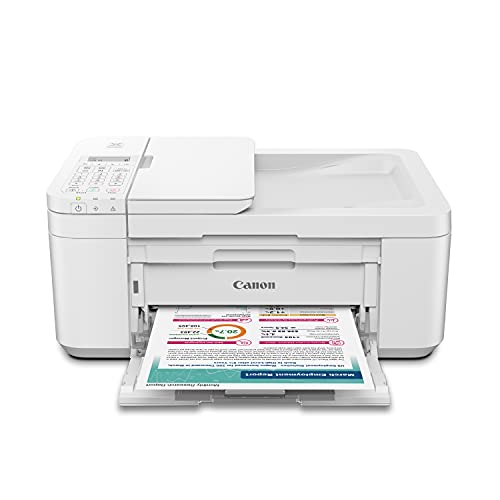
The Canon PIXMA TR4720 is the kind of printer most households actually need — a compact, four-function device that handles printing, copying, scanning, and faxing without occupying half your desk. Setting it up is genuinely straightforward: download the Canon PRINT Inkjet/SELPHY app, follow the guided steps, and you're printing from your phone within minutes, which is exactly the experience a home user deserves. The auto document feeder handles multi-page scans efficiently, so you're not standing over the flatbed feeding pages one at a time during a busy morning.
Bluetooth and Wi-Fi connectivity both work reliably, and Canon's mobile print app supports AirPrint and Mopria, meaning you can print directly from your iPhone or Android device without installing anything additional. Print quality on plain paper is solid for everyday documents and homework, and photo output on Canon's own paper stock looks genuinely vibrant rather than washed out. Ink cartridge installation uses a tool-free mechanism that even non-technical users manage on the first attempt, and the standard and XL cartridge options give you flexibility based on your print volume.
If you're printing documents, school assignments, and occasional photos a few times per week, this is a dependable workhorse that stays out of your way. For higher-volume printing where per-page ink costs start to sting, you'll want to look at the EcoTank below — but for typical home use, the TR4720 delivers consistent results without demanding much from you in return. If you also need iPad-friendly wireless options, check our guide to the best wireless printers for iPad for a broader comparison.
Pros:
- Four-in-one functionality — print, copy, scan, fax — in a compact footprint
- Fast and painless setup via the Canon PRINT app with Bluetooth and Wi-Fi support
- Auto document feeder handles multi-page scanning without manual intervention
- Compatible with AirPrint, Mopria, and the Canon PRINT app across iOS and Android
- Straightforward ink cartridge installation with XL cartridge options available
Cons:
- Standard cartridges have a relatively low page yield, so heavy users will replace them frequently
- Print speeds are moderate rather than fast, which becomes noticeable on larger document batches
2. Epson EcoTank ET-2980 — Best for Ink Savings
The Epson EcoTank ET-2980 makes a compelling argument against the traditional ink cartridge model with a supertank system that ships with enough ink to print up to 6,600 black pages and 5,500 color pages straight out of the box — a figure that represents roughly three years of typical family printing. Each replacement ink bottle set is equivalent to approximately 90 individual cartridges, which translates into genuine long-term savings that compound over the life of the printer. The 1.44-inch color screen on the front panel makes navigation intuitive, giving you a clear status readout without hunting through app menus.
Powered by Epson's PrecisionCore Heat-Free technology, the ET-2980 delivers print speeds that run 50 percent faster than its predecessor while using a permanent printhead engineered for long-term reliability rather than the disposable heads found in conventional cartridge printers. Automatic two-sided printing is included, which cuts paper consumption and makes your documents look significantly more professional without any manual flipping. The wireless all-in-one setup covers printing, scanning, and copying, and Bluetooth connectivity pairs quickly with both iOS and Android devices for direct mobile printing.
The upfront cost is higher than a basic cartridge printer, but the math works strongly in your favor if you print regularly — the break-even point arrives faster than you'd expect. If you're already interested in Epson's supertank lineup, our dedicated Best Epson EcoTank Printer guide covers the full range so you can compare models side by side. For a household that prints consistently throughout the year, the ET-2980 is the smartest long-term investment on this entire list.
Pros:
- Supertank system ships with up to 3 years' worth of ink in the box
- Each ink bottle replacement set equals roughly 90 traditional cartridges
- 50% faster print speeds than the previous generation EcoTank model
- Automatic two-sided printing reduces paper consumption significantly
- PrecisionCore Heat-Free permanent printhead built for long-term durability
- 15 PPM print speed with a clear 1.44-inch color status screen
Cons:
- Higher purchase price compared to standard cartridge all-in-ones
- Tank-fill refill process requires care to avoid spills if you're unfamiliar with it
3. Canon Selphy CP1500 Bundle — Best for Lab-Quality Photos
The Canon Selphy CP1500 Bundle delivers professional dye-sublimation photo prints at home, and this particular kit arrives complete with 108 sheets of KP-108 photo paper, three full-size color ink cartridges, and a Tudak microfiber cleaning cloth — meaning you can unbox it and start printing within minutes without a separate supply run. Dye-sublimation technology produces 4x6 prints that are water-resistant, fingerprint-resistant, and genuinely long-lasting, which means you're getting results that rival what a photo lab produces rather than inkjet prints that smear when wet. The output quality is immediately noticeable: colors are saturated and accurate, skin tones render naturally, and gradients transition smoothly without banding.
Bluetooth connectivity lets you print directly from your smartphone via the Canon PRINT app, and Wi-Fi allows printing from tablets and computers with equal ease. The compact footprint means you can set it on a bookshelf, keep it in a travel bag, or tuck it into a desk corner without it dominating the space. This printer excels at printing event photos, family portraits, and vacation snapshots — essentially anything you want to hold in your hands rather than swipe past on a screen. If you want to explore a broader selection of portable photo printing options, our Best Portable Photo Printer roundup covers additional formats and price points.
The trade-off is that this printer does one thing: it prints 4x6 photos, and it does that one thing exceptionally well. You cannot use it for documents, labels, or scanning — it is a dedicated photo printer, so if you need a do-everything device, combine this with one of the all-in-ones listed above.
Pros:
- Dye-sublimation output matches lab-quality 4x6 prints with accurate, saturated colors
- Water-resistant, fingerprint-resistant, and long-lasting finished prints
- Complete bundle includes paper, ink cartridges, and cleaning cloth at purchase
- Compact and portable design that travels well and stores easily
- Bluetooth and Wi-Fi connectivity for printing directly from smartphone or tablet
Cons:
- Dedicated photo printer only — no document printing, scanning, or copying
- Ongoing cost of dye-sub ink and paper kits adds up for high-volume printing
4. HP Sprocket Studio Plus Bundle — Best for Instant Smartphone Photos
The HP Sprocket Studio Plus takes smartphone photo printing and makes it genuinely instant — you select a photo in the HP Sprocket app, tap print, and a dry-to-the-touch 4x6 print emerges in seconds without waiting for ink to cure or paper to dry. This bundle includes a double pack of paper cartridges, so you have a meaningful supply on hand the moment the printer arrives, and the tear-resistant, smudge-proof, waterproof paper ensures your prints survive real-world handling rather than sitting fragile in a drawer. The build quality feels premium rather than toy-like, and the compact form factor makes it a natural companion for parties, events, and gatherings where people want physical prints immediately.
What sets the Sprocket experience apart from generic photo printers is the HP Sprocket app, which lets you customize each print before it leaves the device — you can add stickers, apply frames, use filters, and adjust the layout to create something personal rather than just a plain reproduction. The wireless connection is Bluetooth-only, which keeps pairing fast and eliminates Wi-Fi network frustrations, and it works reliably with both iOS and Android devices. Print quality is genuinely good for social-media-sized photos and event snapshots, delivering vivid colors and clean edges on the included paper stock.
The limitation to acknowledge here is output size: this is a 4x6 printer designed for casual and social use, not for archival-quality enlargements. If you're specifically looking for iPhone-optimized photo printing solutions, our Best iPhone Photo Printers guide covers several complementary options worth comparing. For parties, travel, and spontaneous printing moments, the Sprocket Studio Plus is the most fun and immediate option on this list.
Pros:
- Instant dry-to-the-touch prints delivered in seconds directly from your smartphone
- Tear-resistant, smudge-proof, and waterproof paper included in the bundle
- HP Sprocket app customization with stickers, frames, and filters before printing
- Reliable Bluetooth-only connection — no Wi-Fi network required
- Compact and portable design ideal for events, travel, and social gatherings
Cons:
- Bluetooth-only connectivity limits printing range compared to Wi-Fi models
- Output limited to 4x6 format — not suited for document or large-format printing
5. Brother P-touch PT-D610BT — Best for Business Label Making
The Brother P-touch PT-D610BT is a professional-grade label maker that operates via Bluetooth or USB, and it's designed specifically for business environments where multiple users need to generate consistent, high-quality labels across departments. The built-in memory stores up to 90 frequently used label templates for quick reprinting — meaning once you've designed your asset tags, file folder labels, or barcode stickers, you retrieve and reprint them in seconds without redesigning from scratch. The QWERTY keyboard makes on-device label creation fast and precise, while the automatic label cutter eliminates manual trimming entirely.
Design flexibility is impressive: you get 17 fonts, 17 font styles, 160 frame options, and 900 symbols available for creating labels up to 1 inch wide, plus high-resolution printing capability that produces crystal-clear barcodes and scannable QR codes. Bluetooth connectivity enables multiple users to design and print labels directly from computers or mobile devices without being tethered to a single workstation, which makes this genuinely practical in dynamic office, warehouse, or retail environments. The P-touch Design&Print 2 app handles the mobile side of the equation with a clean interface that professionals will find intuitive rather than frustrating.
For small business owners who regularly ship packages on eBay, Amazon, or Etsy, this is an excellent complement to a dedicated shipping label printer like the MUNBYN below — the Brother handles organization and internal labeling while the thermal printer handles shipping. If you want to dive deeper into label printing options specifically optimized for selling platforms, our Best Label Printer for eBay guide covers the competitive landscape thoroughly.
Pros:
- Bluetooth and USB connectivity supports multiple users across devices simultaneously
- Built-in memory stores up to 90 label templates for instant reprinting
- 17 fonts, 160 frames, and 900 symbols for professional label customization
- High-resolution output produces sharp, scannable barcodes and QR codes
- Automatic label cutter streamlines the labeling workflow considerably
- QWERTY keyboard enables fast on-device label design without a connected computer
Cons:
- Maximum label width of 1 inch limits it to narrow labels rather than full shipping formats
- TZe tape cartridges are a recurring consumable cost in high-volume environments
6. MUNBYN Bluetooth Thermal Label Printer 941BP — Best for Shipping Labels
The MUNBYN RealWriter 941BP is the answer for small business owners who need to crank out 4x6 shipping labels at volume without spending money on ink, toner, or cartridges of any kind. Thermal printing technology means the only consumable is the label roll itself — no ink to run dry mid-batch, no toner to replace at the worst possible time, and no warm-up delay between print jobs. At 300 DPI and a print speed of 180mm per second, this machine handles over 5,000 labels per day without jamming, which is a serious specification for anyone running a busy eBay, Amazon, Shopify, or Etsy store in 2026.
Bluetooth pairing works natively with iOS and Android through the free Munbyn Print app, and USB Type-C connectivity covers Windows and macOS for desktop operation. The printer supports label widths ranging from 1.57 to 4.3 inches, giving you flexibility for different shipping carrier formats without buying a separate device. An auto-return feature maximizes label usage and prevents waste by ensuring the last label on a roll gets used fully rather than being discarded. Compatible labels include all major thermal direct formats, which are widely available and competitively priced through multiple suppliers.
The 941BP doesn't scan, copy, or produce photos — it prints labels, and it does that at a pace and quality level that makes it the professional choice for fulfillment workflows. If you're shipping regularly from multiple platforms, this printer pays for itself in ink savings alone within the first few months of use, making it one of the most practical investments on this entire list for 2026.
Pros:
- Inkless thermal printing eliminates consumable costs beyond the label roll itself
- 300 DPI resolution with 180mm/s print speed supports over 5,000 labels per day
- Bluetooth support for iOS and Android via Munbyn Print app, plus USB Type-C for desktop
- Supports label widths from 1.57 to 4.3 inches for flexible carrier compatibility
- Auto-return feature maximizes every roll without wasting the final labels
- Compatible with Amazon, eBay, Shopify, Etsy, USPS, and all major shipping platforms
Cons:
- Thermal labels can fade over extended periods under direct heat or sunlight exposure
- No color output — thermal printing is black-only, which limits non-shipping use cases
7. Phomemo Y02C Mini Sticker Printer — Best Pocket Bluetooth Printer
The Phomemo Y02C is a genuinely pocket-sized thermal printer that connects to your phone via Bluetooth and outputs black-and-white stickers, notes, labels, and photo prints without requiring any ink or toner whatsoever. At 203 DPI, the print resolution delivers crisp, readable text and recognizable image output for a device small enough to fit in a jacket pocket, and the inkless thermal mechanism means there are zero consumable costs beyond the paper rolls. The Phomemo app for iOS and Android provides thousands of templates, fonts, frames, and design tools that make creating custom stickers, journal tags, and memo labels an enjoyable creative process rather than a chore.
The app's feature set is notably generous for a printer in this category: OCR text extraction, document printing, image editing, and a template marketplace all live within the same interface, and the learning curve is shallow enough that most users are printing within ten minutes of unboxing. This printer is the natural choice for journaling enthusiasts, students who label notebooks and binders, crafters who make custom stickers for gifts or projects, and anyone who wants the satisfaction of a physical printed output without the footprint or cost of a full-size printer. The Y02C is compact enough to bring to a café, class, or creative session.
The honest limitation here is output quality relative to larger formats: at 203 DPI, photo prints are recognizable and charming rather than photorealistic, so you're printing for aesthetic and functional use rather than gallery-quality reproduction. For monochrome sticker printing, labeling, and creative output at this size, however, the Y02C is unmatched in its category and represents one of the most genuinely fun Bluetooth printers available in 2026.
Pros:
- Truly pocket-sized form factor that fits in a bag, purse, or jacket pocket easily
- Inkless thermal printing — zero ongoing ink or toner costs beyond paper rolls
- 203 DPI delivers clean, readable output for stickers, labels, notes, and basic photos
- Feature-rich Phomemo app includes OCR, templates, document printing, and image editing
- Works with both iOS and Android via simple Bluetooth pairing through the app
- Thousands of app templates available for creative and practical applications
Cons:
- Black-and-white output only — no color printing of any kind
- 203 DPI resolution limits photographic quality compared to dye-sub or inkjet alternatives
Choosing the Right Bluetooth Printer: A Buying Guide
The Bluetooth printer market in 2026 spans a wide range of use cases, and choosing the wrong category of printer wastes both money and desk space. Work through these key criteria before committing to any model.
Determine Your Primary Use Case First
The single most important question is what you're primarily printing, because different output types demand fundamentally different printer technologies. Each use case maps clearly to a specific type:
- Home documents, homework, and occasional photos: An inkjet all-in-one like the Canon PIXMA TR4720 or Epson EcoTank ET-2980 covers everything you need without requiring multiple devices.
- Lab-quality 4x6 photos at home: Dye-sublimation printers like the Canon Selphy CP1500 produce water-resistant, fingerprint-resistant prints that inkjet photo output simply can't match.
- Shipping labels for an e-commerce business: A thermal label printer like the MUNBYN 941BP is the only practical choice — it operates without ink, runs at high speed, and integrates with every major shipping platform.
- Creative stickers, journaling, and pocket printing: Compact thermal printers like the Phomemo Y02C serve this niche perfectly without the bulk or cost of a full-size device.
- Office organization and barcode labeling: A dedicated label maker with QWERTY keyboard and memory storage, like the Brother PT-D610BT, handles this more efficiently than a general-purpose printer.
Evaluate Total Cost of Ownership, Not Just Purchase Price
The sticker price on the box tells you almost nothing about what a printer actually costs to own over twelve months of regular use. Factor in these ongoing expenses before deciding:
- Ink cartridges vs. supertank refills: Standard cartridge printers have lower upfront costs but higher per-page costs over time, while EcoTank models cost more initially and save significantly over months of printing.
- Dye-sub ink and paper kits: Photo printers use bundled ink-and-paper sets, so calculate your expected monthly print volume and the cost per print before comparing options.
- Thermal label rolls: These are among the cheapest consumables in printing — large rolls of compatible labels cost very little per label, which is why thermal shipping label printers have such a strong ROI for small businesses.
- Thermal sticker paper: Pocket printer paper rolls are inexpensive individually, but frequent creative printing adds up, so buy in bulk when you find a compatible roll format.
Understand Bluetooth vs. Wi-Fi Connectivity Trade-offs
Not all wireless printers are equal in how they connect, and the distinction matters depending on how and where you print. Bluetooth-primary printers pair directly with your phone without requiring your home network, which makes them faster to set up and immune to router issues — but they typically require your phone to stay within Bluetooth range during printing. Wi-Fi printers allow printing from anywhere on the same network and support multiple devices without re-pairing, making them better suited for shared household or office use. Most all-in-ones on this list offer both options, giving you flexibility, while dedicated label makers and photo printers tend to be Bluetooth-only for the sake of portability. If you regularly print from multiple devices across a household, prioritize models with both connectivity options. If you need a broader view of the laser printing landscape, our Best Dual Tray Laser Printer guide covers high-volume options that operate on the same wireless principles.
Match Print Volume to Printer Capacity
Every printer has a recommended monthly duty cycle — exceeding it consistently leads to premature failure, while buying more printer than you need wastes money. Here is a practical volume framework for the printers on this list:
- Under 100 pages/month: Any all-in-one on this list handles this volume comfortably, including the TR4720 with standard cartridges.
- 100–500 pages/month: The EcoTank ET-2980 becomes significantly more cost-effective than cartridge alternatives at this volume level.
- 500–5,000+ labels/day: The MUNBYN 941BP is rated for this throughput and designed to sustain it without jamming or overheating.
- Occasional photo printing (under 50 prints/month): Either the Selphy CP1500 or HP Sprocket Studio Plus handles this comfortably; the Selphy produces marginally superior quality while the Sprocket prioritizes speed and customization.
What People Ask
What is the best Bluetooth printer for home use in 2026?
The Canon PIXMA TR4720 is the best all-around home Bluetooth printer for most households in 2026 — it handles printing, copying, scanning, and faxing in a compact footprint and sets up in minutes via the Canon PRINT app. If you print frequently and want to eliminate cartridge costs, the Epson EcoTank ET-2980 is the superior long-term investment with up to three years of ink included in the box.
Do Bluetooth printers work with iPhone and Android?
Yes — every printer on this list works with both iPhone and Android devices. Most use a dedicated companion app for Bluetooth pairing and print management, while all-in-one models also support AirPrint (iOS) and Mopria (Android) for direct printing without installing additional software. The connection process is consistent: enable Bluetooth on your phone, open the app, and follow the pairing prompts.
Is Bluetooth printing as reliable as Wi-Fi printing?
For short-range printing directly from a smartphone, Bluetooth is extremely reliable and often faster to initiate than Wi-Fi because there's no network handshake required. The practical limitation is range — Bluetooth typically works within 30 feet, while Wi-Fi allows printing from anywhere on the same network. For shared household printers accessed from multiple rooms or devices, Wi-Fi is the more practical choice, which is why most all-in-one models on this list include both options.
What is the difference between thermal and inkjet Bluetooth printers?
Inkjet printers spray liquid ink onto paper to produce color output across a wide range of media types, making them versatile for documents, photos, and graphics. Thermal printers use heat to activate chemical coatings on specially treated paper, producing black-and-white output without any ink or toner. Thermal printing is faster, cheaper to operate for high-volume label runs, and completely free of ink-related maintenance — but it only produces monochrome output on thermal-specific paper, which limits it to labels, receipts, and sticker applications.
Can I print shipping labels from my phone with a Bluetooth printer?
Yes — the MUNBYN 941BP is specifically designed for this workflow, pairing with iOS and Android via the Munbyn Print app to print 4x6 shipping labels directly from your phone. Major shipping platforms including USPS, eBay, Amazon Seller Central, Shopify, and Etsy all support label printing via Bluetooth thermal printers, and the process is straightforward once you've configured your printer in the relevant app or platform settings.
Are dye-sublimation photo printers better than inkjet for photos?
For 4x6 print formats, dye-sublimation consistently outperforms inkjet in durability — dye-sub prints are water-resistant, fingerprint-resistant, and genuinely long-lasting without requiring special handling, while inkjet photo prints remain susceptible to smearing and fading under similar conditions. Dye-sublimation also produces smoother tonal gradients with no visible dot pattern, which makes skin tones and sky gradients look more natural. The trade-off is that dye-sub printers are limited to their specific paper-and-ink kit format, while inkjet printers handle a broader range of media types and sizes.
Buy on Walmart
- Canon PIXMA TR4720 All-in-One Wireless Printer Home use, wit — Walmart Link
- Epson EcoTank ET-2980 Wireless All-in-One Color Supertank Pr — Walmart Link
- Canon Selphy CP1500 Photo Printer Bundle (Black) with KP-108 — Walmart Link
- HP Sprocket Studio Plus and Photo Paper Bundle - Wireless Pr — Walmart Link
- Brother® P-touch PT-D610BT Business Professional Connected L — Walmart Link
- MUNBYN Bluetooth Thermal Label Printer 941BP, Wireless 300DP — Walmart Link
- Phomemo Sticker Printer - Y02C Mini Pocket,Portable Thermal — Walmart Link
Buy on eBay
- Canon PIXMA TR4720 All-in-One Wireless Printer Home use, wit — eBay Link
- Epson EcoTank ET-2980 Wireless All-in-One Color Supertank Pr — eBay Link
- Canon Selphy CP1500 Photo Printer Bundle (Black) with KP-108 — eBay Link
- HP Sprocket Studio Plus and Photo Paper Bundle - Wireless Pr — eBay Link
- Brother® P-touch PT-D610BT Business Professional Connected L — eBay Link
- MUNBYN Bluetooth Thermal Label Printer 941BP, Wireless 300DP — eBay Link
- Phomemo Sticker Printer - Y02C Mini Pocket,Portable Thermal — eBay Link
Final Thoughts
The best Bluetooth printer for you in 2026 comes down to a simple match between your primary use case and the right technology — grab the Canon PIXMA TR4720 or Epson EcoTank ET-2980 for home documents, the Selphy CP1500 or Sprocket Studio Plus for photo prints, the Brother PT-D610BT or MUNBYN 941BP for labeling and shipping, or the Phomemo Y02C for creative pocket printing. Review your print volume and total cost of ownership, pick the model that fits your workflow, and you'll have a reliable wireless printing setup that serves you well through the year and beyond.
 |
 |
 |
 |

About Marcus Reeves
Marcus Reeves is a printing technology specialist with over 12 years of hands-on experience in the industry. Before turning to technical writing, he spent eight years as a service technician for HP and Brother enterprise printer lines, where he diagnosed and repaired thousands of inkjet and laser machines. Marcus holds an associate degree in electronic engineering technology from DeVry University and a CompTIA A+ certification. He is passionate about helping home users and small offices get the most out of their printers without paying ink subscription fees. When he is not testing the latest cartridge refill kits, he tinkers with vintage dot-matrix printers and 3D printers in his garage workshop.