 ee
eeLaptops ›
Best Laptop For Data Science 2026
Picture yourself sitting at your desk in early 2026, staring at a terminal window that's been churning through a neural network training job for the past six hours — and your laptop fan sounds like it's preparing for takeoff. If you're a data scientist, machine learning engineer, or quantitative analyst, you already know that your hardware is not merely a convenience but a productivity multiplier. The right laptop for data science in 2026 can cut model training times by half, handle massive pandas DataFrames without stuttering, and run Jupyter notebooks alongside Docker containers without breaking a sweat. The wrong one will have you watching progress bars instead of delivering insights.
The market has matured considerably since the early days of repurposed gaming rigs and consumer ultrabooks pressed into scientific service. Today's top contenders arrive with unified memory architectures, discrete AI accelerators, and displays calibrated for color accuracy rather than refresh rate bragging rights. Whether you're training gradient boosted trees on tabular data, fine-tuning large language models, or wrangling multi-gigabyte CSV files in a Python pipeline, this guide covers the machines purpose-built for your workload. You'll find detailed reviews of seven leading laptops, a structured buying guide, and a comparison table to help you match hardware to workflow.
Before diving into the picks, it's worth noting that mobile workstation laptops have converged with prosumer consumer machines in ways that make the buying decision more nuanced than ever. RAM capacity, GPU VRAM, display color accuracy, and thermals all interact in ways that raw benchmark numbers don't fully capture. The seven machines reviewed here span the full spectrum from polished consumer-pro hybrid to certified mobile workstation, covering every budget tier a working data scientist is likely to consider in 2026. According to Wikipedia's overview of data science, the discipline increasingly demands computational resources previously reserved for enterprise servers — and that trend makes laptop selection more consequential than ever.

Contents
- Our Top Picks for 2026
- Detailed Product Reviews
- Apple MacBook Pro 16 M4 Pro — Best Overall
- Dell XPS 15 9530 — Best Windows Value Pro
- ASUS ProArt P16 — Best for GPU-Accelerated ML
- HP ZBook Fury G11 — Best Mobile Workstation
- Lenovo ThinkPad P16 Gen 2 — Best for Enterprise
- GIGABYTE AORUS 17X — Best for Deep Learning
- Lenovo IdeaPad Pro 5i — Best OLED Value
- Key Features to Consider When Choosing
- Common Questions
- Next Steps
Our Top Picks for 2026
- #PreviewProductRating
- Bestseller No. 1
 Rating:

- Bestseller No. 2
 Rating:
- Bestseller No. 3
 Rating:
 - Bestseller No. 4
 Rating:
 - Bestseller No. 5
 Rating:
 - Bestseller No. 6
 Rating:
 - Bestseller No. 7
 Rating:
Detailed Product Reviews
1. Apple 2024 MacBook Pro 16 M4 Pro — Best Overall for Data Science 2026
Apple's 2024 MacBook Pro, powered by the M4 Pro chip with a 14-core CPU and 20-core GPU, continues to set the benchmark for professional laptop performance in the data science space. The machine ships with 24GB of unified memory — a shared pool accessible simultaneously by the CPU, GPU, and Neural Engine — which translates into exceptionally low-latency data access when your Python environment is juggling NumPy arrays, model weights, and a running visualization dashboard at the same time. The 16.2-inch Liquid Retina XDR display peaks at 1600 nits of brightness with ProMotion adaptive refresh up to 120Hz, delivering the kind of color fidelity that matters when you're building data visualizations destined for client presentations or research publications. The M4 Pro chip's memory bandwidth and the unified memory design make this the most cohesive system for CPU-GPU co-processing available in a laptop form factor today.
Performance-wise, the M4 Pro delivers multi-threaded throughput that rivals Intel's best mobile processors while sipping significantly less power, a balance that translates directly into the all-day battery life Apple advertises. In macOS, the Metal Performance Shaders framework accelerates popular machine learning libraries including TensorFlow and PyTorch, and Apple Silicon's Neural Engine adds another dimension for on-device inference workloads. The Space Black chassis, machined from recycled aluminum, is both thermally efficient and genuinely quiet under sustained load — an attribute that matters in shared office environments. Apple Intelligence integration means that the system-level AI features compound the utility of on-device model work, though you'll need to evaluate your specific library compatibility with the ARM architecture before committing to this platform. If your stack is Python-first and well-tested on macOS, the MacBook Pro 16 M4 Pro is the machine that every other laptop on this list is measured against.
The sole significant trade-off is memory non-upgradability: the 24GB configuration is soldered, so what you configure at purchase is what you work with indefinitely. For users whose workloads involve models that exceed available unified memory, this becomes a hard ceiling. That said, the architecture's efficiency means that 24GB of unified memory punches above the weight of 32GB of conventional DDR5 in most practical data science tasks, particularly when you're not training models that specifically require large GPU VRAM allocations.
Pros:
- M4 Pro chip delivers industry-leading performance-per-watt for sustained CPU and GPU workloads
- All-day battery life holds up through realistic mixed-use data science sessions
- Liquid Retina XDR display with 1600 nits peak brightness is exceptional for visualization work
- Exceptionally quiet thermal management under sustained computation
Cons:
- Unified memory is non-upgradable — 24GB is the ceiling for this configuration
- macOS ecosystem requires library compatibility verification for less-common Python packages
- Premium price point relative to comparably specced Windows alternatives
2. Dell XPS 15 9530 — Best Windows Value Pro for Data Science
The Dell XPS 15 9530 occupies a well-defined position in the data science laptop market: it delivers a premium Windows experience, solid computational horsepower, and a display that meets professional color standards, all within a chassis that remains genuinely portable for a 15-inch machine. The 13th Gen Intel Core i7-13620H processor — a 10-core, 16-thread part with a max turbo frequency of 4.9GHz and 24MB of L3 cache — handles the multi-threaded demands of data preprocessing, model training loops, and compilation tasks without the thermal throttling that plagues thinner Windows machines. The 32GB of DDR5 RAM at 4800MHz ensures your pandas environment and multiple Jupyter kernels coexist comfortably, and the 1TB PCIe NVMe SSD keeps dataset read speeds from becoming a bottleneck in your pipeline. The 15.6-inch FHD+ Infinity Edge display at 100% sRGB coverage and 500 nits of brightness delivers consistent, accurate color reproduction for chart work and dashboard design.
The connectivity story on the XPS 15 9530 is well-considered for a working data scientist: two Thunderbolt 4 ports at 40Gbps, a USB 3.2 Gen 2 Type-C, SD card reader, and Wi-Fi 6 via the AX211 adapter combine to cover the peripheral and network demands of a modern data workflow. The integrated Intel Iris Xe graphics handles display duties and light visualization tasks, though users who require GPU-accelerated training should note the absence of a discrete NVIDIA card in this configuration — this is a CPU-first machine. Windows 11 Pro with AI Copilot integration gives you the enterprise feature set including BitLocker, Hyper-V, and domain join capability, which matters for teams operating under IT governance constraints. For data scientists working primarily in compute-intensive professional environments who need a Windows platform with a premium build quality, the XPS 15 9530 is the most balanced entry point.
The absence of a dedicated GPU is the machine's primary technical limitation for deep learning workloads. If your workflow includes CUDA-accelerated training jobs, this configuration redirects that work to the CPU, where it will complete — eventually — but without the throughput a discrete GPU provides. For classical machine learning, statistical modeling, and data engineering tasks, however, this constraint rarely surfaces in practice, and the machine's light weight and exceptional display make it an easier recommendation for practitioners who travel frequently.
Pros:
- Slim, premium build quality with Infinity Edge display and 100% sRGB coverage
- 32GB DDR5 RAM handles concurrent Jupyter notebooks and Docker environments cleanly
- Dual Thunderbolt 4 ports enable high-bandwidth external GPU or storage expansion
Cons:
- No discrete GPU limits CUDA-accelerated training throughput
- 720p webcam quality is below expectations at this price tier
3. ASUS ProArt P16 AI — Best for GPU-Accelerated Machine Learning
The ASUS ProArt P16 AI is the most forward-looking machine on this list, pairing the AMD Ryzen AI 9 HX 370 processor — a Zen 5 architecture chip running up to 5.1GHz across 12 cores and 24 threads — with the NVIDIA GeForce RTX 5070 discrete GPU carrying 8GB of GDDR7 VRAM. That combination makes it the highest-throughput system for GPU-accelerated deep learning available in a thin-and-light form factor in 2026. The 16.0-inch OLED touchscreen at 2.8K resolution (2880×1800) and 120Hz refresh rate is calibrated for professional content work, delivering deep blacks, wide color gamut, and the kind of contrast that makes data visualizations genuinely easier to interpret at a glance. The RTX 5070's GDDR7 memory and next-generation Tensor cores make it the recommended platform for teams fine-tuning transformer models locally, where VRAM throughput is the primary constraint.
AMD's integrated NPU within the Ryzen AI 9 HX 370 adds on-device AI inference capability that complements the RTX 5070 for lighter inference tasks, reducing the load on both CPU and GPU during mixed workloads. The 32GB of LPDDR5X onboard RAM delivers the bandwidth needed to feed both the processor and GPU without creating memory bottlenecks in large-batch training runs. The 2TB SSD provides meaningful local storage for dataset management without requiring an immediate external drive investment. WiFi 7 connectivity ensures that your data ingestion pipeline from cloud storage buckets or network-attached datasets operates at the highest available wireless throughput. The bundled Dockztorm Wireless Mouse is a practical addition for users who find laptop trackpads insufficient for extended desktop sessions. The ProArt branding carries ASUS's factory color calibration certification, making this machine equally capable in data visualization and visual content production workflows.
The 90WHr battery and 200W power supply reflect the thermal envelope of a machine running a high-performance GPU, meaning battery life under full GPU load is measured in hours rather than the half-day figures Apple Silicon achieves. For lab or office deployment where you're plugged in most of the time, this is an acceptable trade-off. For travel-heavy workflows, the weight and power brick size require consideration before purchase.
Pros:
- RTX 5070 with GDDR7 VRAM delivers the highest local GPU training throughput on this list
- 2.8K OLED 120Hz touchscreen is factory-calibrated for professional color accuracy
- Ryzen AI 9 HX 370's integrated NPU adds dedicated inference acceleration
- WiFi 7 minimizes network bottlenecks in data-intensive pipelines
Cons:
- Battery life under GPU load is significantly shorter than CPU-only competitors
- 200W power supply adds meaningful weight to a travel kit
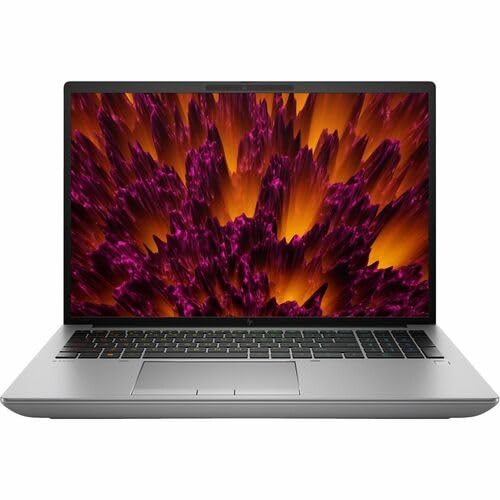
4. HP ZBook Fury G11 16" — Best Mobile Workstation for Data Science
The HP ZBook Fury G11 is the unambiguous choice for data scientists who require certified workstation-grade reliability in a mobile form factor, and the specifications reflect that positioning without compromise. The 14th Gen Intel Core i9-14900HX — Intel's highest-performance mobile processor — drives this system, supported by a substantial 64GB of RAM that eliminates memory constraints for virtually all practical data science workloads, including in-memory processing of datasets that would exhaust the RAM in every other machine on this list. The 16-inch display resolves at WQUXGA (3840×2400), a pixel density that delivers text and visualization clarity beyond what the human eye can readily perceive at laptop viewing distances, ensuring that your work looks exactly as intended without display-level compromise. The 64GB RAM configuration makes the ZBook Fury G11 the correct choice for data scientists handling large in-memory datasets in pandas, Polars, or Spark local mode.
HP's ISV certifications for the ZBook line mean that enterprise-grade software stacks — including SAS, MATLAB, and specific scientific computing environments — are tested and validated on this hardware, a consideration that matters in regulated industries or when using commercial analytics platforms. The Intel WM790 chipset provides enterprise-class I/O and memory controller features not present in consumer platforms, contributing to the machine's system stability under sustained mixed workloads. Running Windows 11 Pro, the machine arrives ready for domain deployment, BitLocker encryption, and the full suite of enterprise IT management tools. The Intel UHD integrated graphics handles display output, which means this specific configuration routes GPU-intensive computation through the CPU — a trade-off that HP compensates for with exceptional per-core performance from the i9-14900HX's architecture and the generous RAM allocation that ensures no workload is memory-constrained.
The ZBook Fury G11 is not a machine you choose for portability; it's a machine you choose because your workloads demand its capabilities and your professional context requires workstation certification. The weight and dimensions reflect the thermal headroom needed to run a 14900HX at full load for extended periods without throttling, and the WQUXGA display at 3840×2400 is a display-class investment that data scientists working in high-fidelity visualization environments will value immediately.
Pros:
- 64GB RAM eliminates memory constraints for large in-memory dataset processing
- Intel Core i9-14900HX delivers maximum single-threaded and multi-threaded CPU performance
- WQUXGA 3840×2400 display provides exceptional pixel density for data visualization
- ISV certifications validate performance for enterprise scientific computing software
Cons:
- Intel UHD integrated graphics limits GPU-accelerated training without discrete NVIDIA option
- Workstation weight and dimensions reduce mobility compared to consumer alternatives
5. Lenovo ThinkPad P16 Gen 2 — Best for Enterprise Data Science Teams
The Lenovo ThinkPad P16 Gen 2 represents Lenovo's flagship mobile workstation line, and this configuration — anchored by the 14th Gen Intel Core i7-14700HX with P-cores reaching 5.50GHz — delivers a compelling balance of professional-grade reliability and quantifiable computational performance for data science applications. The 32GB of DDR5-4000MHz RAM in a dual-channel configuration provides substantial memory bandwidth, which directly benefits operations like matrix multiplication, large DataFrame filtering, and multi-threaded model training that depend on fast CPU-memory throughput. The NVIDIA RTX 2000 discrete GPU brings certified NVIDIA professional graphics driver support — drivers specifically validated for computational stability rather than gaming throughput — along with CUDA support for PyTorch and TensorFlow acceleration. The RTX 2000's ISV certification is the decisive advantage for data scientists running commercial analytics platforms that require NVIDIA Quadro-class validation, a requirement common in financial services, aerospace, and healthcare analytics environments.
The 16-inch WQUXGA display at 3840×2400, 800 nits of brightness, 100% DCI-P3 coverage, and HDR 400 certification is the finest display in this review group by specification, offering color accuracy and resolution that elevates both data visualization development and the review of high-fidelity charts and dashboards. The 1TB PCIe Gen 4 TLC Opal SSD provides both enterprise-grade encryption readiness and sequential read speeds that minimize dataset load times in I/O-bound preprocessing pipelines. Lenovo's ThinkShield security platform — including the fingerprint reader and TPM — rounds out the enterprise deployment profile. The ThinkPad's keyboard, consistently regarded as the best typing experience in the laptop industry, makes the extended sessions of code writing and documentation that define a data scientist's workday more comfortable than on any competing platform.
The weight of the P16 Gen 2 is the primary portability constraint, though Lenovo positions this machine for professionals who move between office locations rather than true road warriors. Battery life under mixed workloads is respectable for a machine of this class, and the 60Hz refresh rate of the display — despite its exceptional resolution and color accuracy — is a trade-off that users accustomed to high-refresh consumer panels will notice, particularly during scrolling through long notebooks or code files. The related category of budget-focused professional laptops serves a different audience, but understanding the trade-offs helps contextualize what the ThinkPad P16's premium specifications actually buy you.
Pros:
- NVIDIA RTX 2000 with ISV certification validates compatibility with enterprise analytics software
- Best-in-class 16" WQUXGA display with 800 nits and 100% DCI-P3 coverage
- ThinkPad keyboard quality reduces fatigue during extended coding and documentation sessions
- ThinkShield security platform with Opal SSD encryption for enterprise deployment
Cons:
- 60Hz display refresh rate is below consumer-grade standards at this price point
- Weight limits genuine portability compared to consumer pro machines
6. GIGABYTE AORUS 17X — Best for Deep Learning and High-Throughput Training
The GIGABYTE AORUS 17X arrives as the highest-raw-throughput machine in this review group for GPU-intensive deep learning workloads, pairing the Intel Core i9-13980HX — a processor that sustains 5.6GHz across its performance cores — with the NVIDIA GeForce RTX 4080 Laptop GPU carrying 12GB of GDDR6 VRAM. That VRAM capacity is the machine's defining technical advantage for data science: 12GB of GPU memory allows you to load larger model batches, work with higher-resolution image datasets in computer vision pipelines, and run multi-task training configurations that simply run out of memory on machines with 6 or 8GB VRAM. The 17.3-inch QHD display at 2560×1440 and 240Hz refresh rate overshoots the needs of data work — the refresh rate is a gaming-lineage feature — but the QHD resolution and 16:9 aspect ratio provide a wide, detailed canvas for multi-panel notebook layouts. The RTX 4080 Laptop GPU's 12GB GDDR6 VRAM makes this the recommended machine for computer vision and NLP model training where dataset batch size directly limits training throughput.
The DDR5 5600MHz memory at 16GB is the configuration's one area of relative weakness compared to the 32GB standard on several competing machines, and users who simultaneously run heavy browser sessions, Docker containers, and IDE tooling alongside training jobs will feel that constraint. The 1TB Gen 4 M.2 SSD provides fast storage access, and the Windows 11 Pro operating system enables the full professional feature set including WSL2 for Linux-native tool compatibility — a meaningful consideration for data scientists whose Python environments depend on Linux-specific library behavior. GIGABYTE's thermal design in the AORUS 17X provides the sustained GPU power delivery needed to run the RTX 4080 Laptop GPU at its rated TDP over extended training sessions, a capability that distinguishes it from thinner machines that advertise the same GPU but throttle it under sustained load. The machine connects to external monitors and peripherals via a comprehensive port array that supports high-bandwidth data transfer throughout your workspace setup.
The AORUS 17X's gaming heritage is visible in its industrial design aesthetic, which may be incongruous in certain professional settings. Battery life under GPU load is short — expect two to three hours under training workloads — making this a desk-bound machine for serious computational work. For teams evaluating the full spectrum of laptops across use cases, the AORUS 17X occupies a specific niche: maximum GPU throughput in a mobile form factor, prioritized over battery life, weight, and display color accuracy.
Pros:
- RTX 4080 Laptop GPU with 12GB GDDR6 VRAM enables larger model batches and dataset sizes
- Core i9-13980HX at 5.6GHz delivers top-tier CPU performance for preprocessing pipelines
- Thermal design sustains full GPU TDP during extended training sessions without throttling
Cons:
- 16GB DDR5 RAM is below the 32GB standard for concurrent multi-task data science environments
- Battery life under GPU load is approximately 2-3 hours — desk deployment is the realistic use case
- Gaming aesthetic may be out of place in enterprise professional settings
7. Lenovo IdeaPad Pro 5i — Best OLED Value for Data Science
The Lenovo IdeaPad Pro 5i closes this review group as the machine that delivers the widest combination of OLED display quality, AI-capable processor, and mid-range GPU at a price point that makes it accessible to independent data scientists, graduate researchers, and early-career practitioners who can't justify workstation-tier spending. The Intel Core Ultra 9 185H — a 16-core processor with an integrated NPU for on-device AI acceleration — provides the foundation for efficient multi-threaded workloads, and the 32GB of LPDDR5x RAM ensures that the memory ceiling won't limit your Jupyter environment under typical data science use. The NVIDIA GeForce RTX 4050 discrete GPU delivers CUDA acceleration for PyTorch and TensorFlow training tasks, though its VRAM capacity positions it for smaller models and datasets than the RTX 4080 in the AORUS 17X. The 16-inch OLED touchscreen at 120Hz and 2048×1280 resolution is the standout display at this price tier, delivering the OLED contrast and color accuracy that make data visualization development genuinely more precise than on equivalent IPS or TN panels.
The touch capability of the IdeaPad Pro 5i's display adds an interaction dimension that data scientists building interactive dashboards or annotation tools will find immediately useful, and the 120Hz refresh rate makes the panel fluid enough for extended daily use without the eye fatigue that lower-refresh displays accumulate over time. The Intel NPU within the Core Ultra 9 185H integrates Lenovo's AI features natively, enabling on-device inference for productivity tools without loading the CPU or GPU — a meaningful contribution to system responsiveness during multi-task sessions. Windows 11 Pro provides the enterprise-ready operating system features including WSL2 compatibility, Hyper-V, and BitLocker, giving this mid-range machine the same professional software feature set as workstation-class competitors. The 1TB PCIe SSD provides adequate local storage for most data science workflows, though analysts working with particularly large datasets will want to budget for external NVMe storage from the outset.
The RTX 4050's VRAM capacity is the primary technical constraint for practitioners doing serious deep learning work: model batches are limited by available GPU memory, and some computer vision or NLP training configurations that run comfortably on the RTX 4080 or RTX 5070 in competing machines will require batch size reduction or model architecture adjustments on the IdeaPad Pro 5i. For data scientists whose workloads center on classical machine learning, statistical analysis, and visualization development — with GPU acceleration as a secondary rather than primary requirement — this is the most value-efficient machine in the review group.
Pros:
- OLED 120Hz touchscreen delivers best-in-class display quality at this price tier
- Intel Core Ultra 9 185H with integrated NPU adds on-device AI inference capability
- 32GB LPDDR5x RAM and Windows 11 Pro deliver a full professional feature set
Cons:
- RTX 4050 VRAM limits batch sizes for large-scale deep learning training tasks
- LPDDR5x RAM is soldered — memory capacity cannot be expanded post-purchase
Key Features to Consider When Choosing a Laptop for Data Science
RAM: The Foundation of Your Working Environment
Random access memory is the single most consequential specification for day-to-day data science productivity, and the threshold that separates functional from frustrating is higher than most general-purpose buying guides acknowledge. A Python environment running pandas, scikit-learn, a Jupyter kernel, and a browser with documentation open will consume 16GB in realistic usage before you've opened a data file. 32GB of RAM is the practical minimum for 2026 data science work, providing adequate headroom for concurrent tooling without constant out-of-memory errors or performance-degrading swap file usage. For users processing datasets that don't fit in 32GB — common in time-series analytics, genomics, or financial tick data analysis — the HP ZBook Fury G11's 64GB configuration becomes the relevant choice rather than an extravagance. Memory type matters too: DDR5 and LPDDR5x deliver significantly higher bandwidth than DDR4, which translates into measurable throughput gains during the matrix-heavy operations that define numerical computing workloads.
GPU and VRAM: Your Training Speed Multiplier
The GPU's role in data science has expanded from optional accelerator to essential component for anyone working with neural networks, and the specific attribute that constrains training speed most directly is VRAM — the GPU's dedicated memory. Model weights, activation tensors, and data batches all compete for VRAM during forward and backward passes, and when you exceed available VRAM, the training job either fails or slows dramatically as the system spills to system RAM. For classical machine learning work — gradient boosting, random forests, logistic regression — GPU acceleration is useful but not essential, and integrated graphics or light discrete GPUs suffice. For deep learning with image data, language models, or multi-modal architectures, you need at minimum 8GB of VRAM, and 12GB of GDDR6 as in the AORUS 17X provides meaningful additional headroom. The ASUS ProArt P16's RTX 5070 with GDDR7 represents the leading edge for 2026, with memory bandwidth improvements that benefit both training throughput and inference latency.
Display Quality: More Critical Than Most Buyers Realize
Data scientists spend extended sessions reading code, interpreting visualizations, and building dashboards, making display quality a direct productivity factor rather than a luxury consideration. Color accuracy — measured in sRGB or DCI-P3 coverage — determines whether the charts and visualizations you build on your laptop look the same when presented on a calibrated external display or in a published report. A display covering 100% sRGB at 500 nits or more is the minimum for professional visualization work; the OLED options in the ASUS ProArt P16, ThinkPad P16, and IdeaPad Pro 5i add infinite contrast ratios that make differentiation between similar colors in scatter plots and heatmaps significantly easier. Resolution above FHD matters for data scientists who work with long code files, wide DataFrames, or multi-panel dashboard layouts — QHD or higher allows you to see more content without scrolling, which compounds into meaningful time savings across a full working day.
Thermals, Battery Life, and Portability Trade-offs
The thermal management of a laptop determines whether its specified CPU and GPU performance is available under sustained load or only in brief burst windows, and this distinction separates honest workstation-class machines from consumer laptops that throttle after minutes of continuous computation. Machines in this review like the AORUS 17X and HP ZBook Fury G11 are engineered to sustain full processor TDP indefinitely, at the cost of weight and fan noise. Apple Silicon's M4 Pro architecture achieves sustained performance with dramatically less thermal output — a qualitative advantage for shared office environments. Battery life and GPU performance exist in direct tension: the RTX 4080 and RTX 5070 configurations in this review deliver 2-3 hours under load, while the MacBook Pro M4 Pro sustains all-day use in realistic mixed workflows. Your deployment context — primarily desk-based or genuinely mobile — should drive this trade-off more than any other single factor in your purchase decision.
Common Questions
How much RAM do I really need for data science in 2026?
For most data science workflows in 2026, 32GB of RAM is the practical minimum that avoids memory-related performance bottlenecks. You need enough memory to run your Python environment, IDE or Jupyter server, browser, Docker containers, and the dataset you're actively processing simultaneously without triggering swap file usage. Practitioners working with datasets larger than 10-15GB in memory, or running memory-intensive ensemble methods, benefit from 64GB configurations like the HP ZBook Fury G11 offers. If your work focuses on classical ML, 32GB is sufficient and is the standard across most machines on this list.
Is a dedicated GPU necessary for data science, or is integrated graphics sufficient?
A dedicated GPU is essential if your work includes any neural network training, computer vision, or NLP model development. CUDA-accelerated frameworks like PyTorch and TensorFlow can reduce training times by 10x to 50x compared to CPU-only training, depending on the architecture. For classical machine learning using scikit-learn, statistical modeling in R or Python, and data engineering workflows, integrated graphics is genuinely sufficient and allows you to prioritize battery life and portability instead. The Dell XPS 15 9530's Intel Iris Xe handles these workloads without GPU acceleration as a limitation.
Should I choose a Mac or Windows laptop for data science?
Both platforms support the core Python data science stack effectively in 2026, but the choice has meaningful implications. macOS on Apple Silicon delivers superior battery life, quiet thermals, and the unified memory architecture that benefits large-model inference. The trade-off is ARM architecture compatibility — most popular libraries work correctly, but obscure packages or those with compiled CUDA dependencies may require workarounds. Windows with WSL2 provides a Linux-native development environment alongside full CUDA support, making it the preferred platform for teams standardizing on GPU-accelerated training. Your organization's existing tooling and IT infrastructure often determines the more practical answer.
What is the minimum display specification I should accept for data science work?
For professional data science work, your display should cover at least 100% sRGB at 400 nits of brightness, with a resolution of FHD+ (1920×1200) or higher. Below these thresholds, color accuracy degrades enough to introduce inconsistencies between your development environment and presentation displays. The 16:10 aspect ratio — present in the Dell XPS 15 9530 and several machines in this review — provides additional vertical screen space that reduces scrolling through long notebooks and code files. OLED panels, available on the ASUS ProArt P16 and Lenovo IdeaPad Pro 5i, add contrast and color depth that make visualization interpretation genuinely easier for extended sessions.
Is 8GB of GPU VRAM enough for machine learning in 2026?
8GB of GPU VRAM is the entry point for practical deep learning work in 2026, sufficient for training small to medium neural networks with reasonable batch sizes. For computer vision models with high-resolution inputs, large language model fine-tuning, or multi-modal architectures, 8GB constrains your batch size and may require gradient checkpointing or mixed-precision training to avoid out-of-memory errors. The RTX 4080 Laptop GPU's 12GB in the AORUS 17X provides meaningful additional headroom for these larger workloads, and the RTX 5070 in the ASUS ProArt P16 represents the leading edge for 2026 mobile GPU training throughput.
How does the laptop choice affect model training time compared to cloud computing?
A high-end laptop like the AORUS 17X or ASUS ProArt P16 with a discrete GPU delivers training throughput comparable to a single-GPU cloud instance, with the advantage of no per-hour billing and the ability to leave jobs running overnight without cost concern. For experimentation, hyperparameter tuning, and iterative development, local GPU hardware typically provides faster iteration cycles than cloud instances due to the elimination of data upload latency and instance startup time. For training runs that require multi-GPU setups, more than 80GB of VRAM, or 48+ hours of continuous computation, cloud platforms remain the practical choice — and a capable local laptop accelerates the development work that precedes those large-scale training runs.
Buy on Walmart
- Apple 2024 MacBook Pro Laptop with M4 Pro, 14‑core CPU, 20‑c — Walmart Link
- Dell XPS 15 9530 Business Laptop (15.6" FHD+, Intel 10-Core — Walmart Link
- ASUS ProArt P16 AI Powered Laptop 16.0" Touch OLED 2.8K Disp — Walmart Link
- HP ZBook Fury G11 16" Mobile Workstation - WQUXGA - Intel Co — Walmart Link
- Lenovo ThinkPad P16 Gen 2 Intel Core i7-14700HX, 20C, 16" WQ — Walmart Link
- GIGABYTE AORUS 17X: 17.3" 16:9 Thin Bezel QHD 2560x1440 240H — Walmart Link
- Lenovo IdeaPad Pro 5i Multi-Touch Laptop, Intel Ultra 9-185H — Walmart Link
Buy on eBay
- Apple 2024 MacBook Pro Laptop with M4 Pro, 14‑core CPU, 20‑c — eBay Link
- Dell XPS 15 9530 Business Laptop (15.6" FHD+, Intel 10-Core — eBay Link
- ASUS ProArt P16 AI Powered Laptop 16.0" Touch OLED 2.8K Disp — eBay Link
- HP ZBook Fury G11 16" Mobile Workstation - WQUXGA - Intel Co — eBay Link
- Lenovo ThinkPad P16 Gen 2 Intel Core i7-14700HX, 20C, 16" WQ — eBay Link
- GIGABYTE AORUS 17X: 17.3" 16:9 Thin Bezel QHD 2560x1440 240H — eBay Link
- Lenovo IdeaPad Pro 5i Multi-Touch Laptop, Intel Ultra 9-185H — eBay Link
Next Steps
- Identify your primary workload type — classical ML, deep learning, or data engineering — and use that to determine whether a discrete GPU with 8GB+ VRAM is essential or a secondary consideration for your purchase.
- Check current Amazon pricing for your top two candidates using the product links above, as prices on these configurations fluctuate and the value ranking can shift significantly within a few weeks.
- Verify RAM and storage upgrade paths before purchasing: machines with soldered memory like the MacBook Pro and IdeaPad Pro 5i require you to configure correctly at purchase, while the ThinkPad P16 Gen 2 supports post-purchase upgrades.
- Benchmark your existing machine's bottleneck — whether RAM, CPU, or GPU — using a representative workload from your current pipeline, so you can verify that the upgrade you're considering actually addresses the constraint slowing your work.
- Read the full comparison in our mobile workstation laptop guide if the HP ZBook Fury G11 or ThinkPad P16 are on your shortlist, as those machines have additional configuration options that may better match your organization's specifications.
 |
 |
 |
 |

About Priya Anand
Priya Anand covers laptops, tablets, and mobile computing for Ceedo. She holds a bachelor degree in computer science from the University of Texas at Austin and has spent the last nine years writing reviews and buying guides for consumer electronics publications. Before joining Ceedo, Priya worked as a product analyst at a major retailer where she helped curate the laptop and tablet category. She has personally benchmarked more than 200 portable computers and is particularly interested in battery longevity, repairability, and the trade-offs between Windows, macOS, ChromeOS, and Android tablets. Outside of work, she runs a small Etsy shop selling laptop sleeves she sews herself.