 ee
eeLaptops ›
Best Mobile Workstation Laptop
Picture this: you're an engineer juggling massive CAD assemblies, a video producer rendering 4K timelines, or a data scientist training models that would choke a consumer laptop before lunch. You head to Amazon, search "mobile workstation laptop," and immediately drown in spec sheets, ISV certifications, and price tags that could fund a small vacation. Choosing the wrong machine means bottlenecks, downtime, and a very unhappy budget meeting. This guide cuts through the noise so you can make a confident, informed purchase in 2026.
A mobile workstation is not just an expensive laptop — it's a tool built around professional-grade reliability, certified GPU drivers, ECC-memory support (on select models), and display panels that color scientists trust. Unlike gaming laptops that prioritize burst performance, workstations emphasize sustained throughput, thermal stability under all-day loads, and ISV certifications from Autodesk, Dassault Systèmes, and ANSYS. If your workflow involves architecture or engineering software, or you regularly push tools that demand accurate color reproduction for professional digital art, you need hardware that's built to a different standard entirely.
We evaluated seven of the most compelling mobile workstations available on Amazon right now, spanning Intel Core Ultra, 13th-gen, and 14th-gen platforms, with GPU options ranging from entry-level RTX A500 all the way to the RTX 3500 Ada. Whether your budget is stretched toward value or you need every ounce of compute you can get, one of these machines will fit your workload. According to Wikipedia's overview of workstations, these systems are purpose-engineered to handle the demanding requirements of professional applications — and the seven options below live up to that definition. Explore more portable computing options across the laptops category for a broader view of the market.

Contents
- Standout Models in 2026
- Detailed Product Reviews
- Dell Precision 5690 — Best Slim Workstation
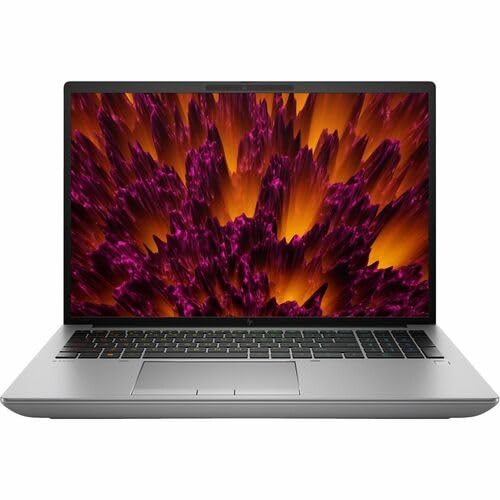
- HP ZBook Fury G11 — Best High-RAM Powerhouse
- Lenovo ThinkPad P16 Gen 2 — Best Display Quality
- HP ZBook Studio 16 G11 — Best Balanced Performance
- Dell Precision 7780 — Best Large-Screen Workstation
- Lenovo ThinkPad P1 Gen 7 — Best for Speed & Portability
- HP ZBook Power 16 G11 — Best Portable Workstation
- Key Features to Consider When Choosing
- What People Ask
- Key Takeaways
Standout Models in 2026
- #PreviewProductRating
- Bestseller No. 1
 Rating:

- Bestseller No. 2
 Rating:
- Bestseller No. 3
 Rating:
 - Bestseller No. 4
 Rating:
 - Bestseller No. 5
 Rating:
 - Bestseller No. 6
 Rating:
 - Bestseller No. 7
 Rating:
Detailed Product Reviews
1. Dell Precision 5690 — Best Slim Workstation
The Dell Precision 5690 is the workstation you reach for when you need serious compute horsepower without the bulk of a traditional mobile workstation chassis. Powered by the Intel Core Ultra 7 165H with 16 cores and a 24MB cache, this machine handles complex simulations, multi-track media projects, and heavy virtual machine workloads with consistent composure. The 16-inch IPS display running at 1920×1200 gives you that extra vertical real estate that makes a genuine difference when you're deep in a technical drawing or comparing split timelines in a video editor. Dell's thermal management on the 5690 is notably well-tuned, sustaining peak clock speeds longer than many competitors in the same weight class.
The 32GB of LPDDR5X memory ensures you're not hitting swap under realistic professional multitasking, and the 512GB SSD delivers fast sequential reads that keep large project files loading without extended waits. Build quality is premium throughout — the chassis is rigid, the keyboard has satisfying travel, and the hinge action feels built to survive years of daily opening and closing. If you're evaluating something lighter for mixed professional and creative use, you might also want to consider the options reviewed in our best laptop for photo editing on a budget guide for a sense of how workstation-class color accuracy compares to mainstream options. For the professional who needs a Precision badge and portability, the 5690 is the clear answer in 2026.
Pros:
- Intel Core Ultra 7 165H delivers exceptional sustained performance across professional workloads
- 16-inch 1920×1200 IPS display with wide color gamut suitable for content review
- 32GB LPDDR5X memory handles heavy multitasking without slowdown
- Compact form factor relative to traditional workstation laptops of this caliber
Cons:
- 512GB storage may feel limiting for users managing large media or dataset libraries
- No discrete professional GPU listed in base configuration
2. HP ZBook Fury G11 — Best High-RAM Powerhouse
When your workflow demands maximum headroom — think large-scale finite element analysis, complex fluid dynamics simulations, or 3D rendering at extreme resolutions — the HP ZBook Fury G11 answers with brute-force specifications that few competitors can match at its price point. 64GB of RAM paired with an Intel Core i9-14900HX means this machine will not flinch under memory-hungry professional applications that would force other workstations into degraded performance states. The WQUXGA display at 3840×2400 is one of the sharpest panels you'll find on any mobile workstation today, delivering pixel density that makes detailed technical drawings and photorealistic renders look genuinely stunning in a 16-inch form factor.
The Intel WM790 chipset provides the platform stability and I/O flexibility that enterprise buyers expect, and the Windows 11 Pro installation ensures compatibility with domain environments and advanced security policies from day one. Thermals on the Fury G11 are managed through HP's dual-fan system, which keeps the i9-14900HX running at sustained frequencies even during extended rendering sessions. The trade-off you accept here is weight and fan noise under load — this is not a machine for working in quiet libraries or cramped café seats. But if your workday revolves around applications where raw compute throughput translates directly into deliverable turnaround time, the Fury G11 is worth every gram and every dollar.
Pros:
- 64GB RAM with Intel Core i9-14900HX is among the most powerful mobile workstation configurations available
- WQUXGA 3840×2400 display is exceptional for detailed professional visualization
- Enterprise-grade WM790 chipset with full Windows 11 Pro compatibility
- 1TB SSD provides substantial storage for large project files and datasets
Cons:
- Significant weight and bulk make daily commuting less comfortable than lighter alternatives
- Fan noise under sustained load is audible in quiet environments
3. Lenovo ThinkPad P16 Gen 2 — Best Display Quality
The Lenovo ThinkPad P16 Gen 2 makes an immediately compelling case with one of the finest display panels in the mobile workstation segment: a 16-inch WQUXGA (3840×2400) IPS screen covering 100% DCI-P3, reaching 800 nits of peak brightness, with HDR 400 certification and Anti-Glare coating that tames reflections in real-world office lighting. For color-critical work — architectural visualization, print pre-press, medical imaging, or professional photography workflows — this display alone justifies serious consideration. The 14th-generation Intel Core i7-14700HX with 20 cores handles computationally intensive tasks with efficiency, and its P-cores push to 5.50 GHz when sustained single-threaded performance matters most.
The 32GB DDR5-4000MHz memory runs in a dual-channel configuration, which maximizes bandwidth for GPU-accelerated workloads sharing system memory with the NVIDIA RTX 2000. That GPU provides certified drivers for applications including SolidWorks, Maya, and Revit, meaning you get validated stability rather than the variable behavior you'd encounter with consumer GeForce cards in the same chassis. Storage is a 1TB PCIe Gen 4 NVMe SSD with TLC NAND and Opal hardware encryption — fast, spacious, and enterprise-secure. The P16 Gen 2 also carries the full ThinkPad heritage: excellent keyboard, robust build quality, and a fingerprint reader for quick, secure authentication. If you prioritize display accuracy above every other specification, this is the machine to buy in 2026.
Pros:
- WQUXGA 800-nit, 100% DCI-P3 display is best-in-class for color-accurate professional work
- NVIDIA RTX 2000 with ISV-certified drivers ensures validated stability in professional applications
- PCIe Gen 4 NVMe SSD with Opal encryption meets enterprise security requirements
- ThinkPad keyboard quality remains industry-leading for extended writing and data entry
Cons:
- 60Hz refresh rate limits appeal for users who value fluid motion in creative tools
- Weight sits at the heavier end compared to ultrabook-style workstations
4. HP ZBook Studio 16 G11 — Best Balanced Performance
The HP ZBook Studio 16 G11 occupies a compelling sweet spot: it's slim enough to travel comfortably in a backpack, yet it packs the Intel Core Ultra 7 165H vPro and NVIDIA RTX 1000 Ada into a chassis that won't make you groan at airport security. The RTX 1000 Ada is a genuinely capable professional GPU — Ada Lovelace architecture brings hardware raytracing, DLSS, and power efficiency improvements over previous generations, and HP's driver certification ensures it runs creative and engineering applications with the reliability your deadlines demand. The 32GB DDR5 SODIMM configuration gives you solid multitasking headroom, and the 1TB SSD keeps large project libraries and virtual machines loading at speed.
vPro certification is worth noting for enterprise buyers: it enables hardware-level remote management through platforms like Intel ME, which simplifies fleet management for IT departments managing distributed teams. The 16-inch display strikes a practical balance for both office and client presentation contexts, and the overall build quality reflects HP's premium ZBook design language — aluminum chassis, refined port selection, and a cooling system that manages the thermal envelope of the 165H processor more gracefully than many competitors at this form factor. If you want a workstation you can carry every day without sacrificing professional application performance, the ZBook Studio 16 G11 is the machine that resolves that trade-off most effectively in 2026.
Pros:
- RTX 1000 Ada delivers modern Ada Lovelace architecture in a slim, portable chassis
- Intel vPro enables enterprise remote management and hardware-level security features
- Well-balanced 32GB DDR5 and 1TB SSD configuration suits most professional workflows
- Slim form factor makes daily commuting significantly more comfortable than traditional workstations
Cons:
- RTX 1000 Ada will be outperformed by higher-tier options for GPU-heavy rendering workloads
- SODIMM RAM format limits future memory upgrade flexibility compared to CAMM2 platforms
5. Dell Precision 7780 — Best Large-Screen Workstation
If you need a desktop replacement that genuinely deserves the name, the Dell Precision 7780 is your answer. At 17.3 inches and a UHD 3840×2160 resolution with 99% DCI-P3 coverage, 500 nits, and a 120Hz refresh rate, this display is the closest you'll get to a professional color-calibrated monitor without buying a separate panel. The NVIDIA RTX 3500 Ada Generation GPU with 12GB of GDDR6 is the most powerful discrete GPU in this roundup — it handles large 3D scene rendering, complex simulation visualization, and GPU-accelerated machine learning inference without compromise. Dell's ProSupport adds 3-year next-business-day onsite service, which is a meaningful differentiator when downtime directly costs your clients or your project timeline.
The Intel Core i7-13850HX with 20 cores provides impressive parallel processing capability, and the 32GB DDR5 running as a single CAMM module leaves room to expand as project demands grow. The 1TB PCIe Gen 4 NVMe SSD is fast enough to keep the CPU and GPU fed during I/O-intensive workflows. The included US English backlit keyboard and SmartCard reader reflect Dell's commitment to security-conscious enterprise environments. Where you compromise with the 7780 is portability — this is a machine you move between your desk and a conference room, not one you carry across a city every morning. But for professionals who need the most capable mobile GPU workstation available, the Precision 7780 stands alone at the top of the performance hierarchy in 2026.
Pros:
- NVIDIA RTX 3500 Ada with 12GB GDDR6 is the most powerful professional mobile GPU in this comparison
- 17.3-inch UHD 120Hz panel with 99% DCI-P3 is exceptional for professional visualization
- Dell ProSupport provides 3-year next-business-day onsite service coverage
- CAMM memory module design enables future high-capacity RAM upgrades
Cons:
- 17.3-inch form factor and significant weight make daily commuting impractical
- Premium specifications translate to a price point that exceeds mainstream professional budgets
6. Lenovo ThinkPad P1 Gen 7 — Best for Speed & Portability
The Lenovo ThinkPad P1 Gen 7 is where serious performance meets a form factor you can actually carry across multiple locations in a single day. 64GB of LPDDR5x-7467MT/s via CAMM2 gives you memory bandwidth that matches or exceeds many desktop workstation configurations — critical for applications that push data between the CPU and GPU at sustained rates. The Intel Core Ultra 7 165H vPro processor delivers P-cores reaching 5.00 GHz, and the NVIDIA RTX 3000 Ada with 8GB GDDR6 provides more than enough professional GPU horsepower for architectural visualization, complex CAD assemblies, and moderate rendering workloads. At 165Hz, the 16-inch WQXGA display is also the highest-refresh professional panel in this comparison, making UI interactions and viewport navigation noticeably fluid during intensive 3D work.
The CAMM2 memory standard is a genuine technical differentiator here: it delivers higher bandwidth than traditional SODIMM configurations and occupies less physical space in the chassis, contributing to the P1 Gen 7's surprisingly manageable thickness. The 1TB PCIe Gen 4 NVMe SSD is fast enough for demanding I/O workloads, and the fingerprint reader paired with vPro security provides the authentication flexibility enterprise environments require. For professionals who move between a home office, client sites, and coworking spaces throughout the week, the ThinkPad P1 Gen 7 resolves the performance-versus-portability dilemma more convincingly than any other option in this roundup. It's the machine that travels with you without forcing you to leave capability at your desk.
Pros:
- 64GB CAMM2 LPDDR5x at 7467MT/s delivers desktop-class memory bandwidth in a portable chassis
- 165Hz WQXGA display is the highest-refresh professional panel in this comparison
- NVIDIA RTX 3000 Ada provides strong professional GPU performance without excessive weight penalty
- vPro certification and fingerprint reader suit enterprise security requirements
Cons:
- 500-nit panel brightness trails the Lenovo P16 Gen 2's 800-nit display for outdoor or bright-room use
- Price point reflects premium specifications — not the entry-level workstation choice
7. HP ZBook Power 16 G11 — Best Portable Workstation
The HP ZBook Power 16 G11 is the option you choose when ISV certification, portability, and professional credibility matter more than raw GPU benchmark scores. Powered by the Intel Core Ultra 7 155U with 12 cores reaching 4.8 GHz, and paired with the NVIDIA RTX A500 with 4GB GDDR6, this machine is ISV-certified for AutoCAD, CREO, SolidWorks, ANSYS, and MATLAB — the software stack that engineers and product designers live in every workday. The all-aluminum chassis meets MIL-STD-810H standards, meaning it's built to survive the physical realities of job sites, field work, and frequent travel. The 83Wh battery provides runtime that keeps you productive through full working days away from power outlets, which is a genuine advantage over heavier workstation competitors.
The 16-inch WUXGA (1920×1200) display at 400 nits with anti-glare coating is well-suited to office and collaborative environments, and the support for three external monitors via HDMI or Thunderbolt 4 means you can expand to a full multi-screen desktop setup at your desk without a docking station. The dual Thunderbolt 4 ports and IR webcam with privacy shutter reflect HP's understanding of how modern hybrid professionals actually work. For designers and engineers who also appreciate the kind of accuracy and pressure sensitivity that goes into tools like drawing tablets, this workstation pairs well with the peripheral setups described in our guide to the best portable drawing tablets. If your priority is a certified, durable, genuinely portable workstation rather than the highest possible benchmark scores, the ZBook Power 16 G11 is the most compelling value in this roundup for 2026.
Pros:
- ISV-certified for AutoCAD, CREO, SolidWorks, ANSYS, and MATLAB ensures validated application stability
- MIL-STD-810H chassis durability suits field use and frequent travel environments
- 83Wh battery provides among the best battery life of any machine in this comparison
- Dual Thunderbolt 4 and three external monitor support suit complex desk setups
Cons:
- RTX A500 with 4GB VRAM limits performance in GPU-heavy rendering and simulation tasks
- Core Ultra 7 155U is a U-series chip — CPU throughput trails H-series competitors under sustained loads
Key Features to Consider When Choosing a Mobile Workstation Laptop
Processor Architecture and Core Count
The CPU in a mobile workstation determines how quickly your applications complete computationally intensive tasks like simulation solving, compilation, and multi-pass rendering. In 2026, you're choosing between Intel's Core Ultra (Meteor Lake) and 13th/14th-generation Core HX platforms. H-series and HX-series processors are the right choice for sustained professional workloads — their higher TDP envelopes allow the CPU to maintain peak frequencies for longer periods than the U-series chips found in thinner ultrabooks. If your work involves parallelizable tasks like CFD simulation, ML model training, or batch media encoding, prioritize core count — a 20-core i9-14900HX will complete those jobs significantly faster than a 12-core U-series processor, even if single-core clock speeds are comparable. For single-threaded applications like many older CAD programs, P-core boost frequency becomes the dominant factor, and the latest platforms reach above 5GHz with regularity.
Professional GPU vs. Consumer GPU
This distinction matters more than any single spec sheet number. NVIDIA RTX Ada Generation professional GPUs use certified, validated drivers that application vendors test against extensively — when SolidWorks or Maya ships an update, the driver team at NVIDIA tests it against the RTX 2000, 3000, and 3500 Ada before releasing. Consumer GeForce cards receive no such guarantee. The result is that professional workloads run more predictably, crash less frequently, and produce correct output on certified hardware. The trade-off is that professional GPUs are often less performant in gaming benchmarks, since they're optimized for precision rather than throughput in rasterized rendering pipelines. If your GPU workload is professional visualization, simulation, or AI inference, choose an RTX Ada Workstation GPU. If gaming performance is also a consideration alongside professional use, evaluate whether the certified GPU in question meets your rendering benchmarks before committing.
Display Resolution, Color Accuracy, and Refresh Rate
A workstation display needs to serve multiple masters simultaneously: color accuracy for creative and visualization work, resolution for detail in technical drawings, and brightness for legibility in varied lighting conditions. The WQUXGA panels at 3840×2400 on the ZBook Fury G11 and ThinkPad P16 Gen 2 represent the current apex of mobile workstation display quality — at 16 inches, that density makes individual pixels invisible at typical viewing distances. For color-critical work, 100% DCI-P3 coverage is the target specification — it ensures that what you see on screen matches what your output device produces. Refresh rate matters for viewport navigation in 3D applications: a 165Hz panel like the ThinkPad P1 Gen 7 makes manipulating dense 3D models in real time noticeably more fluid than a 60Hz panel, even if the difference doesn't show in benchmark scores.
Memory Capacity, Type, and Expandability
RAM requirements for professional workstations have expanded significantly as application datasets grow. Thirty-two gigabytes is the practical minimum for running modern engineering software alongside a browser, communication tools, and documentation simultaneously — 64GB provides genuine headroom for memory-intensive simulation and virtualization workloads. The memory standard also affects performance: LPDDR5x running at 7467MT/s on the ThinkPad P1 Gen 7 through the CAMM2 interface delivers meaningfully higher bandwidth than older LPDDR5 or DDR5 SODIMM configurations. Expandability is a long-term value consideration — machines using CAMM2 or standard SODIMM modules allow future RAM upgrades, while LPDDR5x soldered directly to the board does not. Evaluate not just what the machine ships with, but whether you can grow it as your workload demands increase over the machine's lifespan.
What People Ask
What makes a mobile workstation different from a regular laptop?
A mobile workstation uses professional-grade components including ISV-certified GPU drivers, ECC memory support on select models, more robust thermal management for sustained workloads, and enterprise security features like vPro and SmartCard readers. They're validated by software vendors including Autodesk, Dassault Systèmes, and ANSYS for professional application stability, which consumer laptops are not. The result is a machine that handles demanding professional software more reliably over extended work sessions than any consumer laptop at a similar price.
Is 32GB of RAM enough for a mobile workstation in 2026?
For most professional workflows including 3D CAD, architectural visualization, video editing, and data analysis, 32GB is sufficient and represents the sweet spot for the current software generation. If you run large FEA or CFD simulations, work with ML model training on large datasets, or frequently run multiple virtual machines simultaneously, 64GB provides meaningful headroom. The HP ZBook Fury G11 and Lenovo ThinkPad P1 Gen 7 both ship with 64GB configurations that handle the most demanding scenarios without compromise.
Do I need an ISV-certified GPU for professional work?
For mission-critical professional applications where output accuracy and application stability are non-negotiable, yes — ISV certification ensures your GPU's drivers have been validated by the software vendor against your specific application version. For more general professional creative work like photo editing, video production, or motion graphics, a high-quality consumer GPU can deliver excellent results. The distinction becomes most important in engineering simulation, medical imaging, and applications where rendering precision has direct real-world consequences.
Which mobile workstation is best for AutoCAD and SolidWorks?
The HP ZBook Power 16 G11 is explicitly ISV-certified for both AutoCAD and SolidWorks, making it the safest choice if those are your primary applications. The Lenovo ThinkPad P16 Gen 2 and ThinkPad P1 Gen 7 with NVIDIA RTX Ada GPUs are also strong candidates, as Lenovo and NVIDIA maintain active ISV certification programs for the RTX 2000 and RTX 3000 Ada across major engineering platforms. Always verify the specific GPU-application certification matrix on NVIDIA's professional GPU compatibility page before purchasing.
How important is display refresh rate on a mobile workstation?
Refresh rate matters most for viewport navigation in real-time 3D applications — a 165Hz panel makes manipulating complex 3D assemblies in Maya, Blender, or CATIA noticeably more fluid compared to a 60Hz panel. For static 2D work, document review, or batch rendering where you're not actively interacting with a 3D viewport, the difference is less consequential. If your workday includes significant time in 3D application viewports, prioritize the higher refresh rate. The Lenovo ThinkPad P1 Gen 7 at 165Hz is the clear leader in this comparison for interactive 3D workflows.
Are mobile workstations worth the premium over high-end gaming laptops?
For professional applications, yes — the premium buys you certified driver validation, ProSupport-grade service contracts, enterprise security features, and display panels calibrated for professional color accuracy rather than marketing brightness numbers. Gaming laptops optimize for gaming benchmark performance, which doesn't translate directly to professional application throughput or reliability. If your work involves applications that explicitly list ISV-certified GPU requirements, or if you operate in a managed enterprise environment, the workstation premium delivers tangible, measurable value over the service life of the machine.
Buy on Walmart
- Dell Precision Precision 5690 16" 32GB 512GB SSD Core™ Ultra — Walmart Link
- HP ZBook Fury G11 16" Mobile Workstation - WQUXGA - Intel Co — Walmart Link
- Lenovo ThinkPad P16 Gen 2 Intel Core i7-14700HX, 20C, 16" WQ — Walmart Link
- hp ZBook Studio 16 G11 Mobile Workstation, Intel Ultra 7 165 — Walmart Link
- Dell Precision 7780 Mobile Workstation - 17.3" UHD (3840 x 2 — Walmart Link
- Lenovo ThinkPad P1 Gen 7 Intel Core Ultra 7 165H vPro, 24C, — Walmart Link
- HP ZBook Power 16 G11 Mobile Workstation AI Laptop (16" FHD+ — Walmart Link
Buy on eBay
- Dell Precision Precision 5690 16" 32GB 512GB SSD Core™ Ultra — eBay Link
- HP ZBook Fury G11 16" Mobile Workstation - WQUXGA - Intel Co — eBay Link
- Lenovo ThinkPad P16 Gen 2 Intel Core i7-14700HX, 20C, 16" WQ — eBay Link
- hp ZBook Studio 16 G11 Mobile Workstation, Intel Ultra 7 165 — eBay Link
- Dell Precision 7780 Mobile Workstation - 17.3" UHD (3840 x 2 — eBay Link
- Lenovo ThinkPad P1 Gen 7 Intel Core Ultra 7 165H vPro, 24C, — eBay Link
- HP ZBook Power 16 G11 Mobile Workstation AI Laptop (16" FHD+ — eBay Link
Key Takeaways
- The Dell Precision 7780 is the most powerful option in this roundup and the right choice when you need the maximum GPU performance that a mobile workstation can deliver in 2026.
- The Lenovo ThinkPad P1 Gen 7 resolves the performance-versus-portability dilemma most convincingly, with 64GB CAMM2 memory and a 165Hz display in a chassis you can actually carry daily.
- The HP ZBook Power 16 G11 is the best value for engineers running certified professional applications like SolidWorks, AutoCAD, and ANSYS, with MIL-STD durability and exceptional battery life.
- For color-critical display work, the Lenovo ThinkPad P16 Gen 2's 800-nit, 100% DCI-P3, WQUXGA panel is unmatched in this comparison and worth choosing for any workflow where display accuracy directly affects output quality.
 |
 |
 |
 |

About Priya Anand
Priya Anand covers laptops, tablets, and mobile computing for Ceedo. She holds a bachelor degree in computer science from the University of Texas at Austin and has spent the last nine years writing reviews and buying guides for consumer electronics publications. Before joining Ceedo, Priya worked as a product analyst at a major retailer where she helped curate the laptop and tablet category. She has personally benchmarked more than 200 portable computers and is particularly interested in battery longevity, repairability, and the trade-offs between Windows, macOS, ChromeOS, and Android tablets. Outside of work, she runs a small Etsy shop selling laptop sleeves she sews herself.