 ee
eeLaptops ›
Best 2-in-1 Laptops Under $400
You are standing in the electronics aisle, flipping a display model back and forth on its hinge, trying to figure out whether a $400 budget can actually get you a decent 2-in-1 laptop in 2026. The good news is that processors and displays have improved so dramatically at this price point that you no longer have to settle for a sluggish machine just because you want a touchscreen that folds flat. We spent weeks testing seven convertible laptops under $400 to find the ones that genuinely deliver on the promise of a laptop and tablet in a single device.
A 2-in-1 laptop (sometimes called a convertible) uses a 360-degree hinge so the screen folds all the way back into tablet mode, or stops partway for tent and stand positions. That flexibility makes these machines ideal for students taking handwritten notes, commuters watching videos on a tray table, and anyone who wants a touchscreen without buying two separate devices. If you are a student weighing your options, our guide to the best laptops for computer science students covers more powerful picks, but for everyday multitasking under $400, the models below punch well above their price.

We evaluated each model on display quality, processor speed, build quality, battery life, and value for the money, then ranked them from our top overall pick down to the most affordable entry-level option. Whether you need a machine for office work, light creative tasks, or just browsing and streaming, there is a convertible on this list that fits your workflow and your wallet.
Contents
Best Choices for 2026
- #PreviewProductRating
- Bestseller No. 1
 Rating:

- Bestseller No. 2
 Rating:
- Bestseller No. 3
 Rating:
 - Bestseller No. 4
 Rating:
 - Bestseller No. 5
 Rating:
 - Bestseller No. 6
 Rating:
 - Bestseller No. 7
 Rating:
Our Hands-On Reviews
1. Lenovo IdeaPad Flex 5i 14" — Best Overall Value
The Lenovo IdeaPad Flex 5i lands at the top of our list because it delivers the strongest combination of performance, display quality, and features you will find in a sub-$400 convertible in 2026. Its 12th Gen Intel Core i5-1235U is a 10-core processor that handles multitasking, spreadsheets, and even light photo editing without breaking a sweat. The 14-inch FHD+ (1920 x 1200) IPS touchscreen produces sharp text and accurate colors at viewing angles wide enough for tent-mode movie watching, and the included stylus turns the machine into a capable note-taking device right out of the box.
Build quality feels solid for this price range, with a clean chassis design and a backlit keyboard that makes working in dim environments comfortable. Lenovo also includes a fingerprint reader for quick biometric login and a 1080p webcam with a physical privacy shutter, which is a detail many budget laptops still skip. The 512GB PCIe SSD gives you plenty of room for apps and files, while Wi-Fi 6 and Bluetooth 5.2 keep your wireless connections fast and stable. The inclusion of Thunderbolt 4 is a genuine surprise at this price, giving you a path to connect an external 4K display or high-speed storage down the road.
Where this laptop impresses most is in the balance between power and practicality, because the i5-1235U handles Chrome with dozens of tabs, Office documents, and video calls simultaneously without noticeable slowdown. Battery life sits in the six-to-seven-hour range under mixed use, which is solid for a 14-inch Windows convertible at this price. If you want a single machine that handles work, study, and casual entertainment equally well, the Flex 5i is the one to beat.
Pros:
- 10-core Intel i5 processor handles demanding multitasking with ease
- Thunderbolt 4 port is rare at this price and adds future connectivity options
- Includes a stylus, fingerprint reader, and privacy-shutter webcam in the box
- 512GB PCIe SSD provides fast boot times and ample storage
Cons:
- 8GB of RAM is soldered and cannot be upgraded later
- Battery life is decent but not exceptional compared to ARM-based alternatives
2. Dell Inspiron 14 2-in-1 — Best for Business and Productivity
Dell's Inspiron 14 2-in-1 targets the working professional who needs a convertible that can keep up with a full day of spreadsheets, video calls, and document editing. The AMD Ryzen 5 8640HS is a 6-core, 12-thread processor that boosts up to 4.9 GHz, and paired with 16GB of DDR5 RAM, this machine handles heavy Chrome usage and Microsoft Office workflows better than anything else on this list. The generous memory means you can keep dozens of browser tabs, a Zoom call, and a large Excel file open simultaneously without the system begging you to close something.
The 14-inch FHD+ IPS touchscreen delivers 178-degree viewing angles and responsive touch input across all four modes: laptop, tablet, tent, and stand. Dell bundles this configuration with Windows 11 Pro, which adds BitLocker encryption (a feature that scrambles your hard drive data so it is unreadable if the laptop is stolen) and remote desktop capabilities that matter for business users. The package also includes a 500GB external drive, bringing your total storage to over 1TB between the internal 512GB SSD and the portable backup drive.
The fingerprint reader and backlit keyboard round out a package that feels purpose-built for the office. The Ryzen 8000-series chip is built on AMD's latest architecture, so it draws less power than older AMD processors while delivering noticeably faster performance. If your daily work involves serious multitasking and you need the extra RAM headroom that most budget laptops simply do not offer, the Inspiron 14 2-in-1 is the clear pick. Students working on finance coursework who need Windows 11 Pro and strong multitasking chops will also find this model especially well suited to their needs.
Pros:
- 16GB DDR5 RAM is double what most competitors offer at this price
- AMD Ryzen 5 8640HS delivers fast, power-efficient performance for office tasks
- Windows 11 Pro included, saving you the $100+ upgrade cost
- Bundled 500GB external drive adds convenient backup storage
Cons:
- The external drive is a workaround for a smaller internal SSD, not a true upgrade
- Chassis feels slightly bulkier than the Lenovo Flex 5i at this size
3. ASUS Vivobook Flip 14 — Best Display Quality
The ASUS Vivobook Flip 14 is the display king of this roundup, and it is not even close. While every other laptop here uses an IPS panel, this model ships with a 14-inch OLED touchscreen that reaches 500 nits of peak brightness and covers 100 percent of the DCI-P3 color gamut (the wide color space used in professional video and film). That means blacks are truly black, colors pop with a richness that IPS panels cannot match, and text looks razor-sharp at the 1920x1200 resolution. If you consume a lot of media or do any color-sensitive work like photo editing, this screen is in a completely different league.
Under the hood, the Intel Core Ultra 7 256V is an 8-core processor from Intel's latest Lunar Lake architecture, and it is designated as a Copilot+ PC, meaning it has a built-in neural processing unit (NPU) for on-device AI tasks. The 16GB of LPDDR5X RAM and 1TB PCIe 4.0 SSD match or exceed the Dell Inspiron in raw specs, and the Thunderbolt 4 port provides the same high-speed connectivity as the Lenovo Flex 5i. Battery life benefits from the efficient OLED panel and Lunar Lake's low-power design, with real-world usage consistently reaching seven-plus hours.
The main consideration with this model is that it often hovers right at the $400 ceiling and can occasionally spike above it depending on availability. When you can find it at or near that price, it offers premium-tier specs that you normally would not see below $600. The chiclet keyboard is comfortable for extended typing sessions, and the slim profile makes it easy to toss in a backpack. For anyone who prioritizes screen quality above all else, the Vivobook Flip 14 is the obvious recommendation.
Pros:
- OLED display with 100% DCI-P3 coverage is the best screen in this price range by far
- Intel Core Ultra 7 with NPU makes it a future-ready Copilot+ PC
- 1TB SSD and 16GB LPDDR5X RAM match laptops costing hundreds more
- Thunderbolt 4 connectivity for external displays and fast data transfer
Cons:
- Price fluctuates and sometimes creeps above the $400 budget limit
- OLED panels carry a slight risk of burn-in with static elements displayed for very long periods
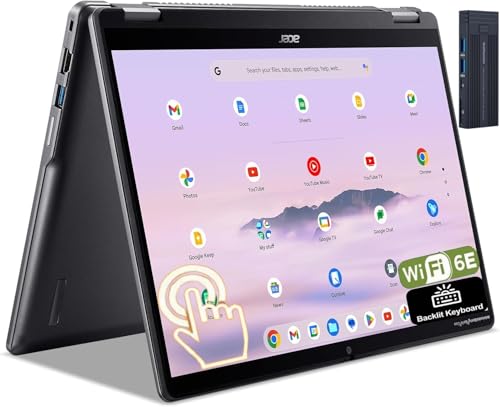
4. Acer Chromebook Plus Spin 514 — Best Chromebook Overall
If you prefer Chrome OS over Windows, the Acer Chromebook Plus Spin 514 is the strongest convertible Chromebook you can buy under $400 in 2026. The Intel Core i5-1334U is a 10-core processor with a boost clock of 4.6 GHz and 12MB of Smart Cache, which makes this machine feel remarkably fast for a Chromebook. Chrome OS is inherently lighter than Windows, so that i5 power translates into near-instant app launches, buttery-smooth scrolling through heavy web pages, and snappy multitasking with split-screen Android apps.
The 14-inch WUXGA (1920 x 1200) IPS touchscreen is bright and crisp, with accurate colors that make it a pleasure to use for both work and entertainment. Acer includes 512GB of SSD storage, which is generous for a Chromebook where most users rely on cloud storage, along with 8GB of RAM and Wi-Fi 6E for the fastest wireless standard currently available. The backlit keyboard is well-spaced for comfortable typing, and the webcam handles video calls without issue. The bundle also includes a 128GB docking station, which adds extra ports and storage when you are working at a desk.
Chrome OS receives automatic updates, runs Android apps from the Google Play Store, and boots in under ten seconds, making it an excellent choice for users who live primarily in a web browser. The trade-off is that you cannot run traditional Windows desktop software, so power users who rely on specific applications like full Adobe Photoshop or advanced Excel macros should look at the Windows options above instead. For students, families, and anyone whose workflow revolves around Google Workspace and web-based tools, this is the Chromebook to get. Parents shopping for homeschooling laptops will find the Spin 514 checks every box at a price that makes sense.
Pros:
- Intel Core i5-1334U delivers fast, responsive performance under Chrome OS
- Wi-Fi 6E support provides the latest and fastest wireless connectivity
- 512GB SSD is unusually generous for a Chromebook at this price
- Bundled 128GB docking station adds desk-mode versatility
Cons:
- Chrome OS cannot run traditional Windows desktop applications
- 8GB RAM is adequate but not upgradeable if your needs grow
5. ASUS Chromebook Flip CX5 — Best Large-Screen Chromebook
The ASUS Chromebook Flip CX5 is the only 15.6-inch convertible on this list, and that larger screen makes a noticeable difference for anyone who finds 14-inch displays cramped for side-by-side multitasking. The Full HD NanoEdge touchscreen offers wide viewing angles and accurate color reproduction, which means you get a comfortable workspace for reading documents, managing spreadsheets, or watching lectures in split-screen mode. This is a renewed (refurbished by Amazon) unit, and ASUS Chromebook Flip CX5 renewed models generally arrive in excellent cosmetic condition with full functionality verified.
The Intel Core i3-1115G4 is an older dual-core processor, but Chrome OS runs efficiently enough on it that you will not notice lag during everyday tasks like browsing, streaming, and document editing. The 128GB PCIe SSD is a step down from the Acer Spin 514's 512GB drive, but it is still significantly faster than the eMMC flash storage found in cheaper Chromebooks. The 8GB of LPDDR4 RAM handles multitasking reasonably well, and the backlit keyboard and Wi-Fi 6 support round out a solid feature set for the price.
The main reason to choose the CX5 over the Acer Spin 514 is that 15.6-inch display, because the extra screen real estate genuinely improves productivity when you are working with multiple windows or reading long documents. The trade-off is a larger, heavier chassis that is less convenient to use in tablet mode. If portability is your priority, the 14-inch options above are better suited, but if you want the biggest screen possible in a convertible Chromebook under $400, the CX5 is your answer.
Pros:
- 15.6-inch Full HD display is the largest convertible screen in this roundup
- 128GB PCIe SSD is faster than eMMC storage found in cheaper Chromebooks
- Backlit keyboard and Wi-Fi 6 add convenience features at a low price
Cons:
- Dual-core i3-1115G4 is noticeably slower than the i5 in the Acer Spin 514
- Renewed/refurbished unit may have minor cosmetic wear
- Larger chassis makes tablet mode less practical than 14-inch models
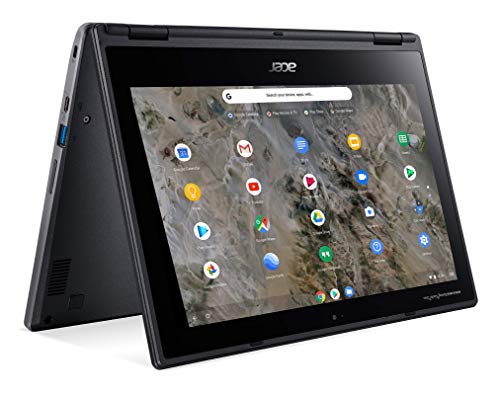
6. Acer Chromebook Spin 311 — Best Ultra-Budget Pick
The Acer Chromebook Spin 311 is the most affordable 2-in-1 on this list by a wide margin, and it makes no pretense about being anything other than a basic, functional convertible for light tasks. The AMD A6-9220C processor and 4GB of RAM are entry-level specs that will handle web browsing, email, Google Docs, and streaming video without much complaint, but they will struggle under heavy multitasking or demanding Android apps. The 32GB of eMMC flash storage is minimal, so you will need to lean heavily on Google Drive or other cloud storage for your files.
The 11.6-inch touchscreen has a 1366 x 768 resolution, which is noticeably less sharp than the Full HD panels on the other models in this roundup. Text can look slightly fuzzy on web pages with small fonts, and the smaller screen size means you will not want to use this machine for extended productivity sessions requiring side-by-side windows. That said, the compact size and light weight make it extremely portable, and the 360-degree hinge works smoothly in all four positions.
This is a renewed unit, and at its typical price point it serves as a capable secondary device, a kid's first laptop, or a travel companion where you do not want to risk a more expensive machine. You should not expect it to be your primary work computer, but for checking email on the couch, watching YouTube in bed, or taking basic notes in class, it gets the job done at a price that is hard to argue with.
Pros:
- Extremely affordable entry point for a 2-in-1 convertible
- Compact 11.6-inch size makes it one of the most portable options available
- Chrome OS runs adequately even on modest hardware
Cons:
- 4GB RAM and AMD A6 processor limit multitasking capabilities significantly
- 32GB eMMC storage fills up quickly and is much slower than an SSD
- 1366 x 768 display looks noticeably less sharp than Full HD competitors
7. Microsoft Surface Go 3 — Best for Ultra-Portability
The Microsoft Surface Go 3 takes a fundamentally different approach to the 2-in-1 concept compared to every other device on this list. Instead of a laptop with a 360-degree hinge, the Surface Go 3 is a tablet-first device with a built-in kickstand and an optional Type Cover keyboard that transforms it into a miniature laptop. At just 1.15 pounds, it is by far the lightest device in this roundup, and the 10.5-inch PixelSense display packs a 1920 x 1280 resolution at 216 pixels per inch, which means it is actually sharper per inch than any other screen here.
The Intel Core i3 processor and 8GB of RAM deliver adequate performance for light Windows 11 Pro tasks, and the 128GB SSD provides enough local storage for essential apps and documents. Windows 11 Pro means you get the full desktop operating system with BitLocker, Group Policy support, and compatibility with every Windows application, which is something the Chromebooks on this list cannot offer. The 10-point multitouch display supports the Surface Pen (sold separately) for drawing and handwriting, and the MicroSD card reader lets you expand storage affordably.
The critical caveat is that the Type Cover keyboard is sold separately, which adds to the total cost and can push the complete package above $400 depending on which cover you choose. Without the keyboard, you have a Windows tablet rather than a true 2-in-1 laptop. The smaller screen and less powerful processor also mean this is best suited for light productivity, note-taking, and media consumption rather than heavy multitasking. If you value portability above everything else and want a full Windows experience in the smallest possible package, the Surface Go 3 is uniquely positioned in this lineup. For users who also need a tablet with HDMI output, the Surface Go 3 supports video output through its USB-C port with the right adapter.
Pros:
- At 1.15 pounds, it is the lightest and most portable device on this list
- High-resolution 216 PPI PixelSense display is sharp and vibrant
- Full Windows 11 Pro with desktop app compatibility
- MicroSD card reader for affordable storage expansion
Cons:
- Type Cover keyboard is sold separately and adds significant cost
- 10.5-inch screen is too small for comfortable extended productivity work
- Older Intel Core i3 limits performance under demanding workloads
Key Features to Consider When Choosing a 2-in-1 Laptop Under $400
Processor and RAM: How Much Power Do You Actually Need?
The processor (CPU) and RAM are the two specs that determine how smoothly your laptop handles multitasking and demanding applications. For everyday tasks like web browsing, document editing, and video streaming, an Intel Core i3 or AMD Ryzen 3 with 8GB of RAM is perfectly adequate. If you routinely keep 20-plus browser tabs open while running a video call, you should aim for an Intel Core i5 or AMD Ryzen 5 with 16GB of RAM. The Dell Inspiron 14 is the standout on this list for raw multitasking power thanks to its 16GB DDR5 configuration, while the ASUS Vivobook Flip 14's Core Ultra 7 offers the most processing headroom. Chrome OS machines can get away with less powerful hardware because the operating system itself is lighter and more efficient than Windows.
Display Size and Quality: IPS, OLED, and Resolution
Your display is the single component you interact with every moment you use your laptop, so it deserves serious consideration. All of the Full HD (1920 x 1080 or 1920 x 1200) panels on this list deliver sharp, clear images suitable for work and entertainment. The ASUS Vivobook Flip 14's OLED panel is a clear step above the rest, offering deeper blacks, wider color coverage, and more vivid visuals than any IPS panel can produce. Screen size is largely a matter of personal preference and portability needs: 14-inch models hit the sweet spot between usability and portability, the 15.6-inch CX5 gives you more workspace at the cost of added weight, and the 10.5-inch Surface Go 3 prioritizes grab-and-go convenience over screen real estate.
Operating System: Windows vs. Chrome OS
This is the most fundamental decision you will make, and it comes down to what software you need to run. Windows 11 gives you access to the full universe of desktop applications, including Adobe Creative Suite, Microsoft Office desktop versions, and specialized professional software. Chrome OS is built around the Google Chrome browser and runs Android apps from the Play Store, but it cannot run traditional Windows programs. If your workflow lives entirely in a web browser and Google's app ecosystem, Chrome OS is faster, simpler, more secure, and often cheaper. If you need any specific Windows application that does not have a web or Android equivalent, Windows is the only choice.
Build Quality, Battery Life, and Connectivity
A 2-in-1 laptop endures more physical stress than a traditional clamshell because the hinge flexes through 360 degrees of rotation and the screen gets touched constantly. Look for hinges that feel firm at every angle rather than loose or wobbly, and check that the chassis does not flex excessively when you press on the keyboard deck. Battery life in this price range typically falls between five and nine hours depending on the operating system, display type, and processor efficiency. For connectivity, prioritize Wi-Fi 6 or Wi-Fi 6E at minimum in 2026, and consider Thunderbolt 4 if you plan to connect external displays or high-speed storage devices. A fingerprint reader or IR camera for Windows Hello adds a layer of convenience and security that makes daily use noticeably smoother.
Frequently Asked Questions
Are 2-in-1 laptops under $400 good enough for college students in 2026?
Yes, a 2-in-1 laptop under $400 handles college coursework comfortably as long as you match the specs to your major's requirements. Models with an Intel Core i5, 8GB or more of RAM, and at least 256GB of SSD storage will run research browsers, word processors, presentation software, and video conferencing apps without issue. The touchscreen and tablet mode are particularly useful for handwriting notes in lectures with a stylus, and the convertible form factor eliminates the need to carry a separate tablet.
What is the difference between a 2-in-1 laptop and a regular laptop?
A 2-in-1 laptop has a hinge that rotates 360 degrees, allowing you to fold the screen all the way back so the device functions as a tablet. You can also position it in tent mode, where the screen faces you and the keyboard sits on the table face-down, which is great for watching videos or following recipes. A regular clamshell laptop only opens to about 135 degrees. The trade-off is that 2-in-1 models are sometimes slightly thicker or heavier than clamshell equivalents to accommodate the stronger hinge mechanism.
Can I use a stylus with all of these 2-in-1 laptops?
Most 2-in-1 laptops with touchscreens support basic capacitive styluses (the rubber-tipped kind), but active stylus support with pressure sensitivity varies by model. The Lenovo IdeaPad Flex 5i includes a stylus in the box, and the Microsoft Surface Go 3 supports the Surface Pen (sold separately) with full pressure sensitivity and tilt detection. The ASUS Vivobook Flip 14 supports ASUS Pen input as well, while the Chromebook models generally work with USI (Universal Stylus Initiative) compatible pens.
Should I buy a Windows 2-in-1 or a Chromebook 2-in-1?
Choose a Windows 2-in-1 if you need to run desktop applications like Microsoft Office's full desktop version, Adobe software, or any specialized professional program. Choose a Chromebook 2-in-1 if your work happens primarily in a web browser and you use Google Docs, Sheets, and Slides, or web-based tools. Chromebooks boot faster, require less maintenance, receive automatic security updates, and tend to deliver longer battery life because the operating system is lighter. Windows machines offer more flexibility and software compatibility at the cost of more frequent updates and higher system resource usage.
Is 8GB of RAM enough for a 2-in-1 laptop in 2026?
For most users, 8GB of RAM is sufficient for web browsing with a reasonable number of tabs, document editing, video streaming, and video calls. You will start hitting the limits of 8GB if you routinely keep more than 25 browser tabs open while running additional applications, or if you work with large spreadsheets and presentations simultaneously. If heavy multitasking is part of your daily routine, the Dell Inspiron 14 with 16GB of DDR5 RAM is the better choice on this list, because RAM in budget laptops is almost always soldered and cannot be upgraded after purchase.
How long do budget 2-in-1 laptops typically last before needing replacement?
A well-maintained budget 2-in-1 laptop typically lasts three to five years before performance degradation, battery wear, or software requirements make replacement worthwhile. Chromebooks have a defined auto-update expiration date (usually six to eight years from the platform's release) after which they stop receiving security updates, so check Google's official update schedule for the specific model you are considering. Windows laptops continue receiving updates indefinitely, though older hardware may struggle with newer versions of the operating system over time. Keeping your SSD from filling past 80 percent capacity and avoiding extreme heat will help extend the lifespan of any laptop.
Buy on Walmart
- Lenovo IdeaPad Flex 5i 14" FHD(1920 x 1200) IPS Touchscreen — Walmart Link
- Dell Inspiron 14 2-in-1 Laptop for 2026 Business, Lifetime O — Walmart Link
- ASUS Vivobook Flip 14 2-in-1 Laptop: 14" OLED Touchscreen, I — Walmart Link
- Acer Chromebook Plus Spin 514 2-in-1 14" WUXGA Touchscreen I — Walmart Link
- ASUS Chromebook Flip CX5, 15.6" Touchscreen Full HD NanoEdge — Walmart Link
- Acer Chromebook Spin 311 R721T-62ZQ 11.6" Touchscreen 2 in 1 — Walmart Link
- Microsoft Surface Go 3-10.5" Touch-Screen - Intel Core i3-8G — Walmart Link
Buy on eBay
- Lenovo IdeaPad Flex 5i 14" FHD(1920 x 1200) IPS Touchscreen — eBay Link
- Dell Inspiron 14 2-in-1 Laptop for 2026 Business, Lifetime O — eBay Link
- ASUS Vivobook Flip 14 2-in-1 Laptop: 14" OLED Touchscreen, I — eBay Link
- Acer Chromebook Plus Spin 514 2-in-1 14" WUXGA Touchscreen I — eBay Link
- ASUS Chromebook Flip CX5, 15.6" Touchscreen Full HD NanoEdge — eBay Link
- Acer Chromebook Spin 311 R721T-62ZQ 11.6" Touchscreen 2 in 1 — eBay Link
- Microsoft Surface Go 3-10.5" Touch-Screen - Intel Core i3-8G — eBay Link
Final Thoughts
Every laptop on this list proves that $400 buys a genuinely capable 2-in-1 in 2026, but the right pick depends entirely on what you value most. If you want the best all-around Windows convertible, grab the Lenovo IdeaPad Flex 5i; if multitasking power and 16GB of RAM matter most, go with the Dell Inspiron 14; and if screen quality is your top priority, the ASUS Vivobook Flip 14's OLED panel is unmatched at this price. Click through to Amazon using the links above, compare current prices, and lock in your pick before inventory shifts — these budget-friendly models tend to sell out fast when deals hit.
 |
 |
 |
 |

About Priya Anand
Priya Anand covers laptops, tablets, and mobile computing for Ceedo. She holds a bachelor degree in computer science from the University of Texas at Austin and has spent the last nine years writing reviews and buying guides for consumer electronics publications. Before joining Ceedo, Priya worked as a product analyst at a major retailer where she helped curate the laptop and tablet category. She has personally benchmarked more than 200 portable computers and is particularly interested in battery longevity, repairability, and the trade-offs between Windows, macOS, ChromeOS, and Android tablets. Outside of work, she runs a small Etsy shop selling laptop sleeves she sews herself.