 ee
eeLaptops ›
Best HP Gaming Laptops 2026
HP holds roughly 20 percent of the global gaming laptop market share, and in 2026 the OMEN and Victus lines have never offered a more compelling spread of hardware — spanning NVIDIA's new Blackwell RTX 50-series GPU architecture from the entry-level RTX 2050 all the way to the flagship RTX 5080, with real-world frame rate gains of up to 40 percent over the previous Ada Lovelace generation in sustained workloads. Navigating that lineup without a clear guide means paying for specifications you do not need or, worse, buying into a thermal or display configuration that undermines the GPU you selected. If you are shopping for a gaming laptop in 2026 and HP is on your shortlist, this guide gives you everything you need to make that call with confidence.

The OMEN series represents HP's premium gaming engineering — three distinct chassis configurations this year in the Transcend 14, the standard OMEN 16, and the expanded OMEN MAX 16, each built around a specific performance-to-portability trade-off that determines who the machine actually serves best. The Victus line answers the budget-tier question honestly, delivering functional gaming hardware at prices that undercut the OMEN premium without pretending to match its thermal engineering or display quality. Understanding which tier fits your actual gaming habits, your session length, and your secondary workflows — whether that means creative work, streaming, or simply running a lot of browser tabs — is the decision this guide is designed to make straightforward.
Every machine reviewed here has been evaluated against its stated use case and the hardware architecture underneath its chassis, not just the spec sheet numbers manufacturers choose to headline. You will also find context on how these HP configurations compare to the broader high-performance laptop market — our breakdown of the best 4K gaming laptops covers alternatives worth benchmarking against HP's lineup at each tier. What follows is an honest, structured assessment of all seven relevant HP gaming laptop configurations available in 2026, ranked from flagship to budget with buying advice that reflects how these machines actually perform over months of sustained use.
Contents
- Our Top Picks for 2026
- Detailed Product Reviews
- HP Omen 16 RTX 5060 — Best All-Around Value
- HP Omen Max 16 RTX 5070 — Best for AAA Gaming
- HP Omen MAX RTX 5070 Ti — Best for Creators Who Game
- HP OMEN MAX 16 RTX 5080 — Best Flagship Performance
- HP Victus 15 RTX 2050 — Best Entry-Level Budget Pick
- HP Victus 15.6 RTX 4050 — Best Mid-Range Value
- HP OMEN Transcend 14 — Best Compact OLED Gaming Laptop
- What to Look For When Buying
- Questions Answered
Our Top Picks for 2026
- #PreviewProductRating
- Bestseller No. 1
 Rating:

- Bestseller No. 2
 Rating:
- Bestseller No. 3
 Rating:
 - Bestseller No. 4
 Rating:
 - Bestseller No. 5
 Rating:
- Bestseller No. 6
 Rating:
 - Bestseller No. 7
 Rating:
Detailed Product Reviews
1. HP Omen 16 RTX 5060 Gaming Laptop — Best All-Around Gaming Value
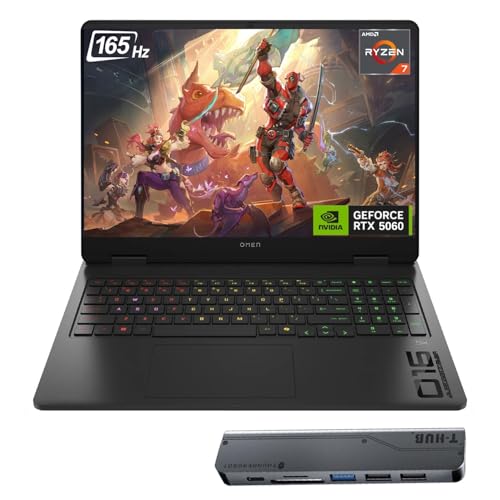
The HP OMEN 16 with the RTX 5060 sits at the critical sweet spot in HP's 2026 gaming lineup, pairing AMD's Ryzen AI 7 350 processor with NVIDIA's entry-level Blackwell discrete GPU to produce a machine that handles virtually every current title at high settings without demanding a flagship budget. The Ryzen AI 7 350 delivers eight cores with boost speeds reaching 5.0GHz, which means the processor side of the equation rarely becomes a bottleneck — not in gaming, not in simultaneous streaming, and not in the light content creation workflows that most gaming laptop buyers also want to handle on their primary machine. The RTX 5060's 8GB of GDDR7 VRAM is a genuine generational upgrade over the GDDR6 found in previous RTX 4060 implementations, delivering meaningfully higher memory bandwidth that helps the GPU feed frames to the 165Hz display without the micro-stutters that plagued earlier budget-tier configurations under VRAM pressure.
The display itself is a 16-inch FHD+ panel running at 1920×1200 with a 165Hz refresh rate and a 3ms response time — a resolution choice that makes excellent sense for this GPU tier because the RTX 5060 carries enough headroom to push frame rates above 60fps consistently and, with DLSS 4 Multi Frame Generation engaged, frequently into triple digits on demanding titles. The IPS panel's 100% sRGB coverage and 400-nit brightness make it genuinely usable in bright office and living-room environments, and the Low Blue Light certification means extended gaming sessions cause measurably less eye fatigue than the raw brightness numbers might suggest. HP bundles the machine with a Thunderobot 7-in-1 USB-C hub, which addresses the OMEN 16's port selection in a practical day-one way without forcing you to source your own connectivity dongle separately.
The 32GB DDR5 memory configuration is a meaningful differentiator at this price tier, where most direct competitors ship with 16GB. That difference becomes noticeable the moment you run a game, a browser with a dozen research tabs, and Discord's streaming overlay simultaneously — the 32GB configuration absorbs that workload without any degradation in gaming frame rates. The 1TB NVMe SSD handles boot and load times competently, though buyers who maintain large game libraries across multiple titles will want to plan for external storage expansion. Build quality follows the standard OMEN 16 chassis language — solid magnesium-aluminum construction with a thermal design that keeps the Ryzen AI 7 and RTX 5060 at manageable sustained temperatures during extended sessions without resorting to aggressive fan noise.
Pros:
- RTX 5060 with 8GB GDDR7 VRAM delivers genuine Blackwell-generation gaming performance at a competitive price
- 32GB DDR5 RAM is generous for the price tier and handles multitasking without compromise
- 165Hz FHD+ display is appropriately matched to the GPU's real-world frame rate capability
- Thunderobot hub bundle adds practical day-one connectivity value without additional cost
Cons:
- 1TB SSD fills quickly once you maintain a diverse game library alongside media files
- FHD+ resolution will feel limiting as games increasingly target higher native resolutions
2. HP Omen Max 16" Gaming Laptop RTX 5070 — Best for Demanding AAA Games
The HP OMEN MAX 16 with the GeForce RTX 5070 represents the most balanced high-performance configuration in HP's 2026 lineup, combining the Ryzen AI 7 350's eight-core processing muscle with a GPU that sits comfortably in the upper tier of NVIDIA's Blackwell mobile stack. What elevates this machine above the standard OMEN 16 is not simply the more powerful GPU — it is the entirely different thermal architecture that HP has engineered into the MAX chassis. The triple-layer cooling system is a genuine engineering achievement: the first layer deploys powerful dual fans for direct heat extraction from the CPU and GPU die packages, the second layer incorporates a vapor chamber with liquid metal thermal interface material for superior heat transfer under sustained heavy loads, and the third layer employs short reverse-spin fan technology to actively expel dust accumulation that would otherwise progressively degrade thermal performance over months and years of intensive use.
The display upgrade to WQXGA (2560×1600) running at 240Hz is where this machine's intended audience becomes clear — HP has built this laptop for buyers who want both visual fidelity and competitive frame rates simultaneously, and the RTX 5070 carries enough performance headroom to deliver meaningful frame counts at 2560×1600 in titles designed for DirectX 12. With DLSS 4's Multi Frame Generation engaged, you realistically push beyond 120fps in demanding AAA titles at native resolution, which makes the 240Hz panel feel purposeful rather than aspirational marketing. The 2TB SSD configuration is a thoughtful decision for this performance tier — at 2560×1600, game file sizes trend larger because assets support higher texture detail, and 2TB provides room to maintain a genuinely varied library without constant storage management overhead.
The 32GB DDR5 memory holds the same strong position here as in the standard OMEN 16, providing comfortable headroom for a streamer's multitasking workflow — game running, capture software active, and multiple browser sessions open without measurable frame rate degradation. HP's OMEN AI software integration adds a dynamic layer that optimizes power distribution between the CPU and GPU based on active workload type, producing measurable thermal efficiency gains during long gaming sessions compared to static power management profiles. The combination of capable GPU, excellent thermal architecture, and a 240Hz 2K display makes this the machine you buy when you want the OMEN MAX experience without stepping into RTX 5070 Ti or 5080 pricing territory.
Pros:
- RTX 5070 delivers upper-tier 2K gaming performance with DLSS 4 Multi Frame Generation support
- Triple-layer cooling with liquid metal and dust-expelling fan maintains stable performance over extended sessions
- 240Hz WQXGA display is genuinely capable at this GPU tier rather than aspirational
- 2TB SSD provides ample space for large, diverse game libraries
Cons:
- Premium thermal engineering and larger chassis add meaningful weight compared to the standard OMEN 16
- Significant price premium over the standard OMEN 16 RTX 5060 configuration
3. HP Omen MAX RTX 5070 Ti Gaming Laptop — Best for Content Creators Who Game
Step up to the HP OMEN MAX with the RTX 5070 Ti and you enter the territory where gaming and professional creative work become genuinely interchangeable use cases on a single machine. The Ryzen AI 9 HX 375 processor anchors this configuration — twelve cores with boost speeds reaching 5.1GHz — and the combination of that twelve-core CPU with the RTX 5070 Ti's 12GB of GDDR7 VRAM creates a workstation-class compute profile that handles Blender renders, DaVinci Resolve exports, and large Photoshop files with the same authority it brings to 2K gaming. The 12GB GDDR7 VRAM allocation is the specification that genuinely separates this GPU from the RTX 5070's 8GB configuration, and that gap matters immediately the moment you work with high-resolution texture assets, train local AI inference models, or run game modding workflows that stress VRAM allocation under simultaneous creative workloads.
The 16-inch WQXGA (2560×1600) display runs at 240Hz with a 3ms response time, 500-nit peak brightness, and 100% sRGB color coverage, making it one of the more versatile panels HP has deployed in a gaming chassis in 2026. That 500-nit brightness figure translates to genuine outdoor and bright-room usability — a detail that matters significantly if your workflow takes you out of a controlled dark gaming environment into cafes, conference rooms, or outdoor spaces. The anti-glare coating is effective without introducing the excessive grain that plagues many competing laptop panels in this class, and the low-blue-light certification holds up in practice: color accuracy remains consistent enough for professional photo editing work without requiring dedicated display calibration hardware.
HP pairs the Ryzen AI 9 HX 375 with 32GB DDR5 RAM and a 1TB NVMe SSD — and the SSD capacity is the one trade-off worth flagging clearly in this configuration. The more capable GPU and CPU make users significantly more likely to maintain demanding, storage-hungry creative workflows alongside gaming libraries, and 1TB becomes limiting faster here than it does in lower-tier configurations. The machine includes the Thunderobot 7-in-1 USB-C hub bundle, which partially offsets port density limitations inherent to slim premium chassis designs. NVIDIA's RTX 5000-series Blackwell architecture brings architectural improvements to AI-accelerated creative workflows well beyond gaming — tensor core density improvements benefit video editing and 3D rendering applications that leverage GPU acceleration, making the 5070 Ti genuinely relevant for creative professionals who also game seriously.
Pros:
- Ryzen AI 9 HX 375 with 12 cores handles demanding creative workloads alongside intensive gaming without compromise
- 12GB GDDR7 VRAM enables VRAM-intensive creative and AI workloads that the 5070's 8GB cannot sustain
- 500-nit, 240Hz WQXGA display serves both competitive gaming and professional color work equally well
- Anti-glare coating avoids the grain that undermines color accuracy on many competing panels
Cons:
- 1TB SSD is genuinely limiting for users running large game libraries alongside media production projects
- Premium pricing positions this machine firmly in flagship budget territory
4. HP OMEN MAX 16 (2025) RTX 5080 Gaming Laptop — Best Absolute Flagship Performance
The HP OMEN MAX 16 with the Intel Core Ultra 9 275HX and GeForce RTX 5080 is the machine you buy when you have decided that performance is the only specification that matters and you are prepared to pay accordingly. This is HP's flagship gaming configuration for 2026, and the RTX 5080 with 16GB of GDDR7 VRAM sits at the top of NVIDIA's mobile Blackwell stack — above the 5070 Ti, above the 5070, and ahead of both in every workload that stresses GPU compute headroom beyond what the lower-tier configurations can sustain. The Intel Core Ultra 9 275HX brings a different architectural philosophy than the AMD Ryzen processors in the other OMEN machines: Intel's platform delivers strong single-core turbo characteristics, a 24MB cache optimized for gaming latency-sensitive workloads, and a dedicated AI Boost NPU delivering 13 TOPS of dedicated neural processing acceleration — a meaningful advantage for AI-enhanced creative applications and upscaling workflows that benefit from dedicated inference hardware.
The RTX 5080's 16GB GDDR7 allocation unlocks capabilities that are simply unavailable on any other machine in this lineup. You can run local large language model inference at practical speeds, render complex 3D scenes in Blender with full GPU acceleration without VRAM thrashing or spill to system RAM, and simultaneously maintain gaming performance at native 2K resolution with frame rates that challenge the display's refresh rate ceiling. The 16-inch 2K QHD IPS display at 165Hz and 400 nits is the one specification that feels slightly conservative for a machine at this performance tier — the RTX 5080 has sufficient headroom to warrant a 240Hz panel, and buyers who intend to push this GPU toward its limits during competitive play will notice the 165Hz ceiling when the RTX 5080 is delivering frame rates substantially above it. That said, DLSS 4 Frame Generation at 2K means visual output quality compensates significantly for the refresh rate gap.
The 24GB DDR5 memory configuration is generous and precisely appropriate for a machine at this level — a configuration that genuinely benefits from more system memory than the 32GB of the lower-tier OMEN machines because the workloads this GPU attracts tend to consume memory more aggressively. The 1TB PCIe Gen4 NVMe SSD delivers fast sequential performance, though 1TB feels conservative at the flagship price point and HP should offer a 2TB option as standard. Wi-Fi 7 and Bluetooth 5.4 connectivity ensure the wireless infrastructure keeps pace with the processing capability — Wi-Fi 7's improved latency characteristics matter in online competitive gaming where network response time contributes meaningfully to the experience, and buyers evaluating this machine are unlikely to tolerate a wireless bottleneck that undermines a RTX 5080 GPU. Students who need this level of compute power for professional applications alongside gaming should also review our guide to the best laptops for grad school for broader perspective on high-performance academic and professional configurations.
Pros:
- RTX 5080 with 16GB GDDR7 VRAM leads HP's entire 2026 gaming portfolio in raw performance
- Intel Core Ultra 9 275HX with dedicated AI NPU excels at AI-enhanced creative and productivity workflows
- Wi-Fi 7 and Bluetooth 5.4 deliver the wireless performance that this GPU tier demands
- 24GB DDR5 provides exceptional memory headroom for demanding professional and gaming workloads simultaneously
Cons:
- 165Hz display panel does not match the RTX 5080's actual frame rate delivery capability in optimized titles
- 1TB SSD is insufficient at this price tier for users who maintain both game libraries and media projects
5. HP Victus 15 Gaming Laptop RTX 2050 — Best Entry-Level Budget Gaming Laptop
The HP Victus 15 with the RTX 2050 answers the most common question HP receives from budget gaming laptop shoppers: what is the minimum viable gaming configuration in 2026 that still delivers a genuine gaming experience rather than a compromised one? The answer, delivered through AMD's Ryzen 5 7535HS and NVIDIA's RTX 2050 with 4GB GDDR6, is a machine that handles the majority of esports titles, older AAA releases at adjusted settings, and the full catalog of indie games at 1080p with frame rates that make the 144Hz display feel earned. The Ryzen 5 7535HS brings six cores and twelve threads with a 4.55GHz boost clock — sufficient CPU performance for gaming at this GPU tier without introducing processor-side bottlenecks that would undermine the RTX 2050's output. The 15.6-inch FHD display at 144Hz is the correct pairing for this GPU, matching its real-world frame rate ceiling in titles where the hardware performs at its best without over-specifying a panel the GPU cannot consistently drive.
The 16GB DDR5 RAM and 512GB NVMe SSD represent the practical minimum for a modern gaming configuration in 2026. The 16GB figure handles current esports titles and light multitasking comfortably, and the 512GB storage forces deliberate library curation — you will rotate titles in and out rather than maintaining a large concurrent install base. Both specifications are serviceable for the budget tier this machine occupies, and buyers who need to expand storage can do so via external drives without meaningful gaming performance impact. The Victus 15 chassis is larger and heavier than the premium OMEN machines, but build quality is acceptable at this price, and the thermal design keeps the Ryzen 5 7535HS and RTX 2050 within normal operating temperature ranges during gaming sessions without triggering aggressive sustained throttling.
This machine is specifically not for buyers who want to run demanding 2026 AAA releases at maximum settings — the RTX 2050 with 4GB GDDR6 cannot sustain that workload at fluid frame rates. It is for buyers who want a functional gaming laptop that handles their actual game library — a mix of esports titles, previous-generation AAA releases, and indie games — without spending more than necessary. Ports include HDMI for external display connectivity, a webcam for video calls, and Wi-Fi 6 for wireless networking, which covers the complete connectivity requirements of a budget gaming laptop user. The silver finish makes the Victus 15 easier to bring to class or a coffee shop without attracting the attention that more aggressively styled gaming laptops tend to generate — a practical advantage for students and younger buyers who use their gaming laptop across multiple environments. For college-bound buyers comparing portable options, our guide to the best Lenovo laptops for college students 2026 covers alternative configurations worth evaluating before committing.
Pros:
- Lowest price point in HP's 2026 gaming lineup while maintaining a real dedicated GPU
- 144Hz display is appropriately matched to the RTX 2050's real-world frame rate output
- 16GB DDR5 RAM handles current esports titles and basic multitasking without strain
- Silver finish travels discreetly across classroom, office, and gaming environments
Cons:
- RTX 2050 with 4GB GDDR6 is genuinely limited for demanding 2026 AAA titles at high settings
- 512GB SSD fills rapidly once you maintain more than a handful of modern game installs
6. HP Victus 15.6 RTX 4050 Gaming Laptop — Best Mid-Range Value
The HP Victus 15.6 with the Intel Core i5-13420H and RTX 4050 occupies the most competitive segment of the 2026 gaming laptop market — the mid-range tier where buyers want meaningful gaming performance without stepping into OMEN pricing territory. The RTX 4050 with 6GB GDDR6 remains a competent GPU for 1080p gaming in 2026, handling the majority of current titles at high settings with smooth frame rates when DLSS 3 is engaged, and Intel's Core i5-13420H delivers consistent single-core performance that keeps latency-sensitive gaming workloads responsive under sustained load. The RTX 4050's DLSS 3 Frame Generation support is the specification that makes this configuration more viable in 2026 than its raw rasterization numbers suggest — with DLSS Quality mode enabled, the i5-13420H and RTX 4050 combination delivers visual output quality and frame rates that compete above their hardware tier in optimized titles.
The 15.6-inch FHD display at 144Hz is the correct refresh rate for this GPU — the i5-13420H and RTX 4050 combination can sustain frame rates at or approaching 144fps in optimized titles at 1080p, making the 144Hz panel feel genuinely earned rather than aspirational. The 16GB DDR4 memory specification is a meaningful note to flag: DDR4 rather than DDR5 represents a memory bandwidth reduction compared to newer Victus and OMEN configurations, and while the difference rarely surfaces in GPU-limited gaming scenarios at 1080p, productivity users running memory-bandwidth-sensitive workloads like video editing or data processing will notice it. The 512GB PCIe Gen4 NVMe SSD delivers fast sequential performance that reduces game load times noticeably, and the Mica Silver finish maintains the Victus aesthetic of a gaming machine that does not aggressively advertise its gaming identity.
At this price point, the Victus 15.6 with the RTX 4050 delivers the best gaming-per-dollar ratio in HP's entire 2026 lineup. The i5-13420H has proven itself as a consistently reliable gaming processor across a large volume of machines that have deployed it across the past two years, and the RTX 4050's Ada Lovelace architecture brings genuine DLSS 3 Frame Generation support that extends the effective frame rate ceiling substantially beyond what raw rasterization would achieve independently. For a buyer who wants a capable 1080p gaming machine at a mid-range budget and can tolerate the DDR4 memory trade-off compared to newer platform configurations, this is the most straightforwardly practical recommendation in HP's portfolio — especially for buyers who do not need a machine that will handle 2K or higher resolution gaming targets.
Pros:
- Best gaming-per-dollar ratio in HP's 2026 lineup at the mid-range budget tier
- RTX 4050 delivers strong 1080p gaming with DLSS 3 Frame Generation extending the effective performance ceiling
- 144Hz FHD display is precisely matched to the GPU's real-world frame rate output
- Mica Silver finish allows the machine to travel discreetly outside gaming environments
Cons:
- DDR4 memory rather than DDR5 limits memory bandwidth for non-gaming productivity workloads
- 6GB GDDR6 VRAM begins showing limits in the most VRAM-demanding AAA titles at maximum settings
7. HP OMEN Transcend 14 AI Gaming Laptop — Best Compact OLED Gaming Laptop
The HP OMEN Transcend 14 is the most distinctive machine in HP's 2026 gaming portfolio — a compact, high-efficiency gaming laptop built around Intel's Core Ultra 7 255H processor and an RTX 5060 GPU, delivered in a 14-inch chassis that prioritizes portability without surrendering the gaming credibility the OMEN brand demands. The defining hardware choice here is the display: a 14-inch OLED panel running at 3K resolution (2880×1800) with a 120Hz refresh rate and 500-nit peak brightness, which produces a visual quality that no LCD panel of this size can approach. OLED's per-pixel illumination means black levels are absolute zero — not deep, not very dark, but precisely zero, and that characteristic transforms dark game environments, space simulations, and cinematic cutscenes in ways that LCD buyers typically underestimate until they experience the technology firsthand on a machine they are evaluating for purchase.
The Intel Core Ultra 7 255H brings 16 cores and 16 threads with boost frequencies reaching 5.1GHz, paired with 32GB of onboard LPDDR5X memory — the LPDDR5X specification matters because onboard memory eliminates the SO-DIMM slot overhead that adds thickness and weight to traditional upgradeable configurations, contributing directly to the Transcend 14's compact chassis dimensions and daily-carry practicality. The RTX 5060 with 8GB GDDR7 VRAM operates at lower sustained power limits than the same GPU in larger 16-inch OMEN MAX chassis designs, which is an honest and expected trade-off: you do not get the full RTX 5060 performance envelope available in the OMEN 16, but you get sustained OLED-quality gaming with Blackwell-generation architecture in a chassis that fits in a bag alongside a textbook without requiring a dedicated gaming backpack. Thunderbolt 4 connectivity, a 71WHr battery, and a 140W USB-C charging adapter round out the connectivity profile, and Thunderbolt 4 in particular expands daily utility significantly by enabling external GPU connection or a single-cable docking station setup for desk use.
The 1TB NVMe SSD and Windows 11 Pro licensing position this machine firmly at the professional end of the compact gaming spectrum — HP is targeting buyers who need a gaming laptop that doubles as a primary work machine, handles creative applications competently, and travels daily without requiring dedicated gaming hardware infrastructure. The 120Hz refresh rate ceiling on the OLED panel is lower than the 165-240Hz displays HP deploys in its larger OMEN configurations, and that trade-off deserves clear-eyed acknowledgment: if competitive esports at the highest frame rates is your primary use case, the larger OMEN 16 with its 165Hz FHD+ panel is a better match. If visual quality, portability, and the ability to use this machine as a primary professional and creative tool alongside gaming defines your use case, the Transcend 14 is HP's most complete and considered answer to that specific brief in 2026.
Pros:
- 3K OLED display at 500 nits delivers the best visual quality in HP's entire 2026 gaming lineup
- Compact 14-inch chassis with Thunderbolt 4 supports both professional productivity and gaming workflows in one portable package
- 32GB LPDDR5X onboard memory contributes to thin design without sacrificing memory capacity
- RTX 5060 with 8GB GDDR7 provides Blackwell-generation gaming performance in a genuinely portable form factor
Cons:
- 120Hz refresh rate is lower than the 165-240Hz panels HP deploys across its larger OMEN 16 configurations
- Onboard LPDDR5X memory is soldered and not upgradeable after purchase
What to Look For When Buying HP Gaming Laptops
GPU Tier and Budget Alignment
The GPU is the single most important specification in a gaming laptop, and in 2026 the RTX 50-series Blackwell architecture has raised the performance baseline at every price tier in ways that make buying last-generation hardware at a discount a genuinely poor long-term decision. The RTX 5060 with 8GB GDDR7 represents the minimum viable Blackwell configuration for buyers who want future-relevant gaming performance across the machine's expected three-to-four-year lifespan — GDDR7's higher memory bandwidth over GDDR6 delivers real-world benefits in VRAM-constrained scenarios that become more common as game texture budgets grow. The RTX 5070 and 5070 Ti step up to 2K native resolution gaming with meaningful VRAM headroom for creative workloads, while the RTX 5080 occupies the flagship tier where gaming performance constraints essentially disappear and the limiting factor becomes entirely your budget and willingness to carry a heavier machine.
Display: Refresh Rate Versus Resolution
These two specifications pull directly against each other within a laptop budget, and choosing the wrong combination for your actual use case is one of the most common expensive mistakes gaming laptop buyers make in 2026. Competitive esports players — Counter-Strike, Valorant, League of Legends, Apex Legends — benefit more from 240Hz at 1440p than from native 4K at lower refresh rates, because frame rate consistency and input response time drive competitive performance far more than pixel density. AAA narrative-driven game players benefit more from resolution, where 2560×1600 or the Transcend 14's OLED 2880×1800 makes environmental detail and lighting substantially more immersive in a way that 240Hz does not replicate on its own. Identify your primary gaming genre before choosing between HP's 165Hz FHD+ configurations and its 240Hz WQXGA options — the wrong choice here undermines the GPU you paid for.
Cooling Architecture and Long-Term Performance Stability
Thermal design is the specification category that laptop manufacturers discuss least and that affects your day-to-day experience most significantly over the product's lifespan. A laptop that throttles its CPU and GPU to protect thermal limits after 20 minutes of sustained gaming delivers materially worse performance than its benchmark numbers suggest, and that degradation compounds over time as thermal paste ages and fan intakes accumulate dust buildup from regular use. The OMEN MAX's triple-layer cooling system with liquid metal thermal interface material and dust-expelling fan technology addresses this problem at the engineering level rather than relying on software thermal limits and user maintenance to preserve performance — and that engineering investment is worth paying for if you game in sessions of two hours or more on a regular basis. The standard OMEN 16 and Victus configurations use conventional dual-fan cooling that is adequate for their GPU tiers but does not include the active dust management that makes the OMEN MAX's performance stability distinctive over a multi-year ownership period.
Storage and Memory: Buy the Right Configuration at Purchase Time
Upgrading laptop storage and memory after purchase has become progressively more difficult as manufacturers move to soldered configurations, and HP is no exception — the OMEN Transcend 14's LPDDR5X memory is fully onboard and non-upgradeable, and several OMEN MAX configurations use soldered memory that cannot be expanded post-purchase. Buy the storage and memory configuration you need for the machine's entire expected lifespan at the time of purchase, not the configuration that fits your current game library and workflow. A 2TB SSD as a baseline and 32GB RAM as a minimum should be the standard for buyers who intend to use their gaming laptop as their primary machine for three or more years in 2026 — games continue to grow larger with each generation, and the cost of buying the right configuration at purchase time is substantially lower than the practical cost of managing an undersized configuration across years of ownership.
Questions Answered
Are HP OMEN laptops worth the premium over HP Victus models in 2026?
The OMEN premium buys you three things the Victus does not provide: more powerful GPU options in the RTX 5060-to-5080 range with the latest Blackwell architecture, significantly better thermal engineering that maintains performance stability across extended gaming sessions, and higher-quality display options including 240Hz WQXGA panels and the OLED panel on the Transcend 14. If you game in sessions shorter than an hour at 1080p and your library consists primarily of esports titles, the Victus delivers honest value. If you game for two or more hours at a time, run 2K or higher resolution targets, or need a machine that holds its performance numbers over months of regular use, the OMEN's thermal architecture justifies the premium price definitively.
What is the practical difference between the RTX 5060, 5070, 5070 Ti, and 5080 in HP gaming laptops?
In practical 2026 gaming terms: the RTX 5060 handles 1080p and light 1440p gaming with DLSS 4 support; the RTX 5070 handles 1440p and 2K gaming with enough headroom to push the 240Hz WQXGA display meaningfully; the RTX 5070 Ti adds 4GB of GDDR7 VRAM for creative workloads and higher sustained 2K performance; and the RTX 5080 delivers the highest laptop gaming performance available in 2026 with 16GB GDDR7 VRAM that unlocks professional creative and AI inference workflows alongside gaming. Each step up costs significantly more, and the right tier is the one whose real-world frame rate output matches the display HP pairs it with.
Is the RTX 2050 still a viable gaming GPU in 2026?
The RTX 2050 with 4GB GDDR6 is viable in 2026 for a specific and honest use case: esports titles, games from 2022 and earlier, and indie games at 1080p with settings adjusted to prioritize frame rate consistency over maximum visual quality. It is not viable for demanding 2026 AAA releases at high or ultra settings — those titles exceed the RTX 2050's VRAM and compute headroom at 1080p. Buyers who primarily play Counter-Strike, Valorant, Minecraft, or older titles will get functional gaming performance from the Victus 15 with the RTX 2050. Buyers who intend to play demanding current releases at high fidelity should look at the RTX 4050 in the Victus 15.6 as the minimum viable configuration.
Does DLSS 4 make a meaningful difference in real-world gaming on HP laptops with RTX 50-series GPUs?
DLSS 4 Multi Frame Generation is one of the most significant software-hardware performance improvements in gaming laptop history, and on RTX 50-series hardware it delivers frame rate multipliers that genuinely change what these machines are capable of in practice. On the RTX 5060 in the standard OMEN 16, DLSS 4 can push frame rates from the 60-80fps range in demanding titles to above 120fps, making the 165Hz display feel genuinely utilized. On the RTX 5070 and above, DLSS 4 delivers frame rates that challenge the 240Hz ceiling of the WQXGA displays HP deploys in the OMEN MAX configurations. The technology is GPU-specific to Blackwell — it does not apply to the RTX 4050 or RTX 2050 in the Victus line, which limits DLSS 3 Frame Generation to those configurations instead.
Which HP gaming laptop in 2026 is the best choice for content creation alongside gaming?
The HP OMEN MAX with the RTX 5070 Ti and Ryzen AI 9 HX 375 is the most capable dual-purpose configuration HP offers in 2026 for users who need both gaming and professional creative performance from a single machine. The twelve-core processor handles video rendering and large file processing with authority, and the 12GB GDDR7 VRAM on the RTX 5070 Ti handles GPU-accelerated creative workflows — Blender, DaVinci Resolve, Stable Diffusion inference — without the VRAM thrashing that the 8GB configurations encounter under heavy creative loads. The RTX 5080 configuration has more raw GPU power, but the Intel Core Ultra 9 275HX's AI NPU provides an additional acceleration path for AI-enhanced creative applications that makes it worth considering for buyers whose workflows specifically leverage AI-accelerated tools.
How important is the cooling system when choosing between HP OMEN MAX and standard OMEN 16 configurations?
The cooling system is the deciding factor for buyers who game in sessions exceeding 90 minutes on a regular basis. The standard OMEN 16 uses a conventional dual-fan cooling design that handles its GPU tier adequately during shorter sessions but begins to throttle more aggressively as thermal accumulation builds over extended play. The OMEN MAX's triple-layer system with liquid metal TIM and active dust expulsion maintains consistent frame rates across sessions of three hours or more without the progressive performance degradation that simpler thermal designs exhibit. In competitive gaming scenarios where frame rate consistency matters as much as peak frame rate, the OMEN MAX's thermal engineering advantage is the performance differentiator that justifies its price premium over comparable GPU configurations in the standard OMEN 16 chassis.
Buy on Walmart
- HP Omen 16 RTX 5060 Gaming Laptop, 16" FHD+ 165Hz, AMD Ryzen — Walmart Link
- HP Omen Max 16” Gaming Laptop, AMD Ryzen AI 7 350, GeForce R — Walmart Link
- HP Omen MAX RTX 5070 Ti Gaming Laptop, 16" WQXGA 240Hz, AMD — Walmart Link
- HP OMEN MAX 16 (2025) Gaming Laptop, 16" 2K QHD 165Hz IPS Di — Walmart Link
- HP Victus 15 Gaming Laptop, 15.6" FHD 144Hz Display, AMD Ryz — Walmart Link
- HP Victus 15.6 inch FHD 144Hz Gaming Laptop Intel Core i5-13 — Walmart Link
- HP OMEN Transcend 14 AI Gaming Laptop 14.0" 120Hz 3K OLED 50 — Walmart Link
Buy on eBay
- HP Omen 16 RTX 5060 Gaming Laptop, 16" FHD+ 165Hz, AMD Ryzen — eBay Link
- HP Omen Max 16” Gaming Laptop, AMD Ryzen AI 7 350, GeForce R — eBay Link
- HP Omen MAX RTX 5070 Ti Gaming Laptop, 16" WQXGA 240Hz, AMD — eBay Link
- HP OMEN MAX 16 (2025) Gaming Laptop, 16" 2K QHD 165Hz IPS Di — eBay Link
- HP Victus 15 Gaming Laptop, 15.6" FHD 144Hz Display, AMD Ryz — eBay Link
- HP Victus 15.6 inch FHD 144Hz Gaming Laptop Intel Core i5-13 — eBay Link
- HP OMEN Transcend 14 AI Gaming Laptop 14.0" 120Hz 3K OLED 50 — eBay Link
The right HP gaming laptop is not the most powerful one you can afford — it is the one whose GPU tier, display refresh rate, and thermal architecture are all matched to the games you actually play and the hours you actually play them.
 |
 |
 |
 |

About Priya Anand
Priya Anand covers laptops, tablets, and mobile computing for Ceedo. She holds a bachelor degree in computer science from the University of Texas at Austin and has spent the last nine years writing reviews and buying guides for consumer electronics publications. Before joining Ceedo, Priya worked as a product analyst at a major retailer where she helped curate the laptop and tablet category. She has personally benchmarked more than 200 portable computers and is particularly interested in battery longevity, repairability, and the trade-offs between Windows, macOS, ChromeOS, and Android tablets. Outside of work, she runs a small Etsy shop selling laptop sleeves she sews herself.