 ee
eeLaptops ›
Best Cheap Windows Laptops 2026
Which cheap Windows laptop actually delivers reliable performance in 2026 without draining a bank account? That question drives more purchasing decisions than any other in the consumer tech space, and after reviewing dozens of budget options, one machine stands out clearly above the rest — the Lenovo ThinkBook 15 G4, which pairs a 12th Gen Intel Core i7 processor with 32GB of RAM at a price point that would have seemed impossible just two years ago.
The budget Windows laptop market has matured significantly heading into 2026, with manufacturers pushing capable hardware — including touchscreens, NVMe solid-state storage, and multi-core processors — into the sub-$600 range. Buyers no longer need to sacrifice everyday usability to stay within a tight budget, though the tradeoffs between processing power, display quality, and build durability still define which machines earn a recommendation.

This guide examines four of the most competitive budget Windows laptops currently available, covering everything from the entry-level Acer Aspire 5 to the business-oriented Dell Inspiron 15 3000. Each model has been evaluated on processor performance, memory configuration, display quality, and real-world usability for home offices, students, and everyday users who need a dependable Windows machine in 2026.
Contents
Editor's Recommendation: Top Picks of 2026
- #PreviewProductRating
- Bestseller No. 1
 Rating:

- Bestseller No. 2
 Rating:
 - Bestseller No. 3
 Rating:
 - Bestseller No. 4
 Rating:
Detailed Product Reviews
1. Dell Inspiron 15 3000 3520 Business Laptop — Best for Business Users on a Budget
The Dell Inspiron 15 3000 3520 positions itself as a no-compromise business machine at a budget price, shipping with Windows 11 Pro — a feature that separates it from the consumer-grade competition and makes it immediately viable for corporate environments. The 11th Gen Intel Core i5-1135G7 (a quad-core chip running eight simultaneous processing threads) handles everyday productivity workloads with consistent responsiveness, and the pairing with 16GB of DDR4 RAM ensures that browser-heavy workflows with 20 or more open tabs remain smooth throughout a full workday.
The 15.6-inch Full HD touchscreen delivers 1920 x 1080 resolution across an IPS panel (in-plane switching, which means colors stay accurate even when viewed from the side), and Dell's use of energy-efficient LED backlighting keeps thermal output low during extended sessions. The 1TB NVMe PCIe solid-state drive — NVMe refers to a fast storage interface that outperforms older SATA drives significantly — means application launch times stay snappy, and the numeric keypad on the right side of the keyboard adds genuine practical value for accountants, data entry professionals, and anyone who works heavily with spreadsheets.
Build quality reflects Dell's enterprise sensibility, with rubber stabilizer feet that prevent the chassis from sliding during use and reinforced hinge bumpers that reduce flex when opening and closing the lid. The inclusion of a dedicated HDMI port, full Wi-Fi support, and an integrated webcam rounds out the connectivity story for remote workers in 2026 who need a single machine that handles video calls, document editing, and light data management without requiring external accessories.
Pros:
- Ships with Windows 11 Pro, ready for business and domain environments out of the box
- 16GB RAM paired with a 1TB NVMe SSD delivers strong multitasking performance at this price tier
- Numeric keypad and touchscreen add daily utility for office and data-entry users
- Stable chassis design with anti-slip feet and reinforced hinge construction
Cons:
- 11th Gen processor is one generation behind the latest Intel silicon available at similar price points
- Display brightness and color gamut coverage are adequate but not impressive for creative or media work
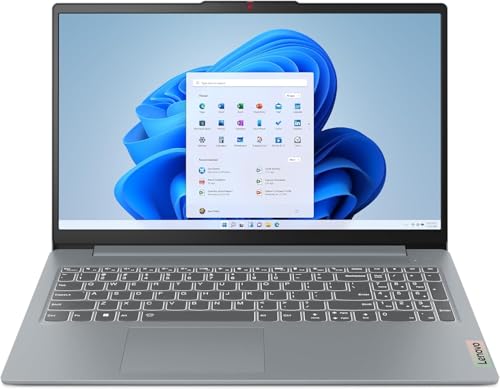
2. Lenovo IdeaPad Slim 3 Laptop 2025 — Best AMD Budget Pick
Lenovo's IdeaPad Slim 3 for 2025 makes a compelling case for AMD-based budget laptops, anchoring its performance around the Ryzen 7 5825U — an eight-core processor that reaches boost speeds of up to 4.5GHz and consistently outperforms Intel's dual-core entry-level chips in multi-threaded tasks like video rendering, compression, and browser-based productivity applications. For buyers who frequently run multiple applications simultaneously, the eight-core architecture delivers a tangible advantage over competing laptops in the same price bracket.
The 15.6-inch FHD IPS touchscreen maintains a 300-nit brightness level, which is sufficient for indoor office and home environments, though the 45% NTSC color gamut (a measurement of how wide a range of colors the display reproduces) will disappoint users who work with photography or video editing professionally. Wi-Fi 6 (the latest wireless networking standard, offering faster speeds and better performance in crowded networks) and Bluetooth 5.2 bring the Slim 3 in line with premium competitors, and the 16GB of DDR4 RAM running at 3200MHz ensures that the Ryzen 7's processing cores are never bottlenecked by slow memory throughput.
The 512GB NVMe SSD provides adequate storage for most everyday users, though buyers who maintain large media libraries or game archives will likely need to supplement with external storage. The 720p HD webcam handles video calls at acceptable quality for professional video conferencing in 2026, and Lenovo's thin-bezel display design gives the machine a more premium visual impression than its price tag suggests.
Pros:
- AMD Ryzen 7 5825U delivers eight-core performance that exceeds most Intel competition at this price
- Wi-Fi 6 and Bluetooth 5.2 offer future-ready wireless connectivity
- 16GB DDR4 at 3200MHz provides fast, capable memory for heavy multitasking
- Thin bezel display design gives a more modern aesthetic than typical budget laptops
Cons:
- 512GB storage is limiting for users managing large media or software libraries
- 45% NTSC color gamut is below average for color-accurate creative work
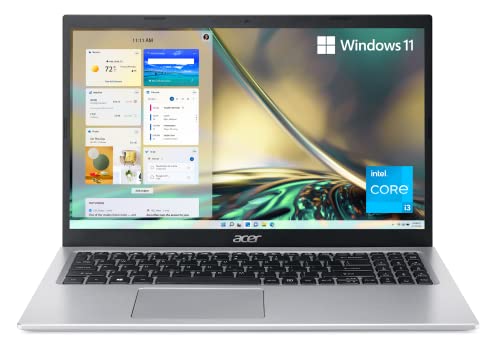
3. Acer Aspire 5 A515-56-347N — Best Entry-Level Option for Light Users
The Acer Aspire 5 A515-56 occupies the entry tier of this roundup with an 11th Gen Intel Core i3-1115G4 dual-core processor, which reaches up to 4.1GHz via Intel Turbo Boost and handles everyday computing tasks — web browsing, document editing, video streaming, and light spreadsheet work — without noticeable lag. The target audience for this machine is students, casual home users, and anyone who primarily lives in a web browser and needs a lightweight, portable Windows 11 device at the most accessible price point available in 2026.
The 15.6-inch Full HD IPS display achieves an impressive 82.58% screen-to-body ratio through its narrow bezel design, which gives the panel a significantly more modern appearance than older budget laptops with thick bezels. Amazon Alexa integration is built in, providing hands-free voice assistant access for reminders, smart home control, and quick information lookups without opening a browser. The ergonomically tilted keyboard hinge — which lifts the keyboard base slightly when the lid is opened — improves both typing comfort and passive cooling airflow, reducing thermal throttling during longer work sessions.
The 128GB NVMe SSD is the most significant limitation of this configuration, as Windows 11 and essential applications consume a meaningful portion of that capacity, leaving limited space for media files or large software installations. Buyers who choose the Aspire 5 should budget for either cloud storage or an external drive from the outset. The 8GB of DDR4 RAM also represents a ceiling for heavy multitasking, though for the light-use audience this machine targets, it proves adequate for typical daily workflows.
Pros:
- Narrow bezel design with 82.58% screen-to-body ratio gives a premium visual profile
- Ergonomic tilting hinge improves typing comfort and passive cooling simultaneously
- Built-in Amazon Alexa adds hands-free assistant functionality without additional hardware
- Most affordable entry point in this roundup for casual and student users
Cons:
- 128GB SSD is critically small — external or cloud storage is essentially mandatory
- Dual-core i3 processor and 8GB RAM limit performance for demanding applications
4. Lenovo ThinkBook 15 G4 2023 Business Laptop — Best Overall Value
The Lenovo ThinkBook 15 G4 earns the top position in this roundup by delivering a hardware configuration that competes directly with mid-range premium laptops at a budget price point. The 12th Gen Intel Core i7-1255U — a ten-core processor (two performance cores handling heavy loads, eight efficiency cores managing lighter tasks simultaneously) that boosts to 4.7GHz — represents a genuine generational leap over the 11th Gen chips found in competing budget options, offering measurably better performance in CPU-intensive workloads like compiling code, processing large spreadsheets, and running virtualization software.
The 32GB of DDR4 RAM running at 3200MHz is the single most differentiating specification in this price category, as most competing budget machines ship with 8GB or 16GB configurations that create multitasking bottlenecks for power users. Thunderbolt 4 (a high-speed data and display port capable of transferring data at 40Gbps and connecting to external monitors at 4K resolution) elevates the ThinkBook 15 above nearly every other machine in the budget segment, and the 1080p FHD webcam with a physical privacy shutter addresses professional video conferencing requirements directly.
The 15.6-inch FHD IPS touchscreen maintains 300-nit brightness with anti-glare coating and a thin bezel design, while the built-in fingerprint reader allows Windows Hello biometric login (a passwordless authentication system built into Windows 11) for fast, secure access. Intel Iris Xe integrated graphics (a step above basic Intel UHD, capable of light gaming and video editing) handle visual tasks that would overwhelm older integrated chips, and Windows 11 Pro ships preinstalled, positioning this machine as a fully capable business workstation at a price that consistently undercuts similarly-specced alternatives by a significant margin in 2026.
Pros:
- 32GB RAM and 1TB NVMe SSD represent exceptional value — rarely found at this price tier
- 12th Gen Intel i7 with 10 cores delivers performance that competes with far more expensive laptops
- Thunderbolt 4 enables 4K external display connections and 40Gbps data transfer
- Fingerprint reader, privacy shutter webcam, and Windows 11 Pro make it enterprise-ready
- Intel Iris Xe graphics handle light creative and gaming workloads beyond basic integrated chips
Cons:
- 2023 model year means the chassis design and battery technology are not the latest generation
- 45% NTSC display gamut limits suitability for professional color work
Buying Guide: How to Choose the Best Cheap Windows Laptop
Processor: The Core of Every Purchase Decision
The processor (CPU) determines how quickly a laptop handles every task, from opening a browser tab to running multiple applications simultaneously. In 2026, buyers should prioritize Intel 12th Gen or AMD Ryzen 5000 series chips at minimum, as older processors — even if listed at attractive prices — will feel sluggish within two to three years of purchase. Dual-core processors like the Intel i3-1115G4 handle light tasks adequately, but quad-core and higher configurations provide noticeably smoother performance when switching between applications or running background processes during video calls.
- Light users (browsing, documents, streaming): Intel i3 or AMD Ryzen 3 — sufficient for everyday tasks
- Moderate users (multitasking, remote work, light editing): Intel i5 or AMD Ryzen 5 — recommended minimum for home offices
- Power users (development, heavy multitasking, virtualization): Intel i7 or AMD Ryzen 7 — invest here for multi-year longevity
RAM and Storage: Where Budget Cuts Hurt Most
Random access memory (RAM) governs how many tasks a laptop can handle at once without slowing down. Eight gigabytes represents the practical minimum for Windows 11 in 2026, but users who keep more than ten browser tabs open, run video conferencing alongside other applications, or use productivity suites should treat 16GB as their starting point. Storage sizing matters equally — a 128GB SSD fills up faster than most buyers anticipate once Windows updates, application installations, and personal files accumulate, making 512GB the sensible minimum for most purchase decisions.
- 8GB RAM / 128GB SSD: Acceptable only for very light, cloud-primary workflows
- 16GB RAM / 512GB SSD: Strong everyday configuration for most home and office users
- 32GB RAM / 1TB SSD: Future-proof configuration suited to demanding professional workloads
Display Quality: Brightness, Resolution, and Touch
All four laptops in this guide ship with 1920 x 1080 (Full HD) displays, which remains the practical standard resolution for 15.6-inch screens in the budget category. Brightness (measured in nits) determines visibility in bright environments — 300 nits is adequate for indoor office settings, while anything below 250 nits will appear washed out near windows or in outdoor spaces. Color gamut coverage (expressed as a percentage of the NTSC or sRGB color space) indicates how vividly a display reproduces color — higher percentages matter most for photographers and video editors, while everyday users will notice limited difference between 45% and 72% NTSC in typical use.
Connectivity and Ports: Planning for Real-World Use
Budget laptops increasingly ship with USB-A, HDMI, and headphone ports as standard, but meaningful differences emerge at the premium end of the budget tier. Thunderbolt 4 — found on the ThinkBook 15 G4 — enables connections to 4K monitors, high-speed external drives, and docking stations that transform a laptop into a full desktop workstation. Wi-Fi 6 (802.11ax) support, present on the Lenovo IdeaPad Slim 3, delivers faster and more reliable wireless performance in congested home and office environments compared to older Wi-Fi 5 adapters. Buyers who rely on wired networking should verify Ethernet port availability, as several slim budget laptops omit it to reduce chassis thickness.
Buy on Walmart
- Dell Inspiron 15 3000 3520 Business Laptop Computer[Windows — Walmart Link
- Lenovo IdeaPad Slim 3 Laptop 2025 15.6” FHD 1920 x 1080 Touc — Walmart Link
- acer Aspire 5 A515-56-347N Slim Laptop - 15.6" Full HD IPS D — Walmart Link
- Lenovo ThinkBook 15 G4 2023 Business Laptop 15.6" FHD IPS To — Walmart Link
Buy on eBay
Frequently Asked Questions
What is a realistic budget for a capable Windows laptop in 2026?
Most users find that spending between $400 and $700 secures a Windows laptop with sufficient RAM (16GB), a fast NVMe SSD (512GB or larger), and a modern multi-core processor for everyday productivity. Below $400, buyers encounter meaningful compromises in storage capacity or processing power that affect long-term usability. Above $700 in the budget segment, the value-per-dollar curve flattens significantly, making mid-range options like the ThinkBook 15 G4 compelling for buyers who want premium specifications without a premium price.
Is 8GB of RAM enough for Windows 11 in 2026?
Eight gigabytes of RAM runs Windows 11 adequately for light single-task workflows, but most users who browse the web, use video conferencing, and run productivity applications simultaneously will notice slowdowns with only 8GB. Microsoft's own system recommendations suggest 16GB for comfortable multitasking in 2026, and buyers who plan to keep a laptop for three or more years should consider 16GB the practical minimum to avoid performance degradation as Windows updates and applications grow more resource-intensive over time.
Should buyers choose Intel or AMD processors for a budget Windows laptop?
Both Intel and AMD deliver competitive performance in the budget laptop segment, and the processor generation matters more than brand allegiance. AMD Ryzen 7 chips — like the 5825U in the IdeaPad Slim 3 — offer strong multi-core performance that benefits video rendering, compression, and heavily multitasked workflows. Intel's 12th Gen Core processors, like the i7-1255U in the ThinkBook 15 G4, excel at single-core tasks and power efficiency. For pure everyday productivity, either platform performs comparably at similar price points — buyers should focus on core count, RAM, and storage before brand preference.
Do budget Windows laptops support external monitors?
Most budget Windows laptops include an HDMI port that supports standard 1080p or 1080p 60Hz external display connections, which suffices for typical home office dual-screen setups. The Lenovo ThinkBook 15 G4 advances significantly beyond this baseline with Thunderbolt 4, which supports 4K external monitors and multi-monitor configurations through a single cable. Buyers who plan to connect a large external display as their primary workspace should prioritize Thunderbolt 4 or at minimum USB-C video output, as standard HDMI limits maximum output resolution on larger monitors.
How long do budget Windows laptops typically last?
A well-specified budget Windows laptop — with 16GB RAM, a modern multi-core processor, and a 512GB or larger SSD — reliably serves most users for four to six years of everyday use. The primary factors that shorten a laptop's useful life are insufficient RAM (causing slowdowns as applications grow), small SSD storage (forcing frequent file management), and aging processors that fall behind software requirements. Choosing a model with at least 16GB of RAM and a current-generation processor in 2026 maximizes the probability of extended service life without performance degradation.
Is a touchscreen worth it on a budget Windows laptop?
Touchscreen functionality on budget Windows laptops adds practical convenience for navigating Windows 11's touch-optimized interface, zooming maps and documents, and casual sketching with a stylus — though most budget touchscreens do not include a stylus. The tradeoff is a modest reduction in battery life and, on some models, slightly increased display reflectivity. For users who primarily type and use a trackpad, a non-touch IPS display typically offers better brightness and battery performance. For tablet-like flexibility at a desk or in a commuter setting, the touchscreen option available on the Dell Inspiron 3520 and ThinkBook 15 G4 justifies the minor compromises.
Conclusion
The budget Windows laptop market in 2026 rewards buyers who know which specifications matter most and resist the temptation to choose the lowest absolute price. The Lenovo ThinkBook 15 G4 stands as the clear overall recommendation for buyers who can stretch their budget slightly, delivering 32GB RAM, a 12th Gen Intel i7 processor, Thunderbolt 4, and Windows 11 Pro in a single package that outperforms most mid-range alternatives. For buyers whose primary concern is AMD performance at a minimal price, the Lenovo IdeaPad Slim 3 2025 offers the Ryzen 7 5825U with adequate storage and strong wireless connectivity. The Dell Inspiron 15 3000 3520 earns its place as the business-ready option with Windows 11 Pro and a numeric keypad, while the Acer Aspire 5 serves students and casual users who need a lightweight, affordable Windows machine for primarily cloud-based workflows.
Key Takeaways
- The Lenovo ThinkBook 15 G4 delivers the best overall value in the 2026 budget laptop market, combining 32GB RAM, a 12th Gen Intel i7, and Thunderbolt 4 at a price that consistently undercuts comparable mid-range alternatives.
- Buyers prioritizing AMD performance should consider the Lenovo IdeaPad Slim 3 2025, which pairs an eight-core Ryzen 7 5825U with Wi-Fi 6 and 16GB of DDR4 memory for capable everyday multitasking.
- The Dell Inspiron 15 3000 3520 remains the strongest choice for business environments requiring Windows 11 Pro, a numeric keypad, and touchscreen functionality in a stable, enterprise-oriented chassis.
- Storage size is the most common regret among budget laptop buyers — selecting 512GB as the minimum SSD capacity significantly extends the useful life of any machine in this category.
 |
 |
 |
 |

About Priya Anand
Priya Anand covers laptops, tablets, and mobile computing for Ceedo. She holds a bachelor degree in computer science from the University of Texas at Austin and has spent the last nine years writing reviews and buying guides for consumer electronics publications. Before joining Ceedo, Priya worked as a product analyst at a major retailer where she helped curate the laptop and tablet category. She has personally benchmarked more than 200 portable computers and is particularly interested in battery longevity, repairability, and the trade-offs between Windows, macOS, ChromeOS, and Android tablets. Outside of work, she runs a small Etsy shop selling laptop sleeves she sews herself.