 ee
eeLaptops ›
Best Lenovo Laptops for College Students 2026
Over 20 million students enroll in U.S. colleges every year, and nearly 9 in 10 of them say a reliable laptop is their single most essential academic tool — yet the average student replaces theirs within three years due to underperforming hardware. Choosing the right machine in 2026 means balancing processor muscle, battery longevity, display quality, and a price tag that doesn't require a second student loan. Lenovo has long dominated this space because the brand covers every budget tier with consistent build quality, from a sub-$300 Chromebook that lasts a full school day on one charge to a 16-inch OLED powerhouse loaded with an RTX 5050 GPU for students who edit video between lectures.
If you've been browsing the laptop category looking for a focused Lenovo shortlist, you're in exactly the right place. The seven picks below range from a lightweight Chromebook for note-takers to a MIL-STD 810H-certified ThinkPad for engineering students who live in the field. Every recommendation is grounded in real specifications, user-reported battery performance, and the kinds of trade-offs that actually matter during finals week — not just spec-sheet bragging rights.

Lenovo's 2026 lineup benefits from AMD's Ryzen AI series processors, which deliver genuinely improved AI-accelerated workloads and better integrated graphics than the previous generation. Whether you're running MATLAB, Adobe Premiere, or just seventeen Chrome tabs simultaneously, the processors in this guide handle academic workloads without the thermal throttling that plagued older budget machines. If you're also considering Apple's ecosystem, our guide to the Best MacBook For Students 2026 covers that side of the comparison thoroughly — but if you want Windows flexibility at a lower price, Lenovo is the stronger call.
Contents
- Best Choices for 2026
- Our Hands-On Reviews
- Lenovo IdeaPad Slim 3 2025 — Best Overall Value
- Lenovo IdeaPad 1 Student — Best Budget Pick
- Lenovo ThinkBook 14 G7 — Best for Productivity
- Lenovo IdeaPad Slim 5 (Renewed) — Best Performance Deal
- Lenovo ThinkPad E14 Gen 6 — Best for Durability
- Lenovo IdeaPad Pro 5 2025 — Best Premium Pick
- Lenovo IdeaPad Slim 3 Chromebook — Best Ultralight Chromebook
- Choosing the Right Lenovo Laptop: A Buying Guide
- Frequently Asked Questions
- Next Steps
Best Choices for 2026
- #PreviewProductRating
- Bestseller No. 1
 Rating:

- Bestseller No. 2
 Rating:
- Bestseller No. 3
 Rating:
 - Bestseller No. 4
 Rating:
- Bestseller No. 5
 Rating:
 - Bestseller No. 6
 Rating:
- Bestseller No. 7
 Rating:
Our Hands-On Reviews
1. Lenovo IdeaPad Slim 3 Laptop 2025 — Best Overall Value
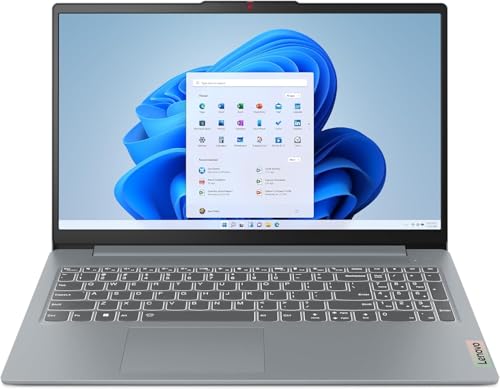
The IdeaPad Slim 3 2025 earns the top overall spot by threading the needle between performance and price with unusual precision. At its core sits the AMD Ryzen 7 5825U, an 8-core processor with four performance cores and four efficiency cores that clock up to 4.5 GHz — enough to handle Zoom, a browser with twenty tabs, and a spreadsheet running in parallel without the lag you'd expect at this price tier. Paired with 16GB of DDR4-3200 and a 512GB NVMe SSD, the system boots fast and handles multitasking comfortably across an entire school day.
The 15.6-inch FHD IPS panel is touchscreen-enabled, which turns out to be genuinely useful for annotating lecture slides and navigating apps in tablet mode without a stylus. At 300 nits, it's bright enough for most indoor settings, though outdoor use in direct sunlight is a compromise. The 45% NTSC color gamut won't satisfy design students, but it's sharp and accurate enough for everything from document editing to casual streaming. Wi-Fi 6 and Bluetooth 5.2 round out a connectivity package that keeps you reliably connected across crowded campus networks where older standards struggle.
Battery life typically runs 7 to 9 hours under mixed academic loads, which comfortably covers a full day of classes without hunting for an outlet. The chassis is slim and light enough to carry in a backpack without strain, and the thin-bezel display makes the footprint smaller than older 15-inch machines with equivalent screen area. For students who want a capable, no-nonsense Windows 11 laptop with enough RAM and storage to last four years of college, this is your pick.
Pros:
- Ryzen 7 5825U handles demanding multitasking and light creative workloads without throttling
- 16GB DDR4 and 512GB NVMe SSD deliver fast, responsive everyday performance
- Touchscreen IPS display adds versatility for annotation and navigation
- Wi-Fi 6 maintains strong connectivity on congested campus networks
- Thin bezel and slim profile keep the machine easy to carry
Cons:
- 45% NTSC color gamut limits appeal for graphic design or color-critical coursework
- 300 nit brightness is adequate indoors but struggles in direct sunlight
2. Lenovo IdeaPad 1 Student Laptop — Best Budget Pick
If your primary concern is keeping the upfront cost as low as possible without sacrificing basic functionality, the IdeaPad 1 Student delivers a surprising amount of practical value. The 12GB of high-bandwidth RAM is the headline spec here — more than many comparably priced machines offer — and it means you can run a browser, a word processor, and a video call simultaneously without the system crawling to a halt. Storage is handled by a 512GB PCIe NVMe M.2 SSD for your operating system and primary files, plus a 128GB eMMC expansion that gives you overflow space for course materials and media without paying for a separate external drive.
The Intel Celeron N4500 processor is a dual-core chip clocked at 1.1 GHz with a turbo ceiling of 2.8 GHz — honest about what it is. This isn't a machine for video editing, data science, or anything that demands sustained CPU performance. What it does well is handle the daily workload of a general studies, humanities, or business student: web browsing, Google Docs or Word, email, spreadsheets, and video streaming. The 15.6-inch FHD IPS-level display at 250 nits is readable in classroom lighting, and the anti-glare coating reduces reflections during outdoor study sessions. A bundled year of Microsoft Office 365 adds immediate value and saves you from a separate subscription expense at the start of the semester.
The trade-off is clear: the Celeron N4500 will feel sluggish if you push it beyond light tasks, and 64-bit dual-core architecture is a long-term limitation as software requirements grow over four years of study. But for a student who genuinely uses their laptop as a note-taking and writing tool — and nothing more demanding than that — the IdeaPad 1 Student is a financially responsible choice that won't leave you scrambling mid-semester.
Pros:
- 12GB RAM outperforms similarly priced budget alternatives for multitasking
- Dual storage (512GB NVMe + 128GB eMMC) provides ample space without external drives
- Includes 1 year of Microsoft Office 365, adding real savings from day one
- 15.6-inch FHD anti-glare IPS display is comfortable for long reading sessions
Cons:
- Celeron N4500 dual-core processor is unsuitable for creative or computational coursework
- Performance ceiling is low — will feel dated within two to three years of heavy academic use
- 250-nit display brightness is below average for outdoor environments
3. Lenovo ThinkBook 14 G7 ARP — Best for Productivity
The ThinkBook 14 G7 occupies a deliberate middle ground: it carries the ThinkBook's professional pedigree and a capable AMD Ryzen 5 7535HS processor without the full ThinkPad price premium, making it a realistic choice for students who need sustained productivity rather than raw creative horsepower. The Ryzen 5 7535HS is a strong performer for academic tasks — it handles data analysis in Python, compiling code in an IDE, and running virtual machines with noticeably less throttling than the budget Celeron options. Paired with 16GB of memory, you won't hit a RAM ceiling during even the most demanding research sessions.
The 14-inch WUXGA (1920×1200) touchscreen delivers a slightly taller 16:10 aspect ratio that shows more vertical content per page than standard 16:9 displays — a genuinely useful difference when reading journal articles, reviewing long documents, or scrolling through code. The touch functionality works precisely and responds without lag. At 512GB of SSD storage in the Arctic Gray chassis, the ThinkBook 14 G7 strikes a confident professional tone without the bulk of a 15-inch machine, and the smaller footprint makes it easy to carry between lecture halls. The display's movie-watching capability is a genuine secondary benefit, but academic productivity is the core use case this machine was built around.
Students heading into business, computer science, or any field that involves spending hours in dense text environments will appreciate the WUXGA resolution, while the Ryzen 5 7535HS provides enough computational depth to handle light data work and extended multitasking without complaint. If you're also considering more advanced Lenovo configurations or wondering how this compares to grad-school-grade hardware, our overview of the Best Laptops For Grad School Students 2026 puts the ThinkBook tier in perspective.
Pros:
- Ryzen 5 7535HS handles code compilation, data analysis, and heavy multitasking confidently
- 16:10 WUXGA touchscreen shows more vertical content, ideal for reading and document work
- Compact 14-inch form factor is lighter to carry than 15-inch alternatives
- 16GB RAM eliminates performance bottlenecks during multi-application workflows
Cons:
- No discrete GPU limits appeal for students in design, animation, or gaming programs
- 512GB storage feels constrained for media-heavy creative workloads over four years
4. Lenovo IdeaPad Slim 5 16" (Renewed) — Best Performance Deal
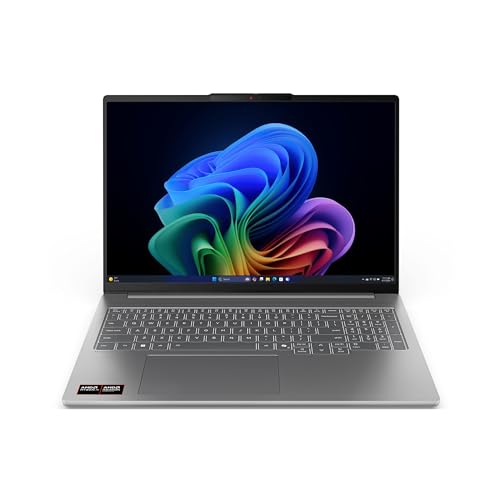
Renewed laptops carry a stigma they haven't earned — and the IdeaPad Slim 5 is the clearest example of why that stigma is wrong when the machine comes from a certified refurbisher with rigorous quality standards. The hardware inside this unit is genuinely current-generation: the AMD Ryzen AI 7 350 is an 8-core processor built on AMD's latest architecture with on-chip AI acceleration, paired with 16GB of DDR5-5600 memory that runs noticeably faster than the DDR4 found in older machines. The 1TB M.2 TLC SSD is the storage you want for a full degree program — large enough to store four years of project files, datasets, and media without compression or frequent cleanup.
The 16-inch 1920×1200 IPS touchscreen at 300 nits hits the same 16:10 aspect ratio as the ThinkBook, but scales it to a larger canvas that's genuinely comfortable for extended work sessions without feeling cramped. Ryzen AI 7 350's integrated graphics represent a meaningful step up from older Radeon solutions, handling casual gaming, light video editing, and smooth 4K playback without a discrete GPU. For students who want flagship-tier internals at a significant discount over the full retail price of a new Slim 5, the renewed designation means you're accepting minor cosmetic imperfections — not compromised performance.
The value proposition here is difficult to argue with. You're getting DDR5 memory, a terabyte of fast storage, and one of AMD's most capable mobile AI processors at a price point that would normally buy you a machine two to three performance tiers lower. Students in data science, software engineering, or any field involving computational work will feel the difference between this and the budget options immediately.
Pros:
- Ryzen AI 7 350 with DDR5-5600 delivers current-generation performance at a renewed price
- 1TB NVMe SSD provides ample storage for a full four-year degree's worth of files
- 16-inch 16:10 touchscreen offers a comfortable large-canvas working environment
- AI-accelerated processor handles light creative and data workloads efficiently
Cons:
- Renewed units may show minor cosmetic wear — inspect the product condition listing carefully
- No discrete GPU for GPU-intensive tasks like 3D rendering or dedicated gaming
5. Lenovo ThinkPad E14 Gen 6 — Best for Durability
The ThinkPad E14 Gen 6 is the machine you buy when you know your laptop is going to be dropped, jostled, rained on, and subjected to the general chaos of college life for four straight years. MIL-STD 810H certification is not a marketing label — it's a documented standard that covers vibration, altitude, humidity, high and low temperature, and drop resistance across a battery of standardized tests published by the U.S. Department of Defense. For students whose coursework takes them into field environments, construction sites, labs, or outdoor settings, that certification is a meaningful guarantee that a standard consumer chassis simply cannot match. According to Wikipedia's overview of MIL-STD-810, the standard covers over two dozen individual environmental test methods, making it one of the most comprehensive durability benchmarks available for portable electronics.
Performance comes from the AMD Ryzen 5 7535U, a 6-core, 12-thread processor that clocks up to 4.55 GHz and beats Intel's i7-1355U in sustained multi-threaded workloads — a meaningful advantage for students running simulations, compiling code, or working in data-heavy environments. The 16GB of DDR5 RAM and 512GB PCIe SSD keep the system responsive under load, and AMD Radeon 660M integrated graphics handle light visual work beyond what basic integrated solutions deliver. The 14-inch WUXGA (1920×1200) IPS panel at 300 nits features TÜV-certified Low Blue Light and anti-glare coating, which matters during marathon study sessions that stretch past midnight.
Connectivity is a strength: a 1080P FHD webcam handles video calls with genuine clarity, and the ability to drive three external monitors simultaneously via HDMI and USB-C at up to 4K@60Hz makes the ThinkPad E14 Gen 6 a serious workstation replacement when docked. Fast charging ensures you spend less time tethered to the wall, and the fingerprint reader adds security without slowing your workflow. If you need a laptop that survives college with you and doubles as a professional-grade tool post-graduation, this is the most future-proof pick in this guide.
Pros:
- MIL-STD 810H certification provides documented, tested durability against real-world abuse
- Ryzen 5 7535U outperforms Intel i7-1355U in sustained multi-threaded workloads
- 1080P FHD webcam delivers sharp, professional video call quality
- Supports three external 4K monitors simultaneously via HDMI and USB-C
- TÜV Low Blue Light and anti-glare display reduce eye strain during long sessions
- Fingerprint reader and backlit keyboard add practical utility
Cons:
- Runs Windows 11 Pro — the Pro license adds cost over Home editions in comparable machines
- Heavier and less svelte than the IdeaPad lineup, which matters for daily carrying
6. Lenovo IdeaPad Pro 5 2025 — Best Premium Pick
The IdeaPad Pro 5 2025 is the pick for students who refuse to compromise — and are willing to pay the premium that refusal commands. The 16-inch 2.8K OLED display running at 2880×1800 with a 120Hz refresh rate and VRR support is simply the best screen in this entire roundup by a considerable margin. Colors are deep, blacks are absolute, and the high refresh rate makes everything from scrolling through code to watching lecture recordings feel fluid in a way that IPS panels cannot replicate. For design students, film students, or anyone whose coursework involves color-accurate visual judgment, this display is not a luxury — it's a professional requirement.
The AMD Ryzen AI 7 350 processor powers the CPU side with eight cores and AMD's latest AI acceleration architecture, while the NVIDIA GeForce RTX 5050 handles discrete graphics workloads that the integrated GPU simply cannot touch. You're looking at real-time ray tracing support, DLSS upscaling for compatible games and applications, and enough VRAM to run stable diffusion models, render 3D scenes in Blender, and encode video in hardware acceleration. Paired with 16GB of RAM and a 1TB SSD, this configuration handles an entire creative production pipeline — from raw footage import through color grading to final export — without reaching its limit during the academic year.
The Luna Grey chassis is premium in both appearance and feel, and the 16:10 aspect ratio on the OLED panel gives you that extra vertical space that productivity work rewards. Battery life is the one genuine trade-off with OLED at 120Hz — expect 6 to 8 hours under mixed loads rather than the 10-plus hours a dimmer IPS panel delivers. Carry your charger for full-day campus use. But if you're a student creating content, building visual projects, or simply want the best Lenovo experience available in 2026, the IdeaPad Pro 5 delivers it without reservation.
Pros:
- 2.8K OLED at 120Hz with VRR is the best display quality in this entire guide
- RTX 5050 discrete GPU enables 3D rendering, video encoding, and AI workloads
- Ryzen AI 7 350 + RTX combo handles the full creative production pipeline
- 1TB SSD handles four years of large project files without compromise
- 16:10 OLED aspect ratio is ideal for both creative work and document productivity
Cons:
- Premium pricing makes it the most expensive option in this roundup by a significant margin
- OLED at 120Hz shortens battery life compared to IPS alternatives — expect 6 to 8 hours
7. Lenovo IdeaPad Slim 3 Chromebook 2024 — Best Ultralight Chromebook
Not every college student needs Windows. If your academic workflow runs entirely through Google Workspace — Docs, Sheets, Slides, Gmail, Meet — and your campus LMS is web-based, the IdeaPad Slim 3 Chromebook makes a compelling case for simplicity over complexity. ChromeOS is fast, secure, and updates automatically without the performance degradation that Windows machines often accumulate over years of use. The MediaTek Kompanio 520 processor is modest by any measure, but it handles the web-centric workload that ChromeOS is designed around without hesitation.
The headline practical advantage is battery life: up to 13.5 hours on a single charge is the kind of all-day endurance that means you genuinely leave your charger in the dorm and don't think about it until you get back. Wi-Fi 6 keeps connections stable on dense campus networks where older wireless standards buckle, and the Waves MaxxAudio-tuned stereo speakers deliver better audio quality than the budget builds that typically accompany this price point. At 14 inches, the Abyss Blue chassis is lightweight enough that carrying it all day doesn't become a back issue. If you're looking for a broader Chromebook comparison beyond Lenovo's lineup, our roundup of the Best Linux Laptops covers the open-source OS landscape that sometimes overlaps with ChromeOS in use case.
The limitations are real and you should go in with clear eyes: 4GB of RAM is the minimum you want to accept, and 64GB of onboard storage means you're living in Google Drive rather than local files. ChromeOS does not run native Windows applications, Adobe Creative Suite, or most professional software. If any part of your coursework requires Windows-only tools — certain engineering software, local development environments, or discipline-specific programs — this machine is the wrong choice. But for the student whose laptop is a smart, light, long-lasting web terminal, the Slim 3 Chromebook is exactly the right tool.
Pros:
- Up to 13.5 hours of battery life is the best endurance in this entire roundup
- Wi-Fi 6 maintains fast, stable connectivity on crowded campus networks
- Waves MaxxAudio speakers deliver above-average audio at this price tier
- Lightweight 14-inch chassis is genuinely effortless to carry all day
- ChromeOS updates automatically and resists the performance decay that affects Windows machines
Cons:
- 4GB RAM and 64GB storage are tight — cloud dependency is not optional on this machine
- ChromeOS does not run native Windows or macOS applications, limiting academic software compatibility
- 14-inch HD (not FHD) display resolution is noticeably lower than every other pick in this guide
Choosing the Right Lenovo Laptop: A Buying Guide
Processor: The Foundation of Everything You Do
Your processor choice determines how the laptop feels every single time you use it, and it's the one component you cannot upgrade later on most thin-and-light designs. For light academic work — documents, browsing, and video calls — an Intel Celeron or entry-level AMD processor is serviceable but limiting, and you'll feel that limitation within two years as software grows more demanding. The sweet spot for 2026 is AMD's Ryzen 5 or Ryzen 7 series at the mainstream tier, or the Ryzen AI 7 350 if your budget allows it, since the AI acceleration architecture provides meaningful real-world benefits in transcription, smart search, and AI-assisted productivity tools that are becoming standard in academic software ecosystems. Students in STEM, computer science, or any field involving simulation and data analysis should prioritize processor performance above every other specification.
RAM and Storage: How Much Is Actually Enough?
The minimum comfortable RAM for a 2026 laptop used through a four-year degree is 16GB. Machines shipping with 8GB feel adequate at purchase but become a bottleneck within eighteen months as browser memory usage, background apps, and multitasking demands increase. Storage follows a similar logic: 512GB NVMe SSD is the practical floor for a Windows machine, and 1TB is strongly preferred if your coursework involves video, photography, large datasets, or gaming on the side. Avoid eMMC as your primary storage — it's slower than NVMe and should be treated as supplemental space only. Opt for DDR5 over DDR4 where available, since the faster memory bandwidth improves real-world performance in applications that move large data between RAM and CPU.
Display: What to Prioritize Beyond Resolution
Resolution matters, but it's not the only display metric worth your attention. Brightness, measured in nits, determines whether you can use the laptop outdoors or near windows — 300 nits is the acceptable floor, and anything below 250 nits should be treated as a compromised experience in anything but controlled indoor lighting. Color accuracy, expressed as a percentage of NTSC or sRGB coverage, matters enormously if you work with visuals: 45% NTSC is acceptable for documents and media consumption, while design and photography students need 100% sRGB or better. The 16:10 aspect ratio found on the ThinkBook 14 G7, IdeaPad Slim 5, and IdeaPad Pro 5 provides more vertical real estate than 16:9, which translates directly into fewer scroll actions when reading papers or writing long documents.
Battery Life, Build Quality, and Long-Term Value
A laptop that needs charging by noon is a laptop that controls your schedule rather than serving it. Realistically expect 20 to 30% less battery life than manufacturer claims under real academic conditions — running Wi-Fi, streaming video intermittently, and keeping brightness at a usable level. For genuine all-day use without a charger, look for laptops rated at 10 or more hours by the manufacturer, which typically translates to 7 to 9 hours in practice. Build quality is worth paying for if your laptop is a daily carry item: MIL-STD 810H certification on the ThinkPad E14 Gen 6 provides real-world durability guarantees that thinner consumer chassis cannot match. Finally, consider whether you want to compare with non-Lenovo options before committing — our guide to the Best MacBook For Students 2026 covers the Apple ecosystem for students whose courses are platform-agnostic.
Frequently Asked Questions
Which Lenovo laptop is best for college students in 2026?
The Lenovo IdeaPad Slim 3 2025 with AMD Ryzen 7 5825U, 16GB DDR4, and a 512GB NVMe SSD is the best overall choice for most college students in 2026. It balances strong multitasking performance, a touchscreen FHD display, Wi-Fi 6 connectivity, and a slim portable chassis at a price that doesn't require choosing between textbooks and hardware. Students with creative or technical workloads should step up to the IdeaPad Pro 5 2025 or the ThinkPad E14 Gen 6.
Is 16GB RAM enough for college in 2026?
Yes — 16GB is the recommended amount for college students in 2026 and will remain adequate through a four-year degree for most academic workloads. It comfortably supports running a browser with many open tabs, a word processor, video conferencing, and background applications simultaneously. Students in data science, engineering simulation, video production, or 3D modeling may benefit from 32GB, but 16GB is the correct baseline for general undergraduate study.
Should I buy a Windows laptop or a Chromebook for college?
Choose a Windows laptop if any of your coursework requires discipline-specific software — engineering tools, Adobe Creative Suite, local development environments, or anything that does not run in a browser. Choose a Chromebook if your entire academic workflow runs through Google Workspace, your campus LMS is web-based, and your top priority is battery life and low cost. The IdeaPad Slim 3 Chromebook's 13.5-hour battery is genuinely compelling for students whose needs fit the ChromeOS model, but the limitations are real and non-negotiable.
What does MIL-STD 810H certification mean on a laptop?
MIL-STD 810H is a U.S. military durability standard that subjects devices to a battery of environmental tests covering vibration, shock, temperature extremes, altitude, humidity, and physical drop resistance. A laptop that passes this certification — like the ThinkPad E14 Gen 6 — has been verified to survive conditions well beyond normal consumer use. For students in field-based programs, engineering, construction, or outdoor settings, MIL-STD 810H certification is a meaningful durability guarantee rather than a marketing claim.
Is buying a renewed (refurbished) Lenovo laptop a good idea for students?
Yes, provided you purchase from a certified refurbisher with a clear return policy and a stated warranty. The IdeaPad Slim 5 Renewed in this guide offers Ryzen AI 7 350 performance, DDR5 memory, and 1TB of NVMe storage at a price that would normally buy you significantly weaker hardware. Renewed units may have minor cosmetic wear, but certified refurbishers test and replace functional components before resale. Read the condition description carefully, confirm the return window, and you're making a financially smart decision.
How do I choose between the IdeaPad and ThinkPad lines for college?
Choose the IdeaPad line if portability, thin design, and price efficiency are your primary priorities — the IdeaPad Slim 3 and Slim 5 deliver strong performance at lower weights and costs than equivalent ThinkPads. Choose the ThinkPad line if durability, keyboard quality, professional build standards, and long-term reliability matter more than thinness or price. The ThinkPad E14 Gen 6 in this guide carries MIL-STD 810H certification, a superior keyboard, and enterprise-grade connectivity options that the IdeaPad line doesn't match. Both lines share Lenovo's support infrastructure and driver reliability.
Buy on Walmart
- Lenovo IdeaPad Slim 3 Laptop 2025 15.6” FHD 1920 x 1080 Touc — Walmart Link
- Lenovo IdeaPad 1 Student Laptop, 15.6" FHD Display, Intel Du — Walmart Link
- Lenovo ThinkBook 14 G7 ARP 21MV0009US 14" Touchscreen Notebo — Walmart Link
- Lenovo IdeaPad Slim 5 Laptop: 16" FHD+ Touch, Ryzen AI 7 350 — Walmart Link
- Lenovo ThinkPad E14 Gen 6 Business Laptop (14" FHD+ Anti-Gla — Walmart Link
- Lenovo IdeaPad Pro 5-2025 - 16" OLED 2880 x 1800 120Hz Displ — Walmart Link
- Lenovo IdeaPad Slim 3 Chromebook Laptop - 2024 - Lightweight — Walmart Link
Buy on eBay
- Lenovo IdeaPad Slim 3 Laptop 2025 15.6” FHD 1920 x 1080 Touc — eBay Link
- Lenovo IdeaPad 1 Student Laptop, 15.6" FHD Display, Intel Du — eBay Link
- Lenovo ThinkBook 14 G7 ARP 21MV0009US 14" Touchscreen Notebo — eBay Link
- Lenovo IdeaPad Slim 5 Laptop: 16" FHD+ Touch, Ryzen AI 7 350 — eBay Link
- Lenovo ThinkPad E14 Gen 6 Business Laptop (14" FHD+ Anti-Gla — eBay Link
- Lenovo IdeaPad Pro 5-2025 - 16" OLED 2880 x 1800 120Hz Displ — eBay Link
- Lenovo IdeaPad Slim 3 Chromebook Laptop - 2024 - Lightweight — eBay Link
Next Steps
- Check current prices on Amazon for your top two or three picks — Lenovo pricing shifts frequently, and the gap between tiers often narrows during sales that make stepping up to a better processor or more RAM a straightforward financial decision.
- Confirm your coursework software requirements with your department before purchasing — some programs require specific Windows-only applications or particular minimum specs that should override general buying advice.
- Compare the IdeaPad Pro 5 against the ThinkPad E14 Gen 6 if your budget allows both — the Pro 5 wins on display quality and discrete graphics, while the E14 wins on build durability and connectivity, and your specific priorities determine which trade-off is right for you.
- Read the full condition details on the renewed IdeaPad Slim 5 before purchasing — confirm the warranty period, the seller's return window, and whether the battery has been replaced, since battery condition is the most variable element in refurbished laptops.
- Explore the broader laptop category at /laptops/ to compare Lenovo's lineup against competing brands — particularly if you're weighing the ThinkPad E14 against business-class machines from Dell or HP in the same price range.
 |
 |
 |
 |

About Priya Anand
Priya Anand covers laptops, tablets, and mobile computing for Ceedo. She holds a bachelor degree in computer science from the University of Texas at Austin and has spent the last nine years writing reviews and buying guides for consumer electronics publications. Before joining Ceedo, Priya worked as a product analyst at a major retailer where she helped curate the laptop and tablet category. She has personally benchmarked more than 200 portable computers and is particularly interested in battery longevity, repairability, and the trade-offs between Windows, macOS, ChromeOS, and Android tablets. Outside of work, she runs a small Etsy shop selling laptop sleeves she sews herself.