 ee
eeLaptops ›
Best Linux Laptops
Linux now powers roughly 3.4% of all desktop computers worldwide — a figure that represents tens of millions of users who've made a deliberate choice to prioritize control, privacy, and raw performance over a pre-packaged operating system. That number has been climbing every year since 2022, and in 2026, the ecosystem of Linux-compatible hardware has never been stronger. Whether you're a developer who needs a rock-solid terminal environment, a sysadmin running containers locally, or simply someone who's tired of Windows telemetry and wants a clean machine, choosing the right hardware matters enormously. Not every laptop plays well with Linux — driver support, firmware compatibility, and power management can make or break the daily experience.
The good news is that the laptops on this list have been vetted specifically for Linux compatibility. Most of them run Ubuntu, Fedora, Debian, and Arch without a single driver fight out of the box. The ThinkPad line, in particular, has been a developer favorite for over a decade — and for good reason. Dell's XPS series ships a developer edition with Ubuntu pre-installed, which tells you everything you need to know about how seriously they take the Linux user base. If you're also comparing with macOS alternatives, check out our roundup of the best MacBooks for students in 2026 — but if you want full Linux control, stay right here.

This guide covers seven of the best laptops for Linux available in 2026, ranging from premium ultrabooks to budget-friendly workhorses. Each has been selected based on hardware compatibility, driver support, build quality, and overall value for Linux users. You'll find a mix of form factors and price points, so whether you're spending $500 or over $1,500, there's a solid pick here for you. For context on how laptops compare to tablets for mobile productivity workflows, our best laptops for grad school students guide covers that overlap in depth.
Contents
- Top Rated Picks of 2026
- Full Product Breakdowns
- Lenovo ThinkPad X1 Carbon Gen 12 — Best Overall
- Dell XPS 13 9340 — Best Ultrabook for Linux
- Lenovo ThinkPad T14s Gen 2 — Best Renewed Value
- Lenovo ThinkPad E14 Gen 6 — Best Mainstream Pick
- HP EliteBook 840 G11 — Best for Enterprise Linux
- Acer Aspire 5 — Best Entry-Level Option
- Dell XPS 15 9530 — Best Large-Screen Linux Laptop
- How to Pick the Best Linux Laptop
- Common Questions
Top Rated Picks of 2026
- #PreviewProductRating
- Bestseller No. 1
 Rating:

- Bestseller No. 2
 Rating:
- Bestseller No. 3
 Rating:
 - Bestseller No. 4
 Rating:
- Bestseller No. 5
 Rating:
 - Bestseller No. 6
 Rating:
 - Bestseller No. 7
 Rating:
Full Product Breakdowns
1. Lenovo ThinkPad X1 Carbon Gen 12 — Best Overall Linux Laptop
If you're looking for the single best Linux laptop you can buy in 2026, the ThinkPad X1 Carbon Gen 12 is where the search ends. Lenovo has been shipping Linux-compatible ThinkPads for years, and this generation raises the bar significantly. The Intel Core Ultra 7 165U processor brings Intel's Meteor Lake architecture to the table, delivering meaningful gains in multi-core performance and AI-accelerated workloads compared to its predecessor. The integrated graphics have improved enough that casual GPU tasks — think data visualization, light ML inference, and even some creative work — no longer require an external GPU. Under Linux, the GPU drivers are well-supported, and kernel 6.x handles the power management correctly without needing manual configuration.
The 14-inch WUXGA touchscreen covers 100% of the sRGB color space, making it genuinely useful for developers who do any kind of design work alongside their coding. The panel is crisp and comfortable for long work sessions. Pair that with 32GB of 6400MHz LPDDR5X RAM and a 1TB Gen4 NVMe SSD, and you have a machine that handles everything from running Docker containers to compiling large codebases without breaking a sweat. The X1 Carbon Gen 12 comes in at under 2.5 pounds — lighter than most 13-inch competitors — which matters if you're carrying this machine through airports and co-working spaces every week.
Build quality is exceptional. Lenovo uses recycled carbon fiber for the chassis, and the result is a laptop that feels both premium and responsible. The keyboard, as always on ThinkPad machines, is class-leading. The FHD IR + RGB camera setup supports Windows Hello-style facial recognition, and under Linux, you can configure this through PAM modules with minimal effort. One year of Lenovo onsite warranty is included, with options to extend to five years of Premier Support. For Linux power users who want the best possible hardware without compromise, this is the machine to get.
Pros:
- Intel Core Ultra 7 165U delivers excellent multi-core and AI performance
- Outstanding Linux driver compatibility out of the box
- Ultra-light at under 2.5 lbs with premium carbon fiber construction
- 32GB RAM and 1TB Gen4 SSD provide serious headroom for development workloads
- 100% sRGB touchscreen is sharp and color-accurate
Cons:
- Premium price tag — not for budget shoppers
- Ships with Windows 11 Pro, so you'll need to install Linux yourself
2. Dell XPS 13 9340 — Best Ultrabook for Linux
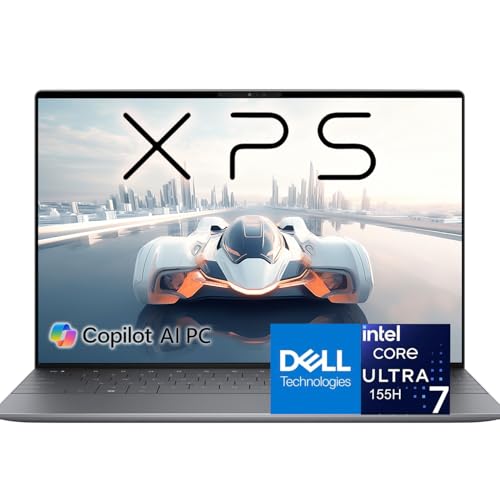
Dell has been one of the most Linux-friendly OEMs in the industry for years — they literally sell an Ubuntu version of the XPS 13 called the Developer Edition. The XPS 13 9340 in this configuration runs the Intel Core Ultra 7 155H, a 16-core, 22-thread chip that hits 4.80GHz under boost. That's a level of raw processing power that you rarely see in a sub-14-inch form factor, and it makes the XPS 13 a legitimate workstation replacement for developers who need to compile, virtualize, or run containerized stacks locally. With 16GB of DDR5X RAM and a 2TB PCIe SSD, you're not going to run out of storage or memory for a very long time.
The 13.4-inch FHD+ display runs at 120Hz with a 500-nit brightness ceiling and EyeSafe certification. Under Linux, the display scaling works cleanly at 1.5x or 2x depending on your desktop environment. The Intel Arc integrated graphics are a newer addition to the Linux ecosystem, and as of kernel 6.6 and later, Arc GPU support is solid and improving with every release. You get smooth video playback, acceptable performance in OpenGL workloads, and reasonable power draw in daily use. The InfinityEdge design keeps the bezels razor-thin, resulting in a screen-to-body ratio that still impresses.
The XPS 13 9340 isn't the cheapest machine on this list, but it offers an exceptional balance of portability and performance. If your workflow involves heavy terminal use, cloud deployments, and the occasional Zoom call, this laptop handles all of it gracefully. The build quality is impeccable — Dell uses CNC-machined aluminum, and the result feels solid without being heavy. For Linux users who want a premium ultrabook that won't fight them at the driver level, the XPS 13 9340 is a top-tier choice.
Pros:
- Core Ultra 7 155H with 16 cores handles demanding development workloads
- Dell's strong Linux compatibility track record — kernel support is excellent
- 2TB SSD is generous for the price point
- 120Hz display is smooth and bright at 500 nits
- Premium aluminum build with compact, portable design
Cons:
- Intel Arc GPU still maturing under Linux — some edge-case driver quirks remain
- Limited port selection requires a hub for most desk setups
3. Lenovo ThinkPad T14s Gen 2 (Renewed) — Best Renewed Value for Linux
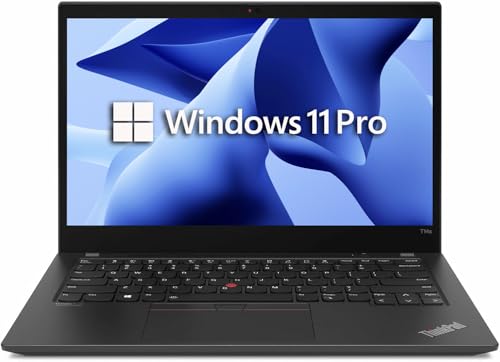
Not everyone needs the latest silicon, and not everyone should pay premium prices when a certified renewed machine does the job just as well. The ThinkPad T14s Gen 2 with an AMD Ryzen 5 PRO 5650U is one of the best value Linux laptops you'll find in 2026. This is a 6-core Zen 3 processor — the same architecture that AMD used in its highest-performing mobile chips — and under Linux, AMD hardware compatibility has been outstanding for years. The open-source AMD drivers are baked directly into the kernel, meaning you boot into Ubuntu or Fedora and everything simply works. No firmware fiddling, no proprietary driver downloads. Just a working machine.
The 16GB of DDR4 RAM keeps multitasking smooth, and the 512GB SSD gives you reasonable working storage. The 14-inch FHD display is sharp enough for daily use, and the ThinkPad form factor gives you one of the best keyboards in the industry — if you're going to be typing thousands of lines of code every day, the tactile feedback on a ThinkPad keyboard is genuinely hard to beat. Connectivity includes Thunderbolt 4 and HDMI, which covers most desk setups without needing a dock. The chassis is classic ThinkPad: matte black, sturdy, and professional without being flashy.
As a renewed unit, you're getting this hardware at a fraction of its original retail price. Certified renewed means the machine has been inspected, cleaned, and tested — and for a ThinkPad that was built to enterprise durability standards in the first place, the remaining service life is substantial. If your budget is tight but you refuse to compromise on Linux compatibility, the T14s Gen 2 is the pragmatic choice. Just be aware that being a previous generation, this machine won't match the power envelope or AI capabilities of newer Intel Core Ultra or AMD Ryzen 7000-series hardware.
Pros:
- AMD Ryzen 5 PRO has exceptional out-of-the-box Linux driver support
- Renewed pricing makes powerful hardware accessible on a tighter budget
- Thunderbolt 4 and HDMI cover standard connectivity needs
- Classic ThinkPad keyboard — one of the best in the business
Cons:
- Older DDR4 RAM and previous-gen processor — won't match 2024/2025 silicon
- As a renewed unit, no manufacturer warranty extension options
4. Lenovo ThinkPad E14 Gen 6 — Best Mainstream Linux Laptop
The ThinkPad E14 Gen 6 occupies a sweet spot in the market: it's a modern machine with current-gen AMD silicon, priced accessibly enough that it makes sense for small teams, students, and independent developers who don't have an enterprise hardware budget. The AMD Ryzen 5 7535U is a 6-core, 12-thread chip that delivers strong single-core and multi-core performance for the price, and the integrated AMD Radeon 660M graphics handle everyday Linux workloads — including light GPU-accelerated tasks like OpenCL operations or CUDA-free ML frameworks — without breaking a sweat.
The 14-inch WUXGA IPS display hits 300 nits, which is adequate for indoor use, and the TÜV Low Blue Light certification means it's comfortable to work on for extended sessions. The 16GB DDR5 RAM and 512GB PCIe SSD combo is the modern baseline for 2026 development machines, and the ThinkPad E14 delivers both. Connectivity is genuinely impressive for this price tier: HDMI, USB-C with Thunderbolt support, and USB-A ports mean you're unlikely to need an external hub for standard desk use. Support for three external monitors up to 4K at 60Hz is a standout feature if you run a multi-monitor setup.
MIL-STD-810H certification tells you this machine was built to take some punishment — drops, dust, temperature swings. For developers who move between locations, that durability matters. The 1080p webcam is sharp enough for daily video calls, and fast charging means you can top up quickly during a break. Under Linux, the Ryzen 7000-series AMD hardware plays beautifully with the open-source AMDGPU driver stack. This is the laptop to recommend to someone who wants a new, under-budget machine with modern specs and zero driver drama. If you're choosing between multiple Dell options, also check our guide to the best Dell laptops under $500 for comparison.
Pros:
- Modern AMD Ryzen 5 7535U with excellent Linux driver support
- MIL-STD-810H durability certification — built for real-world use
- Supports three external 4K monitors via HDMI and USB-C
- 16GB DDR5 RAM is the right baseline for 2026 development work
- Competitive pricing for a brand-new current-gen machine
Cons:
- 300-nit display brightness is modest — challenging in bright outdoor environments
- E-series ThinkPad build quality doesn't quite match T or X series
5. HP EliteBook 840 G11 — Best Enterprise Linux Laptop
HP's EliteBook line has always been positioned for enterprise deployments, and the 840 G11 continues that tradition with a focus on security, manageability, and long-term reliability. The Intel Core Ultra 5 135U with vPro Technology is the defining feature here — vPro gives IT departments remote management and hardware-level security capabilities that consumer laptops simply can't match. If you're deploying Linux across a fleet of corporate machines and need centralized management tools, EliteBook with vPro is the standard. The chip itself is a capable mid-tier processor that handles everyday professional tasks efficiently while keeping power draw in check.
The 14-inch WUXGA IPS display at 1920x1200 resolution gives you that extra vertical space that makes a real difference when reading code, scrolling through logs, or working in split-screen layouts. The In-Plane Switching panel technology ensures consistent color accuracy from any viewing angle. With 16GB RAM and a 512GB SSD, the spec sheet is conservative but functional — this is not a machine built for record-breaking benchmarks, it's built for dependable daily operation over a 5-year deployment cycle. HP's enterprise support ecosystem, including HP Sure Start firmware protection and HP Sure Sense malware detection, layers security features that work independently of the OS you're running.
Under Linux, the EliteBook 840 G11 behaves well. Intel's Core Ultra 5 hardware is well-supported across major distributions, and the slim chassis design keeps the machine portable without sacrificing the sturdy feel expected from a business laptop. The English keyboard layout, standard for enterprise procurement, is clean and well-spaced. If you're a sysadmin, IT manager, or enterprise developer who needs a reliable Linux machine with corporate-grade security credentials, the EliteBook 840 G11 is the one to standardize on.
Pros:
- Intel vPro technology for enterprise remote management and hardware security
- WUXGA 1920x1200 display — extra vertical space is genuinely useful
- HP enterprise support ecosystem with multi-year coverage options
- IPS panel delivers consistent colors at all viewing angles
Cons:
- Core Ultra 5 135U is a mid-tier chip — not suited for compute-heavy workloads
- 512GB SSD storage is on the low end for full Linux development environments
6. Acer Aspire 5 A515-56-347N — Best Entry-Level Linux Laptop
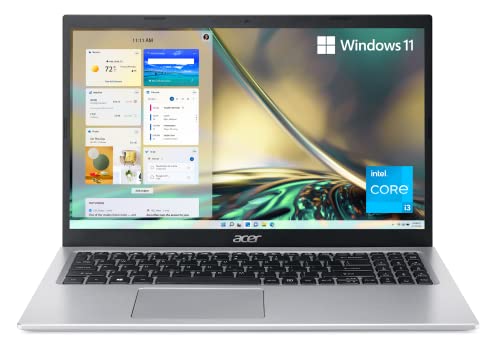
The Acer Aspire 5 is the entry point on this list, and that's worth being direct about: you're trading specs for affordability here, but that trade-off makes sense for a specific type of Linux user. Students learning development, hobbyists spinning up their first home server environment, or anyone who needs a lightweight secondary machine will find the Aspire 5 does the job without the premium price. The Intel Core i3-1115G4 with Turbo Boost up to 4.1GHz is a dual-core 11th-gen chip — plenty capable for terminal work, web browsing, coding in lighter IDEs, and running Docker containers without heavy parallelism requirements.
The 15.6-inch Full HD IPS display is one of the nicest things about this machine at its price point. The 82.58% screen-to-body ratio with narrow bezels gives you a surprisingly modern-looking panel, and the color accuracy is acceptable for everyday use. At 8GB DDR4 RAM and 128GB NVMe SSD, the spec sheet is clearly budget-tier — you'll want to upgrade the SSD if you plan to run multiple Linux distributions or store significant data. The good news is that Acer has made the memory and storage accessible for DIY upgrades. Wi-Fi 6 support is a welcome inclusion at this price, and the ergonomic keyboard hinge lifts the deck slightly when open, improving both typing comfort and airflow.
Linux installation on the Aspire 5 is straightforward. The Intel i3 hardware is among the most universally supported in the Linux kernel, and you'll have your preferred distribution up and running in under 30 minutes. Ships with Windows 11 Home in S Mode, which you'll replace immediately. Battery life is solid for the chip — expect 7-8 hours of light use under Linux, which typically gets better power management than Windows on these Intel platforms. If budget is your primary constraint and you just need a functional Linux machine to learn on or use as a secondary box, the Aspire 5 delivers.
Pros:
- Accessible price point — strong value for budget-conscious Linux newcomers
- Wi-Fi 6 support is a premium feature at this price tier
- 15.6-inch Full HD IPS display with narrow bezels looks better than its price suggests
- Intel i3 hardware has essentially universal Linux kernel support
Cons:
- 8GB RAM and 128GB SSD are genuinely limited — plan for upgrades
- Dual-core processor won't handle compute-heavy development workloads
7. Dell XPS 15 9530 — Best Large-Screen Linux Laptop
Not every Linux user wants a compact ultrabook. If you're doing serious work — compiling large codebases, running multiple virtual machines simultaneously, processing data pipelines, or doing any kind of multimedia production — the XPS 15 9530 is built for you. The Intel Core i7-13620H is a 10-core, 16-thread 13th-gen processor that boosts to 4.9GHz, paired with 32GB DDR5 4800MHz RAM and a 1TB PCIe NVMe SSD. That configuration handles heavy concurrent workloads without thermal throttling in a way that smaller ultrabooks fundamentally cannot match — the larger chassis gives Dell room to implement proper cooling.
The 15.6-inch FHD+ display covers 100% sRGB with 500 nits of brightness and a 16:10 aspect ratio — that extra vertical space makes a significant difference when you're working in a tiling window manager or keeping multiple terminal windows open simultaneously. InfinityEdge bezels keep the footprint compact relative to screen size. Two Thunderbolt 4/USB4 40Gbps ports, a USB 3.2 Gen 2 Type-C, an SD card reader, and a headphone/mic combo jack give you a complete connectivity suite without needing a dock for most setups. Wi-Fi 6 via Intel AX211 with Bluetooth 5.3 rounds out the wireless story.
Under Linux, the XPS 15 9530's Intel Iris Xe integrated graphics are fully supported, and the Thunderbolt 4 ports enable eGPU setups for users who need discrete GPU acceleration for ML workloads. The fingerprint reader works with Linux PAM authentication modules, and the backlit keyboard is comfortable for long work sessions. Dell's strong record of Linux kernel contributions means hardware support for XPS machines improves with every kernel release. This is the machine for the Linux power user who works primarily at a desk but needs the option to move — you get desktop-class performance in a laptop chassis. For more on productivity across devices, our guide to best tablets for video editing in 2026 covers the tablet side of heavy media workflows.
Pros:
- 10-core i7-13620H handles heavy concurrent workloads without throttling
- 32GB DDR5 RAM is the right foundation for virtualization and data work
- 15.6-inch 100% sRGB display at 500 nits with 16:10 ratio
- Thunderbolt 4 ports support eGPU for ML/GPU-accelerated workflows
- Dell's kernel contribution record ensures improving Linux hardware support
Cons:
- 15.6-inch form factor means more weight and bulk than ultrabooks
- 720p webcam is below average at this price point
How to Pick the Best Linux Laptop
Hardware Compatibility Comes First
The single most important criterion when buying a laptop for Linux is hardware compatibility. A machine with impressive specs is worthless if you're fighting Wi-Fi drivers or battling a broken suspend/resume cycle. Before buying any laptop for Linux use, check the Linux kernel documentation and community wikis for your target distribution. ThinkPads and Dell XPS machines consistently rank at the top of compatibility lists because their manufacturers actively work with the Linux community. AMD hardware has excellent open-source driver support baked into the kernel. Intel's newer Core Ultra chips are gaining solid support in kernel 6.5 and later. NVIDIA discrete GPUs remain the most complex setup under Linux — avoid them unless you specifically need CUDA and know what you're getting into.
RAM and Storage: Don't Underbuy in 2026
16GB RAM is the minimum you should consider in 2026 for any serious Linux development machine. Modern development environments — VS Code, JetBrains IDEs, Docker, browser DevTools — consume memory aggressively. If you're running virtual machines or containers alongside your editor, 32GB is the more comfortable baseline. For storage, 512GB is workable but tight once you factor in the OS, development tools, container images, and project files. A 1TB SSD is the sweet spot if your budget allows it. Critically, check whether the laptop's RAM is soldered (unupgradeable) or slotted before buying — some ultrabooks lock you into the factory spec permanently.
Display: Resolution and Color Space Matter
For Linux development work, you want at minimum a 1080p IPS panel with good viewing angles. If you do any frontend design work or content creation alongside coding, a display that covers 100% sRGB is worth the premium — both the ThinkPad X1 Carbon Gen 12 and the Dell XPS 15 9530 clear this bar. The 16:10 aspect ratio (1920x1200 instead of 1920x1080) gives you extra vertical screen real estate that directly translates to more visible lines of code in your editor and fewer scroll events in your terminal. It sounds like a minor detail until you've worked with it for a week and can't go back.
Battery Life and Power Management
Linux power management has improved dramatically over the past few years, but it still varies by hardware. AMD processors on Linux typically achieve excellent battery efficiency with the right power management kernel parameters, often matching or exceeding their Windows counterparts. Intel's newer Meteor Lake and Raptor Lake chips are also well-served by modern kernels with `intel_pstate` scaling. Tools like `tlp`, `powertop`, and `auto-cpufreq` let you tune battery behavior further once the machine is running. As a general rule, expect 20-30% more battery life on Linux compared to Windows benchmarks for the same hardware, provided you're running a recent kernel and have basic power management configured.
Common Questions
What is the best Linux laptop overall in 2026?
The Lenovo ThinkPad X1 Carbon Gen 12 is the best Linux laptop overall in 2026. It combines Intel's Core Ultra 7 165U processor, 32GB RAM, a 1TB Gen4 SSD, and outstanding Linux kernel support in an ultra-light carbon fiber chassis under 2.5 pounds. ThinkPads have decades of proven Linux compatibility, and the Gen 12 continues that tradition at the premium end of the market.
Which laptops have the best Linux driver support?
ThinkPad laptops from Lenovo and XPS laptops from Dell consistently offer the best Linux driver support. Both manufacturers actively collaborate with the Linux kernel community. AMD-powered machines — including the ThinkPad T14s Gen 2 and E14 Gen 6 — benefit from fully open-source GPU and CPU drivers integrated directly into the kernel. Intel's current Core Ultra hardware is also well-supported in kernel 6.5 and later releases.
Can I install Linux on any laptop on this list?
Yes. Every laptop on this list ships with Windows and can have Linux installed in its place or alongside Windows in a dual-boot configuration. The ThinkPad models, Dell XPS machines, and HP EliteBook are particularly straightforward to set up with Ubuntu, Fedora, or Debian. The Acer Aspire 5 also installs Linux cleanly given its Intel Core i3 hardware. Always back up your data and prepare a bootable Linux USB drive before starting the installation process.
Is AMD or Intel better for Linux laptops?
Both are excellent choices in 2026, but AMD has a slight edge for Linux compatibility due to its fully open-source driver stack. AMD's AMDGPU driver is built into the mainline Linux kernel, meaning you rarely need to install anything additional for GPU support. Intel's open-source drivers are also strong, particularly for integrated graphics, and Intel's power management under Linux has improved significantly with kernel 6.x. Either platform will serve you well on any of the laptops in this guide.
Do Linux laptops get better battery life than Windows laptops?
Linux laptops often achieve comparable or better battery life than Windows on the same hardware, particularly with AMD processors and modern Intel chips. Tools like TLP and auto-cpufreq allow fine-tuned power management that Windows doesn't offer at the same level of granularity. However, battery performance under Linux depends heavily on kernel version, distribution, and configuration. Running a current kernel (6.5+) on a well-supported platform like ThinkPad or Dell XPS gives you the best baseline to start from.
What Linux distribution should I use with these laptops in 2026?
Ubuntu 24.04 LTS is the safest choice for most users — it has the widest hardware support, the largest community, and long-term security updates through 2029. Fedora 40+ is excellent for developers who want cutting-edge kernel and toolchain versions without the complexity of a rolling release. Debian stable is the right choice for servers and users who prioritize stability above all else. If you're experienced and want full control, Arch Linux gives you a minimal base with excellent documentation. All of these distributions work well on the laptops in this guide.
Buy on Walmart
- Lenovo Gen 12 ThinkPad X1 Carbon Laptop with Intel Ultra 7 1 — Walmart Link
- Dell XPS 13 9340 AI Powered Laptop • Intel 16-Core Ultra 7 1 — Walmart Link
- Lenovo ThinkPad T14s Gen 2 Laptop, 14" FHD Notebook Computer — Walmart Link
- Lenovo ThinkPad E14 Gen 6 Business Laptop (14" FHD+ Anti-Gla — Walmart Link
- HP EliteBook 840 G11 14" Notebook - WUXGA - Intel Core Ultra — Walmart Link
- acer Aspire 5 A515-56-347N Slim Laptop - 15.6" Full HD IPS D — Walmart Link
- Dell XPS 15 9530 Business Laptop (15.6" FHD+, Intel 10-Core — Walmart Link
Buy on eBay
- Lenovo Gen 12 ThinkPad X1 Carbon Laptop with Intel Ultra 7 1 — eBay Link
- Dell XPS 13 9340 AI Powered Laptop • Intel 16-Core Ultra 7 1 — eBay Link
- Lenovo ThinkPad T14s Gen 2 Laptop, 14" FHD Notebook Computer — eBay Link
- Lenovo ThinkPad E14 Gen 6 Business Laptop (14" FHD+ Anti-Gla — eBay Link
- HP EliteBook 840 G11 14" Notebook - WUXGA - Intel Core Ultra — eBay Link
- acer Aspire 5 A515-56-347N Slim Laptop - 15.6" Full HD IPS D — eBay Link
- Dell XPS 15 9530 Business Laptop (15.6" FHD+, Intel 10-Core — eBay Link
The best Linux laptop isn't the one with the most RAM — it's the one that gets out of your way and lets you work, and in 2026, a ThinkPad or Dell XPS with AMD or Intel Core Ultra silicon does exactly that from the moment you boot the installer.
 |
 |
 |
 |

About Priya Anand
Priya Anand covers laptops, tablets, and mobile computing for Ceedo. She holds a bachelor degree in computer science from the University of Texas at Austin and has spent the last nine years writing reviews and buying guides for consumer electronics publications. Before joining Ceedo, Priya worked as a product analyst at a major retailer where she helped curate the laptop and tablet category. She has personally benchmarked more than 200 portable computers and is particularly interested in battery longevity, repairability, and the trade-offs between Windows, macOS, ChromeOS, and Android tablets. Outside of work, she runs a small Etsy shop selling laptop sleeves she sews herself.