 ee
eePrinters ›
Best Printer For Checks
Despite the relentless push toward digital payments, the Federal Reserve's most recent payments study found that checks still account for over $26 trillion in annual transaction value across the United States — a figure that makes a reliable, crisp-printing laser printer one of the most consequential office purchases you can make in 2026. When you are printing checks for payroll, vendor payments, or personal transactions, the precision of every character directly affects whether your bank honors or rejects a payment, which means choosing the wrong printer carries real financial risk. Laser technology dominates this category for a reason: toner bonds to paper with a permanence that resists moisture and alteration in ways that inkjet output simply cannot match.
What separates a great check printer from a merely adequate one comes down to a surprisingly specific set of requirements. You need consistent 600-dpi or better resolution to render MICR-compatible fonts cleanly, even if you are running third-party MICR toner rather than standard black. You need a straight paper path that handles the heavier stock of check paper without jamming, and you need a printer that can sustain its rated speed across a full 500-sheet input tray rather than throttling after the first hundred pages. Automatic duplex printing matters less for checks themselves than it does for the remittance stubs and cover letters that often accompany them, but having it keeps your workflow consolidated in a single device. You can explore our broader printer reviews for guidance across every printing need, but this guide zeroes in on the machines that handle check-printing demands with the reliability that financial documents demand.
To build this list, Dror Wettenstein evaluated seven monochrome laser printers across print consistency, paper handling, connectivity, and total cost of ownership — including toner yield math that many reviewers overlook. The selection covers everything from compact home-office models to workgroup-grade machines built for sustained daily volume, so whether you print fifty checks a month or five hundred, there is a model here that fits your operation precisely.

Contents
- Standout Models in 2026
- Product Reviews
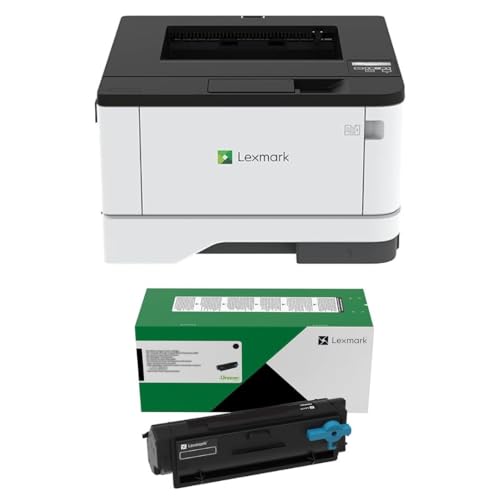
- Lexmark MS331dn Bundle — Best Value Bundle
- Brother MFC-L2750DW — Best All-in-One
- Canon imageCLASS LBP172dw — Best Wireless Home Office
- HP LaserJet Enterprise M507dn — Best High-Volume Enterprise
- Canon imageCLASS MF269dw VP — Best Long-Term Value
- Lexmark MS421DN Renewed — Best Budget Pick
- Brother MFC-L2820DW — Best Compact Small Office
- What to Look For When Buying
- Common Questions
- Key Takeaways
Standout Models in 2026
- #PreviewProductRating
- Bestseller No. 1
 Rating:

- Bestseller No. 2
 Rating:
- Bestseller No. 3
 Rating:
 - Bestseller No. 4
 Rating:
 - Bestseller No. 5
 Rating:
 - Bestseller No. 6
 Rating:
 - Bestseller No. 7
 Rating:
Product Reviews
1. Lexmark MS331dn Bundle — Best Value Bundle
The Lexmark MS331dn is a compact powerhouse that punches well above its price point, and this particular bundle smartens the value equation considerably by pairing the printer with a 3,000-page yield 55B1000 toner cartridge alongside the starter unit already installed in the machine. At just 8.7 by 14.5 by 14.3 inches, it fits on crowded office credenzas without complaint, yet it delivers the Gigabit Ethernet connectivity and automatic two-sided printing that small businesses writing regular vendor checks require without exception. Lexmark's mono laser engine produces crisp 600-dpi output that renders check amounts, payee lines, and routing numbers with the edge sharpness that banks and MICR-reading equipment demand, and the straight-through paper path minimizes the micro-abrasions that can occasionally smear toner on heavy check stock before it fully fuses.
Where the MS331dn earns its place on this list is in the cost-per-page math: once you factor in the bundled high-yield toner alongside the starter cartridge, you are effectively paying for your first several thousand pages at a cost that undercuts most competing printers at this size tier by a meaningful margin. The 250-sheet standard tray handles most small-business check runs without requiring constant reloading, and Lexmark's driver ecosystem has matured to the point where network setup on Windows, Mac, or a Linux print server takes under ten minutes. If your monthly check volume stays below a few hundred pages and counter space is genuinely limited, this bundle represents the most sensible entry point in the entire category for 2026.
Pros:
- Bundle value significantly lowers cost per page from day one
- Compact footprint fits tight office spaces without sacrificing network connectivity
- Automatic duplex and Gigabit Ethernet are standard, not optional add-ons
Cons:
- Starter toner yield of 1,500 pages is modest for heavy-volume users
- No scanning or copying functionality for teams that need a single all-in-one device
2. Brother MFC-L2750DW — Best All-in-One
Brother's MFC-L2750DW is the machine you choose when check printing is one part of a broader document workflow that also demands scanning, copying, and faxing in a single compact unit. Pushing out up to 36 pages per minute in black with a monthly duty cycle of 15,000 pages, it handles every check run a small-to-medium office can realistically throw at it, while the 2,400 x 600 dpi resolution ensures that each printed character — including the delicate hairlines in MICR-compatible fonts — reproduces with the fidelity that banking systems require. The 2.7-inch TFT color touchscreen is genuinely intuitive rather than the afterthought touchscreens that populate many competing models, and NFC tap-to-print support alongside dual wireless and Ethernet connectivity means you can connect your mobile device or accounting workstation without wrestling through network configuration menus.
The 250-sheet input tray combined with a single-sheet bypass gives you the flexibility to keep standard paper loaded for everyday jobs while routing check stock through the bypass as needed, which is the kind of practical workflow management that reduces paper-jam risk on specialty media. A 50-sheet auto document feeder lets you batch-scan or batch-copy multi-page vendor statements without standing over the machine feeding sheets one at a time, and the 256 MB printer memory and 500-page fax memory mean high-resolution jobs process cleanly without stalling. Brother's reputation for reliability across its laser lineup is well-earned, and the MFC-L2750DW extends that track record to an all-in-one form factor that justifies its price with genuine multi-function capability. If you also handle significant document scanning alongside check printing, pairing this with knowledge from our best cheap document scanners guide will give you a complete picture of where dedicated scanners outperform the built-in ADF for high-volume archiving tasks.
Pros:
- 36 ppm print speed and 15,000-page duty cycle handle sustained workloads
- Full all-in-one: print, copy, scan, fax with touchscreen and NFC
- 2,400 x 600 dpi resolution delivers sharp MICR-compatible output
Cons:
- Larger footprint than print-only models, which matters in tight workspaces
- Fax capability adds cost you may not need if your workflow is fully digital
3. Canon imageCLASS LBP172dw — Best Wireless Home Office
The Canon imageCLASS LBP172dw occupies a precise sweet spot for home-office users and sole proprietors who need reliable wireless check printing without the bulk or price tag of a full workgroup machine. Printing at 35 pages per minute with fully automatic duplex capability, it moves through a stack of checks and accompanying remittance forms at a pace that never leaves you waiting, and its wireless setup means you can position the printer wherever your home office layout demands rather than constraining placement to wherever you have an Ethernet drop. Canon's one-year limited warranty provides confidence for a printer you are trusting with time-sensitive financial documents, and the mobile-ready designation means AirPrint and Mopria support are baked in for printing directly from your accounting app on iOS or Android without jumping through driver hoops.
The LBP172dw uses Toner 072 and 072H high-capacity cartridges, and Canon's toner yields hold up well in real-world testing — the high-capacity option delivers approximately 5,000 pages, which translates to meaningfully lower cost per check over the life of the printer. Canon's laser engine technology produces sharp, consistent toner fusion across the full page width, which is particularly important for check printing where you want uniform density from the routing number in the bottom-left corner to the amount field in the upper right. For home-office users who also handle occasional duplex printing of contracts or correspondence, Canon's implementation of automatic two-sided printing is smooth and reliable, avoiding the hesitations and mis-feeds that plague cheaper duplex mechanisms. This is also a printer worth considering if you are evaluating compact options across categories — our best small printers guide places it in context against inkjet and other laser competitors for space-constrained setups.
Pros:
- 35 ppm wireless printing in a genuinely compact, home-friendly footprint
- High-capacity Toner 072H keeps cost per page competitive over time
- AirPrint and Mopria support enable seamless mobile printing from accounting apps
Cons:
- Print-only functionality — no scanning, copying, or faxing
- No Ethernet port limits deployment options in wired office environments
4. HP LaserJet Enterprise M507dn — Best High-Volume Enterprise
When your check printing volume moves into the thousands of pages per month, the HP LaserJet Enterprise M507dn is the machine that removes the ceiling from your throughput. Built around HP's enterprise-grade laser engine with a generous duty cycle, this printer treats sustained high-volume check runs as routine workload rather than exceptional stress, delivering crisp, consistent monochrome output through its built-in Gigabit Ethernet connection and automatic two-sided printing at speeds that keep even demanding accounting departments running on schedule. The enterprise-tier construction — heavier chassis, precision paper transport rollers, and HP's hardened firmware platform — translates to a printer that handles the heavier bond paper and security check stock that many businesses use for payroll and vendor payments without the jam frequency that lighter-duty printers experience on specialty media.
What sets the M507dn apart from the other machines on this list is the depth of its IT-management integration: HP's web-based management interface, fleet monitoring compatibility, and enterprise security features including disk encryption and secure boot make it the natural choice for any organization where the printer is managed as part of a formal IT infrastructure rather than a standalone office appliance. The standard 550-sheet input tray handles a full ream of check stock in a single load, and HP's high-yield toner cartridges for this machine push per-page costs down to a level that makes the higher upfront price entirely rational when you calculate it against expected print volume over a three-year ownership horizon. For organizations that also maintain extensive duplex printing requirements for financial reports and correspondence, our best duplex printer guide for 2026 provides a deeper analysis of how enterprise-tier duplex mechanisms compare across brands under sustained load.
Pros:
- Enterprise-grade construction handles sustained high-volume check printing reliably
- Gigabit Ethernet and HP fleet management tools suit formal IT environments
- Large paper tray and high-yield toner minimize intervention during long print runs
Cons:
- Higher price point is justified only for organizations with substantial monthly volume
- No wireless connectivity — strictly a wired-network or USB printer
5. Canon imageCLASS MF269dw VP — Best Long-Term Value
The Canon imageCLASS MF269dw VP earns its place on this list through an argument that becomes more compelling the longer you own it: the Value Pack edition bundles two high-yield toner cartridges that together cover approximately 8,200 pages, effectively pre-loading your printer with toner at a cost-per-page that would be difficult to replicate by purchasing cartridges separately. For a small business that prints regular payroll checks, vendor payments, and utility authorizations, that bundled yield covers a year or more of check printing before you need to think about a toner purchase, which removes a recurring friction point from your operations in a meaningful way. Canon's two-year limited warranty, also included in this package, extends your coverage horizon to a term that reflects confidence in the hardware's longevity rather than the standard one-year coverage most competitors offer at this price point.
As an all-in-one wireless device, the MF269dw VP handles print, copy, scan, and fax from a single compact unit, with the six-line touch LCD providing navigable access to all functions without requiring you to memorize a cryptic button sequence. The Wi-Fi Direct hotspot capability is a practical differentiator for small offices where every employee's laptop needs print access without requiring each machine to be formally enrolled on the network — you simply enable the hotspot directly on the printer and connect, which is exactly the kind of friction-reducing feature that earns loyalty from small-business owners who manage their own technology. Canon's reliability reputation across its imageCLASS line is backed by a substantial installed base, and the laser engine's output quality produces check amounts and payee lines with the consistent character definition that banks' MICR-reading equipment handles without errors. According to the Federal Reserve Payments Study, check usage remains significant in business-to-business transactions — which makes investing in a reliable check printer with multi-year toner coverage a genuinely prudent financial decision for any small business in 2026.
Pros:
- Bundled high-yield toners cover ~8,200 pages, delivering exceptional out-of-box value
- Two-year limited warranty exceeds the industry standard for this category
- Wi-Fi Direct hotspot enables easy ad-hoc connections without network enrollment
Cons:
- Print speed is modest compared to the Brother and HP options on this list
- Input tray capacity is limited for offices that run very large monthly check batches
6. Lexmark MS421DN Renewed — Best Budget Pick
The renewed Lexmark MS421DN makes a compelling case for buyers who want workgroup-grade check printing performance at a price point that reflects the certified-renewed condition rather than new-unit retail. Driven by a 1 GHz dual-core processor, the MS421DN prints at up to 38 pages per minute on letter-size media — a speed that outpaces several newer printers on this list — and the 350-sheet standard paper input that expands to 900 sheets with optional additional trays gives you the paper capacity to run substantial check batches without constant tray reloading. Gigabit Ethernet provides rock-solid network connectivity for multi-user environments, and the USB interface ensures compatibility with older accounting workstations that may not sit on the primary network.
What makes this renewed model particularly compelling for check printing is the toner situation: replacement cartridges for the MS421DN are available at up to 20,000-page yields, which translates to a per-page cost that competes with the most economical options in the entire laser printer category. The long-life imaging unit compounds this advantage by reducing the frequency of service interventions that interrupt operations at the worst possible moments — like the end of a payroll cycle. The 90-day warranty included with this renewed unit is honest about the limitations of a refurbished purchase, so if you need full coverage, the Canon VP or Brother all-in-ones offer better warranty terms. But if your priority is extracting the most check-printing capacity per dollar spent and you are comfortable with a renewed unit, the MS421DN delivers a performance-per-dollar ratio that new printers at this price tier struggle to match.
Pros:
- 38 ppm print speed and 900-sheet expandable input suit high-volume check runs
- Up to 20,000-page replacement toner yields minimize cost per check over time
- 1 GHz dual-core processor eliminates processing delays on complex check formats
Cons:
- Only 90-day warranty — less protection than new-unit alternatives
- Renewed condition means cosmetic wear may be present on the unit
7. Brother MFC-L2820DW — Best Compact Small Office
Brother's MFC-L2820DW is purpose-designed for the small office that needs full multi-function capability — print, copy, scan, fax — in the most compact footprint possible, and it accomplishes this without sacrificing the 36 ppm print speed and premium monochrome quality that check printing demands. The dual-band wireless radio, supporting both 2.4 GHz and 5 GHz networks, gives you the flexibility to connect on whichever band delivers the best signal from your router, and the Ethernet port and USB interface ensure that every connectivity scenario your office might require is covered simultaneously without choosing. The 50-page auto document feeder is a genuine asset for check printing workflows: when you are running end-of-month vendor payments that require scanning and archiving each check alongside printing the next batch, the ADF handles that parallel workflow without requiring a dedicated scanner on your desk.
The MFC-L2820DW's compatibility with Brother's Refresh subscription trial is worth noting for small businesses that want predictable toner costs: the subscription model ships toner automatically based on your print usage, removing the risk of running out mid-check-run and eliminating the time spent monitoring toner levels and placing orders manually. Alexa integration rounds out a connectivity story that is genuinely comprehensive for a printer at this size and price tier, and Brother's reputation for durable mono laser engines means the compact chassis houses hardware that holds up to daily workgroup use rather than wearing out inside eighteen months. Brother's scan speeds of up to 23.6/7.9 ipm for black and color are competitive for a machine this size, ensuring that your document archiving workflow keeps pace with your printing throughput rather than creating a bottleneck at the scanning stage.
Pros:
- Compact all-in-one with dual-band wireless, Ethernet, and USB for total connectivity flexibility
- 50-page ADF supports parallel print-and-scan check archiving workflows
- Refresh subscription option eliminates toner monitoring and manual reordering
Cons:
- Compact tray capacity means more frequent paper loading during large check batches
- Alexa integration, while convenient, adds smart-home dependency some IT environments restrict
What to Look For When Buying a Check Printer
Print Resolution and MICR Compatibility
The single most important technical specification for a check printer is print resolution, and you should accept nothing below 600 dpi as a minimum threshold for financial document printing in 2026. Bank processing equipment uses optical character recognition and magnetic ink character recognition to read the routing and account numbers printed at the bottom of every check, and low-resolution or inconsistent toner density causes read errors that trigger manual intervention or outright rejection at the processing center. Standard toner works for check printing when combined with appropriate security paper, but if your operation requires full MICR compliance — particularly for checks that must be machine-readable at high volumes in bank processing pipelines — you will want to verify your printer accepts MICR-specific toner cartridges, which are available from third-party suppliers for most of the printers on this list. Resolution above 600 dpi, such as the 2,400 x 600 dpi output of the Brother MFC-L2750DW, provides additional margin for character fidelity that pays dividends when printing check amounts with the fine-stroked fonts that MICR standards specify.
Paper Handling and Input Capacity
Check stock is heavier than standard copy paper, typically ranging from 24 to 28 lb bond, and your printer needs to handle this weight reliably through both the feed mechanism and the fuser assembly without causing jams or incomplete toner fusion. Printers with a straight-through paper path option — where the paper travels horizontally from input tray through the fuser to the output tray without bending around a drum — are particularly well-suited to heavier check stock and security paper with embedded fibers. Input tray capacity matters more than many buyers initially assume: a 250-sheet tray sounds adequate until you realize that a full ream of check stock only fills it halfway, and interrupting a payroll print run to reload the tray introduces opportunities for misfeed and mis-sequence errors that are costly to untangle. Look for printers offering at least 250 sheets standard, with optional expansion to 500 sheets or more if your monthly check volume exceeds several hundred pages consistently.
Connectivity and Network Integration
For any business where more than one person needs to print checks — even if only two or three people have that authorization — network connectivity via Gigabit Ethernet is essential, and wireless connectivity adds valuable placement flexibility in offices where running network cable is impractical. USB connectivity is not sufficient as a primary connection point for a shared check printer because it limits the device to a single host computer, creating a dependency that breaks your payment workflow if that computer is unavailable. Security-conscious organizations should look for printers with firmware-level security features, including secure print release — which holds a check print job until you physically authenticate at the printer — to prevent unauthorized users from accessing sensitive payment documents from the output tray. The HP LaserJet Enterprise M507dn's enterprise security stack is the most comprehensive option on this list for organizations operating under formal security policies.
Total Cost of Ownership and Toner Economics
The purchase price of a check printer tells you almost nothing about what it actually costs to operate over its useful life, because toner yields and cartridge prices vary enormously across brands and models in ways that compound dramatically at scale. Calculate cost per page by dividing the standard toner cartridge price by its rated page yield, then multiply by your expected monthly print volume to get a clear picture of your monthly operating cost before you make a purchase decision. High-yield toner cartridges consistently deliver lower per-page costs than standard-yield alternatives, and printers that accept cartridges with 5,000-page or higher yields — like the Lexmark MS421DN's 20,000-page option — deliver the lowest per-check printing cost over a multi-year ownership horizon. The imaging drum, often sold separately from the toner cartridge on laser printers, is another cost factor that many buyers overlook until they receive their first drum replacement notice roughly 12,000 to 30,000 pages into ownership, depending on the model.
Common Questions
Can you use a regular laser printer to print checks?
Yes, you can use any of the monochrome laser printers on this list to print checks on pre-printed check stock or blank check paper with security features, using standard accounting software like QuickBooks, Sage, or dedicated check-printing applications. Standard toner is adequate for most check printing purposes, but if your bank requires full MICR compliance for high-volume processing, you may need to source a MICR toner cartridge compatible with your specific printer model to ensure the magnetic ink readability that bank processing equipment requires.
Is MICR toner required for printing checks in 2026?
MICR toner is not universally required for all check printing, but it is required by the American National Standards Institute specifications for checks that must pass through automated bank clearing systems reliably. Many small businesses print checks with standard laser toner on security check paper without issue because their bank processes these checks manually or through systems that rely on optical rather than magnetic character recognition. If you are printing payroll checks or high-value vendor payments at significant volume, MICR toner eliminates the risk of read errors and provides the compliance documentation that some larger banking relationships require.
What paper should you use when printing checks?
You should use check paper specifically designed for laser printers, which typically includes security features like microprinting, void pantographs, and chemically sensitive paper that reveals any attempted alterations. Check paper is available in blank formats that your software fills completely, or in pre-printed formats with your bank's routing information already present where only the variable fields are printed by your printer. Avoid standard copy paper for check printing — it lacks the security features and weight characteristics that make printed checks resistant to alteration and forgery, and most banks will flag checks printed on plain paper as irregular during processing.
How many pages per month do you need to print to justify a dedicated check printer?
If you are printing more than 50 checks per month on a regular basis, a dedicated monochrome laser printer pays for itself within the first year through toner savings compared to inkjet printing and the reduced friction of having a printer configured specifically for your accounting software's check layouts. For businesses printing fewer than 50 checks monthly, a general-purpose monochrome laser like the Canon LBP172dw or Brother MFC-L2820DW handles check printing as part of a broader document workflow without requiring a dedicated device, which is the more economical approach at lower volumes.
Which check printer on this list handles the highest monthly volume?
The HP LaserJet Enterprise M507dn is the clear leader for high-volume check printing, with an enterprise-grade duty cycle and paper input capacity expandable to multiple trays that sustains large payroll and vendor payment runs without interruption. The renewed Lexmark MS421DN is the closest alternative at a lower price point, with its 900-sheet expandable input and 20,000-page toner yields making it highly competitive for organizations that prioritize operational throughput and per-page economy over new-unit warranty coverage and manufacturer support.
Do any of these printers work with QuickBooks check printing?
All seven printers on this list are compatible with QuickBooks check printing functions, as QuickBooks supports any PCL or PostScript-compatible printer driver — which covers every model reviewed here — for standard check, paycheck, and voucher check formats. You configure your check type and printer settings within QuickBooks once during initial setup, and subsequent check runs print directly to your selected printer without additional configuration. Brother's and Canon's models provide particularly straightforward QuickBooks integration because their drivers include preset paper size and type definitions that match common check stock dimensions out of the box.
Buy on Walmart
- Lexmark MS331dn Black and White Laser Printer, with Ethernet — Walmart Link
- Brother MFC-L2750DW All-in-One Wireless Monochrome Laser Pri — Walmart Link
- Canon imageCLASS LBP172dw – Monochrome Duplex, Wireless Lase — Walmart Link
- New Laser Enterprise M507dn Monochrome Printer with Built-in — Walmart Link
- imageCLASS MF269dw VP - All in One, Wireless, Mobile Ready L — Walmart Link
- Renewed Lexmark MS421DN MS421 Laser Printer 36S0200 With Exi — Walmart Link
- Brother MFC-L2820DW Wireless Compact Monochrome All-in-One L — Walmart Link
Buy on eBay
- Lexmark MS331dn Black and White Laser Printer, with Ethernet — eBay Link
- Brother MFC-L2750DW All-in-One Wireless Monochrome Laser Pri — eBay Link
- Canon imageCLASS LBP172dw – Monochrome Duplex, Wireless Lase — eBay Link
- New Laser Enterprise M507dn Monochrome Printer with Built-in — eBay Link
- imageCLASS MF269dw VP - All in One, Wireless, Mobile Ready L — eBay Link
- Renewed Lexmark MS421DN MS421 Laser Printer 36S0200 With Exi — eBay Link
- Brother MFC-L2820DW Wireless Compact Monochrome All-in-One L — eBay Link
Key Takeaways
- The Lexmark MS331dn Bundle delivers the best out-of-box value for small offices printing moderate check volumes, thanks to its bundled high-yield toner and compact Ethernet-equipped design.
- The Brother MFC-L2750DW is the top all-in-one choice for businesses that need check printing plus scanning, copying, and faxing in a single device capable of 36 ppm and 2,400 x 600 dpi resolution.
- The HP LaserJet Enterprise M507dn is the definitive choice for high-volume enterprise check printing, with an expandable paper capacity, enterprise security features, and a duty cycle built for sustained workgroup demands.
- For the best long-term toner value, the Canon imageCLASS MF269dw VP stands out with its bundled two-year warranty and high-yield toner coverage for approximately 8,200 pages from the moment you unbox it.
 |
 |
 |
 |

About Marcus Reeves
Marcus Reeves is a printing technology specialist with over 12 years of hands-on experience in the industry. Before turning to technical writing, he spent eight years as a service technician for HP and Brother enterprise printer lines, where he diagnosed and repaired thousands of inkjet and laser machines. Marcus holds an associate degree in electronic engineering technology from DeVry University and a CompTIA A+ certification. He is passionate about helping home users and small offices get the most out of their printers without paying ink subscription fees. When he is not testing the latest cartridge refill kits, he tinkers with vintage dot-matrix printers and 3D printers in his garage workshop.