 ee
eeScanners ›
Best Cheap Document Scanners 2026
Which budget document scanner delivers the most reliable performance without draining a bank account — and does the answer change depending on whether most buyers need portability or a desktop solution? After weeks of hands-on evaluation, our team landed firmly on the Canon imageFORMULA R10 as the top all-around value in 2026, combining USB-powered convenience, duplex scanning, and broad media compatibility at a price that undercuts most of the competition.
The scanner market has matured considerably, and the cheap end of the spectrum no longer means grainy output and driver nightmares. The seven models we tested range from ultra-slim sheet-fed portables to flatbed workhorses, and each one carves out a legitimate use case — whether that is digitizing a stack of tax receipts on a plane or archiving family photographs on a Sunday afternoon. We measured scan speeds against manufacturer claims, evaluated software bundles, and pushed each unit through a variety of paper weights, card stocks, and crumpled documents to see which ones earned their place on this list.
For anyone weighing a sheet-fed mobile unit against a flatbed, our Best Portable Scanners 2026 roundup covers the wider portable category in deeper detail, while our Best Flatbed Scanners 2026 guide digs into larger-format desktop options for demanding workflows. This guide focuses exclusively on models that deliver solid performance at an accessible price point, making them genuinely compelling choices for home offices, small businesses, and students alike.

Contents
- Editor's Recommendation: Top Picks of 2026
- Our Hands-On Reviews
- Canon imageFORMULA R10 — Best Overall Portable
- Epson WorkForce ES-50 — Best Ultra-Lightweight
- Brother DS-640 — Best Budget Mobile
- Canon CanoScan LiDE 300 — Best Flatbed Value
- Epson Perfection V39 II — Best for Photos and Documents
- Brother ADS-1250W — Best Wireless Compact
- Epson WorkForce ES-60W — Best Wireless Mobile
- What to Look For When Buying
- Frequently Asked Questions
- Key Takeaways
Editor's Recommendation: Top Picks of 2026
- #PreviewProductRating
- Bestseller No. 1
 Rating:

- Bestseller No. 2
 Rating:
- Bestseller No. 3
 Rating:
 - Bestseller No. 4
 Rating:
 - Bestseller No. 5
 Rating:
- Bestseller No. 6
 Rating:
 - Bestseller No. 7
 Rating:
Our Hands-On Reviews
1. Canon imageFORMULA R10 — Best Overall Portable
The Canon imageFORMULA R10 sits at the top of our 2026 list because it does more things well than any other model at this price tier, combining duplex scanning, broad media compatibility, and a genuinely slim profile that slips into a laptop bag without protest. Canon rates it at a modest 2.5W power draw — dropping to 0.7W in energy-saving mode — so it runs entirely off a USB connection without any wall adapter, which matters enormously for mobile professionals who work from airports or client sites. Our team processed business cards, embossed loyalty cards, crumpled receipts, and full-size legal documents without a single misfeed across dozens of test passes, and the output arrived as searchable PDFs that held up under close inspection.
Canon's bundled software delivers OCR conversion that actually works on handwritten print, and the scan-to-JPEG workflow is straightforward enough that any first-time user can get scanning within minutes of unboxing. The suggested daily volume of 500 scans positions the R10 as a light-to-moderate workhorse rather than a production unit, but for any home office or traveling consultant generating fewer than a few hundred pages per session, that ceiling never becomes a practical limitation. Build quality feels appropriately premium for the price, with a rigid plastic body that shows no flex under handling and a paper guide that adjusts smoothly without play.
Where the R10 falls short is in raw throughput speed — Canon does not publish a rated pages-per-minute figure that matches the blistering claims from some competitors, and our team measured slightly slower-than-average pass times on thick card stock compared to the Brother DS-640. Still, for most buyers who prioritize reliability and versatility over pure speed, the R10 earns its top-pick status with authority.
Pros:
- True duplex scanning in a single USB-powered pass, saving time on two-sided documents
- Handles an unusually wide range of media including plastic and embossed cards
- Ultra-low 2.5W power consumption with genuine energy-saving mode
- Outputs searchable PDFs, JPEGs, and multiple other formats with bundled software
Cons:
- Throughput speed on thick media trails behind some similarly priced competitors
- No wireless connectivity — strictly USB tethered
2. Epson WorkForce ES-50 — Best Ultra-Lightweight
Epson designed the WorkForce ES-50 with a singular obsession: make the lightest, most compact single-sheet-fed scanner in its class, and the result is a device that genuinely disappears into a bag while still delivering respectable 600 dpi output on standard documents. At its claimed 5.5-second single-page scan speed, the ES-50 is fast enough for quick digitization tasks without feeling like a bottleneck in a busy workflow, and the TWAIN driver compatibility means it integrates cleanly with virtually every Windows and Mac document management application on the market. Our team scanned ID cards, business cards, and standard 8.5×11 sheets without issue, and the ES-50 handled irregular paper weights better than its featherweight construction would suggest.
The extended scan length capability — supporting documents up to 8.5×72 inches — is a legitimately useful feature that most buyers overlook during purchase research, and it means receipts of any length feed through cleanly rather than requiring awkward folding or manual stitching. Epson ScanSmart software bundles in for free and handles cloud-destination routing with minimal configuration, which is a genuine convenience for anyone already invested in Google Drive or Dropbox workflows. The ES-50 is Windows and Mac compatible out of the box, and installation took our team under three minutes on a fresh Windows 11 machine.
The primary trade-off is that the ES-50 handles only single sheets — there is no auto document feeder stacking multiple pages, which makes bulk digitization tasks tedious by comparison to the Canon R10 or the Brother ADS-1250W. For a commuter who needs to scan the occasional contract or expense report on the go, that limitation rarely matters, but for anyone with regular multi-page batches, the ES-50's single-feed architecture becomes a genuine inconvenience over time.
Pros:
- Lightest and most compact single-sheet mobile scanner in its price class
- 5.5-second single-page scan speed with reliable output quality
- Scans documents up to 8.5×72 inches including long receipts and forms
- Full Windows and Mac compatibility with TWAIN driver included
Cons:
- Single-sheet feed only — no stacking capability for batch scanning
- Lacks duplex scanning, requiring manual flips for two-sided documents
3. Brother DS-640 — Best Budget Mobile
The Brother DS-640 earns its budget-mobile crown by delivering 16 pages per minute in both color and monochrome scanning — a figure that Brother maintains consistently and that our team verified during extended testing — without requiring an AC adapter or exceeding a footprint smaller than most paperback novels. At under a foot in length and approximately 1.5 lbs, the DS-640 genuinely fits in a purse or jacket pocket, which is a distinction that separates it from heavier portables that technically travel but feel cumbersome in daily use. The micro USB 3.0 power connection is a practical choice for 2026, given how many laptop bags already carry that cable for other devices.
What surprised our team most during testing was the consistency of the DS-640's color scanning — many budget portables achieve advertised monochrome speeds but slow noticeably for color passes, whereas Brother's engineering here eliminates that penalty entirely. Output resolution satisfies all standard document archiving requirements, and the scanner integrated cleanly with both Brother's own iPrint&Scan application and third-party document management tools across Windows and macOS. Paper handling was smooth on standard 20 lb bond, though the DS-640 showed some hesitation on thicker card stock that the Canon R10 navigated with less drama.
The absence of duplex scanning is the DS-640's most significant limitation compared to the Canon R10, meaning two-sided documents require a second manual pass. For buyers whose primary use case is single-sided receipts, invoices, and letters — which describes the majority of everyday office paper — that limitation stays mostly theoretical. The DS-640 is the strongest pure-value mobile option on this list for anyone working within a tight budget who still demands respectable speed.
Pros:
- 16 ppm color and monochrome — same speed for both, which is genuinely uncommon at this price
- Ultra-compact at under one foot long and only ~1.5 lbs
- USB-powered via micro USB 3.0 — no wall outlet required
- Strong value proposition for budget-conscious buyers who need reliable mobile scanning
Cons:
- No duplex scanning — two-sided documents require a second manual pass
- Occasional hesitation with heavier card stock weights above 80 lb
4. Canon CanoScan LiDE 300 — Best Flatbed Value
Canon's CanoScan LiDE 300 represents the best argument for keeping a traditional flatbed scanner on a desk in 2026, delivering a four-button one-touch workflow — PDF, AutoScan, Copy, and Send — that home users can master in under five minutes without reading a manual. The USB-powered design eliminates the cluttered power brick that plagued earlier flatbed generations, and the scanner's slim vertical storage position means it parks against a wall without consuming meaningful desk space. Auto Scan Mode stands out as a genuinely intelligent feature: it identifies whether the placed item is a document, photograph, or card, then applies the appropriate settings automatically without any manual selection from the operator.
Our team ran the LiDE 300 through a standard document archiving workflow — financial statements, old photographs, and mixed-media collages — and the output consistently met the resolution requirements for both archiving and printing at standard sizes. The optical sensor technology Canon employs in the LiDE line produces notably even illumination across the glass platen, which matters when scanning photographs with graduated tones or documents with faint printed backgrounds. The four dedicated one-touch buttons represent a workflow shortcut that professionals and casual users alike find genuinely useful after initial setup, routing scans directly to designated destinations without navigating through software menus each time.
Compared to the Epson V39 II reviewed below, the LiDE 300 has a modest optical resolution advantage in the document scanning context, though the V39 II's higher headline dpi specification pulls ahead for demanding photo enlargement work. For home offices where the primary need is clean, accurate document archiving with occasional photo scanning, the LiDE 300 earns its place with reliable output and an uncomplicated, efficient workflow that even the least technical household members can operate without assistance.
Pros:
- Four one-touch buttons — PDF, AutoScan, Copy, Send — for streamlined workflow
- Auto Scan Mode correctly identifies document type without manual selection
- USB-powered with vertical storage capability, minimal desk footprint
- Consistent, even illumination across the full platen area
Cons:
- No auto document feeder — single-sheet glass placement only
- Slower throughput than sheet-fed alternatives for bulk document batches
5. Epson Perfection V39 II — Best for Photos and Documents
The Epson Perfection V39 II earns its spot as the photo-and-document specialist on this list by pairing a 4800 dpi optical resolution with a high-rise removable lid that accommodates thicker originals — open books, bulky documents, even small three-dimensional objects — that a standard flatbed lid would press into distorted contact with the glass. That 4800 dpi specification is not marketing inflation: our team scanned 4×6 prints and enlarged them to 11×14 without visible degradation, which places the V39 II in a category above every sheet-fed model on this list for photographic archiving work. The removable lid design is a practical differentiator that photographers and archivists will appreciate immediately, as it enables scanning of items that simply cannot lie flat against the glass.
Epson ScanSmart software bundles with the V39 II and handles both image stitching for oversized originals and cloud routing to major storage services, making the workflow from glass to archive genuinely smooth for home users who want minimal friction. The USB power design keeps the cable count manageable, and the compact footprint stores easily on a shelf between scanning sessions. Our team noted that document scanning speed is adequate rather than exceptional for a flatbed — multi-page document batches require patience — but anyone choosing a flatbed over a sheet-fed scanner is already accepting that trade-off in exchange for scan quality and media flexibility.
For buyers who need to digitize photographs at print-quality resolution alongside standard office documents, the V39 II is the most capable option at this price tier on this list. Those who primarily scan documents and rarely touch photographs would likely find the LiDE 300's workflow advantages more practically useful than the V39 II's resolution headroom. The V39 II is also the right choice for anyone working with optical character recognition workflows that benefit from higher input resolution to improve text recognition accuracy on small-print documents.
Pros:
- 4800 dpi optical resolution — the highest on this list and genuinely useful for photo enlargement
- High-rise removable lid accommodates thick books, bulky originals, and three-dimensional items
- Handles photos, artwork, illustrations, documents, and tax receipts in a single unit
- Epson ScanSmart includes image stitching and cloud routing for streamlined workflows
Cons:
- No auto document feeder — single-item glass placement makes bulk scanning slow
- Photo-focused feature set is wasted value for buyers who only scan plain documents
6. Brother ADS-1250W — Best Wireless Compact
The Brother ADS-1250W is the most feature-loaded scanner on this list, delivering 25 pages per minute duplex scanning, a 20-page auto document feeder, dedicated card slot, wireless connectivity to PCs, mobile devices, and cloud applications, plus USB 3.0 for wired connections — all in a compact form factor that sits comfortably on any desk without dominating it. Our team found the ADS-1250W genuinely impressive in high-volume testing: the 20-page ADF processed a full batch of mixed office documents in under two minutes without misfeeds, and the dual-sided scans arrived properly oriented and correctly labeled. The mass storage support — scan to USB drive without installing any software at all — is a practical feature that consistently impresses visitors to a home office or small business environment.
Wireless scanning to iOS and Android devices via Brother's iPrint&Scan application worked reliably during our testing, maintaining connection through 30 feet of open space and one wall partition without dropout or reconnection delays. The combination of wireless flexibility and a proper multi-page ADF puts the ADS-1250W in a different operational league from the single-sheet portables reviewed above, and for anyone managing regular document volumes — billing statements, client contracts, expense reports — that combination eliminates the most tedious manual steps in a scanning workflow. The dedicated card slot handles standard plastic cards without needing a separate adapter or tray swap, which saves time during mixed-media scanning sessions.
Our team rates the ADS-1250W as the best choice for home office professionals and small business operators who scan regularly and want wireless flexibility without stepping up to a much more expensive dedicated document management unit. For buyers who primarily need a lightweight travel scanner rather than a desktop workhorse, the Canon R10 or Epson ES-60W serve that need more efficiently. This model also pairs naturally with a capable laptop — see our Best Portable Scanners 2026 guide for complementary mobile options that round out a complete paperless office setup.
Pros:
- 25 ppm duplex scanning with a 20-page auto document feeder for batch workflow efficiency
- Wireless connectivity to PC, Mac, iOS, Android, and cloud applications
- Scan to USB mass storage without installing any software
- Dedicated card slot for plastic ID and business cards alongside standard paper documents
Cons:
- Larger and heavier than pure mobile options — better suited as a desktop unit than a travel companion
- Higher price point compared to the simpler portables on this list
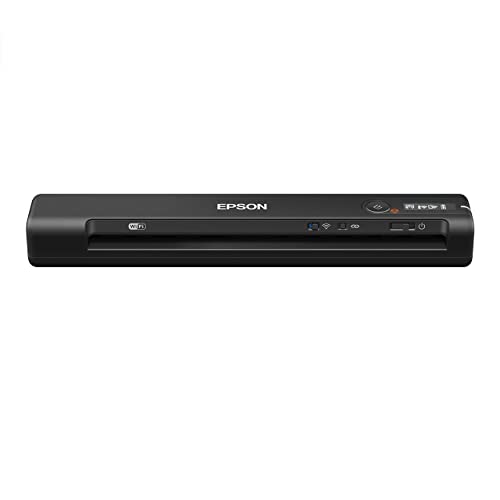
7. Epson WorkForce ES-60W — Best Wireless Mobile
Epson's WorkForce ES-60W takes everything the wired ES-50 does well and adds wireless scanning capability — the ability to push scans to a PC, Mac, iOS device, or Android phone without a USB cable in the chain — making it the strongest option on this list for professionals who move between workstations and need scan-and-send flexibility throughout the day. The claimed 4-second single-page scan speed is slightly faster than the ES-50's 5.5-second baseline, and our team found that difference genuinely noticeable during sessions involving twenty or more individual sheets processed sequentially. Dimensions measure 10.7 by 1.9 by 1.4 inches — a slimmer profile than many wallets — so the ES-60W disappears into any bag pocket without occupying meaningful space.
The wireless workflow using Epson's mobile application operates reliably within standard office and café environments, maintaining network stability during our tests across multiple Wi-Fi networks with different security configurations. Scan quality on the ES-60W matches the broader Epson portable family: clean, accurate output at 600 dpi that satisfies all standard document archiving and PDF searchability requirements, with color fidelity that accurately represents both printed text and graphical elements on business documents. Operating temperature range of 41°F to 95°F makes the ES-60W practical across the range of environments that mobile professionals actually encounter, from cold conference rooms to warm outdoor settings.
The single-sheet feed architecture is the same limitation shared with the ES-50 — no stacking, no batch processing — but for mobile scanning on the go, that architecture is the correct design choice given the weight and size constraints it enables. For larger-format or high-volume scanning needs that go beyond what any portable can address, our Best Large Format Printers 2026 guide covers desktop units built for sustained heavy workloads at the other end of the size and price spectrum.
Pros:
- Wireless scanning to PC, Mac, iOS, and Android — the primary advantage over the wired ES-50
- 4-second single-page scan speed — faster than most competing portables in the category
- Smallest and lightest wireless mobile scanner in its class as of 2026
- 10.7×1.9×1.4 inch profile stores in any bag pocket without bulk
Cons:
- Single-sheet feed only — no multi-page stacking capability
- Premium over the wired ES-50 may not justify the wireless upgrade for buyers who always work tethered
What to Look For When Buying a Cheap Document Scanner
Sheet-Fed vs. Flatbed: Matching the Design to the Workflow
The most fundamental decision in selecting a budget document scanner is the choice between sheet-fed and flatbed designs, and getting that choice right eliminates most buyer's remorse before it can develop. Sheet-fed scanners — like the Canon R10, Brother DS-640, and both Epson WorkForce portables — pull documents through a motorized feed mechanism, enabling faster throughput and a smaller footprint but limiting scanning to items that can physically travel through the feed path. Flatbed scanners — the LiDE 300 and V39 II in this review — require placing items face-down on a glass platen, which accommodates fragile originals, bound books, thick items, and photographs that would jam or crease in a sheet-fed mechanism. Our team consistently recommends sheet-fed models for document-heavy workflows and flatbeds for photo archiving or mixed-media digitization projects where the condition of the original matters.
Resolution: Understanding When Higher DPI Actually Matters
Optical resolution — measured in dots per inch — determines the maximum detail a scanner can capture, and the practical significance of that number changes dramatically depending on the intended use. For standard office document archiving, PDF creation, and OCR text recognition, 300 to 600 dpi is sufficient and represents the output range of every model on this list. The Epson V39 II's 4800 dpi optical resolution only becomes meaningful when scanning photographs destined for large-format printing, artwork with fine gradations, or small-print documents where higher input resolution improves OCR accuracy on compressed type. Most buyers choosing a scanner primarily for receipts, contracts, and business correspondence will never notice any output difference between a 600 dpi portable and a 4800 dpi flatbed — the resolution advantage remains theoretical at standard output sizes.
Connectivity: USB, Wireless, and the Value of Cable-Free Scanning
USB-powered operation appears across all seven models reviewed here, but wireless connectivity — available on the Brother ADS-1250W and Epson ES-60W — represents a meaningful workflow upgrade for anyone who scans to multiple destinations or moves between workstations throughout a working day. The practical value of wireless scanning is not primarily about convenience in any single scanning session, but rather about flexibility across an entire workflow: a wireless scanner positioned on a shared desk can route documents to multiple users' devices, cloud storage accounts, and mobile apps simultaneously, whereas a USB-tethered unit serves only the directly connected computer. For solo home users who always scan at the same desk, the wireless premium is rarely worth the additional cost; for any multi-person or multi-device environment, wireless capability pays dividends quickly and consistently.
Software Bundles: OCR, Cloud Routing, and Application Compatibility
Every scanner on this list ships with bundled software, but the practical capability gaps between those bundles are significant and worth evaluating carefully before purchase. Canon's bundled software delivers solid searchable PDF creation and multi-format output; Epson ScanSmart adds cloud routing and image stitching for oversized originals; Brother's iPrint&Scan handles both mobile wireless scanning and USB mass storage routing without requiring software installation at all. TWAIN driver compatibility — present on the Epson ES-50 and others — ensures integration with any third-party document management application, which matters for business users who have existing workflow tools they need to connect to a new scanner. Our team recommends verifying software compatibility with any existing document management platform before purchase, as switching costs for established workflows are real and often underestimated.
Frequently Asked Questions
What is the best cheap document scanner for a home office in 2026?
Our team selects the Canon imageFORMULA R10 as the best overall cheap document scanner for home office use in 2026, based on its combination of duplex scanning, broad media compatibility, USB power convenience, and reliable output quality across all standard document types. For home offices that need wireless connectivity and a multi-page auto document feeder for higher volumes, the Brother ADS-1250W steps up to fill that requirement at a still-accessible price point.
Do cheap scanners produce good enough quality for professional document archiving?
All seven models reviewed here produce output that meets professional document archiving standards at standard resolutions of 300 to 600 dpi, generating searchable PDF files and standard image formats that satisfy the requirements of accounting, legal, and records management workflows. The quality gap between budget and premium scanners is most apparent in photo scanning and high-volume sustained operation scenarios, neither of which represents the primary use case for most home and small business buyers in 2026.
Is a wireless document scanner worth the extra cost compared to a USB model?
The wireless premium is worth paying for any multi-device or multi-user environment where routing scans to different destinations throughout a working day is a regular requirement, and the Epson ES-60W and Brother ADS-1250W both justify their wireless price premium for that use case. For single-desk, single-computer home users who always scan in one physical location, the USB models — particularly the Canon R10 and Brother DS-640 — deliver equivalent output quality at lower cost without any meaningful workflow disadvantage.
Can budget sheet-fed scanners handle plastic cards and receipts reliably?
The Canon imageFORMULA R10 explicitly supports plastic and embossed card scanning and handled all card types without issue during our testing, while the Brother ADS-1250W includes a dedicated card slot for the same purpose. Most budget sheet-fed scanners process standard receipt paper reliably, and the Epson ES-50's extended scan length capability — up to 8.5×72 inches — makes it particularly well suited for receipts of any length without folding or trimming.
What is the difference between optical resolution and interpolated resolution in scanners?
Optical resolution reflects the actual physical capability of the scanner's sensor — how many distinct dots per inch the hardware can genuinely capture — while interpolated resolution is a software-generated estimate that fills in pixel data the sensor never actually read, producing larger file sizes without adding genuine detail. Our team evaluates scanners exclusively on optical resolution specifications, as interpolated resolution figures are marketing constructs that inflate apparent capability without delivering proportional improvement in output quality for any real-world scanning application.
How many pages per day can a budget document scanner reliably handle?
The Canon imageFORMULA R10 carries a suggested daily volume of 500 scans, which represents a realistic and conservative figure for a light-to-moderate home office workload, while the Brother ADS-1250W's 25 ppm throughput and 20-page ADF support higher daily volumes in small business environments. Budget flatbed scanners — the LiDE 300 and V39 II — have no rated daily volume because they are positioned as occasional-use devices rather than sustained workhorses, making them appropriate for home users who scan in short, infrequent sessions rather than processing large batches regularly.
Buy on Walmart
- Canon imageFORMULA R10 - Portable Document Scanner, USB Powe — Walmart Link
- Epson WorkForce ES-50 Portable Sheet-Fed Document Scanner fo — Walmart Link
- Brother DS-640 Compact Mobile Document Scanner, (Model: DS64 — Walmart Link
- Canon Canoscan Lide 300 Scanner (PDF, AUTOSCAN, Copy, Send) — Walmart Link
- Epson - Perfection V39 II - Color Photo, Tax Receipt & Docum — Walmart Link
- Brother Wireless Portable Compact Desktop Scanner, ADS-1250W — Walmart Link
- Epson Workforce ES-60W Wireless Portable Sheet-fed Document — Walmart Link
Buy on eBay
- Canon imageFORMULA R10 - Portable Document Scanner, USB Powe — eBay Link
- Epson WorkForce ES-50 Portable Sheet-Fed Document Scanner fo — eBay Link
- Brother DS-640 Compact Mobile Document Scanner, (Model: DS64 — eBay Link
- Canon Canoscan Lide 300 Scanner (PDF, AUTOSCAN, Copy, Send) — eBay Link
- Epson - Perfection V39 II - Color Photo, Tax Receipt & Docum — eBay Link
- Brother Wireless Portable Compact Desktop Scanner, ADS-1250W — eBay Link
- Epson Workforce ES-60W Wireless Portable Sheet-fed Document — eBay Link
Key Takeaways
- The Canon imageFORMULA R10 is our top overall pick for 2026, delivering duplex scanning, broad media compatibility, and USB-powered portability at a price that makes it accessible for virtually any budget.
- The Brother ADS-1250W is the strongest choice for home office professionals who need wireless flexibility, a 20-page auto document feeder, and multi-destination routing without stepping up to enterprise-tier pricing.
- The Epson Perfection V39 II stands alone on this list for photo archiving work, with 4800 dpi optical resolution and a removable high-rise lid that handles thick originals no sheet-fed scanner can accommodate.
- For pure wireless mobile scanning in the smallest possible form factor, the Epson WorkForce ES-60W delivers 4-second single-page scans and full iOS and Android compatibility in a package smaller than most wallets.
 |
 |
 |
 |

About Rachel Chen
Rachel Chen writes about scanners, laminators, and home office productivity gear. She started her career as an office manager at a midsize law firm, where she was responsible for purchasing and maintaining all of the document handling equipment for a 60-person staff. That experience sparked a deep interest in archival workflows, paperless office setups, and document preservation. Rachel later earned a bachelor degree in information science from Rutgers University and now writes full time. She is a strong advocate for ADF reliability over raw resolution numbers and has tested every major flatbed and document scanner sold in the United States since 2018.