 ee
eeScanners ›
Best Flatbed Scanners 2026
You're staring at a box of old 35mm slides from the 1990s, a stack of legal documents that need archiving, and a handful of large-format architectural drawings — and you realize that a basic all-in-one printer is not going to cut it for any of those jobs. Flatbed scanners occupy a specific, powerful niche in the document and photo workflow, delivering the kind of optical clarity, film-handling capability, and format flexibility that dedicated scanning demands. Whether you're digitizing family negatives, archiving business records, or running a photography studio, the right flatbed scanner in 2026 makes a measurable difference in output quality and daily efficiency.
The flatbed scanner market in 2026 spans everything from sub-$100 USB-powered slabs designed for casual document scanning to professional-grade devices with dual-lens systems and 4.0 Dmax that rival drum scanners at a fraction of the cost. Resolution, Dmax, film format support, scan speed, and connectivity all factor into the decision, and the gap between a budget unit and a pro unit is enormous in real-world output. This guide cuts through the noise with seven carefully selected picks covering every use case, from the hobbyist digitizing a shoebox of prints to the pro photographer archiving medium-format film archives.
According to the Wikipedia overview of image scanners, modern CCD-based flatbeds remain the gold standard for reflective and transmissive material quality, a fact that still holds true in practice across all the models reviewed here. If you're also in the market for complementary hardware, our roundup of the best book scanners for 2026 covers overhead and planetary scanner options for bound material — a different tool for a different job.

Contents
- Our Top Picks for 2026
- Detailed Product Reviews
- Epson Perfection V600 Photo — Best for Film & Slide Digitization
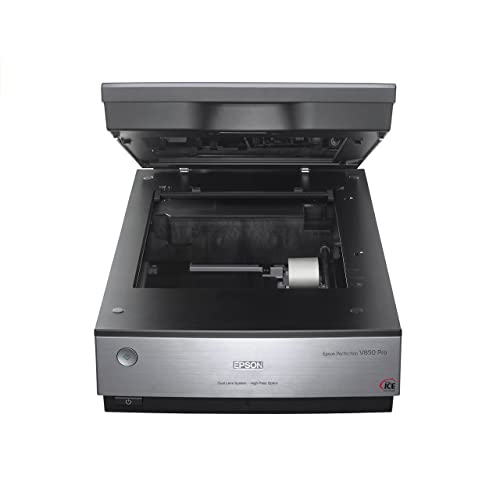
- Epson Perfection V850 Pro — Best for Professional Photography
- Canon CanoScan 9000F Mark II — Best for High-Resolution Negative Scanning
- Canon CanoScan Lide 400 — Best Slim Budget Flatbed
- Epson Perfection V39 II — Best Entry-Level Photo & Document Scanner
- HP ScanJet Pro 3600 f1 — Best for High-Volume Office Scanning
- Plustek OpticPro A320E — Best Large-Format A3 Flatbed
- Choosing the Right Flatbed Scanner: A Buying Guide
- FAQs
- Next Steps
Our Top Picks for 2026
- #PreviewProductRating
- Bestseller No. 1
 Rating:

- Bestseller No. 2
 Rating:
- Bestseller No. 3
 Rating:
 - Bestseller No. 4
 Rating:
 - Bestseller No. 5
 Rating:
- Bestseller No. 6
 Rating:
- Bestseller No. 7
 Rating:
Detailed Product Reviews
1. Epson Perfection V600 Photo — Best for Film & Slide Digitization
The Epson Perfection V600 Photo remains one of the most compelling consumer film scanners available in 2026, offering a 6400 x 9600 dpi optical resolution that translates directly into enlargements up to 17" x 22" from 35mm and medium-format originals. The built-in Transparency Unit handles four mounted 35mm slides simultaneously, 12 negatives in strip form, and medium-format film up to 6 x 22cm — coverage that meets virtually every analog photographer's archive without requiring multiple accessories. ReadyScan LED technology eliminates warm-up time entirely, so the scanner is ready the moment you flip it on, and power consumption stays meaningfully lower than fluorescent-lamp competitors.
Hi-Speed USB 2.0 connectivity keeps the V600 compatible with every modern machine, and Epson's SilverFast and Epson Scan software pipelines both handle color restoration, dust removal, and grain reduction with genuine effectiveness on faded decades-old slides. For users who want to pair their archiving workflow with a printing step, our guide to the best 4×6 photo printers covers compact inkjet options that work beautifully alongside the V600's high-resolution output files. The scan bed handles documents up to 8.5 x 11.7", making it a dual-duty device for anyone who also processes letter-size paperwork.
Where the V600 shows its age is in raw scan speed — a single 6400 dpi 35mm frame takes several minutes, and batch scanning 36 exposures from a full roll requires genuine patience. The Dmax of 3.4 is excellent for a consumer device but trails the V850 Pro noticeably when scanning dense shadow areas in heavily underexposed negatives. For the vast majority of analog archivists, though, the V600 delivers professional-grade results at a price that makes it an easy first recommendation.
Pros:
- 6400 x 9600 dpi resolution supports gallery-quality enlargements from 35mm originals
- Handles 35mm slides, negatives, and medium-format film up to 6 x 22cm in one unit
- ReadyScan LED means zero warm-up time and lower power draw per session
- Dual document and film capability in a single mid-range investment
- Mature software ecosystem with Epson Scan and SilverFast compatibility
Cons:
- Scan speeds at maximum resolution are slow compared to newer dedicated film scanners
- 3.4 Dmax leaves some shadow detail on the table for severely underexposed film
- USB 2.0 only — no USB-C or wireless option
2. Epson Perfection V850 Pro — Best for Professional Photography
If the V600 is the capable enthusiast option, the Epson Perfection V850 Pro is the professional benchmark against which every other consumer flatbed is measured. The signature feature is the exclusive dual-lens system, which selects between two precision optics to deliver optimum focus and edge-to-edge sharpness across the full scan bed — a difference you see immediately when comparing the corners of a V850 scan to those of a single-lens alternative at equivalent settings. The 4.0 Dmax specification is the headline number that separates the V850 from everything below it, capturing smooth tonal gradations from bright highlights through deep shadow regions that cheaper sensors simply clip.
The V850 Pro's 6400 dpi resolution matches the V600 numerically, but the combination of superior optics, higher Dmax, and more sophisticated calibration targets produces scans that resolve meaningfully more fine grain and micro-contrast in practice. Medium-format and large-format film holders are included in the box, and the unit supports 4x5" sheet film — a capability absent from every other flatbed on this list. The calibration target and IT8 workflow built into the professional software bundle allow you to achieve colorimetrically accurate output that holds up under scrutiny from clients and print labs alike.
The V850 Pro carries a price premium that is substantial but entirely justified for anyone running a professional film archive or photography business. For casual photo digitization or document scanning, you're over-buying. For serious analog photographers, medium-format shooters, or professional archivists, the V850 Pro is the correct tool and the investment pays for itself quickly in avoided lab fees and superior deliverable quality.
Pros:
- Dual-lens system delivers edge-to-edge optical sharpness across the full bed
- 4.0 Dmax — the highest available on any consumer flatbed scanner in 2026
- Supports 4x5" large-format sheet film, unique among the scanners reviewed here
- Professional calibration target included for ICC-profiled, colorimetrically accurate output
- Comprehensive film holder set covers 35mm, medium-format, and 4x5 in the box
Cons:
- Price is significantly higher than every other flatbed on this list
- Overkill for users whose primary need is document or casual photo scanning
- Physically large and heavy — desktop footprint is considerable
3. Canon CanoScan 9000F Mark II — Best for High-Resolution Negative Scanning
Canon's CanoScan 9000F Mark II brings a 9600 x 9600 dpi CCD optical engine to a competitive price point, delivering the highest raw resolution spec on this entire list and making it particularly compelling for users who want to push 35mm and medium-format negatives to their absolute resolution limit. The A4-format CCD array processes fine detail with excellent edge acuity, and film holders for 35mm negatives, mounted slides, and medium-format strips ship in the box, making it a genuinely complete kit from the moment you open the package. USB connectivity keeps setup straightforward across Windows and macOS.
The CanoScan 9000F Mark II weighs approximately 4.5 kg and has a sturdy build that communicates quality in hand, differentiating it from lighter plastic-chassis alternatives. Canon's scanning software handles auto exposure, color restoration, and FARE Level 3 dust and scratch reduction — the three-pass infrared dust removal system that is the Canon-branded equivalent of Epson's Digital ICE — producing clean output from moderately damaged prints and negatives without requiring manual retouching. Scan times at maximum resolution are in line with competitors: expect three to four minutes per 35mm frame at 9600 dpi, which is the nature of high-resolution CCD scanning physics rather than a specific flaw.
Where the 9000F Mark II trades performance for value is in Dmax: the dynamic range spec sits meaningfully below the V850 Pro, which is the primary reason it lands at number three rather than challenging for the top professional slot. For most analog photographers working with properly exposed negatives, the difference is invisible. For archivists dealing with severely underexposed or very high-contrast film stocks, the Epson Pro lineup holds the advantage.
Pros:
- 9600 x 9600 dpi — highest optical resolution specification on this list
- FARE Level 3 infrared dust and scratch removal works effectively on most negative stock
- Solid, heavy-duty build quality that inspires confidence in long-term reliability
- Complete film holder kit ships in the box for 35mm and medium-format originals
Cons:
- Dmax lower than the Epson V850 Pro, visible in dense shadow regions of high-contrast film
- Heavier and bulkier than the Lide 400 or V39 II if desktop space is limited
- Software interface feels dated compared to more recently updated competitors
4. Canon CanoScan Lide 400 — Best Slim Budget Flatbed
The Canon CanoScan Lide 400 is the answer to a specific, very practical question: what is the best flatbed scanner you can buy if you need compact dimensions, USB-C bus power, and fast scan speeds without any film-scanning capability? At 7.7" x 14.5" x 0.4" and powered entirely through the USB-C cable — no wall adapter required — the Lide 400 slides into laptop bags, sits vertically on a narrow desktop shelf, and is ready to scan in eight seconds flat. The 4800 x 4800 dpi optical resolution handles detailed photo scanning with genuine fidelity, and color restoration plus automatic dust removal make it a serious photo archiving tool for reflective originals.
The EZ Button system — four dedicated hardware buttons for Auto Scan, PDF, Copy, and Send — removes friction from repetitive scanning tasks that would otherwise require three or four software clicks per sheet. Auto Scan mode detects whether you've placed a photo, document, or card on the platen and adjusts settings automatically, which makes it genuinely useful in a workflow where you're mixing scan types without stopping to reconfigure software presets. Built-in multi-page PDF assembly with searchable and editable output adds document workflow value well above what you'd expect from a scanner at this price tier.
The hard boundary for the Lide 400 is film and slide scanning — there is no transparency unit, no negative holder support, and no pathway to digitizing analog film. If your needs are strictly reflective — prints, documents, artwork, business cards — the Lide 400 delivers exceptional value in an impressively slim chassis. If you need film capability alongside document scanning, step up to the V600 or the 9000F Mark II.
Pros:
- 7.7" x 0.4" profile stores vertically with virtually zero desktop footprint
- Single USB-C cable handles both data and power — no wall adapter needed
- 8-second scan speed at standard resolution is among the fastest in this price range
- 4800 x 4800 dpi delivers crisp, detailed output from photos and documents
- Auto Scan mode and EZ Buttons reduce repetitive scanning friction significantly
Cons:
- No transparency unit — zero support for 35mm negatives, slides, or medium-format film
- Contact Image Sensor (CIS) rather than CCD: depth of field is narrower, affecting slightly warped originals
5. Epson Perfection V39 II — Best Entry-Level Photo & Document Scanner
The Epson Perfection V39 II is the updated version of Epson's long-running entry-level flatbed, and the 2026 iteration brings meaningful refinements including a high-rise removable lid for scanning bound books and thick documents, plus built-in Scan to Cloud functionality through Epson ScanSmart. The 4800 dpi optical resolution is the same as the Lide 400 but Epson's color science and image processing pipeline produces characteristically warm, accurate color rendition that suits photo work particularly well. USB bus power keeps the setup cable-minimal, and the compact, lightweight chassis makes the V39 II the most portable full-featured scanner on this list.
The high-rise, removable lid is genuinely useful for anyone who regularly scans books, thick binders, or passport-style documents where the standard platen pressure would damage the spine or produce keystoned distortion at the edges. ScanSmart's cloud integration connects directly to Google Drive, Dropbox, and OneDrive without requiring a dedicated computer as an intermediary, which simplifies archive workflows for users who work across multiple machines or want automatic off-site backup. The panoramic stitch feature in ScanSmart handles oversized originals that exceed the 8.5" x 11.7" platen by assembling multiple overlapping passes into a single seamless output file.
The V39 II does not include a transparency unit, so film scanning is off the table — the same limitation as the Lide 400. At its price point, that is entirely expected. What sets it above the Lide 400 for some users is the removable lid, the ScanSmart cloud workflow, and Epson's well-regarded color processing, which collectively make it the stronger choice for photo-centric reflective scanning at the entry level.
Pros:
- High-rise, removable lid accommodates thick bound books and large documents without distortion
- Scan to Cloud via ScanSmart connects natively to Google Drive, Dropbox, and OneDrive
- Panoramic stitch function handles originals larger than the physical platen area
- USB bus-powered — single cable, no adapter, genuinely portable
- Epson color processing delivers accurate, natural-looking photo output at this price tier
Cons:
- No transparency unit — no film or slide scanning capability
- 4800 dpi maximum resolution is sufficient but trails film-capable models at the same price point
6. HP ScanJet Pro 3600 f1 — Best for High-Volume Office Scanning
Every other scanner on this list approaches the task from a photo or archival perspective; the HP ScanJet Pro 3600 f1 approaches it from a pure productivity angle, and it does so with specification numbers that dwarf the competition on throughput metrics. Thirty pages per minute single-sided, sixty images per minute duplex, with a 3,000-page daily duty cycle means the 3600 f1 is built for sustained, continuous operation in an office environment where downtime is a cost. The 60-page, two-sided, single-pass auto document feeder handles mixed-size originals without manual intervention, and the flatbed platen provides the flexibility to scan bound documents, ID cards, and irregular-size originals that the ADF can't accommodate.
Output format support is the other area where the 3600 f1 distinguishes itself: native scan-to-Word (DOCX), scan-to-Excel (XLSX), scan-to-CSV, scan-to-PDF, and scan-to-image mean that the scanner handles the OCR and conversion pipeline internally, delivering ready-to-edit files directly to your destination folder without requiring a separate OCR application. For law firms, accounting offices, real estate agencies, or any organization processing high volumes of incoming paper, the ability to scan a 60-page double-sided contract and receive an editable DOCX in under two minutes is operationally significant. If your team is also working with a multifunction printer, the 3600 f1 pairs naturally with it as a dedicated high-volume input device on the same network workflow.
The 3600 f1's 600 dpi optical resolution is a significant step down from photo-oriented models, and this scanner has no transparency unit, no film holder compatibility, and no interest in analog archiving — it is purpose-built for documents, contracts, receipts, and forms. Within that domain, its throughput, reliability, and format conversion capabilities make it the correct recommendation for any team processing more than a few hundred pages per week.
Pros:
- 30 ppm / 60 ipm throughput handles sustained high-volume document processing without bottlenecking
- 3,000-page daily duty cycle rated for genuine office workload, not just occasional use
- Native scan-to-DOCX, XLSX, CSV, and searchable PDF without external OCR software
- 60-page duplex single-pass ADF plus full flatbed platen for flexible input options
Cons:
- 600 dpi optical resolution is inadequate for photo archiving or film scanning use cases
- No transparency unit — purely a document-workflow device
- Larger physical footprint than the budget flatbeds — requires dedicated desk real estate
7. Plustek OpticPro A320E — Best Large-Format A3 Flatbed
Every other scanner on this list tops out at A4/letter format; the Plustek OpticPro A320E doubles the scan bed to 12" x 17", accommodating A3-sized originals, large maps, architectural drawings, oversized bound books, and wide-format printed material in a single pass without stitching, cropping, or repositioning. The CCD sensor scans the full bed area at CCD-quality accuracy, and the 7.8-second scan speed at standard resolution keeps throughput competitive even given the larger platen area. TWAIN and ICA compliance ensures broad compatibility across Windows and macOS workflows without driver complications, and Doc Action software provides direct scan-to-print, scan-to-email, scan-to-FTP, and OCR-to-searchable-PDF routing.
Batch scanning is a first-class feature on the A320E: you can load multiple printed images or documents onto the large platen simultaneously, scan them in a single pass, and have the software save each detected item to a separate PDF or image file automatically. For cartographers, architects, engineers, educators scanning large instructional materials, or anyone working with tabloid-size printed media, this removes the multi-pass stitch workflow entirely and preserves geometric accuracy across the full document. The Doc Action FTP integration is particularly useful for studios and small businesses that route scans directly to a network share without a manual transfer step.
The trade-off you accept with the A320E is resolution ceiling: the maximum dpi is lower than the CCD film scanners reviewed above, making it unsuitable for 35mm film archiving or high-resolution photo reproduction from small originals. But that is not its design brief. For large-format reflective scanning, it is the only flatbed on this list that solves the problem natively, and the CCD sensor quality keeps output well above what you'd get from a stitched multi-pass A4 workflow on a smaller unit. If you ever need to digitize materials from the oversized category, the Plustek A320E is the direct answer.
Pros:
- 12" x 17" scan area covers A3, tabloid, maps, and large architectural drawings in a single pass
- CCD sensor delivers genuine optical quality across the full large-format platen area
- Batch scanning saves multiple detected items to separate files automatically in one pass
- TWAIN and ICA compliant — works with standard scanning software on Windows and macOS
- Doc Action provides direct-to-FTP, email, OCR, and print routing without manual file management
Cons:
- Maximum dpi is insufficient for fine-art photo reproduction or film scanning from small originals
- Physical footprint is the largest on this list by a significant margin — dedicated desk space required
- Price premium over A4 flatbeds is substantial for users who only occasionally scan oversized material
Choosing the Right Flatbed Scanner: A Buying Guide
CCD vs. CIS: The Sensor Technology That Defines Your Output Quality
CCD (Charge-Coupled Device) sensors deliver superior depth of field and color accuracy compared to CIS (Contact Image Sensor) alternatives, a distinction that matters most when scanning slightly warped prints, thick books, or textured originals where the surface deviates from perfect contact with the platen glass. CCD-based scanners — the Epson V600, V850, and Canon 9000F Mark II — maintain focus across a range of depths from the glass surface, while CIS scanners like the Canon Lide 400 require very flat originals for optimal sharpness at the edges. For documents and flat prints the difference is minimal; for film, book spines, or dimensional objects, CCD is the correct choice every time.
Resolution and Dmax: What the Spec Numbers Actually Mean for Your Workflow
Optical resolution — not interpolated resolution — is the specification that governs real scan quality, and the range on this list runs from 600 dpi (HP ScanJet Pro 3600 f1) to 9600 dpi (Canon 9000F Mark II). For document archiving and OCR, 600 dpi is more than adequate. For reflective photo scanning, 1200–2400 dpi captures all the detail present in a standard silver-print photograph. For film scanning — where you're capturing microscopic grain structure from a 35mm negative that will be enlarged 10x or more — you want 4000 dpi minimum, and 6400–9600 dpi for medium-format work that you intend to enlarge. Dmax measures dynamic range: a 4.0 Dmax scanner captures the full tonal range from a dense Velvia slide or a backlit negative; a 3.0 Dmax scanner clips shadow detail in high-contrast originals. Spend money on Dmax for film work; optical dpi matters less than Dmax when your primary challenge is tonal range rather than resolving fine grain.
Film and Transparency Support: The Dividing Line Between Photo and Document Scanners
A transparency unit — the illuminated lid assembly that backlights film, slides, and negatives — is absent from the Canon Lide 400, Epson V39 II, HP ScanJet Pro 3600 f1, and Plustek A320E. If analog film digitization is any part of your current or future workflow, you need either the Epson V600 or the Epson V850 Pro, full stop — the Canon 9000F Mark II also qualifies. The film format coverage matters as well: the V600 and 9000F Mark II handle 35mm and medium-format up to 6x9cm, while the V850 Pro adds 4x5" large-format sheet film support that makes it uniquely capable among consumer flatbeds in 2026.
Scan Format, ADF, and Throughput: Matching the Scanner to Your Document Volume
A pure flatbed scanner requires you to manually position each original on the platen, which is practical for photo scanning or low-volume document work but creates a genuine bottleneck when you're processing invoices, contracts, or multi-page reports at scale. The HP ScanJet Pro 3600 f1 is the only scanner on this list with an auto document feeder, and its 60-page, two-sided, single-pass ADF combined with 30 ppm throughput makes it categorically different from the others for batch document processing. If your workload is measured in stacks rather than individual sheets, the ADF is a non-negotiable feature, and the 3600 f1 is your answer. For users who also need a scanner that handles vinyl cutting design assets or label printing workflows, connecting it with our coverage of the best printers for vinyl stickers provides a useful complementary perspective on output hardware.
FAQs
What is the difference between a flatbed scanner and a sheet-fed scanner?
A flatbed scanner has a stationary glass platen where you place originals face-down, and the sensor moves beneath the glass to capture the image — this design accommodates books, photos, film, and irregular objects that a sheet-fed mechanism cannot handle. A sheet-fed scanner pulls originals through a roller mechanism, which is faster for stacks of loose paper but cannot scan bound documents, fragile originals, film, or anything that would be damaged by the feeding mechanism. The HP ScanJet Pro 3600 f1 on this list combines both in a single unit, giving you the flexibility of a flatbed for special originals and ADF throughput for normal document batches.
What resolution do I need to scan 35mm film or slides?
For 35mm film digitization intended for standard print sizes up to 8x10", 2400–3200 dpi optical resolution captures sufficient detail from a properly exposed negative. For aggressive enlargements to 16x20" or larger, or for archiving at maximum fidelity, 4000–6400 dpi is the appropriate range — both the Epson V600 (6400 dpi) and Canon 9000F Mark II (9600 dpi) meet this requirement. The Epson V850 Pro at 6400 dpi with its 4.0 Dmax is the best choice for slides and dense negatives where shadow detail recovery is the primary challenge, not just resolution.
Is a flatbed scanner better than a smartphone scanning app in 2026?
For documents, business cards, and low-stakes photo copies, smartphone scanning apps have become genuinely useful — but they cannot replicate what a flatbed scanner does at the hardware level. A dedicated flatbed delivers calibrated optical resolution from 600 to 9600 dpi, geometric distortion correction through a flat-glass contact surface, infrared dust removal for film, and a controlled, repeatable lighting environment that a phone camera with variable ambient light cannot match. For archival photo scanning, film digitization, or any output that will be enlarged or scrutinized professionally, a flatbed scanner remains the correct tool in 2026.
Can I scan both film and documents with a single flatbed scanner?
Yes — the Epson V600, Epson V850 Pro, and Canon CanoScan 9000F Mark II all include a transparency unit that handles both film scanning (35mm negatives, mounted slides, medium-format film) and standard reflective scanning of documents and photos on the same device. The Epson V600 in particular is widely recommended as the best single-device solution for users who need both capabilities without the cost of the professional V850 Pro, since it handles documents up to 8.5 x 11.7" on the same platen used for film.
What is Dmax and why does it matter for photo scanning?
Dmax (maximum density) measures the darkest tonal value a scanner's sensor can distinguish from absolute black — a higher Dmax captures more shadow detail and a wider dynamic range between the brightest highlights and deepest shadows in a scan. For print and document scanning, Dmax rarely matters practically since the tonal range of a typical document is well within any scanner's capability. For film and slide scanning — particularly with high-contrast subjects, Kodachrome slides, or underexposed negatives — Dmax is the single most important specification because dense shadow areas on film will simply clip to pure black on a low-Dmax sensor. The Epson V850 Pro's 4.0 Dmax is the benchmark for consumer flatbeds and the reason it commands a price premium over 3.2–3.4 Dmax alternatives.
Which flatbed scanner is best for a home office that only scans documents?
For pure document scanning in a home office context, the Canon CanoScan Lide 400 is the practical first recommendation: USB-C bus power, a slim profile that stores vertically, 8-second scan speeds, built-in PDF assembly, and 4800 dpi resolution that vastly exceeds what documents actually need. If your volume is higher — multiple dozens of pages per day, duplex scanning of multi-page contracts — the HP ScanJet Pro 3600 f1 with its ADF, 30 ppm throughput, and native scan-to-Word/Excel conversion is the correct escalation point. For occasional light document scanning on a tight budget, the Epson Perfection V39 II adds cloud connectivity and a removable lid at a competitive price.
Buy on Walmart
- Epson Perfection V600 Photo Wired USB Connectivity Color Sca — Walmart Link
- Epson Perfection V850 Pro scanner — Walmart Link
- Canon CanoScan 9000F Mark II — Walmart Link
- Canon CanoScan Lide 400 Slim Scanner, 7.7" x 14.5" x 0.4" — Walmart Link
- Epson - Perfection V39 II - Color Photo, Tax Receipt & Docum — Walmart Link
- HP ScanJet Pro 3600 f1 Flatbed/ADF Scanner - 600 dpi Optical — Walmart Link
- Plustek OpticPro A320E - A3 CCD Sensor Flatbed Scanner, 12" — Walmart Link
Buy on eBay
- Epson Perfection V600 Photo Wired USB Connectivity Color Sca — eBay Link
- Epson Perfection V850 Pro scanner — eBay Link
- Canon CanoScan 9000F Mark II — eBay Link
- Canon CanoScan Lide 400 Slim Scanner, 7.7" x 14.5" x 0.4" — eBay Link
- Epson - Perfection V39 II - Color Photo, Tax Receipt & Docum — eBay Link
- HP ScanJet Pro 3600 f1 Flatbed/ADF Scanner - 600 dpi Optical — eBay Link
- Plustek OpticPro A320E - A3 CCD Sensor Flatbed Scanner, 12" — eBay Link
Next Steps
- Identify your primary use case — film and slide archiving, document processing, or large-format scanning — and match it against the buying guide criteria above before committing to a model.
- Check the current price for your shortlisted scanner on Amazon, since prices on scanner hardware fluctuate regularly and the V600 and 9000F Mark II in particular appear in sales cycles throughout the year.
- If you're digitizing film, download a trial of SilverFast or VueScan before purchasing to confirm your preferred software workflow is compatible with the specific scanner model you choose.
- Read full user reviews on Amazon for your top pick, filtering specifically for reviews from users whose original material type matches yours — negative archivists and document processors have very different satisfaction profiles for the same hardware.
- If you're building a complete photo workflow, pair your scanner decision with our guides to the best 4×6 photo printers and best book scanners for 2026 to cover the full range of input and output hardware your setup may require.
 |
 |
 |
 |

About Rachel Chen
Rachel Chen writes about scanners, laminators, and home office productivity gear. She started her career as an office manager at a midsize law firm, where she was responsible for purchasing and maintaining all of the document handling equipment for a 60-person staff. That experience sparked a deep interest in archival workflows, paperless office setups, and document preservation. Rachel later earned a bachelor degree in information science from Rutgers University and now writes full time. She is a strong advocate for ADF reliability over raw resolution numbers and has tested every major flatbed and document scanner sold in the United States since 2018.