 ee
eeLaptops ›
Best Laptops For High School Students
Nearly 95% of high school students say they use a laptop daily for schoolwork, yet fewer than half feel their current device handles the load without frustrating slowdowns. Choosing the right machine in 2026 matters more than ever, because your laptop isn't just for typing essays anymore — it's your research hub, your creative studio, your video conferencing station, and often your entertainment center, all rolled into one device that has to survive a backpack commute every single day.
The market is genuinely overwhelming right now. You're looking at everything from sub-$300 Chromebooks to premium MacBooks pushing past $1,000, with a seemingly endless range of Windows machines filling the space in between. The challenge isn't finding a laptop that works; it's finding the one that works best for your specific situation — whether you're running resource-hungry creative software, grinding through browser-heavy research sessions, or simply need something light enough to carry between seven classes without feeling it. If you're also shopping for a college-bound student or want to see how high school picks compare to higher-education machines, our guide to the best laptop for online schooling covers a broader range of academic use cases.
We've tested and evaluated seven of the strongest contenders available right now, covering Apple, Microsoft, HP, ASUS, Acer, and Lenovo — brands that consistently deliver reliable performance at student-friendly price points. Each pick below was chosen based on real-world performance for homework, research, light creative work, and the occasional gaming session, so you can make an informed decision before spending your money. For those who prefer a touchscreen experience specifically, our best touch screen laptops under $300 roundup is also worth a look. Browse our full laptops category for even more options across every budget and use case.
Contents
- Our Top Picks for 2026
- Full Product Breakdowns
- Apple MacBook Air M2 (Renewed) — Best for Apple Ecosystem
- Microsoft Surface Laptop Go 3 — Best for Ultra-Portability
- HP Envy x360 15.6" — Best 2-in-1 Versatility
- ASUS Vivobook Go 15.6" — Best Budget Pick
- Acer Chromebook Plus Spin 514 — Best Chromebook
- Acer Aspire 5 15 — Best for Raw Performance
- Lenovo IdeaPad Slim 3 2025 — Best Overall Value
- Buying Guide
- Questions Answered
- Final Thoughts
Our Top Picks for 2026
- #PreviewProductRating
- Bestseller No. 1
 Rating:

- Bestseller No. 2
 Rating:
 - Bestseller No. 3
 Rating:
 - Bestseller No. 4
 Rating:
 - Bestseller No. 5
 Rating:
 - Bestseller No. 6
 Rating:
 - Bestseller No. 7
 Rating:
Full Product Breakdowns

1. Apple 2022 MacBook Air M2 (Renewed) — Best for Apple Ecosystem Users
If you already live inside the Apple ecosystem — iPhone, AirPods, iCloud — the MacBook Air M2 is a seamless extension of that world, and the renewed version brings it down to a price that's significantly easier to justify for a high school student. The M2 chip delivers CPU and GPU performance that genuinely embarrasses most Windows laptops in the same price bracket, handling everything from complex Google Slides presentations to light video editing in DaVinci Resolve without thermal throttling, because this machine runs entirely fanless. The 13.6-inch Liquid Retina display is among the sharpest screens you'll find in this class, with over 500 nits of brightness and P3 wide color gamut support making it noticeably better for both creative work and extended reading sessions than the typical 250-nit panels on budget Windows machines.
At just 2.7 pounds, this is one of the lightest full-featured laptops on this entire list, and the build quality — aircraft-grade aluminum chassis, near-zero flex in the lid, perfectly consistent keyboard travel — feels like something that will survive all four years of high school rather than giving up after eighteen months. Battery life is genuinely exceptional, routinely reaching 14 to 16 hours of mixed-use work, which means you can leave the charger at home on most school days. The 8GB of unified memory is the one limitation worth acknowledging honestly: if you regularly run Chrome with fifteen or more tabs, a video editor, and Spotify simultaneously, you'll notice page compression activity. For most high schoolers, though, 8GB handles the daily workload comfortably. Those who want more MacBook options at different price points should also check out our dedicated guide to the best MacBook for students in 2026.
The renewed certification means the unit has been professionally inspected, cleaned, and restored to like-new condition — a worthwhile trade-off when it brings the entry cost down substantially compared to the retail-boxed equivalent. The Midnight colorway is also genuinely attractive, giving the Air a premium desk presence that most student laptops simply don't have.
Pros:
- Exceptional performance-per-watt from the M2 chip, handling multitasking and creative apps without breaking a sweat
- Outstanding battery life reaching 14–16 hours under mixed-use conditions
- Feather-light 2.7-pound chassis with premium aluminum build quality that feels built to last
- Stunning 13.6-inch Liquid Retina display with P3 wide color and 500+ nits brightness
Cons:
- 8GB unified memory shows strain under very heavy multitasking with 15+ browser tabs plus media apps
- macOS requires an adjustment period if you're switching from Windows, particularly for gaming compatibility
2. Microsoft Surface Laptop Go 3 (2023) — Best for Ultra-Portability
The Surface Laptop Go 3 is Microsoft's answer to a very specific question: what if a premium, beautifully designed laptop weighed under 2.5 pounds and cost significantly less than a MacBook? The answer is a machine that competes confidently on design and portability, with a 12.4-inch touchscreen that's pixel-dense enough for comfortable reading and a chassis that comes in four genuinely stylish color options — Platinum, Sage, Sandstone, and Ice Blue — all in durable metal. For students who prioritize carrying comfort and aesthetics alongside functionality, the Laptop Go 3 makes a compelling case that you don't need to sacrifice style to stay on budget.
The Intel Core i5 processor paired with 8GB of RAM runs everyday academic tasks — word processing, spreadsheets, browser research, video streaming — without hesitation, and the touchscreen adds a genuinely useful interaction layer for annotating PDFs or navigating between apps quickly. Microsoft Copilot integration is now baked into the experience, giving you AI-assisted writing and productivity features directly within Windows 11 without needing third-party tools. The 12.4-inch display is smaller than most laptops on this list, which is both a portability advantage and a workspace trade-off: you get a lighter bag and a cramped desktop when multitasking with multiple windows open side by side. The 256GB SSD storage is adequate for schoolwork and apps but fills up quickly if you're storing large media files, so budget for a USB-C external drive if that's part of your workflow.
Battery life reaches around 13 hours under light use, which comfortably covers a full school day, and the fast-charge capability means a short lunch-break charge session adds meaningful runtime. The keyboard, while compact due to the small form factor, has surprisingly good tactile feedback and a comfortable key size for students with average-sized hands.
Pros:
- Incredibly lightweight at under 2.5 pounds — genuinely one of the easiest laptops to carry all day
- Premium metal build with attractive color options that stand out from generic plastic competitors
- Touchscreen adds useful interactivity for annotation and quick navigation
Cons:
- 12.4-inch screen feels cramped during multitasking with multiple app windows open simultaneously
- 256GB storage fills up fast for students who save videos, large projects, or a growing media library
3. HP Envy x360 15.6" 2-in-1 — Best for Versatility
The HP Envy x360 earns its place on this list by doing something no strictly traditional laptop can: it folds completely flat into tablet mode, sits at any angle in tent or stand configuration, and functions as a full Windows laptop the moment you need a keyboard. For high school students whose classes span both note-taking-intensive humanities courses and hands-on creative projects, the 2-in-1 form factor is genuinely practical rather than a gimmick. The 15.6-inch FHD IPS touchscreen is bright, color-accurate, and responsive, with edge-to-edge glass and thin bezels that make the display feel immersive despite the larger chassis footprint.
Under the hood, the 13th Gen Intel Core i5-1335U processor delivers 10 cores and 12 threads with a boost clock of up to 4.6 GHz, which translates to snappy performance across browser-heavy research sessions, simultaneous cloud app usage, and even casual photo editing in Adobe Lightroom. The 16GB of DDR4 RAM is the most you'll find in this price range and ensures that running Chrome, a video call, a document editor, and Spotify concurrently doesn't produce any noticeable slowdowns. The 1TB SSD is the standout storage specification here — four times what many competing laptops offer at similar price points — giving you room for years of school projects, downloaded course materials, and personal media without ever needing to clean house.
The privacy shutter on the webcam is a thoughtful security addition for students frequently on video calls, and the backlit keyboard is comfortable enough for extended writing sessions. The tradeoff for all this capability is weight: at roughly 4 pounds, the Envy x360 is heavier than the ultraportable picks on this list, so if your commute involves a long walk, factor that into your decision. For those who do creative work that extends beyond schoolwork, a related resource is our guide on the best laptops for digital art, which covers how 2-in-1 machines perform for illustration and design workflows.
Pros:
- 1TB SSD provides exceptional storage — far more headroom than most student laptops at this price
- 16GB RAM handles aggressive multitasking without any performance degradation
- 2-in-1 hinge design adds genuine flexibility for different learning and creative scenarios
- Webcam privacy shutter is a practical security feature for regular video calls
Cons:
- At 4 pounds, it's noticeably heavier than ultraportable competitors and adds up over a long school day
- Integrated Iris Xe graphics limit gaming to casual titles — not a machine for serious gaming sessions
4. ASUS Vivobook Go 15.6" — Best Budget Pick
If your budget is the primary constraint and you need a reliable, capable Windows laptop without spending a premium, the ASUS Vivobook Go 15.6" is where your search ends. It ships with an AMD Ryzen 5 7520U processor specifically engineered for thin laptops, delivering fast and consistent performance for browsing, document work, streaming, and light gaming, while integrated AMD Radeon Graphics handle casual visual tasks without dedicated GPU overhead. The 512GB SSD paired with 8GB of fast RAM gives you enough storage for a full year of school files and enough memory to maintain smooth multitasking across the apps you use most.
ASUS built the Vivobook Go to a MIL-STD-810H military-grade durability standard, which means it's been tested against drops, vibrations, extreme temperatures, and humidity — the kind of punishment a school bag delivers daily without you even realizing it. The fast-charging capability adds meaningful convenience, giving you meaningful battery recovery during a short break between classes, and the webcam shield slides physically over the camera lens for privacy without needing software controls. The 15.6-inch NanoEdge display uses a slim-bezel design that maximizes screen real estate within the chassis footprint, though the 250-nit brightness and 45% NTSC color gamut are solidly adequate rather than impressive — you'll notice the difference compared to the MacBook Air's display in direct comparison.
The Cool Silver chassis looks clean and professional despite the budget positioning, and the overall build quality exceeds what the price tag implies. This isn't a laptop that will run demanding creative software at full power, but for every core academic task a high school student faces daily, the Vivobook Go handles the workload without complaint and at a price that leaves room in the budget for accessories, software, or the occasional coffee.
Pros:
- Military-grade MIL-STD-810H durability certification means it handles real-world student punishment reliably
- 512GB SSD storage provides ample space for files, apps, and media at a budget-friendly price point
- Fast-charging support adds convenient flexibility for quick top-ups between classes
Cons:
- 250-nit display brightness is adequate for indoor use but struggles in bright outdoor environments
- 8GB RAM limits future-proofing as apps and browser engines continue to increase memory demands
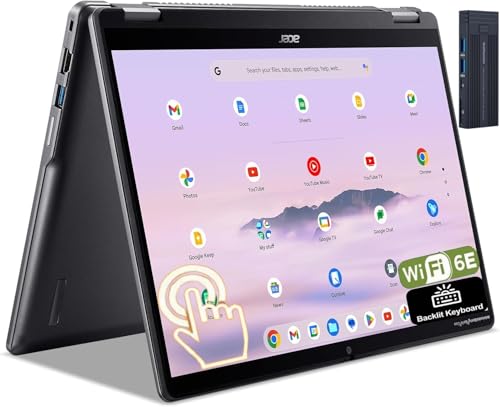
5. Acer Chromebook Plus Spin 514 2-in-1 — Best Chromebook for Students
Chrome OS gets a bad reputation in some circles, but the reality for most high school students in 2026 is that Google Workspace, web-based apps, and browser-driven tools cover the vast majority of academic workflows — and no platform delivers those tasks more fluidly, securely, and efficiently than a well-spec'd Chromebook. The Acer Chromebook Plus Spin 514 sits at the top of the Chromebook category for students because it pairs an Intel Core i5-1334U processor with 8GB RAM and 512GB SSD, specs that genuinely rival mid-range Windows laptops while running an operating system optimized for exactly this workload. According to Wikipedia's overview of ChromeOS, the platform's security model automatically updates in the background and includes sandboxing at the process level, making it one of the most secure computing environments available for students who frequently use shared networks at school.
The 14-inch WUXGA IPS touchscreen at 1920×1200 resolution is sharper than standard FHD displays, giving you noticeably more vertical screen real estate for reading documents and working in split-screen view — a genuine quality-of-life improvement over 1920×1080 panels. The 2-in-1 hinge lets you fold into tablet or tent mode for presentations and media consumption, and Wi-Fi 6E support means you're connected at the fastest speeds your school's network infrastructure can deliver. The included 128GB docking station bundle adds practical value for desktop use, giving you immediate port expansion without an additional purchase.
The one honest limitation to acknowledge is software compatibility: if your school requires specific Windows or macOS applications — certain CAD programs, specialized scientific software, or Windows-only tools — a Chromebook cannot run them natively. For students whose entire academic toolkit lives in a browser or Google Workspace, however, the Chromebook Plus Spin 514 delivers a faster, more secure, and lower-maintenance experience than any Windows laptop at a comparable price point.
Pros:
- WUXGA 1920×1200 IPS display offers more vertical screen real estate than standard FHD — noticeably better for reading and split-screen work
- Wi-Fi 6E delivers the fastest wireless connectivity available for future-proof network performance
- ChromeOS security model with automatic updates and sandboxing reduces malware risk on shared school networks
Cons:
- Cannot run native Windows or macOS applications — a hard stop if your school requires specific Windows-only software
- Smaller app ecosystem limits options for advanced creative software and specialized academic tools
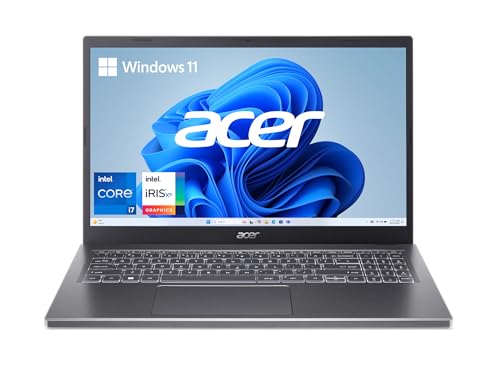
6. Acer Aspire 5 15 Slim — Best for Raw Performance
When you need a high school laptop that handles serious workloads — video production, music composition software, programming environments with multiple compilers running, or ambitious creative projects — the Acer Aspire 5 15 delivers the horsepower at a price that doesn't require a second mortgage. The Intel Core i7-1355U processor is a significant step up from the i5 chips found in most competing laptops, with higher boost frequencies and better sustained performance under load, and it's paired with 16GB of LPDDR5 memory — the faster LPDDR5 standard rather than DDR4 — which noticeably improves data throughput for memory-intensive applications. The 512GB PCIe Gen 4 SSD reads data at speeds that make even large application launches feel instantaneous.
The 15.6-inch FHD IPS touchscreen is bright, color-accurate, and incorporates Acer's visual enhancement technologies for dynamic color optimization — the kind of display that works well for both extended document work and casual media consumption. Narrow bezels maximize the screen-to-body ratio within the 0.70-inch slim chassis, and the aluminum top cover gives the Aspire 5 a premium appearance that punches above its price class. The ergonomic hinge design lifts the keyboard slightly when the lid is open, improving typing angle, cooling airflow, and speaker projection simultaneously — a subtle engineering choice that makes daily use more comfortable than it sounds on paper.
Wi-Fi 6E connectivity future-proofs your wireless performance for the next several years as school network infrastructure upgrades, and the backlit keyboard handles low-light study sessions without requiring a desk lamp nearby. If you're also considering what this level of performance means for more demanding creative disciplines, our guide to best laptops for architecture students covers how i7-class processors perform under CAD and rendering workloads that high school design students increasingly encounter.
Pros:
- Intel Core i7-1355U with 16GB LPDDR5 RAM delivers genuinely premium multitasking and application performance
- PCIe Gen 4 SSD provides faster read/write speeds than most competing laptops at this price point
- Ergonomic hinge lift improves typing comfort, cooling, and audio projection simultaneously
Cons:
- Integrated Intel Iris Xe graphics limit demanding gaming and GPU-accelerated rendering compared to dedicated GPU options
- Larger 15.6-inch chassis with slightly heavier build reduces portability compared to 13-14 inch competitors
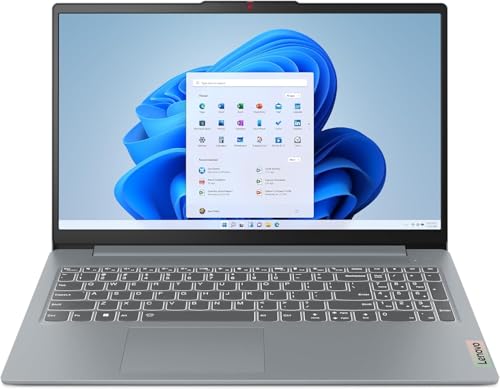
7. Lenovo IdeaPad Slim 3 2025 — Best Overall Value
The Lenovo IdeaPad Slim 3 2025 earns the best overall value designation by delivering an AMD Ryzen 7 5825U 8-core processor — the kind of chip you'd expect in a more expensive machine — alongside 16GB of DDR4 RAM and a 512GB NVMe SSD, all in a touchscreen-equipped 15.6-inch chassis that Lenovo's engineers managed to keep genuinely slim. The Ryzen 7 5825U boosts up to 4.5 GHz and uses a balanced mix of performance and efficiency cores, handling heavy browser sessions, multi-track audio projects, code compilation, and light content creation without throttling down to frustrating speeds under sustained load. For the money, this is the most well-rounded specification sheet on this entire list.
The 15.6-inch FHD IPS touchscreen at 300 nits brightness hits the sweet spot for indoor academic work — bright enough for classroom fluorescent lighting and comfortable enough for extended reading sessions, with anti-glare coating that reduces eye strain during long homework stretches. The thin-bezel design keeps the overall chassis compact for a 15.6-inch machine, and the 45% NTSC color gamut is standard rather than exceptional — the display is accurate and comfortable without being a creative professional tool. Bluetooth 5.2 and Wi-Fi 6 provide solid wireless connectivity, and the 720p webcam covers standard video call quality for remote learning, tutoring sessions, or virtual club meetings without requiring an external camera upgrade.
Lenovo's reputation for keyboard quality holds here: the IdeaPad Slim 3 keyboard has well-spaced keys with satisfying travel that makes long essay-writing sessions far less fatiguing than the shallow chiclet keyboards found on many competing budget machines. Battery life sits around 8–10 hours under mixed academic use, which covers most school days without requiring a midday charge. For students interested in the broader Lenovo ecosystem across different price points, our comprehensive guide to the best Lenovo laptops for college students covers the full range from budget IdeaPads to ThinkPad performance machines.
Pros:
- AMD Ryzen 7 5825U 8-core processor delivers outstanding performance for the price bracket — competitive with i7-class Windows laptops
- 16GB DDR4 RAM with 512GB NVMe SSD provides a well-balanced and future-proof configuration
- Excellent keyboard quality with good key travel makes extended typing sessions comfortable
- Touchscreen adds interactivity for annotation and tablet-style navigation on a Windows platform
Cons:
- 8–10 hour battery life is good but doesn't reach the 13–16 hour benchmarks of the MacBook Air or Surface Go 3
- AMD Radeon integrated graphics handle everyday tasks confidently but aren't built for dedicated GPU workloads
Buying Guide: How to Choose the Best Laptop for High School Students
Processor and RAM: The Performance Foundation
The processor and RAM combination determines how fluidly your laptop handles everything you throw at it simultaneously, and for 2026 student machines, the baseline worth targeting is a current-generation processor paired with at least 8GB of RAM — though 16GB is the wiser long-term investment. AMD Ryzen 5 and 7 series chips and Intel Core i5 and i7 processors from the 12th and 13th generations all deliver capable performance for academic workloads; the meaningful differentiator is the RAM amount and speed. If you're choosing between 8GB and 16GB at the same price point, always choose 16GB — browser engines alone now routinely consume 4–6GB of RAM with a typical student's open tab count, and that leaves 8GB configurations with very little headroom for everything else. Apple Silicon chips (M2 and later) use unified memory architecture that performs differently from conventional LPDDR RAM, making 8GB on a MacBook Air closer in practical performance to 16GB on a Windows machine.
Storage: How Much Do You Actually Need?
The minimum viable storage for a student laptop in 2026 is 256GB SSD, but 512GB is the practical sweet spot that prevents the constant storage management anxiety that 256GB generates within the first year. Consider your workflow honestly before settling: if you download video content, work with large project files, store a growing music library, or use software like Adobe Creative Suite locally, 512GB fills faster than you expect, and 1TB gives you genuine breathing room. All the SSD storage on this list is NVMe-based, which is significantly faster than older SATA SSDs — the difference is most noticeable in boot times, application launches, and large file transfers. Cloud storage through Google Drive, OneDrive, or iCloud supplements local storage for documents and lighter files, but for heavy local workflows, there's no substitute for adequate on-device storage.
Display Size and Battery Life: The Daily Use Trade-Off
The tension between screen size and portability is real, and the right answer depends on whether you prioritize workspace or carrying comfort. A 15.6-inch display gives you more room for multitasking and a more comfortable reading experience, but adds weight and bulk that compounds over a five-class school day. A 12.4–13.6-inch display fits more comfortably in a bag and weighs significantly less, but feels cramped when working with multiple applications side by side. For most high school students who commute daily, a 14-inch display hits the optimal balance between screen real estate and portability. Battery life deserves equal attention: aim for a minimum of 8 hours of claimed battery life, recognizing that real-world usage typically falls 20–30% below manufacturer claims, so an 8-hour laptop realistically delivers 6–7 hours under normal mixed use — just enough for a full school day if you manage it carefully.
Operating System: Windows, macOS, or ChromeOS?
Your school's software requirements should drive this decision before personal preference enters the picture. If your curriculum involves Windows-specific applications — specialized engineering software, certain programming environments, school-issued Windows tools — macOS and ChromeOS immediately become problematic. For schools running entirely on Google Workspace and browser-based tools, ChromeOS delivers the most secure and maintenance-free experience at the best price-to-performance ratio. macOS is the right choice when you're already invested in the Apple ecosystem, need best-in-class battery life and build quality, and your school environment supports it. Windows remains the most universally compatible option, running virtually every application category available and offering the widest hardware variety across every budget tier. Think through your four-year software needs before committing, because switching operating systems mid-high-school means relearning workflows at exactly the wrong time.
Questions Answered
How much should you spend on a laptop for high school?
A realistic budget for a capable high school laptop in 2026 sits between $400 and $900, with the $500–$700 range offering the best performance-per-dollar value. Below $400, you're accepting meaningful compromises in processor speed, RAM, storage, or display quality that will frustrate you within the first semester. Above $900, you're paying for premium build quality, cutting-edge processors, and features like OLED displays or discrete GPUs that most academic workloads don't require. Set your budget based on your four-year use case: if you're pursuing creative fields or STEM-heavy coursework, invest in the upper range; if your needs are standard academic tasks, the mid-range delivers everything you need without overspending.
Is 8GB RAM enough for a high school student in 2026?
8GB of RAM is sufficient for standard academic workloads — document editing, browser research, video streaming, and light multitasking — but it starts showing limitations when you're running Chrome with many tabs alongside a video editor, music software, or multiple heavy applications simultaneously. On conventional Windows laptops, 16GB is the more comfortable and future-proof choice. The exception is Apple's M2 MacBook Air: its unified memory architecture makes 8GB behave more like 12–16GB on Windows machines for most tasks, so the 8GB MacBook Air handles student workflows more gracefully than 8GB Windows laptops typically do.
What's the best laptop for high school students who also want to game?
If gaming is part of your after-school routine, you need to think carefully about the GPU situation because most student laptops ship with integrated graphics that handle casual games but struggle with modern titles at reasonable settings. The Acer Aspire 5 and Lenovo IdeaPad Slim 3 offer the most capable integrated graphics on this list and handle older games and less demanding titles competently. For serious gaming alongside schoolwork, consider stepping up to a machine with a dedicated NVIDIA GeForce RTX 4050 or similar, accepting that the laptop will be heavier, run hotter, and cost more. The MacBook Air's M2 GPU is also surprisingly capable for integrated graphics, handling many popular gaming titles better than equivalent Intel Iris Xe solutions.
Is a Chromebook a good choice for high school?
A Chromebook is an excellent choice for high school students whose school environment runs on Google Workspace — Google Docs, Sheets, Slides, Classroom, and Meet — and whose coursework doesn't require Windows-specific software. ChromeOS is faster to boot, more secure against malware, and easier to maintain than Windows, and modern Chromebook Plus machines like the Acer Spin 514 pack genuine processing power for the price. The limitation is real: if your school or any of your classes requires specific Windows applications, native Office features that Google Workspace doesn't replicate, or specialized software that only runs on Windows, a Chromebook becomes a significant liability. Check your school's technology requirements before committing.
What features matter most for a student laptop that lasts all day at school?
Battery life, build quality, and weight are the three features that determine whether a laptop works for you day after day rather than becoming a frustrating liability. Aim for a minimum of 10 hours of claimed battery life (giving you 7–8 hours of real-world usage), a chassis made from aluminum or magnesium alloy rather than pure plastic (it handles drops and bag pressure better), and a weight under 4 pounds for daily commuting comfort. A good keyboard with adequate key travel matters more than most buyers realize before purchasing — you're typing thousands of words per semester, and a shallow, poorly-designed keyboard accumulates fatigue in ways that affect both comfort and typing accuracy. Touchscreens are a useful bonus but not a necessity; a responsive trackpad and comfortable keyboard are more important for daily productivity.
Should you buy a new laptop or a refurbished one for high school?
Certified refurbished laptops — particularly those sold through Amazon Renewed or manufacturer-certified programs — offer strong value for students on a tighter budget, provided you understand what "refurbished" means in context. Amazon Renewed units have been professionally inspected, cleaned, and tested to function like new, and they come with a return policy that provides meaningful peace of mind. The Apple MacBook Air M2 Renewed on this list is a prime example: you get M2 performance and Apple build quality at a meaningfully reduced price with no functional compromise. The key is buying from reputable certified programs rather than third-party sellers with vague refurbishment claims — the certification standard is what protects you, not just the word "refurbished."
Buy on Walmart
- Apple 2022 MacBook Air with Apple M2 Chip, 13-inch, 8GB RAM, — Walmart Link
- Microsoft Surface Laptop Go 3 (2023) - 12.4" Touchscreen, Th — Walmart Link
- HP Envy x360 15.6" FHD Touchscreen 2-in-1 Laptop, 13th Gen i — Walmart Link
- ASUS Vivobook Go 15.6” Slim Laptop, AMD Ryzen 5 7520U, 8GB, — Walmart Link
- Acer Chromebook Plus Spin 514 2-in-1 14" WUXGA Touchscreen I — Walmart Link
- acer Aspire 5 15 Slim Laptop | 15.6" FHD IPS Touch 1920 x 10 — Walmart Link
- Lenovo IdeaPad Slim 3 Laptop 2025 15.6” FHD 1920 x 1080 Touc — Walmart Link
Buy on eBay
- Apple 2022 MacBook Air with Apple M2 Chip, 13-inch, 8GB RAM, — eBay Link
- Microsoft Surface Laptop Go 3 (2023) - 12.4" Touchscreen, Th — eBay Link
- HP Envy x360 15.6" FHD Touchscreen 2-in-1 Laptop, 13th Gen i — eBay Link
- ASUS Vivobook Go 15.6” Slim Laptop, AMD Ryzen 5 7520U, 8GB, — eBay Link
- Acer Chromebook Plus Spin 514 2-in-1 14" WUXGA Touchscreen I — eBay Link
- acer Aspire 5 15 Slim Laptop | 15.6" FHD IPS Touch 1920 x 10 — eBay Link
- Lenovo IdeaPad Slim 3 Laptop 2025 15.6” FHD 1920 x 1080 Touc — eBay Link
Final Thoughts
Every laptop on this list delivers a genuinely capable academic experience in 2026 — the right choice comes down to your specific priorities around budget, portability, performance headroom, and operating system compatibility. Start by checking your school's software requirements, decide between Windows, macOS, and ChromeOS accordingly, then match the remaining specs to your budget and carrying preferences. Head to our laptops section to compare even more options, or click through to the Amazon listings above to check current pricing and availability before making your final decision.
 |
 |
 |
 |

About Priya Anand
Priya Anand covers laptops, tablets, and mobile computing for Ceedo. She holds a bachelor degree in computer science from the University of Texas at Austin and has spent the last nine years writing reviews and buying guides for consumer electronics publications. Before joining Ceedo, Priya worked as a product analyst at a major retailer where she helped curate the laptop and tablet category. She has personally benchmarked more than 200 portable computers and is particularly interested in battery longevity, repairability, and the trade-offs between Windows, macOS, ChromeOS, and Android tablets. Outside of work, she runs a small Etsy shop selling laptop sleeves she sews herself.