 ee
eeWebcams ›
Best Webcam For Skype 2026
You're about to hop on a Skype call with a client, a recruiter, or a family member overseas, and you suddenly realize your built-in laptop camera makes you look like you're broadcasting from a submarine. That grainy, washed-out image you're projecting tells the other person everything they need to know about how seriously you take the conversation — and none of it is flattering. Picking the right external webcam changes that dynamic immediately, giving you sharp, well-lit video that makes a genuinely strong first impression before you even say a word.
The webcam market in 2026 is more competitive than ever, spanning everything from budget 720p options under $30 all the way to 4K studio-grade cameras that rival professional broadcasting setups. Whether you're calling from a bright home office, a dim apartment bedroom, or a busy open-plan workspace, there's a webcam on this list that will handle your environment and your budget. If you're also shopping for a broader video conferencing setup, our Best Webcam For Video Conferencing 2026 guide covers multi-platform picks in more depth.
We evaluated seven top-rated webcams based on image sharpness, microphone quality, low-light performance, ease of setup, and value for money on webcams available right now. Here are our honest picks, ranked in order of overall recommendation, so you can stop guessing and start upgrading your setup today.

Contents
Best Choices for 2026
- #PreviewProductRating
- Bestseller No. 1
 Rating:

- Bestseller No. 2
 Rating:
 - Bestseller No. 3
 Rating:
 - Bestseller No. 4
 Rating:
 - Bestseller No. 5
 Rating:
 - Bestseller No. 6
 Rating:
- Bestseller No. 7
 Rating:
Detailed Product Reviews
1. Logitech C920x HD Pro PC Webcam — Best Overall for Skype in 2026
The Logitech C920x is the webcam that most professionals quietly rely on, and there's a very good reason it has dominated the category for years — it simply delivers reliable, sharp 1080p video at 30fps without any fuss, configuration headaches, or driver nightmares. The automatic HD light correction is genuinely impressive, compensating for tricky backlighting scenarios like sitting in front of a window, and the autofocus is fast enough that you'll never appear blurry when you lean forward to gesture during a call. Skype, Zoom, Microsoft Teams, and Google Meet all recognize it instantly via USB plug-and-play, so your first call can happen within 30 seconds of taking it out of the box.
The built-in dual microphones provide surprisingly clean audio capture, picking up your voice clearly from a normal conversational distance without sounding hollow or tinny the way many integrated laptop mics do. Logitech's Capture software adds optional recording and scene-switching capabilities if you eventually decide to branch into content creation or streaming, which gives this camera more long-term utility than most of its competitors in the same price range. It also supports Nintendo Switch 2's new GameChat mode, which is a useful bonus if you're a gaming household looking for one camera to serve multiple purposes.
At its price point, the C920x is the safest recommendation on this entire list — you're getting a camera that performs at roughly 80% of what the premium 4K options deliver while paying about 30–40% of their price, and for the vast majority of Skype users that tradeoff is an obvious win.
Pros:
- Consistent 1080p/30fps with accurate color reproduction in most lighting conditions
- Automatic HD light correction handles backlit and low-light environments reliably
- Instant plug-and-play compatibility with Skype, Zoom, Teams, and Google Meet
- Dual microphones deliver clean, natural-sounding audio without external hardware
- Works with Nintendo Switch 2's GameChat mode for multi-use households
Cons:
- Capped at 1080p — not ideal if you plan to upgrade to a 4K monitor setup
- 30fps only; no 60fps option for smoother motion during fast-paced presentations
2. Logitech Brio 4K Webcam — Best Premium Pick for Crystal-Clear Calls
If you want the absolute best video quality money can buy for Skype calls in 2026, the Logitech Brio 4K is the answer — full stop. The 4K resolution at 30fps produces an image so sharp and detailed that it can genuinely transform how you're perceived in professional video calls, making you look polished and present in a way that lower-resolution cameras simply cannot replicate. Logitech's RightLight 3 technology goes beyond basic light correction by analyzing exposure and contrast dynamically, which means it handles backlighting, harsh office fluorescents, and dim evening light with equal competence rather than struggling with one scenario while excelling at another.
The adjustable field of view is one of the Brio's most practical differentiating features — you can toggle between 65°, 78°, and 90° diagonal presets depending on whether you want a tight head-and-shoulders frame or a wider view that shows more of your workspace during collaborative calls. The 5x digital zoom is a useful addition for situations where you want to pull back initially and then close in without physically repositioning the camera. Windows Hello facial recognition support means this camera doubles as a biometric login device on compatible Windows machines, which is a genuinely useful secondary function for business users.
The noise-cancelling microphone delivers noticeably better audio isolation than the C920x, filtering out keyboard clicks, HVAC noise, and ambient room sounds more aggressively — if you're in a challenging audio environment and you don't want to invest in a separate external microphone, that alone might justify the price premium over the standard HD options.
Pros:
- 4K resolution at 30fps delivers exceptional sharpness and color depth for professional calls
- RightLight 3 handles extreme lighting scenarios better than most competing webcams
- Three adjustable field-of-view presets give you genuine compositional control
- 5x digital zoom and Windows Hello facial recognition add meaningful extra functionality
- Noise-cancelling microphone performs strongly in challenging audio environments
Cons:
- Significantly more expensive than the C920x for gains that most casual users won't notice
- 4K only benefits you if your upload bandwidth and the recipient's display can handle it
3. Logitech C270 HD Webcam — Best Budget Pick Under $30
The Logitech C270 is the right choice if your priority is getting off the built-in laptop camera without spending more than necessary, and you make that upgrade without sacrificing compatibility or reliability — it's worked with Skype for over a decade and continues to be one of the best-supported budget webcams available. The 720p resolution at 30fps is a visible step up from most integrated cameras, and the 55° diagonal field of view keeps the framing tight enough that a plain wall or a tidy shelf is all the background you need to look reasonably professional on a call.
The built-in noise-reducing microphone captures voices clearly within about 1.5 meters, which covers the typical sitting distance at a desk with comfortable margin — you don't need to lean forward or speak loudly, and the audio won't pick up as much room echo as an omnidirectional mic would in the same position. Auto light correction adjusts for variable ambient lighting, though it's less sophisticated than the RightLight systems found on Logitech's higher-end cameras and will struggle more noticeably with very harsh backlighting situations.
If you're a student, a casual user who calls family on weekends, or someone who needs a reliable backup camera for the occasional remote meeting, the C270 does everything you need and nothing you don't — its value proposition is simple and honest, and it also supports Nintendo Switch 2's GameChat mode if you want to use it across multiple devices.
Pros:
- Extremely affordable entry point that still delivers clean 720p video on Skype calls
- Noise-reducing microphone performs well at standard desk conversation distances
- Plug-and-play compatibility with Skype, Zoom, and Nintendo Switch 2 GameChat mode
- Compact and lightweight — easy to travel with or move between workstations
Cons:
- 720p resolution is noticeably softer than 1080p when viewed on larger screens
- Light correction is basic and struggles with strong backlighting behind you
- No autofocus — fixed focus only, which can blur if you move closer than expected
4. Microsoft Modern Webcam — Best for Microsoft Teams and Skype Power Users
Microsoft's own webcam is purpose-built for the Microsoft ecosystem, and that heritage shows in how seamlessly it integrates with Teams and Skype — if those are the two platforms that run your professional life, you'll appreciate how the camera's settings surface directly within those applications rather than requiring a separate utility. The HDR video with auto white balance and exposure compensation delivers a noticeably more natural skin tone rendering than cameras that rely on simple brightness boosting, and the result is a more flattering, lifelike image that holds up well even when your office lighting isn't perfect.
The integrated privacy shutter is a physical sliding cover rather than an electronic toggle, which matters more than it might seem — when you slide it closed, you can see it closed, and there's no ambiguity about whether your camera is truly off or just software-disabled. A small usage indicator light illuminates when the camera is active, providing a secondary confirmation that complements the shutter. The mounting design is well-engineered for monitor, laptop lid, and desktop placement, giving you stable attachment options across different workspace configurations without the wobble that affects cheaper clip-on cameras.
This camera is certified for both Teams and Zoom, which means Microsoft has verified it against their quality standards and you're unlikely to encounter any compatibility or performance issues in either platform. If your workflow is centered around Microsoft's communication tools, the native integration alone makes this a strong contender over third-party options.
Pros:
- HDR video with auto white balance produces more natural, accurate skin tones than basic light correction
- Physical privacy shutter provides visible, trustworthy camera-off confirmation
- Certified for both Microsoft Teams and Zoom with seamless software integration
- Stable mounting system works reliably on monitors, laptops, and desktop displays
Cons:
- Slightly less feature-rich than competing cameras at a similar price point
- The noise-cancelling microphone is competent but not exceptional in louder environments
5. Anker PowerConf C200 2K Webcam — Best Mid-Range Value for 2026
The Anker PowerConf C200 sits in the sweet spot between the C920x and the 4K premium tier, delivering 2K resolution that visibly outperforms 1080p cameras without demanding the bandwidth or the premium price of a full 4K setup, and for most Skype users in 2026 that is exactly the right trade-off to make. The AI noise cancellation on the dual microphones is the feature that sets this camera apart from similarly priced competitors — it actively suppresses background sounds like keyboard typing, HVAC, and ambient room noise in real time, which means you can type notes during a call without the other person hearing a constant mechanical clatter.
The superior low-light performance is another genuine differentiator; the C200 captures usable, clean images in dim environments where cameras without dedicated low-light sensors produce noisy, degraded footage, making it a strong choice for anyone who regularly calls from home offices with inconsistent or insufficient natural light. The adjustable field of view lets you switch between wider and tighter framing depending on whether you're on a solo call or want to show more of your setup during a collaborative session. The built-in physical privacy cover is a welcome inclusion at this price point, adding the same piece-of-mind protection that typically only appears on more expensive cameras.
Anker's reputation for solid build quality and responsive customer support translates well here — the C200 feels substantially constructed for its price, and the warranty coverage is better than what you'd get from a no-name 2K alternative at a similar cost.
Pros:
- 2K resolution delivers sharper detail than 1080p without the bandwidth demands of 4K
- AI noise cancellation on dual microphones actively filters typing and ambient background noise
- Strong low-light performance captures clean images without requiring dedicated desk lighting
- Adjustable field of view and built-in physical privacy cover at a very competitive price
Cons:
- Less brand recognition than Logitech, which may concern buyers who prioritize ecosystem longevity
- 2K resolution may not justify the step up from 1080p for users on slower internet connections
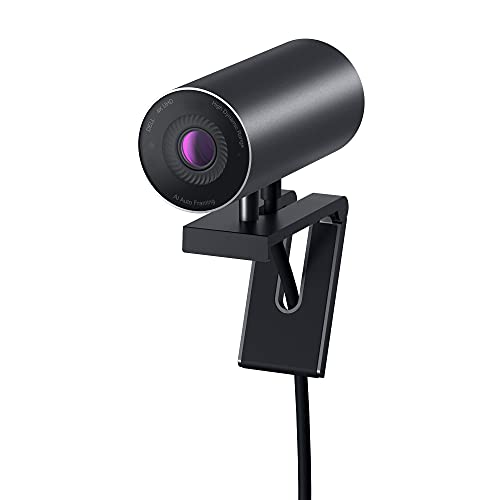
6. Dell UltraSharp Webcam WB7022 — Best 4K Webcam for Business Professionals
The Dell UltraSharp WB7022 is the most technically sophisticated webcam on this list, combining a 4K Sony STARVIS CMOS sensor — the same sensor technology used in professional security and broadcast cameras — with an on-board Image Signal Processor that handles all the computational photography work directly inside the device rather than offloading it to your computer's CPU. That distinction matters for business users who run demanding applications in parallel with video calls, because the camera's internal processing keeps your system responsive without creating the CPU load spikes that software-heavy cameras can trigger. The HDR capability pulls more detail from both shadows and highlights simultaneously, so your face looks properly exposed even when your background is significantly brighter.
The AI Auto Framing feature is genuinely impressive in practice — it tracks your position within the frame and adjusts the crop automatically when you move, which means you stay centered and properly composed throughout a call even if you shift in your chair, stand up to grab something, or lean sideways to reach your keyboard. You get the same three field-of-view presets as the Brio 4K (65°, 78°, and 90°) along with manual brightness, sharpness, contrast, and saturation controls through Dell's companion app, giving you granular control over your image that most webcams don't offer.
This is the camera you choose when your professional image is a genuine business asset and you want a setup that communicates credibility and technical seriousness from the first frame. If you're pairing it with a high-performance laptop — check our Best High Performance Laptop 2026 guide for compatible machines — you'll have an end-to-end setup that holds up in any business context.
Pros:
- 4K Sony STARVIS CMOS sensor delivers exceptional light sensitivity and color accuracy
- On-board Image Signal Processor handles image quality without burdening your CPU
- AI Auto Framing keeps you centered as you move naturally during calls
- Manual image controls via Dell app allow precision calibration for any environment
- HDR performs strongly in extreme backlighting scenarios that defeat simpler cameras
Cons:
- The highest price point on this list — overkill for users who only need reliable 1080p calls
- Dell's companion app adds value but also adds software dependency compared to pure plug-and-play models
7. Poly Studio P5 Professional Webcam — Best for Remote Professionals Who Travel
The Poly Studio P5 is the choice for professionals who need a camera that's genuinely portable without compromising on the quality that business video calls demand, and its compact form factor paired with robust 1080p optics makes it one of the most practical options for people who move between home, office, hotel rooms, and client sites regularly. The 80° field of view strikes an effective balance — wide enough to frame you comfortably with a natural head-and-shoulders composition, but not so wide that it captures the cluttered corners of a hotel room or a busy open office behind you. Poly's automatic low-light adjustment keeps your exposure consistent across the unpredictable lighting conditions that come with traveling and calling from unfamiliar environments.
The directional microphone design is specifically engineered to pick up your voice while attenuating sounds that originate from other directions — in practice, this means keyboard noise, nearby conversations, and HVAC sounds are noticeably less intrusive than they would be with an omnidirectional microphone design. It includes both a tripod mount and a monitor mounting clamp, which gives you flexible positioning options whether you're at a fixed desk or setting up in a location where monitor mounting isn't available. The privacy shutter adds an important layer of security for professionals who handle sensitive information on video calls from shared spaces.
Poly (formerly Plantronics) has deep roots in enterprise audio and communications, and that expertise translates into a camera that's certified for both Microsoft Teams and Zoom — your IT department will appreciate the enterprise-grade reliability and the fact that this isn't a consumer product that happened to work with business platforms.
Pros:
- Compact, portable design with both tripod mount and monitor clamp included in the box
- Directional microphone reduces ambient noise pickup without requiring software processing
- Certified for Teams and Zoom with enterprise-grade reliability and IT-friendly compatibility
- 80° field of view provides flattering framing without exposing too much background
- Privacy shutter is essential for professionals calling from shared or public spaces
Cons:
- 1080p resolution puts it behind 2K and 4K competitors at a similar or higher price point
- Less feature-rich software ecosystem compared to Logitech's Capture app for content creators
Key Features to Consider When Choosing a Webcam for Skype
Resolution and Frame Rate: What You Actually Need
Resolution is the most visible spec, but it's also the most misunderstood — Skype's default calling resolution is 1080p, which means a 4K camera will still be downscaled during a standard call, though the image often retains more clarity because of the higher-quality sensor and optics involved in capturing it. For most users, 1080p is the practical ceiling of what matters in a Skype context, but if you're also using the camera for recording tutorials, creating video content, or streaming, the jump to 2K or 4K becomes relevant for those use cases. According to Wikipedia's webcam overview, modern consumer webcams have advanced considerably in both sensor quality and compression efficiency, making even mid-range options viable for professional applications in 2026.
- 720p: Sufficient for casual family calls but visibly soft on most modern screens
- 1080p: The practical standard for professional Skype calls — covers 95% of use cases
- 2K: Noticeably sharper than 1080p, especially on large monitors, without 4K bandwidth demands
- 4K: Future-proofs your setup and improves image quality even at lower output resolutions due to sensor quality
Low-Light Performance and Light Correction
Your webcam will be judged most harshly in conditions you didn't anticipate — the late afternoon when the sun moves behind you, the early morning call before you've turned on your desk lamp, or the dim conference room where the overhead lights are on a timer. Light correction technology varies enormously between cameras, ranging from simple brightness boosting that creates noise and washes out colors, to sophisticated multi-zone exposure systems like Logitech's RightLight 3 and Dell's STARVIS CMOS sensor that preserve detail in both highlights and shadows simultaneously.
- Look for cameras that specify HDR or multi-zone exposure rather than just "light correction"
- Sony STARVIS sensors specifically excel at capturing clean images in very low ambient light
- Consider your typical calling environment before prioritizing this feature heavily
Microphone Quality and Noise Cancellation
Bad audio damages your credibility on a call faster than bad video does, and most users underestimate how much their webcam's built-in microphone contributes to the other person's experience of the call. Basic noise reduction and advanced AI noise cancellation are meaningfully different technologies — basic reduction applies a static filter that cuts uniform background frequencies, while AI cancellation analyzes the audio stream dynamically and removes sounds that don't match a voice profile in real time, which is far more effective in varied environments. If you regularly call from a busy household, a workspace with HVAC noise, or anywhere with unpredictable ambient sound, prioritizing a camera with genuine AI noise cancellation — like the Anker C200 — is worth the additional cost. You might also want to pair your webcam with a good Mac-compatible webcam setup if you're in an Apple ecosystem.
- Single mics are adequate for quiet, controlled environments only
- Dual stereo mics provide better voice localization and ambient noise rejection
- AI noise cancellation actively suppresses variable background sounds in real time
- Directional microphones like the Poly P5's prioritize sound from the front and reject side noise
Privacy Features and Build Quality
In 2026, a physical privacy shutter is no longer a premium feature — it's a baseline expectation for any camera used in a professional or home-office context, and several cameras on this list include one. The difference between a physical shutter and a software privacy mode is significant: a physical shutter blocks the lens mechanically and provides visual confirmation that the camera cannot be activated remotely or by a software error, while software privacy mode depends entirely on the driver and application layer behaving correctly. If you're handling sensitive client information, participating in confidential business calls, or simply want certainty that your camera is off when you're not using it, prioritize a camera with a physical shutter over one that relies on an indicator light alone. You might also find it useful to explore our Best Webcam for Video Conferencing 2026 guide if you're evaluating options across multiple communication platforms simultaneously.
- Physical shutter: The gold standard — provides mechanically verified camera-off state
- Indicator light: Helpful secondary confirmation but not a substitute for a physical shutter
- Build quality matters for cameras that travel — look for metal mounts and reinforced cables
- Monitor mounting stability varies significantly — test your specific monitor thickness before purchasing
What People Ask
Which webcam is best for Skype calls in 2026?
The Logitech C920x is the best overall webcam for Skype calls in 2026 for most users — it delivers consistent 1080p video, reliable autofocus, and solid microphone quality at a price that doesn't require serious justification. If your budget allows for a premium option and you want the best possible image quality, the Logitech Brio 4K or Dell UltraSharp WB7022 are the right upgrades to consider.
Do I need a 4K webcam for Skype?
You don't need a 4K webcam specifically for Skype calls — Skype's standard calling resolution is 1080p, which means 4K output gets downscaled during a live call regardless. However, 4K cameras often use higher-quality sensors that produce better overall image quality even at 1080p output, so the upgrade can still be worthwhile if image quality is a priority, especially if you also use the camera for recording or streaming.
Is the built-in laptop webcam good enough for professional Skype calls?
Built-in laptop webcams are generally not adequate for professional Skype calls in 2026 — most are 720p or lower quality, with poor low-light performance and inferior microphone quality compared to even budget external webcams. An inexpensive option like the Logitech C270 costs less than $30 and produces a noticeably better result than virtually any built-in camera currently available.
What webcam works best with Skype on a Mac?
All of the webcams on this list are compatible with Skype on Mac, but the Logitech Brio 4K and Logitech C920x have the longest track record of stable Mac compatibility and receive regular driver updates. The Logitech Capture software also has a well-maintained Mac version that adds useful recording and scene-management features beyond basic Skype calling.
Does webcam microphone quality matter for Skype calls?
Webcam microphone quality matters enormously for Skype calls — audio quality directly affects how confident and credible you sound to the other person, and poor audio caused by a weak or noisy microphone is more disruptive to communication than reduced video resolution. If you regularly call from noisy environments, prioritize cameras with AI noise cancellation like the Anker PowerConf C200 or consider adding a dedicated USB microphone to your setup.
What is the difference between a privacy shutter and an indicator light on a webcam?
A physical privacy shutter is a mechanical cover that slides or rotates over the lens and blocks it completely, providing visual confirmation that the camera cannot transmit video regardless of software state. An indicator light is an LED that turns on when the camera is active — it confirms when the camera is in use but relies on the driver behaving correctly, and it does not physically prevent the camera from being activated. A physical shutter is the more secure option and is strongly preferred for professional and privacy-sensitive use cases.
Buy on Walmart
- Logitech C920x HD Pro PC Webcam, Full HD 1080p/30fps Video, — Walmart Link
- Logitech Brio 4K Webcam, Video Calling, Noise-Cancelling mic — Walmart Link
- Logitech C270 HD Webcam, 720p, Widescreen HD Video Calling, — Walmart Link
- Microsoft Modern Webcam with Built-in Noise Cancelling Micro — Walmart Link
- Anker PowerConf C200 2K Webcam for PC/Laptop/Mac, Computer C — Walmart Link
- Dell UltraSharp Webcam - WB7022 - 4K UHD - Large Sony STARVI — Walmart Link
- Poly Studio P5 Professional Webcam (Plantronics) - 1080p HD — Walmart Link
Buy on eBay
- Logitech C920x HD Pro PC Webcam, Full HD 1080p/30fps Video, — eBay Link
- Logitech Brio 4K Webcam, Video Calling, Noise-Cancelling mic — eBay Link
- Logitech C270 HD Webcam, 720p, Widescreen HD Video Calling, — eBay Link
- Microsoft Modern Webcam with Built-in Noise Cancelling Micro — eBay Link
- Anker PowerConf C200 2K Webcam for PC/Laptop/Mac, Computer C — eBay Link
- Dell UltraSharp Webcam - WB7022 - 4K UHD - Large Sony STARVI — eBay Link
- Poly Studio P5 Professional Webcam (Plantronics) - 1080p HD — eBay Link
Next Steps
- Check the current price of your top choice on Amazon — webcam prices fluctuate frequently, and the gap between the C920x and the Brio 4K may be smaller than you expect during sales periods.
- Test your current internet upload speed using a free tool to determine whether your connection can actually take advantage of 2K or 4K video quality before committing to a premium camera.
- Make a test Skype call immediately after setup to verify audio and video quality in your actual calling environment, adjusting camera position and lighting before your first important call.
- If audio quality remains a concern after upgrading your webcam, consider adding a dedicated USB desktop microphone as a complementary upgrade that will further improve your call presence.
- Browse the full webcams category for additional options and specialized picks if none of the seven cameras above perfectly match your specific resolution, budget, or compatibility requirements.
 |
 |
 |
 |

About Diego Martinez
Diego Martinez is Ceedo's webcam and streaming hardware writer. He started streaming on Twitch in 2014 and grew a small audience covering indie game development, which led him to take camera and microphone equipment far more seriously than the average viewer. Diego studied film production at California State University, Long Beach and worked as a freelance video editor before pivoting to writing about consumer AV gear. He has tested webcams from Logitech, Razer, Elgato, AVerMedia, and dozens of smaller brands and has a particular interest in low-light performance, autofocus speed, and built-in noise suppression. He still streams weekly from his home studio in San Diego.