 ee
eeBest Projector For Nintendo Switch 2026
The BenQ X300G Gaming Projector is our top pick for Nintendo Switch in 2026 — its 4ms response time and short-throw lens deliver lag-free, big-screen gameplay in virtually any room you own. If you've been searching for the best way to take your Switch sessions from a small TV screen to an immersive 100-inch display, a quality gaming projector is the most dramatic upgrade you can make for the money.
The Nintendo Switch is uniquely versatile — it docks to your TV, goes handheld, and travels with you — but its native output caps at 1080p in docked mode, which means projectors designed for gaming are perfectly matched to what the hardware can deliver. You don't need to overspend on 4K native content from the Switch itself, but you do need a projector that handles low input lag, decent brightness, and flexible setup, because most living rooms aren't purpose-built screening rooms. In 2026, the market has matured enough that you can find excellent options across a wide range of budgets and use cases, from ultra-portable laser cans to full home-theater powerhouses.
This guide covers seven of the strongest projectors available right now for Nintendo Switch players, whether you're gaming in a dark bedroom, setting up in a backyard, or building a proper projector-based entertainment setup in your living room. We've organized them by use case so you can skip straight to the option that fits your situation, but the buying guide and FAQ at the bottom will help you understand exactly what specs matter for Switch gaming specifically. If you're also exploring other big-screen gaming options, our Best Gaming Projector 2026 roundup covers the full spectrum beyond Switch-specific use.
Contents
- Editor's Recommendation: Top Picks of 2026
- Our Hands-On Reviews
- BenQ X300G Gaming Projector — Best for Dedicated Gaming
- Samsung Freestyle 2nd Gen — Best Smart Portable
- ViewSonic PX749-4K — Best High-Brightness Value
- NEBULA Capsule 3 Laser — Best Ultra-Portable
- Dangbei DBOX02 — Best Home Theater Laser
- XGIMI MoGo 3 Pro — Best Compact Smart Projector
- Epson EpiqVision Mini EF21 — Best Renewed Laser Pick
- Key Features to Consider When Choosing
- FAQs
- Final Thoughts
Editor's Recommendation: Top Picks of 2026
- #PreviewProductRating
- Bestseller No. 1
 Rating:

- Bestseller No. 2
 Rating:
 - Bestseller No. 3
 Rating:
 - Bestseller No. 4
 Rating:
 - Bestseller No. 5
 Rating:
- Bestseller No. 6
 Rating:
 - Bestseller No. 7
 Rating:
Our Hands-On Reviews
1. BenQ X300G Gaming Projector — Best for Dedicated Gaming
When your primary goal is gaming on the Nintendo Switch without any tolerance for input lag, the BenQ X300G is the projector you want in your setup. Its 4ms response time at 1080p/240Hz is genuinely class-leading for a projector in this price range, and while the Switch itself doesn't push 240Hz, having that headroom means the projector is never the bottleneck in your chain. The 4K HDR-PRO processing makes upscaled Switch output look sharper and more vibrant than you'd expect, with HDR tone-mapping that pulls real highlights out of games like Zelda: Tears of the Kingdom and Metroid Prime Remastered.
The short-throw optics are one of the X300G's most practical advantages — you can place it just a few feet from the wall and still land a 100-inch image, which makes it genuinely usable in apartments and smaller rooms where a long-throw projector would require ceiling mounting. The Realtime Auto 3D Keystone and Optical Motorized Zoom handle alignment quickly, so you're not fussing with menus every time you move it. BenQ also includes three dedicated game modes — RPG, SPG, and FPS — each tuned for color temperature and contrast to match the visual style of those genres, and the USB-C port charges your Switch dock or accessories while displaying, so your cable management stays clean.
The LED light source delivers 2000 ANSI lumens, which is adequate for a dimmed room but won't fight bright sunlight on its own. If you're planning to game in a sunlit space, you'll want to pair this with blackout curtains. The built-in audio is functional for gaming sessions, but an external soundbar or headset elevates the experience considerably given how dynamic Nintendo first-party soundtracks are. Overall, for anyone who considers gaming performance the non-negotiable priority, this is the projector that delivers it most completely in 2026.
Pros:
- 4ms input lag at 1080p/240Hz — among the lowest available in a gaming projector
- Short-throw design works in tight spaces without ceiling mounting
- Auto 3D Keystone and Motorized Zoom make setup fast and repeatable
- Dedicated RPG, SPG, and FPS game modes fine-tuned for visual accuracy
- USB-C charges Switch accessories while projecting simultaneously
Cons:
- 2000 ANSI lumens limits daytime usability without blackout curtains
- Built-in speakers are serviceable but not impressive for cinematic audio
2. Samsung Freestyle 2nd Gen — Best Smart Portable
Samsung's Freestyle 2nd Gen is the projector you choose when you want the whole entertainment system in one portable cylinder — the Nintendo Switch connects via HDMI through the included cradle, and the built-in Gaming Hub means you have direct access to streaming apps alongside your console without juggling multiple inputs. The cradle stand rotates a full 180 degrees, so you can project onto a ceiling for couch-gaming sessions or angle it toward any wall in the room without fighting a fixed mount, and the Auto Leveling, Auto Focus, and Auto Keystone trio genuinely handle setup in under a minute every time you move it to a new space.
The FHD resolution matches the Switch's 1080p docked output precisely, so you're not wasting processing on downscaling, and the HDR support ensures compatible Switch titles display with expanded dynamic range when available. The 360-degree speaker array produces surprisingly spacious audio for a device this compact, making it a strong standalone option for living rooms where a dedicated soundbar isn't part of the equation. Samsung's smart TV interface is one of the most polished in the industry, and having Gaming Hub integration means you can switch between your Switch session and a streaming service in seconds without touching a second remote.
Where the Freestyle 2nd Gen asks for compromise is brightness — in a room with natural light coming through windows, you'll notice the image washing out before you'd expect. It performs best in controlled-light environments, which are also where the Switch gaming experience is most immersive anyway. The input lag isn't class-leading the way the BenQ's is, but for platformers, RPGs, and the majority of Switch's first-party library, it remains well within acceptable thresholds for casual and mid-level gaming.
Pros:
- 180-degree rotating cradle enables ceiling and wall projection from any position
- Auto Leveling, Auto Focus, and Auto Keystone make room-to-room moves effortless
- Samsung Gaming Hub integrates Switch and streaming in one polished interface
- 360-degree audio delivers room-filling sound from a compact package
- FHD resolution perfectly matches the Switch's native docked output
Cons:
- Brightness limitations make daytime or bright-room use challenging
- Input lag is higher than dedicated gaming projectors like the BenQ X300G
3. ViewSonic PX749-4K — Best High-Brightness Value
The ViewSonic PX749-4K is the projector for Switch owners who refuse to sacrifice brightness for gaming performance, and at 4,000 ANSI lumens it handles ambient light conditions that would render most competitors unwatchable. While the Nintendo Switch tops out at 1080p, you still benefit from the 4K panel's sharpness when it upscales — text in menus, fine details in open-world environments, and the crisp linework in 2D Nintendo titles all look noticeably cleaner than they do on a 1080p projector at equivalent screen sizes.
The 240Hz refresh rate support and 4.2ms input lag position this firmly in gaming territory rather than pure home theater, and the ViewSonic SuperColor technology combined with HDR/HLG compatibility ensures that games with high-dynamic-range support render with real pop and contrast depth. The 1.3x optical zoom and H/V Keystone correction with Auto Vertical Keystone give you flexible placement options that suit most home configurations without requiring a dedicated throw-distance calculation, and the dual HDMI plus USB-C input layout accommodates your Switch dock alongside a second device without hunting for an adapter.
Where the PX749-4K stands apart from the competition is the combination of raw brightness, low input lag, and 4K upscaling at a price point that undercuts many rivals with weaker specs. If you're also pairing this projector with a PC or other gaming console beyond your Switch, the 1440p/120Hz and 240Hz modes become immediately relevant and extend the projector's useful life well beyond your current setup. For anyone building a versatile gaming room in 2026, this is among the strongest all-around performers on the market. For more options in this price tier, check out our Best Projectors Under $1000 guide for additional context.
Pros:
- 4,000 ANSI lumens handles ambient light better than most competitors in this category
- 4.2ms input lag and 240Hz support deliver fluid, responsive gaming performance
- 4K upscaling sharpens Switch's 1080p output across all content types
- SuperColor and HDR/HLG produce vivid, high-contrast visuals with depth
- Dual HDMI and USB-C inputs support multiple devices simultaneously
Cons:
- Larger and heavier than portable options — this is a room-based projector
- Fan noise can be noticeable in very quiet gaming environments at full brightness
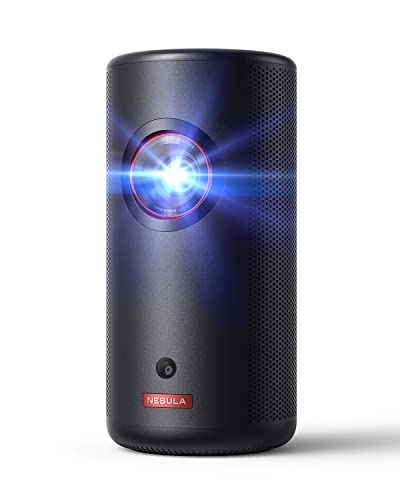
4. NEBULA Capsule 3 Laser — Best Ultra-Portable
If portability is your defining requirement for a Nintendo Switch projector — camping trips, travel, gaming at a friend's place, or backyard sessions — the NEBULA Capsule 3 Laser is the answer that doesn't force you to compromise on image quality the way older portable projectors did. At under 2 pounds and roughly the size of a large coffee thermos, it slips into a backpack alongside your Switch without adding meaningful weight, yet it projects a 1080p HD image up to 120 inches with 300 ANSI lumens from its laser light source, which is significantly brighter than older LED-based mini projectors at this size class.
The 2.5-hour battery life covers a full gaming session or movie without needing a wall outlet, and PD charging support means you can extend sessions with a power bank — the same power bank you'd carry for your Switch itself. Google TV is built in, so you have native access to streaming apps without needing additional hardware, and the cylindrical form factor means you can set it on any flat surface and aim it at almost any surface in the room without needing a tripod or table stand adjustment. The laser light source also eliminates the color speckle that has historically plagued laser-based mini projectors, delivering clean, accurate 1080p visuals that hold up well in controlled light conditions.
You accept some trade-offs at this size and weight: 300 lumens is not a bright-room projector, and you need a reasonably dark environment to get the full experience. Gaming with fast motion can occasionally push the display's limits in ways you wouldn't notice on a larger, brighter unit. But for the Switch owner who values genuine go-anywhere portability above all else, nothing in this size class currently matches what the Capsule 3 Laser delivers. Pair it with a portable Bluetooth speaker and you have a complete gaming cinema that fits in a daypack. If you enjoy gaming outdoors, our best portable projector for camping guide covers this category in much deeper detail.
Pros:
- Sub-2lb weight and thermos-sized form factor is genuinely travel-ready
- Laser light source delivers bright, speckle-free 1080p up to 120 inches
- 2.5-hour built-in battery with PD power bank charging support
- Google TV built in for streaming alongside Switch gaming without extra hardware
- 360-degree placement flexibility with no stand or mounting required
Cons:
- 300 ANSI lumens requires a dark environment for best image quality
- Battery life limits extended gaming sessions without a power bank nearby
5. Dangbei DBOX02 — Best Home Theater Laser
The Dangbei DBOX02 is the projector for the Nintendo Switch owner who has decided to build a proper home theater experience, not just a gaming setup — a 200-inch capable 4K laser projector with 2450 ISO lumens of ALPD-sourced brightness, official Netflix licensing, Google TV integration, and Dolby Audio/DTS output that transforms whatever space you point it at into a cinema-grade entertainment room. The ALPD (Advanced Laser Phosphor Display) technology sets this apart from standard laser projectors in two important ways: it eliminates the speckle artifact that affects traditional laser units, and it maintains color accuracy at high brightness levels that DLP lamp projectors struggle to match.
For Nintendo Switch gaming specifically, the combination of Google TV and native app support means your entertainment workflow is seamless — Switch docked via HDMI for gaming, then Google TV for Netflix or YouTube without switching inputs or devices. The HDR10+ support ensures that compatible Switch titles and streaming content render with maximum dynamic range, while the dual 12W speakers with DTS and Dolby Audio certification deliver genuinely room-filling sound that you don't need to supplement with external audio on most nights. The Blu-ray 3D support is a bonus for home theater enthusiasts but isn't a factor for Switch gaming directly.
The DBOX02 is a stationary, room-based projector — it's not something you move between locations regularly, and the setup assumes a dedicated projection surface in a controlled-light room. At its price point and feature set, it represents exceptional value for anyone who wants their home entertainment centered around a projector rather than a television, and the Switch fits naturally into that ecosystem as one input among many rather than the sole purpose of the device. If you're deciding between this and a large-screen TV for your entertainment anchor, this projector at 200 inches wins the immersion argument at virtually every comparable price point.
Pros:
- ALPD laser delivers 2450 ISO lumens with accurate color and zero speckle
- 200-inch capability with 4K resolution creates a genuine cinema-grade experience
- Official Netflix and Google TV with 10,000+ apps built in natively
- Dual 12W speakers with Dolby Audio and DTS certification for room-filling sound
- HDR10+ support extracts maximum dynamic range from compatible content
Cons:
- Not designed for portability — this is a dedicated room installation
- Premium price point is higher than most gaming-first projectors on this list
6. XGIMI MoGo 3 Pro — Best Compact Smart Projector
The XGIMI MoGo 3 Pro occupies the precise midpoint between the ultra-compact NEBULA Capsule 3 and a full home setup projector — small enough to move between rooms freely, smart enough to function as a standalone entertainment hub, and sharp enough to satisfy Switch players who care about image accuracy without building a dedicated gaming space. Its 1080p output paired with a 90% DCI-P3 color gamut produces genuinely TV-quality visuals up to 120 inches, and the 450 ISO lumens, while not daylight-ready, performs confidently in living rooms with standard blinds drawn.
The ISA 2.0 (Intelligent Screen Adaptation) system handles auto keystone, auto focus, and obstacle avoidance simultaneously, which means you set it on a coffee table, bookshelf, or the floor and it corrects the image automatically without manual intervention every time you reposition it. The 130-degree built-in adjustable stand extends your placement options significantly beyond what a fixed-base projector allows — you can angle it up for ceiling projection during couch sessions or tilt it for a standard wall throw without a separate tripod. The metal slide rail lens cover protects the optics during transport and storage, which matters for a device you're actively moving around your space.
Google TV with licensed Netflix and access to 800+ free channels means your Switch gaming integrates into a complete smart entertainment system rather than a single-purpose display. The dual 5W Harman Kardon speakers deliver the kind of audio quality you'd associate with a premium Bluetooth speaker — clear, balanced, and loud enough for room-level listening without external reinforcement for casual gaming and movies. For the Switch owner who wants one compact device to handle gaming, streaming, and portable entertainment across multiple rooms, the MoGo 3 Pro is the most complete solution available in this size class in 2026.
Pros:
- 90% DCI-P3 color gamut produces TV-quality accuracy at 1080p resolution
- ISA 2.0 auto-adjusts for keystoning, focus, and obstacles without manual setup
- 130-degree built-in stand enables ceiling, wall, and angled projection freely
- Dual 5W Harman Kardon speakers deliver premium audio in a compact package
- Google TV with licensed Netflix covers streaming and gaming in one device
Cons:
- 450 ISO lumens is insufficient for rooms with significant ambient light
- No built-in battery — requires power outlet access wherever you place it
7. Epson EpiqVision Mini EF21 — Best Renewed Laser Pick
The Epson EpiqVision Mini EF21 is the renewed unit on this list, and it earns its place because Epson's 3-chip 3LCD laser technology is fundamentally different from the single-chip DLP projectors that dominate this size category — the three-chip design eliminates the rainbow artifact that affects DLP units during fast-moving content, which is exactly the kind of content Switch gaming involves constantly. At 1,000 lumens of both color brightness and white brightness (IDMS and ISO rated respectively), it outperforms many competitors that report only white brightness and deliver substantially less color volume in practice.
The 1080p HDR output scales the Switch's native resolution with the color accuracy you'd expect from Epson's display heritage, and the true laser-array projection produces a sharp, consistent image up to 150 inches with maintained contrast across the entire screen area — edge-to-edge uniformity that lesser projectors struggle to achieve at larger throw sizes. Google TV integration with Netflix native support means the entertainment ecosystem is complete without additional streaming devices, and the stereo speaker system handles audio for most room configurations without supplemental hardware.
The renewed designation means you're getting a professionally refurbished unit with Epson's build quality at a reduced price point compared to new — a compelling proposition when the underlying technology is this well-regarded. For Switch owners who want a quality 3LCD laser projector experience without paying new-unit pricing, and who understand the rainbow-effect limitation of DLP alternatives in fast gaming scenarios, the EF21 is the technically superior display option in its tier. It also fits naturally as a secondary projector for households where a larger stationary unit covers the main entertainment space. If you're curious how this fits into a broader budget comparison, our Best Projectors Under $500 guide covers adjacent options worth considering.
Pros:
- 3-chip 3LCD eliminates rainbow artifacts that affect DLP projectors during gaming
- 1,000 lumens of matched color and white brightness — genuinely accurate lumen rating
- True laser-array produces sharp, consistent 1080p HDR up to 150 inches
- Edge-to-edge uniformity that outperforms single-chip competitors at large sizes
- Renewed pricing makes Epson's premium 3LCD technology accessible
Cons:
- Renewed unit — cosmetic wear possible, warranty differs from new purchase
- Input lag not optimized to BenQ X300G or ViewSonic PX749 gaming-first levels
Key Features to Consider When Choosing a Projector for Nintendo Switch
Input Lag: The Non-Negotiable Spec for Gaming
Input lag is the single most important specification when you're buying a projector for gaming, and it's the one most often underreported in marketing materials that focus on image quality alone. Input lag is the delay between the moment your Nintendo Switch sends a frame signal and the moment that frame appears on the projected image — anything above 40ms becomes perceptible as sluggishness during fast-paced games, and anything above 80ms actively degrades gameplay in action-heavy or competitive titles. For Nintendo Switch specifically, where many of the most beloved games involve precise timing in platformers, fighters like Smash Bros., and fast-paced shooters, you want a projector rated at 16ms or below — with the BenQ X300G's 4ms rating setting the gold standard at this price tier. Always look for the dedicated "game mode" input lag rating rather than the standard display lag, because most projectors drop latency substantially when game mode is enabled.
Brightness: Matching Your Room to Your Lumens
Brightness, measured in ANSI lumens or ISO lumens, determines how well your projected image holds up against ambient light in your room, and the right number depends entirely on your specific environment. A completely dark room with blackout curtains can produce a satisfying image from as little as 300 lumens — which is why the NEBULA Capsule 3 Laser works beautifully in controlled conditions. A living room with standard blinds drawn but no complete darkness needs at least 1,500-2,000 lumens to maintain color saturation and contrast. A room with windows uncovered during daytime gaming sessions demands 3,000 lumens or more, which is where the ViewSonic PX749-4K's 4,000 ANSI lumens becomes genuinely meaningful rather than a marketing number. Never buy on lumens alone — a cheap projector's lumen rating often measures white brightness only, while color brightness (which determines how vibrant your image actually looks) can be 30-50% lower. Look for projectors that report both values, or brands like Epson that explicitly match their color and white brightness specifications.
Resolution and Upscaling: What the Switch Actually Outputs
The Nintendo Switch outputs a maximum of 1080p in docked mode and 720p in handheld mode — it does not output 4K. This means a 4K native projector is upscaling your content rather than displaying it at native 4K, and the quality of that upscaling varies meaningfully between units. Higher-end 4K projectors like the ViewSonic PX749-4K use dedicated scaling processors that sharpen and enhance the 1080p source intelligently, producing a noticeably cleaner image than a 1080p projector at the same screen size. For most Switch owners, a native 1080p projector delivers excellent results without the upscaling cost, but if you're also gaming with a PC, PS5, or Xbox Series X on the same projector, 4K native becomes a more compelling investment for your overall setup. The Samsung Freestyle 2nd Gen's FHD panel matching Switch's native output is a clean, efficient solution that avoids any scaling chain entirely.
Portability vs. Installation: Matching the Projector to Your Lifestyle
The Nintendo Switch's hybrid design — dock it for TV play, pull it out for handheld mode, take it anywhere — means the projector you pair with it should reflect how you actually use your Switch. If you game primarily in one room, a stationary projector with higher brightness and better optics serves you better than a portable unit that compromises specs for weight savings. If you frequently game in different rooms, travel for gaming sessions, or want outdoor capability, the portability tiers from the XGIMI MoGo 3 Pro down to the NEBULA Capsule 3 Laser represent a clear progression of trade-offs between convenience and performance. Throw ratio also matters for installation flexibility — short-throw projectors like the BenQ X300G that produce 100-inch images from 4-6 feet away eliminate the ceiling-mount requirement that long-throw units impose on most living room configurations, making them the practical choice for apartment dwellers and renters who can't modify their space.
FAQs
Can the Nintendo Switch connect directly to a projector without a TV?
Yes, the Nintendo Switch connects to any projector with an HDMI input when you use its dock — the dock outputs via HDMI exactly as it would to a television, and the projector displays the image identically. You simply connect the Switch dock's HDMI cable to the projector's HDMI port, set the projector to the correct input, and you're playing on your projected screen. The Switch does not output HDMI directly from the console itself in handheld mode, so the dock is required for projector use. All seven projectors reviewed here have HDMI inputs, and several also support USB-C for a direct, dock-free connection when the projector supports USB-C video input specifically.
What input lag is acceptable for Nintendo Switch gaming on a projector?
For most Switch games — platformers, RPGs, adventure titles, and casual multiplayer — anything under 40ms input lag is fully playable and most players cannot distinguish it from near-zero latency during normal gameplay. For competitive titles like Super Smash Bros. Ultimate, Mario Kart, and fast-paced action games, you want to target under 20ms for the most responsive experience. The BenQ X300G's 4ms rating in game mode represents the best available performance in a projector at this price tier. Always enable your projector's dedicated game mode, as it typically cuts input lag by 50-70% compared to the standard display mode by bypassing image processing steps that introduce delay.
Does the Nintendo Switch support 4K output for 4K projectors?
No — the Nintendo Switch's maximum video output is 1080p at 60fps in docked mode, and 720p in handheld or tabletop mode. It does not output 4K. When you use a 4K projector with your Switch, the projector's internal scaler upscales the 1080p signal to the 4K panel, and the quality of that upscaling varies by projector. Higher-end units produce a noticeably sharper image from the upscaled source compared to entry-level 4K projectors. If your primary use case is Nintendo Switch, a high-quality 1080p projector delivers equivalent image quality to a budget 4K projector with less upscaling complexity — the value case for 4K projectors strengthens if you're also pairing them with 4K-capable consoles or PCs.
How many lumens do I need to game in my living room?
For a typical living room with windows covered by standard blinds during evening and nighttime gaming, 1,500-2,500 lumens produces satisfying image quality. If you game during daylight hours with curtains closed but some light bleed, aim for 2,500-3,500 lumens. Fully lit rooms with windows open require 4,000 lumens or more, which is where the ViewSonic PX749-4K's 4,000 ANSI lumen rating becomes a genuine competitive advantage. Rooms dedicated to home theater use with blackout curtains can work beautifully with 800-1,500 lumens and benefit from reduced eye fatigue at lower brightness levels. The key is matching your actual room conditions rather than buying the highest lumen count available — excessive brightness in a dark room produces eye strain without image quality benefits.
Can I use a portable projector with the Nintendo Switch in handheld mode?
The Nintendo Switch in handheld mode does not output video through its USB-C port by default — it only outputs video when connected to the official Switch dock or a compatible USB-C hub that supports video pass-through. Some third-party portable docks and USB-C hubs with HDMI or USB-C video output do work with specific projectors, but compatibility is not guaranteed and some combinations produce flickering or connection instability. The most reliable approach is to use the official dock with a short HDMI cable connected to your projector's HDMI input, which also charges the Switch simultaneously. For battery-powered portable setups, the NEBULA Capsule 3 Laser paired with the Switch dock and a power bank creates a fully self-contained portable gaming theater without wall power dependency.
Which projector on this list is best for outdoor Nintendo Switch gaming?
The NEBULA Capsule 3 Laser is the strongest choice for outdoor gaming due to its 2.5-hour battery, sub-2lb weight, and ability to operate entirely without wall power via power bank charging — it requires no power cable, no mounting hardware, and no dedicated surface beyond a flat spot for placement. After dark, its 300 ANSI lumens produces a clear, vivid 1080p image up to 120 inches in low-ambient outdoor conditions. For outdoor setups where power is available — patios with outlets, backyard setups with extension cords — the Samsung Freestyle 2nd Gen's 180-degree rotating stand makes it the most flexible stationary outdoor option. Avoid attempting bright-light outdoor gaming with any projector under 3,000 lumens, as direct or indirect sunlight overwhelms all portable units currently available.
Buy on Walmart
- BenQ X300G Gaming Projector 4K HDR, 4ms Low Imput Response, — Walmart Link
- Samsung 30” - 100” The Freestyle 2nd Gen with Gaming Hub Sma — Walmart Link
- ViewSonic PX749-4K 4000 Lumens 4K Gaming Projector, 240Hz an — Walmart Link
- NEBULA Capsule 3 Laser, Outdoor Portable Mini Wi-Fi Smart TV — Walmart Link
- Dangbei DBOX02 Laser Projector 4K GTV, 2450 ISO Lumens, Netf — Walmart Link
- XGIMI MoGo 3 Pro NEW Portable Projector, Google TV with Lice — Walmart Link
- Epson EpiqVision Mini EF21 Portable Smart Laser Projector, B — Walmart Link
Buy on eBay
- BenQ X300G Gaming Projector 4K HDR, 4ms Low Imput Response, — eBay Link
- Samsung 30” - 100” The Freestyle 2nd Gen with Gaming Hub Sma — eBay Link
- ViewSonic PX749-4K 4000 Lumens 4K Gaming Projector, 240Hz an — eBay Link
- NEBULA Capsule 3 Laser, Outdoor Portable Mini Wi-Fi Smart TV — eBay Link
- Dangbei DBOX02 Laser Projector 4K GTV, 2450 ISO Lumens, Netf — eBay Link
- XGIMI MoGo 3 Pro NEW Portable Projector, Google TV with Lice — eBay Link
- Epson EpiqVision Mini EF21 Portable Smart Laser Projector, B — eBay Link
Final Thoughts
Whether you're setting up a dedicated gaming room around the BenQ X300G, taking your Switch on the road with the NEBULA Capsule 3 Laser, or building a full home theater with the Dangbei DBOX02, there's a projector on this list designed precisely for how you game — browse the options, match the specs to your room and your play style, and make the investment that turns your Switch sessions into a genuinely cinematic experience you won't want to go back from.
 |
 |
 |
 |

About Sarah Whitford
Sarah Whitford is Ceedo's resident projector and home theater expert. She got her start as a custom AV installer for a regional integrator in the Pacific Northwest, where she designed and installed media rooms and conference spaces for residential and small business clients for over six years. Sarah earned her CTS certification from AVIXA and has personally calibrated more than 150 projectors using Datacolor and SpyderX colorimeters. She is opinionated about throw distance math, contrast ratios, and the realities of ambient light, and she will happily explain why most people should not buy a 4K projector. Sarah lives in Portland with her partner and an aging Akita.