 ee
eeBest Projectors For Golf Simulator 2026
The Optoma GT1090HDR is the best projector for golf simulators in 2026 — its 4,200-lumen laser engine and 120-inch image from just over four feet away make it the single most practical choice for a dedicated simulator bay. Whether you are building a basement setup or converting a garage into a full swing studio, choosing the right projector defines the entire experience, because a dim or laggy image breaks immersion and kills your ability to track ball flight accurately.
Golf simulator projectors face a uniquely demanding set of requirements that standard home theater projectors simply cannot satisfy. The throw distance from the projector to your impact screen is typically very short — often four to eight feet in a residential bay — which means you need a short-throw or ultra-short-throw lens to fill a large screen without the projector sitting in your swing path. Beyond throw ratio, you need serious brightness, because simulator rooms are rarely pitch black. A projector rated below 3,000 lumens will wash out in any room with ambient light, leaving ball tracking software struggling to render a clear image. Laser light sources have replaced lamp-based projectors as the standard for simulator use in 2026, delivering consistent brightness, instant-on capability, and lifespans exceeding 20,000 hours without a single bulb replacement. If you are also shopping for a display surface to pair with your projector, our guide to the best outdoor projector screens covers the impact screens and fixed-frame surfaces that work best with short-throw setups.
This guide covers seven projectors that represent the full range of the 2026 market — from compact 1080p laser units under $1,000 to native 4K ultra-short-throw powerhouses designed for dedicated home theater bays that double as simulators. Every pick has been evaluated against the specific demands of golf simulation: throw ratio, lumen output in real-world conditions, input lag, resolution, and long-term reliability. According to Wikipedia's overview of golf simulator technology, the accuracy of ball-tracking software is directly tied to image quality and frame rate consistency — which is exactly why projector selection matters more than most golfers expect. You can browse the full projectors category for additional display options beyond this list.
Contents
Our Top Picks for 2026
- #PreviewProductRating
- Bestseller No. 1
 Rating:

- Bestseller No. 2
 Rating:
- Bestseller No. 3
 Rating:
 - Bestseller No. 4
 Rating:
 - Bestseller No. 5
 Rating:
 - Bestseller No. 6
 Rating:
- Bestseller No. 7
 Rating:
Our Hands-On Reviews
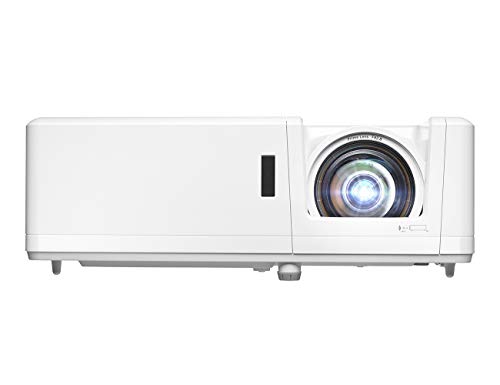
1. Optoma GT1090HDR Short Throw Laser Projector — Best Overall for Golf Simulators
The Optoma GT1090HDR earns the top spot in 2026 because it delivers a 120-inch image from just 4 feet 4 inches away — a critical capability that allows you to mount it on the ceiling or a rear shelf without the unit interfering with your downswing or follow-through. The DuraCore laser light source pumps out 4,200 lumens, which is enough brightness to produce a vivid, high-contrast image even when the room lights are partially on, and the IPX6 dust resistance rating means the optical engine stays clean and stable over years of continuous simulator use. That combination of short throw geometry and laser-grade brightness is precisely why this projector appears in more simulator builds than any other single unit on the market right now.
The HDR10 and HLG compatibility adds genuine value here, because modern simulator software like E6 CONNECT and GSPro renders fairway gradients and shadow detail that plain SDR projectors compress into flat, dull tones. You will notice the difference immediately when playing courses like Pebble Beach, where the cliff-side holes require convincing depth in the sky and ocean textures to feel realistic. The 1080p native resolution is sharp enough for any golf sim application at these screen sizes, and the 4K HDR input means you are not artificially bottlenecking content when you use the projector for movie watching between sessions. With a rated lifespan of 30,000 hours and no lamp replacements ever, the total cost of ownership over a five-year simulator ownership period is dramatically lower than any lamp-based competitor.
Setup is straightforward — the short throw lens eliminates the need for complex ceiling rigging at distance, and horizontal/vertical keystone correction makes fine-tuning the image geometry fast during initial installation. If you want a single projector that handles every simulator platform, every HDR streaming service, and every casual gaming session without compromise, this is the unit you buy and never think about again.
Pros:
- 4,200 lumens laser output stays bright across years without degradation
- 120-inch image from just 4'4" away eliminates swing-path obstruction
- 30,000-hour lifespan with zero lamp or filter replacements required
- IPX6 dust resistance protects the optical engine in dusty garage bays
- HDR10 and HLG support delivers richer course textures in compatible software
Cons:
- Native 1080p resolution rather than 4K native — acceptable for sim use but worth noting
- No built-in smart TV platform; requires external media device for streaming
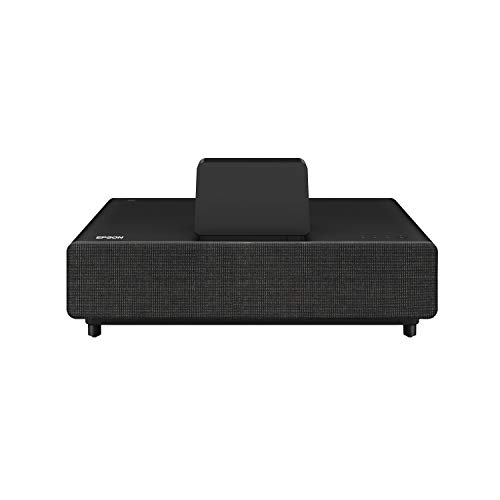
2. Epson EpiqVision Ultra LS500 Laser Ultra Short Throw — Best Ultra Short Throw for Tight Spaces
The Epson LS500 is the projector you choose when the room is genuinely tight and you need the unit sitting just inches from the impact screen rather than several feet behind it. Epson's proprietary Laser Array Technology produces a 130-inch image from a distance measured in inches rather than feet, which fundamentally changes how you design the simulator bay — you can push the impact screen all the way to one end of the room and reclaim every inch of hitting space behind it. At 4,000 lumens, brightness is competitive with the best short-throw alternatives in this guide, and the 4K PRO-UHD processing delivers a visually sharp picture that holds up at large screen sizes without obvious pixel structure.
The built-in Android TV platform with Google Assistant integration transforms this projector into a complete home entertainment hub between simulator sessions. You get native access to Netflix, YouTube, Disney+, and every major streaming service without an external box, which is a genuine convenience advantage over projectors that require an attached Fire Stick or Apple TV. The HDMI 2.0 inputs handle 4K HDR signal from a gaming PC or dedicated simulator hardware without any bandwidth bottleneck. This is a Certified Renewed unit, which means Epson's quality assurance team has inspected and tested every component — you get near-new performance at a meaningfully reduced price point compared to a brand-new LS500.
The ultra-short throw form factor does introduce one practical consideration: the lens is positioned at the base of the unit rather than the top, which means floor-level placement projects upward onto the screen at a sharp angle. You need to account for that geometry when positioning the unit, and vertical keystone correction must be set correctly to avoid a trapezoidal image. Once calibrated, however, the LS500 delivers one of the most cinematic golf simulator images available at any price point in 2026.
Pros:
- True ultra-short throw places the projector inches from the screen, maximizing hitting space
- Built-in Android TV with Google Assistant eliminates the need for any external streaming device
- 4K PRO-UHD processing produces sharp, detailed images at 130-inch screen sizes
- Certified Renewed status means Epson-verified quality at a reduced price
Cons:
- Floor-level projection angle requires careful geometric calibration during setup
- 2,700 effective lumens in some modes — verify room lighting before committing
3. BenQ TK710STi 4K HDR Laser Short Throw — Best for Low Latency and Gaming Performance
If your simulator bay doubles as a serious gaming space — or if you are running a simulator platform that demands the absolute minimum input lag for accurate ball-tracking response — the BenQ TK710STi is the projector that sets the standard in 2026. The 4ms response time at 240Hz is a specification you will not find on any other projector in this guide, and it translates directly into the kind of real-time feedback responsiveness that gaming and simulator software developers build their rendering pipelines around. When you are watching ball flight in GSPro or Trackman software, the image updates feel immediate and precise rather than slightly delayed.
The 3,200-lumen laser output keeps the image punchy and visible even when the room has ambient light from windows or overhead fixtures, and the 95% Rec.709 color coverage ensures that fairway greens and sky blues reproduce with the color accuracy that modern simulator courses are authored to display. Android TV with Netflix, Chromecast, and AirPlay support means the TK710STi handles entertainment duties between rounds without any additional hardware. The 3D keystone correction system — which adjusts geometry across three axes rather than just vertical and horizontal — makes installation in an irregular room straightforward and fast.
The laser light source eliminates the warm-up period that lamp projectors require, so you go from power-on to a bright, calibrated image in seconds. For golfers who play quick 9-hole sessions before dinner and need the system ready instantly, that is a practical quality-of-life advantage that compounds over hundreds of sessions. BenQ's laser architecture also guarantees consistent color temperature across the full rated lifespan, so the image you see on day one is the image you see in year five. This is also worth noting for those researching other display options — if you are comparing projection solutions against flat-panel displays, our guide on the best cheap 1080P projectors covers the budget end of the projection spectrum for context.
Pros:
- 4ms response time at 240Hz — lowest input lag of any projector in this guide
- Native 4K resolution with HDR10 and HLG for exceptional image detail
- 95% Rec.709 color accuracy delivers faithful course color reproduction
- Android TV with Netflix, Chromecast, and AirPlay built in
- 3D keystone correction handles irregular room geometry efficiently
Cons:
- 3,200 lumens is slightly below the 4,200-lumen benchmark set by the Optoma GT1090HDR
- Higher price point than the other short-throw options in this guide
4. Optoma GT2100HDR Compact Short Throw Laser — Best Budget Short Throw for 2026
The Optoma GT2100HDR brings the same core short-throw laser DNA as the GT1090HDR into a more compact chassis with an eco-conscious external power supply design — making it the ideal choice for budget-conscious simulator builders who need proven Optoma performance without the premium price. The 4,200-lumen output matches the GT1090HDR exactly, which means you are not compromising on brightness to save money here. That lumen figure is what separates a projector that works in a simulator room from one that merely works in a sealed, light-controlled home theater.
The 4K HDR input compatibility via HDR10 ensures that your simulator software and any streaming content you run between sessions renders with proper tone-mapping and contrast expansion. Native resolution is 1080p, which is entirely sufficient for golf simulator applications at the screen sizes this projector is designed to fill. The compact form factor makes ceiling mounting or shelf installation easier in rooms with lower ceilings or tighter mounting constraints, and the external power supply moves heat generation away from the optical engine for cleaner long-term thermal management.
You should consider the GT2100HDR if you are building a first simulator setup and want a reliable, proven platform that handles every core requirement without overengineering the display system. It does not offer the smart TV features of the Epson LS500 or the ultra-low latency of the BenQ TK710STi, but for pure simulator image performance at a competitive price, it delivers everything a serious golfer needs from the display component of their setup.
Pros:
- 4,200 lumens matches the top-pick brightness at a lower price point
- Compact chassis simplifies ceiling mounting in rooms with tighter dimensions
- External power supply design improves thermal management and longevity
- Eco-friendly design with energy-efficient laser architecture
Cons:
- No built-in smart TV platform — requires external streaming device
- External power supply adds an extra cable to manage during installation

5. LG HU85LA 4K UHD CineBeam Ultra Short Throw — Best Premium Smart Projector
The LG HU85LA is the premium lifestyle choice among golf simulator projectors — a ultra-short throw 4K laser unit that delivers a 120-inch image from just 7.2 inches away from the projection surface, built into a sleek white chassis that doubles as living room furniture when the simulator tarp is rolled up. The native 4K UHD resolution at 3840×2160 is genuine, not pixel-shifted or upscaled, and the image sharpness at 120 inches is noticeably superior to 1080p projectors when you stand close to the screen and examine fine detail in course textures or on-screen HUD elements.
LG's webOS smart TV platform with built-in Alexa gives you voice control over the entire simulator system, including lighting, temperature, and content selection, if your home is equipped with compatible smart home devices. The 2,700 ANSI lumen output is the lowest on this list, which means the HU85LA works best in rooms where you have real control over ambient light — a dedicated basement theater, for example, rather than a garage with daylight gaps. In those controlled conditions, however, the image quality is genuinely stunning and competes with flat-panel displays in terms of perceived contrast and color vibrancy.
HDCP 2.2 compliance ensures that 4K HDR10 content from streaming services and gaming hardware passes through without any signal compatibility issues, which matters when you are connecting a high-end gaming PC to run premium simulator software alongside 4K streaming. The Magic Remote with gesture control adds a polished interaction layer that LG customers will find familiar and intuitive. If your simulator room is also your primary home theater and you want one projector that handles both use cases at the highest visual quality level, the HU85LA justifies its premium pricing. Pairing it with a quality audio system — you can find recommendations in our guide to the best soundbars without subwoofers — completes the immersive simulator experience.
Pros:
- Native 4K UHD at 3840×2160 — the sharpest image on this list at 120 inches
- 7.2-inch ultra-short throw distance maximizes hitting room behind the screen
- LG webOS with built-in Alexa for full smart home and voice control integration
- HDCP 2.2 ensures clean 4K HDR10 signal from all premium sources
Cons:
- 2,700 lumens requires a well-controlled dark room to shine — not ideal for bright garages
- Premium price point is the highest in this guide by a significant margin
6. BenQ LK936ST 4K Ultra HD Short-Throw Laser DLP — Brightest 4K Option
The BenQ LK936ST stands apart from every other projector in this guide by delivering 5,100 ANSI lumens from a native 4K UHD laser DLP engine — a specification that makes it the only projector here that you can confidently deploy in a room with significant ambient light and still get a bright, punchy, fully detailed image. If your simulator bay shares space with a garage workshop, a fitness area, or any environment where you cannot fully control the lighting, the LK936ST is the projector that guarantees visibility under those conditions. The difference between 3,200 lumens and 5,100 lumens is not subtle — it is the difference between a washed-out daytime image and a vivid, immersive one.
Native 4K UHD at 3840×2160 means every pixel of course detail rendered by premium simulator platforms like Trackman, FSX Play, or E6 CONNECT is displayed at full resolution without any interpolation or pixel-shifting. The 20,000-hour laser lifespan in normal operating mode translates to approximately 5,500 hours of annual use before you reach the halfway point of the rated lifespan — effectively maintenance-free operation for any realistic simulator usage pattern. DLP technology from BenQ has a well-established reputation for precise color accuracy and resistance to color drift over time, which means the image calibration you dial in at installation stays accurate across years of use.
The short-throw lens geometry is well-suited to simulator bays where the projector is mounted on a ceiling shelf at a moderate distance from the screen, and the short-throw ratio gives you flexibility in room configuration without requiring the extreme proximity of an ultra-short-throw unit. The LK936ST is the right choice for commercial simulator installations, country club practice facilities, or serious home builders who want the highest-specification display system available without compromise. It is also worth noting that if you are investing at this level in a simulator display, quality input devices matter equally — gaming peripherals and display accessories reviewed in our best soundbar for large room guide show the same quality-first philosophy applied to audio.
Pros:
- 5,100 ANSI lumens — brightest projector in this guide by a wide margin
- Native 4K UHD resolution with no pixel-shifting or upscaling compromise
- 20,000-hour laser lifespan in normal mode ensures years of maintenance-free operation
- DLP technology delivers precise, drift-resistant color accuracy across the full lifespan
Cons:
- Highest price point among all seven projectors in this guide
- No built-in smart TV platform — requires external media source for streaming content
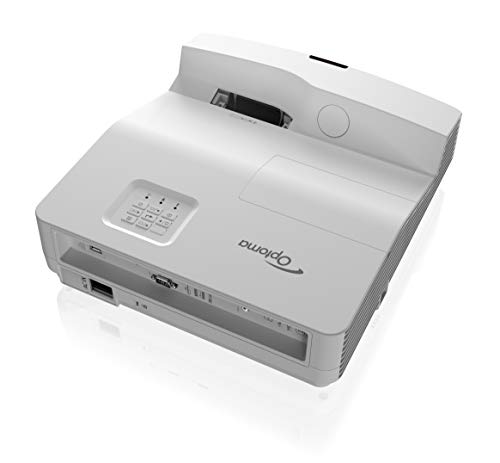
7. Optoma GT5600 Ultra Short Throw Gaming and Movie Projector — Best Ultra Short Throw Value
The Optoma GT5600 closes out this list as the most accessible ultra-short-throw option — a projector that places a 100-inch image on your screen from just a few inches away, with 3,600 lumens of brightness, a 20,000:1 contrast ratio, and 1080p resolution, all at a price point that is substantially lower than the LS500 or LG HU85LA. For golfers who want the space efficiency of an ultra-short-throw design without paying premium prices, the GT5600 delivers the core benefits at a realistic budget. The ability to tuck the projector right against the impact screen means you can configure a simulator in a room that would be too short for a standard short-throw unit.
The auto keystone sensors are a standout feature for simulator applications specifically, because they automatically detect and correct image geometry when the projector or the mounting surface is bumped or shifted — a common occurrence in high-traffic simulator rooms where people are swinging clubs near the equipment. Four-corner correction gives you fine-grained manual control for final calibration, and the image refocuses instantly when the projector is disturbed rather than requiring manual readjustment. That automatic stability is genuinely valuable when the projector is positioned close to the floor or on a shelf in a simulator bay where errant shots could disturb the setup.
The 3,600-lumen output is competitive for rooms with moderate ambient light, though you will want to dim overhead fixtures for the best image quality in a bright space. Resolution is 1080p rather than 4K, which is entirely appropriate for this price tier and for golf simulator use cases where the software rendering engine rather than the display hardware is the primary quality bottleneck. If you are building a budget-conscious first simulator and want to allocate more of your budget to launch monitor hardware and software subscriptions, the GT5600 gives you a solid, reliable display foundation that does not hold the rest of the system back.
Pros:
- Ultra-short throw places a 100-inch image from just inches away — maximizes hitting space
- Auto keystone sensors instantly restore geometry after any disturbance to the unit
- 3,600 lumens and 20,000:1 contrast ratio deliver sharp, high-contrast images
- Most accessible price point among the ultra-short-throw options in this guide
Cons:
- 1080p resolution — not a 4K unit, which matters if you plan to upgrade simulator software later
- Lamp-based rather than laser — requires eventual bulb replacement unlike the other options
Key Features to Consider When Choosing a Golf Simulator Projector
Throw Ratio and Room Dimensions
The throw ratio of a projector determines how far back it must sit to produce a given screen size, and it is the first specification you check when configuring a simulator bay. Standard short-throw projectors like the Optoma GT1090HDR and GT2100HDR require roughly four to five feet to project a 120-inch image, which is manageable in most rooms of 12 feet or more in depth. Ultra-short-throw units like the Epson LS500, LG HU85LA, and Optoma GT5600 require only inches, which lets you push the impact screen to the far wall and claim every foot of hitting space in the room. Measure your available throw distance carefully before selecting, because buying a projector with the wrong throw ratio forces a complete reinstallation. Short throw and ultra-short throw are both valid choices — the right one depends entirely on your room's geometry.
Lumen Output and Ambient Light Management
Golf simulator bays range from fully light-controlled basement theaters to bright garages with daylight infiltration, and the projector brightness you need scales directly with the ambient light level in your specific space. A projector rated below 2,500 lumens produces a washed-out, low-contrast image in any room with unchecked ambient light, which makes it harder for ball-tracking cameras and your own eyes to read ball flight accurately. The practical minimum for a simulator room with any ambient light is 3,000 lumens, with 4,000 lumens or above recommended for spaces you cannot fully darken. The BenQ LK936ST at 5,100 lumens handles the most demanding ambient light conditions; the Optoma GT1090HDR and GT2100HDR at 4,200 lumens cover the majority of residential setups; and the LG HU85LA at 2,700 lumens is reserved for purpose-built dark rooms where brightness is not the constraint.
Resolution, HDR, and Color Accuracy
Native 4K UHD projectors deliver a genuinely sharper image than 1080p units at large screen sizes, and the difference is visible when you sit at a normal viewing distance in a simulator bay. That said, 1080p is entirely acceptable for golf simulator applications in 2026 — the rendering engines in most simulator platforms do not yet mandate 4K display output, and the visual quality difference between a high-brightness 1080p image and a lower-brightness 4K image favors the brighter 1080p unit in any room with ambient light. HDR10 compatibility adds visible depth to course rendering in software that supports HDR output, with richer shadow detail and more accurate sky gradients. Color accuracy — particularly green reproduction on fairways and rough — is where the BenQ LK936ST's 95% Rec.709 coverage and DLP color precision stands out against competing technologies.
Laser vs. Lamp Light Sources
Every serious golf simulator build in 2026 uses a laser light source, and the reasons are straightforward. Laser projectors offer instant-on operation with no warm-up period, consistent brightness across their full rated lifespan rather than gradual lumen depreciation, and lifespans of 20,000 to 30,000 hours without any maintenance intervention. Lamp-based projectors like the Optoma GT5600 require bulb replacement every 3,000 to 5,000 hours, which represents a recurring cost and a service interruption for a simulator that may be used daily. The only scenario where a lamp-based projector is the right choice is strict budget constraint, and even then, the total cost of ownership calculation often favors a laser unit when you factor in replacement bulbs over a five-year period. Laser is the standard for good reason — buy accordingly.
Common Questions
What throw ratio do I need for a golf simulator projector?
For most residential golf simulator bays, a short-throw projector with a throw ratio between 0.5:1 and 0.8:1 is the practical target. This range delivers a 100- to 120-inch image from four to seven feet away, which keeps the projector clear of the swing path while allowing proper room depth behind the hitting position. Ultra-short-throw units with ratios below 0.3:1 are ideal for rooms shorter than 12 feet where every inch of hitting space matters.
How many lumens does a golf simulator projector need?
The minimum recommended brightness for a golf simulator projector is 3,000 ANSI lumens for a room with controlled ambient lighting and 4,000 lumens or above for rooms with any significant daylight or overhead lighting. Projectors below 2,500 lumens produce washed-out images in typical simulator conditions, which compromises both visual immersion and the accuracy of optical ball-tracking systems that rely on high-contrast image rendering.
Is 4K resolution necessary for a golf simulator in 2026?
4K native resolution is not strictly necessary for golf simulator applications, but it delivers a noticeably sharper image at large screen sizes if your launch monitor software and system hardware support 4K output. For most simulator setups in 2026, a high-brightness 1080p laser projector like the Optoma GT1090HDR provides better overall image quality than a lower-brightness 4K unit, because brightness outweighs resolution in rooms where ambient light is a factor. If your bay is fully light-controlled and your simulator platform supports 4K rendering, native 4K becomes a meaningful upgrade.
Can I use a regular home theater projector for a golf simulator?
You can use a standard long-throw home theater projector in a golf simulator only if your room is deep enough to position the projector well behind the impact screen — typically 15 feet or more for a 100-inch image. In most residential simulator bays, that depth is not available, which makes short-throw and ultra-short-throw projectors the practical requirement rather than a preference. Long-throw projectors also risk placing the unit in the swing path and are vulnerable to being struck by errant shots or club heads during follow-through.
Do laser projectors require any maintenance for golf simulator use?
Laser projectors are essentially maintenance-free for golf simulator applications. There are no bulbs to replace, no filters to clean on units with an IPX-rated dust resistance system, and no calibration drift to correct across the 20,000- to 30,000-hour rated lifespan. The only routine maintenance required is occasional exterior cleaning of the lens and chassis. This zero-maintenance profile is one of the primary reasons laser has replaced lamp technology as the standard for simulator installations in 2026.
What is the best projector for a golf simulator in 2026?
The best projector for a golf simulator in 2026 is the Optoma GT1090HDR for most buyers — it delivers 4,200 lumens of laser brightness, a 120-inch image from just over four feet away, HDR10 support, and a 30,000-hour maintenance-free lifespan at a price point that is competitive with every serious alternative. If you need the absolute minimum footprint in an ultra-tight room, the Epson LS500 is the ultra-short-throw choice. For the highest brightness in an ambient-light environment, the BenQ LK936ST at 5,100 lumens is the specification leader.
Buy on Walmart
- Optoma GT1090HDR Short Throw Laser Home Theater Projector | — Walmart Link
- Epson EpiqVision Ultra LS500 Laser Ultra Short Throw Project — Walmart Link
- BenQ TK710STi 4K HDR Laser 3200 Lumens Movie and Gaming Shor — Walmart Link
- Optoma GT2100HDR Compact Short Throw Laser Home Theater and — Walmart Link
- LG HU85LA 120” 4K UHD Resolution (3840 x 2160) Laser Smart H — Walmart Link
- BenQ LK936ST 4K Ultra HD Short-Throw Laser DLP Projector — Walmart Link
- Optoma GT5600 Ultra Short Throw Gaming and Movie Projector, — Walmart Link
Buy on eBay
- Optoma GT1090HDR Short Throw Laser Home Theater Projector | — eBay Link
- Epson EpiqVision Ultra LS500 Laser Ultra Short Throw Project — eBay Link
- BenQ TK710STi 4K HDR Laser 3200 Lumens Movie and Gaming Shor — eBay Link
- Optoma GT2100HDR Compact Short Throw Laser Home Theater and — eBay Link
- LG HU85LA 120” 4K UHD Resolution (3840 x 2160) Laser Smart H — eBay Link
- BenQ LK936ST 4K Ultra HD Short-Throw Laser DLP Projector — eBay Link
- Optoma GT5600 Ultra Short Throw Gaming and Movie Projector, — eBay Link
Buy the brightest laser short-throw projector your room and budget allow — because in a golf simulator, the display is the course, and a dim or laggy image is the one piece of equipment you cannot fix with a better swing.
 |
 |
 |
 |

About Sarah Whitford
Sarah Whitford is Ceedo's resident projector and home theater expert. She got her start as a custom AV installer for a regional integrator in the Pacific Northwest, where she designed and installed media rooms and conference spaces for residential and small business clients for over six years. Sarah earned her CTS certification from AVIXA and has personally calibrated more than 150 projectors using Datacolor and SpyderX colorimeters. She is opinionated about throw distance math, contrast ratios, and the realities of ambient light, and she will happily explain why most people should not buy a 4K projector. Sarah lives in Portland with her partner and an aging Akita.