 ee
eeBest Portable Projectors For Business 2026
The global projector market crossed $9.2 billion in 2025, and portable models now account for nearly 40% of all business projector sales — a figure that's doubled in just five years. That shift makes sense. Remote work, hybrid meetings, and pop-up client presentations have made bulky ceiling-mounted units feel like relics. A projector that fits in a laptop bag and fires up in seconds isn't a luxury anymore; it's a competitive advantage.
But "portable" covers a huge range of devices in 2026, from palm-sized LED picos to full-powered laser units that rival installed conference room hardware. Brightness, resolution, throw distance, connectivity, and battery life all vary wildly across this category. Picking the wrong one means squinting at washed-out slides in a sunlit boardroom or hauling a "portable" brick through airport security. The stakes are real: a bad projector doesn't just look unprofessional — it derails the meeting entirely.

This roundup breaks down seven of the best portable projectors for business use in 2026, covering everything from budget-friendly renewed units to cutting-edge RGB laser machines. Each pick has been evaluated on the metrics that matter most in professional settings: brightness in ambient light, setup speed, connectivity options, and overall portability. Whether the goal is boardroom presentations, on-site client demos, or impromptu team huddles, there's a strong match here. For professionals who also need a reliable machine to drive their presentations, pairing one of these projectors with a solid 2-in-1 laptop creates a powerful mobile office setup.
Contents
Editor's Recommendation: Top Picks of 2026
- #PreviewProductRating
- Bestseller No. 1
 Rating:

- Bestseller No. 2
 Rating:
- Bestseller No. 3
 Rating:
- Bestseller No. 4
 Rating:
- Bestseller No. 5
 Rating:
 - Bestseller No. 6
 Rating:
 - Bestseller No. 7
 Rating:

Detailed Product Reviews
1. Epson PowerLite 1781W — Best Overall for Business
The Epson PowerLite 1781W remains one of the most reliable workhorses in the portable business projector category heading into 2026. At just four pounds and thin enough to slide into a standard laptop bag, it eliminates the usual tradeoff between portability and performance. The 3,200-lumen output — split evenly between color brightness and white brightness thanks to Epson's 3LCD technology — means presentations stay vivid and readable even in conference rooms with overhead fluorescents blazing. That equal color-and-white brightness spec is worth paying attention to, because competing DLP projectors often inflate their lumen count using white-only measurements that don't reflect real-world color accuracy.
WXGA resolution (1280 x 800) delivers twice the pixel count of SVGA models, which translates to noticeably sharper text on spreadsheets, charts, and slide decks. It's not Full HD, but for standard business presentations at screen sizes up to 100 inches, the image holds up well. Wireless connectivity is built in, so presenters can mirror their laptop or mobile device without fumbling with HDMI cables — a genuine time-saver when rotating between multiple speakers in a meeting. The projector supports both PC and Mac out of the box, and Epson's iProjection app adds additional wireless flexibility for screen sharing from tablets and phones.
Build quality is solid without being overbuilt. The chassis feels durable enough to handle regular travel, and the lens is recessed to avoid accidental scratches. Setup is straightforward with automatic vertical keystone correction, though horizontal adjustment is manual. For professionals who prioritize brightness, reliability, and true grab-and-go portability, the PowerLite 1781W sets the standard in its price range.
Pros:
- 3,200 lumens of equal color and white brightness handles well-lit rooms with ease
- Only 4 pounds — genuinely laptop-bag portable
- Built-in wireless removes cable clutter from meeting rooms
- 3LCD technology eliminates the rainbow effect common in DLP units
Cons:
- WXGA resolution falls short of Full HD for detailed video content
- Lamp-based light source requires eventual bulb replacement
2. Optoma ML1080ST — Best Short Throw Laser
The Optoma ML1080ST earns its "world's smallest RGB laser projector" claim, and the real-world implications of that title are significant for business users. Short throw capability means this unit can project a large, sharp image from just a few feet away from the wall — perfect for small conference rooms and huddle spaces where there's no room for a traditional throw distance. The Time of Flight auto-focus system locks in a crisp image within seconds of powering on, eliminating the manual focus wheel fumbling that wastes the first two minutes of every meeting with lesser projectors.
RGB triple laser is the star of the show here. Unlike single-laser or LED-phosphor hybrid systems, this approach delivers 100% of the Rec. 709 color gamut and hits 98% of DCI-P3 wide color gamut. In practical terms, that means brand colors in presentations render accurately, photographs look natural, and video content pops with cinematic richness. The 1,200-lumen output is modest compared to lamp-based competitors, but laser light has a perceptual brightness advantage — the image appears punchier than the raw numbers suggest, especially in moderately lit rooms.
Full HD 1080p native resolution keeps text razor-sharp at any size, and the 23ms input lag at both 1080p and 4K input makes this projector surprisingly capable for interactive presentations and live demos. The compact form factor fits easily in a messenger bag, and the solid-state laser light source is rated for approximately 30,000 hours — effectively the lifetime of the projector itself, with zero bulb replacements. According to the laser projector technology overview on Wikipedia, this solid-state approach also delivers instant on/off capability with no warm-up period, which is a meaningful advantage in fast-paced business environments.
Pros:
- Short throw projects large images in tight spaces — ideal for small meeting rooms
- RGB triple laser delivers cinema-grade color accuracy (98% DCI-P3)
- Auto-focus via Time of Flight sensor eliminates manual setup entirely
- 30,000-hour laser light source means no bulb replacements ever
Cons:
- 1,200 lumens may struggle in brightly lit, large conference rooms
- Premium pricing reflects the cutting-edge laser technology
3. BenQ GP20 — Best Ultra-Lite Wireless
The BenQ GP20 targets a specific use case that many business travelers know well: the impromptu presentation in a client's office, a hotel room, or a co-working space where there's no AV setup waiting. At 700 lumens, it's not going to overpower a sun-drenched conference room, but in dim-to-moderate lighting — which describes most meeting scenarios where blinds get drawn — it delivers a clean, watchable image. The LED light source is rated for an exceptionally long lifespan, and the compact chassis makes the GP20 one of the lightest options in this roundup.
MHL connectivity is the standout feature for mobile professionals. It allows direct mirroring from iOS and Android devices to the big screen, turning a smartphone or tablet into a full presentation hub. For sales teams or consultants who keep their pitch decks on mobile devices, this eliminates the need to carry a laptop entirely. The user interface borrows navigation patterns from popular media devices, so first-time users can navigate menus and settings without cracking open a manual. That kind of intuitive design matters when setup time is measured in minutes before a client walks in.
BenQ included an Auto Blank safety feature that detects movement within 20 to 30 centimeters of the lens and automatically cuts the projection light. While marketed as child safety, it's equally useful in crowded meeting rooms where someone might inadvertently step in front of the projector during a presentation — it prevents a blast of bright light directly into their eyes. The tradeoff for this projector's ultraportability is brightness: 700 lumens demands controlled lighting conditions. For professionals who primarily present in smaller, darker rooms, though, the GP20 is a remarkably capable and convenient tool.
Pros:
- Ultra-lightweight design built specifically for travel and mobile presentations
- MHL connectivity mirrors iOS and Android devices directly
- Intuitive interface requires zero learning curve
- Auto Blank safety feature protects against accidental eye exposure
Cons:
- 700 lumens limits usability to dimmer environments
- Lower resolution than Full HD competitors in this roundup
4. Epson EpiqVision Mini EF21 — Best Smart Projector
The Epson EpiqVision Mini EF21 bridges the gap between a dedicated business projector and a smart entertainment device, making it an excellent choice for professionals who want one projector for both boardroom presentations and after-hours content consumption. Google TV is built directly into the unit, providing access to Netflix and other streaming apps without any external dongles or devices. For business travelers who spend nights in hotel rooms, that dual functionality justifies carrying a single device instead of two. The renewed pricing on this model makes it particularly attractive for budget-conscious buyers who don't want to sacrifice features.
Picture quality is where the EF21 separates itself from many portable competitors. True laser-array projection technology produces a native Full HD 1080p image with HDR support, and Epson's 3-chip 3LCD system generates 1,000 lumens of both color brightness and white brightness. That matched brightness spec — IDMS-rated for color, ISO-rated for white — means presentations and video content maintain accurate color reproduction without the washed-out look that plagues cheaper LED projectors. The image can scale up to 150 inches, though the sweet spot for sharp, bright business presentations is in the 80-to-100-inch range.
Built-in stereo speakers deliver surprisingly full audio for a compact projector, which is a genuine convenience for small team meetings or video playback during presentations. The diamond white chassis is sleek and modern enough to leave on a conference table without looking out of place. Being a renewed unit, buyers should verify the warranty terms, but Epson's renewed program generally includes solid coverage. For anyone who needs a versatile projector that handles Monday morning standups and Friday night movie streams equally well, the EF21 is hard to beat. Pair it with a tablet with HDMI output for an even more flexible mobile presentation kit.
Pros:
- Google TV built in with Netflix access — no dongles needed
- True laser-array technology delivers sharp Full HD with HDR color
- 3-chip 3LCD eliminates rainbow artifacts entirely
- Renewed pricing makes premium features more accessible
Cons:
- Renewed unit — warranty coverage may vary by seller
- 1,000 lumens requires moderate lighting control for best results
5. ViewSonic M2e — Best for Audio Quality
Most portable projectors treat audio as an afterthought — tiny, tinny speakers that force presenters to either shout over them or pack a separate Bluetooth speaker. The ViewSonic M2e takes the opposite approach. Dual Harman Kardon Bluetooth speakers are built directly into the chassis, producing room-filling sound that handles everything from presentation narration to video playback without external audio gear. That Harman Kardon partnership isn't just a branding exercise; the audio quality is noticeably richer and more balanced than what competing portable projectors deliver.
On the visual side, the M2e outputs Full HD 1080p via LED with 400 ANSI lumens and 125% Rec. 709 color accuracy. The extended color gamut means brand colors, product photos, and marketing materials display with faithful accuracy — a detail that matters when presenting creative work to clients. HDR content support adds depth to video playback, and the shorter throw lens allows larger images in tighter spaces than standard throw projectors at the same distance. Auto focus and both horizontal and vertical keystone correction speed up setup considerably, getting from power-on to presentation-ready in under a minute.
The 16GB of onboard storage is a thoughtful inclusion for business users. Presentations, product demos, and video files can be loaded directly onto the projector via USB-C, eliminating the need for a connected laptop entirely. HDMI provides a traditional wired connection when needed, and the USB-C port doubles as both a data and video input. For professionals who frequently present in spaces without reliable AV infrastructure — client offices, trade show booths, training rooms — the M2e's self-contained design reduces the number of things that can go wrong. Those who also use a phone as a webcam for hybrid meetings will appreciate the M2e's Bluetooth audio capability for unified wireless setups.
Pros:
- Dual Harman Kardon speakers deliver premium audio without external gear
- 125% Rec. 709 color accuracy exceeds the standard gamut
- 16GB onboard storage allows standalone presentations without a laptop
- Auto focus and dual keystone correction streamline setup
Cons:
- 400 ANSI lumens requires dimmer rooms for optimal image quality
- No built-in smart TV OS — requires a streaming dongle for apps
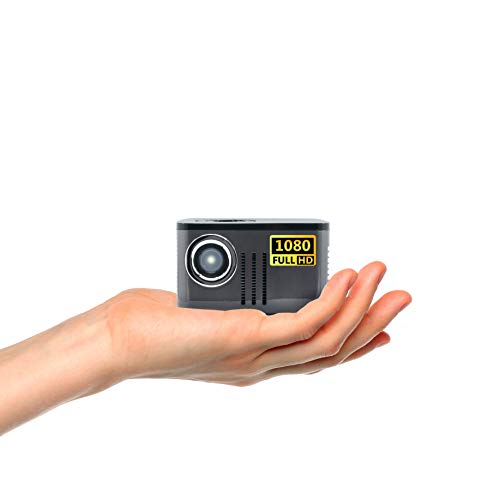
6. AAXA P7 — Best Battery-Powered
True cordless projection remains rare in 2026, and the AAXA P7 is one of the few models that delivers it with Full HD quality. The built-in 38W lithium-ion battery provides up to 90 minutes of runtime — enough for a standard client presentation or team training session without hunting for a power outlet. That capability is transformative for field presentations, outdoor demos, construction site meetings, and any scenario where wall power isn't guaranteed. Native 1080p resolution (1920 x 1080) ensures text and graphics remain sharp and professional, even at screen sizes up to 120 inches.
The 600 LED lumens from Luminus RGB LEDs produce better color clarity than most LCD-based mini projectors at similar brightness levels. The color is vibrant and the image holds together well in dim-to-moderate ambient light. The high-MTF lens contributes to edge-to-edge sharpness that's noticeably better than the soft corners found on many budget portable projectors. The LED light source is rated for over 30,000 hours, effectively eliminating bulb replacement costs over the projector's entire useful life — a meaningful total cost of ownership advantage over lamp-based competitors.
The onboard media player adds standalone flexibility. USB drives loaded with presentations, images, or video can be plugged directly into the P7 for playback without a connected laptop. Bluetooth 4.0 enables wireless audio output to external speakers when the built-in speaker doesn't provide enough volume for larger spaces. The compact form factor is genuinely pocket-friendly for a 1080p projector. For sales teams, trainers, and consultants who present in unpredictable environments, the P7's battery power and Full HD resolution make it a uniquely practical tool that no tethered competitor can match.
Pros:
- Built-in battery delivers up to 90 minutes of cordless projection
- Native 1080p resolution at a mini projector size
- 30,000-hour LED lifespan eliminates bulb replacement entirely
- Onboard media player and Bluetooth 4.0 for standalone operation
Cons:
- 600 lumens limits performance to darker environments
- 90-minute battery may not cover longer presentations or back-to-back sessions
7. ViewSonic PA503W — Best Budget Bright
When raw brightness per dollar is the primary metric, the ViewSonic PA503W dominates this roundup. At 4,000 ANSI lumens (upgraded from the original 3,600 lumen spec), this DLP projector can power through fully lit conference rooms, training halls, and classrooms where every other portable projector on this list would wash out. That brightness advantage is massive in practice — it's the difference between asking everyone to close the blinds and simply hitting "present" without worrying about ambient light at all. For organizations that present in spaces with uncontrollable lighting, no other projector here comes close.
WXGA resolution (1280 x 800) provides the widescreen aspect ratio that modern presentations demand, and ViewSonic's SuperColor technology extends the color gamut beyond what typical DLP projectors achieve. The 1.5-to-1.7 throw ratio offers flexible placement options, and the 16ms input latency paired with a 120Hz refresh rate makes the PA503W surprisingly responsive for interactive content, live demos, and even casual gaming during team-building events. The DLP chip is inherently sharp, and text readability at standard presentation distances is excellent.
Being a renewed unit, this particular listing offers significant cost savings over buying new, and ViewSonic's DLP projectors are known for durability and reliability. The lamp-based light source is the main drawback — eventual bulb replacements add to the total cost of ownership — but the sheer brightness output justifies that tradeoff for many business environments. The PA503W is slightly bulkier than the LED and laser competitors in this roundup, but it's still portable enough for regular transport between meeting rooms or office locations. For budget-conscious teams that need to present in bright rooms, this is the clear winner. Browse more portable projector recommendations for additional options across different price points.
Pros:
- 4,000 ANSI lumens — the brightest projector in this roundup by a wide margin
- SuperColor technology delivers a wider color gamut than standard DLP
- 16ms input latency and 120Hz refresh rate handle fast-paced content smoothly
- Renewed pricing makes high-brightness projection accessible on a budget
Cons:
- Lamp-based light source requires periodic bulb replacement
- Slightly larger footprint than LED and laser models in this list
Key Features to Consider When Choosing a Portable Business Projector
Brightness and Ambient Light Performance
Brightness — measured in lumens or ANSI lumens — is the single most important spec for business projectors in 2026. A projector that looks great in a dark home theater can be completely useless in a sunlit conference room. For controlled environments with dimmable lights, 600 to 1,000 lumens is workable. For typical office meeting rooms with fluorescent lighting, 1,200 to 2,000 lumens provides comfortable visibility. For large rooms, training halls, or any space where lighting can't be controlled, 3,000 lumens or more is the threshold for professional-quality presentation. It's also worth noting that LED and laser lumens have a higher perceived brightness than lamp lumens at the same rating, so direct lumen comparisons across light source types can be misleading.
Resolution and Image Clarity
Native resolution determines how sharp text, charts, and images appear on screen. For business presentations heavy on spreadsheets, small text, and detailed graphics, Full HD 1080p (1920 x 1080) is the recommended minimum in 2026. WXGA (1280 x 800) remains acceptable for standard slide decks and provides a widescreen aspect ratio, but fine text can appear soft at larger projection sizes. Avoid SVGA (800 x 600) entirely — it's a relic that makes modern content look muddy. Beyond native resolution, lens quality matters. A high-MTF (modulation transfer function) lens maintains sharpness from center to corners, while cheaper lenses produce soft edges that become distracting on larger screens.
Portability and Setup Speed
True portability for business use means under five pounds, compact enough for a laptop bag, and fast enough to set up in under two minutes. Weight and dimensions are obvious factors, but setup speed is equally important and often overlooked. Auto-focus, automatic keystone correction, and wireless connectivity all reduce the time between walking into a room and starting the presentation. Manual focus wheels and physical keystone sliders add minutes that feel like hours when a client is watching. Battery power — available on models like the AAXA P7 — eliminates power outlet dependency entirely, which is invaluable for field presentations. Short-throw capability, as found on the Optoma ML1080ST, reduces the required distance between projector and screen, opening up cramped spaces that standard-throw models can't serve.
Connectivity and Compatibility
A business projector in 2026 needs to connect to everything: Windows laptops, MacBooks, tablets, phones, and occasionally USB drives loaded with standalone presentations. HDMI remains the universal baseline, but USB-C is increasingly important as more laptops drop legacy ports. Wireless connectivity — whether through built-in Wi-Fi, Miracast, or manufacturer apps — enables cable-free presenting that keeps meeting rooms clean and setup simple. Bluetooth audio output is a bonus for routing sound to external speakers in larger venues. Onboard storage and media players (found on the ViewSonic M2e and AAXA P7) allow completely standalone presentations without any connected device, which is a powerful backup plan when technology doesn't cooperate.
Common Questions
How many lumens does a portable projector need for business presentations?
For most office conference rooms with standard fluorescent lighting, a minimum of 1,200 lumens provides a watchable image, though 2,000 to 3,000 lumens is ideal for comfort and readability. In brightly lit rooms or large spaces, 3,000 lumens or higher is strongly recommended. For dimmer environments like small huddle rooms with controllable lighting, 600 to 1,000 lumens can work effectively. Laser and LED lumens tend to appear brighter than lamp lumens at the same rating, so the light source type matters alongside the raw number.
What is the difference between DLP, LCD, and laser projectors?
DLP (Digital Light Processing) uses a spinning color wheel and micro-mirrors to create images, offering sharp output but sometimes producing a visible "rainbow effect" for sensitive viewers. LCD projectors, including Epson's 3LCD technology, pass light through liquid crystal panels to produce vibrant, color-accurate images without rainbow artifacts. Laser projectors use solid-state laser diodes as the light source instead of traditional lamps, providing instant on/off, longer lifespan (typically 20,000 to 30,000 hours), and more consistent brightness over time. Some projectors like the Optoma ML1080ST combine laser light sources with DLP imaging chips for the best of both technologies.
Can portable projectors replace monitors for business presentations?
Portable projectors excel in scenarios where a large display is needed temporarily — client meetings, team presentations, training sessions, and trade shows. They can project images from 60 to 150 inches, far larger than any portable monitor. However, they're not ideal as permanent desktop replacements because they require controlled lighting, generate fan noise, and have lamp or LED lifespans that degrade with continuous all-day use. The best approach is using a projector alongside a standard monitor or laptop screen — the projector for group presentations, the monitor for individual work.
Is a short-throw projector worth the extra cost for business use?
Short-throw projectors are worth the investment when presentations frequently happen in small rooms, huddle spaces, or environments where the projector must sit close to the projection surface. A standard-throw projector needs 8 to 12 feet to produce a 100-inch image, while a short-throw model achieves similar sizes from 3 to 5 feet. This eliminates presenter shadow problems (walking between the projector and screen) and opens up rooms that would otherwise be too small for projection. For teams that primarily present in standard-sized conference rooms, a regular throw ratio is perfectly adequate.
How long do portable projector bulbs and light sources last?
Lifespan varies dramatically by light source type. Traditional lamp-based projectors typically last 3,000 to 5,000 hours before needing a replacement bulb (costing $50 to $200). LED projectors offer 20,000 to 30,000 hours — effectively 10 to 15 years of regular business use. Laser projectors match or exceed LED lifespans at 20,000 to 30,000 hours, with the added benefit of maintaining consistent brightness throughout their lifespan, while lamps gradually dim over time. For frequent users, LED or laser light sources offer significant total cost of ownership advantages despite higher upfront prices.
Do portable projectors work well for video conferencing?
Portable projectors can enhance video conferencing by displaying remote participants on a large screen that makes the experience feel more natural and engaging than huddling around a laptop. Models with built-in speakers like the ViewSonic M2e or Epson EF21 can handle audio output adequately for small groups. However, the projector itself doesn't replace a webcam or microphone — those still need to come from a laptop, external camera, or conference room system. The best video conferencing setup pairs a portable projector with a quality webcam and a dedicated microphone for reliable two-way communication.
Buy on Walmart
- Epson PowerLite 1781W WXGA 3200 Lumens Equal Color and White — Walmart Link
- Optoma ML1080ST Ultra-Portable Short Throw Full HD Laser Pro — Walmart Link
- BenQ GP20 Wireless Ultra-Lite LED 700 Lumen Projector — Walmart Link
- Epson EpiqVision Mini EF21 Portable Smart Laser Projector, B — Walmart Link
- ViewSonic M2e 1080p Portable Projector with 400 ANSI Lumens, — Walmart Link
- [Battery] AAXA P7 Mini Projector with Battery, Native 1080P — Walmart Link
- ViewSonic PA503W 3600 Lumens WXGA HDMI Projector (Renewed) — Walmart Link
Buy on eBay
- Epson PowerLite 1781W WXGA 3200 Lumens Equal Color and White — eBay Link
- Optoma ML1080ST Ultra-Portable Short Throw Full HD Laser Pro — eBay Link
- BenQ GP20 Wireless Ultra-Lite LED 700 Lumen Projector — eBay Link
- Epson EpiqVision Mini EF21 Portable Smart Laser Projector, B — eBay Link
- ViewSonic M2e 1080p Portable Projector with 400 ANSI Lumens, — eBay Link
- [Battery] AAXA P7 Mini Projector with Battery, Native 1080P — eBay Link
- ViewSonic PA503W 3600 Lumens WXGA HDMI Projector (Renewed) — eBay Link
Next Steps
- Check current prices on all seven projectors — portable projector pricing fluctuates frequently, and renewed models like the Epson EF21 and ViewSonic PA503W often see significant discounts during seasonal sales.
- Measure the primary presentation room — note the throw distance from where the projector will sit to the screen or wall, and check whether the room has controllable lighting. This determines whether a 600-lumen portable or a 4,000-lumen powerhouse is the right fit.
- Test connectivity with existing devices — confirm that the chosen projector supports the laptop, tablet, or phone ports used daily. USB-C compatibility is worth prioritizing if planning to use newer laptops that lack HDMI.
- Compare total cost of ownership — factor in bulb replacement costs for lamp-based models (the Epson PowerLite 1781W and ViewSonic PA503W) versus the zero-replacement advantage of LED and laser units. Over a three-to-five-year span, the cheaper upfront projector isn't always the cheaper long-term choice.
- Read user reviews for real-world brightness feedback — manufacturer lumen ratings are measured under ideal conditions. User reviews from people presenting in actual office environments provide the most reliable picture of how bright a projector truly appears in practice.
 |
 |
 |
 |

About Sarah Whitford
Sarah Whitford is Ceedo's resident projector and home theater expert. She got her start as a custom AV installer for a regional integrator in the Pacific Northwest, where she designed and installed media rooms and conference spaces for residential and small business clients for over six years. Sarah earned her CTS certification from AVIXA and has personally calibrated more than 150 projectors using Datacolor and SpyderX colorimeters. She is opinionated about throw distance math, contrast ratios, and the realities of ambient light, and she will happily explain why most people should not buy a 4K projector. Sarah lives in Portland with her partner and an aging Akita.