 ee
eeTablets ›
Best Kindle Fire Tablet 2026
Amazon sold over 50 million Fire tablets in a single year, making it the best-selling tablet line outside of Apple's iPad — and in 2026, the lineup is more capable than ever. Whether you're streaming Netflix on the couch, handing a durable screen to a six-year-old, or hunting for a budget-friendly device that won't embarrass you on video calls, there's a Kindle Fire tablet built specifically for your situation. The challenge isn't whether Amazon makes a good tablet; it's figuring out which of the seven current models actually fits your life without overpaying for features you'll never use.
The tablet market has shifted dramatically in recent years, with Amazon leaning hard into value-per-dollar rather than spec-sheet bragging rights. You get tight hardware-software integration, seamless Prime Video access, and a price point that leaves competitors scrambling — but you also get a locked-down Amazon ecosystem, no Google Play Store out of the box, and trade-offs in processing power versus flagship Android slates. Knowing those boundaries upfront saves you from buyer's remorse. This guide reviews every current Fire tablet, ranks them by use case, and tells you exactly which one to buy without hedging.
For parents especially, the decision tree matters. The kids' models bundle parental controls, a two-year worry-free guarantee, and a year of Amazon Kids+ — a combination that rivals anything you'd find when browsing the best kids learning tablets on the market. For adults who want something light for travel, reading, and casual streaming, the calculus is different. Read on for the full breakdown of every Fire tablet available in 2026, ranked and reviewed so you can make a confident call in minutes.

Contents
Top Rated Picks of 2026
- #PreviewProductRating
- Bestseller No. 1
 Rating:

- Bestseller No. 2
 Rating:
 - Bestseller No. 3
 Rating:
 - Bestseller No. 4
 Rating:
 - Bestseller No. 5
 Rating:
 - Bestseller No. 6
 Rating:
 - Bestseller No. 7
 Rating:
Our Hands-On Reviews
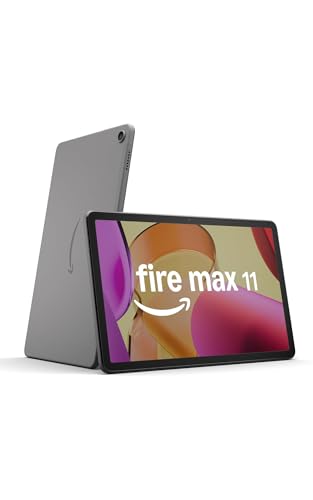
1. Amazon Fire Max 11 — Best Overall Fire Tablet in 2026
The Fire Max 11 is the most complete tablet Amazon has ever shipped, and it earns the top spot on this list without any real competition within the Fire lineup. The 2000 x 1200 resolution 11-inch display packs 2.4 million pixels into a panel that's certified for low blue light, which means you can comfortably read or stream in bed without the eye fatigue that plagues cheaper screens. Paired with an octa-core processor and 4 GB of RAM, this tablet handles side-by-side split-screen apps, HD video playback, and casual gaming without the stuttering that defines lower-tier Fire devices.
The aluminum chassis feels genuinely premium in your hands — this is the first Fire tablet that doesn't feel like a budget product the moment you pick it up. Wi-Fi 6 support means your streaming stays buttery smooth even in crowded networks, and the optional magnetic keyboard and stylus accessories transform it into a lightweight productivity machine when you need to knock out emails or annotate documents. At 14 hours of battery life, you're getting through a full day of heavy use without hunting for a charger.
The trade-off here is price relative to the rest of the Fire lineup, and the ongoing reality that you're working within Amazon's Fire OS rather than stock Android. You won't find Google Play without sideloading, and if you rely on Google apps daily, the friction is real. But if your workflow centers on Prime Video, Kindle, Audible, and light productivity, the Fire Max 11 delivers more screen and more power per dollar than anything else in this size category in 2026.
Pros:
- Stunning 11-inch 2K display with low blue light certification
- Octa-core processor with 4 GB RAM handles multitasking cleanly
- Durable aluminum build — 3x tougher than iPad 10.9 in tumble tests
- Wi-Fi 6 support for fast, stable wireless connectivity
- 14-hour battery life with optional stylus and keyboard accessories
Cons:
- Most expensive Fire tablet — premium price for the ecosystem
- No Google Play Store without sideloading
- Stylus and keyboard sold separately, adding to total cost
2. Amazon Fire HD 10 — Best for All-Day Streaming
The Fire HD 10 is Amazon's sweet-spot tablet for anyone who wants a large, vivid display without climbing to Fire Max 11 pricing. The 10.1-inch 1080p Full HD display delivers rich, accurate color that makes long Netflix binges genuinely enjoyable, and the octa-core processor with 3 GB of RAM keeps performance 25% faster than the previous generation — enough of a jump that you notice it when switching apps or loading content-heavy pages. If your primary use case is relaxation — reading, streaming, casual web browsing — this is the tablet that Amazon designed with you specifically in mind.
Battery life is rated at 13 hours, which matches real-world use closely during video playback at moderate brightness. Storage starts at 32 GB but jumps to 64 GB for a modest price difference, and both options support up to 1 TB of expandable storage via microSD — a practical feature that the Fire Max 11 shares but premium Android tablets often skip. The aluminosilicate glass holds up in tumble tests at 2.7 times the durability of the Samsung Galaxy Tab A8, which means accidental drops off the couch don't end your day.
Where you feel the compromise versus the Fire Max 11 is in the display resolution — 1080p is excellent at this size, but the pixel density doesn't match the Max 11's 2K panel — and the aluminum chassis of the flagship is replaced with a plastic build here. For everyday home use, neither limitation matters much. You're getting a tablet purpose-built for comfort and endurance, and it delivers exactly that without unnecessary complexity.
Pros:
- 10.1-inch 1080p Full HD display with vibrant color reproduction
- 25% faster than previous generation with octa-core processor and 3 GB RAM
- 13-hour battery life designed for long viewing sessions
- Up to 1 TB expandable storage via microSD card
- Durable aluminosilicate glass — 2.7x tougher than Samsung Galaxy Tab A8
Cons:
- Plastic build feels less premium than the Fire Max 11's aluminum chassis
- 3 GB RAM shows limits in heavy multitasking scenarios
- No USB-C fast charging on base model
3. Amazon Fire HD 8 — Best Mid-Range Portable Tablet
The newest Fire HD 8 hits a compelling mid-range position with meaningful upgrades over its predecessor — most notably 3 GB of RAM, a 50% increase over the 2022 release, which translates directly into smoother app switching and more responsive web browsing. The 8-inch HD display balances portability with screen real estate well, making it the right choice for commuters, travelers, and anyone who wants a tablet that genuinely fits in a jacket pocket or small bag without sacrificing the ability to watch a full episode of something on a plane.
Amazon added three smart AI tools to this generation that add real utility: a polished email composition assistant, a webpage summarizer for quick information extraction, and a wallpaper generator for personalization. These aren't gimmicks — the email tool in particular saves time if you use the Fire HD 8 for light work. The 5MP rear camera handles casual photos and document scanning without requiring you to carry a separate device, and the 13-hour battery life keeps pace with the larger HD 10 despite the smaller chassis.
Storage starts at 32 GB with microSD expansion up to 1 TB, which is the same expandability story as the rest of the lineup. If you're someone who downloads movies for offline viewing and keeps a substantial Kindle library synced locally, that expandability matters more than the base storage number. The HD 8 represents the best balance of price, portability, and performance in the Fire lineup for users who don't need the larger screens of the HD 10 or Fire Max 11.
Pros:
- 3 GB RAM — 50% more than previous generation for smoother multitasking
- Compact 8-inch form factor ideal for travel and commuting
- 13-hour battery life matched to the larger HD 10
- New AI tools for email, web summarization, and wallpaper creation
- 5MP rear camera for photos and document scanning
Cons:
- HD display (not Full HD) — noticeable versus the HD 10 at close range
- Smaller screen limits split-screen productivity compared to larger models
- No wireless charging (step up to HD 8 Plus for that)
4. Like-New Amazon Fire 7 — Best Budget Pick Under $60
The Like-New Fire 7 is the answer for anyone who wants a functional Amazon tablet at the lowest possible price point without resorting to off-brand hardware that ships with questionable software. Amazon's refurbished certification means this device is tested and guaranteed to look and work like new, and it carries the same limited warranty as a brand-new unit — so you're not taking on additional risk in exchange for the lower price. For a secondary device, a gift, or a dedicated Kindle/audiobook player, it's the most cost-efficient Fire tablet available in 2026.
The 7-inch touchscreen is modest by modern standards, and you'll notice the screen size limitation if you're used to anything larger. But for reading Kindle books, listening to Audible, following along with recipes in the kitchen, or keeping a child entertained on a car trip, the compact size is actually an advantage. The 10-hour battery handles a full day of light use, and 16 GB of base storage with up to 1 TB of microSD expansion means storage isn't a constraint even at this price tier.
Be clear-eyed about what this tablet isn't: it's not a productivity device, it's not a streaming powerhouse, and the processor shows its limitations with demanding apps. Think of it as a dedicated single-purpose device — whether that purpose is reading, music, or simple web browsing — and it delivers solid value. If you want to explore the full range of what budget tablets offer beyond the Fire lineup, the best 4G tablets guide covers options with cellular connectivity that the Fire 7 doesn't support.
Pros:
- Amazon-certified refurbished with same warranty as new — genuine quality assurance
- Most affordable entry point into the Fire ecosystem under $60
- Up to 1 TB expandable storage via microSD despite the low base price
- Compact 7-inch size ideal for dedicated reading or secondary device use
- 10-hour battery life for all-day light usage
Cons:
- 7-inch display is limiting for streaming or multitasking use cases
- Processor shows its age under heavier app loads
- Refurbished stock availability can fluctuate — not always in stock
5. Amazon Fire HD 8 Plus — Best Fire Tablet for Wireless Charging
The Fire HD 8 Plus takes everything that works in the standard HD 8 and layers on the one feature that makes a meaningful quality-of-life difference for daily users: wireless charging with a 9W power adapter included in the box. Drop it on a compatible charging pad at the end of the day without fumbling for cables, and it's ready to go the next morning — a small convenience that compounds over time. This model also ships with 3 GB of RAM across all configurations, which keeps the performance profile consistent and noticeably responsive compared to older 2 GB Fire tablets.
The hexa-core processor delivers up to 30% faster performance than the previous-generation HD 8 Plus, and the combined camera setup — 2MP front-facing for video calls, 5MP rear-facing for photos — covers everyday use cases without leaving you wishing for more. The aluminosilicate glass build is twice as durable as the Apple iPad mini (2021) in tumble tests, which is a remarkable claim that real-world use generally supports: this tablet handles being tossed in a bag, knocked off a nightstand, or passed around without showing it.
The 13-hour battery life is consistent with the standard HD 8, and storage options run from 32 GB to 64 GB with the same 1 TB microSD expansion ceiling. According to Amazon's Fire tablet product history on Wikipedia, the Plus tier has consistently prioritized convenience features over raw spec upgrades — and that philosophy holds true here. If you want the HD 8 experience with the added polish of wireless charging and the bundled 9W adapter, the Plus is worth the step up over the standard model.
Pros:
- Wireless charging with 9W adapter included — the most convenient Fire HD 8 variant
- 30% faster processor versus previous-generation HD 8 Plus
- 2MP front and 5MP rear cameras for video calls and photos
- Twice as durable as iPad mini (2021) in tumble tests
- 13-hour battery with up to 1 TB expandable storage
Cons:
- Wireless charging dock sold separately — you need a compatible pad
- Older 2022 release compared to the newest HD 8 model — lacks newer AI tools
- HD display rather than Full HD — same limitation as standard HD 8
6. Amazon Fire HD 8 Kids — Best Tablet for Ages 3 to 7
The Fire HD 8 Kids bundle is the single most complete package you can buy for a young child in the tablet category — and "bundle" is the operative word. You get a full-featured tablet, a kid-proof case, and a one-year Amazon Kids+ subscription in a single purchase, which works out to meaningful savings versus buying each component separately. Amazon Kids+ delivers thousands of ad-free books, games, videos, and apps curated from Disney, Nickelodeon, and PBS Kids, including STEM activities and language learning content that parents actually feel good about putting in front of a three-year-old.
The two-year worry-free guarantee is the feature that sets this apart from every competitor in the children's tablet space: if the device breaks for any reason — and young children find creative ways to break things — Amazon replaces it for free, no questions asked. The kid-proof case is purpose-designed to absorb drops and bumps, and the aluminosilicate glass provides the same strengthened protection as the adult HD 8 underneath. Parental controls are robust: you set daily screen time limits, manage content access by age, and review usage from the Amazon Kids Parent Dashboard on your phone.
The 13-hour battery life is genuinely useful during long travel days, and 32 GB of base storage holds enough downloaded content for offline use in areas without Wi-Fi. For families navigating the children's tablet market, this device covers the same ground as the top picks on the best kids learning tablet list, with the added assurance of Amazon's direct support infrastructure. After the first year, Kids+ renews at $5.99 per month — you can cancel any time, and the tablet remains fully functional as a standard Fire HD 8 if you choose not to continue.
Pros:
- Two-year worry-free guarantee — free replacement if it breaks, no conditions
- Includes kid-proof case and one year of Amazon Kids+ subscription
- Thousands of ad-free, age-appropriate books, games, and videos from trusted brands
- Robust parental controls managed from a parent smartphone app
- 13-hour battery life for full days of content consumption
Cons:
- Kids+ subscription auto-renews at $5.99/month after the first year
- Fire OS ecosystem limits access to some popular children's apps not in Amazon's store
- Heavier than the standard HD 8 due to the included protective case
7. Amazon Fire HD 10 Kids Pro — Best Tablet for Ages 6 to 12
The Fire HD 10 Kids Pro occupies a specific and well-defined niche: it's the children's tablet for older kids who are ready for a larger screen and more mature content, but whose parents still want meaningful guardrails in place. The 10.1-inch Full HD display is the same panel as the adult Fire HD 10, which means your nine-year-old is getting a genuinely sharp, color-accurate screen rather than a downgraded children's version. The slim case included with the Pro model is designed to appeal to older kids who would reject the chunky kid-proof cases that come with the younger-skewed models — a design consideration that Amazon clearly thought about.
Privacy protection is built into the hardware and OS level, not just the parental control app — the Kids Pro includes built-in safeguards against malware and spyware, a meaningful distinction in an era where children's digital safety is a serious concern. The Amazon Kids Parent Dashboard, which earned "Best Parental Controls" recognition from Parents Magazine, lets you set screen time limits, review content usage, and control exactly what your child can access remotely from your own device. The 13-hour battery keeps pace with the adult HD 10, so a full school day plus after-school use doesn't require a mid-session charge.
The Amazon Kids+ subscription included for the first year delivers age-appropriate content calibrated for the 6-12 bracket — more complex books, more challenging educational games, and a broader entertainment library than the younger-skewed HD 8 Kids. If you're also looking at drawing and creative tools for this age group, the best drawing tablets for kids guide covers stylus-focused options that complement what the Kids Pro offers for general use. After year one, the subscription continues at $5.99 per month unless you cancel, and the tablet works as a standard Fire HD 10 without it.
Pros:
- Full HD 10.1-inch display — same screen quality as the adult Fire HD 10
- Built-in privacy protection against malware and spyware at the hardware level
- Slim case design appeals to older kids who won't tolerate bulky kid-proof builds
- Award-winning parental controls managed via Amazon Kids Parent Dashboard
- One-year Amazon Kids+ subscription included for ages 6-12 content
Cons:
- Less ruggedized than the HD 8 Kids — slim case doesn't offer the same drop protection
- Kids+ renewal at $5.99/month is an ongoing cost to factor into the total price
- No stylus support limits creative use compared to tablets designed for drawing
What to Look For When Buying a Kindle Fire Tablet
Screen Size and Resolution: Match the Display to Your Use Case
Screen size is the first decision point because it determines every other trade-off — portability, battery life, price, and how comfortable extended use feels. The 7-inch Fire 7 fits in a coat pocket and weighs almost nothing; the 11-inch Fire Max 11 delivers a cinematic experience that justifies the extra bulk. For the vast majority of users, the 8-inch and 10-inch options represent the most balanced choices. Resolution matters more than size alone: a 1080p panel on a 10-inch screen looks excellent for streaming, while an HD (non-Full HD) panel on an 8-inch screen is entirely adequate for reading and casual video. If you're primarily a streamer, prioritize the Full HD models — Fire HD 10 and Fire Max 11 — over the base HD 8. If reading is your dominant use case, any resolution above 720p is comfortable at tablet distances.
RAM and Processor: How Much Performance Do You Actually Need?
Fire tablets are not performance powerhouses by design — Amazon optimizes for value and battery life, not raw computing speed. That said, the difference between 2 GB and 3 GB of RAM is tangible in daily use: 3 GB is the minimum you want for comfortable multitasking, split-screen apps, and smooth web browsing in 2026. Every current Fire tablet except the legacy Fire 7 ships with at least 3 GB, which raises the floor for the entire lineup. The Fire Max 11's 4 GB stands out for users who run multiple apps simultaneously or use the optional keyboard for productivity work. If you're considering a Fire tablet for anything beyond streaming and reading — light content creation, regular video calls, work email — the Fire Max 11's processor and RAM headroom justify the price premium over the HD 10.
Battery Life and Charging: Plan for Your Daily Routine
All current Fire tablets advertise 10 to 14 hours of battery life, and these numbers hold up reasonably well in real-world conditions with auto-brightness enabled and streaming at moderate quality. The Fire Max 11's 14-hour claim leads the lineup, while the HD 8 models and HD 10 hit 13 hours, and the Fire 7 lands at 10 hours. The meaningful differentiator in this category is charging method: the Fire HD 8 Plus is the only model that supports wireless charging, which matters if you value the convenience of pad charging over cable management. All Fire tablets charge via USB-C, which is a welcome standardization that lets you share cables with other modern devices. If you're tablet shopping for travel specifically, the Fire Max 11 or HD 10 give you the most margin before you need to recharge.
Kids' Tablets vs. Adult Models: When to Pay Extra for the Bundle
The children's Fire tablet bundles — HD 8 Kids and HD 10 Kids Pro — are worth the price premium over buying the adult version and adding parental controls manually. The two-year worry-free replacement guarantee alone changes the risk calculus for parents of young children: you're not paying for the device, you're paying for the guarantee plus the included case plus one year of Kids+ content. The breakeven analysis almost always favors the Kids bundle for children under 10 who are rough on devices. For children ages 11 and up who are responsible with hardware, the adult Fire HD 10 with parental controls configured in Fire OS gives you more flexibility at a lower price. The Kids Pro sits in the middle — it offers adult-quality hardware with meaningful parental tools but without the heavy-duty physical protection of the younger-skewed model.
What People Ask
Is the Amazon Fire tablet the same as a Kindle?
No — Kindle and Fire are distinct product lines. Kindles are dedicated e-readers with e-ink displays optimized for text and long battery life measured in weeks, not hours. Fire tablets use LCD displays and run Fire OS, Amazon's Android-based operating system, which supports apps, video streaming, web browsing, and games alongside reading. The Fire tablet reads Kindle books through the Kindle app, but it is a general-purpose tablet rather than an e-reader.
Can you install Google Play on a Kindle Fire tablet in 2026?
Yes, but it requires manual sideloading of the Google Play Store — it does not come pre-installed on any Fire tablet. The process involves enabling installation from unknown sources in settings and downloading the necessary Google Mobile Services packages. Amazon's Appstore covers most major apps and all Amazon services natively, but users who rely on Google apps like Gmail, Google Maps, or YouTube (beyond the web browser) will find sideloading worthwhile. The process is well-documented and works on all current Fire tablet models.
Which Kindle Fire tablet is best for streaming Netflix and Prime Video in 2026?
The Fire Max 11 is the best Fire tablet for streaming, with its 2K 11-inch display and Wi-Fi 6 connectivity delivering the highest-quality playback in the lineup. The Fire HD 10 is the best value streaming choice, with its 1080p Full HD 10.1-inch display and 13-hour battery covering full movie marathons without interruption. Both are Netflix-certified and support HD streaming from Prime Video, Disney+, and other major services. The HD 8 models are fine for streaming but noticeably smaller and lower resolution.
How does the Amazon Kids+ subscription work after the first year?
Amazon Kids+ automatically renews after the included first year at $5.99 per month (plus applicable tax) unless you cancel before the renewal date. You manage the subscription through the Amazon Kids Parent Dashboard app on your phone or the Amazon website. Canceling is straightforward — there are no cancellation fees. After canceling, the tablet continues to function as a standard Fire tablet with access to any apps and content you've purchased separately; only the Kids+ subscription library becomes unavailable.
Does the Kindle Fire tablet work without a Prime membership?
Yes, Fire tablets work without Amazon Prime. Prime membership is not required to set up or use any Fire tablet. Without Prime, you lose access to Prime Video's streaming library and Prime Reading's included books, but the tablet still functions normally for all purchased content, third-party apps from the Amazon Appstore, sideloaded apps, web browsing, and any other non-Prime services. Prime membership enhances the value proposition significantly, but it is entirely optional for Fire tablet ownership.
What is the storage capacity I actually need on a Kindle Fire tablet?
For most users, 32 GB of base storage combined with a microSD card is the practical answer — and all current Fire tablet models support microSD expansion up to 1 TB. If you stream primarily rather than downloading content for offline use, 32 GB handles app storage, photos, and a modest offline library comfortably. Heavy downloaders who want multiple seasons of TV shows and a large local music library should either step up to 64 GB base storage or invest in a 128 GB or 256 GB microSD card. The cost of adding a microSD card is far lower than the difference between storage tiers on the tablet itself.
Buy on Walmart
- Amazon Fire Max 11 tablet (newest model) vivid 11” display, — Walmart Link
- Amazon Fire HD 10 tablet (newest model) built for relaxation — Walmart Link
- Amazon Fire HD 8 tablet (newest model), 8” HD Display, 3GB m — Walmart Link
- Like-New Amazon Fire 7 tablet (newest model) 7” display, rea — Walmart Link
- Amazon Fire HD 8 Plus tablet, 8” HD Display, 32 GB, 30% fast — Walmart Link
- Amazon Fire HD 8 Kids tablet (newest model), ages 3-7. With — Walmart Link
- Amazon Fire HD 10 Kids Pro tablet, ages 6-12. Bright 10.1" H — Walmart Link
Buy on eBay
- Amazon Fire Max 11 tablet (newest model) vivid 11” display, — eBay Link
- Amazon Fire HD 10 tablet (newest model) built for relaxation — eBay Link
- Amazon Fire HD 8 tablet (newest model), 8” HD Display, 3GB m — eBay Link
- Like-New Amazon Fire 7 tablet (newest model) 7” display, rea — eBay Link
- Amazon Fire HD 8 Plus tablet, 8” HD Display, 32 GB, 30% fast — eBay Link
- Amazon Fire HD 8 Kids tablet (newest model), ages 3-7. With — eBay Link
- Amazon Fire HD 10 Kids Pro tablet, ages 6-12. Bright 10.1" H — eBay Link
Final Thoughts
Every Fire tablet on this list earns its place for a specific type of buyer, and the right choice is the one that matches your actual habits rather than the most impressive spec sheet — so pick the Fire Max 11 if you want the best all-around experience, the Fire HD 10 if streaming is your priority on a tighter budget, and one of the Kids bundles if you're buying for a child who needs Amazon's guarantee and content library behind them. Head to Amazon, compare the current prices alongside what you've read here, and make the call with confidence — the Fire lineup in 2026 has never offered better value across the board.
 |
 |
 |
 |

About Priya Anand
Priya Anand covers laptops, tablets, and mobile computing for Ceedo. She holds a bachelor degree in computer science from the University of Texas at Austin and has spent the last nine years writing reviews and buying guides for consumer electronics publications. Before joining Ceedo, Priya worked as a product analyst at a major retailer where she helped curate the laptop and tablet category. She has personally benchmarked more than 200 portable computers and is particularly interested in battery longevity, repairability, and the trade-offs between Windows, macOS, ChromeOS, and Android tablets. Outside of work, she runs a small Etsy shop selling laptop sleeves she sews herself.