 ee
eeTablets ›
Best Rugged Tablet
The Panasonic Toughbook G2 is the rugged tablet to beat in 2026 — its combination of Intel Core i5-10310U performance, Wi-Fi 6 connectivity, and full MIL-SPEC certification makes every other option work harder to justify itself. That said, your job site, budget, and operating system preferences will shape which rugged tablet actually belongs in your hands.
Rugged tablets are not consumer devices with a bumper case slapped on. They are purpose-engineered machines built to survive dust, drops, vibration, and temperature extremes that would destroy a standard iPad or Surface in a week. If you work in field service, warehousing, military logistics, construction, or emergency response, you already know that downtime caused by a broken device is not just inconvenient — it costs money and sometimes lives. The market for purpose-built rugged tablets has grown sharply, and in 2026 you have more strong options than ever across every price tier and platform.
This guide covers seven of the best rugged tablets currently available, from fully rugged Windows workhorses to Android-based enterprise scanners. Whether you need a 12-inch 2-in-1 for field documentation or a compact 7-inch unit for vehicle mounting, the right pick is here. For a broader look at the tablet landscape, check out our complete tablet buying guide — and if LTE connectivity is a priority for your deployment, our best 4G tablets for 2026 roundup covers the connectivity angle in depth.

Contents
- Our Top Picks for 2026
- Product Reviews
- Panasonic Toughbook G2 FZ-G2 MK1 — Best Overall
- Fusion5 10.1" Windows 11 Rugged — Best Value
- Samsung Galaxy Tab Active5 — Best Android Rugged
- Getac K120 12.5" 2-in-1 — Best Large Rugged 2-in-1
- Panasonic Toughpad FZ-M1 — Best Compact Rugged
- Zebra ET40 10" — Best for Barcode & Warehouse Work
- Panasonic Toughbook CF-33 MK1 — Best Rugged 2-in-1 Laptop Hybrid
- What to Look For When Buying
- Common Questions
Our Top Picks for 2026
- #PreviewProductRating
- Bestseller No. 1
 Rating:

- Bestseller No. 2
 Rating:
- Bestseller No. 3
 Rating:
 - Bestseller No. 4
 Rating:
- Bestseller No. 5
 Rating:
 - Bestseller No. 6
 Rating:
 - Bestseller No. 7
 Rating:
Product Reviews
1. Panasonic Toughbook G2 FZ-G2 MK1 — Best Overall
The Panasonic Toughbook G2 is in a class of its own for 2026. You get an Intel Core i5-10310U clocked at 1.7GHz with Turbo Boost up to 4.4GHz — that is real workstation-grade processing power in a fully ruggedized 10.1-inch form factor. The WUXGA 1920×1200 display supports both capacitive gloved multi-touch and a digitizer stylus, which means you can use it bare-handed, with thick work gloves, or with a pen for signatures and field sketches without swapping input modes.
Panasonic has equipped this tablet with 512GB of OPAL NVMe SSD storage and 16GB DDR4 RAM as factory defaults — not upgraded afterthoughts. Wi-Fi 6 and Bluetooth 5.1 keep your connectivity future-proofed, while the 1080p webcam with a physical privacy cover and the 8MP autofocus rear camera with LED flash make documentation and video calls equally capable. The Toughbook G2 is MIL-STD-810H and IP65 certified, meaning it handles drops, dust ingress, and water jets without complaint. This is the tablet you hand to a field technician and expect it to still be running three years from now.
The sticker price is the primary barrier — Toughbooks are a premium investment, not a budget line item. But if you are equipping a team for mission-critical field work and cannot afford equipment failure, the per-unit cost is justified by longevity and reliability that consumer tablets simply do not deliver. Windows 10 Pro is factory installed and fully activatable, with a clean upgrade path to Windows 11.
Pros:
- Intel Core i5-10310U with 4.4GHz Turbo — genuine workstation performance
- 512GB NVMe SSD + 16GB DDR4 RAM, factory installed
- Wi-Fi 6 and Bluetooth 5.1 for future-proof connectivity
- Gloved multi-touch + digitizer on a 1920×1200 display
- MIL-STD-810H and IP65 certified — fully rugged, not semi-rugged
Cons:
- Premium price puts it out of reach for tight budgets
- Ships as tablet-only — keyboard and accessories sold separately
2. Fusion5 10.1" Windows 11 Professional Rugged — Best Value
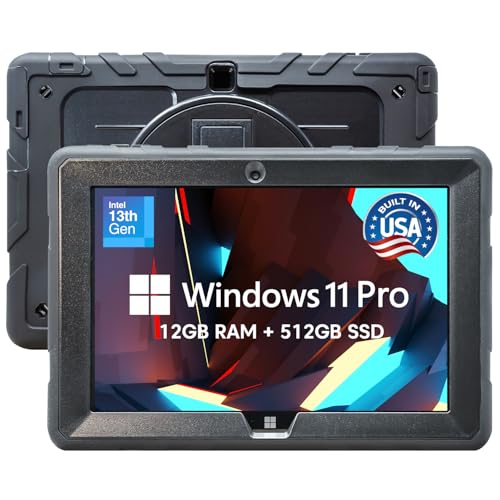
The Fusion5 FWIN232 PRO N5 makes a compelling argument that you do not need to spend Toughbook money to get a capable rugged Windows tablet. Assembled in Pasco County, Florida, this tablet ships with an Intel 13th Gen processor, 12GB of RAM, and a 512GB SSD — more RAM than most comparably priced rugged tablets, which typically max out at 8GB. The Full HD display and Windows 11 Professional license mean you are getting a genuinely productive machine straight out of the box.
What sets the Fusion5 apart at this price tier is its warranty structure. You get a 24-month full warranty that includes coverage for up to two accidental damage incidents. That is essentially bumper-to-bumper insurance for two years, which is a meaningful differentiator when you are deploying tablets in environments where drops and spills are a matter of when, not if. The shockproof and dustproof construction handles the day-to-day abuse of industrial sites, outdoor field work, and classroom settings. HDMI output and USB-C connectivity give you flexible docking options.
The trade-off compared to fully rugged Panasonic or Getac units is certification depth. The Fusion5 does not carry the same MIL-STD certifications as the higher-tier options, so if your environment requires documented compliance with military drop or immersion standards, you will need to look higher on this list. For most small business, light industrial, and classroom deployments, however, this tablet delivers serious value per dollar.
Pros:
- 12GB RAM with Intel 13th Gen — best specs-per-dollar at this tier
- 2-year warranty including two accidental damage incidents
- Assembled in the USA with faster logistics and quality control
- Windows 11 Pro with HDMI and USB-C for flexible connectivity
Cons:
- Does not carry MIL-STD-810 certification
- Newer model with a shorter real-world track record than Panasonic or Getac
3. Samsung Galaxy Tab Active5 Wi-Fi — Best Android Rugged Tablet
Samsung's Galaxy Tab Active5 is the rugged Android tablet that enterprise IT teams have been waiting for. The 8-inch form factor is compact enough to fit in a large cargo pocket or mount inside a vehicle, yet the display is large enough for real productivity. It carries an IP68 rating and MIL-STD-810H certification — the same standard referenced by military equipment procurement — meaning it survives dust, sand, dirt, water immersion, and shock impacts that would destroy consumer-grade Android devices. Samsung also specifies it can be safely sanitized with approved cleaning agents, which matters in healthcare and food service environments.
The battery is designed to last a full shift without hunting for an outlet, and Samsung's Fast Charging gets you back to work quickly when you do plug in. Running Android with Google Mobile Services means you have access to the full Play Store ecosystem, and Samsung's Knox security suite provides enterprise-grade device management that IT departments can push policies to remotely. The 128GB of internal storage is adequate for most enterprise app deployments. If your workflow runs on Android apps — field service platforms, inventory systems, delivery management software — the Active5 is the most polished rugged Android option in 2026.
The main limitation is screen size. Eight inches works well for data entry and scanning tasks but feels constrained for document review or complex forms. Also note that this model does not support voice calls, and the standard warranty is one year — Knox Suite licensing is sold separately. For users who need a larger screen, our roundup of best large tablets 12 inches and above covers options with more real estate.
Pros:
- IP68 and MIL-STD-810H certified — genuine full ruggedization
- Samsung Knox enterprise security built in
- Sanitizable design for healthcare and food service
- Compact 8-inch form factor for vehicle mounting and pocket carry
- Fast Charging with long-lasting battery
Cons:
- 8-inch screen is limiting for document-heavy workflows
- No voice call support on this model
4. Getac K120 12.5" Rugged 2-in-1 — Best Large Rugged 2-in-1
The Getac K120 is the machine you choose when you need a full-size rugged workstation that doubles as a detachable tablet. The 12.5-inch Full HD touchscreen gives you real desktop-class screen space, and the detachable backlit keyboard transforms it from a tablet into a proper laptop. Getac outfitted this renewed unit with an upgraded 16GB RAM configuration and a 512GB SSD, meaning the refurbished hardware delivers better specs than many new competitors at comparable price points. The Windows 11 Pro installation supports multiple voice options out of the box.
The K120's multifunctional hard handle is a distinctive practical feature — it makes the device genuinely portable in the field without a bag, acting as both a grip and a carrying solution. The processor is an Intel Core i5-8250U, which is an older generation but still more than capable for field service software, database applications, GIS mapping, and Windows-based enterprise workflows. The 4G LTE option keeps you connected away from Wi-Fi. The form factor adapts to frontline work across vehicle-mounted, desk, and handheld configurations.
Buying renewed from a reputable source means the internals have been tested and upgraded, but you should confirm the seller's return policy before committing. The i5-8250U is not as fast as the 10th or 13th Gen processors on other picks in this list, and its age means the platform is closer to end-of-support horizon. For users who prioritize raw screen size and the flexibility of a full keyboard attachment, the K120 remains one of the most versatile rugged 2-in-1s you can buy in 2026.
Pros:
- 12.5-inch Full HD touchscreen — largest display on this list
- Detachable backlit keyboard for true laptop versatility
- 16GB RAM and 512GB SSD upgraded in this renewed configuration
- Integrated hard handle for one-handed field carry
- 4G LTE keeps you connected off-site
Cons:
- Intel i5-8250U is an older-generation processor
- Renewed unit — condition depends on seller grading standards
5. Panasonic Toughpad FZ-M1 7" — Best Compact Rugged Tablet
The Panasonic Toughpad FZ-M1 proves that compact does not mean compromised. This 7-inch ruggedized tablet was built specifically for applications where space is at a premium — vehicle cab mounting, wearable vest holsters, or workflows that demand one-handed operation throughout a full shift. The Intel Core i5 4302Y processor is a lower-power Haswell chip optimized for fanless operation, which means no moving parts to fail and no dust ingress through a cooling fan intake. That matters enormously on dusty job sites, in agriculture, or in environments where particulate contamination is a constant concern.
Panasonic's Toughpad line has a decades-long track record in military, public safety, and utility applications. The FZ-M1 inherits that legacy — full MIL-STD certification, IP65 water and dust resistance, and the Panasonic ecosystem of accessories including vehicle docks, desktop cradles, and external optical drives. The 7-inch form factor is small enough to mount on a forklift, a police cruiser's console, or a field technician's forearm holster. It runs Windows, so your existing enterprise software stack works without modification.
The age of the platform is the honest caveat here. The FZ-M1 dates to an earlier processor generation, so you are not getting the processing headroom of the Toughbook G2 or the Fusion5. Battery life and connectivity standards reflect the era it was designed in. But for applications that require a verified, proven compact rugged tablet with a full accessory ecosystem already deployed in the field, the FZ-M1 remains a legitimate and cost-effective choice in 2026.
Pros:
- 7-inch form factor — smallest and most portable on this list
- Fanless Intel Core i5 design — no moving parts, no dust ingress
- Extensive Panasonic accessory ecosystem for vehicle and wearable mounting
- MIL-STD and IP65 certified, proven in field deployments
Cons:
- Older processor generation — limited headroom for modern workloads
- Dated connectivity standards compared to newer rugged tablets
6. Zebra ET40 10" — Best for Barcode & Warehouse Operations
If your use case is warehouse operations, retail inventory, or any workflow that revolves around barcode scanning, the Zebra ET40 is purpose-built in a way that general-purpose rugged tablets simply are not. The integrated OEM 1D/2D barcode scanner is the headline feature — it captures barcodes reliably in poor lighting, at angles, and on damaged labels, which is exactly what you need on a busy dock floor or in a retail stockroom. You are not bolting on a sled scanner or relying on a rear camera scan; the scanner is native hardware integrated into the device design.
The 10-inch durable touchscreen is large enough to display inventory applications, pick lists, and shipping manifests without squinting, and Wi-Fi 6 with Bluetooth 5.1 ensures fast, reliable data sync across a warehouse or distribution center floor. Android OS with Google Mobile Services means compatibility with the major warehouse management system apps, and the front and rear cameras handle documentation without a separate device. The one-year warranty is standard for this class of enterprise hardware, with extended coverage available through Zebra's service programs.
The Zebra ET40 is a vertical-market device first. It is not trying to compete with the Toughbook G2 as a general-purpose Windows workstation. Its 4GB RAM and 64GB storage configuration is sized for Android enterprise apps, not desktop software. If your entire operation runs on a WMS with an Android client, the ET40 is the most efficient tool you can put in a worker's hands in 2026. If you need Windows compatibility, look at the Fusion5 or the Toughbook G2 instead.
Pros:
- Integrated OEM 1D/2D barcode scanner — native, not an add-on
- Wi-Fi 6 and Bluetooth 5.1 for fast warehouse floor connectivity
- 10-inch touchscreen with Android OS and Google Mobile Services
- Front and rear cameras for documentation without a separate device
Cons:
- 4GB RAM and 64GB storage — limited to Android enterprise apps
- Not a general-purpose Windows workstation replacement
7. Panasonic Toughbook CF-33 MK1 — Best Rugged 2-in-1 Laptop Hybrid
The Panasonic Toughbook CF-33 MK1 is the most versatile device on this list. It operates as a fully rugged detachable tablet or as a full-featured laptop with its premium keyboard attachment, and the 12-inch QHD display at 2160×1440 resolution is the sharpest screen in this roundup. The Intel Core i5-7300U with Turbo Boost to 3.5GHz handles demanding field applications, while 16GB DDR4 RAM ensures smooth multitasking across Windows 11 Pro workloads. The 256GB SSD is on the smaller side relative to other picks, but is adequate for most field deployment scenarios.
IP65 dust and water resistance combined with MIL-STD-810G certification means the CF-33 survives a 4-foot gravity drop onto concrete — the kind of drop that happens on job sites every single day. The display brightness ranges up to 1200 nits with anti-reflective treatment, making it fully readable in direct sunlight, which is a feature that matters enormously for outdoor field work. The 4G LTE Advanced Multi Carrier connectivity keeps you online wherever cellular coverage reaches. For a thorough comparison of tablets with cellular connectivity options, our best Verizon tablets guide covers carrier compatibility in detail.
The CF-33 is a renewed unit, which brings the price into a more accessible range while delivering Panasonic's flagship-tier hardware. The Gloved Multi Touch plus digitizer display supports stylus input for precise work — field sketching, form signatures, technical markups — while remaining usable with heavy gloves on. If you need one device that can function as a field tablet and a laptop without compromise, the CF-33 is the answer in 2026.
Pros:
- 12-inch QHD 2160×1440 display — sharpest screen on this list
- Up to 1200 nit brightness with anti-reflective coating — fully sunlight-readable
- IP65 + MIL-STD-810G certified with 4-foot drop rating
- 4G LTE Advanced Multi Carrier for cellular connectivity anywhere
- Detachable premium keyboard converts tablet to full laptop
Cons:
- 256GB SSD is smaller than most competitors at this tier
- 7th Gen i5-7300U processor is older than alternatives on the market
What to Look For When Buying a Rugged Tablet
Ruggedness Certification: MIL-STD vs. IP vs. Marketing Claims
Not every tablet marketed as "rugged" is equally ruggedized. You need to understand the difference between genuine certifications and marketing language. MIL-STD-810 is a US military standard that specifies testing procedures for temperature, shock, vibration, humidity, altitude, and dust. A device that passes MIL-STD-810G or 810H testing has been put through documented, repeatable stress protocols — not just dropped once in a manufacturer's lab. IP ratings work differently: IP65 means dust-tight and water-jet resistant; IP67 means temporary immersion to 1 meter; IP68 means sustained immersion beyond 1 meter. Always look for both a MIL-STD rating and an IP rating for a fully rugged device. A tablet with only one of the two has gaps in its protection profile.
Operating System: Windows vs. Android
The OS decision is often determined by your existing software ecosystem, not by personal preference. If your enterprise runs Windows-based ERP, GIS software, or specialized field service tools, you need a Windows rugged tablet — and Windows 11 Pro is the right version for domain join, BitLocker encryption, and remote management. If your workflow runs on Android apps, the Samsung Galaxy Tab Active5 or Zebra ET40 give you purpose-built Android enterprise platforms with Knox or Zebra's management suite. Android typically wins on battery life and purchase price; Windows wins on software compatibility and peripheral support. Do not assume you can run Windows software on Android — cross-platform compatibility is rarely as clean as vendors suggest.
Performance and Storage for Your Workload
Rugged tablets are not all created equal on the performance side. A device running a lightweight barcode scanning app can get by with 4GB RAM and a modest processor. A device running real-time CAD markup, video documentation, or multi-tab enterprise browser applications needs 16GB RAM and a current-generation Core i5 or better. NVMe SSD storage is significantly faster than eMMC — if response time matters on your job site, pay attention to the storage type, not just the capacity. Storage size should be matched to your data retention needs; if you sync frequently to a server, 128–256GB is adequate; if you work offline for extended periods with large files, 512GB is the practical minimum.
Display Brightness, Touch Mode, and Size
Consumer tablet displays top out around 500 nits. In direct sunlight — on a construction site, in an agricultural field, or on a military vehicle — you need at least 800 nits for readable content, and 1200 nits if you are working in harsh glare conditions. Beyond brightness, consider touch mode: capacitive gloved multi-touch allows use with safety gloves without a stylus, which matters enormously in construction, manufacturing, and outdoor response scenarios. Digitizer support adds stylus precision for signatures and technical drawings. Screen size is a function of portability versus usability — a 7-inch unit fits in a vest holster; a 12-inch unit requires a bag or vehicle mount but provides genuine productivity space.
Common Questions
What is the difference between semi-rugged and fully rugged tablets?
Semi-rugged tablets have reinforced cases and can handle light drops and splashes, but they are not tested or certified to military standards. Fully rugged tablets like the Panasonic Toughbook series and Samsung Galaxy Tab Active5 carry MIL-STD-810 certification and IP65 or higher ratings, meaning they survive dust immersion, water jets, temperature extremes, vibration, and drops that would destroy semi-rugged and consumer devices. If you are working in genuinely harsh environments, only fully rugged certified devices should be considered.
Can I use a rugged tablet as my primary work computer?
Yes — Windows-based rugged tablets like the Panasonic Toughbook G2 or CF-33, the Fusion5, and the Getac K120 all run full Windows 11 Pro and can handle anything a standard business laptop handles. With a Bluetooth or USB keyboard and an external monitor via HDMI or USB-C, they function as complete desktop workstations. Android rugged tablets like the Samsung Galaxy Tab Active5 are more limited to app-based workflows and are not true desktop computer replacements.
Do rugged tablets work with gloves on?
The best rugged tablets on this list are specifically designed for gloved operation. The Panasonic Toughbook G2 and CF-33 feature capacitive gloved multi-touch displays that register input through standard and thick work gloves. The Samsung Galaxy Tab Active5 also supports gloved touch. Always verify that the specific model lists gloved touch support — not all rugged tablets include this feature, and a device that requires bare fingertip input is a serious liability in cold-weather or hazmat environments.
What rugged tablet is best for warehouse and inventory work?
The Zebra ET40 is the clear choice for warehouse and inventory workflows. Its integrated OEM 1D/2D barcode scanner is purpose-built for the job, reliably capturing barcodes at angles, in low light, and on damaged labels — something no rear camera can match in a production environment. It runs Android with Google Mobile Services, making it compatible with all major warehouse management system apps. Wi-Fi 6 connectivity ensures fast data sync on the warehouse floor. If your operation is Amazon fulfillment, retail stockroom, or distribution center logistics, the ET40 is the right tool.
Is a refurbished or renewed rugged tablet worth buying?
Renewed rugged tablets from reputable sellers can represent excellent value, especially for enterprise-grade devices like the Getac K120 or Panasonic CF-33 that hold their hardware quality well. The key checks are: verify the seller's certification process and what components have been replaced or upgraded, confirm the Windows license is genuine and fully activated, and understand the return and warranty terms. A renewed Toughbook with upgraded RAM and SSD often outperforms a new budget rugged tablet in real-world performance. Always buy renewed from sellers with documented refurbishment processes.
How long do rugged tablets typically last compared to consumer tablets?
Purpose-built rugged tablets are designed for five to seven year deployment cycles, compared to two to three years for consumer tablets. Enterprise manufacturers like Panasonic, Getac, and Zebra provide long-term parts availability, service contracts, and driver support that consumer brands do not. The total cost of ownership calculation often favors rugged tablets even at two to three times the upfront price — fewer replacements, less downtime, and sustained software support across a longer operational lifespan. If you are equipping a team rather than a single user, factor in fleet management, service contracts, and replacement cost when comparing price.
Buy on Walmart
- Panasonic Toughbook G2, FZ-G2 MK1, 10.1inch Gloved Multi Tou — Walmart Link
- Fusion5 Built in USA 10.1” Windows 11 Professional Rugged Ta — Walmart Link
- SAMSUNG Galaxy Tab Active5 Wi-Fi 8” 128GB Android Tablet for — Walmart Link
- Getac K120, 12.5"" FHD Touchscreen, Rugged, 2-in-1, Intel Co — Walmart Link
- Panasonic Toughpad FZ-M1 - 7" - Core i5 4302Y — Walmart Link
- Zebra ET40 Tablet 10"| Touch Screen | WiFi 6, Bluetooth | 1 — Walmart Link
- Panasonic Toughbook CF-33 MK1, Rugged 2-in-1, Intel Core i5- — Walmart Link
Buy on eBay
- Panasonic Toughbook G2, FZ-G2 MK1, 10.1inch Gloved Multi Tou — eBay Link
- Fusion5 Built in USA 10.1” Windows 11 Professional Rugged Ta — eBay Link
- SAMSUNG Galaxy Tab Active5 Wi-Fi 8” 128GB Android Tablet for — eBay Link
- Getac K120, 12.5"" FHD Touchscreen, Rugged, 2-in-1, Intel Co — eBay Link
- Panasonic Toughpad FZ-M1 - 7" - Core i5 4302Y — eBay Link
- Zebra ET40 Tablet 10"| Touch Screen | WiFi 6, Bluetooth | 1 — eBay Link
- Panasonic Toughbook CF-33 MK1, Rugged 2-in-1, Intel Core i5- — eBay Link
Buy the rugged tablet that matches your harshest working condition — not your best day on the job.
 |
 |
 |
 |

About Priya Anand
Priya Anand covers laptops, tablets, and mobile computing for Ceedo. She holds a bachelor degree in computer science from the University of Texas at Austin and has spent the last nine years writing reviews and buying guides for consumer electronics publications. Before joining Ceedo, Priya worked as a product analyst at a major retailer where she helped curate the laptop and tablet category. She has personally benchmarked more than 200 portable computers and is particularly interested in battery longevity, repairability, and the trade-offs between Windows, macOS, ChromeOS, and Android tablets. Outside of work, she runs a small Etsy shop selling laptop sleeves she sews herself.