 ee
eeTablets ›
Best Kids Learning Tablet
Picture this: you're standing in the electronics aisle or scrolling through page after page of Amazon listings at midnight, trying to figure out which kids learning tablet won't turn into an expensive paperweight by spring break. There are dozens of options, prices range from budget-friendly to surprisingly steep, and every product description sounds identical. You need a real breakdown — not marketing copy — so your child actually gets a device worth using in 2026.
Kids tablets have come a long way. The best ones today combine durable hardware, content-safe ecosystems, and parental controls that actually work. Whether your child is three years old and just starting to explore interactive books, or ten years old ready for more advanced learning apps, there's a purpose-built device for them. The challenge is cutting through the noise and matching the right specs to your family's real needs.
This guide reviews seven of the top-rated kids learning tablets available right now. We've evaluated screen quality, battery life, content ecosystems, parental control depth, and build durability. If you're also exploring the broader tablets category for the rest of the family, we've got recommendations there too. For now, here's everything you need to make a confident choice.
Contents
Best Choices for 2026
- #PreviewProductRating
- Bestseller No. 1
 Rating:

- Bestseller No. 2
 Rating:
 - Bestseller No. 3
 Rating:
 - Bestseller No. 4
 Rating:
- Bestseller No. 5
 Rating:
 - Bestseller No. 6
 Rating:
 - Bestseller No. 7
 Rating:
Our Hands-On Reviews

1. Amazon Fire HD 8 Kids Tablet — Best Overall for Ages 3–7
The Amazon Fire HD 8 Kids is the sweet spot in Amazon's kids tablet lineup, and for most families with children ages 3–7, it's the one to buy. The 8-inch HD display delivers sharp, vivid visuals that hold up well in bright rooms — a genuine upgrade over the smaller 7-inch model — and the 13-hour battery life means it will comfortably survive a full day of use without hunting for a charger. At 32GB of onboard storage, there's room for plenty of downloaded content, which matters when you're traveling or dealing with spotty Wi-Fi.
The bundle is where this tablet earns its keep. Amazon includes a one-year subscription to Amazon Kids+, an ad-free content ecosystem with thousands of books, apps, videos, and interactive games drawn from brands like Disney, Nickelodeon, and PBS Kids. The parental controls through the Amazon Kids Parent Dashboard are among the deepest you'll find on any kids device — you can set daily screen time limits, control which content categories your child sees, and review activity reports remotely from your phone. The included kid-proof case is built from thick, shock-absorbing foam, and Amazon backs it with a two-year worry-free guarantee: if the tablet breaks for any reason in those two years, they replace it, no questions asked.
The screen is made with strengthened aluminosilicate glass rather than standard soda-lime glass, giving it noticeably better drop resistance. Setup takes under ten minutes, and because this runs Amazon's Fire OS, you don't have to worry about your three-year-old accidentally wandering into the wrong corner of the internet. After the first year, Kids+ renews at $5.99/month — worth budgeting for, because the content library is genuinely good.
Pros:
- Bright 8" HD display with strengthened aluminosilicate glass
- 13-hour battery life handles full days easily
- One full year of Amazon Kids+ included
- Two-year worry-free replacement guarantee
- Deep parental controls via Amazon Kids Parent Dashboard
Cons:
- Locked into Amazon's ecosystem — no Google Play access
- Kids+ subscription renews at $5.99/month after year one
2. Amazon Fire 7 Kids Tablet — Best Budget Pick
If budget is your primary concern, the Amazon Fire 7 Kids is the entry point that doesn't cut corners where it counts. At seven inches it's the most compact option in Amazon's kids lineup, which actually works in its favor for smaller hands. The 10-hour battery holds its own for daily use, and 16GB of storage is sufficient for a child who primarily streams content rather than downloading large libraries offline. This is the top-selling kids tablet on Amazon for a reason — it offers the same trusted Kids+ ecosystem and the same two-year replacement guarantee at a lower price.
The bundle here includes six months of Amazon Kids+ rather than a full year, which is worth noting when comparing total costs with the Fire HD 8. That said, the six months covers you through the bulk of the initial excitement phase, and if your child uses the tablet regularly, the subscription pays for itself many times over in content value. The parental controls are identical to the HD 8 version — same dashboard, same granular time limits, same content filters — so you're not sacrificing any safety features to save money.
The kid-proof case is included in the box, and Amazon's worry-free guarantee applies here too. The screen resolution is lower than the HD models, so visuals won't be quite as crisp, but for a child who's primarily reading interactive books or playing educational games, the difference is minimal. This is the right call if you want to test whether your child will actually use a tablet before committing to a higher-end model.
Pros:
- Most affordable entry into the Amazon Kids ecosystem
- Same two-year worry-free replacement guarantee
- Identical parental control depth as higher-end models
- Compact size suits younger children's smaller hands
Cons:
- Only six months of Kids+ included (not a full year)
- Lower resolution screen compared to HD siblings
- 16GB storage fills up faster if you download a lot
3. Amazon Fire HD 10 Kids Tablet — Best Large Screen for Young Learners
The Amazon Fire HD 10 Kids delivers the biggest screen in Amazon's younger-focused lineup, and that 10.1-inch HD display is genuinely impressive for a kids device. Reading along with interactive books, watching educational videos, or working through STEM activities all feel more immersive at this size. The 13-hour battery matches the Fire HD 8, and at 32GB of storage with a full year of Kids+ included, this bundle represents excellent value for families who want maximum screen real estate without sacrificing any of the safety infrastructure.
This model is still targeted at ages 3–7, so you get the same full Amazon Kids ecosystem — Disney, Nickelodeon, PBS Kids content, interactive games, books, and language learning apps — with the same comprehensive parental controls. The larger form factor does make it slightly heavier and less portable than the 7 or 8-inch models, but if your child primarily uses their tablet at home — propped on a table or in a case stand — the size advantage outweighs the portability trade-off. The kid-proof case is included, and the two-year worry-free guarantee applies.
Where this tablet stands apart is in visual comfort. The larger screen reduces the need for children to hold the device close to their face while reading or watching content, which matters if you're thinking about eye health over extended use. For families who can absorb the slightly higher price point, the Fire HD 10 Kids is the premium version of what the 8-inch model already does well.
Pros:
- Largest screen in Amazon's kids lineup at 10.1 inches
- Full year of Amazon Kids+ included
- 13-hour battery for full-day use
- 32GB storage with kid-proof case and replacement guarantee
Cons:
- Heavier and bulkier than smaller kids tablets
- Higher price than the Fire 7 or HD 8 models
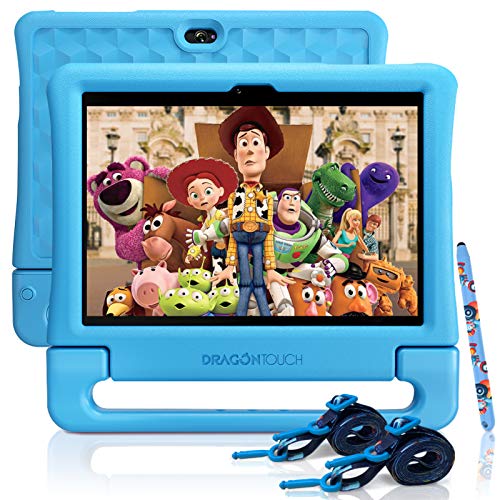
4. Dragon Touch Kids Tablet 10" — Best Open Android Option
If Amazon's closed ecosystem isn't for you, the Dragon Touch Kids Tablet gives you a 10-inch IPS HD display running full Android with complete access to Google Play — and that changes everything. You can install Khan Academy Kids, Duolingo, ABCmouse, or any of the hundreds of credentialed educational apps that parents and teachers actually recommend. The tablet comes with KIDOZ pre-installed, a curated kids content platform that provides age-appropriate apps, games, and videos without requiring a separate subscription. This is the pick for families who want flexibility over a walled garden.
Under the hood, you get a quad-core processor, 2GB of RAM, and 32GB of storage — competent specs for a kids learning device. The dual-band Wi-Fi (both 2.4GHz and 5GHz) gives you faster, more stable connections for streaming and online apps, which matters when your child is doing live lessons or video calls with a teacher. Storage can be expanded via microSD up to 128GB, so you'll never run out of room. The included kid-proof case comes with a shoulder strap and a stylus, making it genuinely portable and ready for use right out of the box.
Parental controls are handled through both Google Family Link and KIDOZ, giving you two layers of oversight. You can create separate child profiles, restrict app categories, set screen time limits, and monitor activity. The trade-off compared to Amazon's system is that Google Family Link requires a bit more setup knowledge — it's not quite as turnkey. But for parents who are comfortable with Android and want access to the full Google Play library, Dragon Touch delivers serious value at a competitive price point. Worth reading our best drawing tablets for kids guide too if your child shows any interest in digital creativity.
Pros:
- Full Google Play access — install any educational app
- 10-inch IPS HD display at a strong price
- Dual-band Wi-Fi for faster, more stable connections
- Expandable storage up to 128GB via microSD
- Includes stylus, shoulder strap, and kid-proof case
Cons:
- No built-in subscription content like Amazon Kids+
- Parental controls require more manual setup than Amazon's system
- No hardware replacement guarantee like Amazon offers
5. Lenovo Tab M8 Gen 4 (2024) — Best for Google Kids Space
The Lenovo Tab M8 Gen 4 takes a different approach from Amazon's ecosystem: it leans on Google Kids Space, Google's own curated environment for children that surfaces teacher-approved apps, books, and videos based on each child's unique interests. If your family is already embedded in the Google ecosystem — Android phones, Google accounts, Chromebooks at school — this tablet slots in seamlessly. The 8-inch HD display is crisp and bright enough for comfortable reading and video, and the slim profile makes it one of the more portable picks in this category.
The standout spec here is battery life. Lenovo claims up to 16 hours of online video playback, which is the highest endurance figure in this entire roundup. For parents who need a tablet that survives long road trips, flights, or marathon learning sessions without drama, that runtime is a meaningful advantage. The MediaTek Helio A22 processor paired with 2GB RAM handles typical kids tasks — streaming, educational games, reading apps — without noticeable lag, and the included folio with stand means you don't need to buy accessories separately.
Google Kids Space requires a Google account set up for your child under the Family Link umbrella, which gives you the same granular parental controls and activity monitoring you'd expect from Google's parent ecosystem. Content recommendations adjust as your child's interests evolve, which keeps the experience fresh over time. At 32GB of storage, space is adequate, though Google's platform leans more toward streaming than local downloads. This is a thoughtfully designed family tablet, and if you're comparing it against other mid-range options, the battery advantage alone justifies serious consideration.
Pros:
- Industry-leading 16-hour battery life
- Google Kids Space with adaptive, teacher-approved content
- Slim, portable design with included folio stand
- Powerful dual speakers for clear audio
Cons:
- Only 2GB RAM — lighter on multitasking than premium Android tablets
- Google Kids Space setup requires more steps than Amazon's system
- No hardware replacement guarantee
6. Amazon Fire HD 10 Kids Pro — Best for Ages 6–12
As children grow into the 6–12 age range, a standard kids tablet often starts feeling babyish. The Amazon Fire HD 10 Kids Pro is designed specifically for this transition — it has the same powerful 10.1-inch HD screen and 13-hour battery as the standard Fire HD 10 Kids, but comes with a sleeker, slimmer case that looks more like what you'd see on a grown-up tablet. The "Pro" distinction here is about age-appropriate design, not just specs. Your eight-year-old won't be embarrassed pulling this out at a sleepover.
The Amazon Kids+ subscription included for one year unlocks a content library that scales with older children — more advanced chapter books, STEM learning apps, creative tools, and age-gated videos. Amazon's Kids Parent Dashboard earned a "Best Parental Controls" award from Parents Magazine, and at this age level it gives you critical tools: the ability to set educational goals, require learning app time before entertainment time, and review exactly what your child has been reading or watching. Built-in malware and spyware protection means your child can browse safely without you monitoring every click.
Privacy safeguards are baked into the hardware and software layers, which is increasingly important as older kids start interacting with more online content. The two-year worry-free replacement guarantee applies here too — and at this age, tablets tend to take more punishment as kids become more independent. When your child eventually outgrows kids tablets entirely, take a look at our best laptops for high school students guide for the natural next step. For now, the Kids Pro is the best-designed bridge between toddler tablets and adult devices.
Pros:
- Purpose-built for ages 6–12 with a mature, slim design
- One year of Amazon Kids+ with age-appropriate content library
- Award-winning parental controls with educational goal-setting
- Built-in malware and spyware protection
- Two-year worry-free replacement guarantee
Cons:
- Still locked into Amazon's Fire OS — no Google Play
- Premium price for what is still a mid-range processor
7. Core Innovations PBS Kids Playtime Pad+ — Best for PBS Kids Fans
The Core Innovations PBS Kids Playtime Pad+ is a niche pick, but a very good one for the right family. If your child is already a committed PBS Kids fan — think Daniel Tiger, Curious George, Wild Kratts — this tablet puts that content front and center in a dedicated, kid-safe environment. The 7-inch HD display (1024×600) delivers clear enough visuals for its target audience, and the Android 11 Go edition operating system keeps the interface fast and lightweight on the quad-core 1.6GHz processor. The inclusion of live PBS Kids TV content is the differentiator here — no other tablet on this list offers it.
With 2GB of RAM and 16GB of built-in storage, the hardware is modest but functional for the intended use case: PBS Kids content, learning apps, and basic digital activities. The durable design is built to handle the wear and tear of young children's daily use, and the tablet ships with parental controls that restrict content to age-appropriate material. Because it runs Android 11, parents can supplement the PBS content with additional apps from the Play Store within the parental control parameters they set.
This tablet won't win on pure specs, and it's not trying to. It wins on content specificity and brand trust. For families whose children are deeply invested in PBS Kids programming and want a device that feels like an extension of that world rather than a generic kids tablet, the Playtime Pad+ delivers exactly what it promises. The research behind PBS Kids content and its educational value is well-established — as noted by the PBS Kids Wikipedia page, the brand has been a leader in children's educational media for decades.
Pros:
- Dedicated PBS Kids content ecosystem with live TV access
- Android 11 allows additional app installation
- Compact and durable design for young children
- Strong parental controls restricting content by default
Cons:
- Only 16GB storage — fills up quickly with apps and downloads
- Lower screen resolution than competing 7-inch tablets
- No hardware replacement guarantee
Buying Guide: How to Choose the Best Kids Learning Tablet
Screen Size and Display Quality
Screen size directly affects how comfortable a tablet is for different ages. A 7-inch display suits toddlers and preschoolers who hold the device in their hands. An 8-inch display is the sweet spot for ages 4–8, offering more visual real estate without being cumbersome. A 10-inch display works well for older children doing reading-heavy tasks or watching educational videos. Display quality matters beyond size — look for HD resolution (at least 1280×800) and good brightness. Your child will use this tablet in a variety of lighting conditions, and a dim or low-resolution screen causes eye strain over time. Strengthened glass is a bonus if drop resistance matters to you.
Content Ecosystem and Parental Controls
This is the most important decision you'll make. Amazon's Kids+ ecosystem is the most comprehensive closed system available — thousands of ad-free books, apps, and videos from trusted brands, managed through one of the best parental control dashboards on the market. Google Kids Space (available on Android devices like the Lenovo Tab M8) offers adaptive content recommendations and integrates cleanly with Google Family Link. Open Android tablets give you full Google Play access, which means more educational app choices but also more parental oversight required. Match the ecosystem to your comfort level with managing digital permissions. A robust parental control system is non-negotiable — screen time limits, content filters, and activity monitoring are features you'll use every week.
Battery Life and Durability
Kids don't stop using tablets because the battery is at 20%. They keep going until it dies and then they're upset. Battery life matters more on a kids tablet than almost any other device category. Look for a minimum of 10 hours; 13+ hours puts you firmly in all-day territory. Durability is equally critical. Drop resistance comes from two things: the quality of the screen glass and the quality of the case. Amazon's kid-proof cases are excellent — thick foam bumpers that absorb real-world impacts. If you're buying a non-Amazon tablet, budget for a quality third-party case. For reference, the same principles that make rugged tablets reliable for fieldwork apply here — shock absorption and sealed ports matter.
Storage and Expandability
16GB is the minimum you should consider, and even then only if your child primarily streams rather than downloads. 32GB is the comfortable standard for a tablet that will be used regularly over two or more years. If the tablet supports microSD expansion — as the Dragon Touch does — that's a meaningful advantage. Offline content availability is especially valuable for travel, car rides, and situations where Wi-Fi isn't reliable. A child mid-lesson or mid-book who loses their Wi-Fi connection is a frustration you can avoid entirely with adequate local storage. Also factor in OS updates and app caches, which consume storage that never shows up in the marketing spec sheet.
Questions Answered
What age is appropriate for a first kids tablet?
Most child development experts suggest that interactive educational tablet use can begin around age 2–3, with close parental supervision. The tablets in this guide are designed for ages 3 and up, with the content ecosystems curated to match developmental stages. For children under 2, screen time is generally not recommended beyond video chatting. The key isn't age alone — it's matching the device to your child's developmental readiness and ensuring content is educational rather than purely passive entertainment.
Is Amazon Kids+ worth the subscription cost?
For most families, yes. Amazon Kids+ provides thousands of books, educational games, apps, and videos from Disney, Nickelodeon, PBS Kids, and other trusted brands — all ad-free. At $5.99/month after the free trial period, the cost is lower than most individual educational app subscriptions. The real value is the curated, age-appropriate nature of the library combined with the parental control integration. If your child uses the tablet regularly, the content library more than justifies the ongoing cost.
Can kids tablets run regular apps like YouTube or Roblox?
It depends on the device. Amazon Fire Kids tablets run a locked-down version of Fire OS — access to regular apps like YouTube or Roblox requires disabling Kids Mode and switching to the adult profile. Open Android tablets like the Dragon Touch give full Google Play access, so your child can technically access any app. Google Kids Space and KIDOZ create curated environments within Android. If you want complete app freedom from day one, go with an open Android device. If you want a locked-down experience by default, Amazon's Kids lineup is the cleaner choice.
What happens if the Amazon Kids tablet breaks?
Amazon's two-year worry-free guarantee covers any accidental damage — drops, liquid spills, screen cracks. You return the broken tablet and Amazon replaces it for free, no questions asked. This is one of the most compelling aspects of buying into Amazon's kids ecosystem. No other brand on this list offers an equivalent hardware replacement guarantee. Given how rough children can be on electronics, this guarantee alone can justify the price premium over non-Amazon alternatives.
How do parental controls work on these tablets in 2026?
All seven tablets reviewed here include some form of parental controls, but depth varies significantly. Amazon's Kids Parent Dashboard (web and mobile app) offers the most comprehensive set of tools: screen time schedules, content category filters, educational goal-setting, and activity reports. Google Family Link provides similar controls for Android devices. KIDOZ and Dragon Touch's built-in controls offer filtering and time limits. The more granular the controls, the more time you'll spend in setup — but that investment pays off in reduced daily management friction.
Should I buy a kids tablet or a regular tablet with parental controls enabled?
For children under 8, a purpose-built kids tablet is almost always the better choice. The hardware durability, the curated content ecosystems, and the designed-for-children interfaces significantly outperform a standard tablet with a parental control app bolted on. For children 8 and older, a regular tablet with robust parental controls becomes a viable option, especially since kids this age start needing access to apps and websites that kids tablets don't support. The Amazon Fire HD 10 Kids Pro bridges this gap well for the 6–12 age range.
Buy on Walmart
- Amazon Fire HD 8 Kids tablet (newest model), ages 3-7. With — Walmart Link
- Amazon Fire 7 Kids tablet (newest model) ages 3-7. Top-selli — Walmart Link
- Amazon Fire HD 10 Kids tablet (newest model) ages 3-7 | Brig — Walmart Link
- Dragon Touch Kids Tablet 10 inch IPS HD Display Android Tabl — Walmart Link
- Lenovo Tab M8 Gen 4-2024 - Family Tablet - Google Kids Space — Walmart Link
- Amazon Fire HD 10 Kids Pro tablet, ages 6-12. Bright 10.1" H — Walmart Link
- Core Innovations PBS Kids Playtime Pad+ – 7” HD Kid-Safe And — Walmart Link
Buy on eBay
- Amazon Fire HD 8 Kids tablet (newest model), ages 3-7. With — eBay Link
- Amazon Fire 7 Kids tablet (newest model) ages 3-7. Top-selli — eBay Link
- Amazon Fire HD 10 Kids tablet (newest model) ages 3-7 | Brig — eBay Link
- Dragon Touch Kids Tablet 10 inch IPS HD Display Android Tabl — eBay Link
- Lenovo Tab M8 Gen 4-2024 - Family Tablet - Google Kids Space — eBay Link
- Amazon Fire HD 10 Kids Pro tablet, ages 6-12. Bright 10.1" H — eBay Link
- Core Innovations PBS Kids Playtime Pad+ – 7” HD Kid-Safe And — eBay Link
Final Thoughts
The right kids learning tablet in 2026 comes down to three things: your child's age, your preferred content ecosystem, and how much peace of mind a hardware guarantee is worth to you. Start with the Amazon Fire HD 8 Kids if you want the most trusted all-in-one package for ages 3–7, step up to the Fire HD 10 Kids Pro for older children who need more sophisticated content, or choose the Dragon Touch if open Android access to the full Google Play library is a priority — then visit our rugged tablet guide when they're ready for something tougher. Browse the full product lineup on Amazon, compare the bundle values carefully, and pick the one that fits your family's actual day-to-day needs rather than the one with the longest spec sheet.
 |
 |
 |
 |

About Dror Wettenstein
Dror Wettenstein is the founder and editor-in-chief of Ceedo. He launched the site in 2012 to help everyday consumers cut through marketing fluff and pick the right tech for their actual needs. Dror has spent more than 15 years in the technology industry, with a background that spans software engineering, e-commerce, and consumer electronics retail. He earned his bachelor degree from UC Irvine and went on to work at several Silicon Valley startups before turning his attention to product reviews full time. Today he leads a small editorial team of category specialists, edits and approves every published article, and still personally writes guides on the topics he is most passionate about. When he is not testing gear, Dror enjoys playing guitar, hiking the trails near his home in San Diego, and spending time with his wife and two kids.