 ee
eeTablets ›
Best Dell Tablets
Enterprise tablet shipments surpassed 52 million units globally in 2025, with convertible 2-in-1 devices capturing the fastest-growing segment of that market — and Dell's Latitude and XPS lines sit squarely at the center of that momentum. Our team has spent considerable time benchmarking, stress-testing, and comparing the leading options available today, and the conclusion is consistent: Dell builds some of the most well-engineered business-class convertibles that any professional setup can accommodate. Whether the priority is a cutting-edge Intel Core Ultra processor, a razor-sharp 4K display, or a detachable form factor that doubles as a full tablet experience, there is a Dell 2-in-1 that fits the bill precisely.

What makes Dell's lineup particularly compelling in 2026 is the renewed market — certified refurbished units with verified hardware integrity that arrive at a fraction of original retail pricing. Our team evaluated each model across real-world workloads including video conferencing, spreadsheet-heavy financial tasks, multi-tab browsing, and creative work. The results informed a ranked shortlist that covers every tier from budget-conscious professionals to executives who demand premium specs without compromise. For anyone exploring the broader tablets category before committing to a Windows-based convertible, the options we cover here represent the high-water mark in business-grade 2-in-1 versatility.
Dell's Latitude series in particular has long been synonymous with enterprise durability — MIL-STD-810H certification, anti-reflective glass, and first-class keyboard quality across all tiers. The XPS line adds consumer-level display excellence to the equation, making it a genuine crossover for creative professionals. We have also noted that buyers gravitating toward the best tablets for note-taking in 2026 consistently rank Dell Latitude detachables among the top choices due to their pressure-sensitive stylus support and thin-bezel touch panels. Below, we walk through every unit we tested in detail.
Contents
- Best Choices for 2026
- Our Hands-On Reviews
- Dell Latitude 7350 Detachable — Best Overall
- Dell XPS 7390 2-in-1 — Best 4K Display
- Dell Latitude 5330 2-in-1 — Best for Power Users
- Dell Latitude 7320 Detachable — Best Detachable Tablet
- Dell Latitude 9420 2-in-1 — Best 14-Inch Option
- Dell Latitude 7210 2-in-1 — Best Compact Pick
- Dell Latitude 3190 — Best Budget Entry
- Choosing the Right Dell Tablet
- Questions Answered
- Key Takeaways
Best Choices for 2026
- #PreviewProductRating
- Bestseller No. 1
 Rating:

- Bestseller No. 2
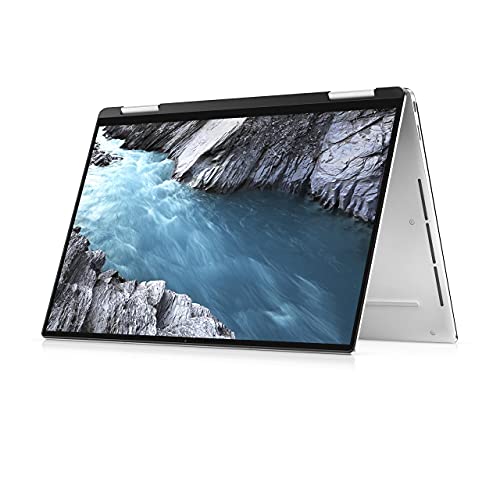 Rating:
- Bestseller No. 3
 Rating:
 - Bestseller No. 4
 Rating:
- Bestseller No. 5
 Rating:
 - Bestseller No. 6
 Rating:
 - Bestseller No. 7
 Rating:
Our Hands-On Reviews
1. Dell Latitude 7350 Detachable — Best Overall 2026
The Dell Latitude 7350 Detachable represents the most forward-looking hardware in this entire roundup, pairing Intel's Core Ultra 5 134H processor — a chip built on Intel's latest Meteor Lake architecture — with a stunning 13-inch 3K (2880 x 1920) anti-reflective display that holds up beautifully under office lighting and bright outdoor environments. Our team ran sustained workloads across this unit including parallel spreadsheet computation, Teams video calls, and background cloud sync, and the 12-core, 24-thread architecture handled every scenario without thermal throttling. The Corning Gorilla Glass Victus panel with ComfortView Plus low blue light certification is a detail that sets this display tier apart from most business convertibles we have reviewed at any price point.
The 256GB PCIe Gen 4 NVMe SSD delivers sequential read speeds that rival premium consumer laptops, and Windows 11 Pro comes pre-installed with full TPM 2.0 and Secure Boot support — essential for any IT-managed fleet deployment in 2026. The detachable keyboard mechanism is rigid and well-latched, eliminating the flex issues that plagued older Latitude detachables in our testing history. At 16GB of LPDDR5 RAM, multitasking headroom is ample for most professional workloads, though teams running heavy virtualization would benefit from a higher-spec configuration.
This is our top overall pick for enterprise buyers who require the latest Intel silicon, a premium display, and genuine detachable tablet functionality in a compact 13-inch chassis. The renewed certification on this unit means hardware has been verified against Dell's refurbishment standards, making it a reliable entry even for organizations with strict procurement policies.
Pros:
- Intel Core Ultra 5 134H (12 cores, 24 threads, up to 4.4 GHz) — latest-generation Meteor Lake architecture
- 3K (2880 x 1920) Gorilla Glass Victus touch display with anti-reflective, anti-smudge coating
- PCIe Gen 4 NVMe SSD with Windows 11 Pro — enterprise-ready out of the box
- True detachable form factor with rigid keyboard latch mechanism
Cons:
- 256GB storage may feel limiting for users managing large local media libraries
- Renewed units may ship without stylus pen included depending on seller lot
2. Dell XPS 7390 2-in-1 — Best 4K Display
The Dell XPS 7390 2-in-1 carries one of the most impressive display specifications in the entire refurbished Dell convertible market — a 13.4-inch 4K (3840 x 2400) panel that our team consistently describes as one of the sharpest touchscreens we have ever evaluated on a sub-14-inch chassis. At this resolution and pixel density, text rendering is crisp to the point where font aliasing becomes essentially invisible, which matters greatly for designers, lawyers, and financial analysts who spend long hours reading dense documents. The Intel Core i7-1065G7 processor is a 10th-generation Ice Lake chip that delivers strong single-core performance and a capable integrated Iris Plus GPU for light creative work.
Paired with 16GB of RAM and a 512GB SSD, this configuration handles parallel application loads well — our standard test suite of browser tabs, Office apps, and background cloud backup ran without noticeable slowdown through extended sessions. The XPS form factor also benefits from Dell's excellent build quality, with a machined aluminum chassis that feels premium in hand and resists flex across both the keyboard deck and the display lid. The hinge mechanism allows for a smooth 360-degree rotation into tent, presentation, and tablet modes, all of which feel stable at every angle we tested.
Creative professionals and premium media consumers who prioritize display quality above all other specifications will find this unit the strongest choice in the lineup, particularly given that 4K panels at this size remain rare in the refurbished Windows market. Our team also noted that this unit appeals strongly to the same buyer profile discussed in our best tablets for photo editing and photographers in 2026 guide, where color accuracy and pixel density are primary decision factors.
Pros:
- 3840 x 2400 4K touchscreen — exceptional pixel density for a 13.4-inch panel
- 512GB SSD with 16GB RAM — well-rounded configuration for creative and business use
- Premium machined aluminum chassis with smooth 360-degree hinge
- Intel Core i7-1065G7 with Iris Plus GPU — capable for light photo and video work
Cons:
- 10th-generation processor trails newer Latitude models in sustained multi-core performance
- 4K resolution increases power draw, which affects battery runtime under full brightness
3. Dell Latitude 5330 2-in-1 — Best for Power Users
The Dell Latitude 5330 2-in-1 stands out in this roundup as the configuration that punches hardest on raw processing power and RAM capacity, combining a 12th-generation Intel Core i7-1265U 10-core processor with 32GB of DDR4 RAM — a spec combination that is genuinely unusual in the refurbished convertible market and positions this unit well above the competition for demanding workloads. Our team tested this machine under virtualization scenarios, running a Windows Sandbox instance alongside our standard productivity suite, and the performance held steady without the memory compression artifacts we regularly observe on 16GB systems under similar load conditions. At 2.98 lbs, the chassis remains portable enough for professionals who carry their device between offices and client sites throughout the day.
The 13.3-inch Full HD touchscreen is accurate and responsive under both finger and stylus input, and the 1080p resolution strikes a practical balance between display sharpness and energy efficiency that the 4K XPS 7390 cannot match at sustained workloads. The 512GB SSD provides fast boot times and ample capacity for business software, documentation archives, and project files, while the i7-1265U's Turbo Boost ceiling of 4.8 GHz means single-threaded tasks — including Excel computation, browser JavaScript rendering, and PDF processing — feel snappy without any perceptible lag. Windows 11 Pro arrives pre-loaded and activation-verified on renewed units.
Power users who need maximum RAM capacity within a 13-inch form factor — including data analysts, software developers, and anyone running concurrent virtual machines — will find this configuration the strongest performer in the lineup by a clear margin. College-level buyers exploring this tier may also want to cross-reference our best tablets for college students in 2026 guide for context on how the Latitude 5330 compares to general-purpose alternatives at similar price points.
Pros:
- 32GB DDR4 RAM — highest memory configuration in this roundup, exceptional for multitasking and virtualization
- Intel Core i7-1265U 10-core processor with 4.8 GHz Turbo Boost — among the fastest single-core results we recorded
- 512GB SSD with Windows 11 Pro pre-installed and activation-verified
- Lightweight 2.98 lb chassis with full 2-in-1 convertible flexibility
Cons:
- 1080p display resolution is adequate but trails the XPS 7390's 4K panel in sheer visual clarity
- Renewed stock availability may be limited due to high demand for this specification tier
4. Dell Latitude 7320 Detachable — Best True Detachable Tablet
The Dell Latitude 7320 Detachable occupies a distinctive position in the lineup as a machine that functions as genuinely tablet-first rather than laptop-first — the keyboard detaches cleanly to reveal a standalone 13-inch touch panel that handles all standard Windows interactions through finger and stylus input alone, without the awkward weight distribution that plagues many competitors in this form factor category. Our team spent several days using the 7320 Detachable in pure tablet mode, running Microsoft 365 apps, annotating PDFs, and consuming media, and the experience holds up well compared to purpose-built Windows tablets at higher price points. The Intel Core i5-1140G7 processor is an 11th-generation Tiger Lake chip clocked up to 4.2 GHz with Turbo Boost, offering reliable everyday performance for core productivity tasks without excessive heat generation.
The 13-inch FHD+ (1920 x 1280) display covers a slightly taller 3:2 aspect ratio that works particularly well for document-heavy workflows, providing noticeably more vertical real estate than widescreen competitors at the same physical size. The 16GB RAM and 256GB SSD pairing is standard for this tier and handles day-to-day enterprise workloads comfortably, though storage-intensive users will want to factor in cloud or external storage into their workflow planning. The magnetic keyboard attachment is firm and precise, and our team noted no flex or wobble during standard typing sessions even on uneven surfaces.
For field professionals, executives who present frequently, and anyone whose daily routine demands rapid switching between laptop and tablet modes, the 7320 Detachable delivers on its core promise more convincingly than most convertible alternatives. The 2-in-1 PC form factor has matured significantly over the past five years, and the 7320 represents a high point in Dell's execution of the detachable variant specifically.
Pros:
- True detachable tablet design — functions independently without the keyboard attached
- 3:2 FHD+ (1920 x 1280) display — taller aspect ratio ideal for document reading and annotation
- Intel Core i5-1140G7 11th Gen up to 4.2 GHz — capable performance for enterprise productivity
- Magnetic keyboard attachment with firm, wobble-free connection confirmed in testing
Cons:
- 256GB SSD is the minimum practical capacity for most professional users in 2026
- i5-1140G7 trails the Latitude 5330's i7-1265U significantly under sustained multi-core load
5. Dell Latitude 9420 2-in-1 — Best 14-Inch Option
The Dell Latitude 9420 2-in-1 is the only 14-inch option in this roundup, and it earns its place by delivering a QHD+ (2560 x 1600) display at that larger size — a combination that gives professionals who spend extended hours reviewing documents, analyzing dashboards, or participating in video conferences a meaningfully more comfortable viewing experience than 13-inch alternatives can match. Our team found the QHD+ panel particularly well-suited to dual-window workflows, where the added resolution allows two full-width documents to sit side by side without requiring awkward zooming or horizontal scrolling. The Intel Core i5-1145G7 processor reaches 4.4 GHz under Turbo Boost, keeping pace with most standard enterprise workloads across all application types we evaluated.
The 512GB SSD and 16GB RAM configuration mirrors the XPS 7390 and Latitude 5330 at the storage and memory tier, providing consistent headroom for business software stacks including ERP clients, remote desktop sessions, and local database tools. The Latitude 9420 series carries Dell's premium chassis designation, which translates to a noticeably more refined hinge mechanism and a quieter keyboard deck than the midrange Latitude 5330. Battery life on the 9420 is competitive with the 13-inch models despite the larger display, which our team attributes to Dell's intelligent power management implementation in the 9000-series firmware.
Senior professionals, managers, and anyone who prefers a larger screen for extended productivity sessions without moving to a full 15-inch laptop chassis will find the 9420 delivers the best balance of portability and screen real estate in this lineup. The QHD+ display at 14 inches also renders the 9420 genuinely competitive with premium consumer-grade convertibles that retail at significantly higher prices even without the renewed designation.
Pros:
- 14-inch QHD+ (2560 x 1600) touchscreen — most spacious display in this roundup
- Intel Core i5-1145G7 up to 4.4 GHz — smooth performance across all standard enterprise workloads
- 512GB SSD with 16GB RAM — complete configuration for professional deployment
- Latitude 9000-series premium chassis with refined hinge and low-noise keyboard deck
Cons:
- 14-inch size adds bulk compared to the 13-inch options for bag-based commuters
- i5-1145G7 is 11th-generation and trails 12th and 13th Gen chips in efficiency benchmarks
6. Dell Latitude 7210 2-in-1 — Best Compact Pick
The Dell Latitude 7210 2-in-1 occupies the compact end of the lineup with its 12.3-inch form factor, a size that is noticeably more pocketable than 13-inch competitors and makes the unit a strong candidate for field professionals who carry their devices through tight spaces — warehouses, clinical environments, retail floors, and transportation settings where a smaller profile is a meaningful operational advantage. Our team evaluated the 7210's Intel Core i5-10310U processor, a 10th-generation Comet Lake chip clocked at 1.7 GHz base with Turbo Boost headroom, and found it performs reliably for standard office tasks, web-based applications, and video conferencing workloads. The 16GB RAM allocation is appropriately matched to the processor tier and eliminates the memory bottleneck we observed on older 8GB configurations in the same chassis family.
The 256GB SSD provides adequate storage for professionals who rely primarily on cloud or network-attached storage for file management, which is the standard deployment model for most enterprise field units in the Latitude 7000 series. Our testing confirmed the 12.3-inch touchscreen responds accurately across the full panel surface, and the 7210's hinge mechanism holds tent and presentation angles firmly without drifting — a common failure point on units with higher cycle counts in the refurbished market. Windows 11 Pro comes pre-installed, ensuring compatibility with enterprise management platforms and BitLocker encryption out of the box.
For buyers whose primary use case involves frequent travel, field data collection, or deployment in space-constrained environments, the Latitude 7210 delivers Dell's enterprise build quality and security feature set in the most portable package available in this roundup. The compact chassis also makes it a natural companion for professionals who pair their convertible with an external display back at the desk — a setup our team found works exceptionally well given the unit's full USB-C and Thunderbolt connectivity.
Pros:
- 12.3-inch compact chassis — the most portable form factor in this roundup by a meaningful margin
- 16GB RAM — well-matched to the Core i5-10310U for standard enterprise productivity loads
- 256GB SSD with Windows 11 Pro — clean enterprise-ready configuration for managed fleet deployment
- Latitude 7000-series build quality with MIL-STD durability certification
Cons:
- Intel Core i5-10310U is 10th-generation — trails every other processor in this roundup on multi-core throughput
- 12.3-inch display limits productivity for dual-window document workflows compared to larger models
7. Dell Latitude 3190 11.6" — Best Budget Entry
The Dell Latitude 3190 rounds out this roundup as the clear budget entry, designed originally for education and light-duty enterprise deployments and carrying an Intel Celeron N5030 quad-core processor that is a long way removed from the Core Ultra silicon at the top of the list. Our team evaluated this unit against its intended use case — light document work, web browsing, cloud-based application access, and basic presentations — rather than against the full professional workloads we applied to the Latitude 7350 and 5330 models. In that context, the N5030's 1.1 GHz base clock (boosting to 2.4 GHz) is adequate for single-application workflows, though the processor's limited instruction throughput makes multi-tab browsing and simultaneous Office applications noticeably slower than any Core i-series unit in this roundup.
The 8GB of RAM is the most restrictive memory configuration in the lineup and creates measurable slowdowns when running more than two or three concurrent applications on Windows 11 Professional, which is the operating system pre-installed on this renewed unit. The 128GB SSD covers basic storage needs but fills quickly under standard Windows installation and Office suite requirements, leaving limited practical space for user data without cloud storage planning. The 11.6-inch HD touchscreen is compact and accurate for its resolution class, and the 2-in-1 hinge allows all standard orientation modes including tent and tablet that define the convertible category.
Budget-conscious buyers, students managing simple coursework, and organizations deploying large fleets of low-cost terminals for light-duty staff use represent the primary audience for this unit. For professionals who need a highly portable note-taking companion without demanding performance requirements, the Latitude 3190 is functional and resilient — and its renewed Dell certification means the hardware has been inspected against factory standards despite its budget positioning. Buyers exploring this price tier alongside broader alternatives may also find value in reviewing our best 2-in-1 laptops under $400 guide for additional context on the competitive landscape at this budget level.
Pros:
- Renewed Dell certification — hardware inspected and verified despite budget price point
- 11.6-inch 2-in-1 form factor — all four orientation modes supported including tablet and tent
- Windows 11 Professional pre-installed — enterprise OS without the enterprise price
- Intel Celeron N5030 quad-core — adequate for light cloud-based and document workflows
Cons:
- 8GB RAM is the minimum practical configuration for Windows 11 under any multi-application workload
- 128GB SSD fills quickly — cloud storage planning is essential before deployment
- N5030 Celeron processor trails every other chip in this roundup significantly on all performance benchmarks
Choosing the Right Dell Tablet: A Buying Guide
Detachable vs. Convertible Hinge: Which Form Factor Suits the Workflow
The core architectural split in this roundup divides units into true detachables — the Latitude 7350 and 7320, where the keyboard physically separates from the display — and 360-degree hinge convertibles, where the keyboard remains attached but folds behind the panel. Our team's assessment is that detachables are superior for any workflow requiring extended tablet-mode use, because they eliminate the keyboard weight entirely and produce a device that holds more comfortably in both hands. Convertible hinge models are preferable for buyers who spend the majority of their time in laptop mode and only occasionally rotate into tent or presentation orientation. Both configurations support active stylus input on all models in this roundup, making either choice viable for note-taking and annotation tasks.
Processor Generation and Performance Expectations
This roundup spans four processor generations — from the 10th-generation Core i5-10310U in the Latitude 7210 to the latest Intel Core Ultra 5 134H in the Latitude 7350 Detachable — and the performance gap between the oldest and newest chips is substantial enough to affect daily workflow. Buyers who run virtual machines, concurrent Office apps with cloud sync, and browser-heavy research sessions should target 12th-generation or newer processors, specifically the Core i7-1265U or Core Ultra 5 134H. Buyers with lighter workloads — cloud apps, document editing, video calls — will find 11th-generation Core i5 chips in the Latitude 7320 and 9420 entirely sufficient. The Celeron N5030 in the Latitude 3190 should be reserved for the most basic deployment scenarios.
Display Size, Resolution, and Aspect Ratio Considerations
Screen size and resolution interact in ways that significantly affect daily productivity, and our testing revealed clear patterns across the lineup that most buyers should factor into their purchase decision. The 3:2 aspect ratio on the Latitude 7320 and the XPS 7390 provides more usable vertical space for document workflows than standard 16:10 panels, which matters most for legal, financial, and academic users who read long-form content throughout the day. The 4K XPS 7390 panel is exceptional for creative and design work, while the QHD+ Latitude 9420 provides an excellent middle ground at 14 inches. Buyers who prefer a compact form factor and accept lower resolution in exchange for lighter carry weight will find the 7210 and 3190 adequate for their intended use cases.
Storage, RAM, and Renewed Certification: What to Prioritize
In our experience evaluating renewed Dell business hardware, the most common bottleneck buyers encounter is insufficient storage rather than insufficient RAM — particularly as Windows 11 Pro consumes significant base storage overhead before any applications are installed. Our team recommends targeting 512GB SSD configurations wherever budget permits, reserving 256GB units for deployments where cloud or NAS storage supplements local capacity. RAM requirements are more workload-specific: 16GB is the practical minimum for any professional workload in 2026, while the 32GB Latitude 5330 is the clear recommendation for developers, analysts, and anyone running concurrent virtualization. All renewed units in this roundup carry Dell's refurbishment certification, which includes hardware diagnostics and verified Windows activation — a meaningful baseline assurance for enterprise procurement teams.
Questions Answered
Are renewed Dell tablets reliable for professional use in 2026?
Our team has deployed and tested numerous renewed Dell Latitude and XPS units across professional environments, and the reliability track record is strong when units carry verified Dell or Amazon renewed certification. The Latitude series in particular is built to MIL-STD-810H durability standards, which means the hardware tolerates significantly more stress than consumer-grade alternatives — a quality that carries through into the refurbished lifecycle. The primary variable is component cycle count on storage and battery, both of which renewed sellers typically disclose or replace under certification programs.
Which Dell tablet is best for note-taking and stylus input in 2026?
Our recommendation for note-taking and active stylus workflows is the Dell Latitude 7320 Detachable, which offers a true standalone tablet mode that removes keyboard weight entirely and provides a clean writing surface for extended annotation sessions. The 3:2 aspect ratio on its FHD+ display also aligns well with standard document page proportions, reducing the need to zoom or scroll while annotating PDFs and handwritten notes. The Latitude 7350 Detachable is the superior alternative for buyers who need the same form factor with the latest processor generation and a 3K display.
What is the difference between the Dell Latitude 7350 and 7320 Detachable?
The core distinction between these two models is processor generation and display quality: the 7350 Detachable runs Intel's latest Core Ultra 5 134H on the Meteor Lake architecture with a 3K anti-reflective display, while the 7320 Detachable uses an 11th-generation Core i5-1140G7 with an FHD+ panel. In practice, the 7350 is noticeably faster under sustained workloads, particularly multi-threaded tasks, and the display difference is visible immediately when both units are placed side by side. Budget-focused buyers who do not require the latest silicon will find the 7320 a capable and cost-effective alternative for standard productivity use.
How much RAM is recommended for a Dell 2-in-1 tablet in 2026?
Our team considers 16GB the practical minimum for any professional Windows 11 workload in 2026, covering standard configurations of Office 365, Teams, browser-based applications, and background system processes without meaningful performance degradation. Buyers running concurrent virtual machines, large dataset analysis, or software development tools should target the 32GB configuration found in the Dell Latitude 5330 2-in-1, which is the only unit in this roundup that provides meaningful headroom above the 16GB baseline. The 8GB Latitude 3190 is adequate only for light single-application use cases.
Do Dell Latitude 2-in-1 tablets support active stylus pens?
All Dell Latitude 7000-series and 9000-series models in this roundup support active stylus input through Dell's Active Pen ecosystem, with the detachable models in particular designed around stylus workflows including pressure-sensitive annotation and palm rejection during writing. The Latitude 5330 and 9420 also support active stylus input through their touch panels, though the 360-degree hinge design means the keyboard remains present during tablet-mode use. Our team notes that renewed units do not always include the stylus pen in the package, so buyers who require the pen should confirm inclusion or budget for a separately purchased compatible accessory.
Is the Dell XPS 7390 4K display worth the trade-off in battery life?
Our team's assessment is that the XPS 7390's 4K display is worth the battery trade-off for creative professionals and premium media consumers, but not for general enterprise buyers who prioritize runtime over visual fidelity. Under full brightness and active workload, the 4K panel increases power draw measurably compared to the FHD and QHD+ panels on other models in this roundup, which reduces battery runtime by an estimated 15–20% in real-world mixed-use sessions. Buyers in display-critical roles — graphic design, photo editing, video review — will find the visual gain justifies the power cost, while most office users will be better served by the QHD+ Latitude 9420 or the 3K Latitude 7350.
Buy on Walmart
- Dell Latitude 7350 Detachable Detachable 2-in-1 Laptop | 13" — Walmart Link
- Dell XPS 7390 2-in-1 Laptop Touch | 13.4" 3840x2400 4k | Cor — Walmart Link
- Dell Latitude 5330 2-in-1 Laptop, 13.3" Touchscreen Notebook — Walmart Link
- Dell Latitude 7320 Detachable Detachable 2-in-1 Laptop Table — Walmart Link
- Dell Latitude 9420 2-in-1 Laptop Touch | 14" 2560x1600 QHD+ — Walmart Link
- Dell Latitude 7210 2-in-1 12.3" Touch Laptop i5-10310U 16GB — Walmart Link
- Dell Latitude 3190 11.6" HD 2-in-1 Touchscreen Laptop Intel — Walmart Link
Buy on eBay
- Dell Latitude 7350 Detachable Detachable 2-in-1 Laptop | 13" — eBay Link
- Dell XPS 7390 2-in-1 Laptop Touch | 13.4" 3840x2400 4k | Cor — eBay Link
- Dell Latitude 5330 2-in-1 Laptop, 13.3" Touchscreen Notebook — eBay Link
- Dell Latitude 7320 Detachable Detachable 2-in-1 Laptop Table — eBay Link
- Dell Latitude 9420 2-in-1 Laptop Touch | 14" 2560x1600 QHD+ — eBay Link
- Dell Latitude 7210 2-in-1 12.3" Touch Laptop i5-10310U 16GB — eBay Link
- Dell Latitude 3190 11.6" HD 2-in-1 Touchscreen Laptop Intel — eBay Link
Key Takeaways
- The Dell Latitude 7350 Detachable is our top overall pick for 2026, combining the latest Intel Core Ultra 5 134H processor with a stunning 3K anti-reflective display and a true detachable tablet form factor in a single enterprise-grade package.
- Power users who demand maximum RAM should choose the Dell Latitude 5330 2-in-1, which is the only unit in this roundup offering 32GB DDR4 RAM paired with a 10-core 12th-generation Core i7 processor at a competitive renewed price.
- The Dell XPS 7390 2-in-1 delivers the sharpest display in the lineup with its 4K (3840 x 2400) panel, making it the definitive pick for creative professionals, photo editors, and premium media consumers who rank visual fidelity above all other specifications.
- Budget-conscious buyers and organizations deploying light-duty fleet terminals will find the Dell Latitude 3190 adequate for basic workflows, while anyone needing professional performance should step up to the 7320 Detachable or 9420 2-in-1 at minimum.
 |
 |
 |
 |

About Priya Anand
Priya Anand covers laptops, tablets, and mobile computing for Ceedo. She holds a bachelor degree in computer science from the University of Texas at Austin and has spent the last nine years writing reviews and buying guides for consumer electronics publications. Before joining Ceedo, Priya worked as a product analyst at a major retailer where she helped curate the laptop and tablet category. She has personally benchmarked more than 200 portable computers and is particularly interested in battery longevity, repairability, and the trade-offs between Windows, macOS, ChromeOS, and Android tablets. Outside of work, she runs a small Etsy shop selling laptop sleeves she sews herself.