 ee
eeTablets ›
Best Cheap Android Tablets
You're sitting on the couch at 10 p.m., trying to decide between seven different budget tablets, each with nearly identical stock photos and suspiciously similar spec sheets. The price tags look appealing but you have no idea which one will actually hold up past the first month of daily use and which ones are destined for the junk drawer by summer. That moment of paralysis is exactly why this guide exists.
In 2026, the budget Android tablet market is more competitive than ever, with Amazon, Samsung, TCL, and Lenovo all fighting for your attention at price points that would have seemed impossible five years ago. You can land a genuinely capable 10-inch tablet with Full HD display and solid battery life for well under $150, and the entry-level options under $60 are better than most mid-range tablets were just a few years back. Whether you need a simple media streamer, a kids' device, or something that can handle light productivity alongside entertainment, there is a real option on this list for you. If you have a child with specific needs, you may also want to read our detailed guide on the best tablets for autistic children 2026 before making your final decision.
We tested and evaluated seven of the top budget Android tablets based on display sharpness, processor responsiveness, battery endurance, build quality, and real-world usability. Every product below is available on Amazon, and you can browse the full range of options on our tablets category page for even more comparisons. The seven picks below represent the clearest value at each price tier in 2026, and we tell you exactly who each one is best suited for.

Contents
- Editor's Recommendation: Top Picks of 2026
- Detailed Product Reviews
- Like-New Amazon Fire 7 — Best Under $60
- Amazon Fire HD 8 Plus — Best Wireless Charging Budget Tablet
- Amazon Fire HD 10 — Best Amazon Tablet Overall
- Samsung Galaxy Tab A8 10.5" — Best Non-Amazon Budget Tablet
- TCL TAB 10 Gen 2 — Best Storage Value
- Lenovo Tab M10 Plus 3rd Gen — Best for Students
- Samsung Tab A7 Lite (Renewed) — Best Compact Budget Pick
- Choosing the Right Cheap Android Tablet
- Frequently Asked Questions
- Next Steps
Editor's Recommendation: Top Picks of 2026
- #PreviewProductRating
- Bestseller No. 1
 Rating:

- Bestseller No. 2
 Rating:
 - Bestseller No. 3
 Rating:
 - Bestseller No. 4
 Rating:
 - Bestseller No. 5
 Rating:
- Bestseller No. 6
 Rating:
 - Bestseller No. 7
 Rating:
Detailed Product Reviews
1. Like-New Amazon Fire 7 — Best Under $60
If your budget is genuinely tight and you need a functional tablet for under $60, the Like-New Amazon Fire 7 is the most honest deal on this list. Amazon's certified refurbished program means each unit is tested and certified to look and work like new, backed by the same limited warranty as a brand-new device — so you are not just buying someone's returned dud in a generic box and hoping for the best. The 7-inch touchscreen keeps the form factor compact and easy to hold for one-handed reading or video watching, and the 16 GB of base storage is expandable up to 1 TB via microSD, which effectively removes storage as a concern if you pick up a budget card.
Performance is entry-level by design, and you need to calibrate your expectations accordingly. This is not a tablet for multitasking or gaming — it is a dedicated media consumption and light browsing device that does those two things reliably. The 10-hour battery life is legitimately accurate under typical use, which means you can get through a full day of intermittent video and reading without hunting for a charger. Amazon's Fire OS limits you to the Amazon Appstore by default, though sideloading Google Play is possible with a few steps if you need access to a broader app library.
The build quality reflects the price point — the plastic chassis feels serviceable rather than premium — but for a device that will live on a nightstand or a kid's backpack, the durability is adequate. If you want to understand the broader Amazon Fire ecosystem before deciding between models, our best Kindle Fire tablet 2026 guide breaks down the full lineup in detail. For under $60, the Like-New Fire 7 is the most straightforward recommendation we can make to budget-first shoppers.
Pros:
- Genuinely under $60 with certified refurbished quality assurance
- Up to 10 hours of battery life for all-day light use
- Expandable storage up to 1 TB via microSD card
- Backed by Amazon's standard limited warranty
Cons:
- Locked to Amazon Appstore by default — Google Play requires manual sideloading
- Entry-level processor limits multitasking and gaming performance
- 7-inch screen is small for comfortable video watching over long sessions
2. Amazon Fire HD 8 Plus — Best Wireless Charging Budget Tablet
The Amazon Fire HD 8 Plus is the rare budget tablet that includes wireless charging, and that single feature elevates the entire ownership experience in ways that are hard to quantify until you have lived with it. Drop it on the dock at night without fumbling for a cable, and wake up to a full battery every morning — it sounds like a small thing but it changes how you interact with the device on a daily basis. The 2022 release brought a redesigned chassis that is noticeably thinner and lighter than the previous generation, with a screen made from strengthened aluminosilicate glass that Amazon claims is twice as durable as the Apple iPad mini (2021) in tumble tests.
The hexa-core processor delivers up to 30% faster performance compared to the previous generation Fire HD 8 Plus, and with 3 GB of RAM on board, this tablet handles email, web browsing, light productivity tasks, and streaming simultaneously without the stuttering that plagues entry-level single-core devices. The 2 MP front-facing camera is adequate for video calls, and the 5 MP rear-facing camera is better than most budget tablets in this range — not a photography tool, but functional for scanning documents or capturing quick reference photos. At 13 hours of rated battery life, this is one of the longest-lasting tablets under $100.
You get 32 GB or 64 GB storage options, both expandable up to 1 TB via microSD, so you are never forced to manage storage aggressively. The 8-inch screen hits the sweet spot between portability and viewing comfort — large enough to watch shows comfortably in bed, small enough to hold with one hand during commutes. Fire OS remains the primary limitation here: you are in Amazon's ecosystem, and while Alexa integration is genuinely useful for hands-free control, Google app access requires workarounds. If you are on the fence between the Fire HD 8 Plus and a full Android tablet, the wireless charging and battery life are the features that most reliably justify the Amazon ecosystem trade-off.
Pros:
- Wireless charging support — a rare feature at this price point
- Up to 13 hours of battery life, one of the longest in budget class
- 3 GB RAM and hexa-core processor handle multitasking cleanly
- Aluminosilicate glass screen is significantly more drop-resistant than plastic alternatives
- Both front and rear cameras included
Cons:
- Wireless charging dock not included — sold separately
- Fire OS ecosystem restricts Google app access without sideloading
3. Amazon Fire HD 10 — Best Amazon Tablet Overall
The Amazon Fire HD 10 is the best all-around value in Amazon's tablet lineup, and the newest model brings meaningful upgrades that push it firmly into the recommendation zone for anyone who wants a capable 10-inch tablet without spending iPad money. The 10.1-inch 1080p Full HD display is the star of the show here — at this screen size and resolution, streaming Netflix, Disney+, or Prime Video looks genuinely sharp with accurate color reproduction, and gaming visuals hold up well in portrait and landscape orientations. The octa-core processor paired with 3 GB RAM delivers 25% faster performance than the previous generation, making this the smoothest-feeling Amazon tablet in the lineup.
Battery life at 13 hours is rated on par with the Fire HD 8 Plus despite the larger screen, which is an engineering achievement worth noting. The display uses aluminosilicate glass, and Amazon's own testing puts the Fire HD 10 at 2.7 times the durability of the Samsung Galaxy Tab A8 (2022) in tumble tests — that is a specific, verifiable claim rather than vague marketing language, and it matters if you plan to use this device in less controlled environments. You get 32 or 64 GB base storage with expandability up to 1 TB via microSD, covering every storage scenario you are likely to encounter.
Where the Fire HD 10 shines brightest is as a dedicated entertainment and relaxation device — the combination of the large Full HD display, the 13-hour battery, and Amazon's tight integration with Prime Video makes this the easiest recommendation for anyone already in the Amazon ecosystem. The lightweight and durable design means you can take this from room to room or toss it in a bag without treating it like fine china. It runs Fire OS rather than stock Android, which is the one consistent trade-off across every Amazon tablet, but at this display quality and performance level, the price-to-performance ratio in 2026 is difficult to beat.
Pros:
- 10.1-inch 1080p Full HD display with excellent color accuracy for streaming
- Octa-core processor provides the fastest performance in the Fire lineup
- 13-hour battery life on a large-screen tablet is genuinely impressive
- 2.7x more durable than Samsung Galaxy Tab A8 per tumble testing
- Available in multiple colors including Ocean, Olive, and Rose
Cons:
- Fire OS restricts native Google app access
- No USB-C fast charging at base configuration
4. Samsung Galaxy Tab A8 10.5" — Best Non-Amazon Budget Tablet
If you want full Android with the Google Play Store and all the apps that come with it — no sideloading, no workarounds — the Samsung Galaxy Tab A8 is the best budget option to make that happen at this price point. Running standard Android means you get the complete Google ecosystem out of the box, including Google Maps, YouTube, Gmail, Chrome, and every app in the Play Store without restrictions, and Samsung's One UI adds useful productivity features like DeX mode support and Samsung Kids for household multi-user setups. The 10.5-inch LCD screen is the largest display on this list and handles everything from streaming to video calls to document editing with comfortable screen real estate.
Samsung's upgraded chipset provides noticeably snappy performance for everyday tasks, and the storage configuration scales up to 128 GB — double what most competitors offer at this tier — with microSD expansion on top of that for effectively unlimited media storage. The USB-C port supports fast charging, which is a meaningful quality-of-life advantage over some competitors that still rely on older charging standards. Samsung Kids content integration and Smart Switch for easy device migration make this a practical family tablet that multiple household members can use with distinct profiles without stepping on each other's data.
The long-lasting battery handles extended sessions without anxiety, and the slim profile makes it comfortable to hold during extended use. Build quality feels a notch above the entry-level Amazon Fire devices — the chassis has a more premium feel in the hand despite the budget price tag. The one trade-off compared to the Amazon Fire tablets is that you are giving up tight Prime Video and Alexa integration, but for anyone who wants a full Google Android experience without the Fire OS compromise, the Galaxy Tab A8 is the clear choice. If you plan to use your tablet in the kitchen for recipe browsing and video calls, this screen size makes it particularly well-suited for that environment — see our guide on the best tablets for kitchen use for setup tips.
Pros:
- Full Google Android with complete Play Store access — no sideloading required
- 10.5-inch LCD screen with the largest viewing area on this list
- Up to 128 GB internal storage plus microSD expandability
- USB-C fast charging for quick turnaround times
- Samsung Kids content and Smart Switch for family and multi-user setups
Cons:
- Slightly higher price point than comparable Amazon Fire options
- LCD panel lacks the contrast depth of AMOLED alternatives
5. TCL TAB 10 Gen 2 — Best Storage Value
The TCL TAB 10 Gen 2 is the outlier on this list in the best possible way — it ships with 128 GB of internal storage and a 2K display at a budget price point that most competitors do not approach until you step up to mid-range tiers. Running Android 13 straight out of the box means you get full Google Play access and all the modern Android features without the Fire OS restrictions that define most of the cheaper options on this list. The 10.4-inch 2K Full HD+ display enhanced by TCL's proprietary NXTVISION technology delivers notably sharp and vibrant visuals, making this one of the best screens for media consumption on a budget tablet in 2026.
128 GB of internal storage means you can download movies, games, and apps without the constant storage management juggling act that plagues the 32 GB base configurations on competing devices. Stack that with expandable storage up to 1 TB via microSD and you essentially never need to worry about running out of space. The 6000 mAh battery is rated for up to 9 hours of streaming or 6 hours of online gaming on a single charge, which holds up well for most all-day use scenarios. The slim design and manageable weight make it comfortable to hold during extended sessions, and the build quality feels solid for the price bracket.
TCL's NXTVISION display enhancement is a genuine differentiator here — it dynamically adjusts contrast, sharpness, and color based on the content you are viewing, and the difference is visible when you place this display next to a standard LCD at the same price. The only area where the TCL trails is brand recognition and long-term software update commitments, which Samsung handles more reliably. But for sheer hardware value per dollar — 2K display, 128 GB storage, Android 13, 6000 mAh battery — the TCL TAB 10 Gen 2 is the best spec sheet on this list for its price. According to Android's development history, modern versions of Android have significantly optimized memory management, which means the combination of Android 13 and adequate RAM in tablets like this TCL delivers noticeably smoother performance than older Android builds could manage.
Pros:
- 128 GB internal storage — the most base storage on this list by a wide margin
- 2K Full HD+ display with NXTVISION enhancement for superior sharpness
- Full Android 13 with Google Play Store access out of the box
- 6000 mAh battery designed for full-day streaming use
- Expandable storage up to 1 TB via microSD
Cons:
- TCL's long-term software update track record is less established than Samsung's
- Brand is less familiar to buyers upgrading from Samsung or Amazon devices
6. Lenovo Tab M10 Plus 3rd Gen — Best for Students
Lenovo's Tab M10 Plus 3rd Gen is purpose-built for extended reading, research, and light productivity tasks, and the feature set reflects that focus in several ways that matter if you are a student or frequent reader. The 10.6-inch FHD IPS display supports streaming at up to 1080p, and the quad speaker system optimized for Dolby Atmos is genuinely one of the better audio setups you will find on a budget Android tablet — important for students who watch video lectures or participate in remote classes without headphones. The Immersive Reading Mode actively reduces eye strain during long screen sessions by adjusting color temperature and enhancing readability in a way that feels closer to reading on paper than on a standard LCD.
Lenovo's Instant Memo app integrates natively with on-screen input, making this tablet one of the more practical options for students who want to take handwritten notes or annotate documents directly on the screen. The lightweight and portable design means you can carry it in a bag alongside a laptop without adding significant weight to your daily load. Android compatibility gives you access to the full Google Play ecosystem including Google Classroom, Docs, Sheets, and every other productivity app that matters in an academic context.
The 32 GB base storage is modest by current standards, but Android 12's efficient storage management keeps the system itself lean and leaves adequate space for apps and documents, with microSD expansion available if you need to store large media files locally. Build quality is well-suited to the daily wear of student use — the aluminum chassis provides a degree of rigidity that keeps the device from flexing under moderate pressure. If you are looking at this for a high school or college student and want to compare it against laptop alternatives in the same price bracket, our guide to the best laptops for high school students covers that comparison in detail. For a tablet specifically designed with productivity and reading in mind, the Lenovo Tab M10 Plus 3rd Gen is the most thoughtfully designed budget option on this list.
Pros:
- Dolby Atmos quad speaker system delivers superior audio for video lectures and media
- Immersive Reading Mode reduces eye strain during extended study sessions
- Lenovo Instant Memo supports natural on-screen handwritten note-taking
- Lightweight and portable enough for daily student carry
- Full Android 12 with complete Google Classroom and productivity app support
Cons:
- 32 GB base storage is the lowest on this list — microSD is a near-essential add-on
- Processor is quad-core rather than octa-core, limiting heavy multitasking
7. Samsung Tab A7 Lite 8.7" (Renewed) — Best Compact Budget Pick
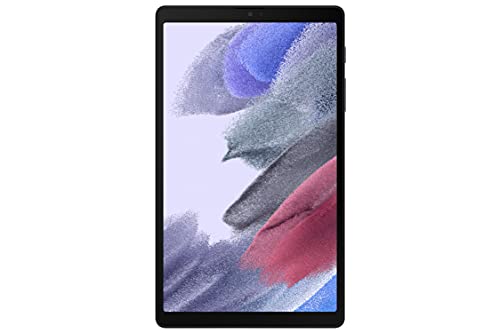
The Samsung Tab A7 Lite hits a specific use case that larger tablets consistently miss: a genuinely pocketable, one-hand-friendly 8.7-inch device that does not sacrifice build quality to get there. The upgraded metal frame is the defining physical characteristic here — most tablets at this price point use all-plastic construction, but the A7 Lite's metal chassis provides a structural rigidity that makes it feel significantly more durable and premium than the price suggests. The compact form factor makes it the best option on this list for commuting, travel, or any scenario where you are regularly pulling a tablet out of a bag and putting it back dozens of times per day.
The renewed certification means this unit has been professionally inspected, tested, and recertified to functional standards, bringing the price down further while maintaining Samsung's quality baseline. Samsung's software ecosystem means you get full Android with Google Play access, Samsung Kids for family use, and the same DeX-compatible software suite that larger Galaxy Tab devices run. Two months of free YouTube Premium is included, which is a legitimate bonus for a budget device aimed at entertainment consumption — ad-free YouTube for 60 days has real monetary value attached to it.
The 8.7-inch screen is smaller than the 10-inch options on this list, and if your primary use case is streaming movies or video content at length, you will notice the size difference. But for reading, social media, casual gaming, video calls, and quick browsing sessions, the compact size is an advantage rather than a limitation. The slim design and sturdy metal frame mean this tablet travels well and handles the casual drops and bumps of daily use without requiring a case for basic protection. For the buyer who wants a Samsung device, full Android, and a compact form factor at the lowest possible price point in 2026, this renewed A7 Lite is the correct choice.
Pros:
- Metal frame construction provides significantly better durability than plastic budget tablets
- Compact 8.7-inch size ideal for travel and one-handed use
- Renewed certification ensures tested and verified functional quality
- Two months of free YouTube Premium included
- Full Android with Google Play — no ecosystem restrictions
Cons:
- Smaller screen is less comfortable for extended video watching compared to 10-inch options
- Renewed stock availability can fluctuate — stock levels change frequently
Choosing the Right Cheap Android Tablet: A Buying Guide
Before you commit to any of the tablets above, it helps to understand the key specifications that actually determine your day-to-day experience. Marketing language in the budget tablet space is particularly unreliable, so here are the specifications that matter most and how to evaluate them accurately in 2026.
Screen Size and Display Quality
Screen size is the most personal decision in this buying process, and there is no universally correct answer. The key trade-offs break down like this:
- 7–8 inch tablets (Fire 7, Tab A7 Lite): Best for reading, commuting, and one-handed use — easy to hold for extended periods but noticeably small for video content
- 8–9 inch tablets (Fire HD 8 Plus): The versatility sweet spot — portable enough for travel but large enough for comfortable streaming
- 10–10.6 inch tablets (Fire HD 10, Samsung Tab A8, TCL TAB 10, Lenovo M10): The best option for media consumption, productivity, and anything requiring a keyboard accessory
Display resolution matters more at larger screen sizes. A 1080p display on a 10-inch tablet looks noticeably sharper than on a 7-inch display because the pixel density differs significantly. If you plan to stream HD content regularly, prioritize Full HD (1080p) or better at the 10-inch tier. The TCL TAB 10 Gen 2's 2K display is the best screen on this list at any price.
Processor and RAM: What You Actually Need
Budget tablet processors fall into three practical performance tiers, and understanding them helps you match performance to your use case without overspending:
- Entry-level (quad-core, 1–2 GB RAM): Adequate for reading, music, and single-app streaming; struggles with multitasking and modern games
- Mid-range (hexa-core, 3 GB RAM): Handles multitasking, web browsing with multiple tabs, and casual gaming without significant lag — the Fire HD 8 Plus and most Samsung options fall here
- Upper budget (octa-core, 3–4 GB RAM): Approaches mid-range tablet performance — the Fire HD 10 and TCL TAB 10 Gen 2 deliver smooth performance across all typical tablet tasks
RAM is often more important than raw clock speed for the way people actually use tablets — having 3 GB versus 2 GB means apps stay in memory when you switch between them, which eliminates the constant reloading that makes budget devices feel sluggish.
Battery Life and Charging
Budget tablets compete aggressively on battery life because large batteries are relatively cheap to include and resonate strongly with buyers. The practical guidance here is straightforward:
- 10 hours is the minimum acceptable for a tablet used primarily at home
- 13 hours is the target if you travel or use the device away from outlets regularly
- Wireless charging (Fire HD 8 Plus) and USB-C fast charging (Samsung Tab A8) meaningfully reduce daily charging friction
- Battery figures are measured under controlled conditions — expect 10–15% less in real-world use with Wi-Fi active and brightness at 50%
Android vs. Fire OS: The Ecosystem Decision
This is the decision that most budget tablet buyers underestimate, and it determines more about your daily experience than any hardware specification. Fire OS is Amazon's Android fork, and it comes with meaningful restrictions:
- Fire OS tablets (Fire 7, Fire HD 8 Plus, Fire HD 10): No Google Play by default — requires manual sideloading to install Google apps; tightly integrated with Amazon Prime, Prime Video, and Alexa; best if you are already deep in the Amazon ecosystem
- Standard Android tablets (Samsung Tab A8, TCL TAB 10, Lenovo M10, Samsung Tab A7 Lite): Full Google Play Store access; Google apps work natively; better app compatibility for education, productivity, and gaming
If you rely on Google apps daily — especially Google Classroom, Google Maps, or YouTube Kids — a standard Android tablet is the right choice, and the price premium over comparable Fire OS devices is smaller than it used to be in 2026.
Frequently Asked Questions
What is the best cheap Android tablet under $100 in 2026?
The Amazon Fire HD 8 Plus is the best option under $100 for most buyers in 2026, offering wireless charging, 3 GB RAM, a hexa-core processor, and 13 hours of battery life — a hardware package that rivals tablets priced considerably higher. If you need full Google Play access rather than Fire OS, the Samsung Tab A7 Lite (Renewed) is the best full Android option under $100.
Is a cheap Android tablet good enough for streaming Netflix and YouTube?
Yes, every tablet on this list handles Netflix and YouTube streaming reliably. The higher-resolution displays on the Fire HD 10, TCL TAB 10 Gen 2, and Samsung Tab A8 deliver a noticeably better streaming experience at 10 inches and above. For 1080p streaming without buffering issues, any tablet with a hexa-core or better processor and at least 2 GB of RAM performs adequately on a standard Wi-Fi connection.
What is the difference between Fire OS and standard Android on budget tablets?
Fire OS is Amazon's modified version of Android that replaces the Google Play Store with the Amazon Appstore and deeply integrates Amazon's services like Prime Video and Alexa. Standard Android uses Google Play and has access to a significantly larger app library. Sideloading Google Play onto Fire OS tablets is possible but requires additional setup steps. If you use Google apps daily, choose a tablet running standard Android.
How much storage do I need on a budget Android tablet?
For a tablet used primarily for streaming (where content is stored in the cloud), 32 GB is workable but leaves limited room for apps and offline downloads. For a tablet used for gaming, offline media, or app-heavy workflows, 64 GB is the comfortable minimum and 128 GB is strongly preferable. All tablets on this list support microSD expansion up to 1 TB, so buying a 128 GB microSD card alongside a base-storage model is often the most cost-effective approach.
Are refurbished tablets worth buying in 2026?
Certified refurbished tablets from reputable sources — specifically Amazon's Like-New program and Samsung's Renewed certification — are absolutely worth considering in 2026. Both programs test and certify devices to work like new, include the standard limited warranty, and deliver meaningful price savings over new units. The risk with uncertified third-party refurbished devices is considerably higher, so stick to manufacturer-certified or Amazon-certified programs for confidence in quality.
Can I use a cheap Android tablet for work tasks like email and spreadsheets?
Yes, budget tablets handle email, spreadsheets, document editing, and video conferencing reliably when running standard Android with Google Workspace or Microsoft 365 apps installed. The Samsung Galaxy Tab A8 and Lenovo Tab M10 Plus 3rd Gen are the strongest choices for productivity use cases due to their larger screens, full Google Play access, and productivity-oriented software integrations like Samsung DeX mode and Lenovo's Instant Memo. For intensive productivity work, pairing a budget tablet with a Bluetooth keyboard transforms the experience considerably.
Buy on Walmart
- Like-New Amazon Fire 7 tablet (newest model) 7” display, rea — Walmart Link
- Amazon Fire HD 8 Plus tablet, 8” HD Display, 32 GB, 30% fast — Walmart Link
- Amazon Fire HD 10 tablet (newest model) built for relaxation — Walmart Link
- SAMSUNG Galaxy Tab A8 10.5” 32GB Android Tablet, LCD Screen, — Walmart Link
- TCL TAB 10 Gen 2, 10.4" Wi-Fi Android Tablet 128GB, 2K Full — Walmart Link
- Lenovo Tab M10 Plus 3rd Gen Tablet - 10" FHD - Android 12-32 — Walmart Link
- Samsung Tab A7 Lite 8.7" Gray 32GB (SM-T220NZAAXAR) (Renewed — Walmart Link
Buy on eBay
- Like-New Amazon Fire 7 tablet (newest model) 7” display, rea — eBay Link
- Amazon Fire HD 8 Plus tablet, 8” HD Display, 32 GB, 30% fast — eBay Link
- Amazon Fire HD 10 tablet (newest model) built for relaxation — eBay Link
- SAMSUNG Galaxy Tab A8 10.5” 32GB Android Tablet, LCD Screen, — eBay Link
- TCL TAB 10 Gen 2, 10.4" Wi-Fi Android Tablet 128GB, 2K Full — eBay Link
- Lenovo Tab M10 Plus 3rd Gen Tablet - 10" FHD - Android 12-32 — eBay Link
- Samsung Tab A7 Lite 8.7" Gray 32GB (SM-T220NZAAXAR) (Renewed — eBay Link
Next Steps
- Check the current price of your top one or two picks on Amazon — budget tablet prices shift frequently and the gap between tiers often narrows during sales events, which could change the value calculation in your favor.
- Decide whether you need full Android (Google Play) or are comfortable with Fire OS before purchasing — this single decision narrows the field immediately and prevents buyer's remorse after unboxing.
- Add a microSD card to your cart alongside any tablet with 32 GB or less of base storage — a 128 GB or 256 GB card costs under $20 and eliminates storage management as a long-term frustration.
- Read user reviews specifically filtered to the last 90 days on Amazon to identify any recent batch quality issues or software update problems that post-launch reviewers may have flagged.
- If you are buying for a child or family member with specific needs, visit our guide on the best kids learning tablets to see which of these budget options have the strongest parental controls and educational app ecosystems before finalizing your choice.
 |
 |
 |
 |

About Dror Wettenstein
Dror Wettenstein is the founder and editor-in-chief of Ceedo. He launched the site in 2012 to help everyday consumers cut through marketing fluff and pick the right tech for their actual needs. Dror has spent more than 15 years in the technology industry, with a background that spans software engineering, e-commerce, and consumer electronics retail. He earned his bachelor degree from UC Irvine and went on to work at several Silicon Valley startups before turning his attention to product reviews full time. Today he leads a small editorial team of category specialists, edits and approves every published article, and still personally writes guides on the topics he is most passionate about. When he is not testing gear, Dror enjoys playing guitar, hiking the trails near his home in San Diego, and spending time with his wife and two kids.