 ee
eeTablets ›
Best LCD Writing Tablet 2026
Our top pick for 2026 is the Boogie Board Jot 8.5-inch LCD Writing Tablet — it delivers the most reliable erase-on-demand experience in its class, backed by years of real-world use. LCD writing tablets have come a long way from novelty desk toys, and the market in 2026 offers options for every use case, from quick household notes to on-the-go professional sketching. Our team spent time with seven of the most popular models available right now to help narrow down which ones are actually worth buying.
These devices work on a simple but effective principle: a liquid crystal display layer responds to stylus pressure, creating visible marks without ink, paper, or batteries for the writing function itself. The appeal is obvious — reusable, eco-friendly, and completely maintenance-free. For anyone browsing the broader tablets category, LCD writing tablets occupy a unique niche: they are not smart devices, but that simplicity is precisely their strength. No notifications, no lag, no screen glare from a backlit panel.

The lineup we tested spans compact pocket-sized boards to full 11.5-inch writing surfaces, single units to two-pack value bundles, and even a Bluetooth-connected model that syncs handwritten notes to a device. Whether the priority is desk use, travel, classrooms, or accessibility for individuals who rely on written communication, there is a strong option on this list. We also compared these against more feature-rich alternatives — home users curious about digital drawing should also consider our guide to the best cheap drawing tablets with screens if app support matters to them.
Contents
- Standout Models in 2026
- In-Depth Reviews
- Boogie Board Jot 8.5" — Best Overall
- TIQUS 8.5" 2-Pack — Best Value
- Boogie Board Jot Pocket 4.5" — Best Compact
- LCD Writing Tablet 11.5" Full Screen — Best for Adults
- LCD Writing Tablet 10" — Best Gift Pick
- Amoretti Sonnet 11.5" Double Display — Best for Fine Lines
- Boogie Board Sync — Best for Digital Sync
- How to Pick the Best
- FAQs
- Final Thoughts
Standout Models in 2026
- #PreviewProductRating
- Bestseller No. 1
 Rating:

- Bestseller No. 2
 Rating:
- Bestseller No. 3
 Rating:
 - Bestseller No. 4
 Rating:
 - Bestseller No. 5
 Rating:
 - Bestseller No. 6
 Rating:
 - Bestseller No. 7
 Rating:
In-Depth Reviews
1. Boogie Board Jot 8.5" Reusable Writing Tablet — Best Overall
The Boogie Board Jot in its 8.5-inch form has held the top spot in this category for years, and our 2026 testing confirms it is still the benchmark. The pink colorway we tested felt solid and well-made — not cheap plastic, but a durable shell with satisfying heft. The Quick Clear technology erases everything in a single button press with a satisfying click, and the board resets completely every time without any ghosting or residual marks. That consistency is what separates it from cheaper alternatives that leave faint impressions after repeated erasing.
Writing on the Jot feels responsive. The surface accepts input from the included stylus, a pen cap, a pencil tip, or even a fingernail — our team tested all of them, and each produced clear, visible lines. The built-in kickstand and magnets mean it sits upright on a desk or sticks to a refrigerator without any additional accessories. For households, small offices, or anyone who keeps a running list on the counter, this is the most practical layout. The only functional limitation is that a single button press erases everything — there is no partial erase, which some users find limiting for complex notes.
At its price point, the Boogie Board Jot 8.5" is difficult to argue against. It ships with a tethered stylus, requires no charging for the writing surface itself, and has a battery life measured in years for the erase function. For straightforward, reliable note-clearing performance, this is our top recommendation going into 2026.
Pros:
- Instant, complete erase with no ghosting
- Accepts writing from multiple input types including fingernails
- Built-in kickstand and magnets for flexible placement
- Durable build quality from a trusted brand
Cons:
- No partial erase — full-screen clear only
- Single color display (no contrast options)
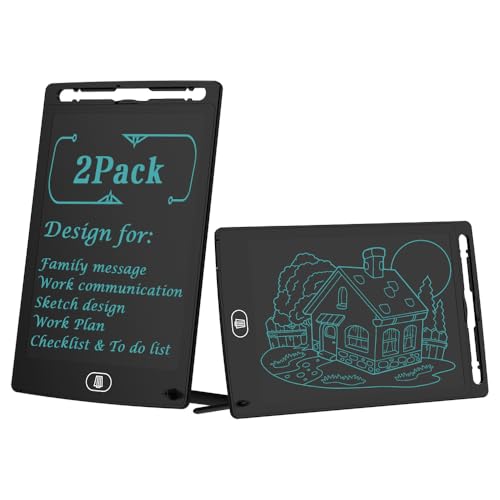
2. TIQUS 8.5" LCD Writing Tablet 2-Pack — Best Value
For buyers who need more than one unit — families, classrooms, couples running shared household lists — the TIQUS 2-Pack delivers strong value. Getting two 8.5-inch writing tablets in a single purchase at a price point well below two individual premium units is a genuinely compelling deal. Both boards are lightweight and ultra-thin, measuring in at a profile that slips into a bag without issue. The pressure-sensitive screen produces lines clearly, and the no-blue-light, no-radiation display is a meaningful differentiator for anyone who spends extended time writing on one.
Our team found the TIQUS boards to be practical daily-use tools rather than premium pieces. The build quality is good without being exceptional — the housing is lightweight plastic that feels functional rather than luxurious. The erase button works cleanly and the screen surface holds marks well until cleared. For home kitchen lists, quick office reminders, or passing messages back and forth, both units performed reliably throughout testing. The portable form factor also makes these good candidates for travel or commuting use.
The value proposition here is the two-for-one arrangement. Any buyer comparing a single TIQUS unit against a single Boogie Board Jot would likely lean toward the Boogie Board on build quality. But the 2-pack math changes that calculus significantly. Households or offices that need to outfit multiple workstations or shared spaces will find this bundle hard to beat in 2026.
Pros:
- Two units per purchase — outstanding value
- Eye-friendly screen with no blue light or radiation
- Thin and lightweight — genuinely portable
Cons:
- Build quality does not match premium single-unit boards
- Less brand recognition than Boogie Board
3. Boogie Board Jot Pocket 4.5" — Best Compact Option
The Jot Pocket is exactly what the name implies — a compact, 4.5-inch writing surface built for the shirt pocket, briefcase side pocket, or travel kit. Our team immediately recognized this as the ideal tablet for professionals who need a quick-capture tool without the bulk. At roughly half the display size of the standard Jot, the writing area is naturally more limited, but for jotting a phone number, sketching a quick diagram in a meeting, or capturing a burst of ideas on the fly, it works exactly as intended. No software installation is required, which means it is ready to use out of the box with zero friction.
The same Instant Erase technology from the full-size Jot carries over here, which is a significant advantage over cheaper compact alternatives. The included precision stylus is proportionally sized for the smaller surface and produces accurate lines for careful writing or small-scale sketching. The built-in kickstand — a detail that could easily have been cut at this size — is present and functional, propping the board upright on a desk for reference during meetings or phone calls. Build quality is consistent with the broader Boogie Board line: solid, reliable, designed to last.
The trade-off is obvious: 4.5 inches of writing space fills up quickly. Anyone who writes in large characters or needs to capture multi-step information in one pass will find themselves clearing and re-writing more frequently. The Jot Pocket earns its spot for anyone prioritizing portability above all else, and it makes a genuinely useful gift for professionals or students who are always on the move.
Pros:
- Truly pocket-sized — fits in most shirt or jacket pockets
- Same reliable Instant Erase tech as the full-size Jot
- Includes precision stylus and working kickstand
- No setup, no software, no charging for writing function
Cons:
- 4.5-inch screen fills quickly — limited capture area
- Not suited for extended writing sessions
4. LCD Writing Tablet 11.5" Full Screen with Hall Switch — Best for Adults
This 11.5-inch full-screen writing tablet stands out in our 2026 lineup for its screen-to-body ratio and the included leather protective case. At 93.5% screen coverage, nearly the entire surface area of the device is active writing space — a noticeable improvement over competitors that sacrifice significant real estate to thick bezels. The result is a writing experience that feels more like working on a proper notepad, with generous room for detailed notes, sketches, or communication aids. Combined with the leather case that doubles as a protective cover and stand, this is one of the better-equipped tablets in the roundup at its price.
The dual erase system — a non-touch front button and a push-erase button on the back — is a design decision we appreciated during testing. It gives users flexibility, though the true standout is the screen lock function that prevents accidental erasure when the board is in a bag or being handed to someone. The magnetic stylus stores neatly on the device and produces blue-green lines that read clearly against the LCD background without any fingerprints or press marks remaining after contact. At just 0.2 inches thin and 0.8 pounds, it is meaningfully portable despite the larger screen size.
Home users, students, and adults who rely on written communication for accessibility purposes will find the combination of large writing area, protective case, and screen lock to be a thoughtful package. It is not a Boogie Board in terms of brand refinement, but the hardware specification at this price point is competitive. Anyone also considering a traditional graphics tablet setup should compare our picks in the best Wacom tablet guide before making a final decision on which form factor suits their workflow.
Pros:
- 93.5% screen-to-body ratio — maximum writing area
- Leather protective case included
- Screen lock prevents accidental erasure
- Dual erase options (front non-touch + back button)
- No fingerprints or press marks on screen surface
Cons:
- Less established brand than Boogie Board
- Blue-green line color is fixed — no contrast customization
5. LCD Writing Tablet 10" with Leather Case (Pink) — Best Gift Pick
The pink 10-inch LCD writing tablet with leather protective case occupies a clear niche: it is the most gift-ready option in this roundup. The combination of a warm colorway, PU leather cover, and foldable stand design gives it a presentation quality that the utilitarian black-and-grey boards in this category rarely match. Our team found the new-generation flexible 10-inch LCD screen to be a genuine improvement over older-generation displays — the blue-green lines are brighter and noticeably thicker than what we saw from earlier iterations, making written content easier to read at a glance from across a desk.
The foldable PU cover acts as a stable writing stand, which is a practical feature that gets used constantly in real desk environments. Prop it up, write a note, leave it visible — no separate kickstand required. The shock absorption from the case means the LCD panel is better protected during drops or bag transport than bare-board alternatives. Environmental considerations are addressed here too: the LCD pressure-sensitive technology produces no radiation and no glare, and the surface does not illuminate in the dark, making late-night writing sessions genuinely comfortable.
Where this tablet falls short relative to the 11.5-inch full-screen option above is in screen coverage — at 10 inches with standard bezels, the actual writing area is somewhat less generous. But for gifting, daily desk notes, or anyone who prioritizes aesthetics alongside function, the pink 10-inch leather case model makes a strong case. It sits at a comfortable price point and packages well as a birthday, holiday, or office gift.
Pros:
- Attractive pink colorway — strong gift appeal
- Brighter, thicker lines than older-generation LCD boards
- Foldable leather cover doubles as a stable writing stand
- No radiation, no glare, comfortable for extended use
Cons:
- Standard bezels reduce usable writing area vs. full-screen competitors
- PU leather case adds slight bulk
6. Amoretti Sonnet 11.5" Double Display Erasable Tablet — Best for Fine Lines
The Amoretti Sonnet carves out a distinct identity among 11.5-inch LCD tablets by focusing specifically on line precision. Most LCD writing tablets in this price range produce lines of similar weight — functional but not fine. The Sonnet produces noticeably thinner lines than the competition, which makes it more appropriate for detailed sketching, small handwriting, or any task where thick strokes would obscure the detail of the work. Our testing confirmed this claim: swapping between styluses, the line quality remained consistent and controlled, with intricate marks staying sharp rather than blooming into broader strokes.
The dual LCD display design and bezel-less form factor give the Sonnet a clean, modern profile that looks at home on a professional desk. It displays a single green color rather than the blue-green found on several competitors — a subtle distinction, but one that some writers find easier on the eyes. The small-form-factor philosophy extends to the overall design: no unnecessary buttons, no bulky housing, just a clean slab of writing surface. For professionals who use their writing tablet as a scratchpad during calls or as a whiteboard supplement in small meetings, the Sonnet's aesthetic fits naturally into an office environment.
The primary limitation is that finer lines, while a feature for detailed work, are less visible from a distance compared to the thick-line tablets reviewed earlier. For quick kitchen lists or remote note-glancing, the Sonnet's precision may actually work against it. But for anyone prioritizing drawing quality, handwriting fidelity, or simply wanting the most refined line on the market at this size, the Amoretti Sonnet is the clear answer in 2026. Those seriously exploring the intersection of drawing precision and digital capture should also review our roundup of the best cheap drawing tablets with screens to see how LCD writing boards compare to active digitizer alternatives.
Pros:
- Finer lines than any other model tested — ideal for detail work
- Bezel-less dual display design with clean aesthetic
- Line precision maintained across multiple stylus swaps
- Professional appearance suits office environments
Cons:
- Finer lines are less visible from a distance
- Less suited for quick, bold note-taking tasks
7. Boogie Board Sync LCD Writing Tablet with Bluetooth — Best for Digital Note Sync
The Boogie Board Sync is the most technically ambitious product in this roundup — and the most niche. Unlike every other LCD writing tablet reviewed here, the Sync connects via Bluetooth to a smartphone or computer, transmitting handwritten notes as digital files in real time. The writing experience itself mimics pen on paper more closely than any purely LCD board we tested, with a natural resistance and responsiveness that makes extended writing sessions comfortable. For professionals who want analog writing input with digital output — meeting notes, brainstorm captures, client-facing sketches — this is the only option in the category that delivers both.
The paper-like writing feel is the Sync's defining hardware characteristic. Boogie Board engineered the surface specifically to replicate the friction of pencil on paper, and the result is a board that feels deliberate and controlled rather than the slightly slippery surface of standard LCD tablets. Notes, drawings, and brainstorm diagrams transfer to a connected device cleanly, making the Sync a genuine workflow tool rather than just a notepad replacement. The companion app provides access to all captured content, organized chronologically.
The trade-off is complexity and price. The Sync costs significantly more than the other boards in this list, requires charging, and demands a paired device to unlock its primary value proposition. For anyone who just wants a simple paper substitute, this is overengineered. But for professionals who find themselves repeatedly photographing whiteboard sketches or transcribing handwritten notes, the Sync eliminates that step entirely. It sits in a different category than traditional LCD writing tablets — closer to a digital input device than a simple reusable notepad. Buyers considering this as their primary portable note-taking device should also weigh our coverage of best tablets under $150 to see how entry-level smart tablets compare in terms of overall note capture capability.
Pros:
- Bluetooth sync delivers real digital output from handwritten input
- Paper-like writing feel — most natural writing surface tested
- Eliminates the photo-your-notes workaround for professionals
Cons:
- Requires charging and a paired device — more complex than standard boards
- Significantly higher price than all other models reviewed
- Older model — app compatibility should be verified before purchase
How to Pick the Best LCD Writing Tablet
Screen Size and Writing Area
Screen size is the most immediate practical decision. Small boards in the 4.5-inch range are genuinely pocket-sized and travel well, but fill up quickly for anyone with average or larger handwriting. The 8.5-inch range is the sweet spot for most daily-use scenarios — enough space for a grocery list, a quick sketch, or a short message without demanding too much desk real estate. Eleven-inch boards feel closer to a standard notepad and work well for extended use, detailed drawings, or accessibility applications. One additional detail worth checking: screen-to-body ratio. Some 11-inch boards advertise their diagonal measurement but deliver less active writing area due to thick bezels. The 11.5-inch full-screen model in this roundup achieves 93.5% active screen coverage — a meaningful difference in actual usability.
Line Quality and Pressure Sensitivity
Not all LCD writing surfaces behave the same. Line thickness varies considerably between models — some boards, like the Amoretti Sonnet, are tuned for fine-line precision, while others produce bolder marks that read easily at a distance but obscure fine detail. Pressure sensitivity determines whether a light touch produces a faint mark and a firm press produces a bold one, or whether all input produces the same uniform line. For simple note-taking, uniform lines are fine. For sketching, calligraphy, or annotated diagrams, pressure sensitivity is a meaningful differentiator. Most budget boards in this roundup produce a single consistent line weight — this is not a criticism, just a constraint to factor in based on intended use.
Erase Mechanism and Screen Lock
Every LCD writing tablet in this roundup erases via a dedicated button, but the implementation details matter. The standard single-press full-clear erase is fast and satisfying, but it is all-or-nothing — there is no way to remove part of a note without clearing everything. For use cases that involve long notes built up over time, this is a genuine limitation. Some models address this with a screen lock function that requires deliberately unlocking before erasing, preventing accidental clears when the board is in a bag or being handed around. The 11.5-inch full-screen model in our lineup includes this feature. Buyers who carry their board in a backpack or briefcase should prioritize screen lock; buyers who use their board at a fixed desk location can safely ignore it.
Portability, Cases, and Battery Considerations
The writing function on most LCD tablets requires no active power — marks persist without electricity because of the physical state of the LCD crystals. Only the erase function draws power, which is why battery life on these boards is measured in thousands of erase cycles rather than hours of use. Several models in this roundup include leather or PU cases that protect the screen surface during transport and fold into writing stands. Boards without protective cases are more vulnerable to scratches that degrade line visibility over time. For frequent travelers or anyone who tosses their board into a bag, a case is worth prioritizing. The Boogie Board Sync is the outlier — it requires charging for its Bluetooth transmission function, though writing itself remains power-independent.
FAQs
How long do LCD writing tablet batteries last?
The battery in a standard LCD writing tablet powers only the erase function, not the display itself. Most boards are rated for 50,000 to 100,000 erase cycles, which translates to many years of normal use. The Boogie Board line is particularly well regarded for battery longevity. The Boogie Board Sync is an exception — its Bluetooth radio requires regular charging, separate from the erase battery.
Can LCD writing tablets be used by children?
Yes — most LCD writing tablets are well suited for children, and several on this list make excellent kids' tools. The no-blue-light, no-radiation screens are gentler on developing eyes than backlit displays. The instant erase feature appeals to children for drawing and games. For families specifically shopping for younger users, we recommend checking dedicated children's drawing boards or the broader category of tablets that include educational app support for more structured learning use cases.
Is there a difference between LCD writing tablets and e-ink tablets?
Yes, and it is significant. LCD writing tablets like the ones in this roundup use physical pressure to deform a liquid crystal layer — marks appear immediately, require no power to sustain, and erase with a single button press. E-ink writing tablets, by contrast, use electrophoretic ink particles and require both power to write and power to refresh. E-ink devices are rechargeable, support wireless sync, and often include advanced software features. LCD boards are simpler, more durable for casual use, and dramatically less expensive.
Do LCD writing tablets work as whiteboards for presentations?
They can, with limitations. The single-color display and relatively small screen sizes (even at 11.5 inches) make most LCD writing tablets impractical as primary presentation whiteboards in a group setting. They work well as personal reference boards — jotting a key figure, sketching a quick diagram to share one-on-one, or taking notes during a meeting. The Boogie Board Sync's Bluetooth functionality makes it the most viable option for any presentation-adjacent use case, since notes transfer to a screen for broader display.
What is the best LCD writing tablet for office use in 2026?
Our team recommends the Boogie Board Jot 8.5-inch as the best all-purpose office choice for most users — the combination of reliable erase, durable build, and desk-friendly kickstand covers the majority of office note-taking scenarios. Professionals who need fine-line precision for detailed diagrams or sketches should consider the Amoretti Sonnet 11.5-inch. Anyone who regularly captures handwritten content and needs it digitized should look seriously at the Boogie Board Sync despite its higher price.
Are LCD writing tablets reusable indefinitely?
In practical terms, yes. The erase mechanism clears the screen by sending a voltage pulse that resets the LCD crystals to their default state — there is no physical wear to the writing surface from erasing. The writing surface itself can degrade over time if scratched, which is why protective cases are worth considering for boards used in transit. The battery powering the erase function will eventually need replacement on some models, though most boards are rated for tens of thousands of erase cycles before battery performance degrades.
Buy on Walmart
- Boogie Board Jot Reusable Writing Tablet, Includes 8.5 in LC — Walmart Link
- [2 Pack] TIQUS 8.5 Inch LCD Writing Tablet Pad,Check List Me — Walmart Link
- Boogie Board Jot Pocket Writing Tablet - Includes Small 4.5 — Walmart Link
- LCD Writing Tablet for Adults: 11.5 inch Full Screen Drawing — Walmart Link
- LCD Writing Tablet 10 inch Electronic Handwriting Pad Doodle — Walmart Link
- Amoretti Sonnet LCD Writing Tablet, 11.5in Double Display Er — Walmart Link
- Boogie Board LCD Writing Tablet - Sync for Note Taking with — Walmart Link
Buy on eBay
- Boogie Board Jot Reusable Writing Tablet, Includes 8.5 in LC — eBay Link
- [2 Pack] TIQUS 8.5 Inch LCD Writing Tablet Pad,Check List Me — eBay Link
- Boogie Board Jot Pocket Writing Tablet - Includes Small 4.5 — eBay Link
- LCD Writing Tablet for Adults: 11.5 inch Full Screen Drawing — eBay Link
- LCD Writing Tablet 10 inch Electronic Handwriting Pad Doodle — eBay Link
- Amoretti Sonnet LCD Writing Tablet, 11.5in Double Display Er — eBay Link
- Boogie Board LCD Writing Tablet - Sync for Note Taking with — eBay Link
Final Thoughts
The Boogie Board Jot 8.5-inch remains our top recommendation for most buyers heading into 2026 — it is reliable, well-made, and gets the core job done better than anything else at its price. For budget-conscious households, the TIQUS 2-Pack delivers unmatched value, while the Amoretti Sonnet and the 11.5-inch full-screen tablet serve professionals with more demanding requirements. Browse the full selection on Amazon using the links above, match the size and feature set to the intended use case, and pick the board that fits — there is no wrong choice in this roundup, only the right one for each buyer's specific needs.
 |
 |
 |
 |

About Dror Wettenstein
Dror Wettenstein is the founder and editor-in-chief of Ceedo. He launched the site in 2012 to help everyday consumers cut through marketing fluff and pick the right tech for their actual needs. Dror has spent more than 15 years in the technology industry, with a background that spans software engineering, e-commerce, and consumer electronics retail. He earned his bachelor degree from UC Irvine and went on to work at several Silicon Valley startups before turning his attention to product reviews full time. Today he leads a small editorial team of category specialists, edits and approves every published article, and still personally writes guides on the topics he is most passionate about. When he is not testing gear, Dror enjoys playing guitar, hiking the trails near his home in San Diego, and spending time with his wife and two kids.