 ee
eePrinters ›
Best Printer For Photographers 2026
The Epson SureColor P700 takes our top recommendation for most photographers in 2026, thanks to its UltraChrome PRO10 ink system and dedicated matte/photo black nozzles that eliminate the ink-switching headache. Whether you're outputting gallery prints, client proofs, or portfolio pieces, a dedicated photo printer transforms your workflow in ways that even the best monitor calibration can't replicate.
Choosing a printer built for photography means weighing color accuracy, ink longevity, media flexibility, and print size against your budget and available desk space. The gap between prosumer and professional models has narrowed considerably — today's 13-inch desktop units rival the output quality of wide-format machines that cost three times as much just a few years ago. If you're still relying on a general-purpose inkjet for your prints, you're leaving visible quality on the table. Understanding the difference between pigment ink and dye ink is one of the first decisions you'll face, and it shapes almost everything else about the printer you should buy.

We evaluated seven printers across a range of budgets and use cases — from compact dye-sub units for event photographers to wide-format pigment machines for fine-art reproduction. Every model below was assessed on color gamut, black density, media handling, ink cost per print, and overall build quality. Here are the best printers for photographers in 2026.
Contents
Editor's Recommendation: Top Picks of 2026
- #PreviewProductRating
- Bestseller No. 1
 Rating:

- Bestseller No. 2
 Rating:
 - Bestseller No. 3
 Rating:
 - Bestseller No. 4
 Rating:
- Bestseller No. 5
 Rating:
 - Bestseller No. 6
 Rating:
 - Bestseller No. 7
 Rating:
Full Product Breakdowns
1. Canon Pixma Pro-200s — Best Dye-Ink Photo Printer
The Canon Pixma Pro-200s occupies a unique position in the 2026 photography printer market. It uses a dye-based ink system rather than pigment, which gives it an edge in color vibrancy and saturation on glossy and semi-gloss media. If your primary output is glossy portfolio prints, exhibition proofs on lustre paper, or client deliverables where color pop matters more than archival longevity, this printer delivers results that genuinely impress. The eight-ink system — including photo cyan and photo magenta — produces smooth gradients with virtually no visible banding, even in critical skin-tone transitions.
Canon supports an impressive range of media sizes and types with this model, from 4×6 snapshots up to 13×19 borderless prints. Fine art papers, matte cards, and panoramic rolls all feed reliably. The built-in 3-inch LCD panel provides real-time ink level monitoring and maintenance access without needing to open a laptop. Print speed is respectable for a dye-ink unit, though you'll notice it slows down considerably when outputting at maximum quality on larger sheets. For photographers who want vibrant color without the higher price tag of pigment-based machines, the Pro-200s represents excellent value.
Where the Pro-200s falls short is longevity. Dye-based prints are inherently more susceptible to fading under UV exposure compared to pigment alternatives, so if you're producing work for gallery display or archival storage, you'll want to factor in protective framing or UV-resistant coatings. The printer's footprint is also substantial — plan for dedicated shelf space.
Pros:
- Exceptional color vibrancy on glossy and semi-gloss media
- Eight-ink system delivers smooth gradients with minimal banding
- Supports borderless printing up to 13×19 inches
- Built-in LCD for ink monitoring and maintenance
Cons:
- Dye-based inks fade faster than pigment under UV exposure
- Large physical footprint requires dedicated workspace
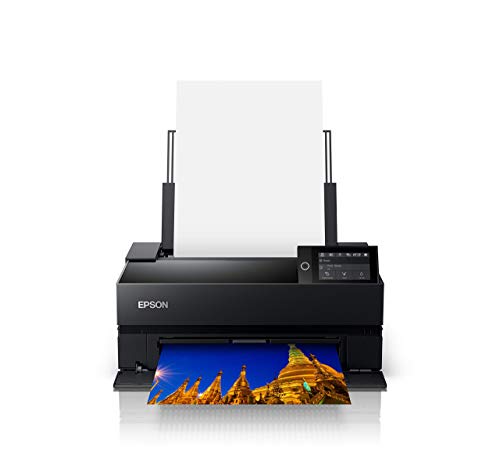
2. Epson SureColor P700 — Best Overall for Serious Photographers
The Epson SureColor P700 is the printer that made us rethink what a 13-inch desktop machine can do. Its UltraChrome PRO10 ink set includes ten pigment-based inks with the addition of Violet, expanding the reproducible color gamut well beyond what previous-generation models could achieve. Colors that typically challenge inkjet printers — deep teals, saturated purples, and subtle earth tones — print with remarkable fidelity. This is the kind of output quality that previously required stepping up to a 17-inch or 24-inch professional unit.
One of the P700's most practical advantages is something you don't see on the print: it has dedicated nozzles for both Photo Black and Matte Black ink. That means zero ink switching when you move between glossy and matte media. If you've ever wasted ink and time waiting for a black ink swap on an older Epson, you'll appreciate how much this improves daily workflow. The 10-channel MicroPiezo AMC printhead maintains consistent dot placement and density across long print runs, so your fiftieth print looks identical to your first.
The P700 handles everything from cut sheets to roll media, supports borderless printing, and integrates cleanly with both Mac and Windows color management workflows. Epson's driver and ICC profile support remain among the best in the industry. The only real limitation is the 13-inch maximum width — if you regularly need prints larger than 13×19, you'll need to step up to the P900 or a wide-format model. But for the vast majority of photographers, 13 inches covers portfolios, client proofs, and all but the largest exhibition work.
Pros:
- UltraChrome PRO10 with Violet ink delivers an exceptionally wide color gamut
- No Photo Black / Matte Black switching — dedicated nozzles for both
- Consistent output quality over long print runs
- Excellent ICC profile and color management support
Cons:
- Maximum print width of 13 inches may limit large-format needs
- Premium price point relative to dye-ink alternatives
3. Canon imagePROGRAF PRO-310 — Best Canon Pigment Printer Under 17 Inches
Canon's imagePROGRAF PRO-310 brings the company's professional-grade pigment ink technology down to a 13-inch desktop form factor. The nine-color pigment system plus Chroma Optimizer produces gallery-quality output with impressive gloss uniformity — a persistent challenge with pigment inks that Canon has largely solved here. Black density is a standout feature: the dedicated Matte Black ink delivers deep, rich shadows with a wider dark-area reproduction range than most competitors in this size class.
Reliability is where the PRO-310 differentiates itself from earlier Canon professional models. The Anti-Clogging System keeps nozzles clear even during extended periods of inactivity, which is a genuine concern for photographers who may go days or weeks between print sessions. Skew Correction automatically compensates for minor media misalignment during feeding, reducing wasted paper from crooked prints. These are the kinds of quality-of-life features that save you real money over time. The 3-inch color LCD monitor provides straightforward status monitoring and menu navigation.
The PRO-310 integrates with Canon's Professional Print & Layout software, which works both standalone and as a plug-in for Adobe Photoshop and Lightroom. If you shoot with Canon cameras and use Digital Photo Professional for raw processing, the end-to-end Canon workflow is notably seamless. Print quality on fine art papers — particularly cotton rag and baryta — is excellent, with the Chroma Optimizer doing visible work to reduce bronzing and metamerism on glossy surfaces.
Pros:
- Nine-color pigment system with Chroma Optimizer for superior gloss uniformity
- Anti-Clogging System prevents nozzle issues during inactivity
- Enhanced matte black density for deeper shadow reproduction
- Tight integration with Canon's professional software ecosystem
Cons:
- Higher ink cost per print compared to dye-based alternatives
- Canon's media ecosystem is somewhat narrower than Epson's third-party paper support
4. Epson SureColor P900 — Best 17-Inch Desktop Printer
When 13 inches isn't enough, the Epson SureColor P900 steps in as the best desktop option for photographers who need 17-inch output without the bulk and expense of a true wide-format machine. It uses the same UltraChrome PRO10 pigment ink set as the P700, so you get identical color accuracy and gamut — just on a larger canvas. The simultaneous matte and photo black channels carry over as well, preserving the no-switching workflow advantage that makes Epson's current lineup so practical for mixed-media printing.
Build quality is a clear step up from consumer-grade printers. The P900 feels like professional studio equipment, with a rigid chassis and precision paper path that handles heavy fine art media without jams or misfeeds. It supports both cut sheets and roll paper, with borderless output up to 17 inches wide. For photographers preparing exhibition prints, the ability to produce a 17×22 borderless print on your desk — with pigment-based archival quality — eliminates most reasons to outsource to a print lab. The included bundle with ethernet cable, USB cable, and fiber cloth adds practical connectivity options right out of the box.
The P900 is a significant investment, and running costs reflect its professional positioning. Ink cartridges are larger than the P700's, but the cost per print on 17-inch sheets is still meaningful. If you're primarily printing 13×19 or smaller, the P700 offers the same image quality at a lower entry point. The P900 earns its keep when you consistently need those larger dimensions — for gallery submissions, large portfolio pages, or exhibition-scale work. If you're curious about managing ink expenses, our guide on how much ink a printer uses per page breaks down the real-world numbers.
Pros:
- Full UltraChrome PRO10 quality at 17-inch width
- Simultaneous matte and photo black channels — no ink switching
- Robust build quality suitable for heavy media and long print runs
- Roll paper support for panoramic and custom-length prints
Cons:
- Higher upfront cost and ink expenses than 13-inch models
- Substantial desk footprint — requires dedicated space
5. Epson Expression Photo XP-8800 — Best Budget Photo Printer
Not every photographer needs a $700+ dedicated photo printer, and the Epson Expression Photo XP-8800 proves that impressive photo output is achievable at a fraction of the cost. This compact all-in-one uses a six-color Claria Photo HD ink system that includes dedicated photo black and light cyan/light magenta cartridges — a meaningful upgrade over the four-color systems found in standard consumer inkjets. The result is noticeably smoother gradients and more accurate skin tones, particularly in portrait work where banding or color shifts are immediately visible.
Speed is a genuine strength here. The XP-8800 delivers a borderless 4×6 photo in as fast as 10 seconds, making it practical for batch printing event photos or quick client proofs. The 4.3-inch color touchscreen is responsive and well-organized, with an Easy Mode that simplifies navigation for users who just want to print without diving into driver settings. The built-in scanner and copier add versatility, though the scanner resolution won't satisfy anyone digitizing film negatives or slides.
The trade-off is print size and longevity. Maximum borderless output is 8.5×11 inches — fine for snapshots and small prints, but limiting for anyone who needs larger format work. Claria inks are dye-based, so prints won't match the archival stability of pigment alternatives. Think of the XP-8800 as an outstanding entry point. If your printing needs grow, you can always step up to a P700 or PRO-310 later while keeping this unit as a reliable everyday workhorse for documents and quick snapshots.
Pros:
- Six-color ink system delivers excellent photo quality at a budget price
- Very fast 4×6 borderless prints — under 10 seconds
- Intuitive 4.3-inch touchscreen with Easy Mode
- Built-in scanner and copier for all-in-one convenience
Cons:
- Maximum borderless print size of 8.5×11 inches
- Dye-based inks have shorter archival life than pigment
6. Canon Selphy CP1500 — Best Portable Photo Printer
The Canon Selphy CP1500 is a completely different animal from every other printer on this list, and that's precisely why it belongs here. This compact dye-sublimation printer produces 4×6 prints that are instantly dry, water-resistant, and rated for up to 100 years of display life. For event photographers, wedding shooters, and anyone who needs to hand physical prints to clients on-site, the Selphy CP1500 is essentially irreplaceable. No inkjet — regardless of price — matches its combination of portability, instant-dry output, and print durability.
The dye-sublimation process works fundamentally differently from inkjet printing. Instead of spraying ink droplets, it uses heat to transfer dye from a ribbon onto specially coated paper in three color passes plus a protective overcoat. The result is a continuous-tone print with no visible dots, no banding, and a protective layer that resists fingerprints, moisture, and UV fading. Wi-Fi and smartphone connectivity make it trivially easy to print directly from your phone — useful at events where guests want instant prints of themselves.
The obvious limitation is size. The CP1500 maxes out at 4×6 postcard prints. It doesn't do 5×7, it doesn't do 8×10, and it certainly doesn't do 13×19. It also requires proprietary Canon media packs that bundle the dye ribbon and paper together. You're locked into Canon's paper ecosystem entirely. But within its niche — portable, instant, durable small prints — nothing else in 2026 does it better. With the optional battery pack, you can print anywhere without a power outlet.
Pros:
- Instantly dry, water-resistant prints rated for 100+ year life
- Continuous-tone dye-sub output — no visible dots or banding
- Ultra-compact and portable with optional battery operation
- Wi-Fi and smartphone direct printing
Cons:
- Limited to 4×6 maximum print size
- Requires proprietary Canon media packs — no third-party paper
7. Canon imagePROGRAF PRO-1100 — Best Wide-Format Professional Printer
The Canon imagePROGRAF PRO-1100 sits at the top of this list in both capability and price. Its 11-color LUCIA PRO II pigment ink system plus Chroma Optimizer represents Canon's most advanced desktop ink technology for 2026. The expanded color gamut faithfully reproduces colors that push the boundaries of what inkjet printing can achieve — particularly in blue-violet and red-orange ranges where lesser ink sets visibly compress. If you've ever printed a sunset or underwater scene and felt the output didn't match your screen, this is the printer that closes that gap.
At 17 inches wide, the PRO-1100 handles the same maximum print dimensions as the Epson P900, but Canon's approach differs in its ink chemistry and gloss optimization. The Chroma Optimizer applies a transparent coating that flattens the print surface, virtually eliminating the differential gloss issue that plagues pigment prints — where inked areas appear shinier than unprinted paper. The anti-bronzing performance is equally impressive, maintaining neutral tones under gallery lighting conditions that would shift lesser prints toward green or magenta. For fine art reproduction and gallery work, these characteristics matter enormously.
Canon's Professional Print & Layout software provides granular control over color management, soft proofing, and layout — it works as a standalone app or integrates with Adobe Photoshop, Lightroom, and Canon's own Digital Photo Professional. The wireless connectivity is reliable and well-implemented, supporting both infrastructure Wi-Fi and direct connection. The main barrier is cost: the PRO-1100 is a serious investment, and the 11-ink system means higher consumable expenses. But for professional photographers whose reputation depends on print quality, this machine delivers output that competes with commercial fine art printers costing significantly more. Proper inkjet printer maintenance will help you protect that investment over the long term.
Pros:
- 11-color LUCIA PRO II pigment system plus Chroma Optimizer — widest color gamut in its class
- Exceptional anti-bronzing and gloss uniformity on glossy media
- Professional Print & Layout software with Adobe and DPP integration
- 17-inch borderless output with reliable wireless connectivity
Cons:
- Highest upfront cost and running expenses on this list
- Large and heavy — requires a dedicated table or printer stand
How to Pick the Best Printer for Photography
Pigment vs. Dye Ink: The Fundamental Choice
Every photographer printer decision starts here. Pigment inks use microscopic solid particles suspended in liquid — they sit on top of the paper surface and resist UV fading, moisture, and gas exposure far better than dye inks. This makes them the clear choice for gallery prints, archival work, and anything that needs to look the same in 20 years. Dye inks dissolve into the paper coating, producing more vibrant colors and smoother tonal transitions on glossy media, but they're more vulnerable to environmental degradation over time.
In practical terms: if your prints will be framed behind glass or stored in portfolios, pigment is the safer bet. If you're producing client proofs, social media prints, or work that won't be displayed long-term, dye inks can deliver more eye-catching results at a lower cost. Several printers on this list — the Canon Pro-200s and Epson XP-8800 — use dye inks, while the Epson P700/P900 and Canon PRO-310/PRO-1100 use pigment. Choose based on your output's intended life span.
Print Size and Format Requirements
Think honestly about the largest prints you regularly produce. A 13-inch printer handles everything up to 13×19 inches — that covers portfolios, most client deliverables, and smaller exhibition prints. A 17-inch printer adds 17×22 output, which reaches gallery-standard sizing without needing to outsource. Unless you consistently print larger than 17 inches, there's rarely a practical reason to go wider. Every step up in maximum width increases cost, footprint, and ink consumption.
Roll paper support is worth considering if you produce panoramic prints or want to print custom lengths. Both the Epson P700/P900 and Canon PRO-310/PRO-1100 support roll media. For event and travel photographers, the compact Selphy CP1500 fills a niche that no desktop inkjet can — instant 4×6 prints on location.
Color Management and Software Integration
The best hardware means nothing without accurate color management. Both Epson and Canon provide ICC profiles for their branded papers, and both support third-party profiles from paper manufacturers like Hahnemühle, Canson, and Red River. Epson's driver architecture is generally more flexible with third-party papers, while Canon's Professional Print & Layout software offers tighter integration within the Canon ecosystem. If you're already invested in one manufacturer's cameras and software, staying within that ecosystem simplifies your workflow. If you work across multiple editing platforms, Epson's broader compatibility may be more practical.
Running Costs and Maintenance
The purchase price is just the beginning. Ink cost per print varies significantly across models and print sizes. Professional pigment printers use more ink per square inch than consumer dye-based units, and their cartridges carry higher price tags. Factor in media costs as well — fine art papers can cost several dollars per sheet at larger sizes. Maintenance is another consideration: inkjet printers that sit idle for weeks can develop clogged nozzles, wasting ink on cleaning cycles. If you print infrequently, look for features like Canon's Anti-Clogging System on the PRO-310 or plan for regular maintenance prints to keep nozzles clear.
FAQs
What is the best printer for photography in 2026?
The Epson SureColor P700 offers the best combination of color accuracy, convenience, and value for most photographers. Its UltraChrome PRO10 ink system with Violet ink produces an exceptionally wide color gamut, and dedicated matte/photo black nozzles eliminate ink switching. For larger prints, the Epson P900 and Canon PRO-1100 extend to 17-inch output with comparable quality.
Should I choose pigment or dye ink for photo printing?
Choose pigment ink if your prints will be displayed, sold, or archived — pigment prints resist fading for decades. Choose dye ink if you prioritize color vibrancy on glossy media and your prints won't face prolonged UV exposure. For professional photographers selling prints, pigment is almost always the right choice. For personal use and short-term displays, dye ink delivers beautiful results at lower cost.
Is a 13-inch or 17-inch photo printer better?
A 13-inch printer covers most photography needs, including portfolios, client proofs, and smaller exhibition prints up to 13×19 inches. Step up to 17 inches only if you regularly produce gallery-size work at 17×22 or need roll paper for panoramic output. The quality is identical between the Epson P700 (13-inch) and P900 (17-inch) — you're paying for the larger print area, not better image quality.
How long do photo prints last from inkjet printers?
Pigment-based prints from printers like the Epson P700 or Canon PRO-1100 can last 100+ years when properly displayed behind glass and away from direct sunlight, according to independent testing by Wilhelm Imaging Research. Dye-based prints typically last 30–60 years under similar conditions. The Canon Selphy CP1500's dye-sublimation prints are rated for approximately 100 years due to their protective overcoat layer.
Do I need a dedicated photo printer if I already have a good inkjet?
If your current inkjet uses four or fewer ink colors, a dedicated photo printer will produce visibly better results — particularly in gradients, skin tones, and shadow detail. Photo printers with six or more ink channels produce smoother transitions and a wider color gamut. If you're printing photos for portfolios, clients, or display, the difference is immediately apparent and worth the upgrade.
What paper should I use with a photo printer?
Start with your printer manufacturer's branded papers, as these come with optimized ICC profiles that ensure accurate color reproduction. Once you're comfortable with your workflow, experiment with third-party papers from Hahnemühle, Canson Infinity, or Red River Paper — these brands provide downloadable ICC profiles for most popular printers. Match paper finish to your subject: glossy for product and commercial work, matte or fine art for landscapes and black-and-white photography.
Buy on Walmart
- Canon Pixma Pro-200s — Walmart Link
- Epson SureColor P700 13-Inch Printer,Black — Walmart Link
- Canon imagePROGRAF Professional 13" PRO-310 Wireless Inkjet — Walmart Link
- EPSON SureColor P900 17 Inch Photo Printer (C11CH37201) Bund — Walmart Link
- Epson Expression Photo XP-8800 Wireless Printer with 6-Color — Walmart Link
- Canon Selphy CP1500 Wireless Compact Photo Printer (Black) — Walmart Link
- Canon imagePROGRAF PRO-1100: 17” Professional Wireless Inkje — Walmart Link
Buy on eBay
- Canon Pixma Pro-200s — eBay Link
- Epson SureColor P700 13-Inch Printer,Black — eBay Link
- Canon imagePROGRAF Professional 13" PRO-310 Wireless Inkjet — eBay Link
- EPSON SureColor P900 17 Inch Photo Printer (C11CH37201) Bund — eBay Link
- Epson Expression Photo XP-8800 Wireless Printer with 6-Color — eBay Link
- Canon Selphy CP1500 Wireless Compact Photo Printer (Black) — eBay Link
- Canon imagePROGRAF PRO-1100: 17” Professional Wireless Inkje — eBay Link
Final Thoughts
Every photographer on this list can find a printer that matches their workflow and budget — from the Selphy CP1500 for instant event prints to the imagePROGRAF PRO-1100 for museum-quality gallery work. Identify your most common print size, decide whether archival permanence or color vibrancy matters more to your work, and let those two factors guide your choice. Whichever model you pick, printing your own photographs is one of the most rewarding steps you can take as a photographer — start with a printer that matches where you are now, and it will serve you well as your craft evolves.
 |
 |
 |
 |

About Marcus Reeves
Marcus Reeves is a printing technology specialist with over 12 years of hands-on experience in the industry. Before turning to technical writing, he spent eight years as a service technician for HP and Brother enterprise printer lines, where he diagnosed and repaired thousands of inkjet and laser machines. Marcus holds an associate degree in electronic engineering technology from DeVry University and a CompTIA A+ certification. He is passionate about helping home users and small offices get the most out of their printers without paying ink subscription fees. When he is not testing the latest cartridge refill kits, he tinkers with vintage dot-matrix printers and 3D printers in his garage workshop.